air condition LEXUS RX300H 2017 User Guide
[x] Cancel search | Manufacturer: LEXUS, Model Year: 2017, Model line: RX300H, Model: LEXUS RX300H 2017Pages: 640, PDF Size: 35.53 MB
Page 119 of 640
1192. Instrument cluster
2
Instrument cluster
RC300h_EE(OM24740E)
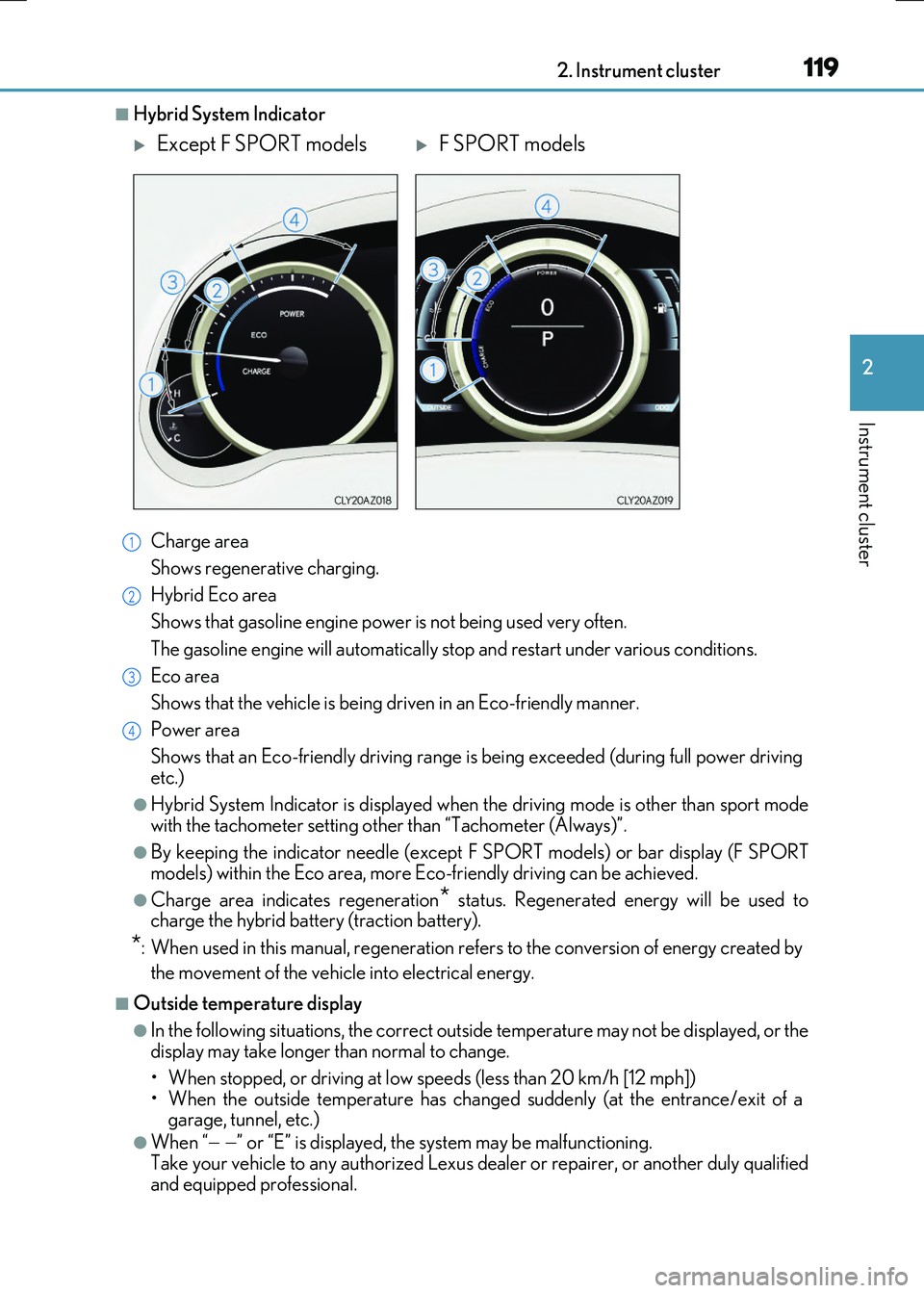
■Hybrid System Indicator
Charge area
Shows regenerative charging.
Hybrid Eco area
Shows that gasoline engine power is not being used very often.
The gasoline engine will aut omatically stop and restart under various conditions.
Eco area
Shows that the vehicle is being dr iven in an Eco-friendly manner.
Power area
Shows that an Eco-friendly dr iving range is being exceeded (during full power driving etc.)
●Hybrid System Indicator is displayed when the driving mode is other than sport mode with the tachometer setting other than “Tachometer (Always)”.
●By keeping the indicator needle (except F SPORT models) or bar display (F SPORT
models) within the Eco area, more Eco- friendly driving can be achieved.
●Charge area indicates regeneration* status. Regenerated energy will be used to charge the hybrid battery (traction battery).
*: When used in this manual, re generation refers to the conversion of energy created by
the movement of the vehicle into electrical energy.
■Outside temperature display
●In the following situations, the correct outside temperature may not be displayed, or the display may take longer than normal to change.
• When stopped, or driving at low speeds (less than 20 km/h [12 mph]) • When the outside temperature has changed suddenly (at the entrance/exit of agarage, tunnel, etc.)
●When “ ” or “E” is displayed, the system may be malfunctioning. Take your vehicle to any authorized Lexus de aler or repairer, or another duly qualified
and equipped professional.
Except F SPORT modelsF SPORT models
1
2
3
4
Page 157 of 640
1573-2. Opening, closing and locking the doors and trunk
3
Operation of each component
RC300h_EE(OM24740E)
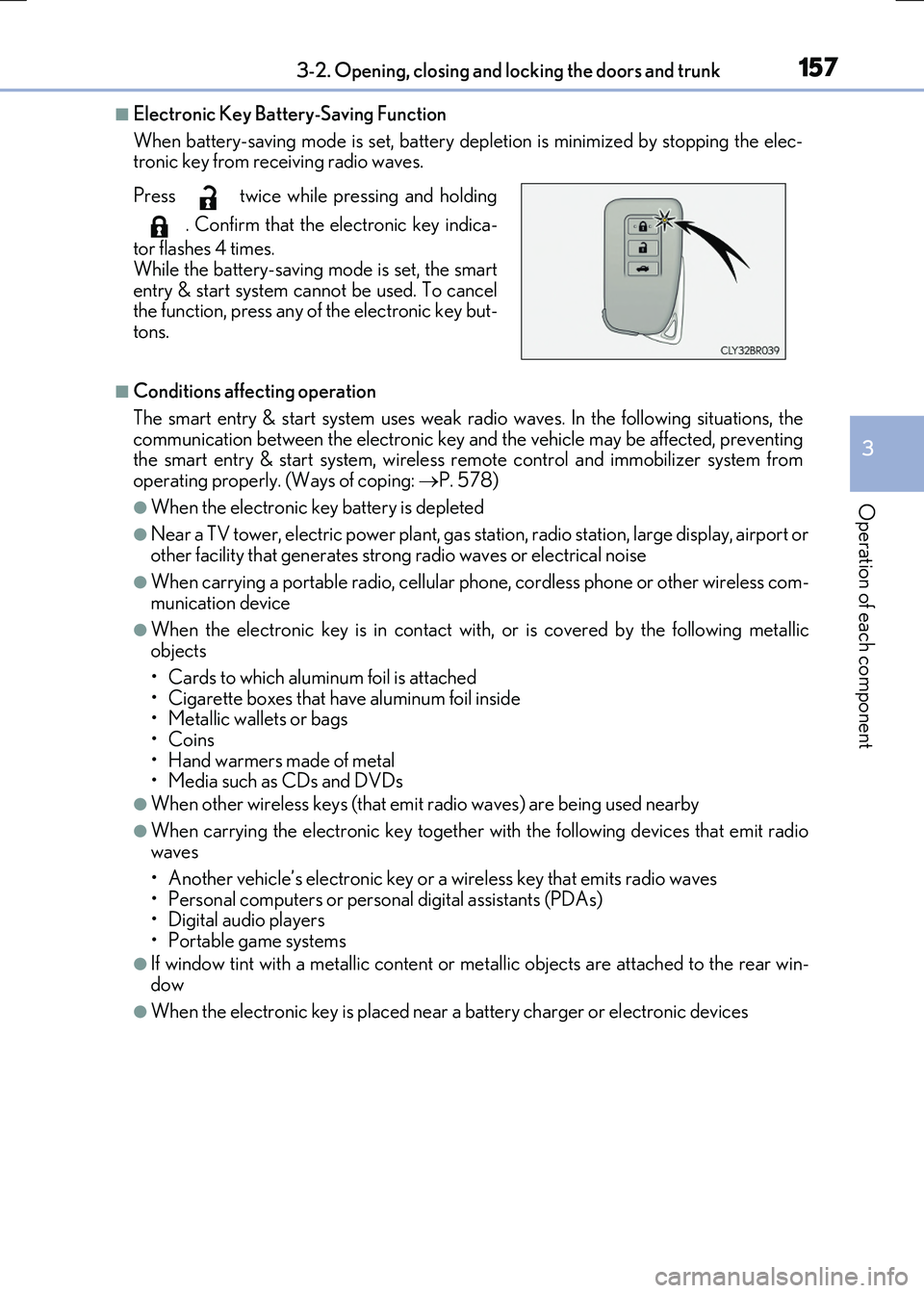
■Electronic Key Battery-Saving Function
When battery-saving mode is set, battery depl etion is minimized by stopping the elec- tronic key from receiving radio waves.
■Conditions affecting operation
The smart entry & start system uses weak ra dio waves. In the following situations, the communication between the electronic key an d the vehicle may be affected, preventing the smart entry & start system, wireless remote control and immobilizer system from
operating properly. (Ways of coping: P. 578)
●When the electronic key battery is depleted
●Near a TV tower, electric power plant, gas station, radio station, large display, airport or
other facility that gene rates strong radio waves or electrical noise
●When carrying a portable radio, cellular phone, cordless phone or other wireless com- munication device
●When the electronic key is in contact wi th, or is covered by the following metallic objects
• Cards to which aluminum foil is attached
• Cigarette boxes that have aluminum foil inside • Metallic wallets or bags•Coins
• Hand warmers made of metal • Media such as CDs and DVDs
●When other wireless keys (that emit radio waves) are being used nearby
●When carrying the electronic key together with the following devices that emit radiowaves
• Another vehicle’s electronic key or a wireless key that emits radio waves • Personal computers or personal digital assistants (PDAs)• Digital audio players
• Portable game systems
●If window tint with a metallic content or me tallic objects are attached to the rear win-
dow
●When the electronic key is placed near a battery charger or electronic devices
Press twice while pressing and holding
. Confirm that the electronic key indica-
tor flashes 4 times.
While the battery-saving mode is set, the smart entry & start system cannot be used. To cancelthe function, press any of the electronic key but-
tons.
Page 212 of 640
2124-1. Before driving
RC300h_EE(OM24740E)
NOTICE
■When driving the vehicle
●Do not depress the accelerator and brake pedals at the same time while driving, as this may restrain the hybrid system output.
●Do not use the accelerator pedal or depress the accelerator and brake pedals at thesame time to hold the vehicle on a hill.
■When parking the vehicle
Always set the parking brake, and shift the sh ift lever to P. Failure to do so may cause the vehicle to move or the vehicle may accelerate suddenly if the accelerator pedal isaccidentally depressed.
■Avoiding damage to vehicle parts
●Do not turn the steering wheel fully in either direction and hold it there for anextended period of time.
Doing so may damage the power steering motor.
●When driving over bumps in the road, driv e as slowly as possible to avoid damaging the wheels, underside of the vehicle, etc.
■If you get a flat tire while driving
A flat or damaged tire may cause the following situations. Hold the steering wheel firmly and gradually depress the brake pedal to slow down the vehicle.
●It may be difficult to control your vehicle.
●The vehicle will make abnormal sounds or vibrations.
●The vehicle will lean abnormally.
Information on what to do in case of a flat tire ( P. 563)
■When encountering flooded roads
Do not drive on a road that has flooded after heavy rain etc. Doing so may cause the
following serious damage to the vehicle:
●Engine stalling
●Short in electrical components
●Engine damage caused by water immersion
In the event that you drive on a flooded road and the vehicle is flooded, be sure to have any authorized Lexus dealer or repairer, or another duly qualified and equipped pro-
fessional check the following:
●Brake function
●Changes in quantity and quality of oil and fluid used for the engine, hybrid transmis-
sion, differentials, etc.
●Lubricant condition for the propeller shaft, bearings and suspension joints (where possible), and the function of all joints, bearings, etc.
Page 217 of 640
2174-2. Driving procedures
4
Driving
RC300h_EE(OM24740E)
■Auto power off function
If the vehicle is left in ACCESSORY mode for more than 20 minutes or ON mode (the hybrid system is not operating) for more than an hour with the shift lever in P, the power switch will automatically turn off. However, th is function cannot entirely prevent 12-volt
battery discharge. Do not leave the vehicle with the power switch in ACCESSORY or ON mode for long periods of time when the hybrid system is not operating.
■Sounds and vibrations specific to a hybrid vehicle
P. 88
■Electronic key battery depletion
P. 141
■When the ambient temperature is low, such as during winter driving conditions
When starting the hybrid system, the flashing time of the “READY” indicator may be long. Leave the vehicle as it is until the “REA DY” indicator is steady on, as steady means
the vehicle is able to move.
■Conditions affecting operation
P. 157
■Notes for the entry function
P. 158
■If the hybrid system does not start
●Check that the shift lever is securely set in P. The hybrid system may not start if the shift lever is displaced out of P.
●The immobilizer system may not have been deactivated. ( P. 95)
Contact any authorized Lexus dealer or repairer, or another duly qualified and equipped professional.
■Steering lock
After turning the power switch off and openin g and closing the doors, the steering wheel will be locked due to the steering lock func tion. Operating the power switch again auto- matically cancels the steering lock.
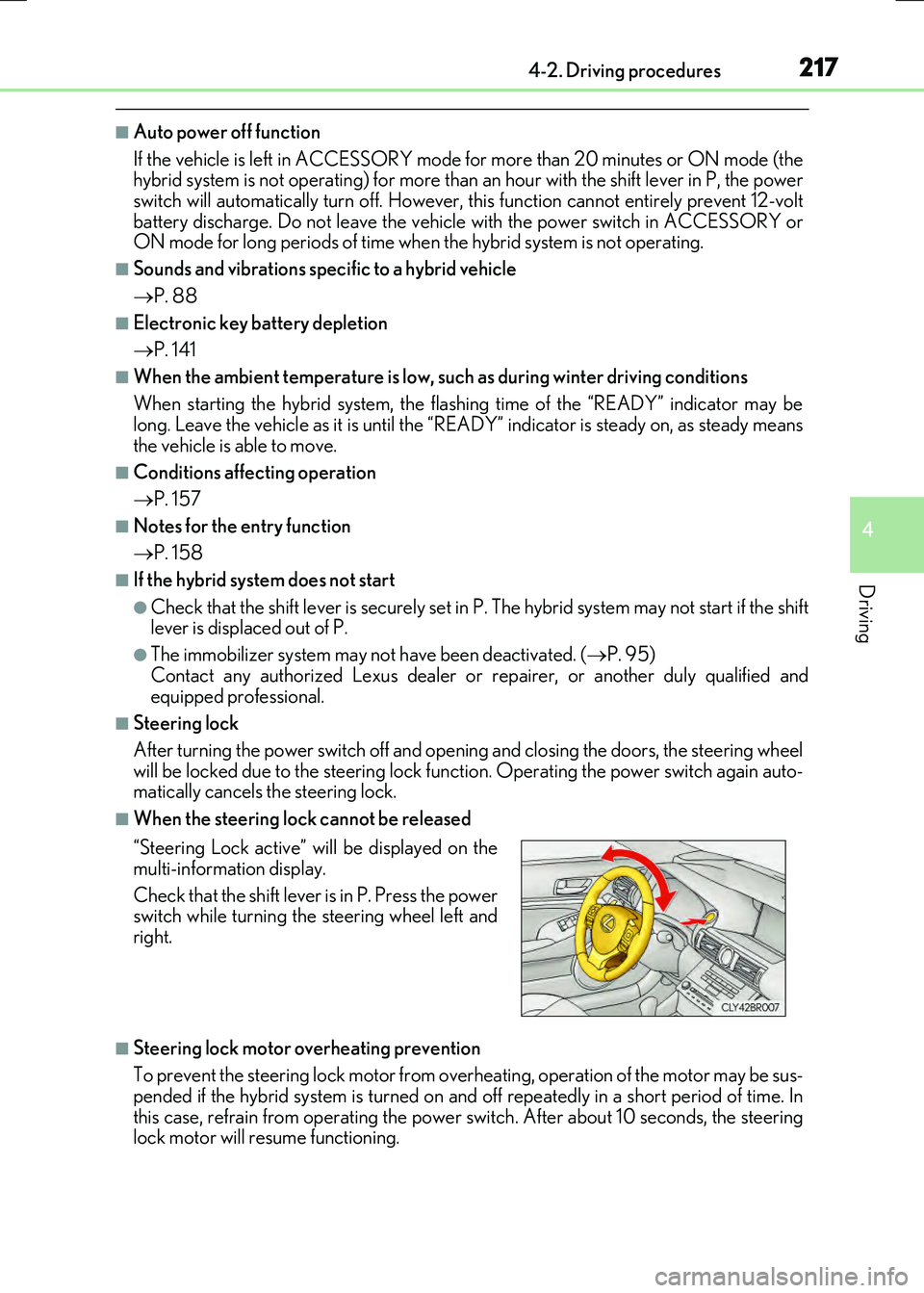
■When the steering lock cannot be released
■Steering lock motor overheating prevention
To prevent the steering lock motor from over heating, operation of the motor may be sus- pended if the hybrid system is turned on an d off repeatedly in a short period of time. In
this case, refrain from operating the power switch. After about 10 seconds, the steering lock motor will resume functioning.
“Steering Lock active” will be displayed on the
multi-information display.
Check that the shift lever is in P. Press the power switch while turning the steering wheel left and
right.
Page 276 of 640
2764-5. Using the driving support systems
RC300h_EE(OM24740E)
■Temporary cancelation of the LDA system functions
If any of the following occurs, the LDA system functions will be temporarily canceled. The functions will resume after the necessary operating conditions have returned.
●The turn signal lever is operated.
●The vehicle speed deviates from the operating range of the LDA system functions.
●When the lane lines cannot be recognized while driving.
●When the lane departure warning sounds.
The lane departure warning function will not operate again for a several seconds after it has been activated, even if the vehicle leaves the lane again.
■The lane departure warning
Depending on the audio system sound level or air conditioning fan noise while the audio system or air conditioning system is in use, it may be difficult to hear the warning sound.
■After the vehicle has been parked in the sun
The LDA system may not be available and a warning message ( P. 548) will be dis- played for a while after driving has started. When the temperature in the cabin decreasesand the temperature around the camera sensor ( P. 273) becomes suitable for its
operation, the functions will begin to operate.
■If there are lane markers on only one side of the vehicle
The lane departure warning will not operate fo r the side on which lane markers could not
be recognized.
■Conditions in which the function may not operate correctly
In the following situations, the camera sensor may be unable to recognize lane markers
causing the lane departure warning function to operate incorrectly. However, this does not indicate a malfunction.
●When driving through an area with no lane markers, such as a tollbooth, a crossing or
before a ticket checkpoint
●When driving on a sharp curve
●When lane markers are extremely narrow or extremely wide
●When the vehicle leans to one side an unusual amount due to a heavy load or improper tire inflation pressure
●When the following distance between your vehicle and the vehicle ahead is extremely
short
●When the lane markers are yellow (These ma y be more difficult for the system to rec- ognize compared to white markers.)
●When the lane markers are broken, Botts’ dots (raised pavement markers) or stones
●When the lane markers are on a curb etc.
●When lane markers are obscured or partially obscured by sand, dirt, etc.
●When there are shadows on the road running parallel with lane markers, or if a shadow covers the lane markers
●When driving on a partic ularly bright road surface, such as concrete
●When driving on a road surface that is bright due to reflected light
●When driving in a location where the light level changes rapidly, such as the entrance to
or exit from a tunnel
Page 284 of 640
2844-5. Using the driving support systems
RC300h_EE(OM24740E)
■If a message is displayed on the multi-information display
P. 545
WARNING
■When using the Lexus parking assist-sensor
Observe the following precautions.
Failing to do so may result in the vehicle be ing unable to be driven safely and possibly cause an accident.
●Do not use the sensor at speeds in excess of 10 km/h (6 mph).
●The sensors’ detection areas and reaction times are limited. When moving forward or reversing, check the areas surrounding the vehicle (especially the sides of the vehi-cle) for safety, and drive slowly, using the brake to control the vehicle’s speed.
●Do not install accessories within the sensors’ detection areas.
■Limitations of the sensors
●The detection areas of the sensors are limited to the areas around the vehicle’s front
and rear bumpers.
●Certain vehicle conditions and surrounding environments, such as the following, may affect the ability of the sensors to correctly detect objects. Pay particular attention in
the following situations. Failure to do so may result in the vehicle being driven unsafely, possibly leading to an accident.
• When there is dirt, snow or ice on a sens or (Cleaning the sensor will resolve this
problem.) • When the sensor is frozen (Thawing the area will resolve this problem.)In especially cold weather, if a sensor is frozen the screen may show an abnormal
display, or objects may not be detected • When a sensor is covered in any way• When the vehicle is leaning considerably to one side
• When driving on an extremely bumpy road, incline, gravel, or grass • When the vicinity of the vehicle is noisy due to vehicle horns, motorcycle engines,air brakes of large vehicles, or other loud noises producing ultrasonic waves
• When there is another vehicle equipped with parking assist sensor in the vicinity • When the sensor is coated with a sheet of spray or heavy rain• When the vehicle is equipped with a fender pole or wireless antenna
• When a towing eyelet is installed • When a bumper or sensor receives a strong impact• When the vehicle is approaching a tall or curved curb
• When driving in harsh sunlight or intense cold weather • When an object is directly under a bumper• When objects become too close to the sensors
• When a non-genuine Lexus suspension (l owered suspension, etc.) is installed In addition to the situations above, there are instances in which, because of theirshape, signs and other objects may be judged by the sensor to be closer than they
are.
Page 285 of 640
2854-5. Using the driving support systems
4
Driving
RC300h_EE(OM24740E)
WARNING
●The shape of an object may prevent the sensor from detecting it. Pay particular atten- tion to the following:
• Wires, fences, ropes, etc.
• Cotton, snow and other materials that absorb sound waves • Sharply-angled objects•Low objects
• Tall objects with upper sections projecting outwards in the direction of your vehi- cle• People, animals and other moving objects
• People wearing certain types of clothing
●The following situations may occur when using the Lexus parking assist-sensor.
• Depending on the shape of the object and other factors, the detection distance may be shortened, or detection may not be possible.• Objects may not be detected if they are too close to a sensor.
• There will be a short delay between the de tection of an object and display of the detection. Even at slow speeds, there is a possibility that the object will come within a sensor’s detection area before the display is shown and a warning beep
sounds. • Thin posts or objects lower than a sensor may not be detected when approached,even if they have been detected once.
• It might be difficult to hear beeps due to the volume of the audio system or air flow noise of the air conditioning system.
NOTICE
■When using Lexus parking assist-sensor
In the following situations, the system may not function correctly due to a sensor mal-
function etc. Have the vehicle checked by any authorized Lexus dealer or repairer, or another duly qualified and equipped professional.
●The Lexus parking assist-sensor operation display flashes, and a beep sounds when
no obstacles are detected.
●If the area around a sensor collides with something, or is subjected to strong impact.
●If the bumper or grille collides with something.
●If the display shows continuously without beeping, except when the switch has been turned on.
●If a display error occurs, first check the sensor.
If the error occurs even when there is no ice, snow or mud on the sensor, it is likely that the sensor is malfunctioning.
■Notes when washing the vehicle
Do not apply intensive bursts of water or steam to the sensor area.
Doing so may result in the sensor malfunctioning.
Page 297 of 640
2974-5. Using the driving support systems
4
Driving
RC300h_EE(OM24740E)
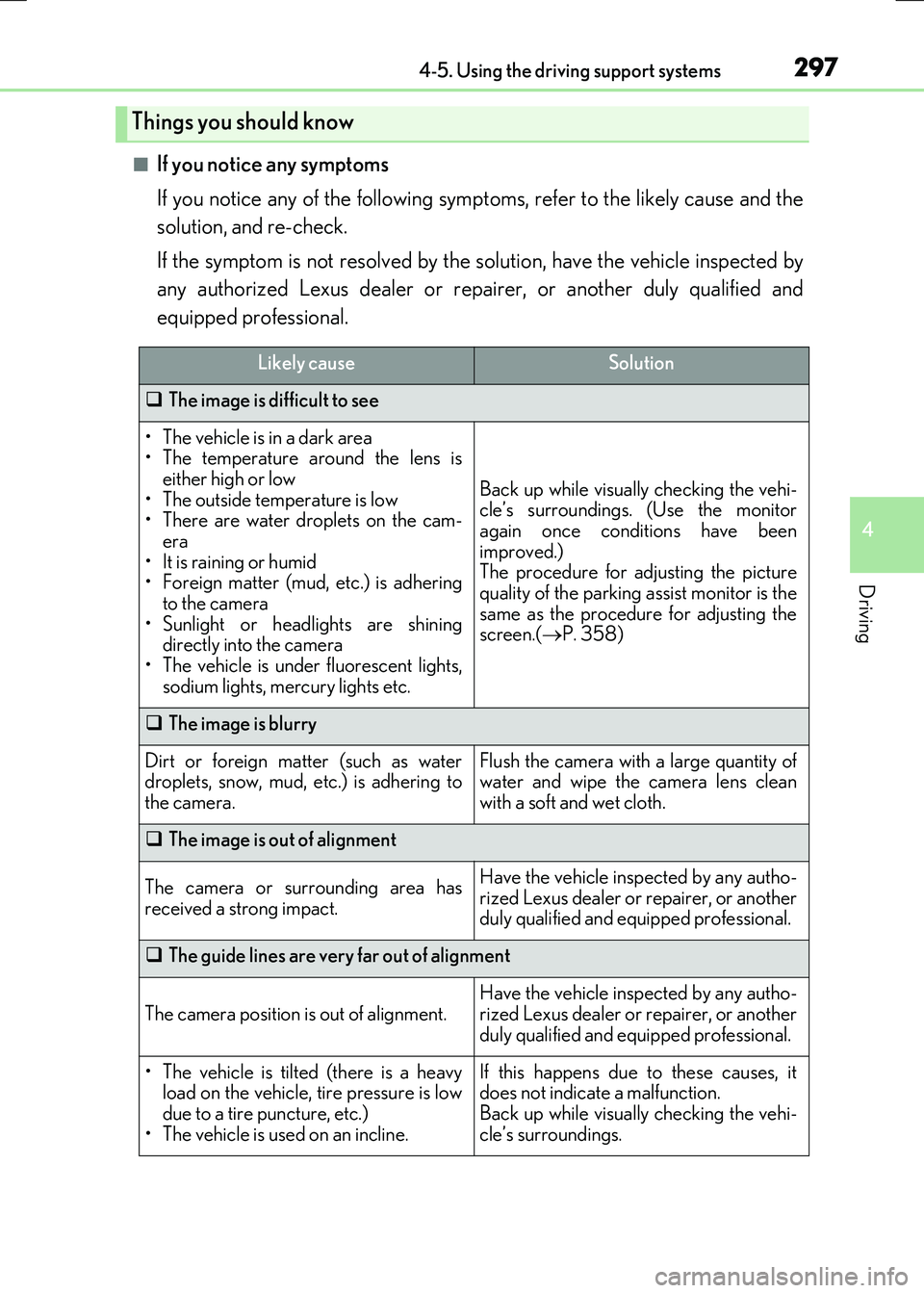
■If you notice any symptoms
If you notice any of the following symp toms, refer to the likely cause and the
solution, and re-check.
If the symptom is not resolved by the solution, have the vehicle inspected by
any authorized Lexus dealer or repairer, or another duly qualified and
equipped professional.
Things you should know
Likely causeSolution
The image is difficult to see
• The vehicle is in a dark area • The temperature around the lens iseither high or low
• The outside temperature is low • There are water droplets on the cam-era
• It is raining or humid • Foreign matter (mud, etc.) is adheringto the camera
• Sunlight or headlights are shining directly into the camera• The vehicle is under fluorescent lights,
sodium lights, mercury lights etc.
Back up while visually checking the vehi- cle’s surroundings. (Use the monitor
again once conditions have been improved.)The procedure for adjusting the picture
quality of the parking assist monitor is the same as the procedure for adjusting thescreen.( P. 358)
The image is blurry
Dirt or foreign matter (such as water droplets, snow, mud, etc.) is adhering to
the camera.
Flush the camera with a large quantity of water and wipe the camera lens clean
with a soft and wet cloth.
The image is out of alignment
The camera or surrounding area has
received a strong impact.
Have the vehicle inspected by any autho- rized Lexus dealer or repairer, or anotherduly qualified and equipped professional.
The guide lines are very far out of alignment
The camera position is out of alignment.
Have the vehicle inspected by any autho-
rized Lexus dealer or repairer, or another duly qualified and equipped professional.
• The vehicle is tilted (there is a heavyload on the vehicle, tire pressure is low
due to a tire puncture, etc.) • The vehicle is used on an incline.
If this happens due to these causes, itdoes not indicate a malfunction.
Back up while visually checking the vehi- cle’s surroundings.
Page 299 of 640
2994-5. Using the driving support systems
4
Driving
RC300h_EE(OM24740E)
WARNING
■When using the Lexus parking assist monitor system
The parking assist monitor is a supplemental device intended to assist the driver when backing up. When backing up, be sure to check visually behind and all around the vehi-
cle before proceeding.
Observe the following precautions to avoid an accident that could result in death or serious injuries.
●Never depend on the parking assist monitor entirely when backing up. The imageand the position of the guide lines displayed on the screen may differ from the actualstate.
Use caution, just as you would when backing up any vehicle.
●Be sure to back up slowly, depressing the brake pedal to control vehicle speed.
●If you seem likely to hit nearby vehicles , obstacles, people or mount the shoulder,
depress the brake pedal to stop the vehicle.
●The instructions given are only guidelines.
When and how much to turn the steering wheel will vary according to traffic condi-
tions, road surface conditions, vehicle condition, etc. when parking. It is necessary to be fully aware of this before using the parking assist system.
●When parking, be sure to check that th e parking space will accommodate your vehi-
cle before maneuvering into it.
●Do not use the parking assist monitor in the following cases:
• On icy or slick road surfaces, or in snow
• When using tire chains or emergency tires • When the trunk is not closed completely• On roads that are not flat or straight, such as curves or slopes.
●In low temperatures, the screen may darken or the image may become faint. Theimage could distort when the vehicle is moving, or you may become unable to see the
image on the screen. Be sure to check direct visually and with the mirrors all around the vehicle before proceeding.
●If the tire sizes are changed, the position of the guide lines displayed on the screen
may change.
●The camera uses a special lens. The distances between objects and pedestrians that appear in the image displayed on the screen will differ from the actual distances.
( P. 294)
●Estimated course line display mode: If the steering wheel is straight and the vehicle width guide lines and the estimated course lin es are not in alignment, have the vehicle
inspected by any authorized Lexus dealer or repairer, or another duly qualified and equipped professional.
Page 301 of 640
3014-5. Using the driving support systems
4
Driving
RC300h_EE(OM24740E)
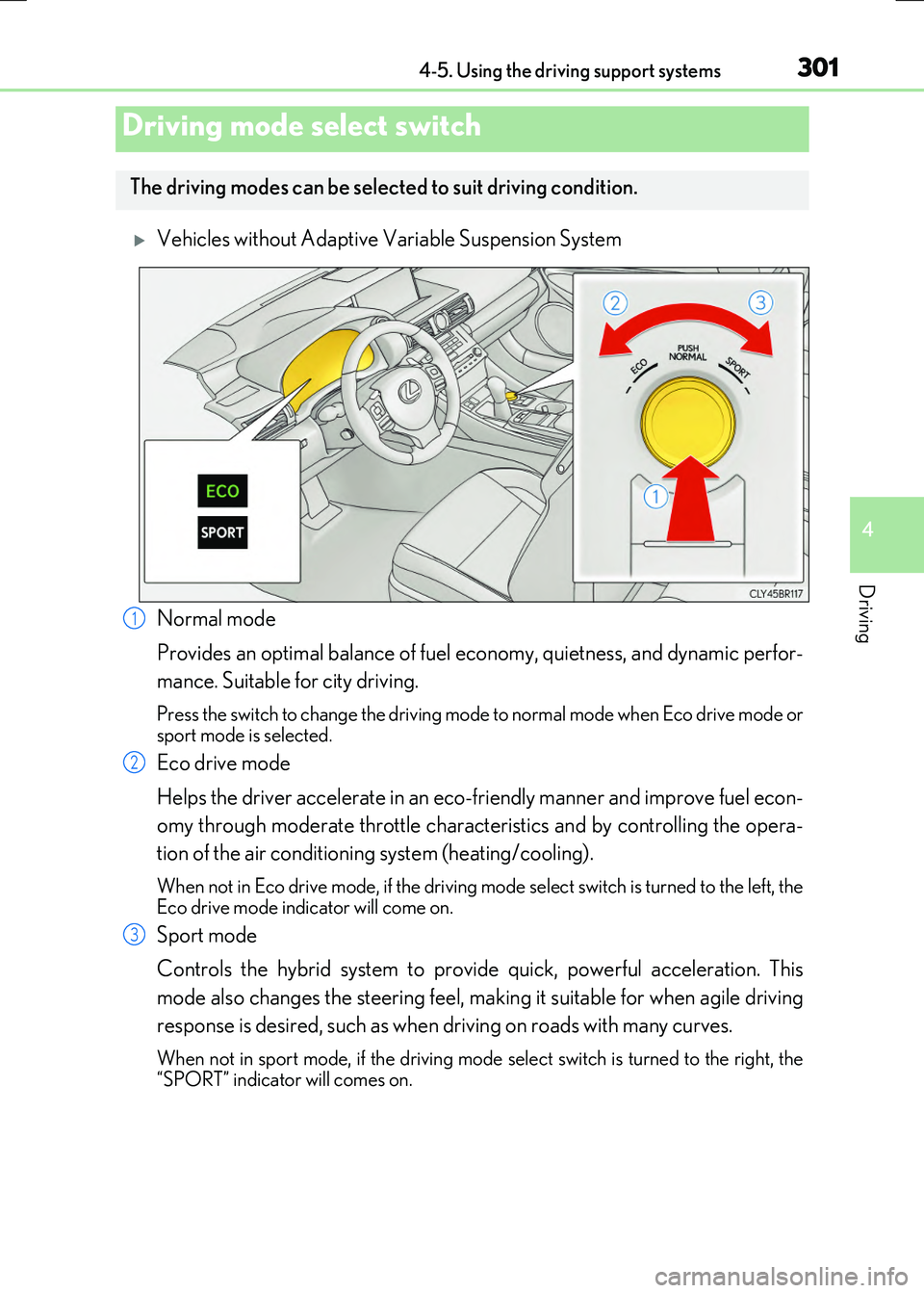
Vehicles without Adaptive Variable Suspension System
Normal mode
Provides an optimal balance of fuel ec onomy, quietness, and dynamic perfor-
mance. Suitable for city driving.
Press the switch to change the driving mode to normal mode when Eco drive mode or sport mode is selected.
Eco drive mode
Helps the driver accelerate in an eco-friendly manner and improve fuel econ-
omy through moderate throttle characteristics and by controlling the opera-
tion of the air conditioning system (heating/cooling).
When not in Eco drive mode, if the driving mode select switch is turned to the left, the Eco drive mode indicator will come on.
Sport mode
Controls the hybrid system to provide quick, powerful acceleration. This
mode also changes the steering feel, making it suitable for when agile driving
response is desired, such as when driving on roads with many curves.
When not in sport mode, if the driving mode select switch is turned to the right, the
“SPORT” indicator will comes on.
Driving mode select switch
The driving modes can be select ed to suit driving condition.
1
2
3