air condition LEXUS RX300H 2017 Owner's Manual
[x] Cancel search | Manufacturer: LEXUS, Model Year: 2017, Model line: RX300H, Model: LEXUS RX300H 2017Pages: 640, PDF Size: 35.53 MB
Page 302 of 640
3024-5. Using the driving support systems
RC300h_EE(OM24740E)
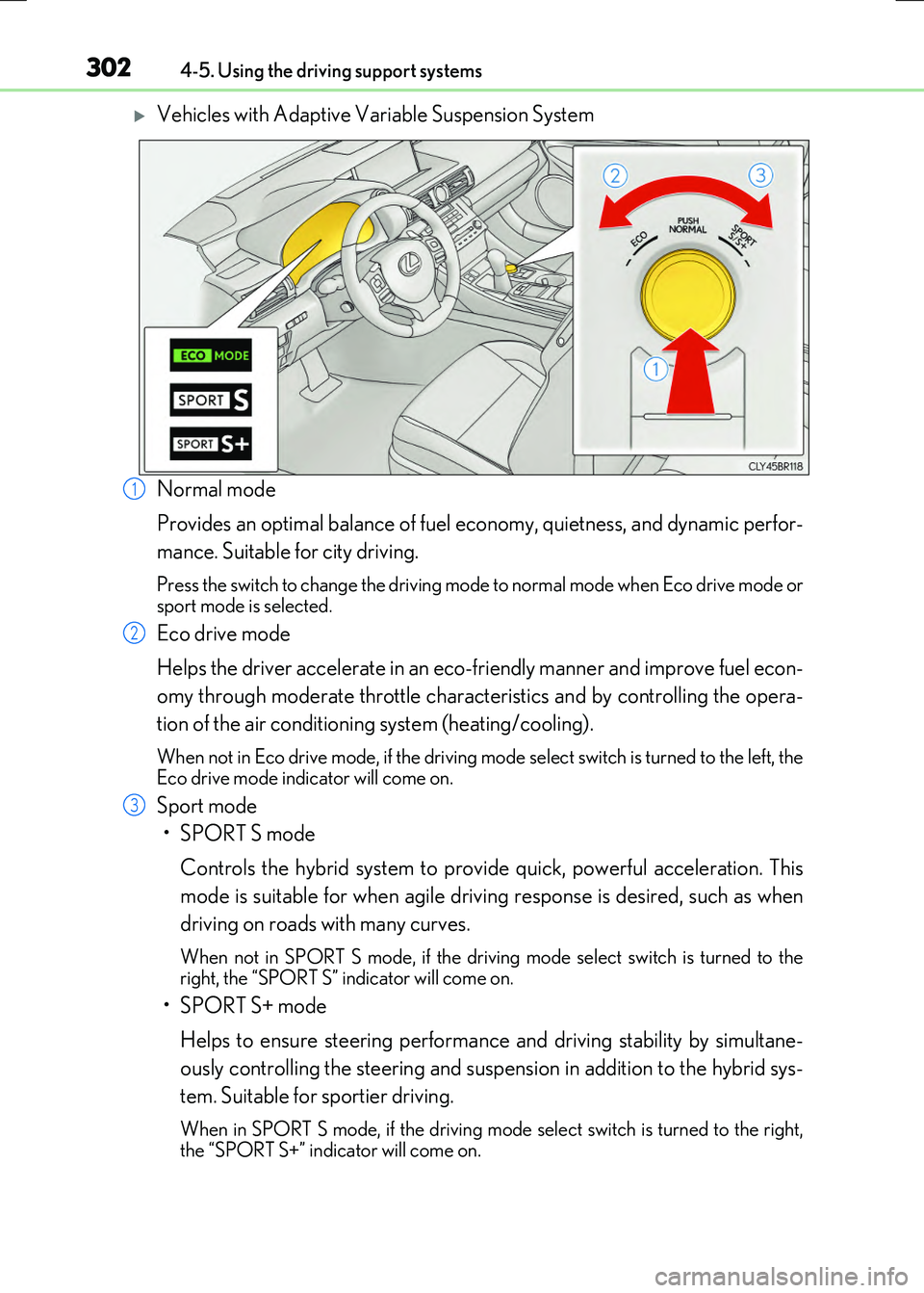
Vehicles with Adaptive Variable Suspension System
Normal mode
Provides an optimal balance of fuel ec onomy, quietness, and dynamic perfor-
mance. Suitable for city driving.
Press the switch to change the driving mode to normal mode when Eco drive mode or sport mode is selected.
Eco drive mode
Helps the driver accelerate in an eco-friendly manner and improve fuel econ-
omy through moderate throttle characteristics and by controlling the opera-
tion of the air conditioning system (heating/cooling).
When not in Eco drive mode, if the driving mode select switch is turned to the left, the Eco drive mode indicator will come on.
Sport mode
•SPORT S mode
Controls the hybrid system to provide quick, powerful acceleration. This
mode is suitable for when agile driving response is desired, such as when
driving on roads with many curves.
When not in SPORT S mode, if the drivin g mode select switch is turned to the right, the “SPORT S” indicator will come on.
•SPORT S+ mode
Helps to ensure steering performanc e and driving stability by simultane-
ously controlling the steering and suspen sion in addition to the hybrid sys-
tem. Suitable for sportier driving.
When in SPORT S mode, if th e driving mode select switch is turned to the right, the “SPORT S+” indicator will come on.
1
2
3
Page 303 of 640
3034-5. Using the driving support systems
4
Driving
RC300h_EE(OM24740E)
■Operation of the air conditioning system in Eco drive mode
Eco drive mode controls the heating/cooling operations and fan speed of the air condi- tioning system to enhance fuel efficiency ( P. 432). To improve air conditioning perfor- mance, adjust the fan speed or turn off Eco drive mode.
■Sport mode automatic deactivation
Sport mode is automatically deactivated if the power switch is turned off after driving in sport mode.
Page 317 of 640
3174-5. Using the driving support systems
4
Driving
RC300h_EE(OM24740E)
WARNING
■Limitations of the pre-crash safety system
●The driver is solely responsible for safe driving. Always drive safely, taking care to observe your surroundings.
Do not use the pre-crash safety system in stead of normal braking operations under any circumstances. This system will not pr event collisions or lessen damage or inju- ries in all cases. Do not overly rely on this system. Failure to do so may cause an acci-
dent, resulting in death or serious injury.
●This system has been designed to help avoid and reduce the impact of collisions. However, the system operates differe ntly depending on the situation (P. 313). As a
result, the same level of performance may no t be expected in all cases. Also, the pre- crash safety brakes may not operate if th e driver is depressing the brake pedal or turning the steering wheel, as the system will determine such conditions as collision
avoidance operations.
●As the pre-crash safety system is designed to assist the driver in safe driving, it may operate under sporty driving conditions, which may cause an accident. For this rea-
son under sporty driving conditions, it is recommended that this system be disabled by using the PCS OFF switch.
■Handling the radar sensor
Observe the following to ensure the pre-crash safety system can function effectively. Otherwise, the system may not function correctly and could result in an accident.
●Keep the sensor and grille cover clean at all times.
Clean the sensor and grille cover with a soft cloth so you do not mark or damage them.
●Do not subject the sensor or surrounding area to a strong impact.
If the sensor moves even slightly off po sition, the system may become inaccurate or malfunction. If the sensor or surrounding area is subject to a strong impact, alwayshave the area inspected and adjusted by an y authorized Lexus dealer or repairer, or
another duly qualified an d equipped professional.
●Do not disassemble the sensor.
●Do not attach accessories or stickers to the sensor, grille cover or surrounding area.
●Do not modify or paint the sensor and grille cover.
●If the radar sensor needs to be replaced, contact any authorized Lexus dealer or repairer, or another duly qualified and equipped professional.
Page 324 of 640
3244-5. Using the driving support systems
RC300h_EE(OM24740E)
WARNING
■Handling the radar sensor
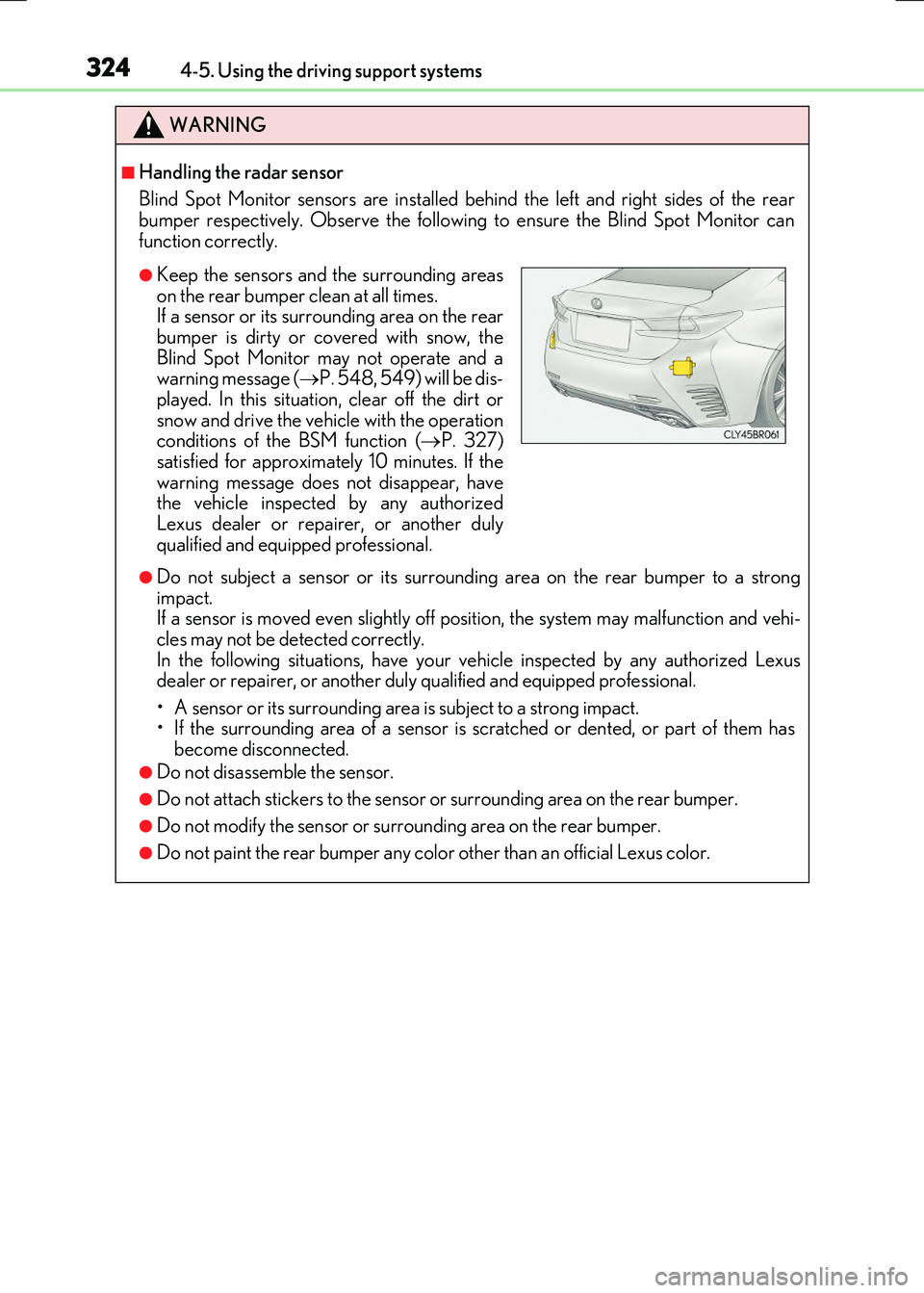
Blind Spot Monitor sensors are installed be hind the left and right sides of the rear bumper respectively. Observe the following to ensure the Blind Spot Monitor can
function correctly.
●Do not subject a sensor or its surrounding area on the rear bumper to a strong impact. If a sensor is moved even slightly off po sition, the system may malfunction and vehi-
cles may not be detected correctly. In the following situations, have your ve hicle inspected by any authorized Lexus dealer or repairer, or another duly qualified and equipped professional.
• A sensor or its surrounding area is subject to a strong impact. • If the surrounding area of a sensor is scratched or dented, or part of them hasbecome disconnected.
●Do not disassemble the sensor.
●Do not attach stickers to the sensor or surrounding area on the rear bumper.
●Do not modify the sensor or surrounding area on the rear bumper.
●Do not paint the rear bumper any color other than an official Lexus color.
●Keep the sensors and the surrounding areas
on the rear bumper clean at all times. If a sensor or its surrounding area on the rearbumper is dirty or covered with snow, the
Blind Spot Monitor may not operate and a warning message ( P. 548, 549) will be dis- played. In this situation, clear off the dirt or
snow and drive the vehicle with the operation conditions of the BSM function ( P. 327) satisfied for approximately 10 minutes. If the
warning message does not disappear, have the vehicle inspected by any authorizedLexus dealer or repairer, or another duly
qualified and equipped professional.
Page 334 of 640
334
RC300h_EE(OM24740E)
4-6. Driving tips
◆Using Eco drive mode
When using Eco drive mode, the torque corresponding to the accelerator
pedal depression amount can be generate d more smoothly than it is in normal
conditions. In addition, the operation of the air conditioning system (heating/
cooling) will be minimized, improving the fuel economy. ( P. 301)
◆Use of Hybrid System Indicator
The Eco-friendly driving is possible by keeping the needle of Hybrid System
Indicator within Eco area. ( P. 119)
◆Shift lever operation
Shift the shift lever to D when stopped at a traffic light, or driving in heavy traf-
fic etc. Shift the shift lever to P when parking. When using the N, there is no
positive effect on fuel consumption. In the N, the gasoline engine operates but
electricity cannot be generated. Also, when using the air conditioning system,
etc., the hybrid battery (traction battery) power is consumed.
◆Accelerator pedal/brake pedal operation
●Drive your vehicle smoothly. Avoid abrupt acceleration and deceleration.
Gradual acceleration and deceleration will make more effective use of the
electric motor (traction motor) without having to use gasoline engine
power.
●Avoid repeated acceleration. Repeated acceleration consumes hybrid bat-
tery (traction battery) power, resulting in poor fuel consumption. Battery
power can be restored by driving with the accelerator pedal slightly
released.
Hybrid vehicle driving tips
For economical and ecological driving, pay attention to the following points:
Page 335 of 640
3354-6. Driving tips
4
Driving
RC300h_EE(OM24740E)
◆When braking
Make sure to operate the brakes gently and in a timely manner. A greater
amount of electrical energy can be regenerated when slowing down.
◆Delays
Repeated acceleration and deceleration, as well as long waits at traffic lights,
will lead to bad fuel economy. Check traffic reports before leaving and avoid
delays as much as possible. When driving in a traffic jam, gently release the
brake pedal to allow the vehicle to move forward slightly while avoiding over-
use of the accelerator pedal. Doing so can help control excessive gasoline
consumption.
◆Highway driving
Control and maintain the vehicle at a constant speed. Before stopping at a toll
booth or similar, allow plenty of time to release the accelerator and gently
apply the brakes. A greater amount of electrical energy can be regenerated
when slowing down.
◆Air conditioning
Use the air conditioning only when necessary. Doing so can help reduce
excessive gasoline consumption.
In summer: When the ambient temperature is high, use the recirculated air
mode. Doing so will help to reduce the burden on the air conditioning system
and reduce fuel consumption as well.
In winter: Because the gasoline engine will not automatically cut out until it
and the interior of the vehicle are warm, it will consume fuel. Also, fuel con-
sumption can be improved by av oiding overuse of the heater.
◆Checking tire inflation pressure
Make sure to check the tire inflation pressure frequently. Improper tire infla-
tion pressure can cause poor fuel economy.
Also, as snow tires can cause large amounts of friction, their use on dry roads
can lead to poor fuel economy. Use ti res that are appropriate for the season.
Page 337 of 640
3374-6. Driving tips
4
Driving
RC300h_EE(OM24740E)
●Use fluids that are appropriate to the prevailing outside temperatures.
•Engine oil
• Engine coolant
• Washer fluid
●Have a service technician inspect the condition of the 12-volt battery.
●Have the vehicle fitted with four snow tires or purchase a set of tire chains for
the rear tires.*
Ensure that all tires are the specified size and brand, and that chains match the size of the tires.
*: Tire chains cannot be mounted on vehicles with 19-inch tires.
Perform the following according to the driving conditions:
●Do not try to forcibly open a window or move a wiper that is frozen. Pour
warm water over the frozen area to melt the ice. Wipe away the water imme-
diately to prevent it from freezing.
●To ensure proper operation of the climate control system fan, remove any
snow that has accumulated on the air inlet vents in front of the windshield.
●Check for and remove any excess ice or snow that may have accumulated on
the exterior lights, vehicle’s roof, chassi s, around the tires or on the brakes.
●Remove any snow or mud from the bottom of your shoes before getting in the
vehicle.
Winter driving tips
Carry out the necessary preparations and inspections before driving the vehi-
cle in winter. Always drive the vehicle in a manner appropriate to the prevail-
ing weather conditions.
Preparation for winter
Before driving the vehicle
Page 338 of 640
3384-6. Driving tips
RC300h_EE(OM24740E)
Accelerate the vehicle slowly, keep a safe distance between you and the vehicle
ahead, and drive at a reduced speed suitable to road conditions.
●Park the vehicle and move the shift lever to P without setting the parking
brake. The parking brake may freeze up, preventing it from being released. If
the vehicle is parked without setting the parking brake, make sure to block the
wheels.
Failure to do so may be dangerous because it may cause the vehicle to move
unexpectedly, possibly leading to an accident.
●If the vehicle is parked without setting the parking brake, confirm that the shift
lever cannot be moved out of P*.
*: The shift lever will be locked if it is attempted to be shifted from P to any other posi-
tion without depressing the brake pedal. If the shift lever can be shifted from P,
there may be a problem with the shift lock system. Have the vehicle inspected by
your authorized Lexus retailer or Lexu s authorized repairer, or any reliable
repairer immediately.
Except for vehicles with 19- inch tires
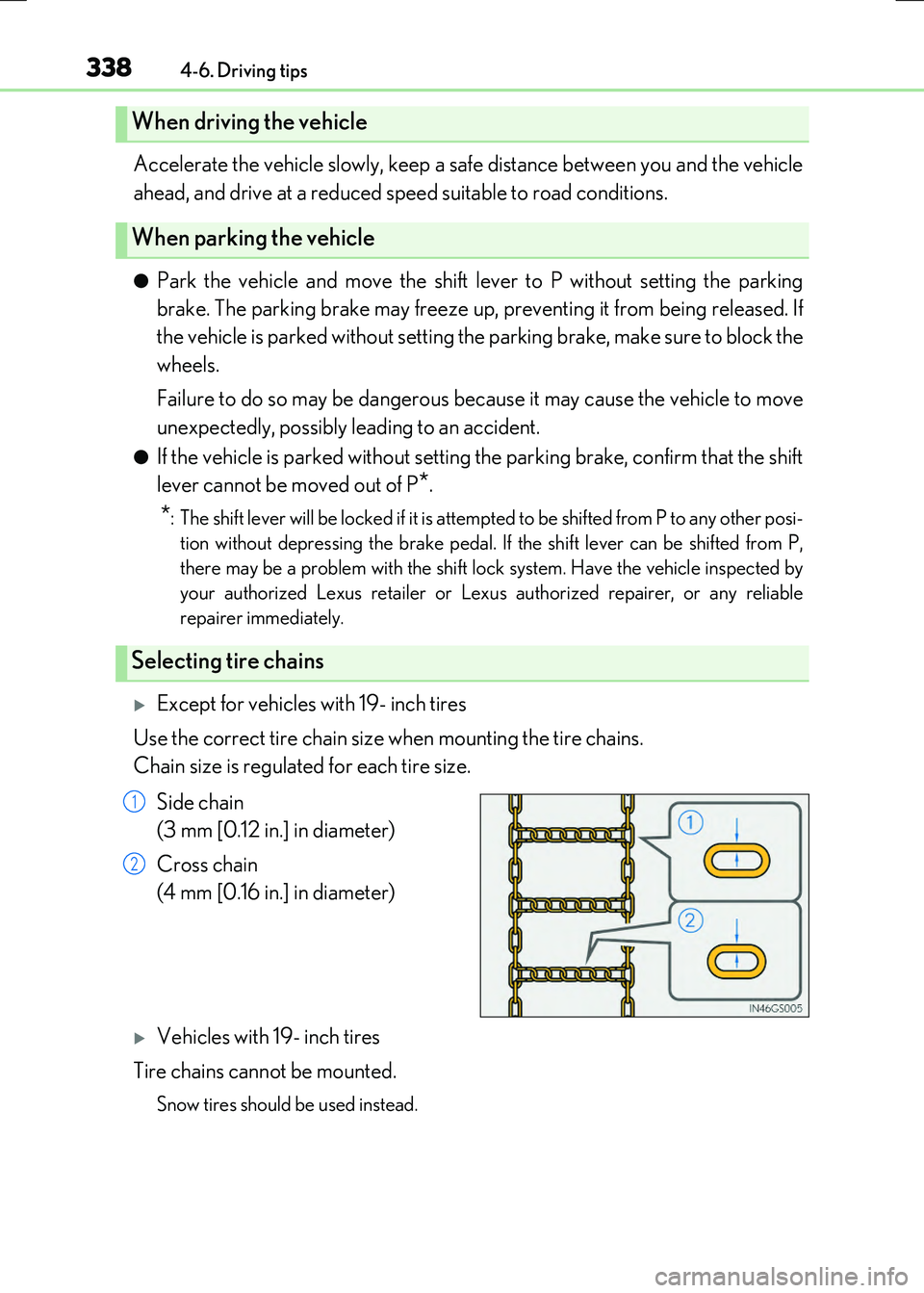
Use the correct tire chain size when mounting the tire chains.
Chain size is regulated for each tire size.
Side chain
(3 mm [0.12 in.] in diameter)
Cross chain
(4 mm [0.16 in.] in diameter)
Vehicles with 19- inch tires
Tire chains cannot be mounted.
Snow tires should be used instead.
When driving the vehicle
When parking the vehicle
Selecting tire chains
1
2
Page 345 of 640
3455-1. Basic Operations
5
Lexus Display Audio system
RC300h_EE(OM24740E)
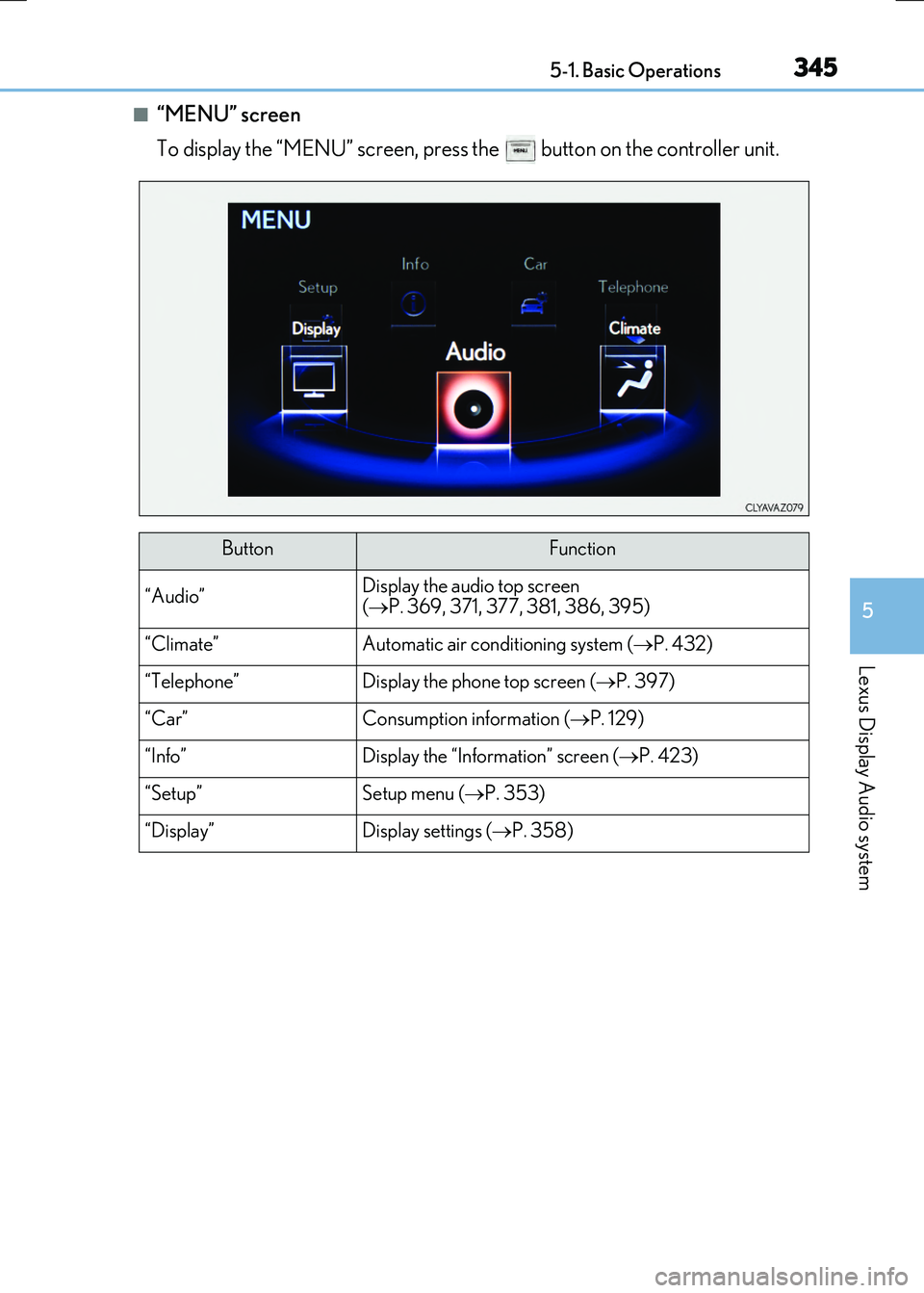
■“MENU” screen
To display the “MENU” screen, press the button on the controller unit.
ButtonFunction
“Audio”Display the audio top screen
( P. 369, 371, 377, 381, 386, 395)
“Climate”Automatic air conditioning system (P. 432)
“Telephone”Display the phone top screen (P. 397)
“Car” Consumption information (P. 129)
“Info”Display the “Information” screen (P. 423)
“Setup”Setup menu (P. 353)
“Display”Display settings (P. 358)
Page 349 of 640
3495-1. Basic Operations
5
Lexus Display Audio system
RC300h_EE(OM24740E)
■When using the screen
●Under extremely cold conditions, the Lexus Display Audio controller may react slowly.
●If the screen is cold, the display may be dark, or the system may seem to be operating slightly slower than normal.
●The screen may seem dark and hard to se e when viewed through sunglasses. Change your angle of viewing, adjust the display on the “Display” screen ( P. 358) or remove your sunglasses.
■Using cellular phones
Interference may be heard through the audio system's speakers if a cellular phone is being used inside or close to the vehicle while the audio system is operating.
WARNING
■Using the Lexus Display Audio controller
Be careful when touching the Lexus Display Audio controller in extreme temperatures as it may become very hot or cold due to the temperature inside the vehicle.
■Laser product
This product is a class 1 laser product.
Do not open the cover of the player or attempt to repair the unit yourself. Refer servic- ing to qualified personnel.
NOTICE
■To prevent Lexus Display Audio controller malfunction
●Do not allow the Lexus Display Audio controller to come into contact with food, liq-uid, stickers or lit cigarettes as doing so may cause it to change color, emit a strangeodor or stop functioning.
●Do not subject the Lexus Display Audio controller to excessive pressure or strongimpact as the controller may bend or break off.
■To prevent 12-volt battery discharge
Do not leave the audio system on longer than necessary when the hybrid system is off.
■To avoid damaging the audio system
Take care not to spill drinks or other fluids on the audio system.