Head LEXUS RX300H 2017 Workshop Manual
[x] Cancel search | Manufacturer: LEXUS, Model Year: 2017, Model line: RX300H, Model: LEXUS RX300H 2017Pages: 640, PDF Size: 35.53 MB
Page 261 of 640
2614-5. Using the driving support systems
4
Driving
RC300h_EE(OM24740E)
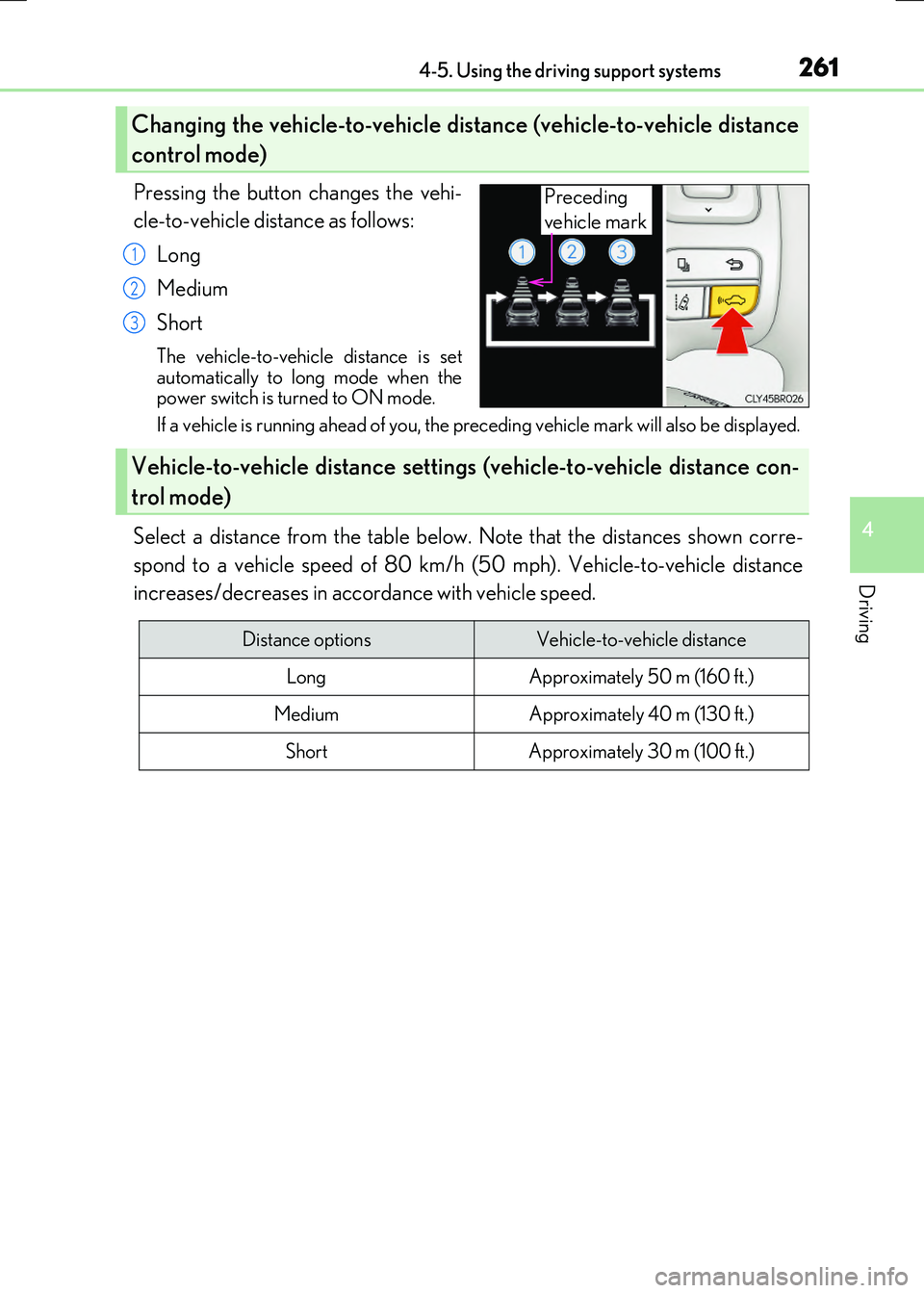
Pressing the button changes the vehi-
cle-to-vehicle distance as follows:
Long
Medium
Short
The vehicle-to-vehicle distance is set automatically to long mode when thepower switch is turned to ON mode.
If a vehicle is running ahead of you, the preceding vehicle mark will also be displayed.
Select a distance from the table below. Note that the distances shown corre-
spond to a vehicle speed of 80 km/h (50 mph). Vehicle-to-vehicle distance
increases/decreases in accordance with vehicle speed.
Changing the vehicle-to-vehicle di stance (vehicle-to-vehicle distance
control mode)
Preceding
vehicle mark
1
2
3
Vehicle-to-vehicle distance setting s (vehicle-to-vehicle distance con-
trol mode)
Distance optionsVehicle-to-vehicle distance
LongApproximately 50 m (160 ft.)
MediumApproximately 40 m (130 ft.)
ShortApproximately 30 m (100 ft.)
Page 262 of 640
2624-5. Using the driving support systems
RC300h_EE(OM24740E)
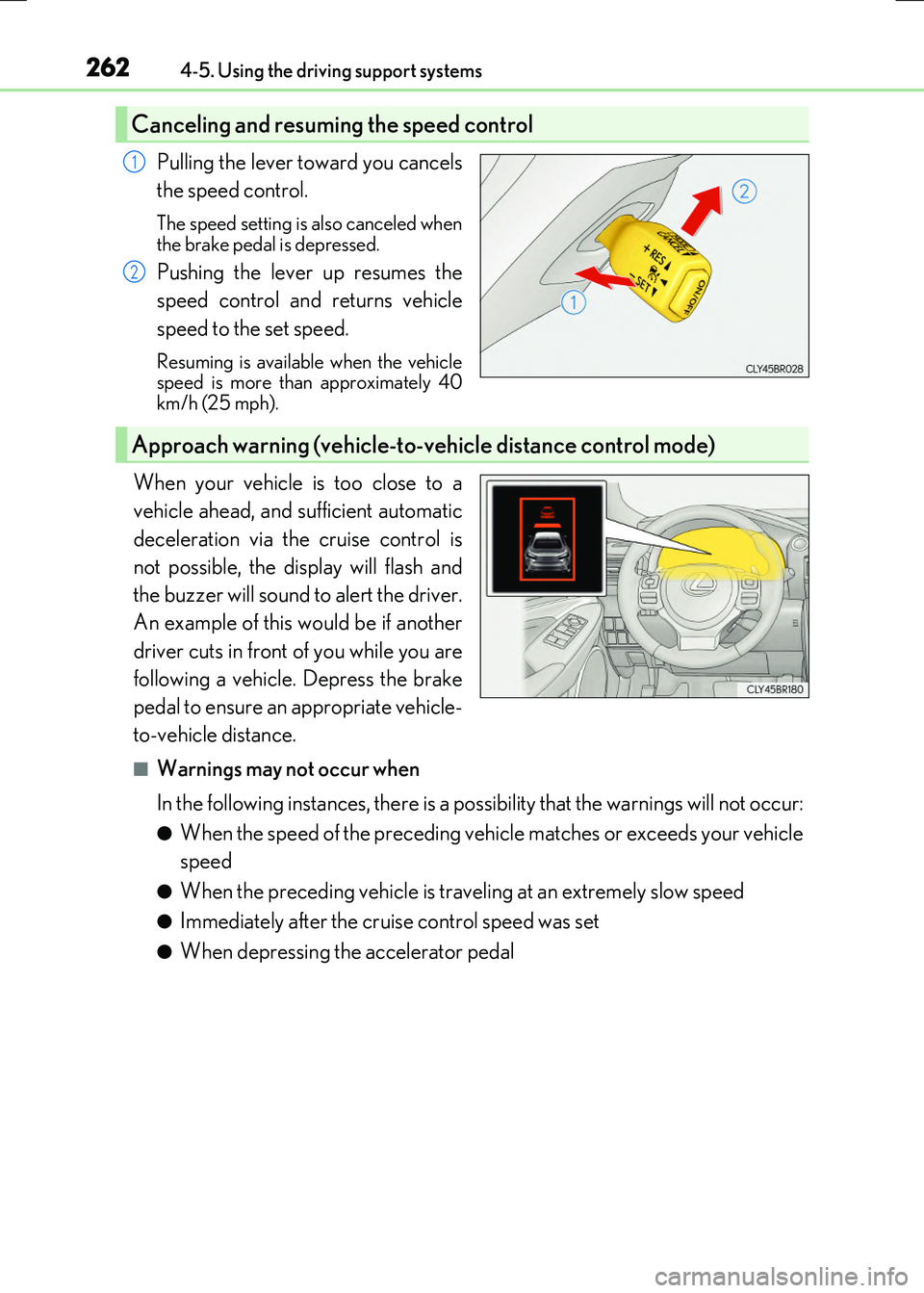
Pulling the lever toward you cancels
the speed control.
The speed setting is also canceled when
the brake pedal is depressed.
Pushing the lever up resumes the
speed control and returns vehicle
speed to the set speed.
Resuming is available when the vehicle speed is more than approximately 40km/h (25 mph).
When your vehicle is too close to a
vehicle ahead, and sufficient automatic
deceleration via the cruise control is
not possible, the display will flash and
the buzzer will sound to alert the driver.
An example of this would be if another
driver cuts in front of you while you are
following a vehicle. Depress the brake
pedal to ensure an appropriate vehicle-
to-vehicle distance.
■Warnings may not occur when
In the following instances, there is a possibility that the warnings will not occur:
●When the speed of the preceding vehicle matches or exceeds your vehicle
speed
●When the preceding vehicle is traveling at an extremely slow speed
●Immediately after the cruise control speed was set
●When depressing the accelerator pedal
Canceling and resuming the speed control
1
2
Approach warning (vehicle-to-vehicle distance control mode)
Page 268 of 640
2684-5. Using the driving support systems
RC300h_EE(OM24740E)
WARNING
■Before using dynamic radar cruise control
Do not overly rely on vehicle-to-vehicle distance control mode. Be aware of the set speed. If automatic deceleration/acceleration is not appropriate,
adjust the vehicle speed, as well as the distance between your vehicle and vehicles ahead by applying the brakes, etc.
■Cautions regarding the driving assist systems
Observe the following precautions. Failure to do so may cause an accident resulting in death or serious injury.
●Assisting the driver to measure following distance
The dynamic radar cruise control is only in tended to help the driver in determining the following distance between the driver’s own vehicle and a designated vehicletraveling ahead. It is not a mechanism that allows careless or inattentive driving, and it
is not a system that can assist the driver in low-visibility conditions. It is still necessary for driver to pay close attention to the vehicle’s surroundings.
●Assisting the driver to judge proper following distance
The dynamic radar cruise control determines whether the following distance between the driver’s own vehicle and a designated vehicle traveling ahead is appro-priate or not. It is not capable of making any other type of judgement. Therefore, it is
absolutely necessary for the driver to remain vigilant and to determine whether or not there is a possibility of danger in any given situation.
●Assisting the driver to operate the vehicle
The dynamic radar cruise control has no ca pability to prevent or avoid a collision with a vehicle traveling ahead. Therefore, if there is ever any danger, the driver must takeimmediate and direct control of the vehicle and act appropriately in order to ensure
the safety of all involved.
■To avoid inadvertent dynamic radar cruise control activation
Switch the dynamic radar cruise control off using the “ON/OFF” button when not in
use.
Page 270 of 640
2704-5. Using the driving support systems
RC300h_EE(OM24740E)
WARNING
■When the sensor may not be correctly detecting the vehicle ahead
In the case of the following and depending on the conditions, operate the brake pedal when deceleration of the system is insufficient or operate the accelerator pedal when
acceleration is required. As the sensor may not be able to correctly detect these types of vehicles, the approachwarning ( P. 262) will not be activated, which may lead to an accident resulting in
death or serious injury.
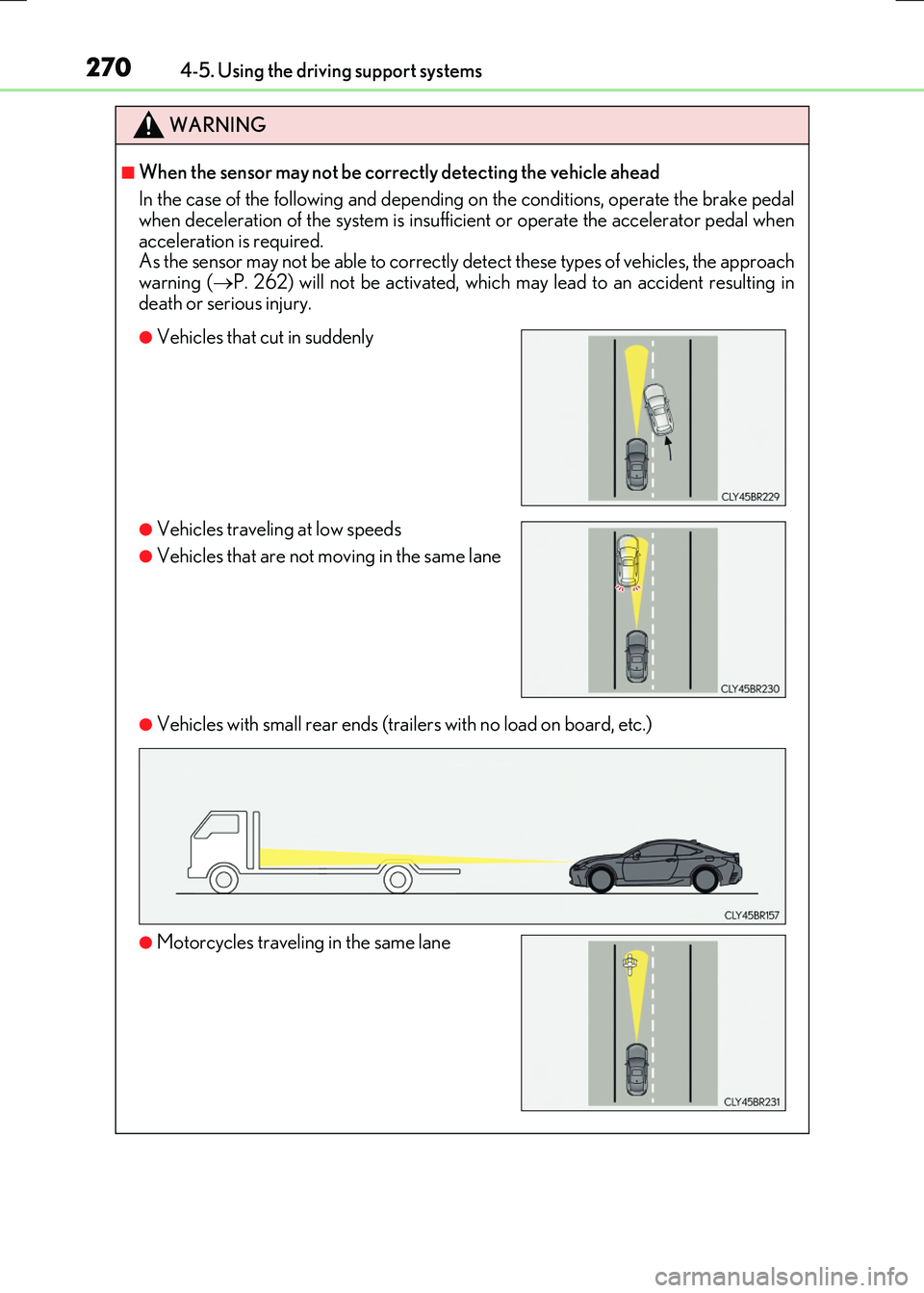
●Vehicles with small rear ends (trailers with no load on board, etc.)
●Vehicles that cut in suddenly
●Vehicles traveling at low speeds
●Vehicles that are not moving in the same lane
●Motorcycles traveling in the same lane
Page 271 of 640
2714-5. Using the driving support systems
4
Driving
RC300h_EE(OM24740E)
WARNING
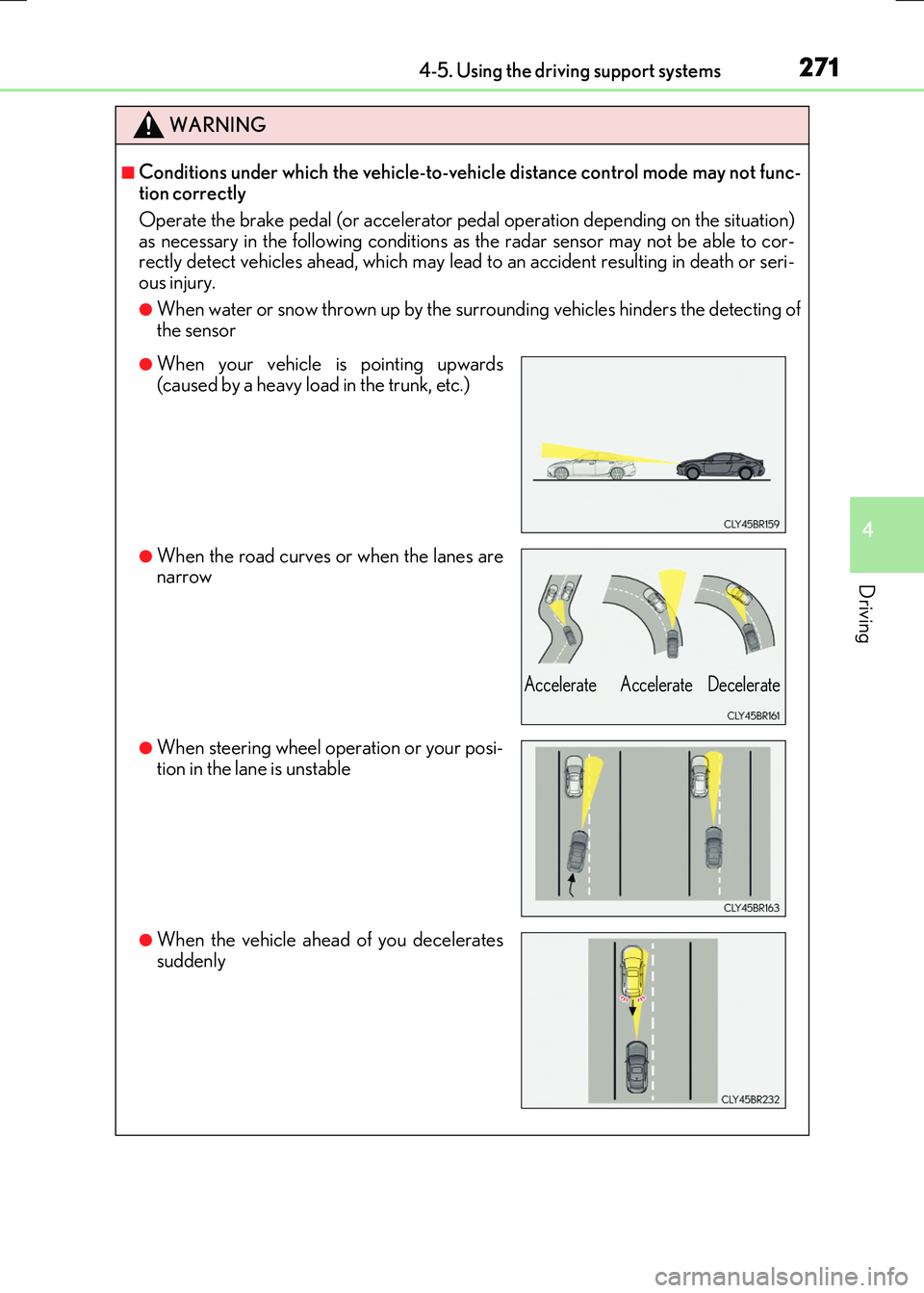
■Conditions under which the vehicle-to-vehicle distance control mode may not func- tion correctly
Operate the brake pedal (or accelerator pedal operation depending on the situation)
as necessary in the following conditions as the radar sensor may not be able to cor- rectly detect vehicles ahead, which may lead to an accident resulting in death or seri-ous injury.
●When water or snow thrown up by the surrounding vehicles hinders the detecting ofthe sensor
●When your vehicle is pointing upwards(caused by a heavy load in the trunk, etc.)
●When the road curves or when the lanes arenarrow
●When steering wheel operation or your posi-tion in the lane is unstable
●When the vehicle ahead of you decelerates
suddenly
Accelerate Accelerate Decelerate
Page 276 of 640
2764-5. Using the driving support systems
RC300h_EE(OM24740E)
■Temporary cancelation of the LDA system functions
If any of the following occurs, the LDA system functions will be temporarily canceled. The functions will resume after the necessary operating conditions have returned.
●The turn signal lever is operated.
●The vehicle speed deviates from the operating range of the LDA system functions.
●When the lane lines cannot be recognized while driving.
●When the lane departure warning sounds.
The lane departure warning function will not operate again for a several seconds after it has been activated, even if the vehicle leaves the lane again.
■The lane departure warning
Depending on the audio system sound level or air conditioning fan noise while the audio system or air conditioning system is in use, it may be difficult to hear the warning sound.
■After the vehicle has been parked in the sun
The LDA system may not be available and a warning message ( P. 548) will be dis- played for a while after driving has started. When the temperature in the cabin decreasesand the temperature around the camera sensor ( P. 273) becomes suitable for its
operation, the functions will begin to operate.
■If there are lane markers on only one side of the vehicle
The lane departure warning will not operate fo r the side on which lane markers could not
be recognized.
■Conditions in which the function may not operate correctly
In the following situations, the camera sensor may be unable to recognize lane markers
causing the lane departure warning function to operate incorrectly. However, this does not indicate a malfunction.
●When driving through an area with no lane markers, such as a tollbooth, a crossing or
before a ticket checkpoint
●When driving on a sharp curve
●When lane markers are extremely narrow or extremely wide
●When the vehicle leans to one side an unusual amount due to a heavy load or improper tire inflation pressure
●When the following distance between your vehicle and the vehicle ahead is extremely
short
●When the lane markers are yellow (These ma y be more difficult for the system to rec- ognize compared to white markers.)
●When the lane markers are broken, Botts’ dots (raised pavement markers) or stones
●When the lane markers are on a curb etc.
●When lane markers are obscured or partially obscured by sand, dirt, etc.
●When there are shadows on the road running parallel with lane markers, or if a shadow covers the lane markers
●When driving on a partic ularly bright road surface, such as concrete
●When driving on a road surface that is bright due to reflected light
●When driving in a location where the light level changes rapidly, such as the entrance to
or exit from a tunnel
Page 277 of 640
2774-5. Using the driving support systems
4
Driving
RC300h_EE(OM24740E)
●When sunlight or the headlights of oncoming vehicles are shining directly into the cam- era lens
●When driving on roads that are branching or merging
●When driving on a road surface that is wet du e to rain, previous rainfall, standing water, etc.
●When the vehicle experiences strong up-and-down motion such as when driving on an
extremely rough road or on a seam in the pavement
●When headlight brightness at nighttime is reduced due to dirt on the lenses, or when the headlights are misaligned
●When driving on winding roads or roads that are uneven
●When driving on rough or unpaved roads
■When changing the tires
Depending on the tires used, sufficient performance may not be maintainable.
■Warning messages for the LDA system
Warning messages are used to indicate a syst em malfunction or to inform the driver of
the need for caution while driving. ( P. 549)
WARNING
■Before using the LDA system
Do not rely solely on the LDA system. The LDA system does not drive the vehicle auto- matically, nor does it reduce the amount of care you need to take. As such, the driver
must always assume full responsibility fo r understanding his/her surroundings, for operating the steering wheel to correct the driving line, and for driving safely.
Inappropriate or negligent driving could lead to an accident.
■To avoid operating the LDA by mistake
Switch the LDA system off using the LDA switch when not in use.
■Situations unsuitable for LDA system
Do not use the LDA system in any of the following situations.
Otherwise, the system may not function correctly and could result in an accident.
●When driving with tire chains, a spare tire, or similar equipment
●When there are objects or structures along the roadside that might be misinterpreted as lane markers (such as guardrails, a curb, reflector posts, etc.)
●When driving on snowy roads
●When pavement lane markers are difficult to see due to rain, snow, fog, sand, dirt, etc.
●When there are visible lines on the pavement from road repairs, or if the remains of old lane markers are still visible on the road
●When driving on a road with lane closures due to maintenance, or when driving in a temporary lane
Page 278 of 640
2784-5. Using the driving support systems
RC300h_EE(OM24740E)
NOTICE
■To prevent damage to or incorrect operation of the LDA system
●Do not modify the headlights or attach stickers to the surface of the lights.
●Do not modify the suspension.
If any suspension parts need to be replac ed, contact any authorized Lexus dealer or repairer, or another duly qualified and equipped professional.
●Do not install or place anything on the h ood or the grille. Also, do not install a grille
guard (bull bars, kangaroo bar etc.).
●If your windshield needs repairs, contact any authorized Lexus dealer or repairer, or another duly qualified an d equipped professional.
■Camera sensor
Observe the following to ensure that the LDA system functions correctly.
●Keep the windshield clean at all times.
Performance could be affected if the windshie ld is dirty, or if raindrops, condensation or ice are adhering to the windshield.
●Do not spill liquid onto the camera sensor.
●Do not attach window tinting to the windshield.
●Do not install an antenna in front of the camera lens.
●If the area of the windshield in front of the camera sensor is fogged up, use the wind-
shield defogger to remove the fog. When it is cold, setting the heater to blow air to the feet only may cause the area ofthe windshield in front of the camera sensor to fog up. This will have a negative effect
on the images.
●Do not scratch the camera lens, or let it get dirty. When cleaning the inside of the windshield, be careful not to get any glass cleaner
etc. on the lens. Also, do not touch the lens. For lens repair, contact any authorized Lexus dealer or repairer, or another duly qual- ified and equipped professional.
●Do not change the installation position or direction of the camera sensor or remove it. The direction of the camera sensor is precisely adjusted.
●Do not subject the camera sensor to strong impact or force, and do not disassemble
the camera sensor.
●If the windshield needs to be replaced, contact any authorized Lexus dealer or repairer, or another duly qualified and equipped professional.
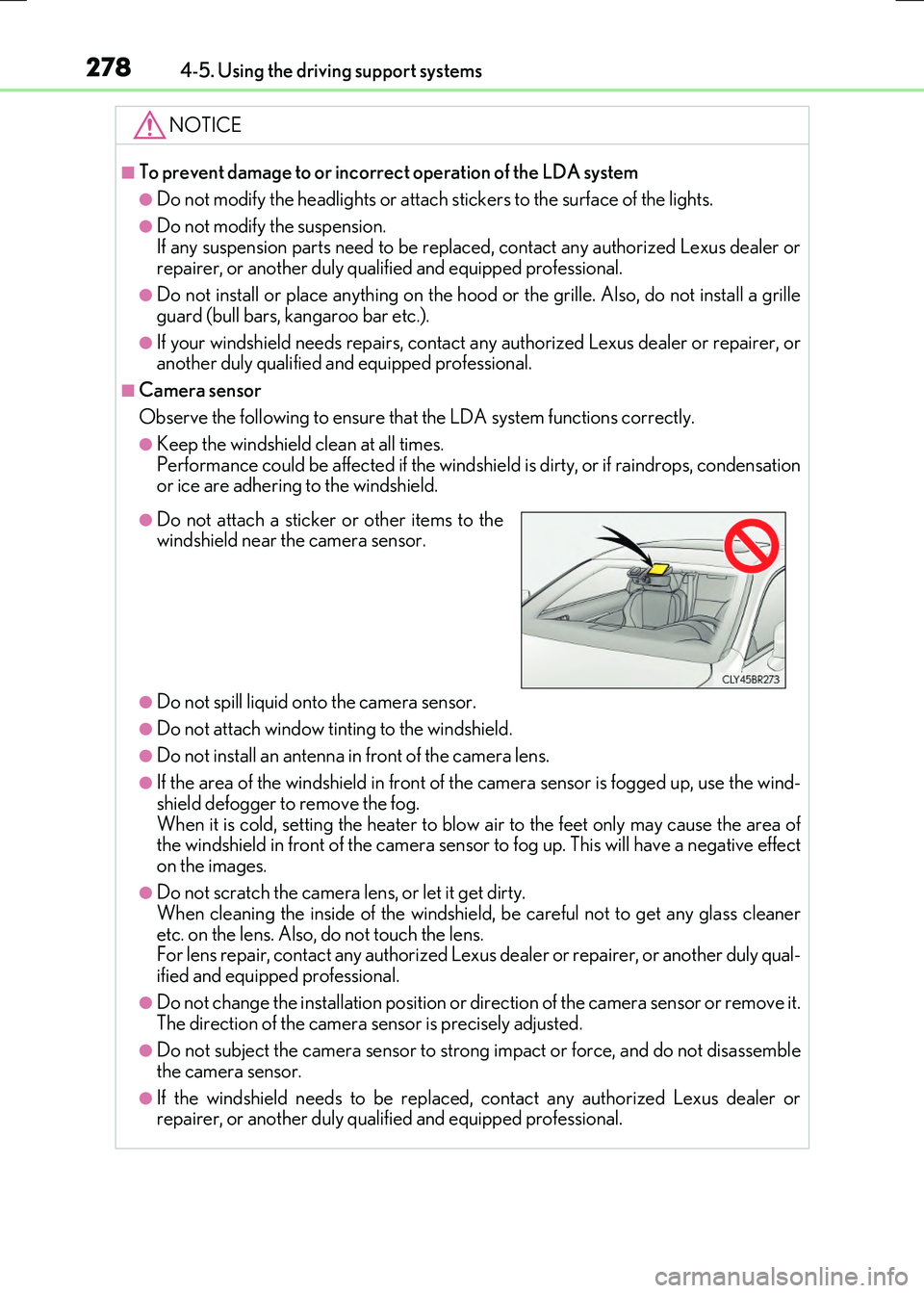
●Do not attach a sticker or other items to thewindshield near the camera sensor.
Page 297 of 640
2974-5. Using the driving support systems
4
Driving
RC300h_EE(OM24740E)
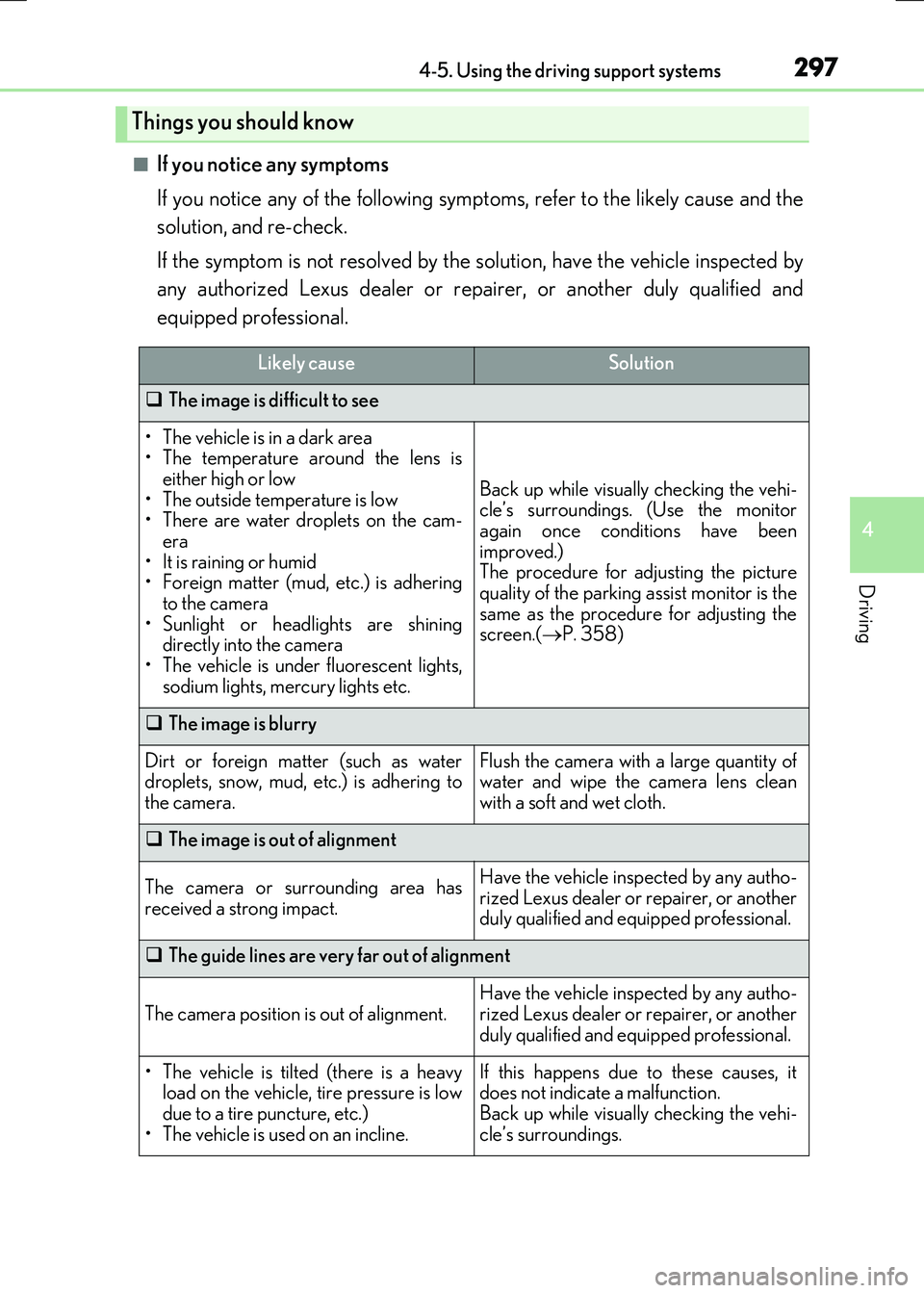
■If you notice any symptoms
If you notice any of the following symp toms, refer to the likely cause and the
solution, and re-check.
If the symptom is not resolved by the solution, have the vehicle inspected by
any authorized Lexus dealer or repairer, or another duly qualified and
equipped professional.
Things you should know
Likely causeSolution
The image is difficult to see
• The vehicle is in a dark area • The temperature around the lens iseither high or low
• The outside temperature is low • There are water droplets on the cam-era
• It is raining or humid • Foreign matter (mud, etc.) is adheringto the camera
• Sunlight or headlights are shining directly into the camera• The vehicle is under fluorescent lights,
sodium lights, mercury lights etc.
Back up while visually checking the vehi- cle’s surroundings. (Use the monitor
again once conditions have been improved.)The procedure for adjusting the picture
quality of the parking assist monitor is the same as the procedure for adjusting thescreen.( P. 358)
The image is blurry
Dirt or foreign matter (such as water droplets, snow, mud, etc.) is adhering to
the camera.
Flush the camera with a large quantity of water and wipe the camera lens clean
with a soft and wet cloth.
The image is out of alignment
The camera or surrounding area has
received a strong impact.
Have the vehicle inspected by any autho- rized Lexus dealer or repairer, or anotherduly qualified and equipped professional.
The guide lines are very far out of alignment
The camera position is out of alignment.
Have the vehicle inspected by any autho-
rized Lexus dealer or repairer, or another duly qualified and equipped professional.
• The vehicle is tilted (there is a heavyload on the vehicle, tire pressure is low
due to a tire puncture, etc.) • The vehicle is used on an incline.
If this happens due to these causes, itdoes not indicate a malfunction.
Back up while visually checking the vehi- cle’s surroundings.
Page 312 of 640
3124-5. Using the driving support systems
RC300h_EE(OM24740E)
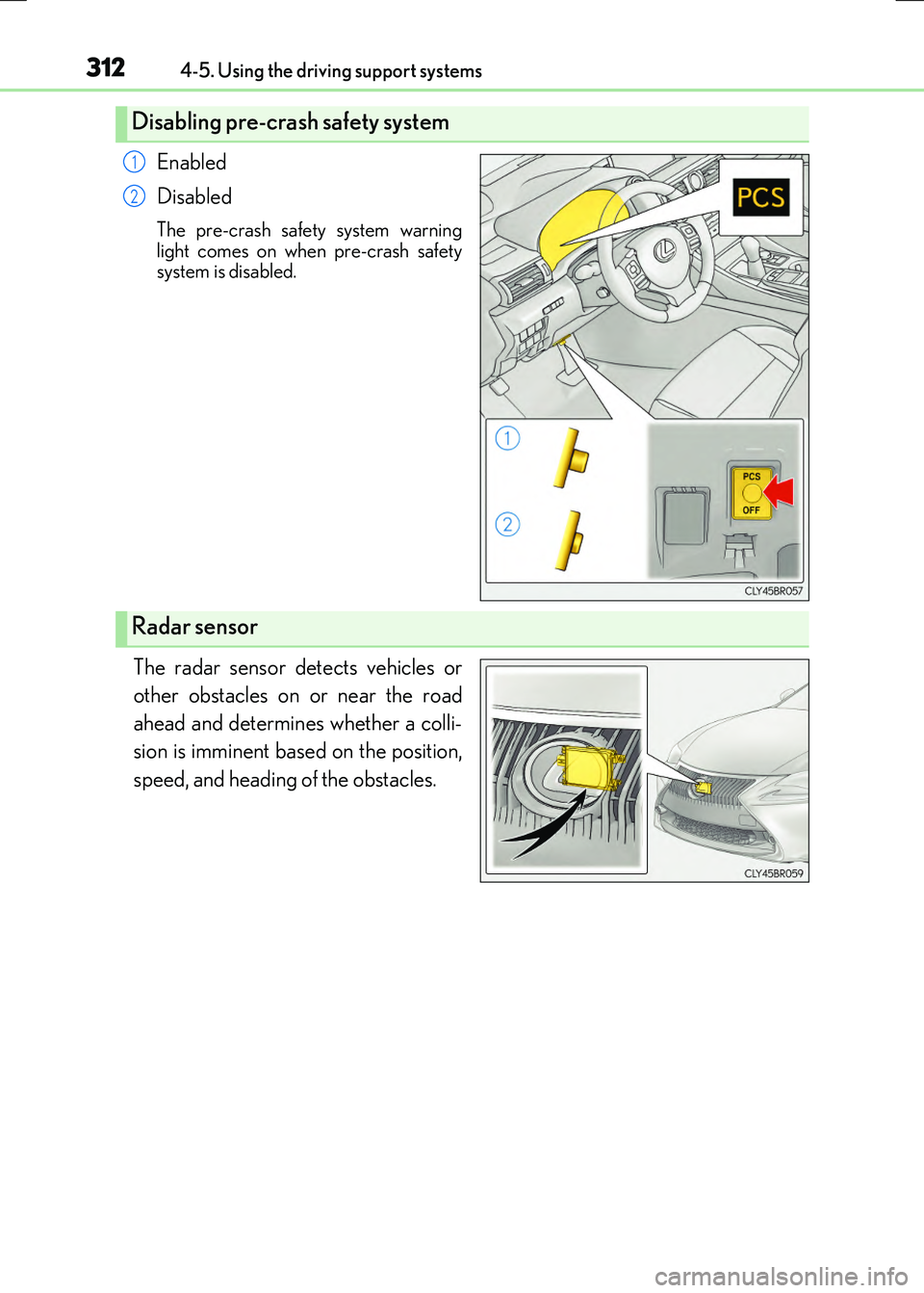
Enabled
Disabled
The pre-crash safety system warning
light comes on when pre-crash safety system is disabled.
The radar sensor detects vehicles or
other obstacles on or near the road
ahead and determines whether a colli-
sion is imminent based on the position,
speed, and heading of the obstacles.
Disabling pre-crash safety system
1
2
Radar sensor