light LEXUS RX350 2011 Owners Manual
[x] Cancel search | Manufacturer: LEXUS, Model Year: 2011, Model line: RX350, Model: LEXUS RX350 2011Pages: 821, PDF Size: 13.27 MB
Page 287 of 821
215
2-4. Using other driving systems
2
When driving
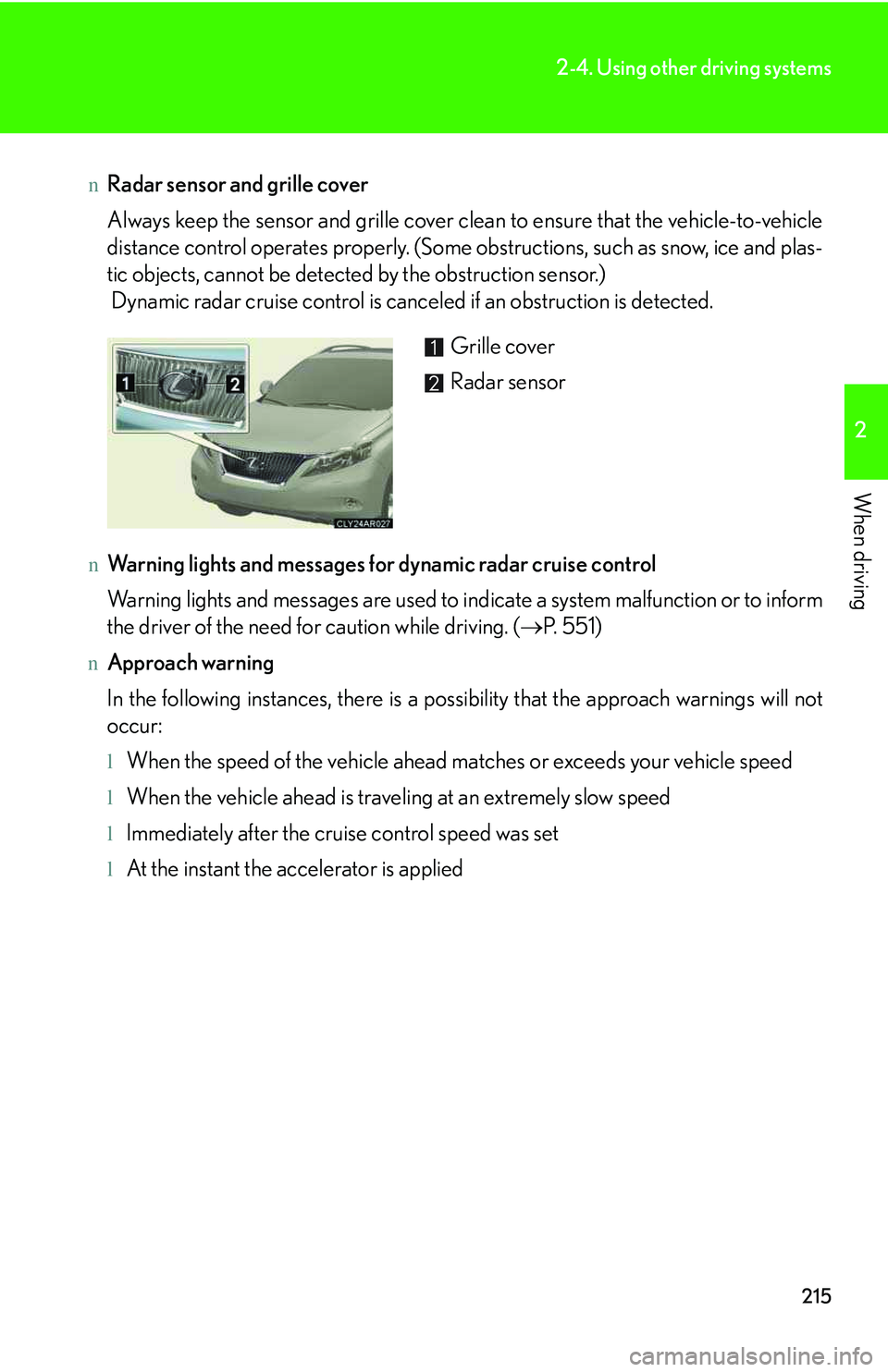
nRadar sensor and grille cover
Always keep the sensor and grille cover clean to ensure that the vehicle-to-vehicle
distance control operates properly. (Some obstructions, such as snow, ice and plas-
tic objects, cannot be detected by the obstruction sensor.)
Dynamic radar cruise control is canceled if an obstruction is detected.
nWarning lights and messages for dynamic radar cruise control
Warning lights and messages are used to indicate a system malfunction or to inform
the driver of the need for caution while driving. (→P. 5 5 1 )
nApproach warning
In the following instances, there is a possibility that the approach warnings will not
occur:
lWhen the speed of the vehicle ahead matches or exceeds your vehicle speed
lWhen the vehicle ahead is traveling at an extremely slow speed
lImmediately after the cruise control speed was set
lAt the instant the accelerator is applied
Grille cover
Radar sensor
Page 291 of 821
219
2-4. Using other driving systems
2
When driving
CAUTION
nConditions under which the vehicle-to-vehicle distance control may not function
correctly
Apply the brakes as necessary in the following conditions as the radar sensor may
not be able to correctly detect vehicles ahead, and an accident may result:
lWhen water or snow thrown up by the surrounding vehicles hinders the function-
ing of the radar sensor
lWhen your vehicle is pointing upwards (caused by a heavy load in the luggage
compartment etc.)
lWhen the road curves or when the lanes are narrow
lWhen steering wheel operation or your position in the lane is unstable
lWhen the vehicle ahead of you decelerates suddenly
nTo ensure the radar sensor functions correctly
Do not do the following to the sensor or grille as doing so may cause the sensor not
to function correctly and could result in an accident:
lSticking or attaching anything to them
lLeaving them dirty
lDisassembling or subjecting them to strong shocks
lModifying or painting them
lReplacing them with non-genuine parts
nHandling the radar sensor
Observe the following to ensure the cruise control system can function effectively:
lKeep the sensor and front grille clean at all times.
Clean the sensor and front grille with a soft cloth so you do not mark or damage
them.
lDo not subject the sensor or surrounding area to a strong impact.
If the sensor moves even slightly off position, the system may malfunction. If the
sensor or surrounding area is subject to a strong impact, always have the area
inspected and adjusted by your Lexus dealer.
lDo not disassemble the sensor.
lDo not attach accessories or stickers to the sensor, grille or surrounding area.
lDo not modify or paint the sensor and grille.
Page 301 of 821
229
2-4. Using other driving systems
2
When driving
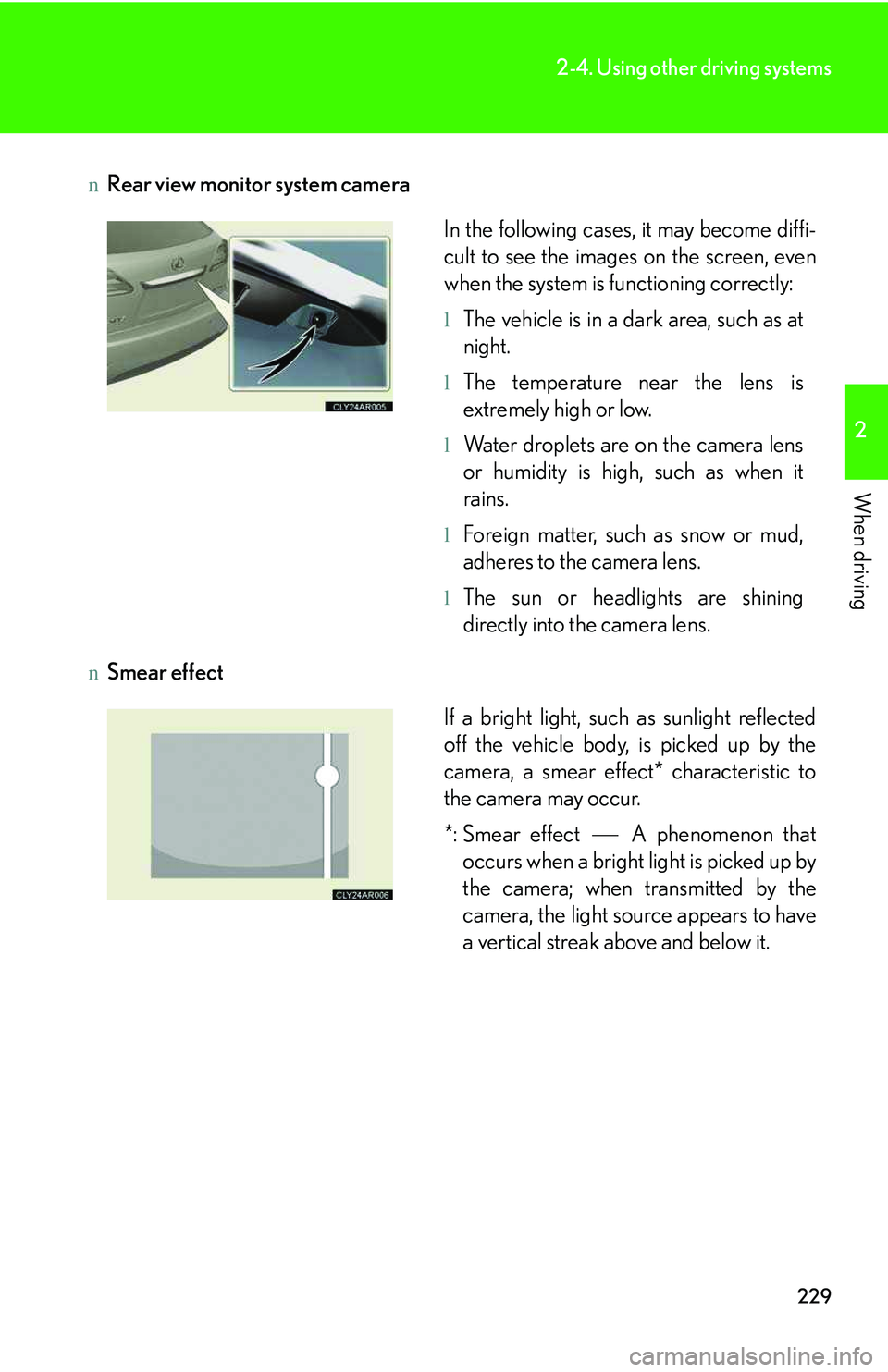
nRear view monitor system camera
nSmear effect
In the following cases, it may become diffi-
cult to see the images on the screen, even
when the system is functioning correctly:
lThe vehicle is in a dark area, such as at
night.
lThe temperature near the lens is
extremely high or low.
lWater droplets are on the camera lens
or humidity is high, such as when it
rains.
lForeign matter, such as snow or mud,
adheres to the camera lens.
lThe sun or headlights are shining
directly into the camera lens.
If a bright light, such as sunlight reflected
off the vehicle body, is picked up by the
camera, a smear effect* characteristic to
the camera may occur.
*: Smear effect ⎯ A phenomenon that
occurs when a bright light is picked up by
the camera; when transmitted by the
camera, the light source appears to have
a vertical streak above and below it.
Page 302 of 821
230
2-4. Using other driving systems
CAUTION
nWhen using the rear view monitor system, observe the following precautions to
avoid an accident that could result in death or serious injuries:
lNever depend solely on the monitor system when reversing.
lAlways check visually and with the mirrors to confirm your intended path is clear.
lDepicted distances between objects and flat surfaces differ from actual dis-
tances.
nConditions which may affect the rear view monitor system
lIf the back of the vehicle has been hit, the camera’s position and mounting angle
may have changed. Have the vehicle inspected by your Lexus dealer.
lRapid temperature changes, such as when hot water is poured on the vehicle in
cold weather, may cause the system to function abnormally.
lIf the camera lens is dirty, it cannot transmit a clear image. Rinse with water and
wipe with a soft cloth. If extremely dirty, wash with a mild cleanser and rinse.
lThe displayed image may be darker and moving images may be slightly distorted
when the system is cold.
Page 304 of 821
232
2-4. Using other driving systems
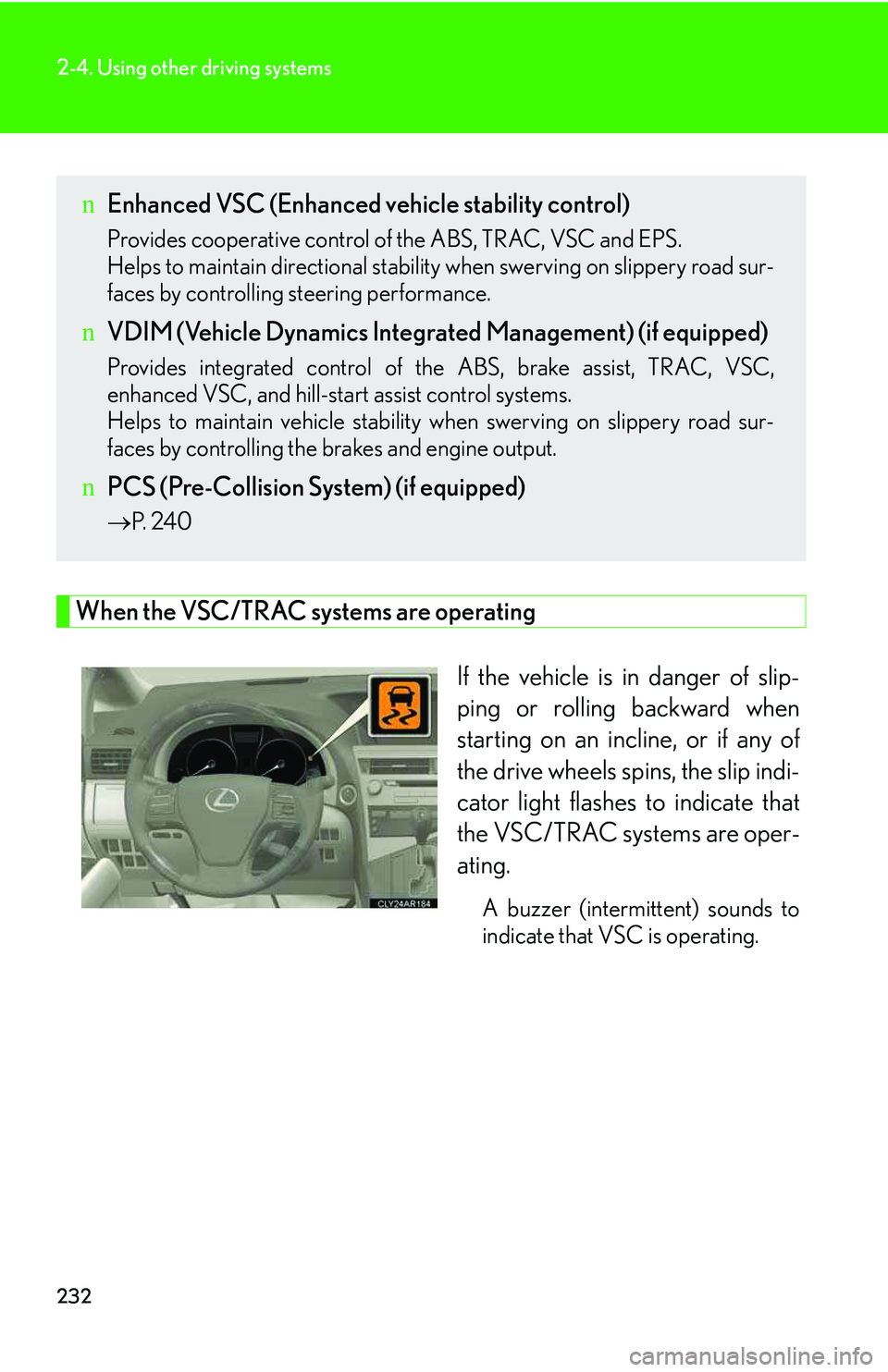
When the VSC/TRAC systems are operating
If the vehicle is in danger of slip-
ping or rolling backward when
starting on an incline, or if any of
the drive wheels spins, the slip indi-
cator light flashes to indicate that
the VSC/TRAC systems are oper-
ating.
A buzzer (intermittent) sounds to
indicate that VSC is operating.
nEnhanced VSC (Enhanced vehicle stability control)
Provides cooperative control of the ABS, TRAC, VSC and EPS.
Helps to maintain directional stability when swerving on slippery road sur-
faces by controlling steering performance.
nVDIM (Vehicle Dynamics Integrated Management) (if equipped)
Provides integrated control of the ABS, brake assist, TRAC, VSC,
enhanced VSC, and hill-start assist control systems.
Helps to maintain vehicle stability when swerving on slippery road sur-
faces by controlling the brakes and engine output.
nPCS (Pre-Collision System) (if equipped)
→P. 2 4 0
Page 305 of 821
233
2-4. Using other driving systems
2
When driving
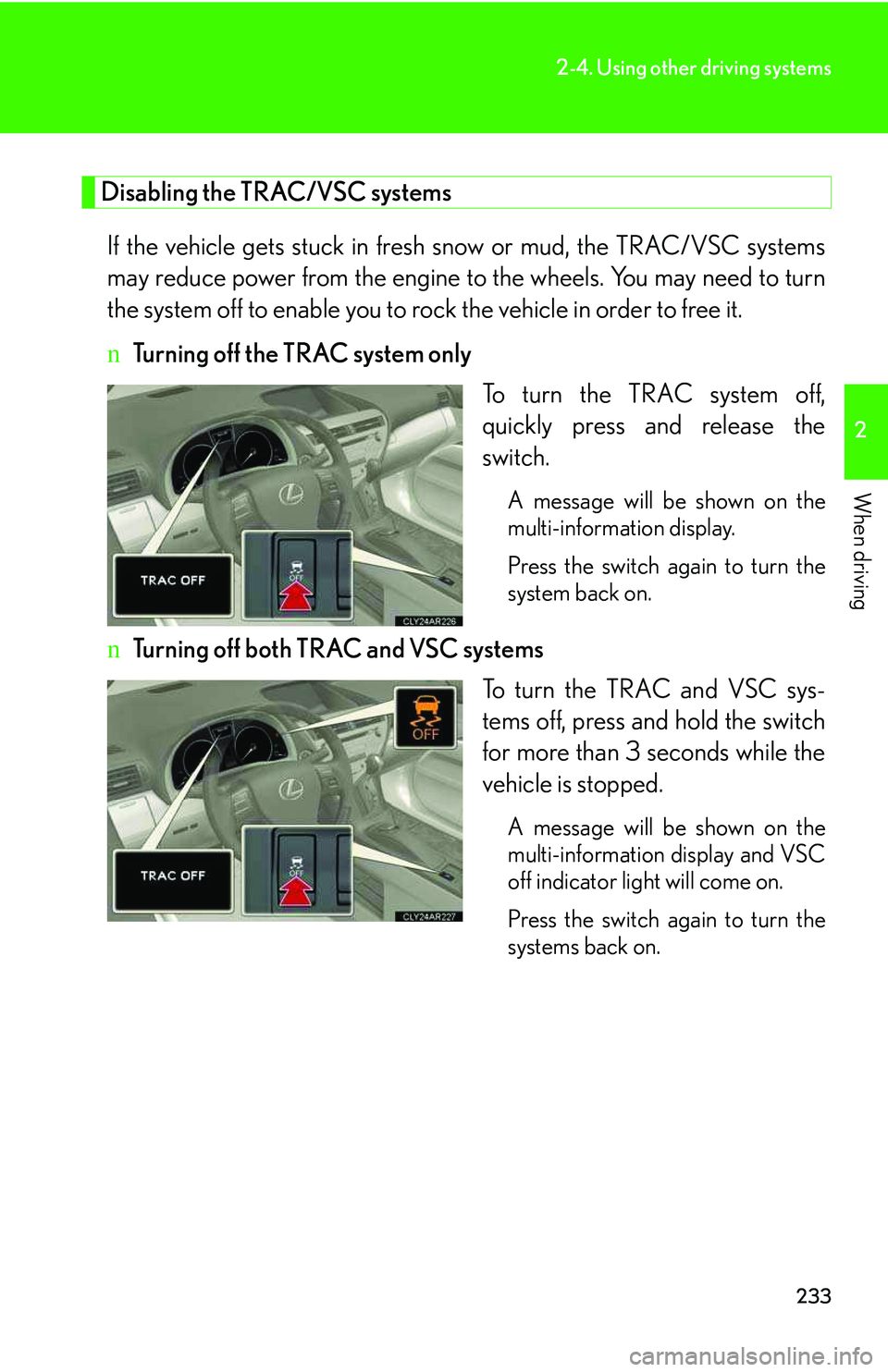
Disabling the TRAC/VSC systems
If the vehicle gets stuck in fresh snow or mud, the TRAC/VSC systems
may reduce power from the engine to the wheels. You may need to turn
the system off to enable you to rock the vehicle in order to free it.
nTurning off the TRAC system only
To turn the TRAC system off,
quickly press and release the
switch.
A message will be shown on the
multi-information display.
Press the switch again to turn the
system back on.
nTurning off both TRAC and VSC systems
To turn the TRAC and VSC sys-
tems off, press and hold the switch
for more than 3 seconds while the
vehicle is stopped.
A message will be shown on the
multi-information display and VSC
off indicator light will come on.
Press the switch again to turn the
systems back on.
Page 308 of 821
236
2-4. Using other driving systems
CAUTION
nWhen the VSC is activated
The slip indicator light flashes and a warning buzzer sounds. Always drive carefully.
Reckless driving may cause an accident. Exercise particular care when the indica-
tor light flashes and a buzzer sounds.
nWhen the TRAC/VSC systems are turned off
Be especially careful and drive at a speed appropriate to the road conditions. As
these are the systems to ensure vehicle stability and driving force, do not turn the
TRAC/VSC systems off unless necessary.
nReplacing tires
Make sure that all tires are of the same size, brand, tread pattern and total load
capacity. In addition, make sure that the tires are inflated to the recommended tire
inflation pressure level.
The ABS and VSC systems will not function correctly if different tires are installed
on the vehicle.
Contact your Lexus dealer for further information when replacing tires or wheels.
nHandling of tires and suspension
Using tires with any kind of problem or modifying the suspension will affect the driv-
ing assist systems, and may cause a system malfunction.
Page 310 of 821
238
2-4. Using other driving systems
Hill-start assist control
nHill-start assist control can be operated when
lThe shift lever is in a position other than P.
lThe parking brake is not applied.
lThe accelerator pedal is not depressed.
nHill-start assist control
lWhile hill-start assist control is operating, the brakes remain automatically
applied after the driver releases the brake pedal. The stop lights and the high
mounted stoplight turn on.
lHill-start assist control operates for about 2 seconds after the brake pedal is
released.
lIf the slip indicator does not flash and the buzzer does not sound when the brake
pedal is further depressed, slightly reduce the pressure on the brake pedal (do
not allow the vehicle to roll backward) and then firmly depress it again. If the sys-
tem still does not operate, check if the operating conditions explained above
have been met.
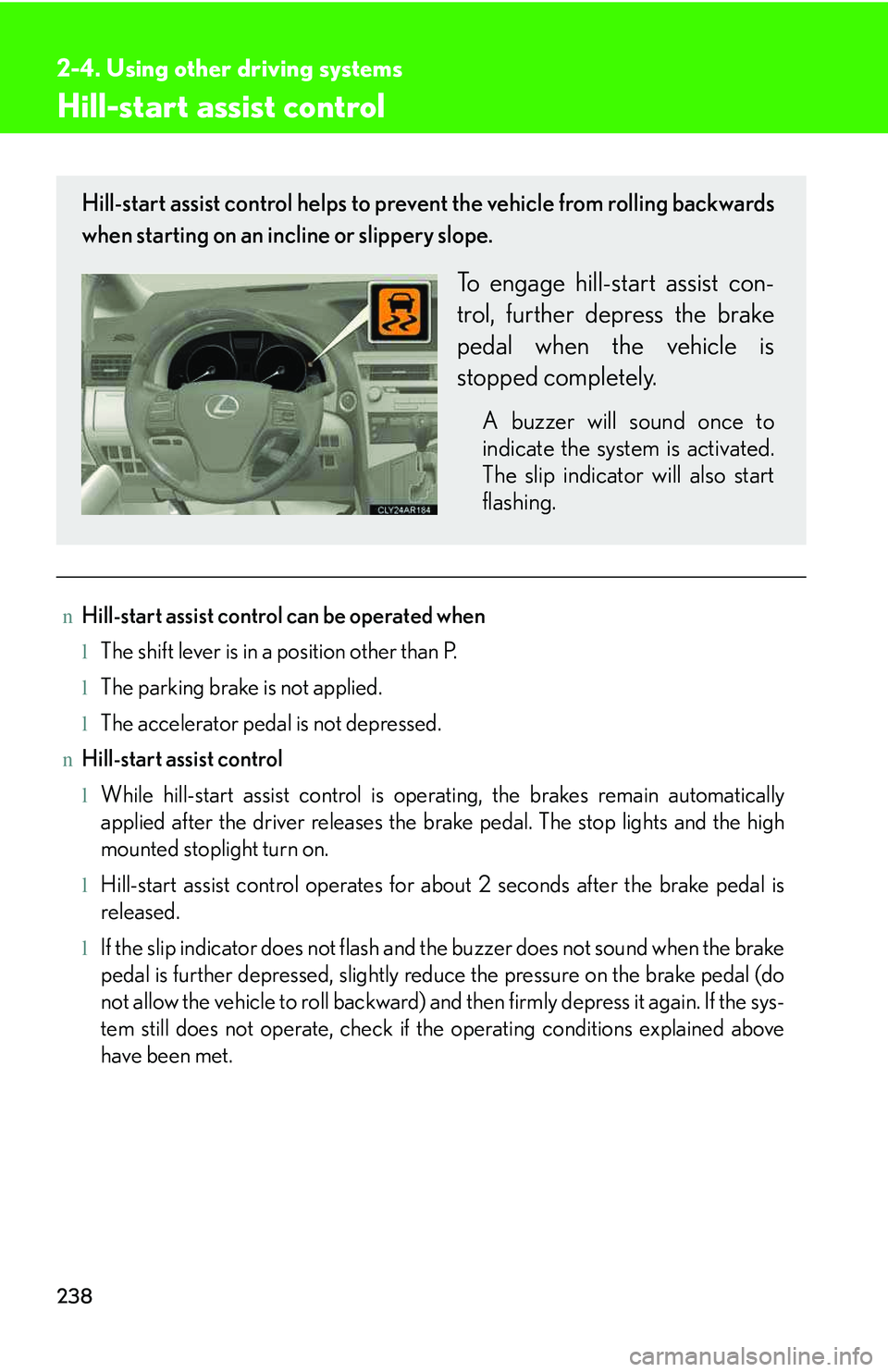
Hill-start assist control helps to prevent the vehicle from rolling backwards
when starting on an incline or slippery slope.
To engage hill-start assist con-
trol, further depress the brake
pedal when the vehicle is
stopped completely.
A buzzer will sound once to
indicate the system is activated.
The slip indicator will also start
flashing.
Page 314 of 821
242
2-4. Using other driving systems
When the system is activated in the situations described above, there is also a possi-
bility that the seat belts will retract quickly and the brakes will be applied with a force
greater than normal. When the seat belt is locked in the retracted position, stop the
vehicle in a safe place, release the seat belt and refasten it.
nObstacles not detected
The sensor cannot detect plastic obstacles such as traffic cones. There may also be
occasions when the sensor cannot detect pedestrians, animals, bicycles, motorcy-
cles, trees, or snowdrifts.
nWhen there is a malfunction in the system
Warning lights and/or warning messages will turn on or flash. (→P. 535, 545)
nCertification
For vehicles sold in U.S.A.
FCC ID: HYQDNMWR005
This device complies with Part 15 of the FCC Rules. Operation is subject to the fol-
lowing two conditions: (1) this device may not cause harmful interference, and (2)
this device must accept any interference received, including interference that may
cause undesired operation.
FCC WARNING
Changes or modifications not expressly approved by the party responsible for
compliance could void the user's authority to operate the equipment.
Radiofrequency radiation exposure Information:
This equipment complies with FCC radiation exposure limits set forth for an uncon-
trolled environment.
This equipment should be installed and operated with minimum distance of 20 cm
between the radiator (antenna) and your body.
This transmitter must not be co-located or operating in conjunction with any other
antenna or transmitter.
For vehicles sold in Canada
Operation is subject to the following two conditions: (1) this device may not cause
interference, and (2) this device must accept any interference, including interfer-
ence that may cause undesired operation of the device.
Page 315 of 821
243
2-4. Using other driving systems
2
When driving
CAUTION
nLimitations of the pre-collision system
Do not rely on the pre-collision system. Always drive safely, taking care to observe
your surroundings and checking for any obstacles or other road hazards.
Failure to do so may cause an accident resulting in death or serious injury.
nWhen the sensor may not be correctly detecting the vehicle ahead
Apply the brakes as necessary in any of the following situations.
lWhen water or snow thrown up by the surrounding vehicles hinders the function-
ing of the sensor
lWhen your vehicle is pointing upwards (caused by a heavy load in the luggage
compartment etc.)
lVehicles that cut in suddenly
lVehicles with small rear ends (trailers with no load on board etc.)
lMotorcycles traveling in the same lane
nHandling the radar sensor
Observe the following to ensure the pre-collision system can function effectively:
lKeep the sensor and front grille clean at all times.
Clean the sensor and front grille with a soft cloth so you do not mark or damage
them.
lDo not subject the sensor or surrounding area to a strong impact.
If the sensor moves even slightly off position, the system may malfunction. If the
sensor or surrounding area is subject to a strong impact, always have the area
inspected and adjusted by your Lexus dealer.
lDo not disassemble the sensor.
lDo not attach accessories or stickers to the sensor, grille or surrounding area.
lDo not modify or paint the sensor and grille cover.