park assist LEXUS RX350 2011 User Guide
[x] Cancel search | Manufacturer: LEXUS, Model Year: 2011, Model line: RX350, Model: LEXUS RX350 2011Pages: 821, PDF Size: 13.27 MB
Page 293 of 821
221
2-4. Using other driving systems
2
When driving
Display
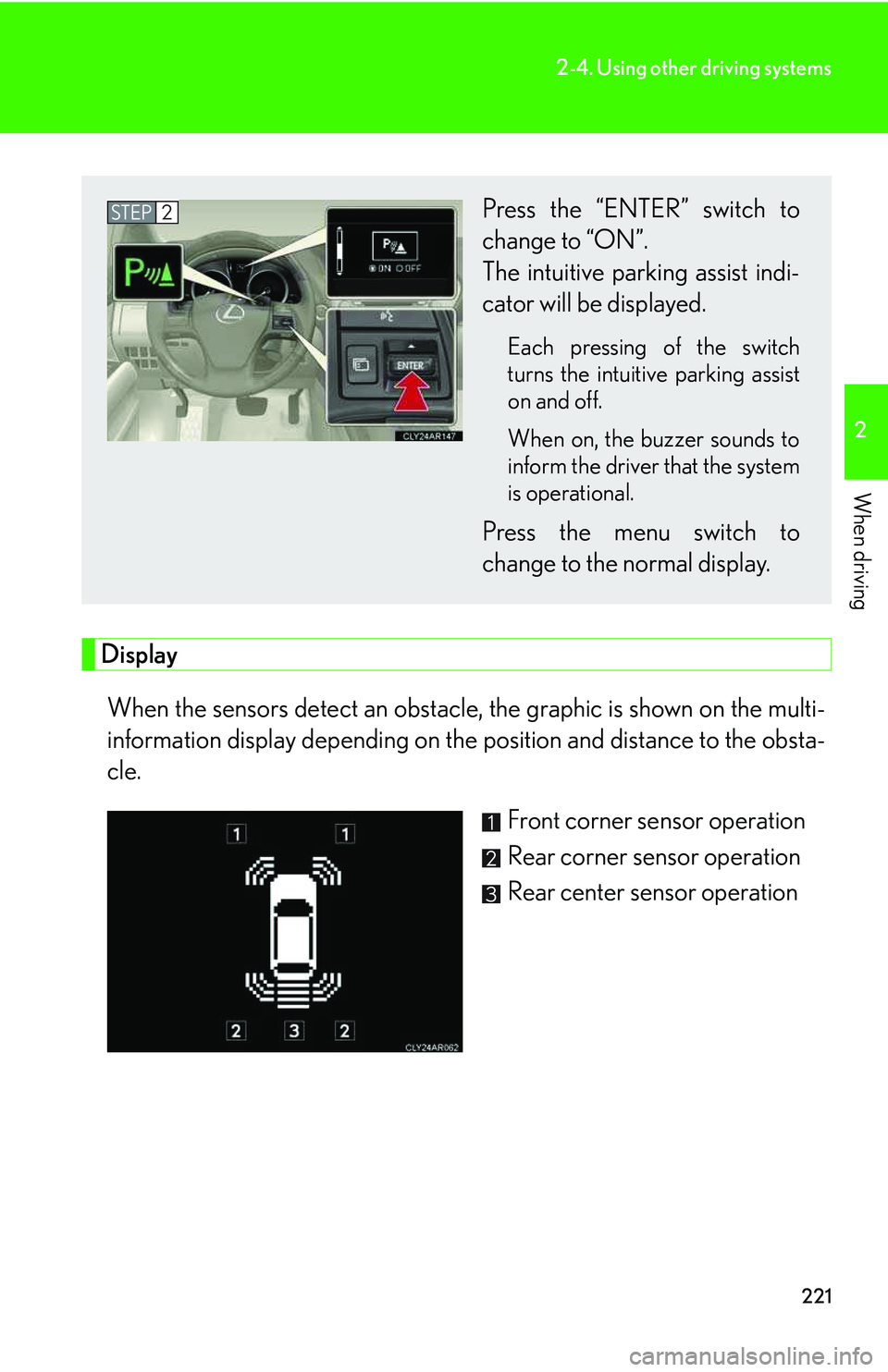
When the sensors detect an obstacle, the graphic is shown on the multi-
information display depending on the position and distance to the obsta-
cle.
Front corner sensor operation
Rear corner sensor operation
Rear center sensor operation
Press the “ENTER” switch to
change to “ON”.
The intuitive parking assist indi-
cator will be displayed.
Each pressing of the switch
turns the intuitive parking assist
on and off.
When on, the buzzer sounds to
inform the driver that the system
is operational.
Press the menu switch to
change to the normal display.
STEP2
Page 296 of 821
224
2-4. Using other driving systems
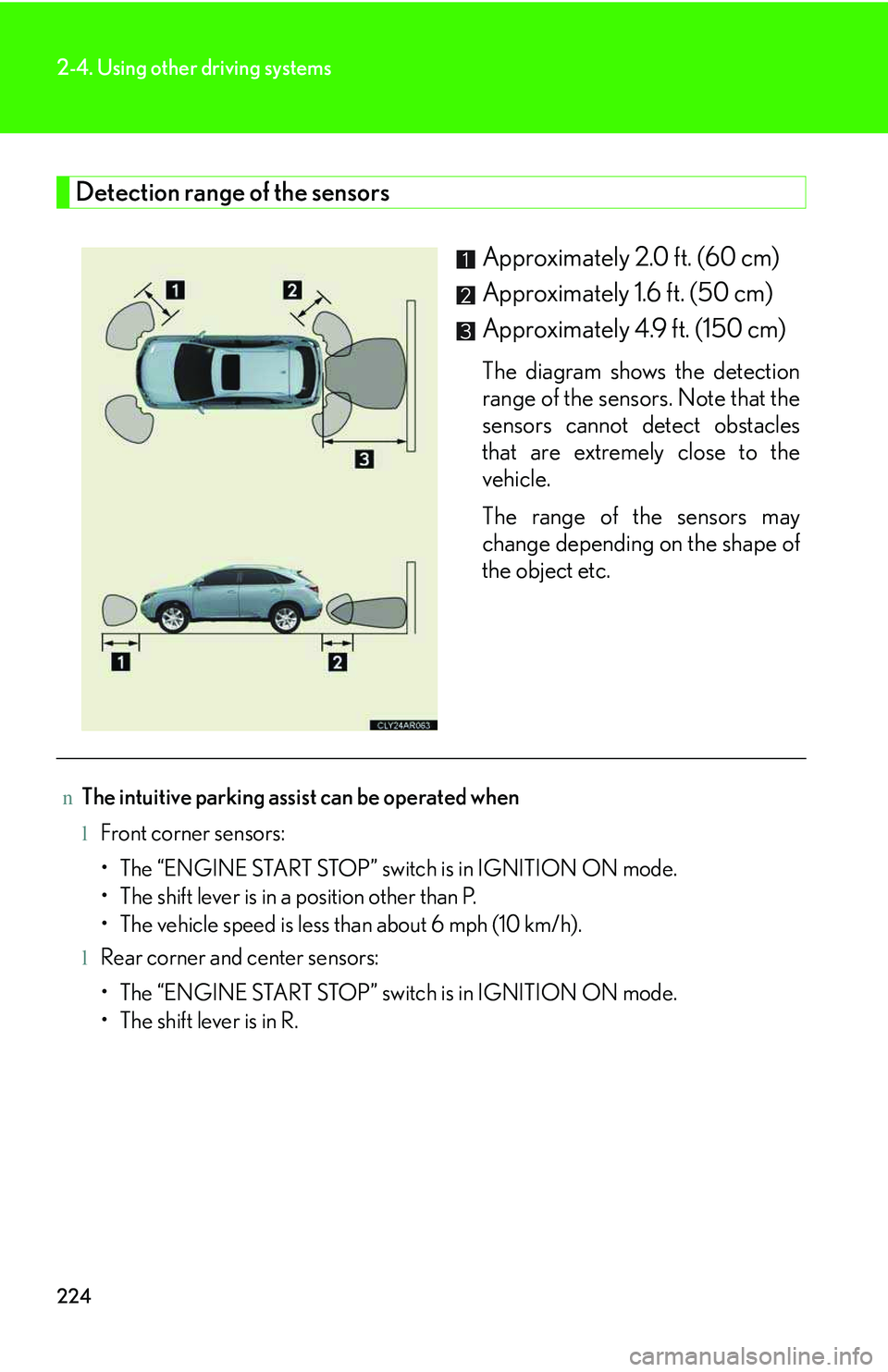
Detection range of the sensors
Approximately 2.0 ft. (60 cm)
Approximately 1.6 ft. (50 cm)
Approximately 4.9 ft. (150 cm)
The diagram shows the detection
range of the sensors. Note that the
sensors cannot detect obstacles
that are extremely close to the
vehicle.
The range of the sensors may
change depending on the shape of
the object etc.
nThe intuitive parking assist can be operated when
lFront corner sensors:
Page 298 of 821
226
2-4. Using other driving systems
nCustomization
Settings (e.g. buzzer volume) can be changed. (Customizable features →P. 6 2 1 )
CAUTION
nCaution when using the intuitive parking assist
Observe the following precautions.
Failing to do so may result in the vehicle being unable to be driven safely and possi-
bly cause an accident.
lDo not use the sensor at speeds in excess of 6 mph (10 km/h).
lDo not attach any accessories within the sensor range.
NOTICE
nNotes when washing the vehicle
Do not apply intensive bursts of water or steam to the sensor area.
Doing so may result in the sensor malfunctioning.
nConditions possibly indicating system malfunctions
If any of the following occurs, the system may be malfunctioning due to a sensor fail-
ure etc. Have the vehicle inspected by your Lexus dealer.
lThe buzzer does not sound when the intuitive parking assist mode is set.
lThe sensor operation display flashes and the buzzer sounds even when no obsta-
cle is detected.
lAn area of the sensors is hit or subjected to a strong impact.
lEither bumper is hit.
lThe sensor operation display remains on even though no buzzer sounds.
Page 310 of 821
238
2-4. Using other driving systems
Hill-start assist control
nHill-start assist control can be operated when
lThe shift lever is in a position other than P.
lThe parking brake is not applied.
lThe accelerator pedal is not depressed.
nHill-start assist control
lWhile hill-start assist control is operating, the brakes remain automatically
applied after the driver releases the brake pedal. The stop lights and the high
mounted stoplight turn on.
lHill-start assist control operates for about 2 seconds after the brake pedal is
released.
lIf the slip indicator does not flash and the buzzer does not sound when the brake
pedal is further depressed, slightly reduce the pressure on the brake pedal (do
not allow the vehicle to roll backward) and then firmly depress it again. If the sys-
tem still does not operate, check if the operating conditions explained above
have been met.
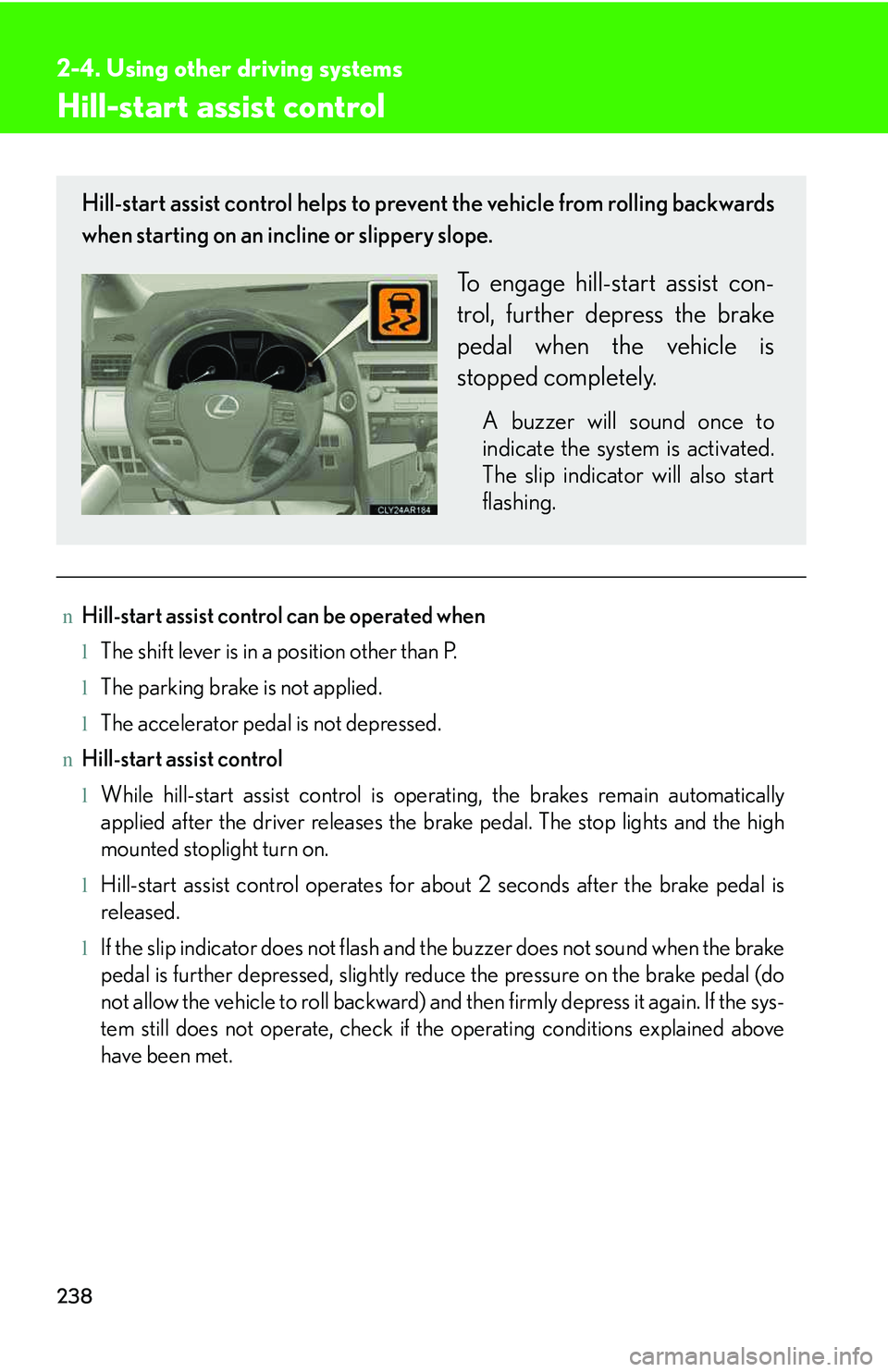
Hill-start assist control helps to prevent the vehicle from rolling backwards
when starting on an incline or slippery slope.
To engage hill-start assist con-
trol, further depress the brake
pedal when the vehicle is
stopped completely.
A buzzer will sound once to
indicate the system is activated.
The slip indicator will also start
flashing.
Page 577 of 821
507
4-3. Do-it-yourself maintenance
4
Maintenance and care
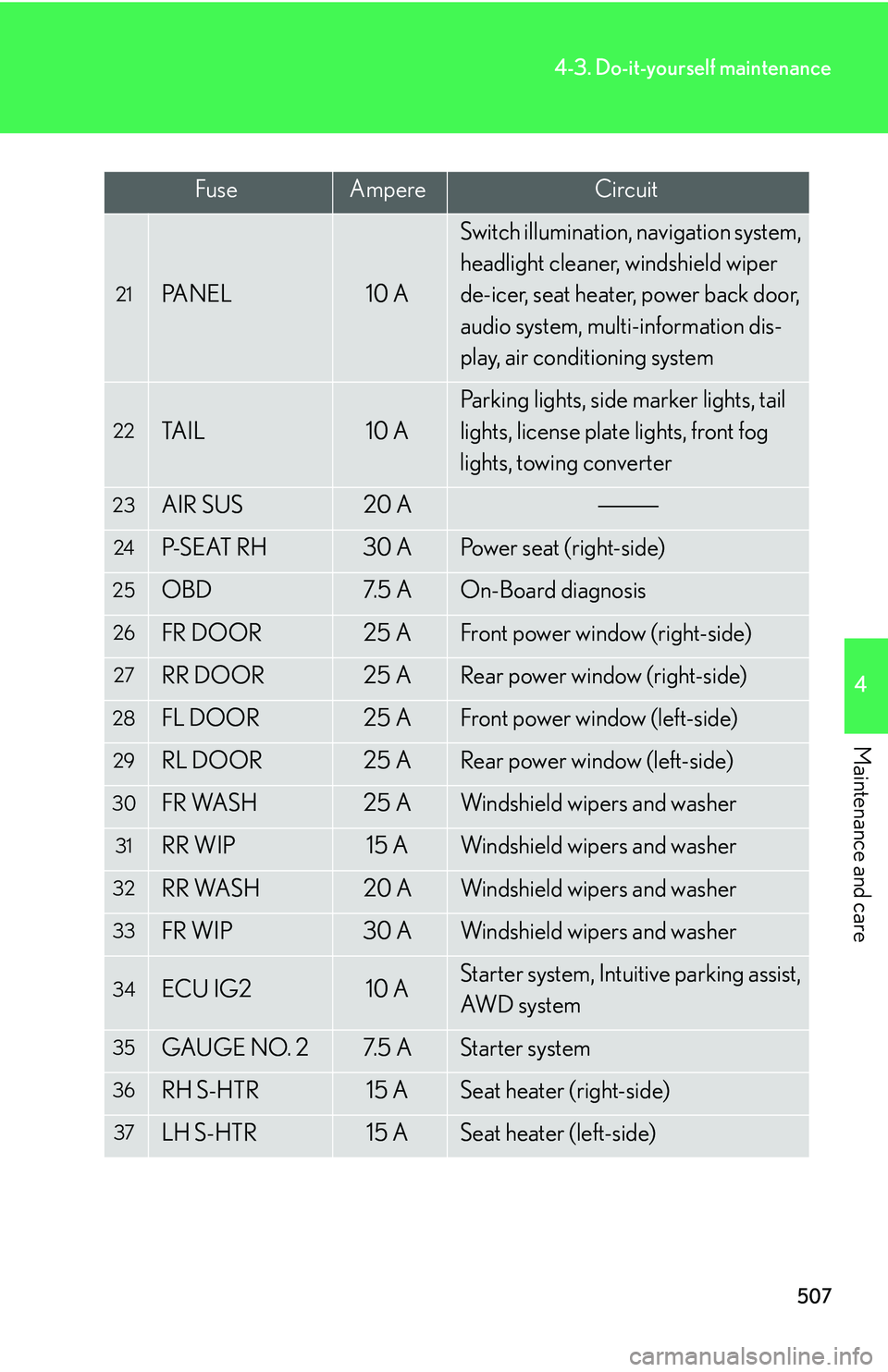
21PA N E L10 A
Switch illumination, navigation system,
headlight cleaner, windshield wiper
de-icer, seat heater, power back door,
audio system, multi-information dis-
play, air conditioning system
22TA I L10 A
Parking lights, side marker lights, tail
lights, license plate lights, front fog
lights, towing converter
23AIR SUS20 A
24P-S E AT R H30 APower seat (right-side)
25OBD7. 5 AOn-Board diagnosis
26FR DOOR25 AFront power window (right-side)
27RR DOOR25 ARear power window (right-side)
28FL DOOR25 AFront power window (left-side)
29RL DOOR25 ARear power window (left-side)
30FR WASH25 AWindshield wipers and washer
31RR WIP15 AWindshield wipers and washer
32RR WASH20 AWindshield wipers and washer
33FR WIP30 AWindshield wipers and washer
34ECU IG210 AStarter system, Intuitive parking assist,
AWD s y s t e m
35GAUGE NO. 27. 5 AStarter system
36RH S-HTR15 ASeat heater (right-side)
37LH S-HTR15 ASeat heater (left-side)
FuseAmpereCircuit
Page 598 of 821
5
When trouble arises
529
5-1. Essential information
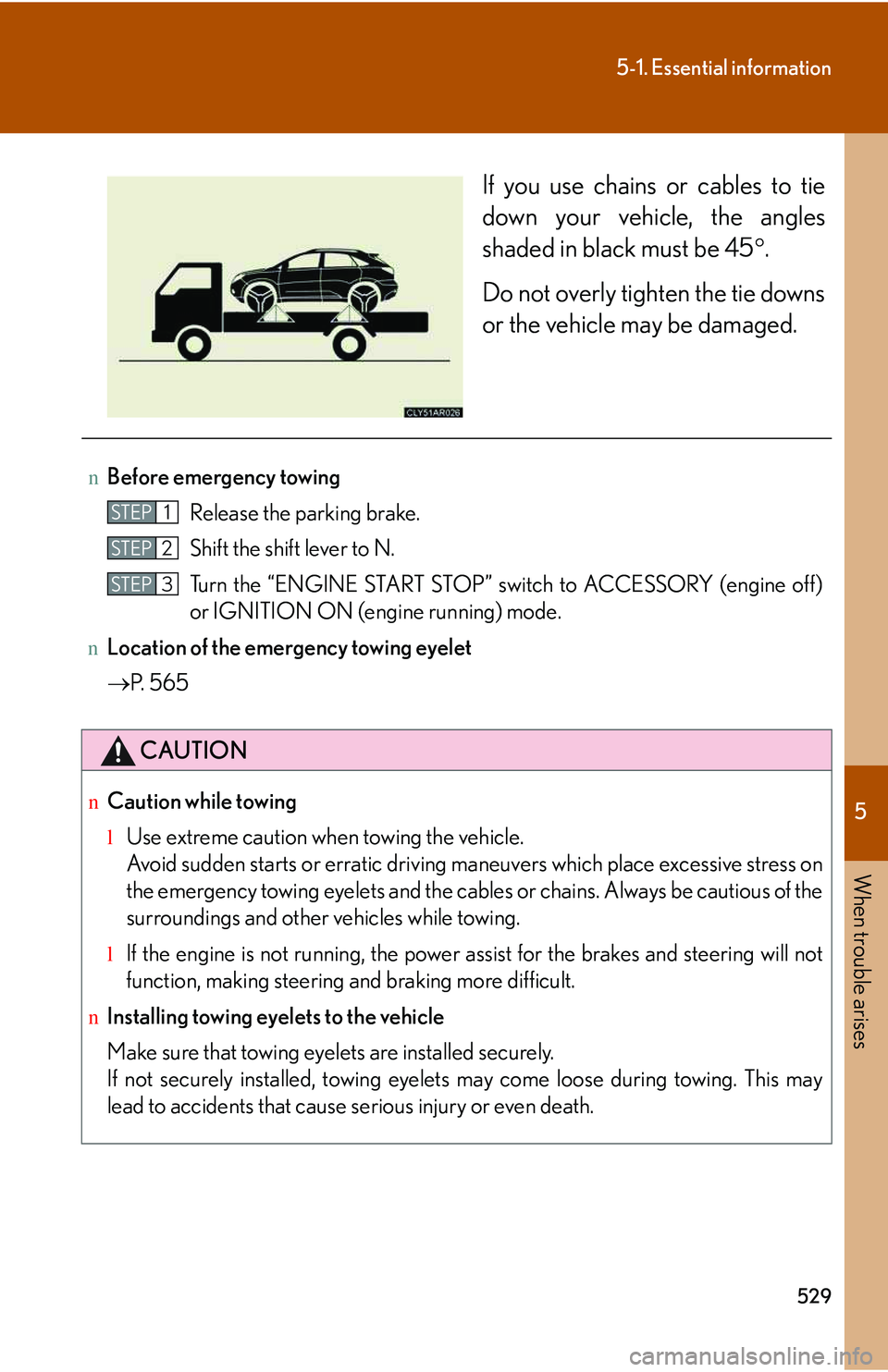
If you use chains or cables to tie
down your vehicle, the angles
shaded in black must be 45°.
Do not overly tighten the tie downs
or the vehicle may be damaged.
nBefore emergency towing
Release the parking brake.
Shift the shift lever to N.
Turn the “ENGINE START STOP” switch to ACCESSORY (engine off )
or IGNITION ON (engine running) mode.
nLocation of the emergency towing eyelet
→P. 5 6 5
CAUTION
nCaution while towing
lUse extreme caution when towing the vehicle.
Avoid sudden starts or erratic driving maneuvers which place excessive stress on
the emergency towing eyelets and the cables or chains. Always be cautious of the
surroundings and other vehicles while towing.
lIf the engine is not running, the power assist for the brakes and steering will not
function, making steering and braking more difficult.
nInstalling towing eyelets to the vehicle
Make sure that towing eyelets are installed securely.
If not securely installed, towing eyelets may come loose during towing. This may
lead to accidents that cause serious injury or even death.
STEP1
STEP2
STEP3
Page 617 of 821
548
5-2. Steps to take in an emergency
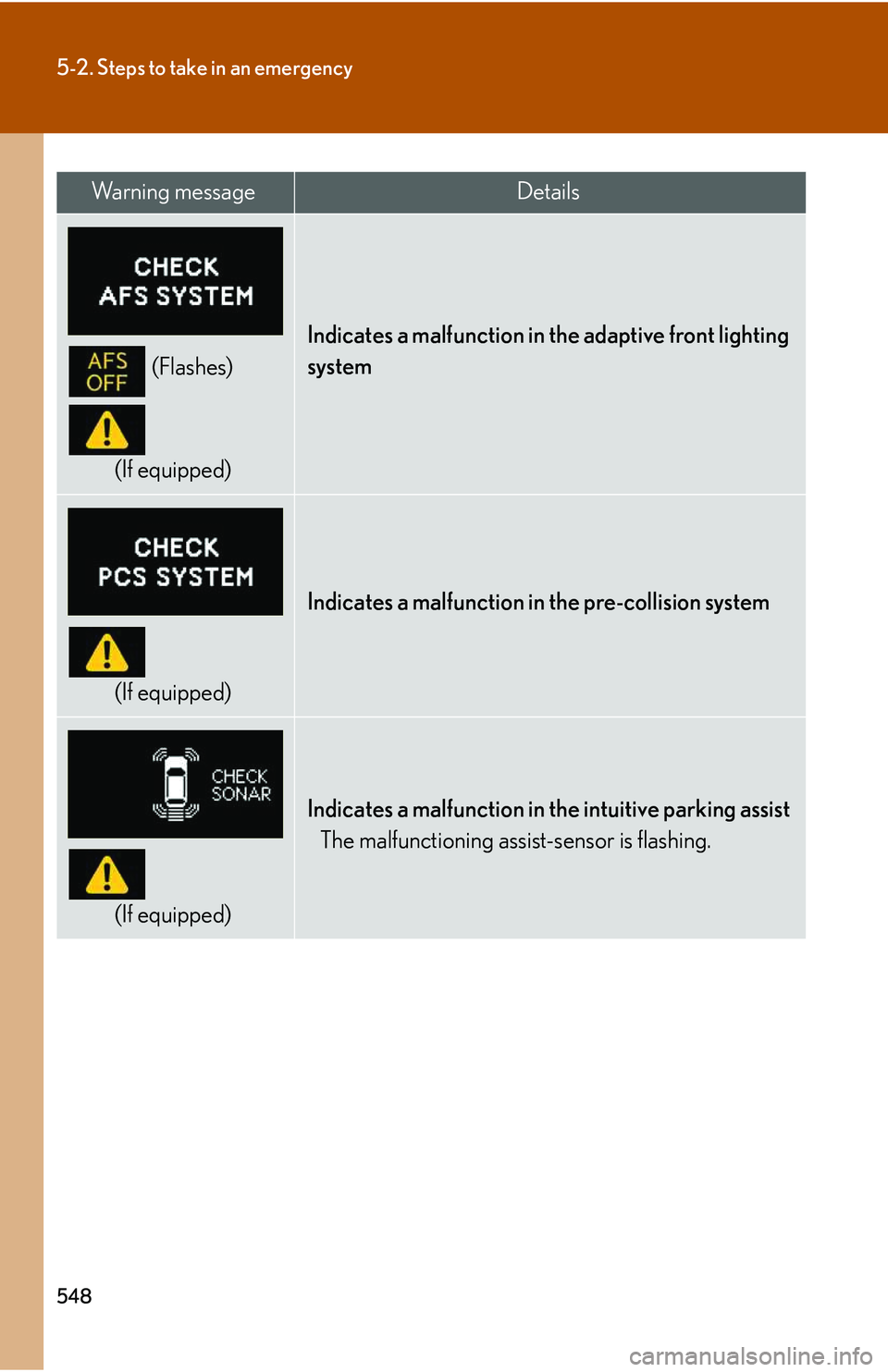
(Flashes)
(If equipped)
Indicates a malfunction in the adaptive front lighting
system
(If equipped)
Indicates a malfunction in the pre-collision system
(If equipped)
Indicates a malfunction in the intuitive parking assist
The malfunctioning assist-sensor is flashing.
Wa r n i n g m e s s a g eDetails
Page 623 of 821
554
5-2. Steps to take in an emergency
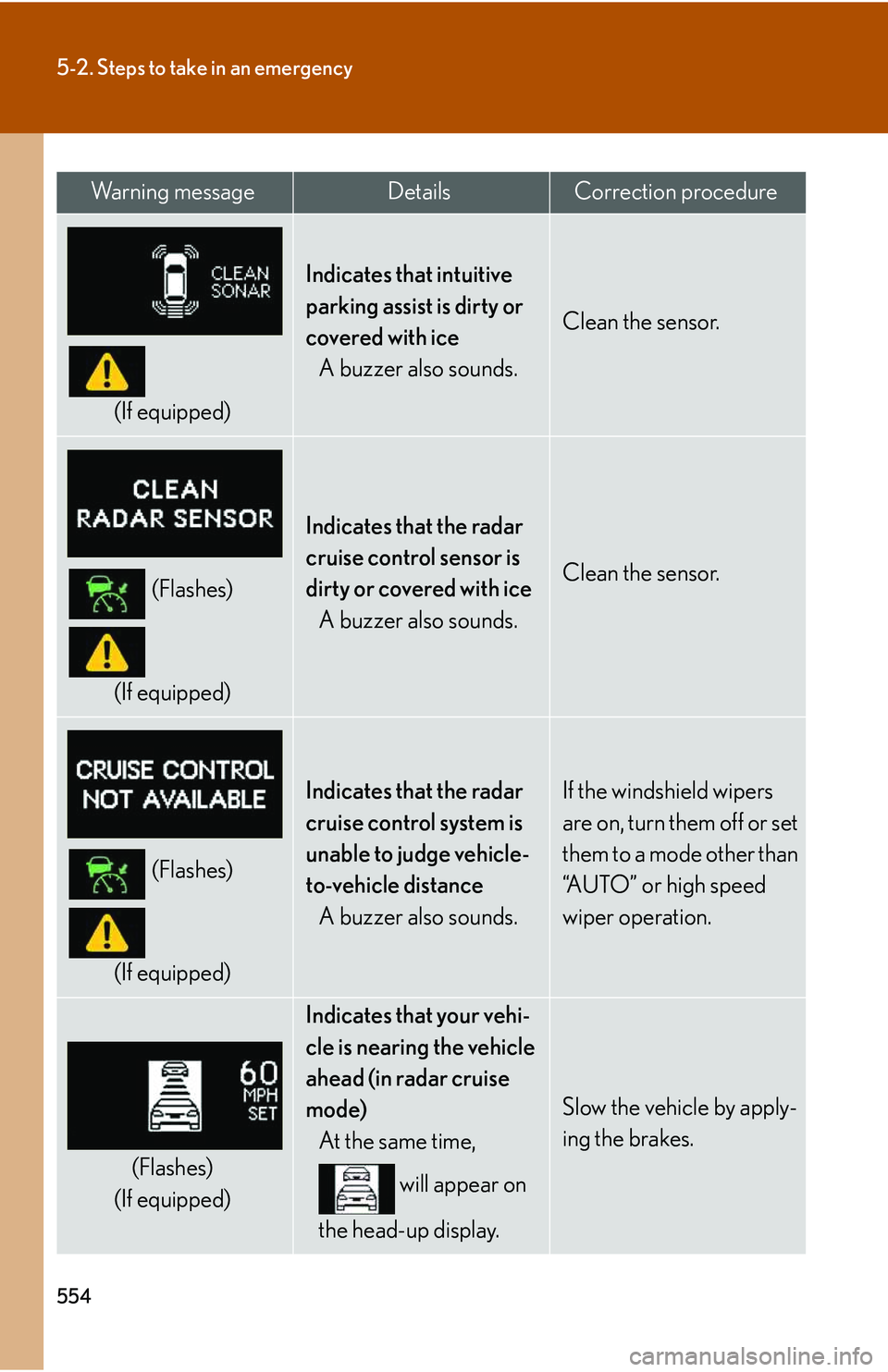
(If equipped)
Indicates that intuitive
parking assist is dirty or
covered with ice
A buzzer also sounds.
Clean the sensor.
(Flashes)
(If equipped)
Indicates that the radar
cruise control sensor is
dirty or covered with ice
A buzzer also sounds.
Clean the sensor.
(Flashes)
(If equipped)
Indicates that the radar
cruise control system is
unable to judge vehicle-
to-vehicle distance
A buzzer also sounds.
If the windshield wipers
are on, turn them off or set
them to a mode other than
“AUTO” or high speed
wiper operation.
(Flashes)
(If equipped)
Indicates that your vehi-
cle is nearing the vehicle
ahead (in radar cruise
mode)
At the same time,
will appear on
the head-up display.
Slow the vehicle by apply-
ing the brakes.
Wa r n i n g m e s s a g eDetailsCorrection procedure
Page 699 of 821
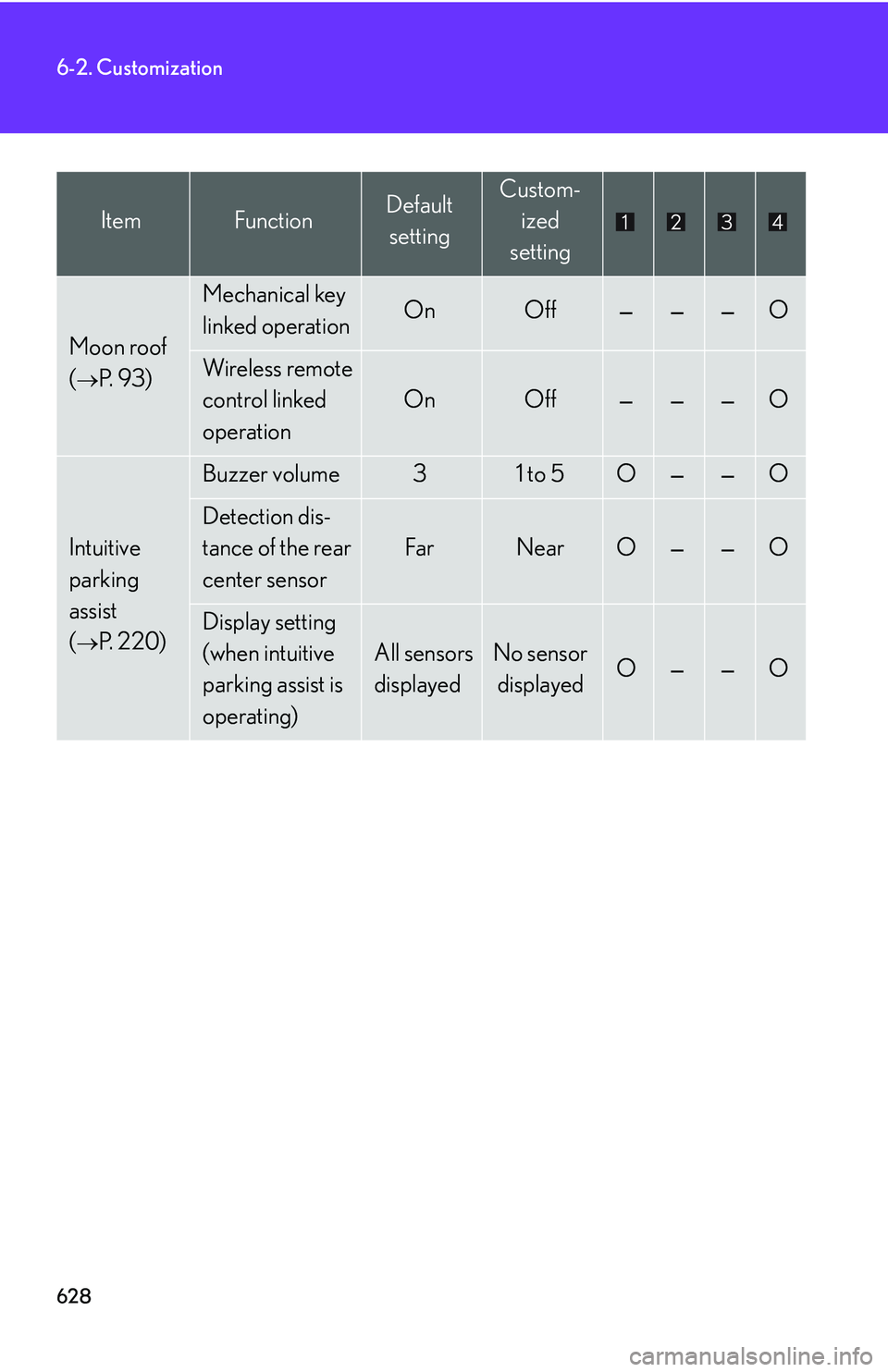
628
6-2. Customization
Moon roof
(→P. 9 3 )
Mechanical key
linked operationOnOff———O
Wireless remote
control linked
operation
OnOff———O
Intuitive
parking
assist
(→P. 220)
Buzzer volume31 to 5O——O
Detection dis-
tance of the rear
center sensor
FarNearO——O
Display setting
(when intuitive
parking assist is
operating)
All sensors
displayed
No sensor
displayedO——O
ItemFunctionDefault
setting
Custom-
ized
setting
Page 721 of 821
652
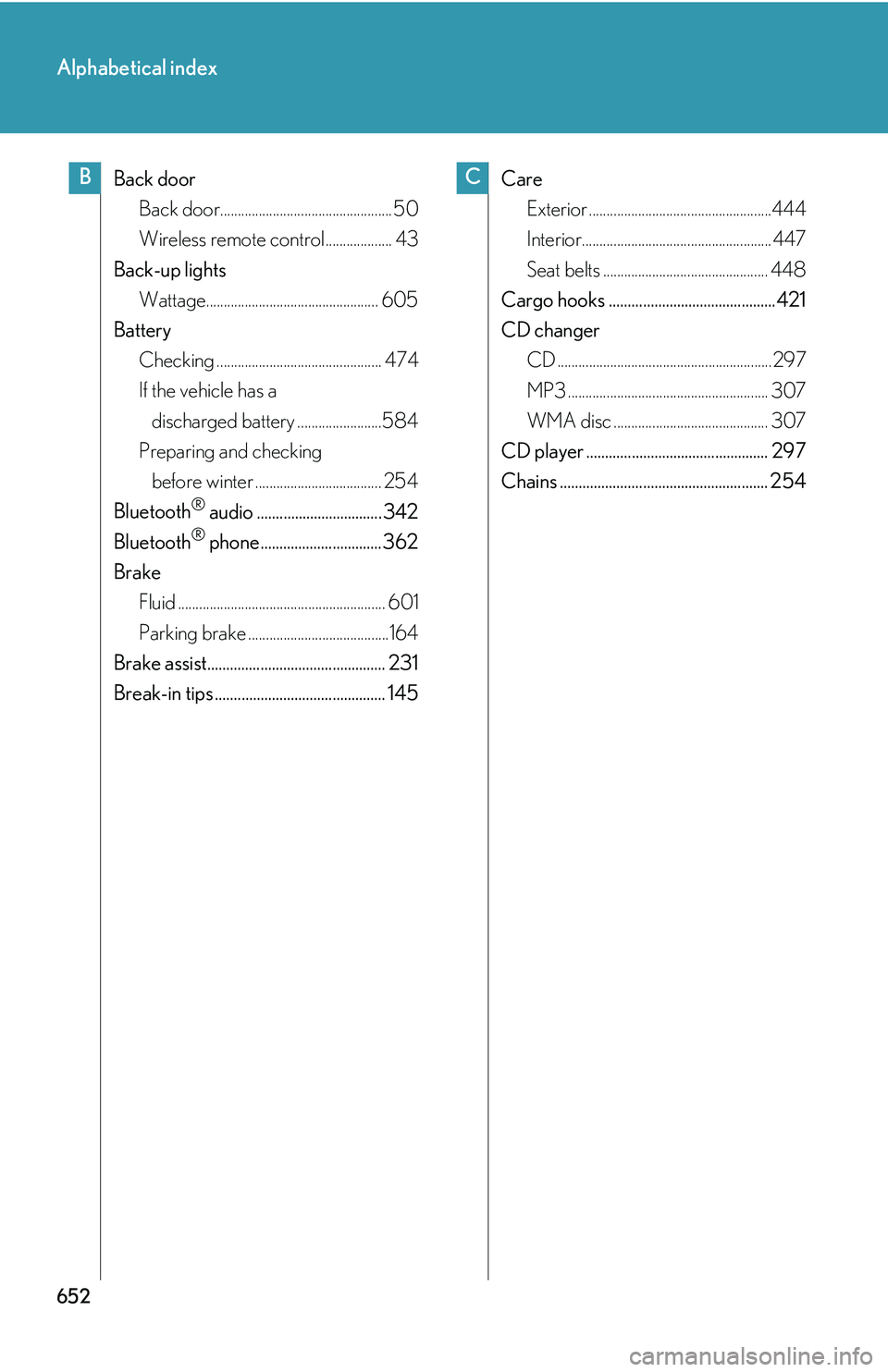
Alphabetical index
Back door
Back door................................................. 50
Wireless remote control................... 43
Back-up lights
Wattage................................................. 605
Battery
Checking ............................................... 474
If the vehicle has a
discharged battery ........................584
Preparing and checking
before winter .................................... 254
Bluetooth® audio ................................. 342
Bluetooth® phone................................ 362
Brake
Fluid ........................................................... 601
Parking brake ........................................164
Brake assist............................................... 231
Break-in tips ............................................. 145
Care
Exterior ....................................................444
Interior...................................................... 447
Seat belts ............................................... 448
Cargo hooks ............................................421
CD changer
CD .............................................................297
MP3 ......................................................... 307
WMA disc ............................................ 307
CD player ................................................ 297
Chains ....................................................... 254
BC