fuel LEXUS RX350 2015 User Guide
[x] Cancel search | Manufacturer: LEXUS, Model Year: 2015, Model line: RX350, Model: LEXUS RX350 2015Pages: 886, PDF Size: 11 MB
Page 107 of 886
![LEXUS RX350 2015 User Guide 1071-5. Refueling
1
Before driving
■
Fuel types
Unleaded gasoline (Octane rating 87 [R esearch Octane Number 91] or higher)Pull the lever.
Install the auxiliary box using the clips.STEP 4
STEP 5](/img/36/58970/w960_58970-106.png "LEXUS RX350 2015 User Guide 1071-5. Refueling
1
Before driving
■
Fuel types
Unleaded gasoline (Octane rating 87 [R esearch Octane Number 91] or higher)Pull the lever.
Install the auxiliary box using the clips.STEP 4
STEP 5")
1071-5. Refueling
1
Before driving
■
Fuel types
Unleaded gasoline (Octane rating 87 [R esearch Octane Number 91] or higher)Pull the lever.
Install the auxiliary box using the clips.STEP 4
STEP 5
Page 108 of 886
1081-5. Refueling
CAUTION■
When refueling the vehicle
Observe the following precautions while refueling the vehicle. Failure to do so may
result in death or serious injury. ●
After exiting the vehicle and before opening the fuel door, touch an unpainted
metal surface to discharge any static electricity. It is important to discharge static
electricity before refueling because sparks resulting from static electricity can
cause fuel vapors to ignite while refueling.●
Always hold the grips on the fuel tank cap and turn it slowly to remove it.
A whooshing sound may be heard when the fuel tank cap is loosened. Wait until
the sound cannot be heard before fully re moving the cap. In hot weather, pressur-
ized fuel may spray out of the filler neck and cause injury.●
Do not allow anyone that has not discharged static electricity from their body to
come close to an open fuel tank.●
Do not inhale vaporized fuel.
Fuel contains substances that are harmful if inhaled.●
Do not smoke while refueling the vehicle.
Doing so may cause the fuel to ignite and cause a fire.●
Do not return to the vehicle or touch an y person or object that is statically
charged.
This may cause static electricity to build up , resulting in a possible ignition hazard.■
When refueling
Observe the following precautions to prevent fuel overflowing from the fuel tank: ●
Securely insert the fuel nozzle into the fuel filler neck●
Stop filling the tank after the fuel nozzle automatically clicks off●
Do not top off the fuel tank
■
When replacing the fuel cap
Do not use anything but a genuine Lexus fuel tank cap designed for your vehicle.
Doing so may cause a fire or other incident which may result in death or serious
injury.
Page 109 of 886

1091-5. Refueling
1
Before driving NOTICE■
Refueling
Do not spill fuel during refueling.
Doing so may damage the vehicle, such as causing the emission control system to
operate abnormally or damaging fuel syst em components or the vehicle's painted
surface.
Page 156 of 886
1562-1. Driving procedures
■
Drum-in-disc type parking brake system
Your vehicle has a drum-in-disc type parking brake system. This type of brake sys-
tem needs bedding-down of the brake shoe s periodically or whenever the parking
brake shoes and/or drum are replaced. Have your Lexus dealer perform the bed-
ding down operation.■
Operating your vehicle in a foreign country
Comply with the relevant vehicle registration laws and confirm the availability of the
correct fuel. ( P. 808)■
Eco-friendly driving
■
Customization
Setting of Eco Driving Indica tor Light can be changed.
(Customizable features P. 8 3 4 )
CAUTION
■
When starting the vehicle
Always keep your foot on the brake pedal while stopped with the engine running.
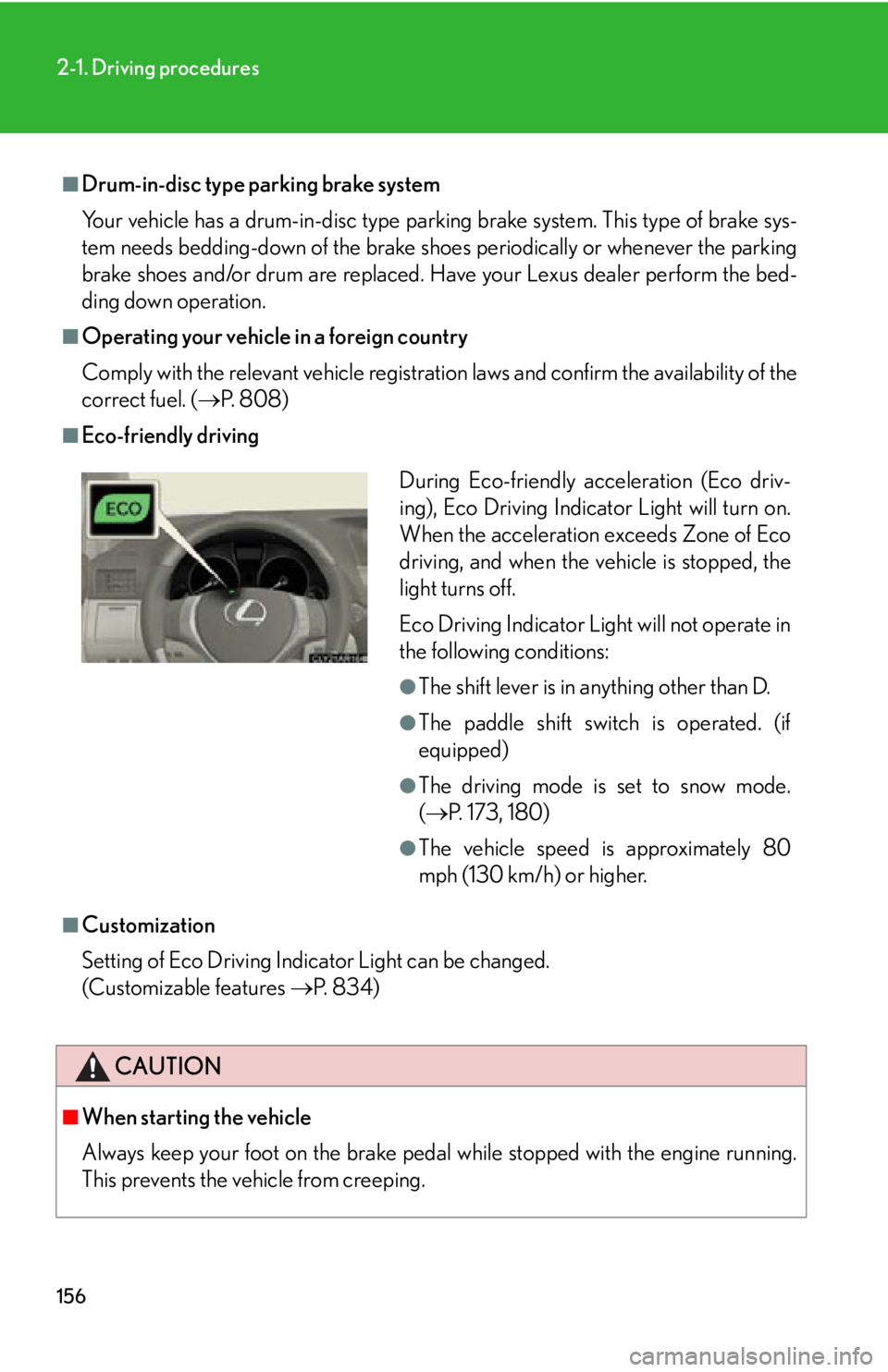
This prevents the vehicle from creeping. During Eco-friendly acceleration (Eco driv-
ing), Eco Driving Indicator Light will turn on.
When the acceleration exceeds Zone of Eco
driving, and when the ve hicle is stopped, the
light turns off.
Eco Driving Indicator Light will not operate in
the following conditions: ●
The shift lever is in anything other than D. ●
The paddle shift switch is operated. (if
equipped) ●
The driving mode is set to snow mode.
( P. 173, 180)●
The vehicle speed is approximately 80
mph (130 km/h) or higher.
Page 178 of 886
1782-1. Driving procedures
Automatic transmission (8-speed models) Select a shift position appropriate for the driving conditions.
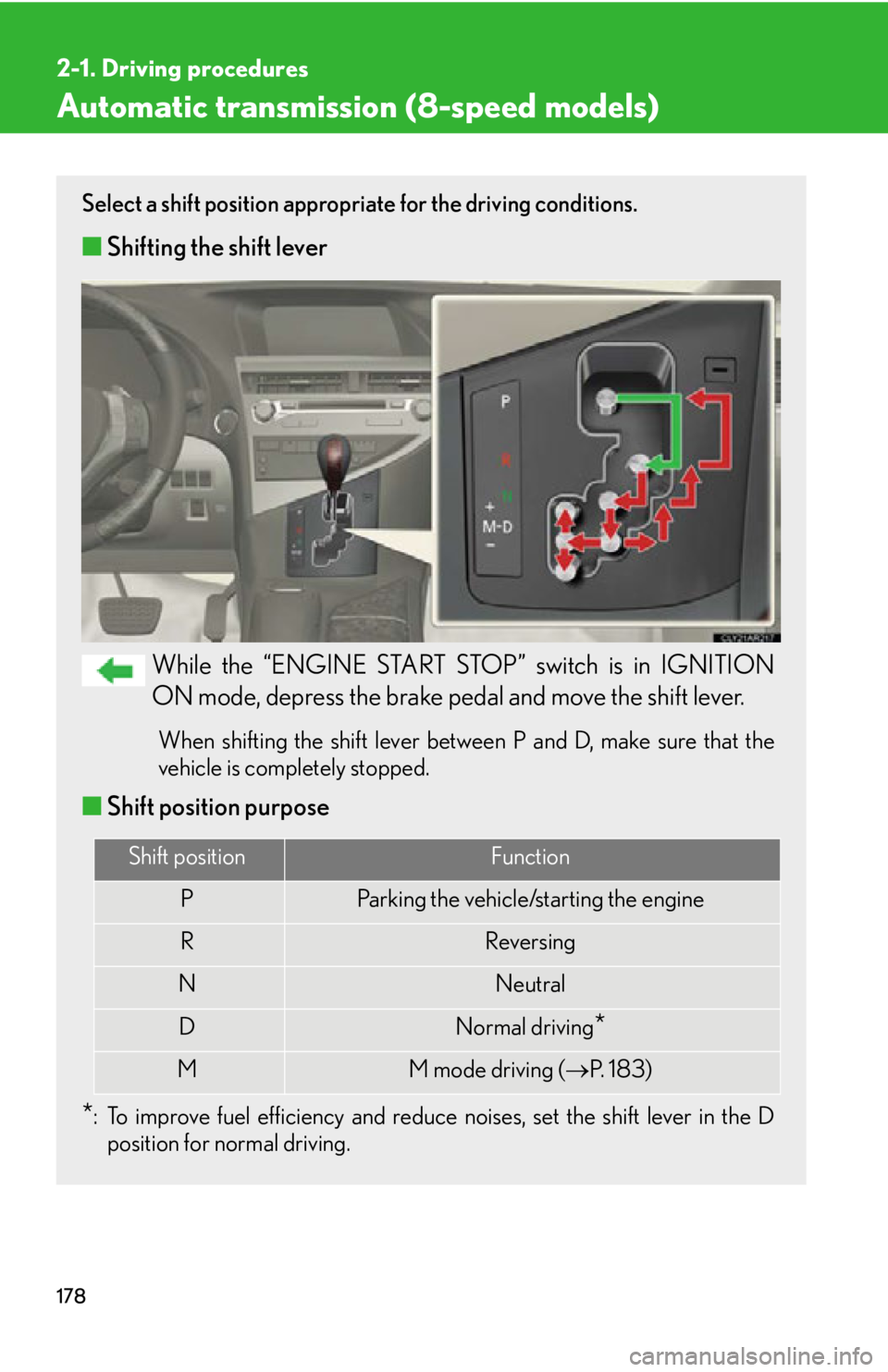
■ Shifting the shift lever
While the “ENGINE START STOP” switch is in IGNITION
ON mode, depress the brake pedal and move the shift lever. When shifting the shift lever between P and D, make sure that the
vehicle is completely stopped.
■ Shift position purpose
* : To improve fuel efficiency and reduce noises, set the shift lever in the D
position for normal driving. Shift position Function
P Parking the vehicle/starting the engine
R Reversing
N Neutral
D Normal driving
*M M mode driving ( P. 1 8 3 )
Page 191 of 886
1912
When driving 2-2. Instrument cluster
Gauges and meters
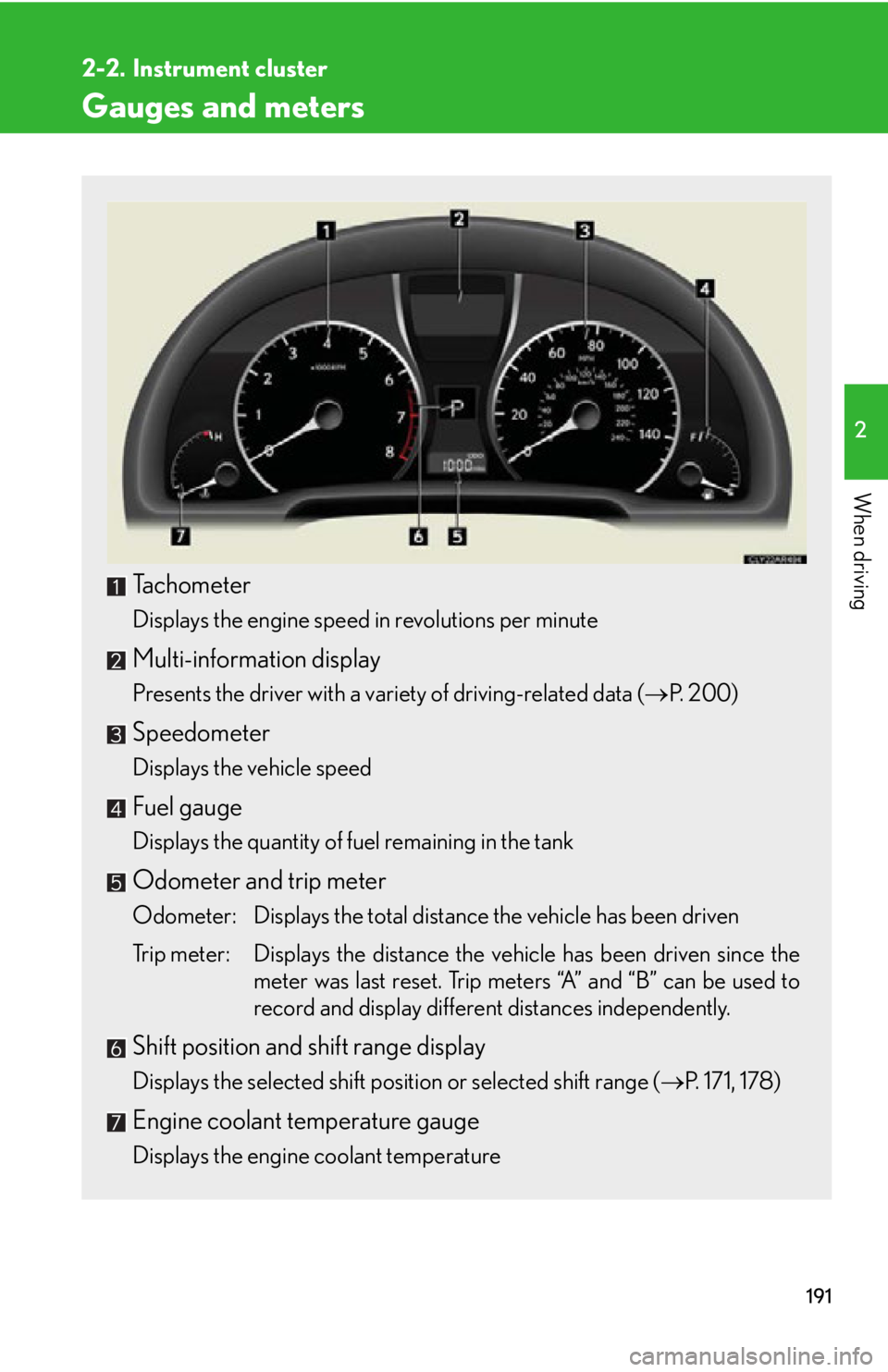
Tachometer Displays the engine speed in revolutions per minute
Multi-information display Presents the driver with a variety of driving-related data ( P. 200)
Speedometer Displays the vehicle speed
Fuel gauge Displays the quantity of fuel remaining in the tank
Odometer and trip meter Odometer: Displays the total distance the vehicle has been driven
Trip meter: Displays the distance the vehicle has been driven since the
meter was last reset. Trip meters “A” and “B” can be used to
record and display different distances independently.
Shift position and shift range display
Displays the selected shift position or selected shift range ( P. 171, 178)
Engine coolant temperature gauge
Displays the engine coolant temperature
Page 201 of 886
2012-2. Instrument cluster
2
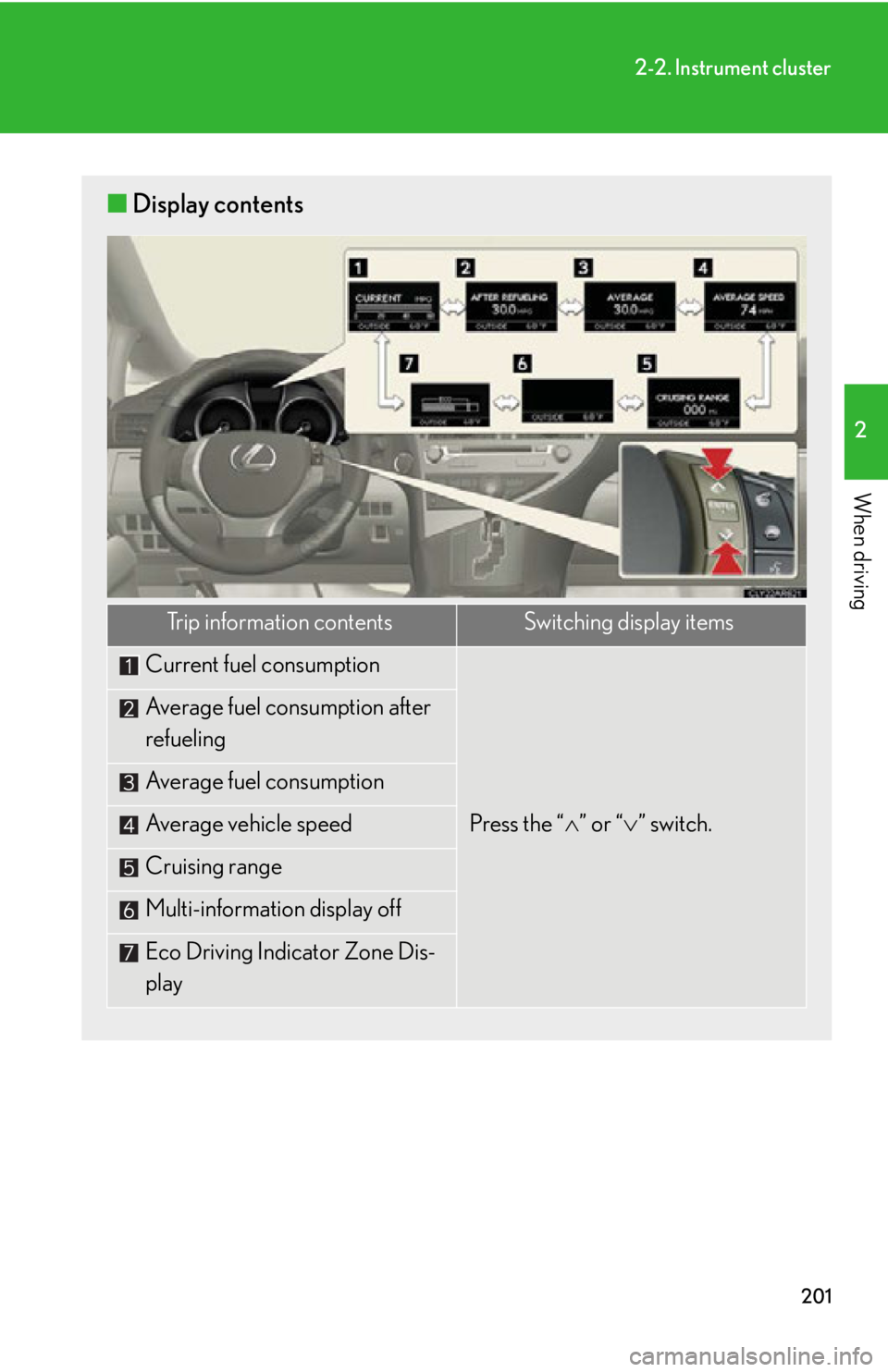
When driving ■ Display contents
Trip information contents Switching display items
Current fuel consumption
Press the “ ” or “ ” switch.Average fuel consumption after
refueling
Average fuel consumption
Average vehicle speed
Cruising range
Multi-information display off
Eco Driving Indicator Zone Dis-
play
Page 203 of 886

2032-2. Instrument cluster
2
When driving Trip information
■ Current fuel consumption
Displays the current ra te of fuel consumption
■ Average fuel consumption after refueling
Displays the average fuel consumptio n since the vehicle was last refu-
eled Use the displayed average fuel consumption as a reference.
■ Average fuel consumption
Displays the average fuel consumpti on since the function was reset• The function can be reset by pushing the “ENTER” switch for longer
than one second when the average fuel consumption is displayed.
• Use the displayed average fuel consumption as a reference.
■ Average vehicle speed
Displays the average vehicle speed since the function was reset The function can be reset by pushing the “ENTER” switch for longer than
one second when the average vehicle speed is displayed.
■ Cruising range
Displays the estimated maximum distan ce that can be driven with the
quantity of fuel remaining
• This distance is computed based on your average fuel consumption. As
a result, the actual distance that can be driven may differ from that dis-
played.
• When only a small amount of fuel is added to the tank, the display may
not be updated.
When refueling, turn the “ENGINE START STOP” switch off. If the
vehicle is refueled without turning the “ENGINE START STOP” switch
off, the display may not be updated.
■ Eco Driving Indicator Zone Display
P. 2 0 4
Page 213 of 886

2132-3. Operating the light s and windshield wipers
2
When driving Turning on the high beam headlights
With the headlights on, push the
lever away from you to turn on
the high beams. Pull the lever toward you to the
center position to turn the high
beams off.
Pull the lever toward you to turn
on the high beams. Release the lever to turn them off.
You can flash the high beams with
the headlights on or off.■
Daytime running light system ●
To make your vehicle more visible to other drivers, the daytime running lights
turn on automatically whenever the engine is started and the parking brake is
released. Daytime running lights ar e not designed for use at night.
Type A: Daytime running lights can be turned off by operating the switch.●
Compared to turning on th e headlights, the daytime running light system offers
greater durability and consumes less electricity, so it can help improve fuel
economy.■
Headlight control sensor
The sensor may not function properly if an
object is placed on the sensor, or anything
that blocks the sensor is affixed to the wind-
shield.
Doing so interferes with the sensor detecting
the level of ambient light and may cause the
automatic headlight system to malfunction.
Page 296 of 886
2962-5. Driving information
Cargo and luggage
Capacity and distribution
Cargo capacity depends on the to tal weight of the occupants.
(Cargo capacity) = (Total load capa city) — (Total weight of occupants)
Steps for Determining Correct Load Limit
(1) Locate the statement “The combined weight of occupants and cargo
should never exceed XXX kg or XXX lbs.” on your vehicle’s placard.
(2) Determine the combined weight of th e driver and passengers that will
be riding in your vehicle.
(3)Subtract the combined weight of the driver and passengers from
XXX kg or XXX lbs.
(4)The resulting figure equals the av ailable amount of cargo and luggage
load capacity.
For example, if the “XXX” amount equals 1400 lbs. and there will be
five 150 lb passengers in your ve hicle, the amount of available cargo
and luggage load capacity is 650 lbs. (1400 750 (5 150) = 650
lbs.)
(5)Determine the combined weight of luggage and cargo being loaded
on the vehicle. That weight may no t safely exceed the available cargo
and luggage load capacity calculated in Step 4. Take notice of the following information about storage precautions, cargo
capacity and load.
● Stow cargo and luggage in the luggage compartment whenever
possible.
● Be sure all items are secured in place.
● Be careful to keep the vehicle level. Placing the weight as far for-
ward as possible helps maintain vehicle balance.
● For better fuel economy, do not carry unnecessary weight.