engine LEXUS RX350 2016 Owners Manual
[x] Cancel search | Manufacturer: LEXUS, Model Year: 2016, Model line: RX350, Model: LEXUS RX350 2016Pages: 748, PDF Size: 12.36 MB
Page 257 of 748

2574-3. Operating the lights and wipers
4
Driving
RX350_U_OM48E90U ■
The rear window wiper and washer can be operated when
The engine switch is in IGNITION ON mode. ■
If no washer fluid sprays
Check that the washer nozzle is not blocked if there is washer fluid in the washer fluid
tank.
NOTICE ■
When the rear window is dry
Do not use the wiper, as it may damage the rear window. ■
When the washer fluid tank is empty
Do not operate the switch continually as the washer fluid pump may overheat. ■
When a nozzle becomes blocked
In this case, contact your Lexus dealer.
Do not try to clear it with a pin or other object. The nozzle will be damaged.
Page 258 of 748

258
RX350_U_OM48E90U 4-4. Refueling
●
Close all the doors and windows, and turn the engine switch off. ●
Confirm the type of fuel. ■
Fuel types
P. 6 8 3 ■
Fuel tank opening for unleaded gasoline
To help prevent incorrect fueling, your vehicle has a fuel tank opening that only accom-
modates the special nozzle on unleaded fuel pumps.
Opening the fuel tank cap Perform the following steps to open the fuel tank cap:
Before refueling the vehicle
Page 273 of 748
2734-5. Using the driving support systems
4
Driving
RX350_U_OM48E90U WA R N I N G ■
When to disable the pre-collision system
In the following situations, disable the syst em, as it may not operate properly, possibly
leading to an accident resultin g in death or serious injury:●
When the vehicle is being towed ●
When your vehicle is towing another vehicle ●
When transporting the vehicle via truck, boat, train or similar means of transportation ●
When the vehicle is raised on a lift with the engine running and the tires are allowed to
rotate freely ●
When inspecting the vehicle using a drum tester such as a chassis dynamometer or
speedometer tester, or when using an on vehicle wheel balancer ●
When a strong impact is app lied to the front bumper or front grille, due to an accident
or other reasons ●
If the vehicle cannot be driven in a stable manner, such as when the vehicle has been
in an accident or is malfunctioning ●
When the vehicle is driven in a sporty manner or off-road ●
When the tires are not properly inflated ●
When the tires are very worn ●
When tires of a size other than specified are installed●
When tire chains are installed ●
When a compact spare tire or an emergency tire puncture repair kit is used ●
If the suspensi on is modified●
If the front of the vehicle is raised or lowered, such as when loaded with heavy lug-
gage
Page 274 of 748
274 4-5. Using the driving support systems
RX350_U_OM48E90U ■
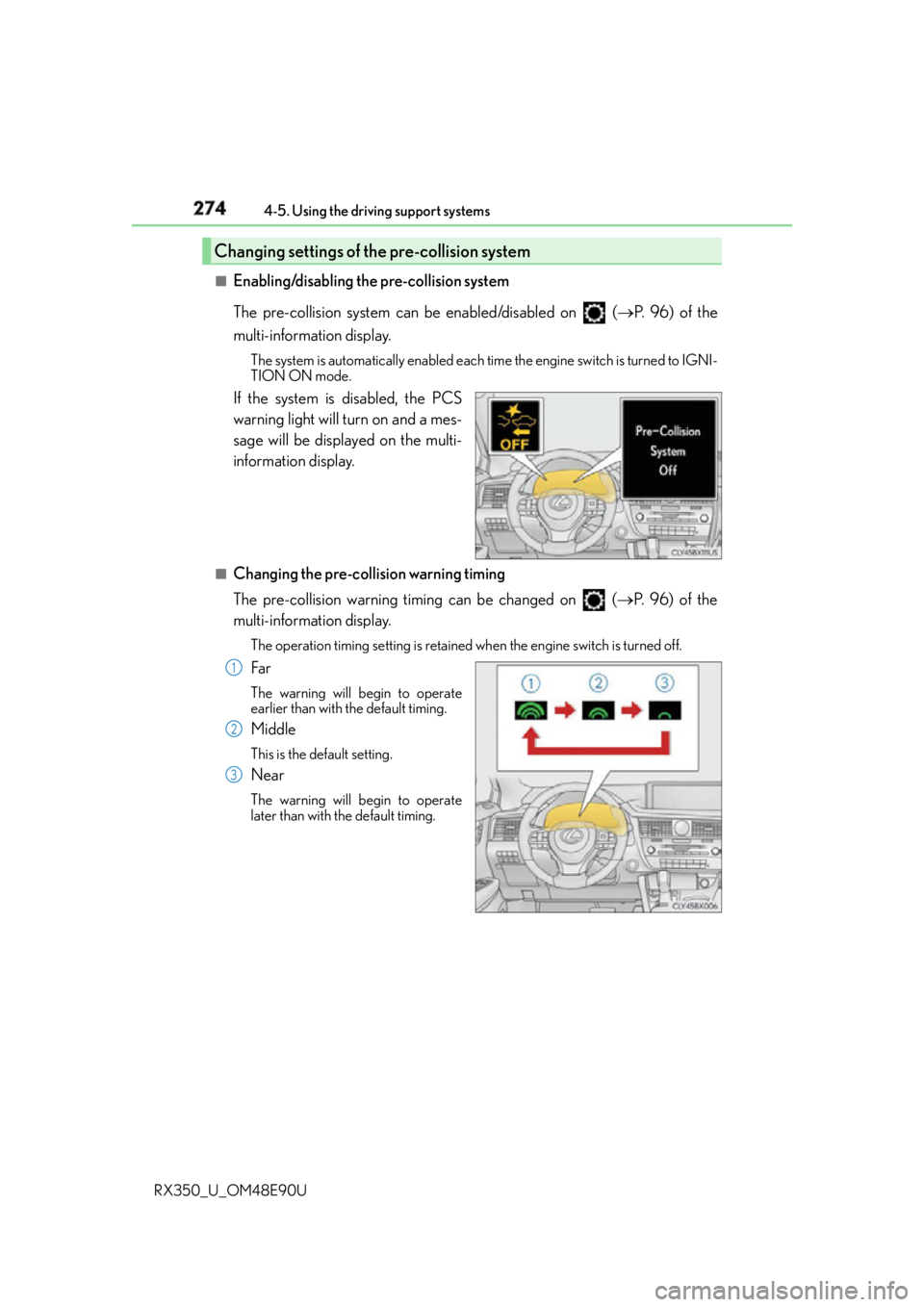
Enabling/disabling the pre-collision system
The pre-collision system can be enabled/disabled on ( P. 9 6 ) o f t h e
multi-information display. The system is automatically enabled each time the engine switch is turned to IGNI-
TION ON mode.
If the system is disabled, the PCS
warning light will turn on and a mes-
sage will be displayed on the multi-
information display. ■
Changing the pre-col lision warning timing
The pre-collision warning timing can be changed on ( P. 9 6 ) o f t h e
multi-information display. The operation timing setting is retained when the engine switch is turned off.
Far The warning will begin to operate
earlier than with the default timing.
Middle This is the default setting.
Near The warning will begin to operate
later than with the default timing.Changing settings of the pre-collision system
1
2
3
Page 281 of 748

2814-5. Using the driving support systems
4
Driving
RX350_U_OM48E90U • After the engine has started the vehicle has not been driven for a certain amount of
time
• While making a left/right turn and for a few seconds after making a left/right turn
• While driving on a curve and for a few seconds after driving on a curve
• If your vehicle is skidding
• If the front of the vehicle is raised or lowered, such as when the road surface is
uneven or undulating
• If the wheels are misaligned
• If a wiper blade is blocking the camera sensor
• The vehicle is wobbling.
• The vehicle is being driven at extremely high speeds.
• When driving on a hill ●
In some situations such as the following, su fficient braking force may not be obtained,
preventing the system from performing properly:
• If the braking functions cannot operate to their full extent, such as when the brake
parts are extremely cold, extremely hot, or wet
• If the vehicle is not properly maintained (brakes or tires are excessively worn,
improper tire inflation pressure, etc.)
• When the vehicle is being driven on a gravel road or other slippery surface ●
Some pedestrians such as the following may not be detected by the radar sensor and
camera sensor, preventing the system from operating properly
* 4
:
• Pedestrians shorter than approximately 3.2 ft. (1 m) or taller than approximately 6.5
ft. (2 m)
• Pedestrians wearing oversized clothing (a rain coat, long skirt, etc.), making their sil-
houette obscure
• Pedestrians who are carrying large baggag e, holding an umbrella, etc., hiding part
of their body
• Pedestrians who are bending forward or squatting
• Pedestrians who are pushing a stroller, wheelchair, bicycle or other vehicle
• Groups of pedestrians which are close together
• Pedestrians who are wearing white and look extremely bright
• Pedestrians in the dark, such as at night or while in a tunnel
• Pedestrians whose clothing appears to be nearly the same color or brightness as
their surroundings
• Pedestrians near walls, fences, guardrails, or large objects
• Pedestrians who are on a metal object (man hole cover, steel plate, etc.) on the road
• Pedestrians who are walking fast
• Pedestrians who are changing speed abruptly
• Pedestrians running out from behind a vehicle or a large object
• Pedestrians who are extremely close to the side of the vehicle (outside rear view
mirror, etc.)
* 4
: Depending on the region in which the ve hicle was sold, the pedestrian detection
function may not be available.
Page 287 of 748
2874-5. Using the driving support systems
4
Driving
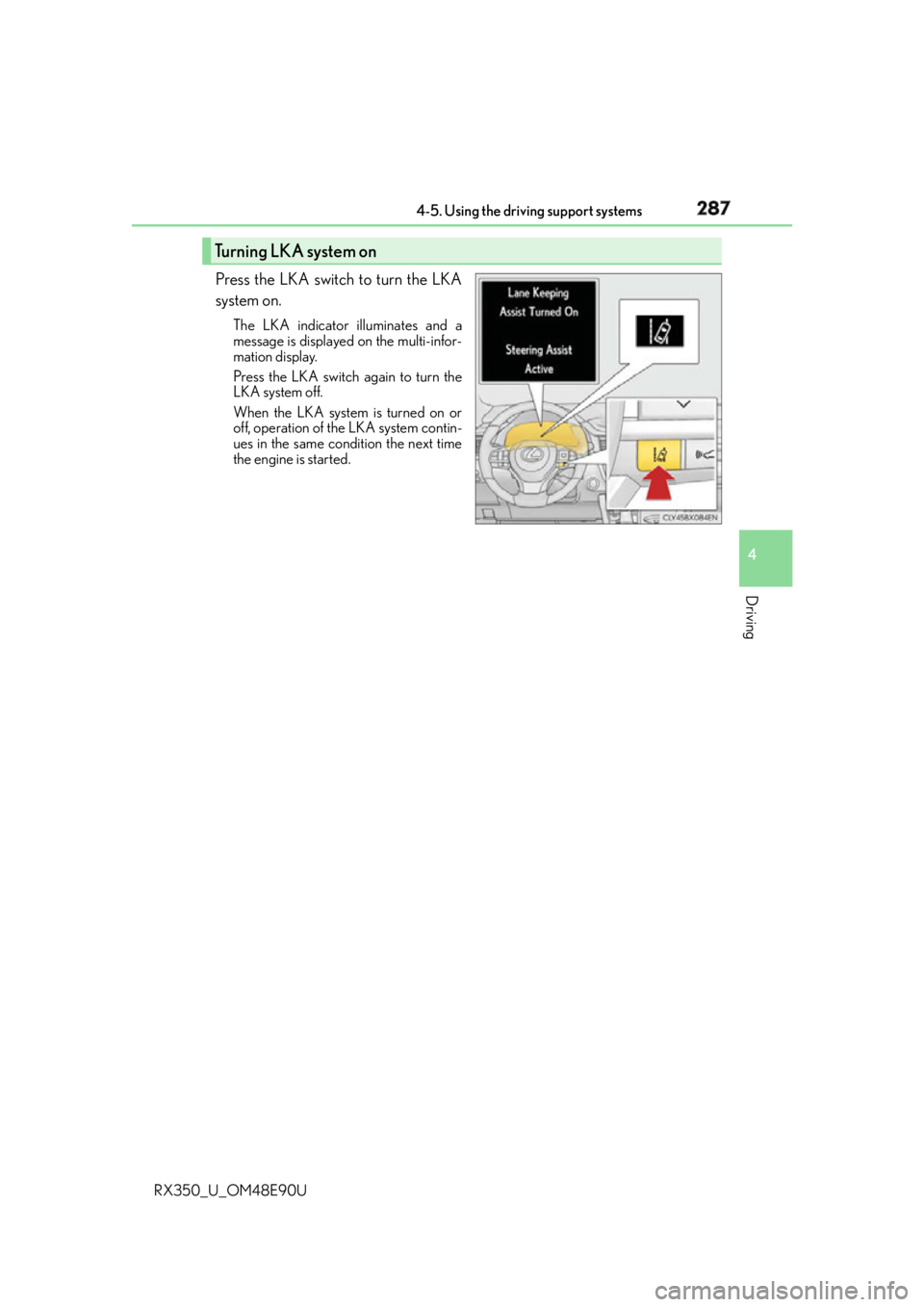
RX350_U_OM48E90U Press the LKA switch to turn the LKA
system on. The LKA indicator illuminates and a
message is displayed on the multi-infor-
mation display.
Press the LKA switch again to turn the
LKA system off.
When the LKA system is turned on or
off, operation of the LKA system contin-
ues in the same condition the next time
the engine is started.Turning LKA system on
Page 296 of 748
296 4-5. Using the driving support systems
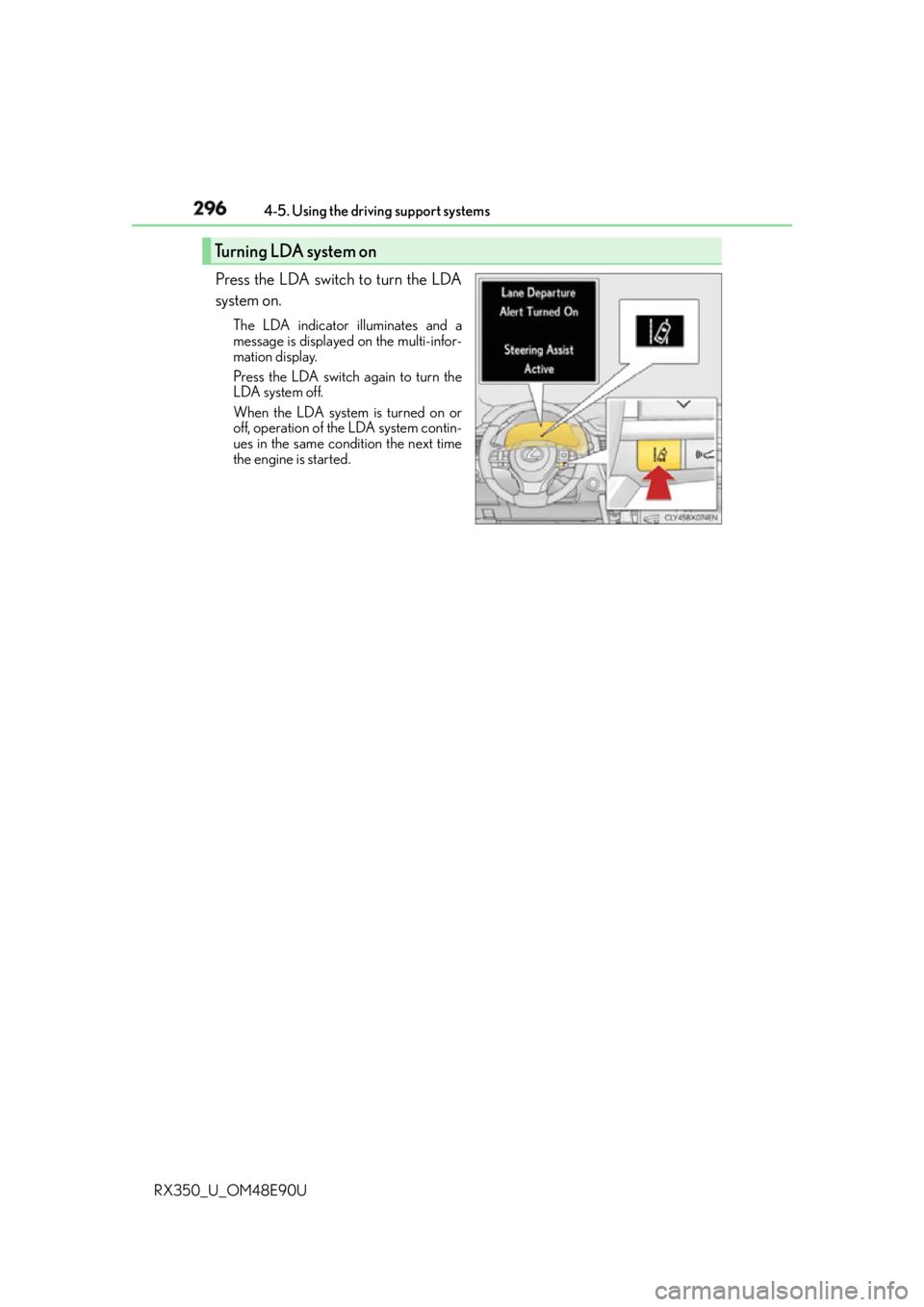
RX350_U_OM48E90U Press the LDA switch to turn the LDA
system on. The LDA indicator illuminates and a
message is displayed on the multi-infor-
mation display.
Press the LDA switch again to turn the
LDA system off.
When the LDA system is turned on or
off, operation of the LDA system contin-
ues in the same condition the next time
the engine is started.Turning LDA system on
Page 308 of 748
308 4-5. Using the driving support systems
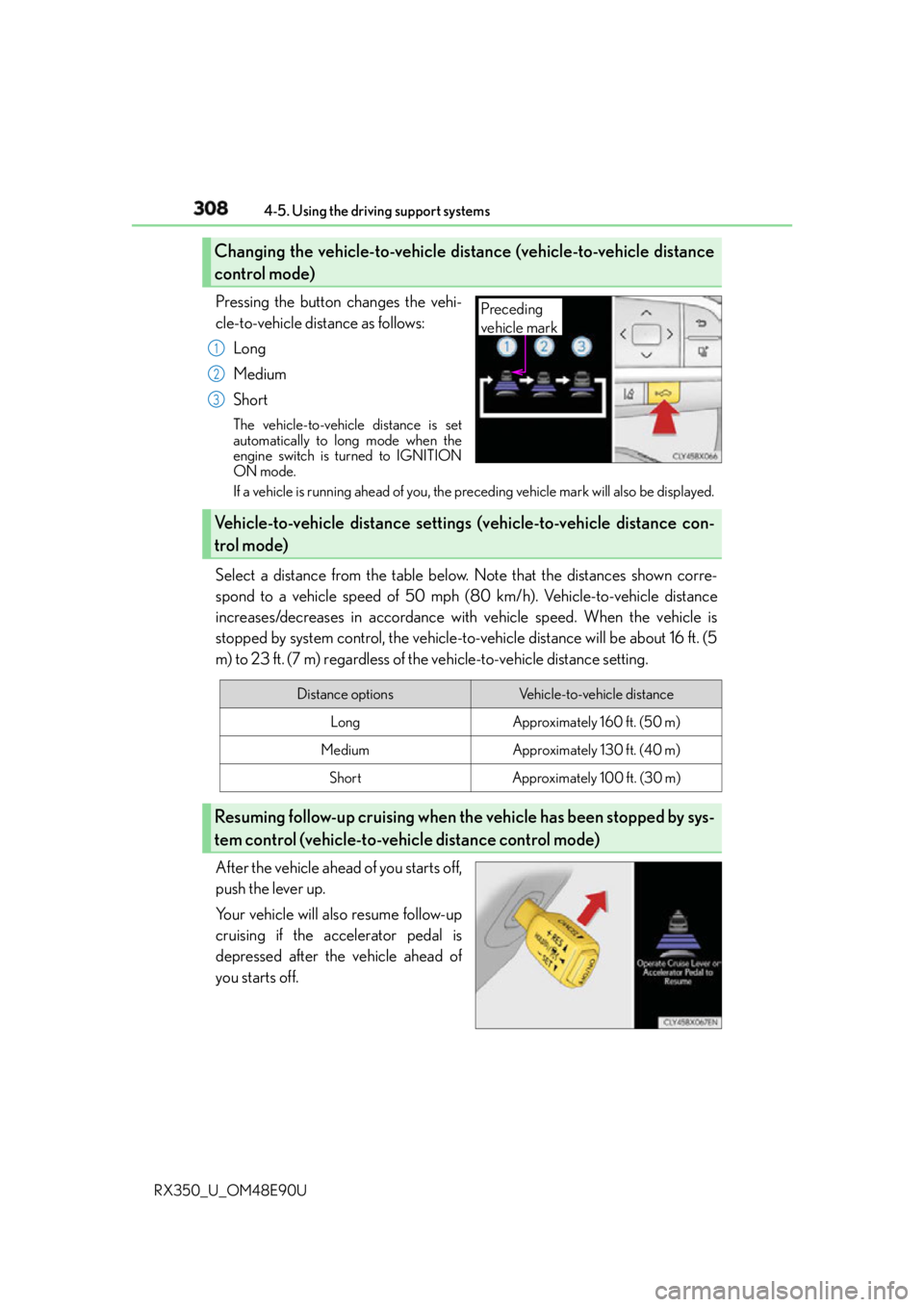
RX350_U_OM48E90U Pressing the button changes the vehi-
cle-to-vehicle distance as follows:
Long
Medium
Short The vehicle-to-vehicle distance is set
automatically to long mode when the
engine switch is turned to IGNITION
ON mode.
If a vehicle is running ahead of you, the preceding vehicle mark will also be displayed.
Select a distance from the table below. Note that the distances shown corre-
spond to a vehicle speed of 50 mph (8 0 km/h). Vehicle-to-vehicle distance
increases/decreases in accordance with vehicle speed. When the vehicle is
stopped by system control, the vehicle-to-vehicle distance will be about 16 ft. (5
m) to 23 ft. (7 m) regardless of the vehicle-to-vehicle distance setting.
After the vehicle ahead of you starts off,
push the lever up.
Your vehicle will also resume follow-up
cruising if the accelerator pedal is
depressed after the vehicle ahead of
you starts off.Changing the vehicle-to-vehicle distance (vehicle-to-vehicle distance
control mode) Preceding
vehicle mark1
2
3
Vehicle-to-vehicle distance settings (vehicle-to-vehicle distance con-
trol mode)
Distance options Vehicle-to-vehicle distance
Long Approximately 160 ft. (50 m)
Medium Approximately 130 ft. (40 m)
Short Approximately 100 ft. (30 m)
Resuming follow-up cruising when th e vehicle has been stopped by sys-
tem control (vehicle-to-vehicle distance control mode)
Page 320 of 748
320 4-5. Using the driving support systems
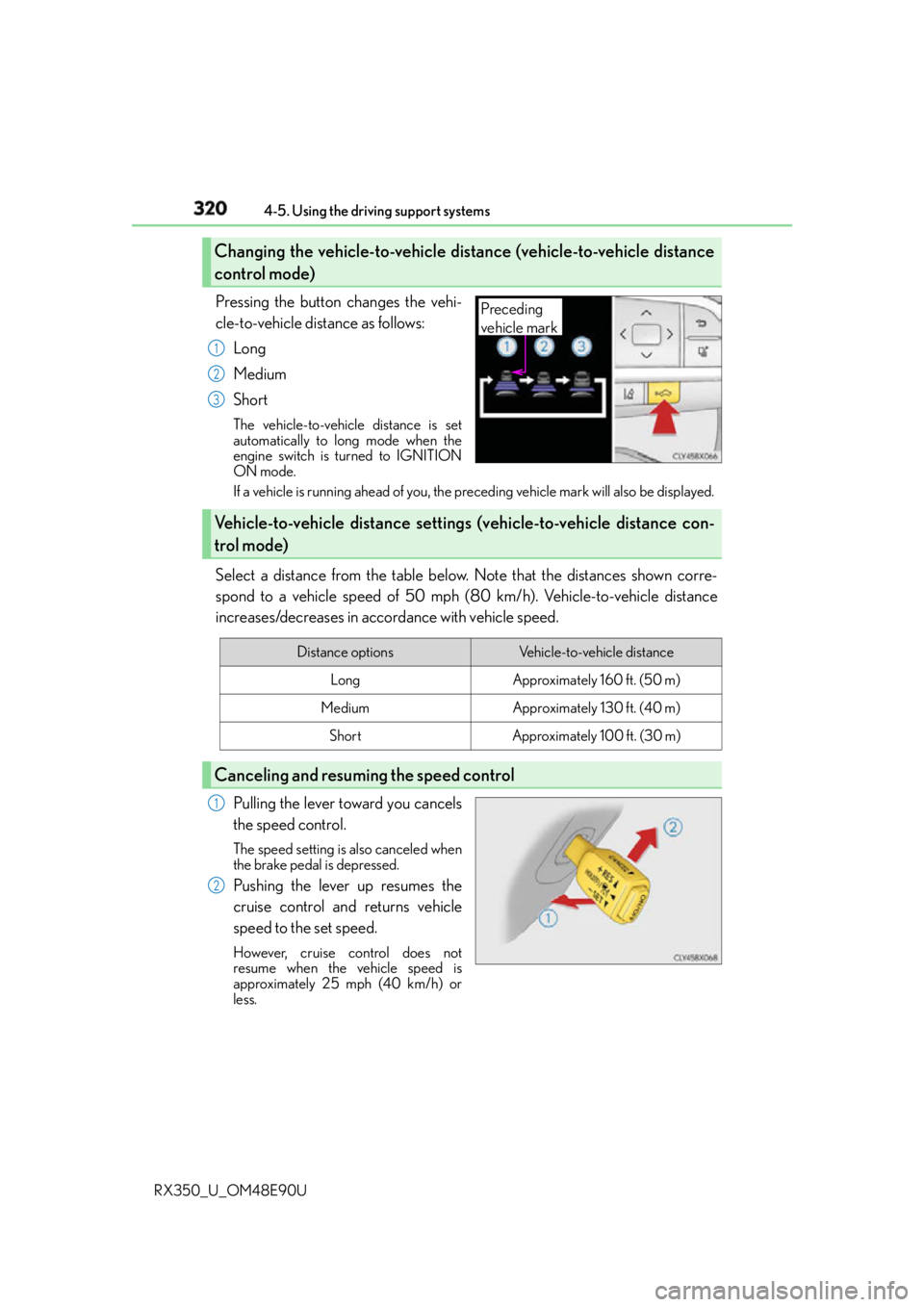
RX350_U_OM48E90U Pressing the button changes the vehi-
cle-to-vehicle distance as follows:
Long
Medium
Short The vehicle-to-vehicle distance is set
automatically to long mode when the
engine switch is turned to IGNITION
ON mode.
If a vehicle is running ahead of you, the preceding vehicle mark will also be displayed.
Select a distance from the table below. Note that the distances shown corre-
spond to a vehicle speed of 50 mph (8 0 km/h). Vehicle-to-vehicle distance
increases/decreases in accordance with vehicle speed.
Pulling the lever toward you cancels
the speed control. The speed setting is also canceled when
the brake pedal is depressed.
Pushing the lever up resumes the
cruise control and returns vehicle
speed to the set speed. However, cruise control does not
resume when the vehicle speed is
approximately 25 mph (40 km/h) or
less.Changing the vehicle-to-vehicle distance (vehicle-to-vehicle distance
control mode) Preceding
vehicle mark1
2
3
Vehicle-to-vehicle distance settings (vehicle-to-vehicle distance con-
trol mode) Distance options Vehicle-to-vehicle distance
Long Approximately 160 ft. (50 m)
Medium Approximately 130 ft. (40 m)
Short Approximately 100 ft. (30 m)
Canceling and resuming the speed control 1
2
Page 335 of 748
3354-5. Using the driving support systems
4
Driving
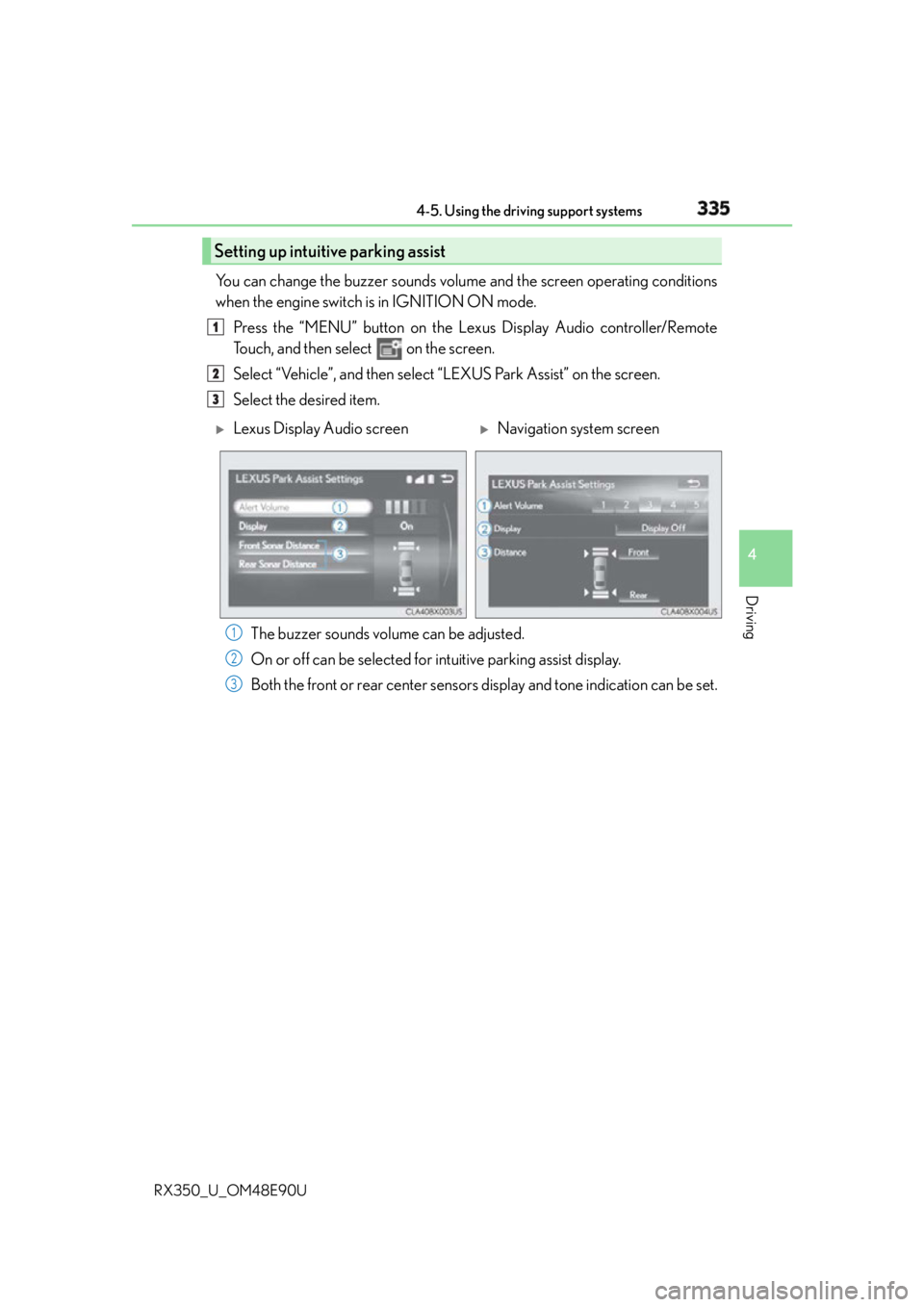
RX350_U_OM48E90U You can change the buzzer sounds volu me and the screen operating conditions
when the engine switch is in IGNITION ON mode.
Press the “MENU” button on the Le xus Display Audio controller/Remote
Touch, and then select on the screen.
Select “Vehicle”, and th en select “LEXUS Park Assist” on the screen.
Select the desired item.
The buzzer sounds volume can be adjusted.
On or off can be selected for intuitive parking assist display.
Both the front or rear center sensors display and tone indication can be set.Setting up intuitive parking assist 1
2
3
Lexus Display Audio screen
Navigation system screen
1
2
3