engine LEXUS RX350 2016 Owners Manual
[x] Cancel search | Manufacturer: LEXUS, Model Year: 2016, Model line: RX350, Model: LEXUS RX350 2016Pages: 748, PDF Size: 12.36 MB
Page 237 of 748

2374-2. Driving procedures
4
Driving
RX350_U_OM48E90U ■
Parking brake operation sound
When the parking brake operates, a motor sound (whirring sound) may be heard. This
does not indicate a malfunction. ■
Parking brake indicator light and parking brake lamp ●
Depending on the engine switch mode, the parking brake indicator light and parking
brake lamp will turn on and stay on as described below:
IGNITION ON mode: Comes on until the parking brake is released.
Not in IGNITION ON mode: Stays on for approximately 15 seconds. ●
When the engine switch is turned off with the parking brake set, the parking brake indi-
cator light and parking brake lamp will stay on for about 15 seconds. This does not indi-
cate a malfunction. ■
Changing the mode
When changing the automatic mode on/off , the message will be shown on the multi-
information display and the buzzer sounds. ■
Parking brake engaged warning buzzer
A buzzer will sound if the vehicle is driven with the parking brake engaged. “Release
Parking Brake” is displayed on the multi-information display. ■
Warning messages and buzzers
Warning messages and buzzers are used to indicate a system malfunction or to inform
the driver of the need for caution. If a warn ing message is shown on the multi-information
display, read the message and follow the instructions.■
If the brake system warning light comes on
P. 6 3 4 ■
Usage in winter time
P. 3 8 1
Page 240 of 748
240 4-2. Driving procedures
RX350_U_OM48E90U ■
Brake hold function ●
If the brake pedal is left released for a period of about 3 minutes after the system has
started holding the brake, the parking brake w ill be set automatically. In this case, a
warning buzzer sounds and a message is shown on the multi-information display.●
To turn the system off while the system is holding the brake, firmly depress the brake
pedal and press the button again. ●
The brake hold function may not hold the vehicle when the vehicle is on a steep incline.
In this situation, it may be necessary fo r the driver to apply the brakes. A warning
buzzer will sound and the multi-information di splay will inform the dr iver of this situa-
tion. If a warning message is shown on the multi-information displa y, re a d t h e m e s s a g e
and follow the instructions. ■
When the parking brake is set automatically while the system is holding the brakes
The parking brake will not be released automatically. With the brake pedal depressed,
release the parking brake by operating the parking brake switch, making sure that the
parking brake indicator light goes off. ( P. 2 3 5 )■
If “Brake Hold Fault Depress Brake to Deacti vate Visit Your Dealer” is displayed on the
multi-information display
The system may be malfunctioning. Have the vehicle inspected by your Lexus dealer
immediately. ■
Warning messages and buzzers
Warning messages and buzzers are used to indicate a system malfunction or to inform
the driver of the need for caution. If a warn ing message is shown on the multi-information
display, read the message and follow the instructions.■
If the brake hold operated indicator flashes
P. 6 3 4
WA R N I N G ■
When the vehicle is on a steep incline
When using the brake hold system on a stee p incline exercise caution. The brake hold
function may not hold the vehicle in such a situation. ■
When stopped on a slippery road
The system cannot stop the vehicle when the gripping ability of the tires has been
exceeded. Do not use the system when stopped on a slippery road.
NOTICE ■
When parking the vehicle
The brake hold system is not designed for use when parking the vehicle for a long
period of time. Turning the engine switch of f while the system is holding the brake may
release the brake, which would cause the vehicle to move. When operating the engine
switch, depress the brake pedal, shift the shift lever to P and set the parking brake.
Page 241 of 748
241
4
Driving
RX350_U_OM48E90U 4-3. Operating the lights and wipers
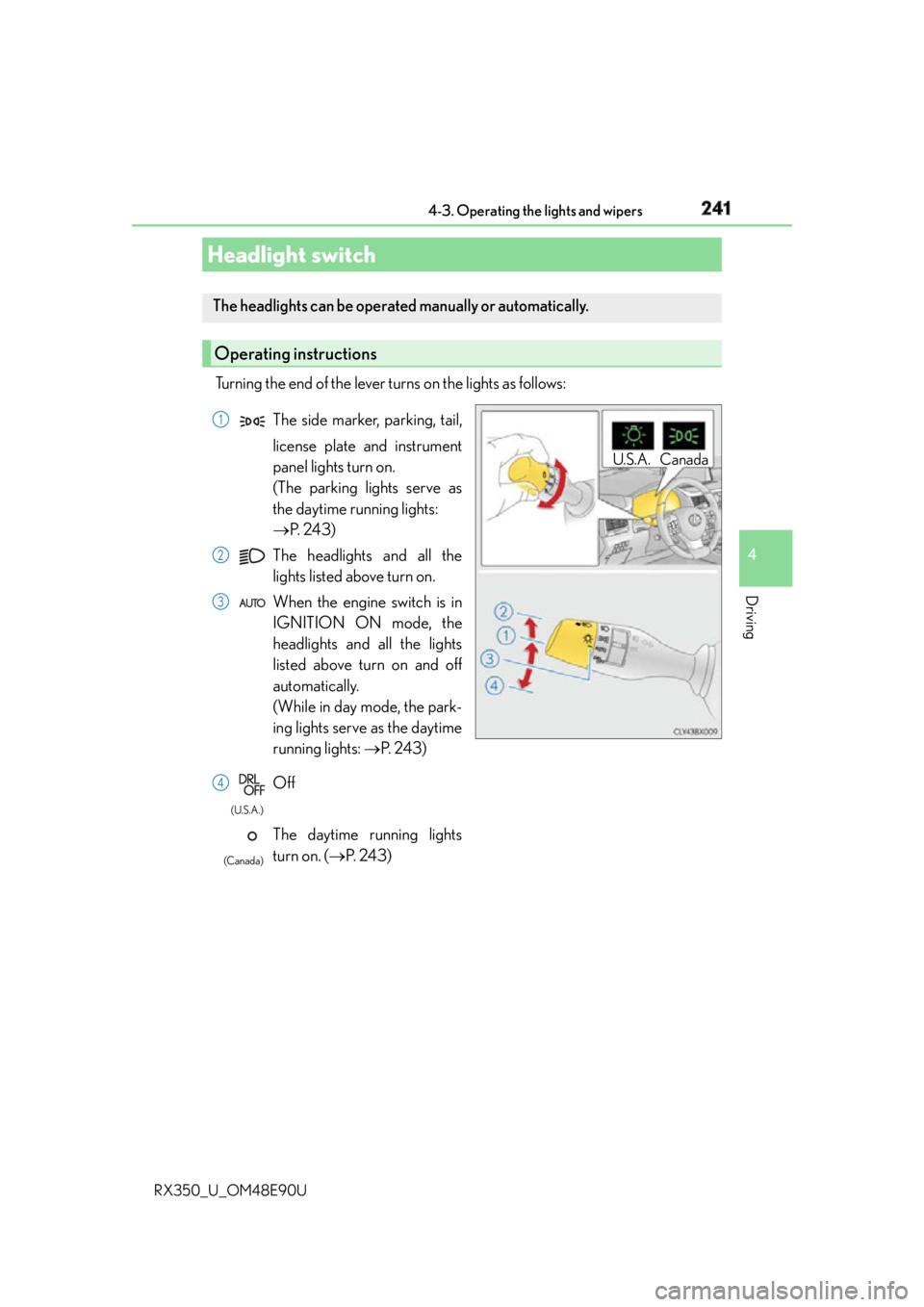
Turning the end of the lever turns on the lights as follows:
Headlight switch The headlights can be operated manually or automatically.
Operating instructions U.S.A. CanadaThe side marker, parking, tail,
license plate and instrument
panel lights turn on.
(The parking lights serve as
the daytime running lights:
P. 2 4 3 )
The headlights and all the
lights listed above turn on.
When the engine switch is in
IGNITION ON mode, the
headlights and all the lights
listed above turn on and off
automatically.
(While in day mode, the park-
ing lights serve as the daytime
running lights: P. 2 4 3 )
Off
The daytime running lights
turn on. ( P. 2 4 3 ) 1
2
3
4 (U.S.A.)
(Canada)
Page 243 of 748
2434-3. Operating the lights and wipers
4
Driving
RX350_U_OM48E90U ■
Daytime running light system ●
To make your vehicle more visible to other drivers during daytime driving, the daytime
running lights turn on automatically whenever the engine is started and the parking
brake is released with the headlight sw itch in (Canada only) or position.
(Illuminate brighter th an the parking li ghts.) Daytime running lights are not designed for
use at night.
For the U.S.A.: Daytime running lights can be turned off by operating the headlight
switch to position. ●
Compared to turning on the headlights, the daytime running light system offers greater
durability and consumes less electricity, so it can help improve fuel economy. ■
Cornering lights (if equipped)
When the cornering lights are on for more th an 30 minutes, they will turn off automati-
cally. ■
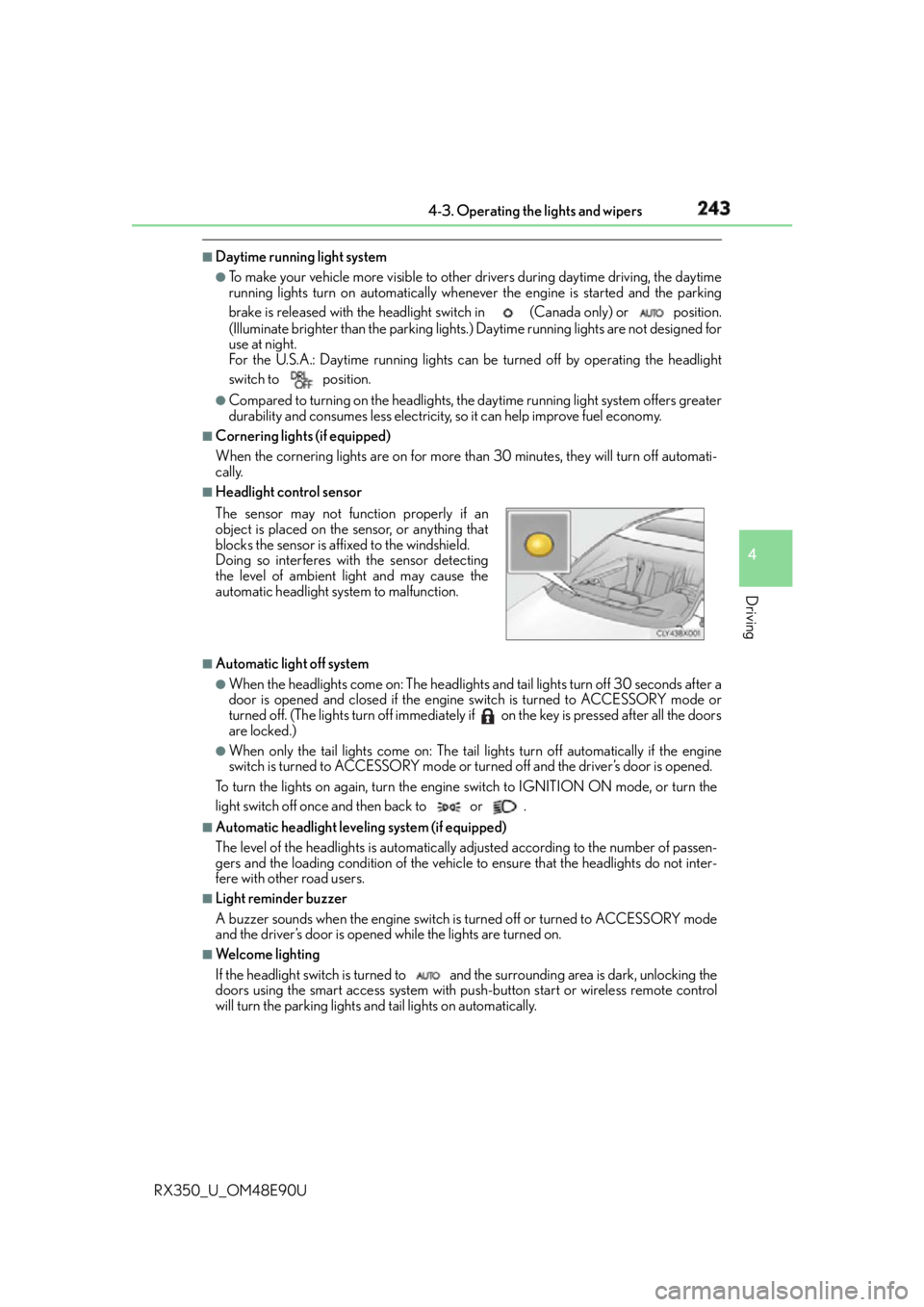
Headlight control sensor
■
Automatic light off system ●
When the headlights come on: The headlights and tail lights turn off 30 seconds after a
door is opened and closed if the engine switch is turned to ACCESSORY mode or
turned off. (The lights turn off immediately if on the key is pressed after all the doors
are locked.) ●
When only the tail lights come on: The tail lights turn off automatically if the engine
switch is turned to ACCESSORY mode or turned off and the driver’s door is opened.
To turn the lights on again, turn the engine switch to IGNITION ON mode, or turn the
light switch off once and then back to or . ■
Automatic headlight leveling system (if equipped)
The level of the headlights is automatically ad justed according to the number of passen-
gers and the loading condition of the vehicle to ensure that the headlights do not inter-
fere with other road users. ■
Light reminder buzzer
A buzzer sounds when the engine switch is turned off or turned to ACCESSORY mode
and the driver’s door is opened while the lights are turned on. ■
We l c o m e l i g h t i n g
If the headlight switch is turned to and the surrounding area is dark, unlocking the
doors using the smart access system with pu sh-button start or wireless remote control
will turn the parking lights and tail lights on automatically.The sensor may not function properly if an
object is placed on the sensor, or anything that
blocks the sensor is affixed to the windshield.
Doing so interferes with the sensor detecting
the level of ambient light and may cause the
automatic headlight system to malfunction.
Page 244 of 748

244 4-3. Operating the lights and wipers
RX350_U_OM48E90U ■
Windshield wiper linked headlight illumination
When driving during daytime with the headlight switch tu rned to , if the windshield
wipers are used, the headlight s will turn on automatically after several seconds to help
enhance the visibility of your vehicle. ■
Battery-saving function
In order to prevent the battery of the vehicle from discharging, if the headlights and/or tail
lights are on when the engine switch is turned off the battery saving function will operate
and automatically turn off all the lights afte r approximately 20 minutes. When the engine
switch is turned to IGNITION ON mode, the battery-saving function will be disabled.
When any of the following are performed, the battery-saving function is canceled once
and then reactivated. All the lights will turn off automatically 20 minutes after the bat-
tery-saving function has been reactivated: ●
When the headlight switch is operated ●
When a door is opened or closed ■
Customization
Some functions can be customized. ( P. 6 9 9 )
NOTICE ■
To prevent battery discharge
Do not leave the lights on longer than necessary when the engine is off.
Page 248 of 748

248 4-3. Operating the lights and wipers
RX350_U_OM48E90U ●
In the following situations the system may not be able to correctly detect the surround-
ing brightness level. This may cause the lo w beams to remain on or the high beams to
flash or dazzle pedestrians or vehicles ahead. In such a case, it is necessary to manually
switch between the high and low beams.
• When driving in inclement weather (hea vy rain, snow, fog, sandstorms, etc.)
• When the windshield is obscured by fog, mist, ice, dirt, etc.
• When the windshield is cracked or damaged
• When the camera sensor is deformed or dirty
• When the temperature of the camera sensor is extremely high
• When the surrounding brightness level is equa l to that of headlights, tail lights or fog
lights
• When headlights or tail lights of vehicles ah ead are turned off, dirty, changing color,
or not aimed properly
• When the vehicle is hit by water, snow, dust, etc. from a preceding vehicle
• When driving through an area of intermit tently changing brightness and darkness
• When frequently and repeatedly driving ascending/descending roads, or roads with
rough, bumpy or uneven surfaces (such as stone-paved roads, gravel roads, etc.)
•When frequently and repe atedly taking curves or driving on a winding road
• When there is a highly reflective object ahead of the vehicle, such as a sign or mirror
• When the back of a preceding vehicle is hi ghly reflective, such as a container on a
truck
• When the vehicle's headlights are damaged or dirty, or are not aimed properly
• When the vehicle is listing or titling due to a flat tire, a trailer being towed, etc.
• When the headlights are changed between the high beams and low beams repeat-
edly in an abnormal manner
• When the driver believes that the high beams may be flashing or dazzling pedestri-
ans or other drivers■
Temporarily lowering sensor sensitivity
The sensitivity of the sensor can be temporarily lowered.
Turn the engine switch off while the following conditions are met.
• The headlight switch is in or .
• The headlight switch lever is in high beam position.
• Automatic High Beam switch is on.
Turn the engine switch to IGNITION ON mode.
Within 30 seconds after , re peat pulling the headlight sw itch lever to the original
position then pushing it to the high beam po sition quickly 10 times, then leave the lever
in high beam position.
If the sensitivity is changed, the Automatic High Beam indicator is turn on and off 3
times.
Automatic High Beam (headlights) may turn on even the vehicle is stopped.1
2
3 2
4
Page 251 of 748
2514-3. Operating the lights and wipers
4
Driving
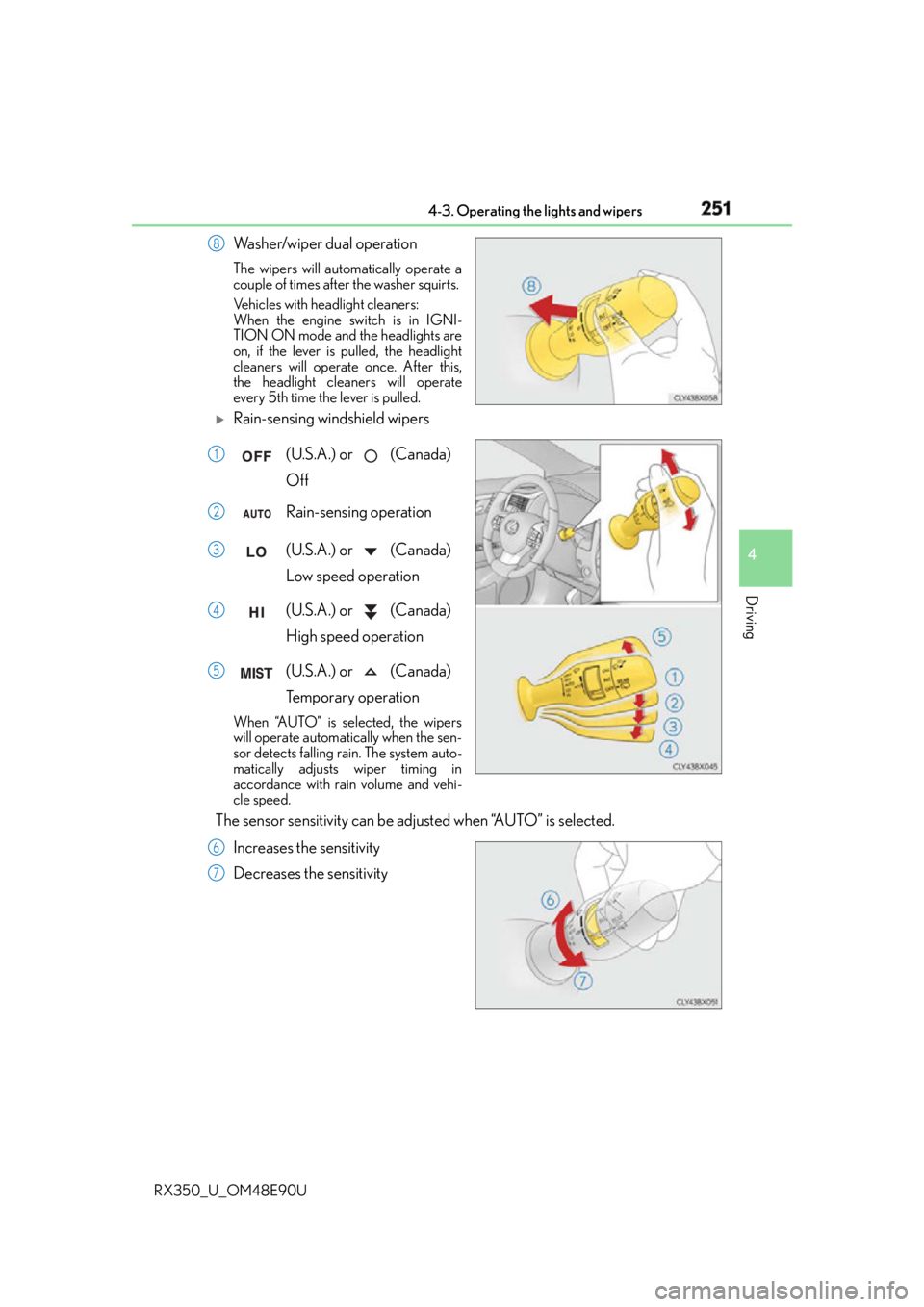
RX350_U_OM48E90U Washer/wiper dual operation The wipers will automatically operate a
couple of times after the washer squirts.
Vehicles with headlight cleaners:
When the engine switch is in IGNI-
TION ON mode and the headlights are
on, if the lever is pulled, the headlight
cleaners will operate once. After this,
the headlight cleaners will operate
every 5th time the lever is pulled.
Rain-sensing windshield wipers
(U.S.A.) or (Canada)
Off
Rain-sensing operation
(U.S.A.) or (Canada)
Low speed operation
(U.S.A.) or (Canada)
High speed operation
(U.S.A.) or (Canada)
Temporary operationWhen “AUTO” is selected, the wipers
will operate automatically when the sen-
sor detects falling rain. The system auto-
matically adjusts wiper timing in
accordance with rain volume and vehi-
cle speed.
The sensor sensitivity can be adjusted when “AUTO” is selected.
Increases the sensitivity
Decreases the sensitivity 8
1
2
3
4
5
6
7
Page 252 of 748
252 4-3. Operating the lights and wipers
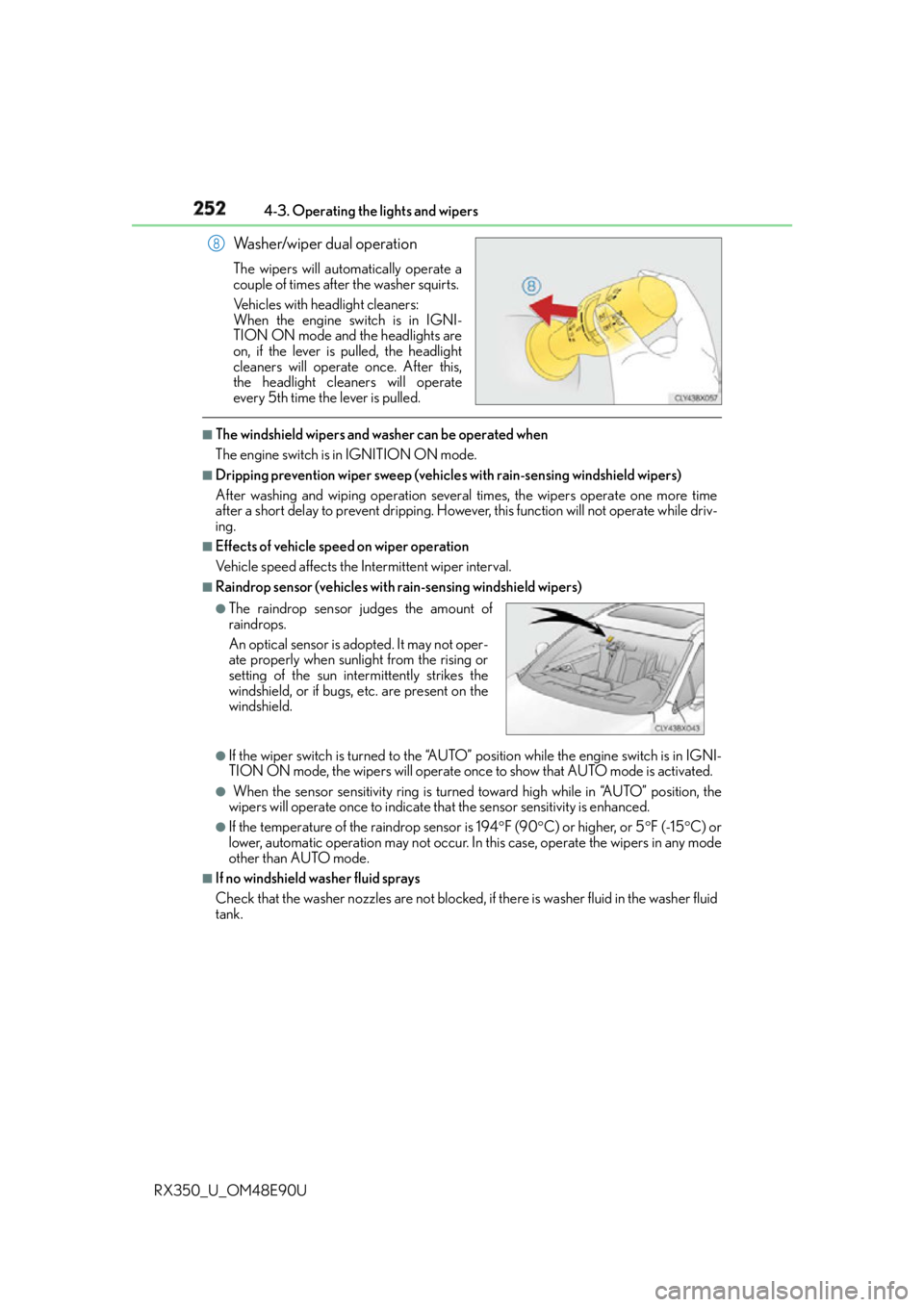
RX350_U_OM48E90U Washer/wiper dual operation The wipers will automatically operate a
couple of times after the washer squirts.
Vehicles with headlight cleaners:
When the engine switch is in IGNI-
TION ON mode and the headlights are
on, if the lever is pulled, the headlight
cleaners will operate once. After this,
the headlight cleaners will operate
every 5th time the lever is pulled. ■
The windshield wipers and washer can be operated when
The engine switch is in IGNITION ON mode. ■
Dripping prevention wiper sweep (vehicle s with rain-sensing windshield wipers)
After washing and wiping operation several times, the wipers operate one more time
after a short delay to prevent dripping. Howeve r, this function will not operate while driv-
ing. ■
Effects of vehicle speed on wiper operation
Vehicle speed affects the Intermittent wiper interval. ■
Raindrop sensor (vehicles with rain-sensing windshield wipers)
●
If the wiper switch is turned to the “AUTO” position while the engine switch is in IGNI-
TION ON mode, the wipers will operate once to show that AUTO mode is activated.●
When the sensor sens itivity ring is turned toward hi gh while in “AUTO” position, the
wipers will operate once to indicate th at the sensor sensit ivity is enhanced.●
If the temperature of the raindrop sensor is 194 F (90 C) or higher, or 5 F (-15 C) or
lower, automatic operation may not occur. In this case, operate the wipers in any mode
other than AUTO mode. ■
If no windshield washer fluid sprays
Check that the washer nozzles are not blocked, if there is washer fluid in the washer fluid
tank. 8
●
The raindrop sensor judges the amount of
raindrops.
An optical sensor is ad opted. It may not oper-
ate properly when sunlight from the rising or
setting of the sun intermittently strikes the
windshield, or if bugs, etc. are present on the
windshield.
Page 254 of 748
254 4-3. Operating the lights and wipers
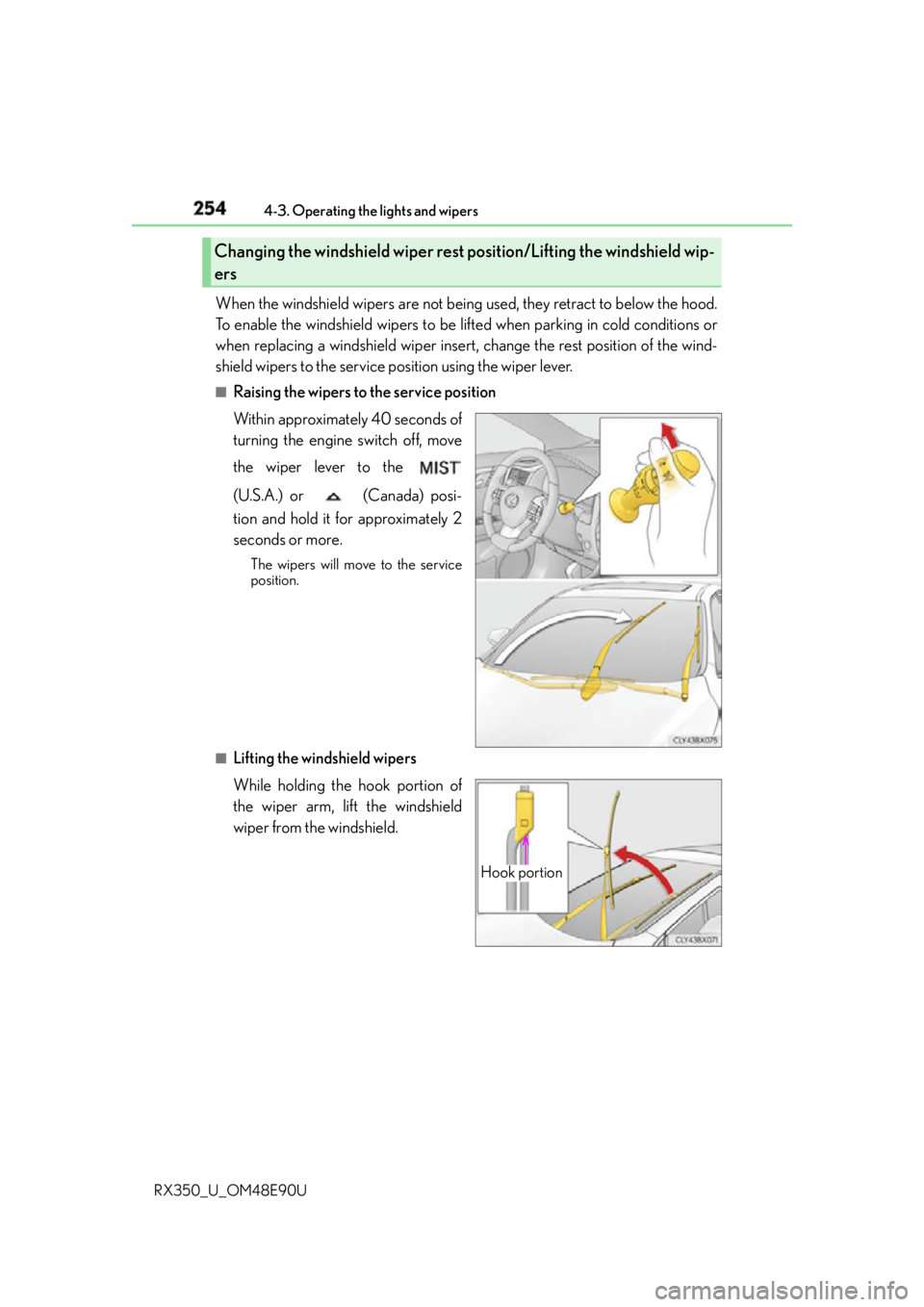
RX350_U_OM48E90U When the windshield wipers are not being used, they retract to below the hood.
To enable the windshield wipers to be lifted when parking in cold conditions or
when replacing a windshield wiper insert, change the rest position of the wind-
shield wipers to the service position using the wiper lever. ■
Raising the wipers to the service position
Within approximately 40 seconds of
turning the engine switch off, move
the wiper lever to the
(U.S.A.) or (Canada) posi-
tion and hold it for approximately 2
seconds or more. The wipers will move to the service
position.
■
Lifting the windshield wipers
While holding the hook portion of
the wiper arm, lift the windshield
wiper from the windshield.Changing the windshield wiper rest position/Lifting the windshield wip-
ers
Hook portion
Page 255 of 748
2554-3. Operating the lights and wipers
4
Driving
RX350_U_OM48E90U ■
Lowering the windshield wipe rs to the retracted position
With the windshield wipers placed on the wi ndshield, turn the engine switch to IGNI-
TION ON mode and then move the wiper lever to an operating position. When the
wiper switch is turned off, the windshield wipers will st op at the retracted position.
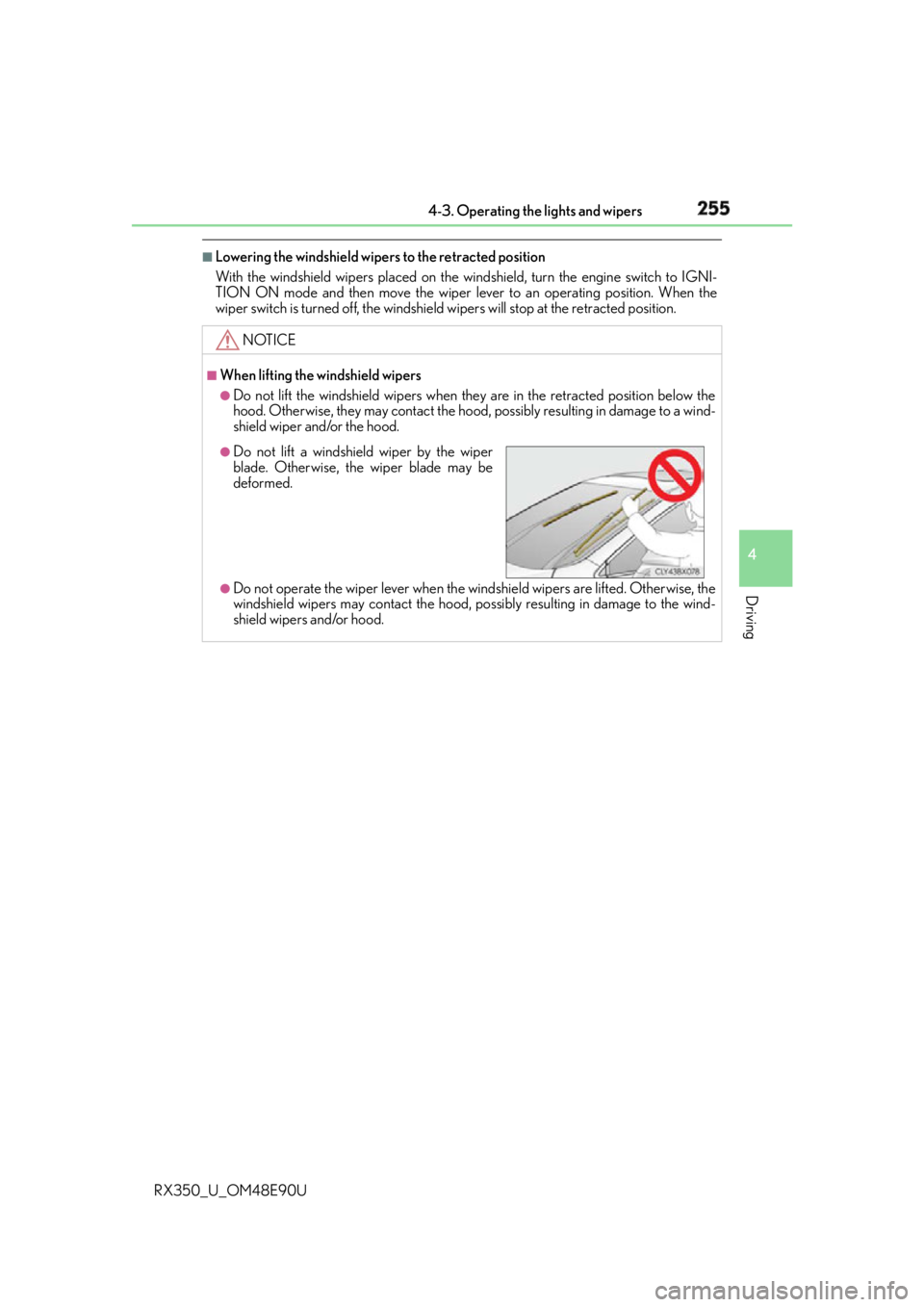
NOTICE ■
When lifting the windshield wipers ●
Do not lift the windshield wipers when they are in the retracted position below the
hood. Otherwise, they may contact the hood, possibly resulting in damage to a wind-
shield wiper and/or the hood.
●
Do not operate the wiper lever when the wind shield wipers are lifted. Otherwise, the
windshield wipers may contac t the hood, possibly resultin g in damage to the wind-
shield wipers and/or hood. ●
Do not lift a windshield wiper by the wiper
blade. Otherwise, the wiper blade may be
deformed.