change time LEXUS RX350 2016 User Guide
[x] Cancel search | Manufacturer: LEXUS, Model Year: 2016, Model line: RX350, Model: LEXUS RX350 2016Pages: 748, PDF Size: 12.36 MB
Page 175 of 748

1753-4. Adjusting the steering wheel and mirrors
3
Operation of each component
RX350_U_OM48E90U When the mirror select switch is in the “L” or “R” position, the outside rear view
mirrors will automatically angle downwards when the vehicle is reversing in
order to give a better view of the ground.
To disable this function, select neither “L” nor “R” of the mirror select switch. ■
Adjusting the mirror angle when the vehicle is reversing
With the shift lever in R, adjust the mirror angle at a desired position.
The adjusted angle will be memorized and the mirror will automatically tilt to
the memorized angle whenever the shift lever is shifted to R from next time. The memorized downward tilt position of the mirror is linked to the normal position
(angle adjusted with the shif t lever in other than R). Therefore, if the normal posi-
tion is changed after adjustment, th e tilt position will also change.
When the normal position is chang ed, readjust the angle in reversing.■
Mirror angle can be adjusted when
The engine switch is in ACCESSORY or IGNITION ON mode. ■
When disconnecting and reconn ecting battery terminals (v ehicles with an automatic
folding/extending mirror function)
The automatic folding/extending mirror function will return to off as default. To turn the
function on, press the switch again to select on. ■
When the mirrors are fogged up
The outside rear view mirrors can be cleare d using the mirror defoggers. Turn on the
rear window defogger to turn on the outside rear view mirror defoggers. ( P. 5 0 0 )■
Automatic adjustment of the mirror angle (if equipped)
A desired mirror face angle can be entered to memory and recalled automatically by the
driving position memory. ( P. 1 6 2 )■
Auto anti-glare function (if equipped)
When the anti-glare inside rear view mirror is set to automatic mode, the outside rear
view mirrors will activate in conjunction with the anti-glare inside rear view mirror to
reduce reflected light. ( P. 1 7 1 )■
Using automatic mode in cold weather (if equipped)
When automatic mode is used in cold weather, the door mirror could freeze up and
automatic stowing and return may not be possible. In this case, remove any ice and snow
from the door mirror, then either operate th e mirror using manual mode or move the mir-
ror by hand. ■
Customization
Some functions can be customized. ( P. 6 9 9 )Linked mirror function when reversing
Page 199 of 748
1994-1. Before driving
4
Driving
RX350_U_OM48E90U NOTICE ■
When driving the vehicle ●
Do not depress the accelerator and brake peda ls at the same time during driving, as
this may restrain driving torque. ●
Do not use the accelerator pedal or depress the accelerator and brake pedals at the
same time to hold the vehicle on a hill. ■
When parking the vehicle
Always shift the shift lever to P, set the parking brake. Failure to do so may cause the
vehicle to move or the vehicle may accelerate suddenly if the acce lerator pedal is acci-
dentally depressed. ■
Avoiding damage to vehicle parts ●
Do not turn the steering wheel fully in either direction and hold it there for an
extended period of time.
Doing so may damage the power steering motor. ●
When driving over bumps in the road, drive as slowly as possible to avoid damaging
the wheels, underside of the vehicle, etc. ■
If you get a flat tire while driving
A flat or damaged tire may cause the follo wing situations. Hold the steering wheel
firmly and gradually depress the brak e pedal to slow down the vehicle.●
It may be difficult to control your vehicle. ●
The vehicle will make abnormal sounds or vibrations. ●
The vehicle will lean abnormally.
Information on what to do in case of a flat tire ( P. 646)■
When encountering flooded roads
Do not drive on a road that has flooded after heavy rain, etc. Doing so may cause the
following serious damage to the vehicle: ●
Engine stalling ●
Short in electrical components ●
Engine damage caused by water immersion
In the event that you drive on a flooded road and the vehicle is flooded, be sure to have
your Lexus dealer check the following: ●
Brake function ●
Changes in quantity and quality of oil and fl uid used for the engine, transaxle, transfer
(AWD models), rear differential (AWD models), etc. ●
Lubricant condition for the propeller shaft (AWD models), bearings and suspension
joints (where possible), and the fu nction of all joints, bearings, etc.
Page 221 of 748
2214-2. Driving procedures
4
Driving
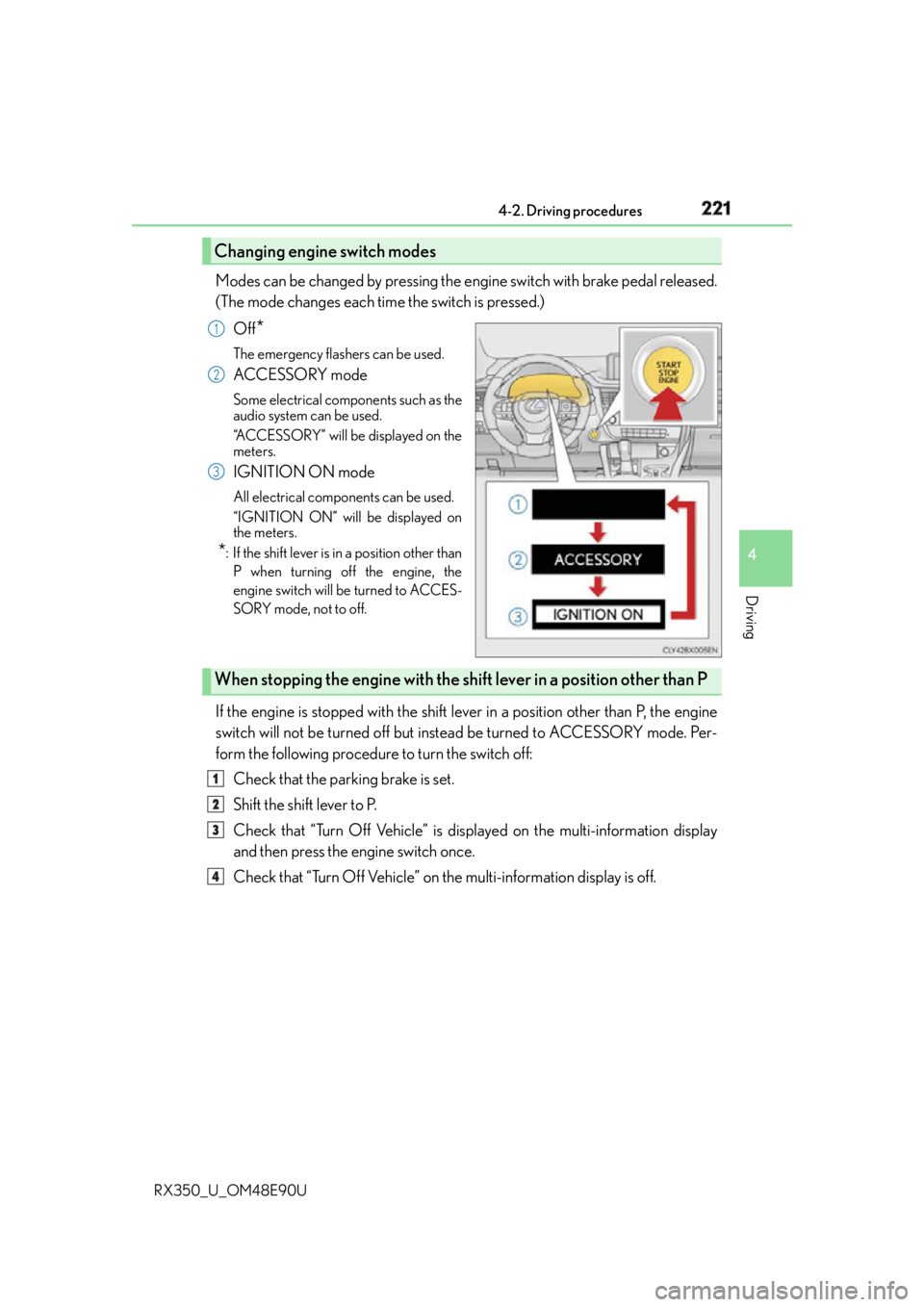
RX350_U_OM48E90U Modes can be changed by pressing the engine switch with brake pedal released.
(The mode changes each time the switch is pressed.)
Off
* The emergency flashers can be used.
ACCESSORY mode Some electrical components such as the
audio system can be used.
“ACCESSORY” will be displayed on the
meters.
IGNITION ON mode All electrical components can be used.
“IGNITION ON” will be displayed on
the meters.
* : If the shift lever is in a position other than
P when turning off the engine, the
engine switch will be turned to ACCES-
SORY mode, not to off.
If the engine is stopped with the shift le ver in a position other than P, the engine
switch will not be turned off but inst ead be turned to ACCESSORY mode. Per-
form the following procedure to turn the switch off:
Check that the parking brake is set.
Shift the shift lever to P.
Check that “Turn Off Vehicle” is displayed on the multi-information display
and then press the engine switch once.
Check that “Turn Off Vehicle” on the multi-information display is off.Changing engine switch modes 1
2
3
When stopping the engine with the shift lever in a position other than P1
2
3
4
Page 223 of 748

2234-2. Driving procedures
4
Driving
RX350_U_OM48E90U ■
If the electronic key battery is depleted
P. 6 0 3 ■
Operation of the engine switch ●
When operating the engine switch, one short, firm press is enough. If the switch is
pressed improperly, the engine may not start or the engine switch mode may not
change. It is not necessary to press and hold the switch. ●
If attempting to restart the engine immediat ely after turning the engine switch off, the
engine may not start in some cases. After tu rning the engine switch off, please wait a
few seconds before re starting the engine.■
If the smart access system with push-butto n start has been deactivated by a customized
setting
P. 6 6 1
WA R N I N G ■
When starting the engine
Always start the engine while sitting in the driver’s seat. Do not depress the accelerator
pedal while starting the engine under any circumstances.
Doing so may cause an accident resu lting in death or serious injury.■
Caution while driving
If engine failure occurs while the vehicle is moving, do not lock or open the doors until
the vehicle reaches a safe and complete stop. Activation of the steering lock in this cir-
cumstance may lead to an accident, re sulting in death or serious injury.■
Stopping the engine in an emergency
If you want to stop the engine in an emergency while driving the vehicle, press and hold
the engine switch for more than 2 seconds, or press it briefly 3 times or more in succes-
sion. ( P. 6 2 5 )
However, do not touch the engine switch while driving except in an emergency. Turning
the engine off while driving will not cause lo ss of steering or braking control, but the
power assist to these systems will be lost. Th is will make it more difficult to steer and
brake, so you should pull over and stop the vehicle as soon as it is safe to do so.
Page 231 of 748
2314-2. Driving procedures
4
Driving
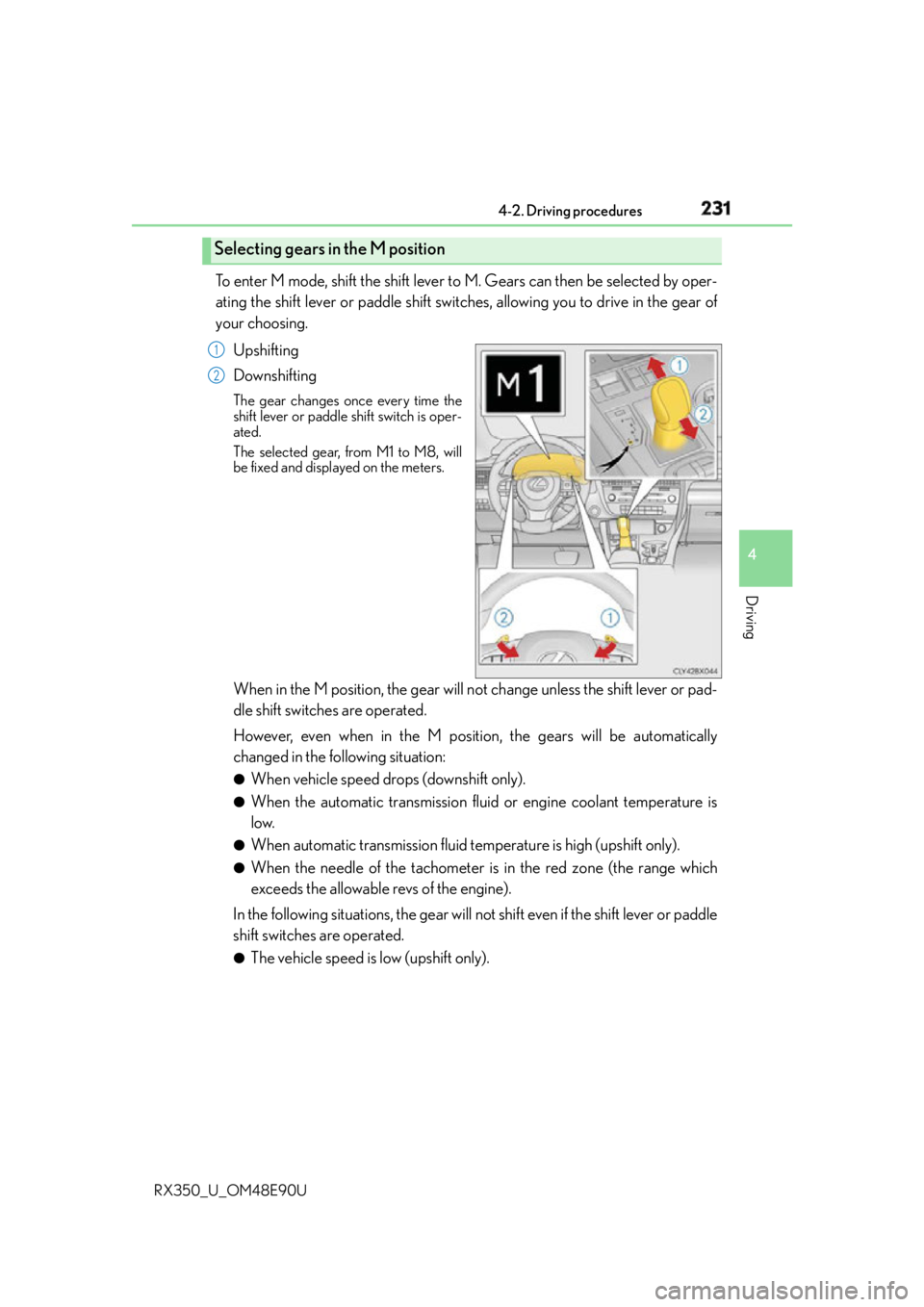
RX350_U_OM48E90U To enter M mode, shift the shift lever to M. Gears can then be selected by oper-
ating the shift lever or paddle shift switches, allowing you to drive in the gear of
your choosing.
Upshifting
Downshifting The gear changes once every time the
shift lever or paddle shift switch is oper-
ated.
The selected gear, from M1 to M8, will
be fixed and displayed on the meters.
When in the M position, the gear will no t change unless the shift lever or pad-
dle shift switches are operated.
However, even when in the M position, the gears will be automatically
changed in the following situation: ●
When vehicle speed drops (downshift only). ●
When the automatic transmission flui d or engine coolant temperature is
low. ●
When automatic transmission fluid temperature is high (upshift only). ●
When the needle of the tachometer is in the red zone (the range which
exceeds the allowable revs of the engine).
In the following situations, the gear will not shift even if the shift lever or paddle
shift switches are operated. ●
The vehicle speed is low (upshift only).Selecting gears in the M position 1
2
Page 234 of 748
234 4-2. Driving procedures
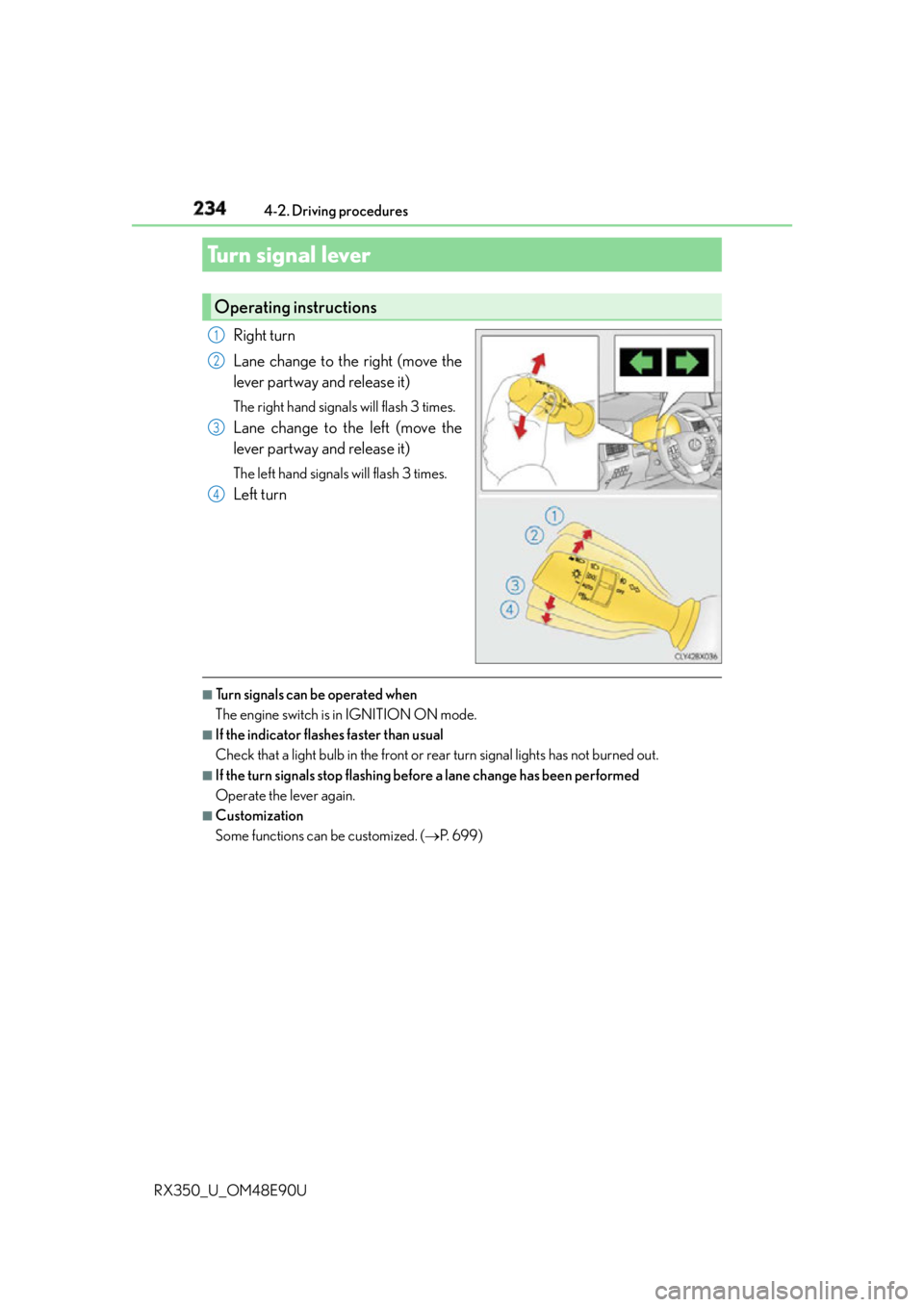
RX350_U_OM48E90U Right turn
Lane change to the right (move the
lever partway and release it) The right hand signals will flash 3 times.
Lane change to the left (move the
lever partway and release it) The left hand signals will flash 3 times.
Left turn
■
Turn signals can be operated when
The engine switch is in IGNITION ON mode. ■
If the indicator flashes faster than usual
Check that a light bulb in the front or rear turn signal lights has not burned out. ■
If the turn signals stop flashing befo re a lane change has been performed
Operate the lever again. ■
Customization
Some functions can be customized. ( P. 6 9 9 )Turn signal lever Operating instructions 1
2
3
4
Page 247 of 748

2474-3. Operating the lights and wipers
4
Driving
RX350_U_OM48E90U ■
Conditions to turn the high beams on/off automatically ●
When all of the following conditions are met, the high beams will be turned on automat-
ically (after approximately 1 second):
• The vehicle speed is approximately 21 mph (34 km/h) or more.
• The area ahead of the vehicle is dark.
• There are no vehicles ahead with headlights or tail lights turned on.
• There are few streetlights on the road ahead. ●
If any of the following conditions is met, the high beams will turn off automatically:
• The vehicle speed is below approximately 17 mph (27 km/h).
• The area ahead of the vehicle is not dark.
• Vehicles ahead have their headli ghts or tail lights turned on.
• There are many streetlights on the road ahead. ■
Camera sensor dete ction information●
The high beams may not be automatically turned off in the fo llowing situations:
• When a vehicle suddenly appears from around a curve
• When the vehicle is cut in front of by another vehicle
• When vehicles ahead cannot be detected du e to repeated curves, road dividers or
roadside trees
• When vehicles ahead appear in a faraway lane on a wide road
• When the lights of vehicles ahead are not on ●
The high beams may be turned off if a vehicl e ahead that is using fog lights without its
headlights turned on is detected. ●
House lights, street lights, traffic signals, and illuminated billboards or signs and other
reflective objects may cause the high beams to change to the low beams, or the low
beams to remain on. ●
The following factors may affect the amount of time taken for the high beams to turn on
or off:
• The brightness of the headlights, fog li ghts, and tail lights of vehicles ahead
• The movement and direction of vehicles ahead
• When a vehicle ahead only has operational lights on one side
• When a vehicle ahead is a two-wheeled vehicle
• The condition of the road (gradient, curve, condition of the road surface, etc.)
• The number of passengers and amount of luggage in the vehicle ●
The high beams may turn on or off unexpectedly.●
Bicycles or similar vehicles may not be detected.
Page 248 of 748

248 4-3. Operating the lights and wipers
RX350_U_OM48E90U ●
In the following situations the system may not be able to correctly detect the surround-
ing brightness level. This may cause the lo w beams to remain on or the high beams to
flash or dazzle pedestrians or vehicles ahead. In such a case, it is necessary to manually
switch between the high and low beams.
• When driving in inclement weather (hea vy rain, snow, fog, sandstorms, etc.)
• When the windshield is obscured by fog, mist, ice, dirt, etc.
• When the windshield is cracked or damaged
• When the camera sensor is deformed or dirty
• When the temperature of the camera sensor is extremely high
• When the surrounding brightness level is equa l to that of headlights, tail lights or fog
lights
• When headlights or tail lights of vehicles ah ead are turned off, dirty, changing color,
or not aimed properly
• When the vehicle is hit by water, snow, dust, etc. from a preceding vehicle
• When driving through an area of intermit tently changing brightness and darkness
• When frequently and repeatedly driving ascending/descending roads, or roads with
rough, bumpy or uneven surfaces (such as stone-paved roads, gravel roads, etc.)
•When frequently and repe atedly taking curves or driving on a winding road
• When there is a highly reflective object ahead of the vehicle, such as a sign or mirror
• When the back of a preceding vehicle is hi ghly reflective, such as a container on a
truck
• When the vehicle's headlights are damaged or dirty, or are not aimed properly
• When the vehicle is listing or titling due to a flat tire, a trailer being towed, etc.
• When the headlights are changed between the high beams and low beams repeat-
edly in an abnormal manner
• When the driver believes that the high beams may be flashing or dazzling pedestri-
ans or other drivers■
Temporarily lowering sensor sensitivity
The sensitivity of the sensor can be temporarily lowered.
Turn the engine switch off while the following conditions are met.
• The headlight switch is in or .
• The headlight switch lever is in high beam position.
• Automatic High Beam switch is on.
Turn the engine switch to IGNITION ON mode.
Within 30 seconds after , re peat pulling the headlight sw itch lever to the original
position then pushing it to the high beam po sition quickly 10 times, then leave the lever
in high beam position.
If the sensitivity is changed, the Automatic High Beam indicator is turn on and off 3
times.
Automatic High Beam (headlights) may turn on even the vehicle is stopped.1
2
3 2
4
Page 274 of 748
274 4-5. Using the driving support systems
RX350_U_OM48E90U ■
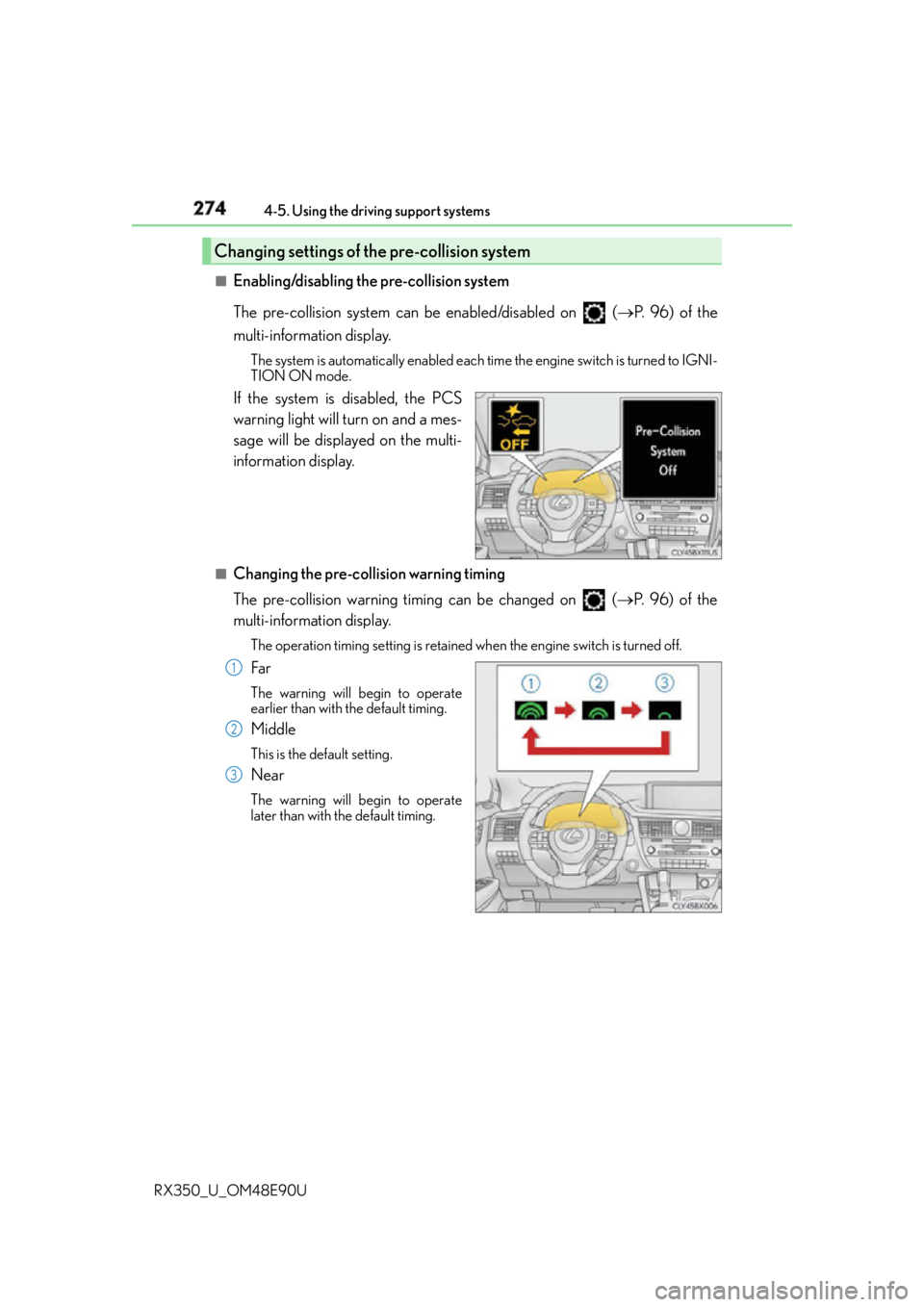
Enabling/disabling the pre-collision system
The pre-collision system can be enabled/disabled on ( P. 9 6 ) o f t h e
multi-information display. The system is automatically enabled each time the engine switch is turned to IGNI-
TION ON mode.
If the system is disabled, the PCS
warning light will turn on and a mes-
sage will be displayed on the multi-
information display. ■
Changing the pre-col lision warning timing
The pre-collision warning timing can be changed on ( P. 9 6 ) o f t h e
multi-information display. The operation timing setting is retained when the engine switch is turned off.
Far The warning will begin to operate
earlier than with the default timing.
Middle This is the default setting.
Near The warning will begin to operate
later than with the default timing.Changing settings of the pre-collision system
1
2
3
Page 305 of 748
3054-5. Using the driving support systems
4
Driving
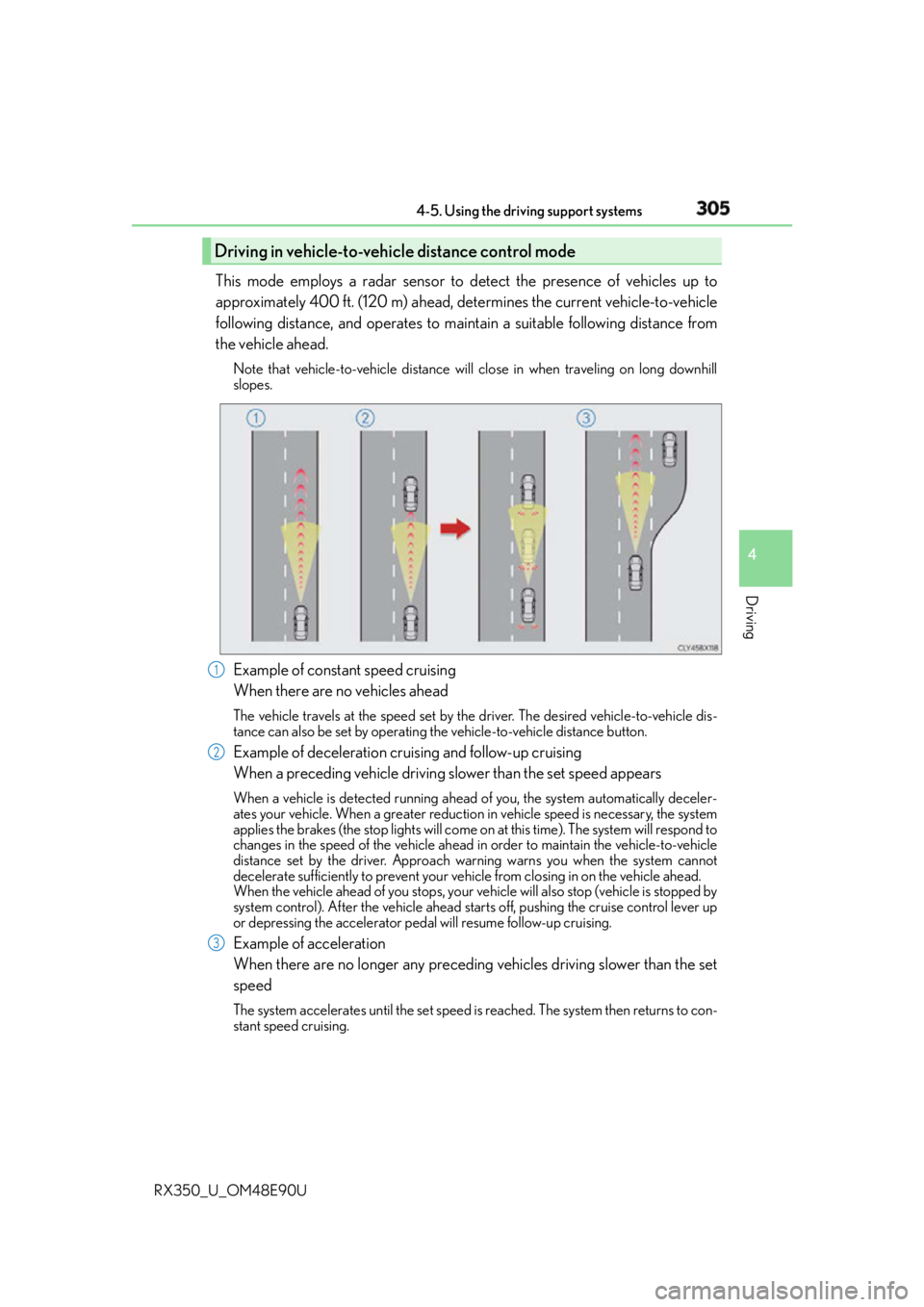
RX350_U_OM48E90U This mode employs a radar sensor to detect the presence of vehicles up to
approximately 400 ft. (120 m) ahead, determines the current vehicle-to-vehicle
following distance, and operates to main tain a suitable following distance from
the vehicle ahead. Note that vehicle-to-vehicle distance will close in when traveling on long downhill
slopes.
Example of constant speed cruising
When there are no vehicles ahead The vehicle travels at the speed set by the driver. The desired vehicle-to-vehicle dis-
tance can also be set by operating th e vehicle-to-vehicle distance button.
Example of deceleration cruising and follow-up cruising
When a preceding vehicle driving slower than the set speed appears When a vehicle is detected running ahead of you, the system automatically deceler-
ates your vehicle. When a greater reduction in vehicle speed is necessary, the system
applies the brakes (the stop lights will come on at this time). The system will respond to
changes in the speed of the vehicle ahead in order to maintain the vehicle-to-vehicle
distance set by the driver. Approach wa rning warns you when the system cannot
decelerate sufficiently to prevent your ve hicle from closing in on the vehicle ahead.
When the vehicle ahead of you stops, your ve hicle will also stop (vehicle is stopped by
system control). After the vehicle ahead starts off, pushing the cruise control lever up
or depressing the accelerator peda l will resume follow-up cruising.
Example of acceleration
When there are no longer any preceding vehicles driving slower than the set
speed The system accelerates until the set speed is reached. The system then returns to con-
stant speed cruising.Driving in vehicle-to-vehicle distance control mode
1
2
3