change time LEXUS RX350 2016 Owner's Guide
[x] Cancel search | Manufacturer: LEXUS, Model Year: 2016, Model line: RX350, Model: LEXUS RX350 2016Pages: 748, PDF Size: 12.36 MB
Page 496 of 748

496 6-2. Using the air conditio ning system and defogger
RX350_U_OM48E90U ■
Change the airflow mode
To change the air outlets, press .
The air outlets used are switched each time the button is pressed.
Air flows to the upper body.
Air flows to the upper body and feet.
Air flows to the feet.
Air flows to the feet and the windshield defogger operates■
S-FLOW mode
In S-FLOW mode, priority for the airflow is given to the front seats, reducing
the airflow and air conditioning effect on the rear seats.
If a passenger is not detected in the front passenger seat, priority for the air-
flow will be given to the driver's seat only. In this case, the temperature indicator fo r the front passenger side will turn off.
S-FLOW mode will be activated automatically according to the set tempera-
ture, outside temperature, etc. ( P. 5 0 2 )The indicator comes on when S-FLOW mode is on.
■
Other functions ●
Switching between outside air and recirculated air modes ( P. 499)●
Defogging the windshield ( P. 5 0 0 )●
Defogging the rear window and outside rear view mirrors ( P. 500)
Vehicles with a Lexus Display
Audio system
Vehicles with a navigation system
1
2
3
4
Page 502 of 748
502 6-2. Using the air conditio ning system and defogger
RX350_U_OM48E90U ■
Registering air conditioning settings to elec tronic keys (vehicles with driving position
memory) ●
Unlocking the vehicle using an electronic ke y and turning the engine switch to IGNI-
TION ON mode will recall that key’s registered air conditioning settings. ●
When the engine switch is tu rned off, the current air conditioning settings will automat-
ically be registered to the electronic key that was used to unlock the vehicle.●
The system may not operate correctly if more th an one electronic key is in the vicinity or
if the smart access system with push-button start is used to unlock a passenger door. ●
The doors that can recall the air conditioni ng setting when unlocked using the smart
access system with push-b utton start can be changed.
* For details, contact your Lexus
dealer.
* : The doors that can recall the driving positi on memory are changed at the same time.■
Using automatic mode
Fan speed is adjusted automatically accordin g to the temperature setting and the ambi-
ent conditions.
Therefore, the fan may stop for a while until warm or cool air is ready to flow immediately
after the “AUTO” button is pr essed or “AUTO” is selected.■
Operation of S-FLOW mode
In automatic mode, S-FLOW mode will be turned off if a rear door has been opened and
closed. To activate S-FLOW mode again, press . ■
Using the voice command system (veh icles with a navigation system)
Air conditioning system can be operated usin g voice commands. For details, refer to the
“NAVIGATION SYSTEM OWNER’S MANUAL”. ■
When the outside temperature exceeds 75 F (24 C) and the air conditioning system
is on ●
In order to reduce the air conditioning po wer consumption, the ai r conditioning system
may switch to recirculated air mode automatically.
This may also reduce fuel consumption. ●
Recirculated air mode is selected as a defaul t mode when the engine switch is turned to
IGNITION ON mode. ●
It is possible to switch to outside air mode at any time by pressing the outside/recircu-
lated air mode button. ■
Automatic mode for air intake control (if equipped)
In automatic mode, the system detects exhaust gas and other pollutants and automati-
cally switches between outside air and recirculated air modes.
When the dehumidification function is off, and the fan is operating, turning automatic
mode on will activate the dehumidification function.■
Fogging up of the windows ●
The windows will easily fog up when the humidi ty in the vehicle is high. Selecting “A/C”
will dehumidify the air from the outlet s and defog the windshield effectively. ●
If you turn “A/C” off, the windows may fog up more easily. ●
The windows may fog up if the recirculated air mode is used.
Page 506 of 748
506 6-2. Using the air conditio ning system and defogger
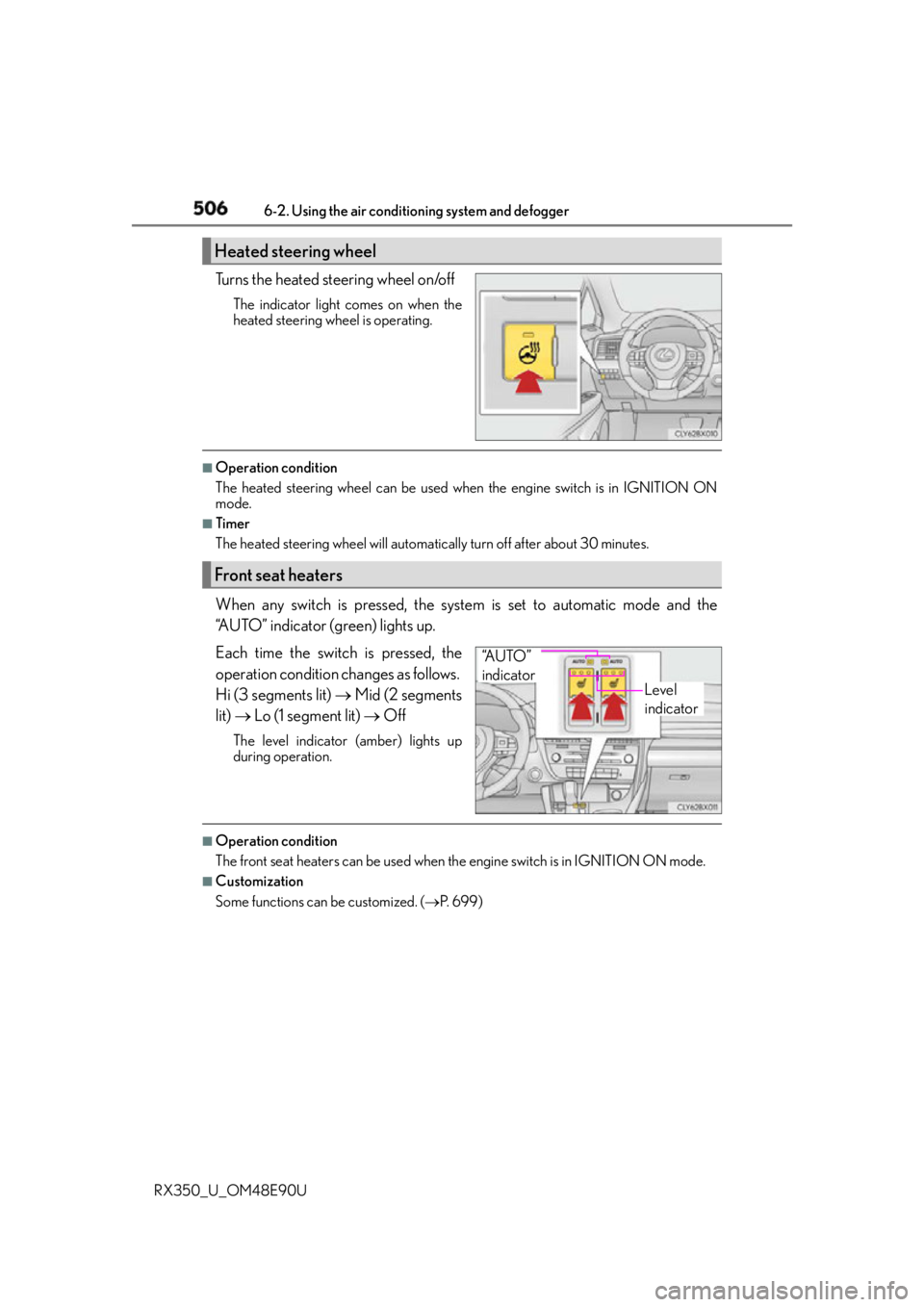
RX350_U_OM48E90U Turns the heated steering wheel on/off The indicator light comes on when the
heated steering wheel is operating. ■
Operation condition
The heated steering wheel can be used when the engine switch is in IGNITION ON
mode. ■
Timer
The heated steering wheel will automati cally turn off after about 30 minutes.
When any switch is pressed, the system is set to automatic mode and the
“AUTO” indicator (green) lights up.
Each time the switch is pressed, the
operation condition changes as follows.
Hi (3 segments lit) Mid (2 segments
lit) Lo (1 segment lit) OffThe level indicator (amber) lights up
during operation.
■
Operation condition
The front seat heaters can be used when th e engine switch is in IGNITION ON mode.■
Customization
Some functions can be customized. ( P. 6 9 9 )Heated steering wheel
Front seat heaters
Level
indicator“A U T O ”
indicator
Page 507 of 748
5076-2. Using the air conditioning system and defogger
6
Interior features
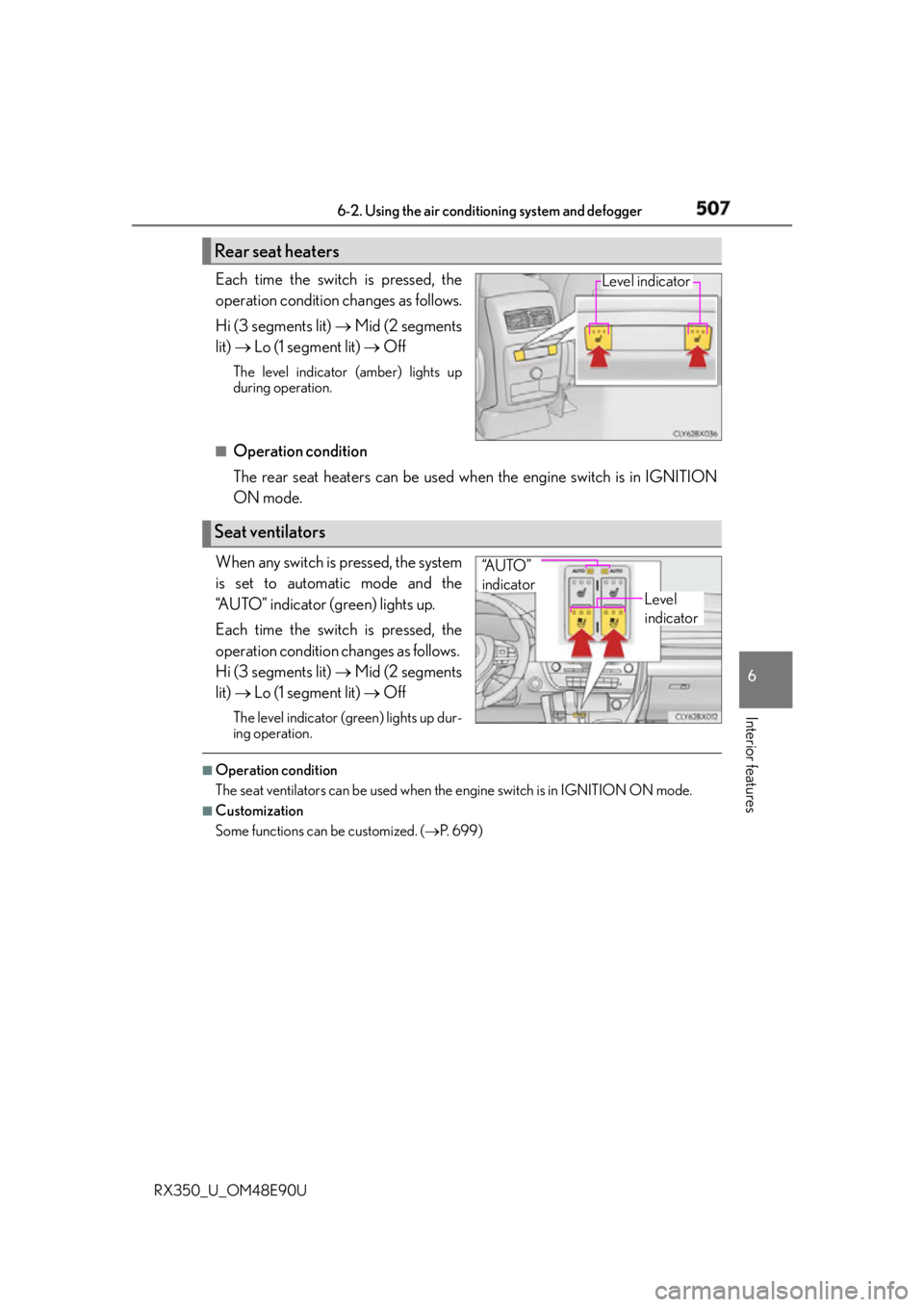
RX350_U_OM48E90U Each time the switch is pressed, the
operation condition changes as follows.
Hi (3 segments lit) Mid (2 segments
lit) Lo (1 segment lit) OffThe level indicator (amber) lights up
during operation.
■
Operation condition
The rear seat heaters can be used wh en the engine switch is in IGNITION
ON mode.
When any switch is pressed, the system
is set to automatic mode and the
“AUTO” indicator (green) lights up.
Each time the switch is pressed, the
operation condition changes as follows.
Hi (3 segments lit) Mid (2 segments
lit) Lo (1 segment lit) OffThe level indicator (g reen) lights up dur-
ing operation. ■
Operation condition
The seat ventilators can be used when the engine switch is in IGNITION ON mode.■
Customization
Some functions can be customized. ( P. 6 9 9 )Rear seat heaters Level indicator
Seat ventilators Level
indicator“A U T O ”
indicator
Page 527 of 748
5276-5. Using the other interior features
6
Interior features
RX350_U_OM48E90U ■
If a cover or accessory is attached to the portable device
Do not charge a portable device if a cover or accessory which is not Qi compatible is
attached. Depending on the type of cover and/or accessory attached, it may not be pos-
sible to charge the portable device. If the portable device is placed on the charging area
and does not charge, remove the cover and/or accessories. ■
If interference is heard in AM radio broadcasts while charging
Turn off the wireless charger and check if the noise is reduced. If noise is reduced, press
and hold the power supply switch of the wire less charger for 2 seconds. The frequency of
the wireless charger is changed and noise may be reduced. When the frequency is
changed, the operation indicator light will blink (orange) 2 times.■
Charging precautions ●
If the electronic key cannot be detected in the cabin, charging cannot be performed.
When a door is opened and closed, ch arging may be temporarily suspended.●
While charging, the wireless charger and the portable device will become warm. This is
not a malfunction.
If a portable device becomes warm while ch arging and charging stops due to the pro-
tection function of the portable device, wait until the portable device cools down and
charge it again. ■
Sound generated du ring operation
When the power supply switch is turned on or while a portable device is being identified,
operation sounds may be heard. This is not a malfunction. ■
Cleaning the wireless charger
P. 5 6 2 ■
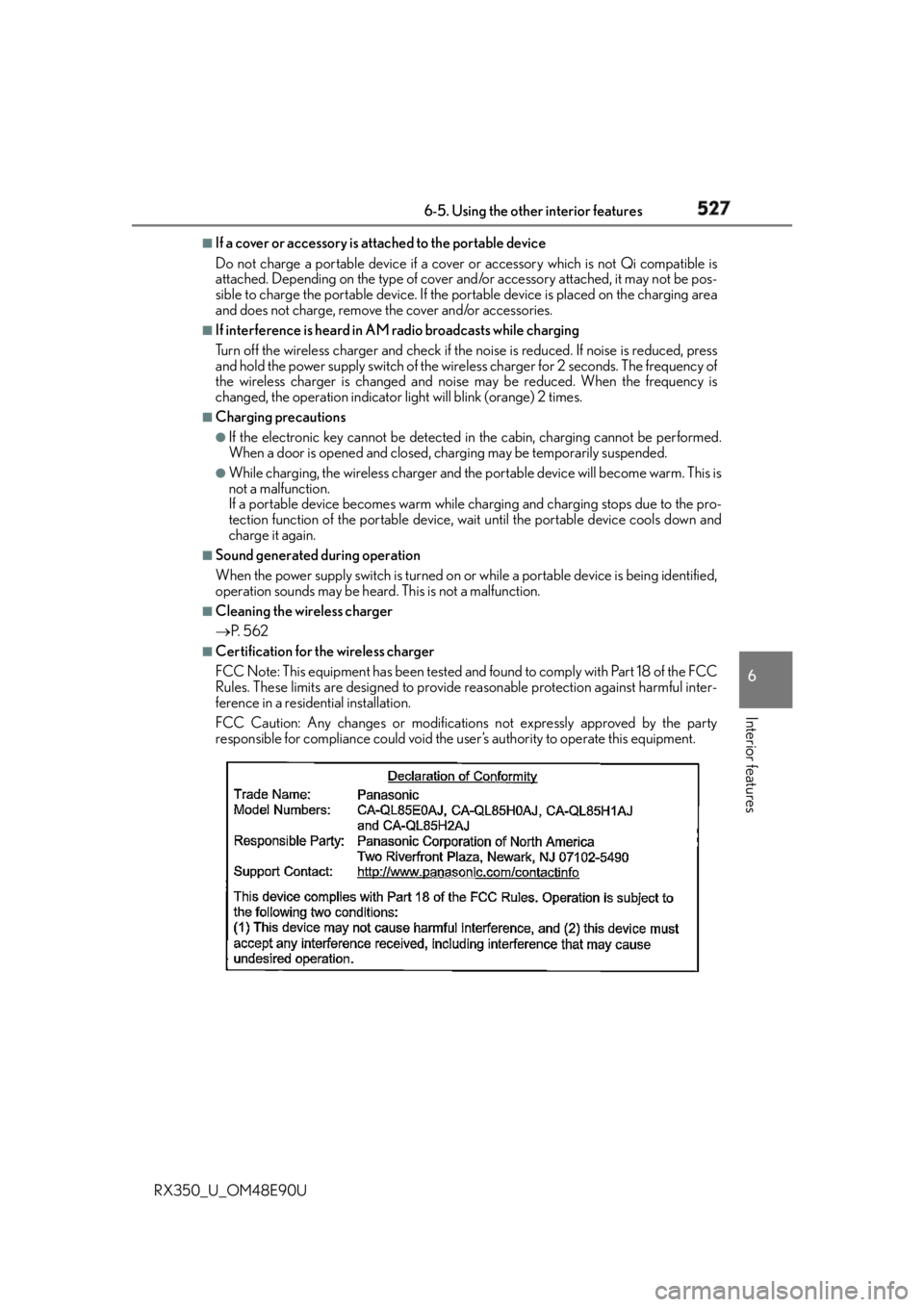
Certification for the wireless charger
FCC Note: This equipment has been tested and found to comply with Part 18 of the FCC
Rules. These limits are designed to provide reasonable protection against harmful inter-
ference in a residential installation.
FCC Caution: Any changes or modification s not expressly approved by the party
responsible for compliance could void the user’s authority to operate this equipment.
Page 590 of 748

590 7-3. Do-it-yourself maintenance
RX350_U_OM48E90U ■
Warning performance of the tire pressure warning system
The warning of the tire pressure warning syst em will change in accordance with the con-
ditions under which it was initialized. For this reason, the system may give a warning even
if the tire pressure does not reach a low enough level, or if the pressure is higher than the
pressure that was adjusted to when the system was initialized. ■
When initialization of the tire pressure warning system has failed
Initialization may take longer to complete if the vehicle is driven on an unpaved road.
When performing initialization, drive on a pa ved road if possible. Depending on the driv-
ing environment and condition of the tires, initialization will be completed in approxi-
mately 10 to 30 minutes. If initialization is not complete af ter driving approximately 10 to
30 minutes, continue driving for a while.
If the inflation pressure of each tire is not displayed after driving for approximately 1 hour,
perform the following procedure. ●
Park the vehicle in a safe place for approxim ately 20 minutes. Then drive straight (with
occasional left and right turns) at approximately 25 mph (40 km/h) or more for
approximately 10 to 30 minutes.
However, in the following situations, the tire inflation pressure will not be recorded and
the system will not operate properly. Perform initialization again. ●
When operating the tire pressure warning reset switch, the tire pressure warning light
does not blink 3 times. ●
After performing initialization, the tire pres sure warning light blinks for 1 minute then
stays on while driving.
If the inflation pressure of each tire is st ill not displayed, have the vehicle inspected by
your Lexus dealer.
Page 664 of 748
664 8-2. Steps to take in an emergency
RX350_U_OM48E90U ■
Stopping the engine
Shift the shift lever to P, set the parking br ake, and press the engine switch as you nor-
mally do when stop ping the engine.■
Replacing the key battery
As the above procedure is a temporary measure, it is recommended that the electronic
key battery be replaced immediately when the battery is depleted. ( P. 6 0 3 )■
Changing engine switch modes
Release the brake pedal and press the engine switch in step above.
The engine does not start and modes will be changed each time the switch is pressed.
( P. 221) ■
When the electronic key does not work properly ●
Make sure that the smart access system wi th push-button start has not been deacti-
vated in the custom ization setting. If it is off, turn the function on.
(Customizable features P. 699)●
Check if battery-saving mo de is set. If it is se t, cancel the function. ( P. 1 4 8 )
WA R N I N G ■
When using the mechanical key and operating the power windows or the moon roof
or panoramic moon roof
Operate the power window or the moon roof or panoramic moon roof after checking
to make sure that there is no possibility of any passenger ha ving any of their body parts
caught in the window or the moon roof or panoramic moon roof.
Also, do not allow children to operate the mech anical key. It is possible for children and
other passengers to get caught in the powe r window or the moon roof or panoramic
moon roof. 3
Page 707 of 748
7079-2. Customization
9
Vehicle specifications
RX350_U_OM48E90U ■
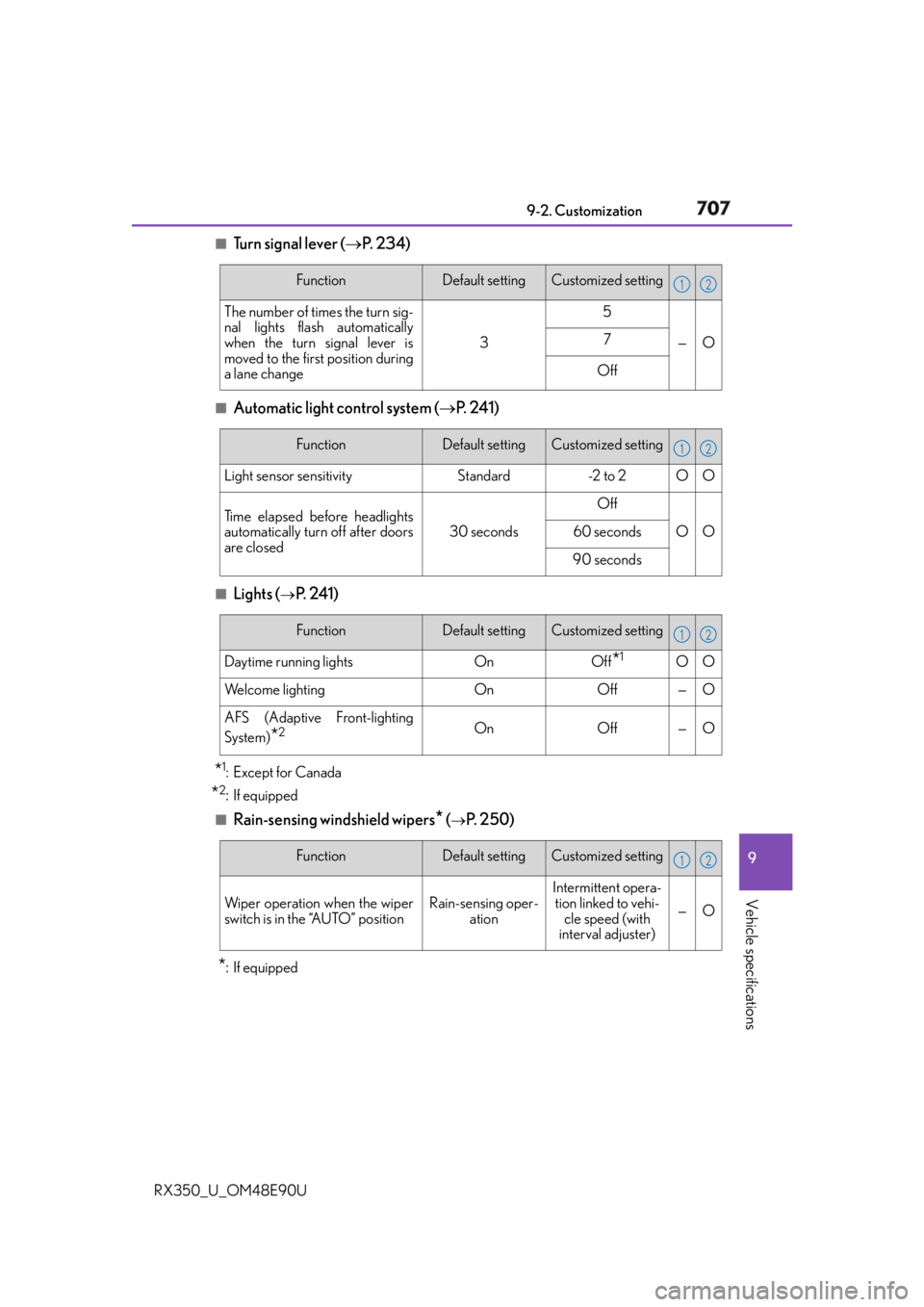
Tu r n s i g n a l l e v e r ( P. 2 3 4 )
■
Automatic light control system ( P. 2 4 1 )
■
Lights (
P. 2 4 1 )
* 1
: Except for Canada
* 2
: If equipped■
Rain-sensing windshield wipers
* (
P. 2 5 0 )
* : If equipped Function Default setting Customized setting
The number of times the turn sig-
nal lights flash automatically
when the turn signal lever is
moved to the first position during
a lane change 3 5
— O7
Off 1 2
Function Default setting Customized setting
Light sensor sensitivity Standard -2 to 2 O O
Time elapsed before headlights
automatically turn off after doors
are closed 30 seconds Off
OO
60 seconds
90 seconds 1 2
Function Default setting Customized setting
Daytime running lights On Off
* 1
O O
We l c o m e l i g h t i n g On Off — O
AFS (Adaptive Front-lighting
System)
* 2
On Off — O 1 2
Function Default setting Customized setting
Wiper operation when the wiper
switch is in the “AUTO” position Rain-sensing oper-
ation Intermittent opera-
tion linked to vehi-
cle speed (with
interval adjuster) — O 1 2
Page 711 of 748
7119-2. Customization
9
Vehicle specifications
RX350_U_OM48E90U ■
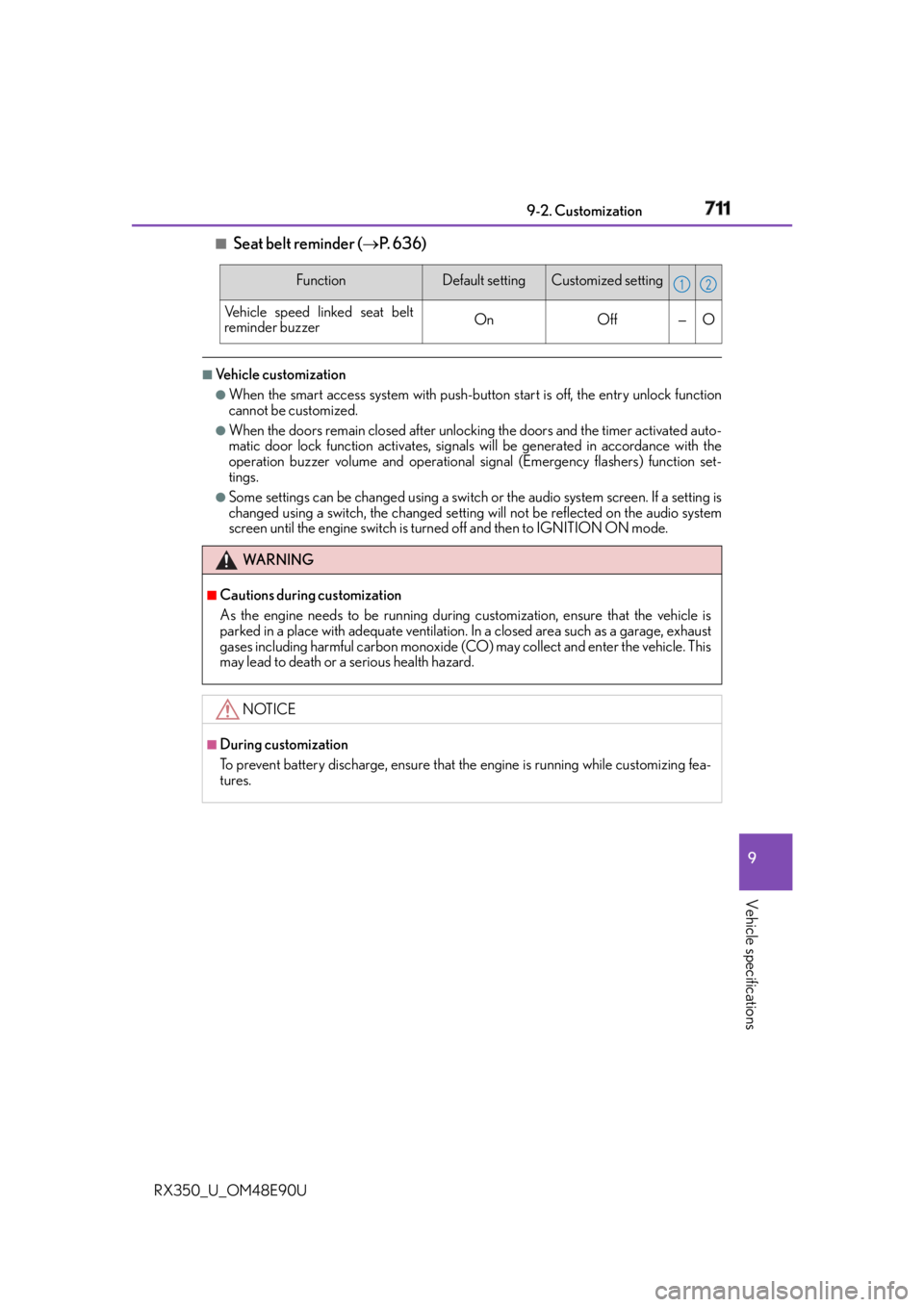
Seat belt reminder ( P. 636)■
Vehicle customization ●
When the smart access system with push-but ton start is off, the entry unlock function
cannot be customized. ●
When the doors remain closed after unlocking the doors and the timer activated auto-
matic door lock function activates, signals will be generated in accordance with the
operation buzzer volume and operational si gnal (Emergency flashers) function set-
tings. ●
Some settings can be changed using a switch or the audio system screen. If a setting is
changed using a switch, the changed setting will not be reflected on the audio system
screen until the engine switch is turn ed off and then to IGNITION ON mode.Function Default setting Customized setting
Vehicle speed linked seat belt
reminder buzzer On Off — O
WA R N I N G ■
Cautions during customization
As the engine needs to be running during customization, ensure that the vehicle is
parked in a place with adequate ventilation. In a closed area such as a garage, exhaust
gases including harmful carbon monoxide (CO) may collect and enter the vehicle. This
may lead to death or a serious health hazard.
NOTICE ■
During customization
To prevent battery discharge, ensure that the engine is running while customizing fea-
tures. 1 2