ESP LEXUS RX350 2016 Owner's Manual
[x] Cancel search | Manufacturer: LEXUS, Model Year: 2016, Model line: RX350, Model: LEXUS RX350 2016Pages: 748, PDF Size: 12.36 MB
Page 184 of 748
184 3-5. Opening, closing the windows and moon roof
RX350_U_OM48E90U WA R N I N G
Observe the following precautions.
Failing to do so may caus e death or serious injury.■
Opening the moon roof ●
Do not allow any passengers to put their hands or heads outside the vehicle while it is
moving. ●
Do not sit on top of the moon roof. ■
Opening and closing the moon roof ●
The driver is responsible for moon roof opening and closing operations.
In order to prevent accidental operation, espe cially by a child, do not let a child oper-
ate the moon roof. It is possible for children and other passengers to have body parts
caught in the moon roof.
■
Jam protection function ●
Never use any part of your body to intentio nally activate the jam protection function.●
The jam protection function may not work if something gets caught just before the
moon roof is fully closed. Also, the jam prot ection function is not designed to operate
while the switch is being pressed. Take care so that your fingers, etc. do not get
caught. ●
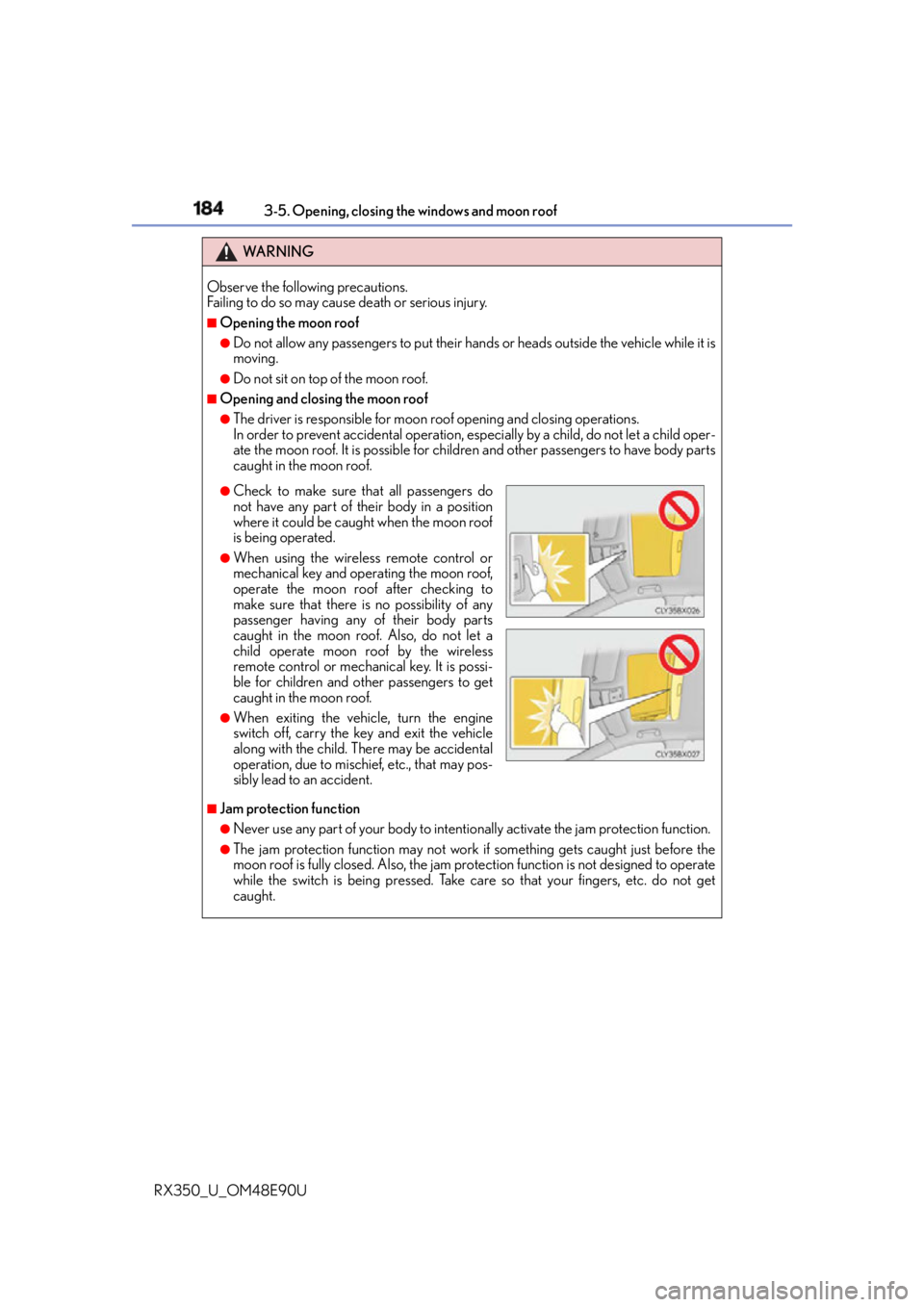
Check to make sure that all passengers do
not have any part of their body in a position
where it could be caught when the moon roof
is being operated. ●
When using the wireless remote control or
mechanical key and operating the moon roof,
operate the moon roof after checking to
make sure that there is no possibility of any
passenger having any of their body parts
caught in the moon roof. Also, do not let a
child operate moon roof by the wireless
remote control or mechanical key. It is possi-
ble for children and other passengers to get
caught in the moon roof. ●
When exiting the vehicle, turn the engine
switch off, carry the key and exit the vehicle
along with the child. Th ere may be accidental
operation, due to mischief, etc., that may pos-
sibly lead to an accident.
Page 188 of 748
188 3-5. Opening, closing the windows and moon roof
RX350_U_OM48E90U WA R N I N G
Observe the following precautions.
Failing to do so may caus e death or serious injury.■
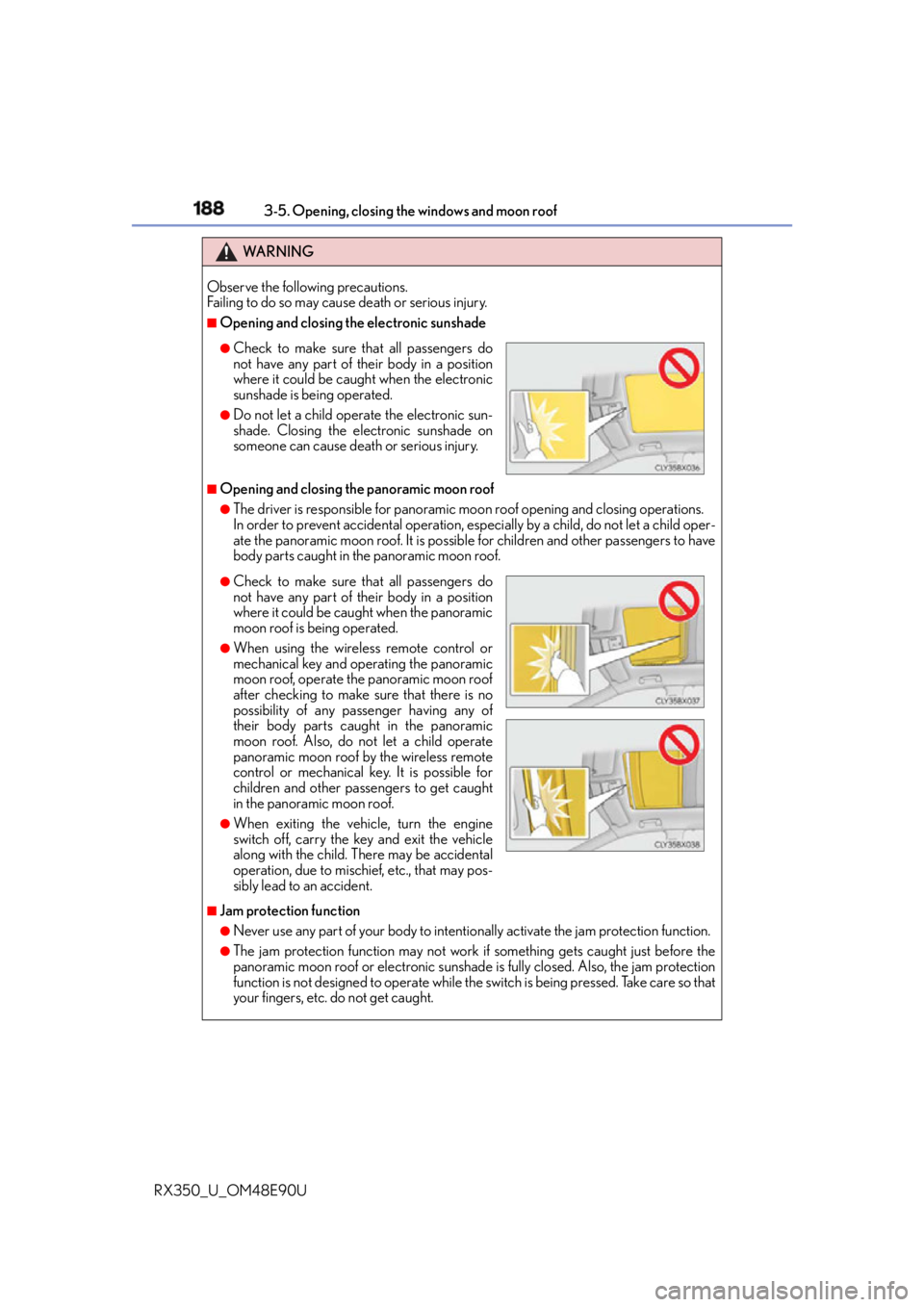
Opening and closing the electronic sunshade
■
Opening and closing the panoramic moon roof ●
The driver is responsible for panoramic m oon roof opening and closing operations.
In order to prevent accidental operation, espe cially by a child, do not let a child oper-
ate the panoramic moon roof. It is possible for children and other passengers to have
body parts caught in the panoramic moon roof.
■
Jam protection function ●
Never use any part of your body to intentio nally activate the jam protection function.●
The jam protection function may not work if something gets caught just before the
panoramic moon roof or electronic sunshade is fully closed. Also, the jam protection
function is not designed to operate while the switch is being pressed. Take care so that
your fingers, etc. do not get caught.●
Check to make sure that all passengers do
not have any part of their body in a position
where it could be caught when the electronic
sunshade is being operated. ●
Do not let a child operate the electronic sun-
shade. Closing the electronic sunshade on
someone can cause death or serious injury.
●
Check to make sure that all passengers do
not have any part of their body in a position
where it could be caught when the panoramic
moon roof is being operated. ●
When using the wireless remote control or
mechanical key and operating the panoramic
moon roof, operate the panoramic moon roof
after checking to make sure that there is no
possibility of any passenger having any of
their body parts caught in the panoramic
moon roof. Also, do not let a child operate
panoramic moon roof by the wireless remote
control or mechanical key. It is possible for
children and other passengers to get caught
in the panoramic moon roof. ●
When exiting the vehicle, turn the engine
switch off, carry the key and exit the vehicle
along with the child. Th ere may be accidental
operation, due to mischief, etc., that may pos-
sibly lead to an accident.
Page 193 of 748
1934-1. Before driving
4
Driving
RX350_U_OM48E90U With the brake pedal depressed, shift the shift lever to D. ( P. 2 2 9 )
Pull the parking brake switch and parking brake is set manually. ( P. 2 3 6 )
Release the brake pedal and gently depress the accelerator pedal to acceler-
ate the vehicle.
Press the parking brake switch and parking brake is released manually.
( P. 2 3 6 ) ■
When starting off on a uphill
The hill-start assist co ntrol will activate. ( P. 3 74 )■
Driving in the rain ●
Drive carefully when it is raining, because visibility will be reduced, the windows may
become fogged-up, and th e road will be slippery.●
Drive carefully when it starts to rain, becau se the road surface will be especially slip-
pery. ●
Refrain from high speeds when driving on an expressway in the rain, because there may
be a layer of water between the tires and the road surface, preventing the steering and
brakes from operating properly. ■
Engine speed while driving
In the following conditions, the engine speed may become high while driving. This is due
to automatic up-shifting control or down-shi fting implementation to meet driving condi-
tions. It does not indica te sudden acceleration.●
The vehicle is judged to be driving uphill or downhill ●
When the accelerato r pedal is released●
When the brake pedal is depressed while sport mode is selected ■
Restraining the engine output (Brake Override System) ●
When the accelerator and brake pedals are depressed at the same time, the engine
output may be restrained. ●
A warning message is displayed on the multi-information display while the system is
operating. If a warning message is shown on the multi-information display, read the
message and follow the instructions.■
Restraining sudden start (Drive-Start Control) ●
When the following unusual operation is performed, the engine output may be
restrained.
• When the shift lever is shifted from R to D, D to R, N to R, P to D, or P to R (D
includes M or S) with the accelerator pe dal depressed, a warning message appears
on the multi-information display. If a wa rning message is shown on the multi-infor-
mation display, read the messag e and follow the instructions.
• When the accelerator pedal is depresse d too while the vehicle is in reverse.●
While Drive-Start Control is being activate d, your vehicle may have trouble escaping
from the mud or fresh snow. In such case, deactivate TRAC ( P. 376) to cancel Drive-
Start Control so that the vehicle may become able to escape from the mud or fresh
snow.Starting off on a uphill 1
2
3
4
Page 195 of 748
1954-1. Before driving
4
Driving
RX350_U_OM48E90U WA R N I N G
Observe the following precautions.
Failure to do so may result in death or serious injury. ■
When starting the vehicle
Always keep your foot on the brake pedal while stopped engine running. This prevents
the vehicle from creeping. ■
When driving the vehicle ●
Do not drive if you are unfamiliar with the location of the brake and accelerator ped-
als to avoid depressing the wrong pedal.
• Accidentally depressing th e accelerator pedal instead of the brake pedal will
result in sudden acceleration that may lead to an accident.
• When backing up, you may twist your body around, leading to difficulty in operat-
ing the pedals. Make sure to operate the pedals properly.
• Make sure to keep a correct driving posture even when moving the vehicle only
slightly. This allows you to depress th e brake and accelerator pedals properly.
• Depress the brake pedal using your righ t foot. Depressing the brake pedal using
your left foot may delay response in an emergency, resulting in an accident. ●
Do not drive the vehicle over or stop the vehicle near flammable materials.
The exhaust system and exhaust gases can be extremely hot. These hot parts may
cause a fire if there is any flammable material nearby. ●
During normal driving, do not turn off the engine. Turning the engine off while driving
will not cause loss of steering or braking co ntrol, but the power assist to these systems
will be lost. This will make it more difficul t to steer and brake, so you should pull over
and stop the vehicle as soon as it is safe to do so.
However, in the event of an emergency, such as if it becomes impossible to stop the
vehicle in the normal way: P. 6 2 5●
Use engine braking (downshift) to maintain a safe speed when driving down a steep
hill.
Using the brakes continuously may cause th e brakes to overheat and lose effective-
ness. ( P. 2 2 9 )●
Do not adjust the positions of the steering wh eel, the seat, or the inside or outside rear
view mirrors while driving.
Doing so may result in a loss of vehicle control. ●
Always check that all passengers’ arms, heads or other parts of their body are not
outside the vehicle. ●
AWD models: Do not drive the vehicle off-road.
This is not an AWD vehicle designed for of f-road driving. Proceed with all due cau-
tion if it becomes unavoidable to drive off-road. ●
Do not drive across a river or through other bodies of water.
This may cause electric/electronic components to short circuit, damage the engine or
cause other serious damage to the vehicle. ●
Do not drive in excess of the speed limit. Ev en if the legal speed lim it permits it, do not
drive over 85 mph (140 km/h) unless your vehicle has high-speed capability tires.
Driving over 85 mph (140 km/h) may result in tire failure, loss of control and possible
injury. Be sure to consult a tire dealer to determine whether the tires on your vehicle
are high-speed capability tires or not before driving at such speeds.
Page 212 of 748

212 4-1. Before driving
RX350_U_OM48E90U Your vehicle will handle differently when towing a trailer. Help to avoid an acci-
dent, death or serious injury, keep the following in mind when towing: ●
Speed limits for towing a trailer vary by state or province. Do not exceed the
posted towing speed limit. ●
Lexus recommends that the vehicle-trailer speed limit is 65 mph (104 km/h)
on a flat, straight, dry road. Do not exceed this limit, the posted towing speed
limit or the speed limit for your trailer as set forth in your trailer owner’s man-
ual, whichever is lowest. Instability of the towing vehicle-trailer combination
(trailer sway) increases as speed increases. Exceeding speed limits may cause
loss of control. ●
Before starting out, check the trailer lights, tires and the vehicle-trailer con-
nections. Recheck after driving a short distance. ●
Practice turning, stopping and reversing with the trailer attached in an area
away from traffic until you become accustomed to the feel of the vehicle-
trailer combination. ●
Reversing with a trailer attached is di fficult and requires practice. Grip the
bottom of the steering wheel and move your hand to the left to move the
trailer to the left. Move your hand to the right to move the trailer to right. (This
is generally opposite to reversing without a trailer attached.) Avoid sharp or
prolonged turning. Have someone guid e you when reversing to reduce the
risk of an accident. ●
As stopping distance is increased when towing a trailer, vehicle-to vehicle dis-
tance should be increased. For each 10 mph (16 km/h) of speed, allow at least
one vehicle and trailer length. ●
Avoid sudden braking as you may skid, re sulting in the traile r jackknifing and a
loss of vehicle control. This is especially true on wet or slippery surfaces. ●
Avoid jerky starts or sudden acceleration. ●
Avoid jerky steering and sharp turns, and slow down before making a turn. ●
Note that when making a turn, the traile r wheels will be closer than the vehicle
wheels to the inside of the turn. Comp ensate by making a wider than normal
turning radius. ●
Slow down before making a turn, in cross winds, on wet or slippery surfaces,
etc.
Increasing vehicle speed can destabilize the trailer. ●
Take care when passing other vehicles. Passing requires considerable dis-
tance. After passing a vehicle, do not forget the length of your trailer, and be
sure you have plenty of room before changing lanes.Trailer towing tips
Page 216 of 748
216 4-1. Before driving
RX350_U_OM48E90U WA R N I N G ■
Trailer towing precautions
To tow a trailer safely, use extreme care and drive the vehicle in accordance with the
trailer’s characteristics and op erating conditions. Failure to do so could cause an acci-
dent resulting in death or serious injury. Vehicle stability and braking performance are
affected by trailer stability, brake setting and performance, and the hitch. Your vehicle
will handle differently when towing a trailer. ■
To avoid accident or injury ●
Do not exceed the TWR, unbrak ed TWR, GCWR, GVWR or GAWR.●
If the gross trailer weight is over 2000 lb. (907 kg), a sway control device with suffi-
cient capacity is required. ●
Adjust the tongue weight within the approp riate range. Place heavier loads as close
to the trailer axle as possible. ●
Do not exceed 65 mph (104 km/h), the posted towing speed limit or the speed limit
for your trailer as set forth in your trailer owner’s manual, whichever is lowest. Slow
down sufficiently before making a turn, in cr oss winds, on wet or slippery surface, etc.
to help avoid an accident. If you experience a vehicle-trailer instability from reducing
a certain speed, slow down and make sure you keep your vehicle speed under the
speed of which you expe rience the instability.●
Do not make jerky, abrupt or sharp turns. ●
Do not apply the brakes suddenly as you ma y skid, resulting in ja ckknifing and loss of
vehicle control. This is especially true on wet or slippery surfaces. ●
Do not exceed the trailer hitch assembly weight, gross vehicle weight, gross axle
weight and trailer tongue weight capacities. ●
Do not use the following systems when trailer towing.
•Cruise control
*• Dynamic radar cruise control
*• Dynamic radar cruise cont rol with full-speed range
*• LDA (Lane-Departure Alert with steering control)
*• LKA (Lane-Keeping Assist)
*• PCS (Pre-Crash Safety system)
*• BSM (Blind Spot Monitor)
*
* : If equipped ●
Slow down and downshift before descending steep or long downhill grades. Do not
make sudden downshifts while descen ding steep or long downhill grades.●
Vehicle-trailer instability is more likely on steep long downhills. Before descending
steep or long downhill grades, slow down and downshift. Do not make sudden down-
shifts when descending stee p or long downhill grades. Avoid holding the brake pedal
down too long or applying the brakes too frequently. This could cause the brakes to
overheat and result in reduced braking efficiency. ●
Do not tow a trailer when the compact spare tire is installed on your vehicle.
Page 262 of 748
262
RX350_U_OM48E90U 4-5. Using the driving support systems
◆ PCS (Pre-Collision System)
P. 2 7 0
◆ LKA (Lane-Keeping Assist)
P. 2 8 3
◆ LDA (Lane Departure Alert with steering control)
P. 2 9 3
◆ Automatic High Beam
P. 2 4 5
◆ Dynamic radar cruise control with full-speed range
P. 3 0 2
◆ Dynamic radar cruise control
P. 3 1 4Lexus Safety System+
: If equippedThe Lexus Safety System+ consists of the following drive assist systems and
contributes to a safe and comfo rtable driving experience:
WA R N I N G ■
Lexus Safety System+
The Lexus Safety System+ is designed to operate under the assumption that the driver
will drive safely, and is designed to help reduce the impact to the occupants and the
vehicle in the case of a collision or assist the driver in normal driving conditions.
As there is a limit to the degree of recognition accuracy and control performance that
this system can provide, do not overly rely on this system. The driver is always responsi-
ble for paying attention to the vehicl e's surroundings and driving safely.
Page 263 of 748

2634-5. Using the driving support systems
4
Driving
RX350_U_OM48E90U The pre-collision system is equipped wi th a sophisticated computer that will
record certain data, such as:
• Accelerator status
•Brake status
• Vehicle speed
• Operation status of the pre-collision system functions
• Information (such as the distance and relative speed between your vehicle
and the vehicle ahead or other objects)
Additionally, if the pre-collision braking fu nction is operating, image information
from the camera sensor will also be re corded. The pre-collisio n system does not
record conversations, sounds or pictures. ●
Data usage
Lexus may use the data recorded in this computer to diagnose malfunctions,
conduct research and development, and improve quality.
Lexus will not disclose the recorded data to a third party except:
• With the consent of the vehicle owner or with the consent of the lessee if
the vehicle is leased
• In response to an official request by the police, a court of law or a govern-
ment agency
• For use by Lexus in a lawsuit
• For research purposes where the data is not tied to a specific vehicle or
vehicle owner●
Recorded image information can be erased using a specialized device.
The image information recording function can be disabled. However, if the
function is disabled, data from when the pre-collision system operates will not
be available.Vehicle data recording
Page 272 of 748
272 4-5. Using the driving support systems
RX350_U_OM48E90U WA R N I N G ■
Limitations of the pre-collision system ●
The driver is solely responsible for safe driving. Always drive safely, taking care to
observe your surroundings.
Do not use the pre-collision system instea d of normal braking operations under any
circumstances. This system will not preven t collisions or lessen collision damage or
injury in every situation. Do not overly rely on this system. Failure to do so may lead to
an accident, resulting in death or serious injury.●
Although this system is design ed to help avoid and reduce the impact of a collision, its
effectiveness may change according to various conditions, therefore the system may
not always be able to achieve the same level of performance.
Read the following conditions carefully. Do not overly rely on this system and always
drive carefully.
• Conditions under which the system may operat e even if there is no possibility of a
collision: P. 2 7 7
• Conditions under which the system may not operate properly: P. 2 8 0●
Do not attempt to test the operation of the pre-collision system yourself, as the system
may not operate properly, poss ibly leading to an accident.■
Pre-collision braking
* 3
●
The pre-collision braking function may not operate if certain operations are per-
formed by the driver. If the accelerator peda l is being depressed strongly or the steer-
ing wheel is being turned, the system may de termine that the driver is taking evasive
action and possibly prevent the pre-colli sion braking function from operating.●
In some situations, while the pre-collision braking function is op erating, operation of
the function may be canceled if the accele rator pedal is depressed strongly or the
steering wheel is turned and the system determines that the driver is taking evasive
action. ●
A large amount of braking force is applied while the pre-collision braking function is
operating. Additionally, as the vehicle may creep if it has been stopped by the pre-
collision braking function, the driver should depress the brake pedal as necessary. ●
If the brake pedal is being depressed, the system may determine that the driver is tak-
ing evasive action and possibly delay the op eration timing of the pre-collision braking
function.
* 3
: Depending on the region in which the ve hicle was sold, the pre-collision braking
function may not be available.
Page 286 of 748
286 4-5. Using the driving support systems
RX350_U_OM48E90U WA R N I N G ■
Before using LKA system
Do not rely solely upon the LKA system. LKA is not a system which automatically
drives the vehicle or reduces the amount of attention that must be paid to the area in
front of the vehicle. The driver must always assume full responsibility for driving safely
by always paying careful attention to the surrounding conditions and operate the steer-
ing wheel to correct the path of the vehicle. Also, make sure to take adequate breaks
when fatigued, such as from driv ing for a long period of time.
Failure to perform appropriate driving operat ions and pay careful attention may lead to
an accident, resulting in death or serious injury. ■
To avoid operating LKA by mistake
When not using the LKA system, use the LKA switch to turn the system off. ■
Situations unsuitable for LKA
Do not use the LKA system in the following situations.
The system may not operate properly and le ad to an accident, resulting in death or
serious injury. ●
A spare tire, tire chains, etc., are equipped. ●
When the tires have been excessively worn, or when the tire inflation pressure is low. ●
Tires which differ by structure, manufa cturer, brand or tread pattern are used.●
Objects or patterns that could be mistaken for white (yellow) lines are present on the
side of the road (guardrails, curbs, reflective poles, etc.).●
Vehicle is driven on a snow-covered road. ●
White (yellow) lines are difficult to see due to rain, snow, fog, dust, etc. ●
Asphalt repair marks, white (y ellow) line marks, etc., are present due to road repair.●
Vehicle is driven in a temporary lane or restricted lane due to construction work. ●
Vehicle is driven on a road surface which is slippery due to rainy weather, fallen snow,
freezing, etc. ●
Vehicle is driven in traffic lanes other than on highways and freeways. ●
Vehicle is driven in a construction zone. ●
When your vehicle is towing a trailer or during emergency towing ■
Preventing LKA system malfunctions and operations performed by mistake●
Do not modify the headlights or place stickers, etc., on the surface of the lights. ●
Do not modify the suspension etc. If the suspension etc. needs to be replaced, con-
tact your Lexus dealer. ●
Do not install or place anything on the hood or grille. Also, do not install a grille guard
(bull bars, kangaroo bar, etc.). ●
If your windshield needs repair s, contact your Lexus dealer.