ESP LEXUS RX350 2016 Workshop Manual
[x] Cancel search | Manufacturer: LEXUS, Model Year: 2016, Model line: RX350, Model: LEXUS RX350 2016Pages: 748, PDF Size: 12.36 MB
Page 404 of 748
404 5-2. Setup
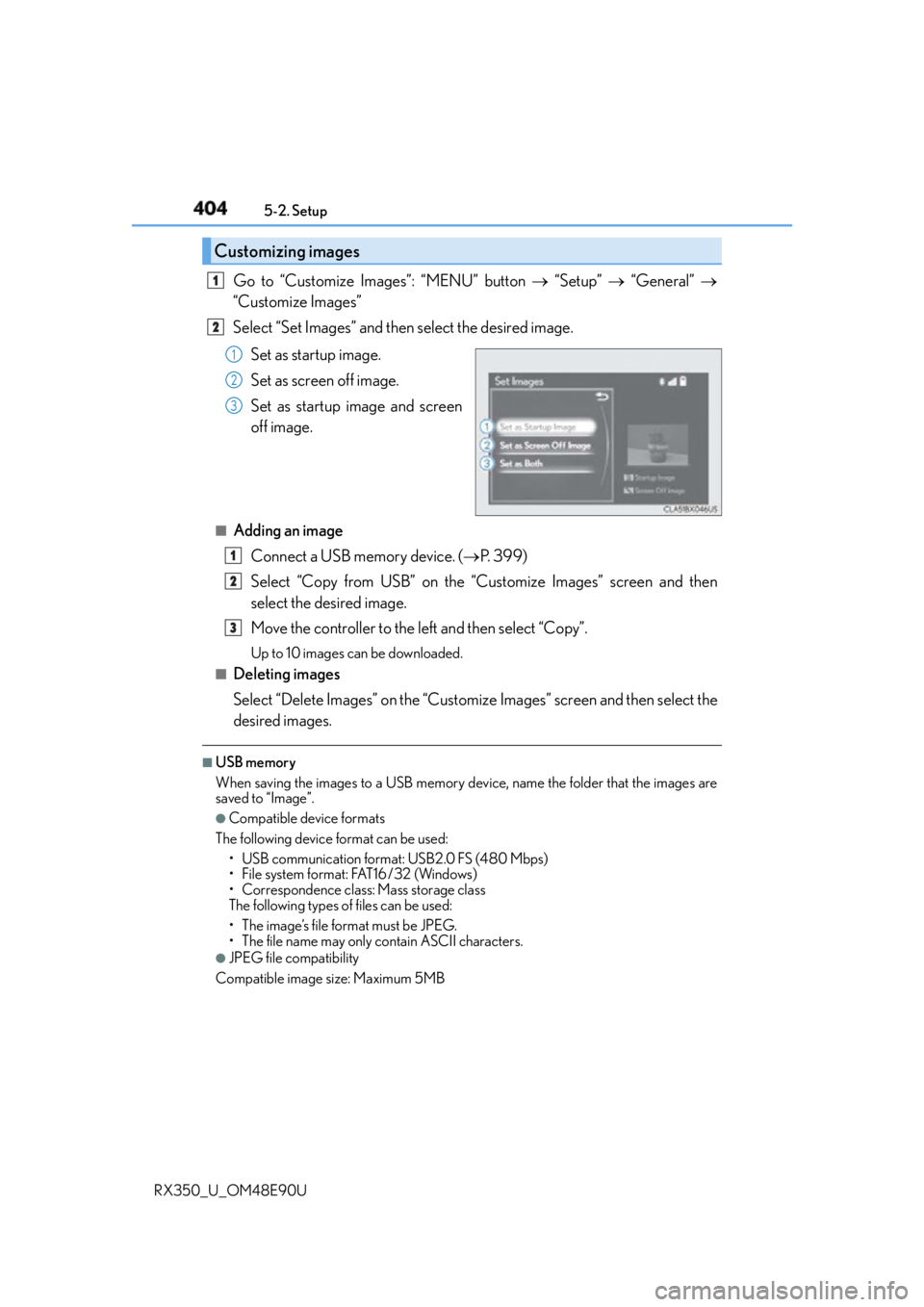
RX350_U_OM48E90U Go to “Customize Images”: “MENU” button “Setup” “General”
“Customize Images”
Select “Set Images” and then select the desired image.
Set as startup image.
Set as screen off image.
Set as startup image and screen
off image.■
Adding an image
Connect a USB memory device. ( P. 3 9 9 )
Select “Copy from USB” on the “Customize Images” screen and then
select the desired image.
Move the controller to the left and then select “Copy”. Up to 10 images can be downloaded.■
Deleting images
Select “Delete Images” on the “Customize Images” screen and then select the
desired images. ■
USB memory
When saving the images to a USB memory device, name the folder that the images are
saved to “Image”. ●
Compatible device formats
The following device format can be used:
• USB communication format: USB2.0 FS (480 Mbps)
• File system format: FAT16/32 (Windows)
• Correspondence class: Mass storage class
The following types of files can be used:
• The image’s file format must be JPEG.
• The file name may only contain ASCII characters. ●
JPEG file compatibility
Compatible image size: Maximum 5MBCustomizing images 1
2
1
2
3
1
2
3
Page 420 of 748

420 5-4. Using the radio
RX350_U_OM48E90U ■
XM Radio Services — Descriptions ●
Radio and Entertainment
XM offers more than 170 satellite radio channels of commercial-free music and pre-
mier sports, news, talk, and entertainment. XM is broadcast via satellites to millions of
listeners across the continental United States . XM subscribers listen to XM on satellite
radio receivers for the car, home, and port able use. More information about XM is
available online at www.siriusxm.com
(U.S.A.) or www.siriusxm.ca (Canada).●
Satellite tuner
The tuner supports only Audio Services (M usic and Talk) and the accompanying Text
Information of XM ®
Satellite Radio.■
XM Radio Services — Subscription Instructions
For XM Services requiring a subscription (s uch as XM Radio), the following paragraph
shall be included.
Required XM Radio monthly subscriptions sold separately after tr ial period. Subscrip-
tion fee is consumer only. All fees and prog ramming subject to change. Subscriptions are
subject to the Customer Agreement available at www.siriusxm.com
(U.S.A.) or
www.siriusxm.ca (Canada) XM service only availa ble in the 48 contiguous United
States and 10 Canadian provinces. © 2011 Sirius XM Radio Inc. Sirius, XM and all
related marks and logos are trademarks of Sirius XM Radio Inc. All other marks, channel
names and logos are the property of their respective owners.
For more information, program schedules, and to subscribe or extend subscription after
complimentary trial period; more information is available at:
U.S.A. Customers:
Visit w w w.siriusxm.com or call 1-877-447-0011
Canadian Customers:
Visit w w w.siriusxm.ca or call 1-877-438-9677●
Radio ID
You will need the radio ID when activating XM service or reporting a problem. If
“Ch000” is selected using the “TUNE•SCRO LL” knob, the ID code, which is 8 alpha-
numeric characters, will be displayed. If anot her channel is selected , the ID code will no
longer be displayed. The channel (000) alte rnates between displaying the radio ID and
the specific radio code. ■
XM Radio Services — Legal Disclaimers and Warnings ●
Fees and Taxes — Subscription fee, taxes, on e time activation fee, and other fees may
apply. Subscription fee is consumer only. All fees and programming subject to change.
Subscriptions subject to Customer Agreement available at www.siriusxm.com (U.S.A.)
or www.siriusxm.ca (Canada) XM service only available in the 48 contiguous United
States and Canada
* .
* : Canada — some deterioration of service may occur in extreme northern latitudes.
This is beyond the control of XM Satellite Radio.
Explicit Language Notice — Channels with frequent explicit la nguage are indicated
with an “XL” preceding the channel name. Channel blocking is available for XM Satel-
lite Radio receivers by notifying XM at;
U.S.A. Customers:
Visit www.siriusxm.com or calling 1-877-447-0011
Canadian Customers:
Visit www.siriusxm.ca or calling 1-877-438-9677
Page 430 of 748
430 5-6. Using an external device
RX350_U_OM48E90U ●
“Made for iPod” and “Made for iPhone” mean that an electronic accessory has been
designed to connect specifically to an iPod , or iPhone, respectively, and has been certi-
fied by the developer to meet Apple performance standards. ●
Apple is not responsible for the operation of this device or its compliance with safety
and regulatory standards. Please note that th e use of this accessory with iPod or iPhone
may affect wireless performance. ●
iPhone, iPod, iPod classic, iPod nano and iPod touch are trademarks of Apple Inc., reg-
istered in the U.S. and other countries. ■
iPod cover art ●
Depending on the iPod and songs in the iPod, iPod cover art may be displayed.●
This function can be changed to on/off. ( P. 4 1 2 )●
It may take time to display iPod cover art, and the iPod may not be operated while the
cover art display is in process. ■
iPod functions ●
When an iPod is connected and the audio sour ce is changed to iPod mode, the iPod will
resume play from the same poin t in which it was last used.●
Depending on the iPod that is connected to the system, certain functions may not be
available. If a function is un available due to a malfunction (as opposed to a system spec-
ification), disconnecting the device and reconnecting it may resolve the problem.●
Depending on the iPod, while connected to the system, the iPod cannot be operated
with its own controls. It is necessary to us e the controls of the vehicle’s audio system
instead. ●
When the battery level of an iPod is very low, the iPod may not operate. If so, charge the
iPod before use. ●
Compatible models ( P. 4 3 2 )■
iPod problems
To resolve most problems encountered when using your iPod, disconnect your iPod from
the vehicle iPod connection and reset it. For in structions on how to reset your iPod, refer
to your iPod Owner’s Manual.
Page 434 of 748
434 5-6. Using an external device
RX350_U_OM48E90U ■
USB memory functions ●
Depending on the USB memory device that is connected to the system, the device
itself may not be operable and certain functions may not be available. If the device is
inoperable or a function is unavailable du e to a malfunction (as opposed to a system
specification), disco nnecting the device and reconnect ing it may resolve the problem.●
If the USB memory device still does not be gin operation after being disconnected and
reconnected, format the device. ■
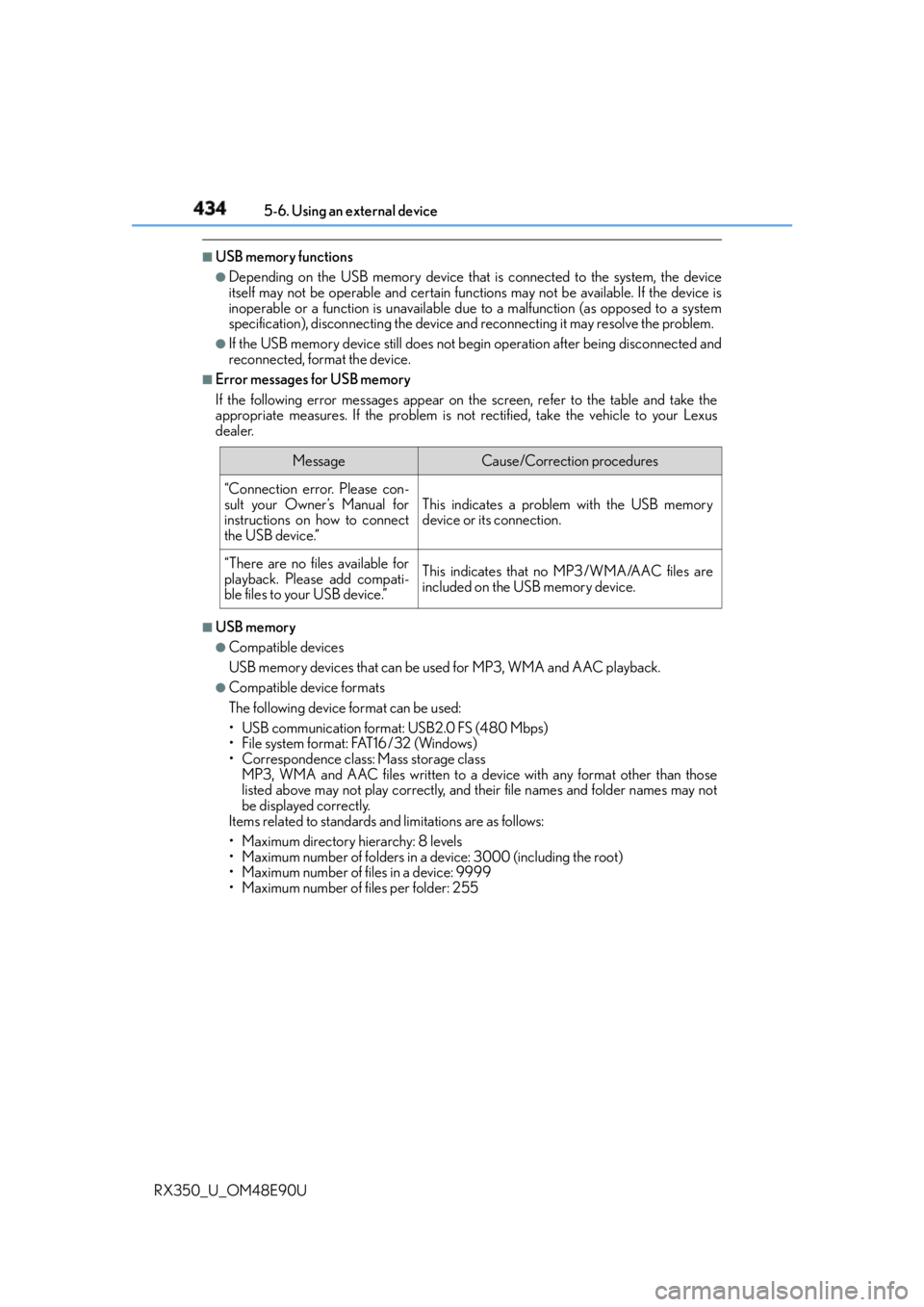
Error messages for USB memory
If the following error messages appear on the screen, refer to the table and take the
appropriate measures. If the pr oblem is not rectified, take the vehicle to your Lexus
dealer.
■
USB memory ●
Compatible devices
USB memory devices that can be used for MP3, WMA and AAC playback. ●
Compatible device formats
The following device format can be used:
• USB communication format: USB2.0 FS (480 Mbps)
• File system format: FAT16/32 (Windows)
• Correspondence class: Mass storage class
MP3, WMA and AAC files written to a device with any format other than those
listed above may not play correctly, and their file names and folder names may not
be displayed correctly.
Items related to standards and limitations are as follows:
• Maximum directory hierarchy: 8 levels
• Maximum number of folders in a device: 3000 (including the root)
• Maximum number of files in a device: 9999
• Maximum number of files per folder: 255 Message Cause/Correction procedures
“Connection error. Please con-
sult your Owner’s Manual for
instructions on how to connect
the USB device.” This indicates a problem with the USB memory
device or its connection.
“There are no files available for
playback. Please add compati-
ble files to your USB device.” This indicates that no MP3/WMA/AAC files are
included on the USB memory device.
Page 472 of 748
472 5-11. Bluetooth ®
RX350_U_OM48E90U ■
Bluetooth ®
antenna
The antenna is built into the display.
If the portable audio player is behind the seat or in the glove box or console box, or is
touching or covered by metal objects, the connection status may deteriorate.
If the cellular phone is behind the seat or in the console box, or touching or covered by
metal objects, the connection status may deteriorate. ■
Battery charge/signal status ●
This display may not correspond exactly wi th the portable audio player or cellular
phone itself. ●
This system does not have a charging function. ●
The portable audio player or cellular phone battery will be deplet ed quickly when the
device is connected to Bluetooth ®
.■
When using the Bluetooth ®
audio and hands-free system at the same time
The following problems may occur. ●
The Bluetooth ®
audio connection may be interrupted.●
Noise may be heard during Bluetooth ®
audio playback.■
About the contact in this system
The following data is stored for every regi stered cellular phone. When another phone is
connecting, you cannot read the registered data. ●
Contact data ●
Call history ●
Favorite ●
Message
When removing a Bluetooth ®
phone from the system, the above-mentioned data is also
deleted. ■
About Bluetooth ®
The Bluetooth ®
word mark and logos are regis-
tered trademarks owned by Bluetooth SIG, Inc.
and any use of such marks by PIONEER
Corporation is under license. Other trademarks
and trade names are those of their respective
owners.
Page 474 of 748

474 5-11. Bluetooth ®
RX350_U_OM48E90U ■
Certification
FCC ID:AJDK066
IC:775E-K066
NOTE:
This device complies with part 15 of the FC C Rules. Operation is subject to the following
two conditions: (1) This device may not caus e harmful interference, and (2) this device
must accept any interference received, incl uding interference that may cause undesired
operation.
This device complies with Industry Canada licence-exempt RSS st andard(s). Operation
is subject to the following two conditions: (1) this device may not cause interference, and
(2) this device must accept any interference, including interference that may cause
undesired operation of the device.
Le présent appareil est conforme aux CNR d'Industrie Canada applicables aux
appareils radio exempts de licence. L'exploitation est autorisée aux deux conditions
suivantes : (1) l'appareil ne doit pas produire de brouillage, et (2) l'utilisateur de l'appareil
doit accepter tout brouillage radioélectrique subi, même si le brouillage est susceptible
d'en compromettre le fonctionnement.
FCC WARNING:
Changes or modifications not expressly approved by the party responsible for compli-
ance could void the user’s authority to operate the equipment.
CAUTION:
This equipment complies with FCC radiation exposure limits set forth for an uncontrolled
environment and meets the FCC radio frequency (RF) Exposure Guidelines. This equip-
ment should be installed and operated keepin g the radiator at least 20cm or more away
from person’s body.
This equipment complies with IC radiation exposure limits set forth for an uncontrolled
environment and meets RSS-102 of the IC radio frequency (RF) Exposure rules. This
equipment should be installed and operated keeping the radiator at least 20cm or more
away from person’s body.
Cet équipement est conforme aux limites d’exposition aux rayonnements énoncées
pour un environnement non contrôlé et resp ecte les règles d’exposition aux fréquences
radioélectriques (RF) CNR-102 de l’IC. Cet éq uipement doit être installé et utilisé en
gardant une distance de 20 cm ou plus en tre le dispositif rayonnant et le corps.
Co-Location:
This transmitter must not be co-located or operated in conjunction with any other
antenna or transmitter.
Under Industry Canada regulations, this radio transmitter may only operate using an
antenna of a type and maximum (or lesser) gain approved for the transmitter by Industry
Canada. To reduce potential radio interference to other users, the antenna type and its
gain should be so chosen that the equivalent isotropically radiated power (e.i.r.p.) is not
more than that necessary for successful communication.
Conformément à la réglementation d’Indust rie Canada, le présent émetteur radio peut
fonctionner avec une antenne d’un type et d’un gain maximal (ou inférieur) approuvé
pour l’émetteur par Industrie Canada. Dans le but de réduire les risques de brouillage
radioélectrique à l’intention des autres utilisateurs, il faut choi sir le type d’antenne et son
gain de sorte que la puissance isotrope rayonnée équivalente (p.i.r.e.) ne dépasse pas
l’intensité nécessaire à l’établisseme nt d’une communicati on satisfaisante.
Page 479 of 748
4795-12. Other function
5
Lexus Display Audio system
RX350_U_OM48E90U ■
USB memory functions
P. 4 3 4 ■
USB memory ●
Compatible devices
USB memory device that can be used for JPEG display. ●
Compatible device formats
The following device format can be used:
• USB communication format: USB2.0 FS (480 Mbps)
• File system format: FAT16/32 (Windows)
• Correspondence class: Mass storage class ●
JPEG file compatibility
• Compatible image size: Maximum 10MB
• Compatible pixel size: Maximum 10,000,000 pixels
NOTICE ■
To prevent damage to the USB me mory device or its terminals
P. 4 3 6
Page 481 of 748
4815-12. Other function
5
Lexus Display Audio system
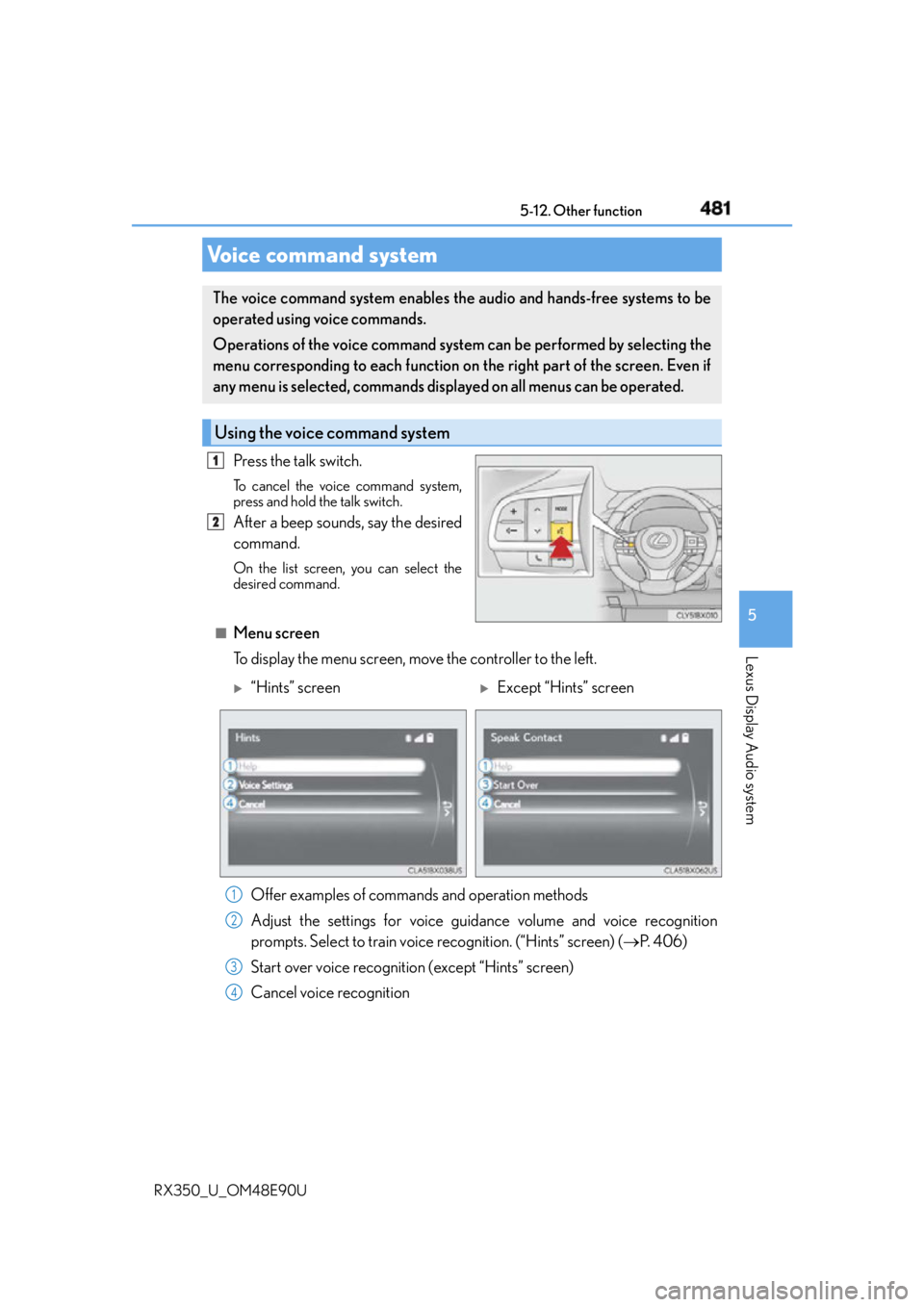
RX350_U_OM48E90U Press the talk switch. To cancel the voice command system,
press and hold the talk switch.
After a beep sounds, say the desired
command. On the list screen, you can select the
desired command.
■
Menu screen
To display the menu screen, move the controller to the left.Voice command system The voice command system enables the audio and hands-free systems to be
operated using voice commands.
Operations of the voice command system can be performed by selecting the
menu corresponding to each function on the right part of the screen. Even if
any menu is selected, commands displayed on all menus can be operated.
Using the voice command system 1
2
“Hints” screen
Except “Hints” screen
Offer examples of commands and operation methods
Adjust the settings for voice guidance volume and voice recognition
prompts. Select to train voice recognition. (“Hints” screen) ( P. 4 0 6 )
Start over voice recognition (except “Hints” screen)
Cancel voice recognition 1
2
3
4
Page 490 of 748
490 6-1. Basic operation of the Remote Touch screen
RX350_U_OM48E90U ■
Screen display during low temperatures
When the ambient temperature is extremely low, screen response may be delayed even
if the Remote Touch is operated.
WA R N I N G ■
When using the Remote Touch ●
Do not allow fingers, fingernails or hair to become caught in the Remote Touch as this
may cause an injury. ●
Be careful when selecting the Remote To uch in extreme temperatures as it may
become very hot or cold due to the temperature inside the vehicle.
NOTICE ■
To prevent damage to the Remote Touch ●
Do not allow the Remote Touch to come into contact with food, liquid, stickers or lit
cigarettes as doing so may cause it to change color, emit a strange odor or stop func-
tioning. ●
Do not subject the Remote Touch to excessive pressure or strong impact as the knob
may bend or break off. ●
Do not allow coins, contact lenses or other such items to become caught in the
Remote Touch as this may cause it to stop functioning. ●
Items of clothing may rip if they beco me caught on the Remote Touch knob.●
If your hand or any object is on the Remote Touch knob when the engine switch is in
ACCESSORY mode, the Remote Touch knob may not operate properly.
Page 493 of 748
4936-1. Basic operation of the Remote Touch screen
6
Interior features
RX350_U_OM48E90U ■
Selecting the operation screen
When selecting the main display, move the Remote Touch knob to the left.
When selecting the side display, move the Remote Touch knob to the right. ■
Main display
For details about the functions and operat ion of the main display, refer to the
respective section and “NAVIGATION SYSTEM OWNER’S MANUAL”. ■
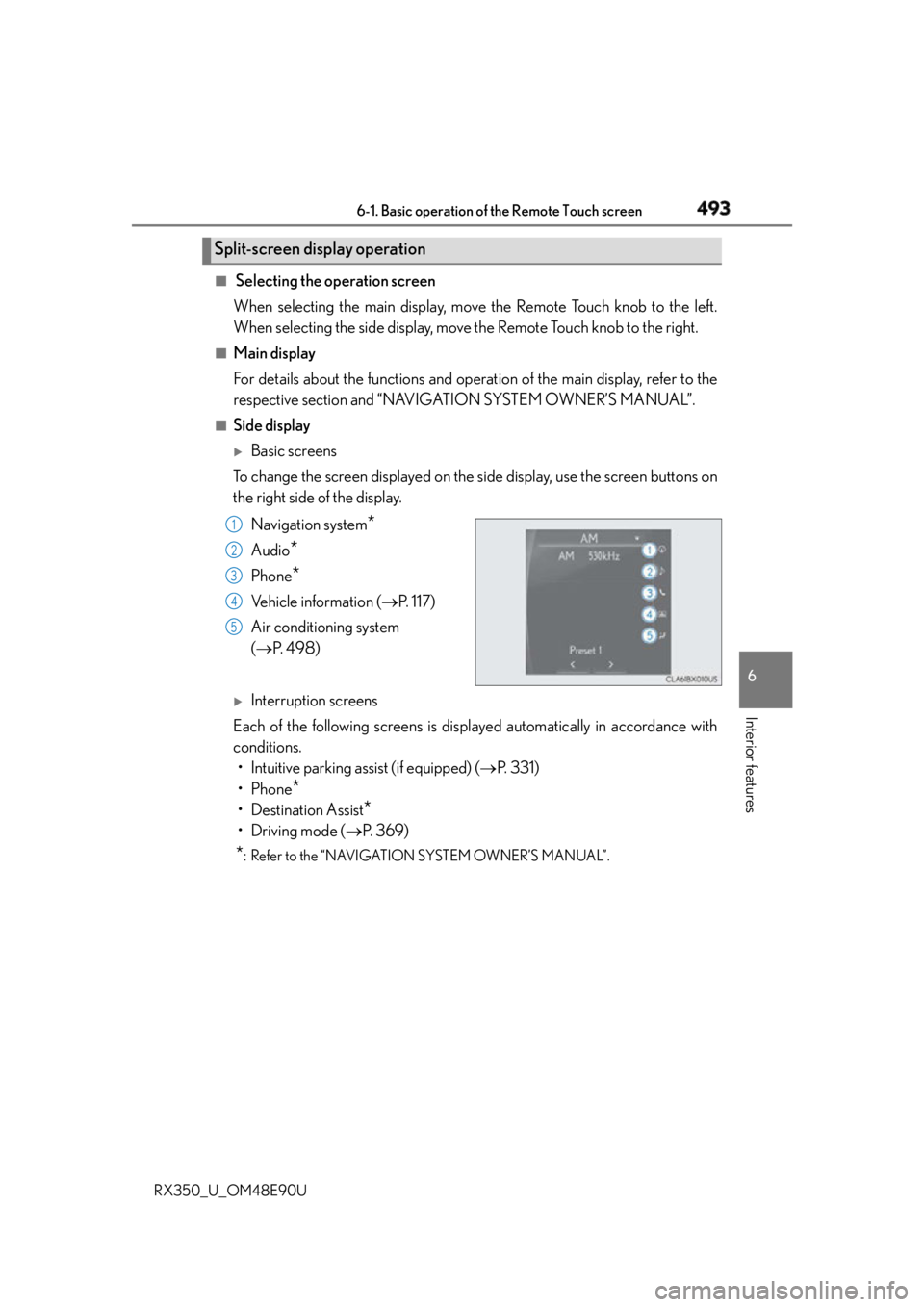
Side display
Basic screens
To change the screen displayed on the side display, use the screen buttons on
the right side of the display.
Navigation system
*Audio
* Phone
* Vehicle information ( P. 117)
Air conditioning system
( P. 4 9 8 )
Interruption screens
Each of the following screens is displayed automatically in accordance with
conditions.
• Intuitive parking assist (if equipped) ( P. 3 3 1 )
•Phone
*• Destination Assist
*•Driving mode ( P. 3 6 9 )
* : Refer to the “NAVIGATION SYSTEM OWNER’S MANUAL”.Split-screen display operation
1
2
3
4
5