ESP LEXUS RX350 2016 Service Manual
[x] Cancel search | Manufacturer: LEXUS, Model Year: 2016, Model line: RX350, Model: LEXUS RX350 2016Pages: 748, PDF Size: 12.36 MB
Page 360 of 748
360 4-5. Using the driving support systems
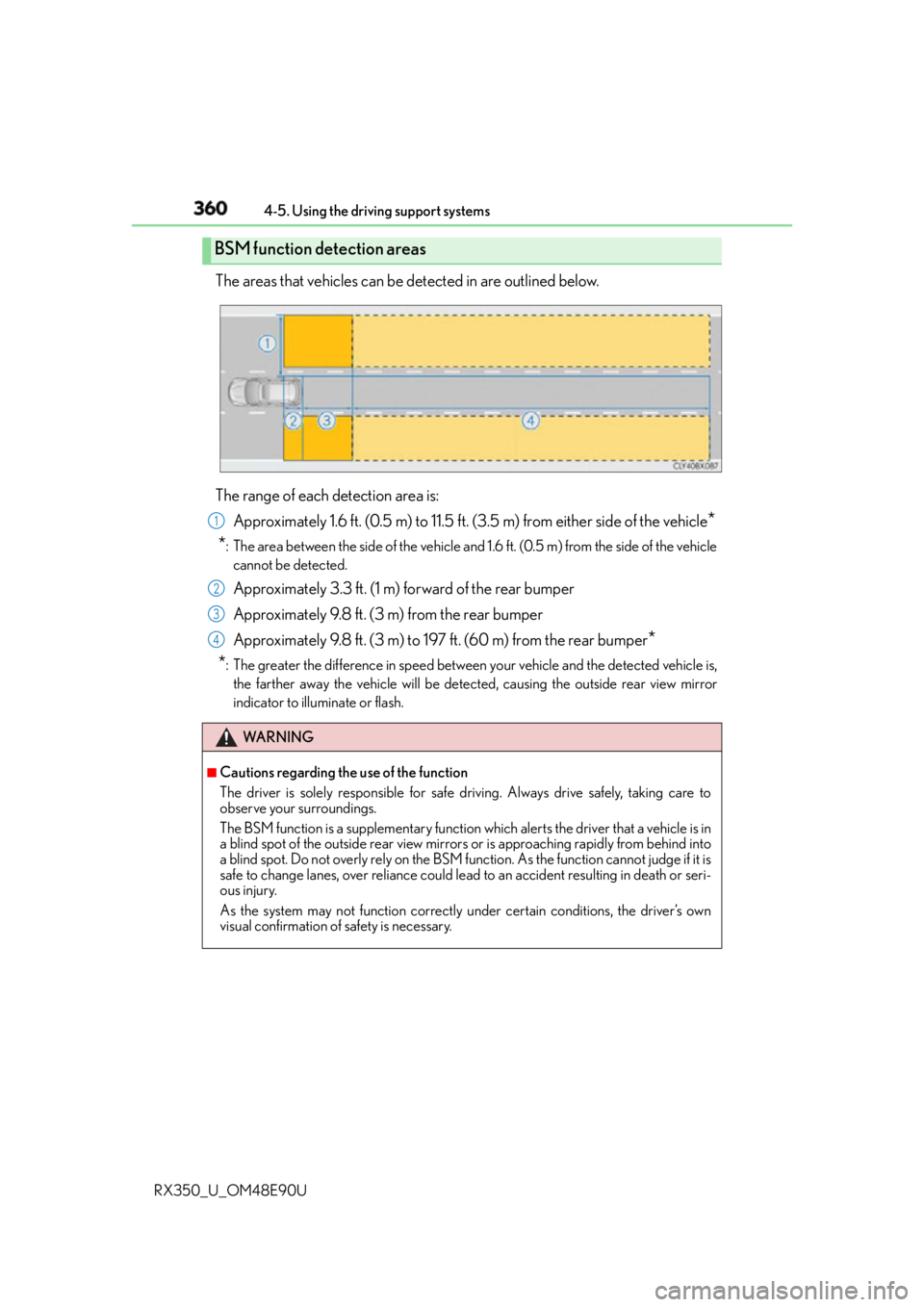
RX350_U_OM48E90U The areas that vehicles can be detected in are outlined below.
The range of each detection area is:
Approximately 1.6 ft. (0.5 m) to 11.5 ft. (3.5 m) from either side of the vehicle
*
* : The area between the side of the vehicle and 1.6 ft. (0.5 m) from the side of the vehicle
cannot be detected.
Approximately 3.3 ft. (1 m) forward of the rear bumper
Approximately 9.8 ft. (3 m) from the rear bumper
Approximately 9.8 ft. (3 m) to 197 ft. (60 m) from the rear bumper
*
* : The greater the difference in speed between your vehicle and the detected vehicle is,
the farther away the vehicle will be detected, causing th e outside rear view mirror
indicator to illuminate or flash.BSM function detection areas
WA R N I N G ■
Cautions regarding the use of the function
The driver is solely responsible for safe driving. Always drive safely, taking care to
observe your surroundings.
The BSM function is a supplementary function which alerts the driver that a vehicle is in
a blind spot of the outside rear view mirror s or is approaching rapidly from behind into
a blind spot. Do not overly rely on the BSM fu nction. As the function cannot judge if it is
safe to change lanes, over reliance could le ad to an accident resulting in death or seri-
ous injury.
As the system may not function correctly under certain conditions, the driver’s own
visual confirmation of safety is necessary. 1
2
3
4
Page 364 of 748
364 4-5. Using the driving support systems
RX350_U_OM48E90U ■
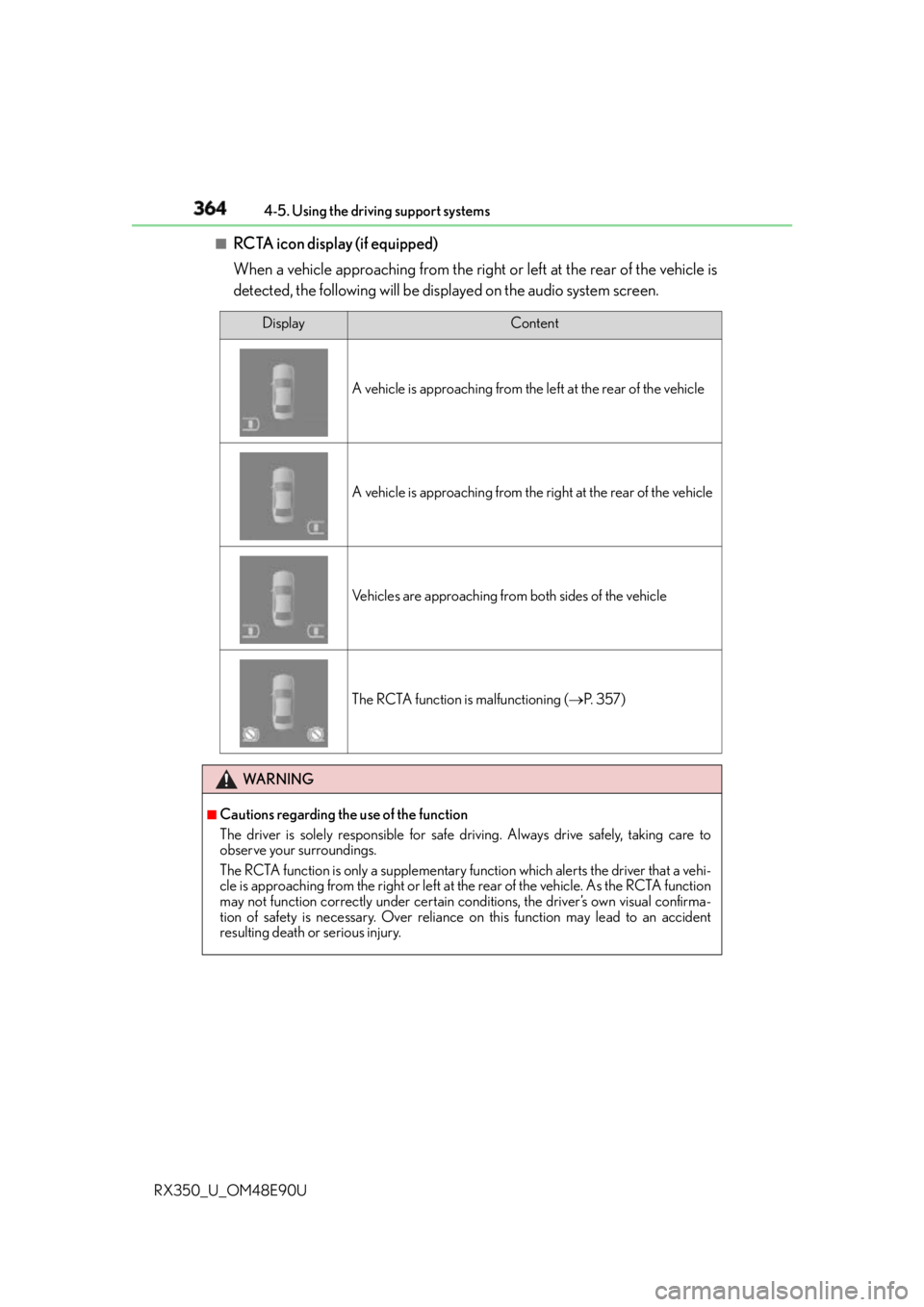
RCTA icon display (if equipped)
When a vehicle approaching from the right or left at the rear of the vehicle is
detected, the following will be displayed on the audio system screen. Display Content
A vehicle is approaching from the left at the rear of the vehicle
A vehicle is approaching from the right at the rear of the vehicle
Vehicles are approaching from both sides of the vehicle
The RCTA function is malfunctioning ( P. 3 5 7 )
WA R N I N G ■
Cautions regarding the use of the function
The driver is solely responsible for safe driving. Always drive safely, taking care to
observe your surroundings.
The RCTA function is only a supplementary fu nction which alerts the driver that a vehi-
cle is approaching from the right or left at the rear of the vehicle. As the RCTA function
may not function correctly under certain conditions, the driver’s own visual confirma-
tion of safety is necessary. Over reliance on this function may lead to an accident
resulting death or serious injury.
Page 369 of 748
3694-5. Using the driving support systems
4
Driving
RX350_U_OM48E90U
Vehicles without Adaptive Variable Suspension System
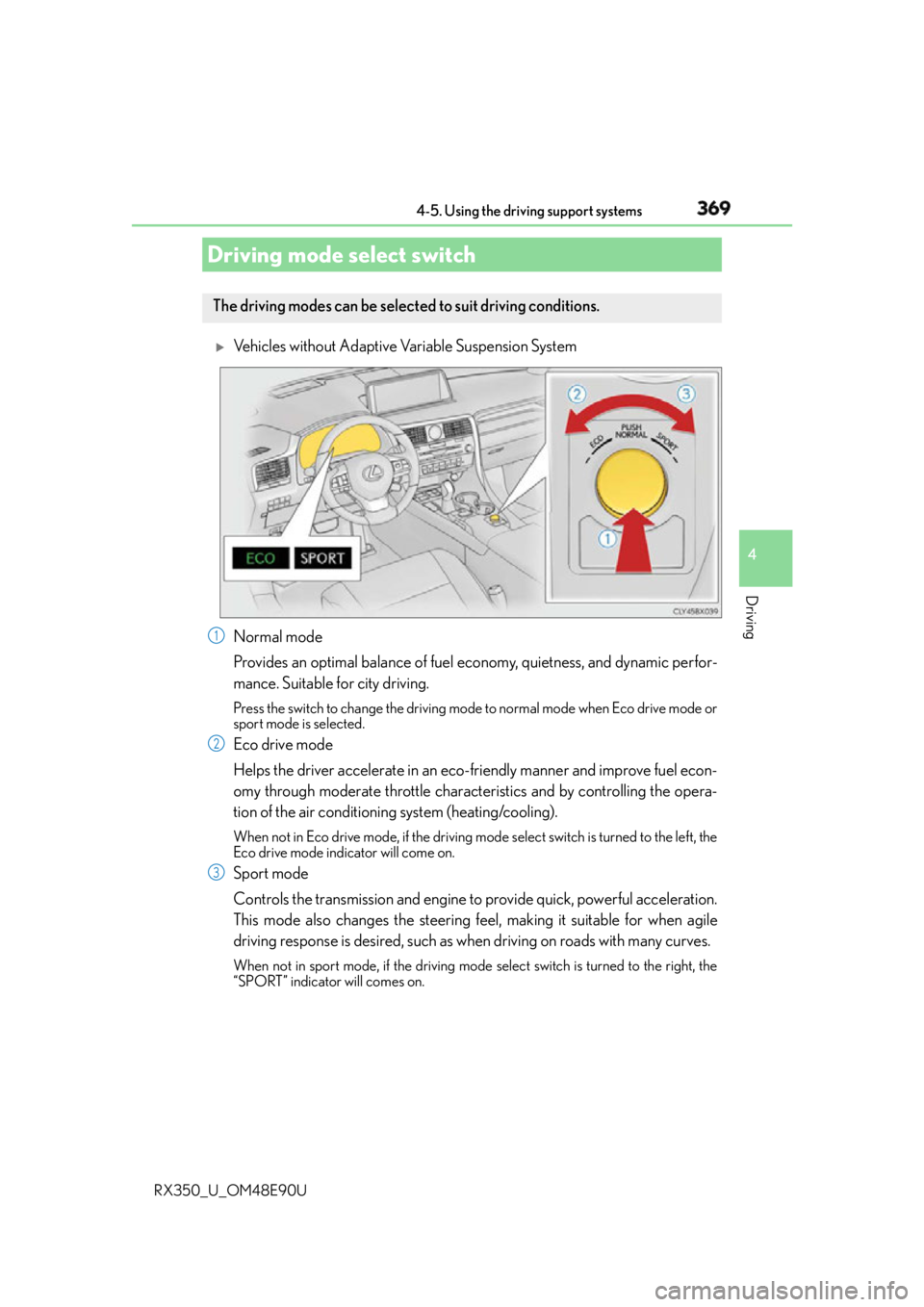
Normal mode
Provides an optimal balance of fuel economy, quietness, and dynamic perfor-
mance. Suitable for city driving. Press the switch to change the driving mode to normal mode when Eco drive mode or
sport mode is selected.
Eco drive mode
Helps the driver accelerate in an eco- friendly manner and improve fuel econ-
omy through moderate throttle characteristics and by controlling the opera-
tion of the air conditioning system (heating/cooling). When not in Eco drive mode, if the driving mode select switch is tu rned to the left, the
Eco drive mode indicator will come on.
Sport mode
Controls the transmission and engine to provide quick, powerful acceleration.
This mode also changes the steering f eel, making it suitable for when agile
driving response is desired, such as wh en driving on roads with many curves.When not in sport mode, if the driving mode select switch is turned to the right, the
“SPORT” indicator will comes on.Driving mode select switch The driving modes can be selected to suit driving conditions.
1
2
3
Page 371 of 748
3714-5. Using the driving support systems
4
Driving
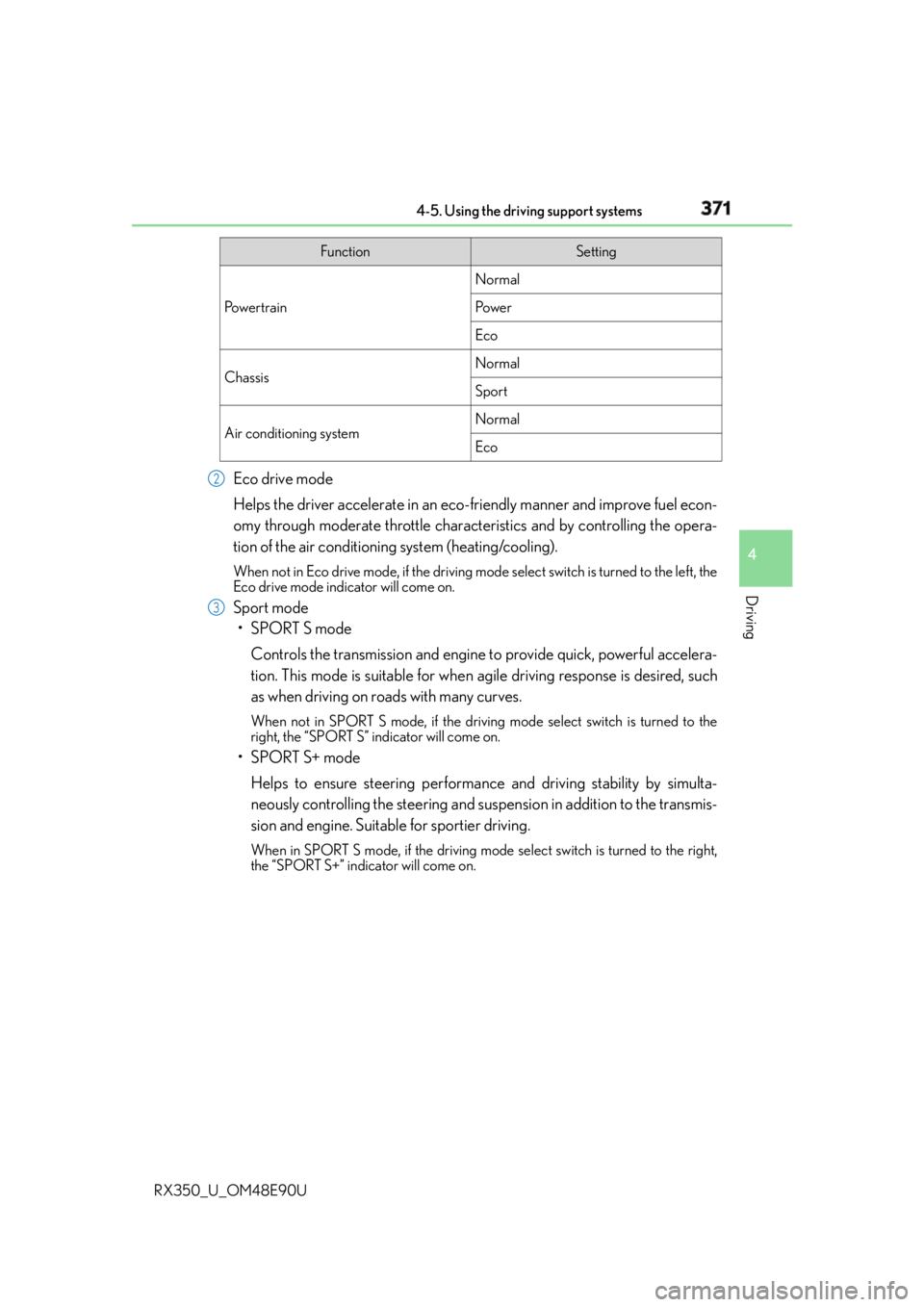
RX350_U_OM48E90U Eco drive mode
Helps the driver accelerate in an eco- friendly manner and improve fuel econ-
omy through moderate throttle characteristics and by controlling the opera-
tion of the air conditioning system (heating/cooling). When not in Eco drive mode, if the driving mode select switch is tu rned to the left, the
Eco drive mode indicator will come on.
Sport mode
•SPORT S mode
Controls the transmission and engine to provide quick, powerful accelera-
tion. This mode is suitable for when agile driving response is desired, such
as when driving on roads with many curves. When not in SPORT S mode, if the driving mode select switch is turned to the
right, the “SPORT S” indicator will come on.
•SPORT S+ mode
Helps to ensure steering performanc e and driving stability by simulta-
neously controlling the steering and suspen sion in addition to the transmis-
sion and engine. Suitable for sportier driving. When in SPORT S mode, if the driving mode select switch is turned to the right,
the “SPORT S+” indicator will come on. Function Setting
Po w e r t r a i n Normal
Po w e r
Eco
Chassis Normal
Sport
Air conditioning system Normal
Eco2
3
Page 374 of 748
374 4-5. Using the driving support systems
RX350_U_OM48E90U ◆ ABS (Anti-lock Brake System)
Helps to prevent wheel lock when the brakes are applied suddenly, or if the
brakes are applied while drivin g on a slippery road surface
◆ Brake assist
Generates an increased level of braking force after the brake pedal is
depressed when the system detects a panic stop situation
◆ VSC (Vehicle Stability Control)
Helps the driver to control skidding when swerving suddenly or turning on
slippery road surfaces
◆ Enhanced VSC (Enhanced Vehicle Stability Control)
Provides cooperative control of the ABS, TRAC, VSC and EPS.
Helps to maintain directional stability when swerving on slippery road sur-
faces by controlling steering performance.
◆ TRAC (Traction Control)
Helps to maintain drive power and prevent the drive wheels from spinning
when starting the vehicle or accelerating on slippery roads
◆ Hill-start assist control
Prevents the vehicle from rolling backward when starting on an incline or slip-
pery slope
◆ EPS (Electric Power Steering)
Employs an electric motor to reduce the amount of effort needed to turn the
steering wheelDriving assist systems To help enhance driving safety and performance, the following systems oper-
ate automatically in response to various driving situations. Be aware, however,
that these systems are supplementary and should not be relied upon too
heavily when operating the vehicle.
Page 378 of 748
378 4-5. Using the driving support systems
RX350_U_OM48E90U ■
Reactivation of the TRAC system linked to vehicle speed
When only the TRAC system is turned off, the TRAC system will turn on when vehicle
speed increases. However, when TRAC, VS C and Trailer Sway Control systems are
turned off, the systems will not turn on even when vehicle speed increases.■
Reduced effectiveness of the EPS system
The effectiveness of the EPS system is reduced to prevent the system from overheating
when there is frequent steering input over an extended period of time. The steering
wheel may feel heavy as a result. Should this occur, refrain from excessive steering input
or stop the vehicle and turn the engine of f. The EPS system should return to normal
within 10 minutes. ■
Operating conditions of hill-start assist control
When the following four conditions are met, the hill-start assist control will operate:●
The shift lever is in a position other than P or N (when starting off forward/backward on
an upward incline). ●
The vehicle is stopped. ●
The accelerator pedal is not depressed. ●
The parking brake is not engaged. ■
Automatic system cancelation of hill-start assist control
The hill-start assist control will turn off in any of the following situations: ●
The shift lever is moved to P or N. ●
The accelerator pedal is depressed. ●
The parking brake is engaged. ●
Approximately 2 seconds elapse after the brake pedal is released.
WA R N I N G ■
The ABS does not operate effectively when ●
The limits of tire gripping performance have been exceeded (such as excessively
worn tires on a snow covered road). ●
The vehicle hydroplanes while driving at high speed on wet or slick roads. ■
Stopping distance when the ABS is operat ing may exceed that of normal conditions
The ABS is not designed to shorten the vehicle’s stopping distance. Always maintain a
safe distance from the vehicle in front of you, especially in the following situations:●
When driving on dirt, gravel or snow-covered roads ●
When driving with tire chains ●
When driving over bumps in the road ●
When driving over roads with potholes or uneven surfaces ■
TRAC may not operate effectively when
Directional control and power may not be achievable while drivin g on slippery road
surfaces, even if the TRAC system is operating.
Drive the vehicle carefully in conditions where stability and power may be lost.
Page 379 of 748
3794-5. Using the driving support systems
4
Driving
RX350_U_OM48E90U WA R N I N G ■
Hill-start assist control does not operate effectively when ●
Do not overly rely on the hill-start assist control. The hill-start assist control may not
operate effectively on steep inclines and roads covered with ice. ●
Unlike the parking brake, hill-start assist control is not intended to hold the vehicle
stationary for an extended period of time. Do not attempt to use hill-start assist con-
trol to hold the vehicle on an incline, as doing so may lead to an accident. ■
When the VSC/Trailer Sway Control is activated
The slip indicator light flashes. Always drive carefully. Reckless driving may cause an
accident. Exercise particular care when the indicator light flashes. ■
When the TRAC/VSC/Trailer Sway Control systems are turned off
Be especially careful and drive at a speed ap propriate to the road conditions. As these
are the systems to help ensure vehicle st ability and driving force, do not turn the
TRAC/VSC/Trailer Sway Control systems off unless necessary. ■
Replacing tires
Make sure that all tires are of the specified size, brand, tread pattern and total load
capacity. In addition, make sure that the tires are inflated to the recommended tire infla-
tion pressure level.
The ABS, TRAC, VSC and Trailer Sway Control systems will not function correctly if
different tires are installed on the vehicle.
Contact your Lexus dealer for further information when replacing tires or wheels. ■
Handling of tires and the suspension
Using tires with any kind of problem or modi fying the suspension will affect the driving
assist systems, and may caus e a system to malfunction.■
Trailer Sway Control precaution
The Trailer Sway Control system is not able to reduce trailer sway in all situations.
Depending on many factors such as the condit ions of the vehicle, trailer, road surface,
and driving environment, the Trailer Sway Co ntrol system may not be effective. Refer to
your trailer owner’s manual for information on how to tow your trailer properly. ■
If trailer sway occurs
Observe the following precautions.
Failing to do so may caus e death or serious injury.●
Firmly grip the steering wh eel. Steer straight ahead.
Do not try to control trailer swaying by turning the steering wheel. ●
Begin releasing the accelerator pedal i mmediately but very gradually to reduce
speed.
Do not increase speed. Do not apply vehicle brakes.
If you make no extreme correction with the steering or brakes, your vehicle and trailer
should stabilize. ( P. 2 1 5 )
Page 385 of 748

3854-6. Driving tips
4
Driving
RX350_U_OM48E90U Your vehicle is not designed to be driven off-road. However, in the event that
off-road driving cannot be avoided, please observe the following precautions to
help avoid the areas prohibited to vehicles. ●
Drive your vehicle only in areas where off-road vehicles are permitted to
travel. ●
Respect private property. Get owner’s permission before entering private
property. ●
Do not enter areas that are closed. Honor gates, barriers and signs that
restrict travel. ●
Stay on established roads. When co nditions are wet, driving techniques
should be changed or travel delayed to prevent damage to roads. ●
AWD models: Avoid driving on very steep, slippery roads and other surfaces,
such as sand, where the tires are liable to lose traction. Your vehicle may not
perform as well as conventional AWD on-road vehicles on these surfaces.■
Additional information for off-road driving
For owners in U.S. mainland, Hawaii and Puerto Rico:
To obtain additional informat ion pertaining to driving your vehicle off-road, consult the
following organizations. ●
State and Local Parks and Recreation Departments ●
State Motor Vehicle Bureau ●
Recreational Vehicle Clubs ●
U.S. Forest Service and Bureau of Land ManagementOff-road driving
Page 386 of 748

386 4-6. Driving tips
RX350_U_OM48E90U WA R N I N G ■
Off-road driving precautions
Always observe the following precautions to minimize the risk of death, serious injury
or damage to your vehicle: ●
Drive carefully when off the road. Do not ta ke unnecessary risks by driving in danger-
ous places. ●
Do not grip the steering wheel spokes when driving off-road. A bad bump could jerk
the wheel and injure your hands. Keep both hands and especially your thumbs on the
outside of the rim. ●
Always check your brakes for effectivenes s immediately after driving in sand, mud,
water or snow. ●
After driving through tall grass, mud, rock, sand, rivers, etc., check that there is no
grass, bush, paper, rags, stone, sand, etc. adhering or trapped on the underbody.
Clear off any such matter from the underbody. If the vehicle is used with these materi-
als trapped or adhering to the underb ody, a breakdown or fire could occur.●
When driving off-road or in rugged terrai n, do not drive at excessive speeds, jump,
make sharp turns, strike objects, etc. This may cause loss of control or vehicle rollover
causing death or serious injury. You are also risking expensive damage to your vehi-
cle’s suspension and chassis.
NOTICE ■
To prevent water damage
Take all necessary safety measures to ensure that water damage to the engine or other
components does not occur. ●
Water entering the engine air intake will cause severe engine damage. ●
Water entering the automatic transmission will cause deterioration in shift quality,
locking up of your transmission accompan ied by vibration, and ultimately damage.●
Water can wash the grease from wheel be arings, causing rusting and premature fail-
ure, and may also enter the differential, tr ansmission and transfer (AWD models only)
case, reducing the gear o il’s lubricating qualities.■
When you drive through water
If driving through water, such as when crossing shallow streams, first check the depth of
the water and the bottom of the riverbed for firmness. Drive slowly and avoid deep
water. ■
Inspection after off-road driving ●
Sand and mud that has accumulated around brake discs may affect braking efficiency
and may damage brake system components. ●
Always perform a maintenance inspection after each day of off-road driving that has
taken you through rough terr ain, sand, mud, or water. For scheduled maintenance
information, refer to the “Warranty and Services Guide/Owner’s Manual Supple-
ment/Scheduled Maintenance”.
Page 397 of 748
3975-1. Basic Operations
5
Lexus Display Audio system
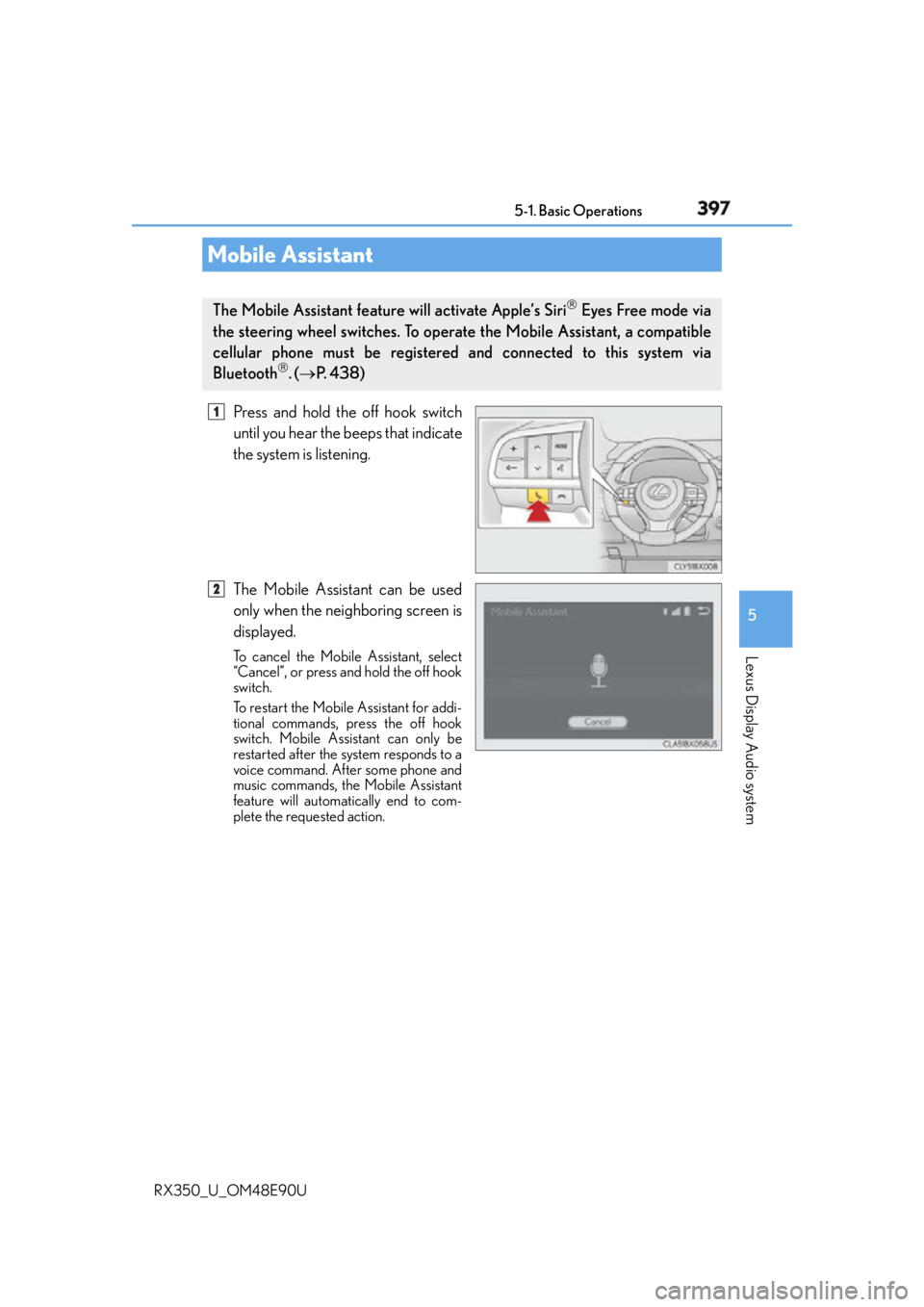
RX350_U_OM48E90U Press and hold the off hook switch
until you hear the beeps that indicate
the system is listening.
The Mobile Assistant can be used
only when the neighboring screen is
displayed. To cancel the Mobile Assistant, select
“Cancel”, or press and hold the off hook
switch.
To restart the Mobile Assistant for addi-
tional commands, press the off hook
switch. Mobile Assistant can only be
restarted after the system responds to a
voice command. After some phone and
music commands, the Mobile Assistant
feature will automatically end to com-
plete the requested action.Mobile Assistant The Mobile Assistant feature will activate Apple’s Siri
Eyes Free mode via
the steering wheel switches. To operate the Mobile Assistant, a compatible
cellular phone must be registered and connected to this system via
Bluetooth
. ( P. 4 3 8 ) 1
2