towing LEXUS RX350 2016 Owner's Manual
[x] Cancel search | Manufacturer: LEXUS, Model Year: 2016, Model line: RX350, Model: LEXUS RX350 2016Pages: 748, PDF Size: 12.36 MB
Page 273 of 748
2734-5. Using the driving support systems
4
Driving
RX350_U_OM48E90U WA R N I N G ■
When to disable the pre-collision system
In the following situations, disable the syst em, as it may not operate properly, possibly
leading to an accident resultin g in death or serious injury:●
When the vehicle is being towed ●
When your vehicle is towing another vehicle ●
When transporting the vehicle via truck, boat, train or similar means of transportation ●
When the vehicle is raised on a lift with the engine running and the tires are allowed to
rotate freely ●
When inspecting the vehicle using a drum tester such as a chassis dynamometer or
speedometer tester, or when using an on vehicle wheel balancer ●
When a strong impact is app lied to the front bumper or front grille, due to an accident
or other reasons ●
If the vehicle cannot be driven in a stable manner, such as when the vehicle has been
in an accident or is malfunctioning ●
When the vehicle is driven in a sporty manner or off-road ●
When the tires are not properly inflated ●
When the tires are very worn ●
When tires of a size other than specified are installed●
When tire chains are installed ●
When a compact spare tire or an emergency tire puncture repair kit is used ●
If the suspensi on is modified●
If the front of the vehicle is raised or lowered, such as when loaded with heavy lug-
gage
Page 286 of 748
286 4-5. Using the driving support systems
RX350_U_OM48E90U WA R N I N G ■
Before using LKA system
Do not rely solely upon the LKA system. LKA is not a system which automatically
drives the vehicle or reduces the amount of attention that must be paid to the area in
front of the vehicle. The driver must always assume full responsibility for driving safely
by always paying careful attention to the surrounding conditions and operate the steer-
ing wheel to correct the path of the vehicle. Also, make sure to take adequate breaks
when fatigued, such as from driv ing for a long period of time.
Failure to perform appropriate driving operat ions and pay careful attention may lead to
an accident, resulting in death or serious injury. ■
To avoid operating LKA by mistake
When not using the LKA system, use the LKA switch to turn the system off. ■
Situations unsuitable for LKA
Do not use the LKA system in the following situations.
The system may not operate properly and le ad to an accident, resulting in death or
serious injury. ●
A spare tire, tire chains, etc., are equipped. ●
When the tires have been excessively worn, or when the tire inflation pressure is low. ●
Tires which differ by structure, manufa cturer, brand or tread pattern are used.●
Objects or patterns that could be mistaken for white (yellow) lines are present on the
side of the road (guardrails, curbs, reflective poles, etc.).●
Vehicle is driven on a snow-covered road. ●
White (yellow) lines are difficult to see due to rain, snow, fog, dust, etc. ●
Asphalt repair marks, white (y ellow) line marks, etc., are present due to road repair.●
Vehicle is driven in a temporary lane or restricted lane due to construction work. ●
Vehicle is driven on a road surface which is slippery due to rainy weather, fallen snow,
freezing, etc. ●
Vehicle is driven in traffic lanes other than on highways and freeways. ●
Vehicle is driven in a construction zone. ●
When your vehicle is towing a trailer or during emergency towing ■
Preventing LKA system malfunctions and operations performed by mistake●
Do not modify the headlights or place stickers, etc., on the surface of the lights. ●
Do not modify the suspension etc. If the suspension etc. needs to be replaced, con-
tact your Lexus dealer. ●
Do not install or place anything on the hood or grille. Also, do not install a grille guard
(bull bars, kangaroo bar, etc.). ●
If your windshield needs repair s, contact your Lexus dealer.
Page 295 of 748
2954-5. Using the driving support systems
4
Driving
RX350_U_OM48E90U WA R N I N G ■
Before using LDA system
Do not rely solely upon the LDA system. LDA is not a system which automatically
drives the vehicle or reduces the amount of attention that must be paid to the area in
front of the vehicle. The driver must always assume full responsibility for driving safely
by always paying careful attention to the surrounding conditions and operate the steer-
ing wheel to correct the path of the vehicle. Also, make sure to take adequate breaks
when fatigued, such as from driv ing for a long period of time.
Failure to perform appropriate driving operat ions and pay careful attention may lead to
an accident, resulting in death or serious injury. ■
To avoid operating LDA by mistake
When not using the LDA system, use the LDA switch to turn the system off. ■
Situations unsuitable for LDA
Do not use the LDA system in the following situations.
The system may not operate properly and le ad to an accident, resulting in death or
serious injury. ●
A spare tire, tire chains, etc., are equipped. ●
When the tires have been excessively worn, or when the tire inflation pressure is low. ●
Tires which differ by structure, manufa cturer, brand or tread pattern are used.●
Objects or patterns that could be mistaken for white (yellow) lines are present on the
side of the road (guardrails, curbs, reflective poles, etc.).●
Vehicle is driven on a snow-covered road. ●
White (yellow) lines are difficult to see due to rain, snow, fog, dust, etc. ●
Asphalt repair marks, white (y ellow) line marks, etc., are present due to road repair.●
Vehicle is driven in a temporary lane or restricted lane due to construction work. ●
Vehicle is driven on a road surface which is slippery due to rainy weather, fallen snow,
freezing, etc. ●
Vehicle is driven in traffic lanes other than on highways and freeways. ●
Vehicle is driven in a construction zone. ●
When your vehicle is towing a trailer or during emergency towing ■
Preventing LDA system malfunctions and operations performed by mistake●
Do not modify the headlights or place stickers, etc., on the surface of the lights. ●
Do not modify the suspension etc. If the suspension etc. needs to be replaced, con-
tact your Lexus dealer. ●
Do not install or place anything on the hood or grille. Also, do not install a grille guard
(bull bars, kangaroo bar, etc.). ●
If your windshield needs repair s, contact your Lexus dealer.
Page 304 of 748
304 4-5. Using the driving support systems
RX350_U_OM48E90U WA R N I N G ■
Situations unsuitable for dynamic rada r cruise control with full-speed range
Do not use dynamic radar cruise control wi th full-speed range in any of the following
situations.
Doing so may result in inappropriate speed control and could cause an accident result-
ing in death or serious injury. ●
Roads where there are pede strians, cyclers, etc.●
In heavy traffic ●
On roads with sharp bends ●
On winding roads ●
On slippery roads, such as thos e covered with rain, ice or snow●
On steep downhills, or where there are sudden changes between sharp up and down
gradients
Vehicle speed may exceed the set speed when driving down a steep hill. ●
At entrances to freeways and highways ●
When weather conditions are bad enough that they may prevent the sensors from
detecting correctly (fog, snow, sandstorm, heavy rain, etc.)●
When there is rain, snow, etc. on the front surface of the radar sensor or camera sen-
sor ●
In traffic conditions that require frequent repeated acceleration and deceleration ●
When your vehicle is towing a trailer or during emergency towing ●
When an approach warning buzzer is heard often
Page 316 of 748
316 4-5. Using the driving support systems
RX350_U_OM48E90U WA R N I N G ■
Situations unsuitable for dynamic radar cruise control
Do not use dynamic radar cruise control in any of the following situations.
Doing so may result in inappropriate speed control and could cause an accident result-
ing in death or serious injury. ●
Roads where there are pede strians, cyclers, etc.●
In heavy traffic ●
On roads with sharp bends ●
On winding roads ●
On slippery roads, such as thos e covered with rain, ice or snow●
On steep downhills, or where there are sudden changes between sharp up and down
gradients
Vehicle speed may exceed the set speed when driving down a steep hill. ●
At entrances to freeways and highways ●
When weather conditions are bad enough that they may prevent the sensors from
detecting correctly (fog, snow, sandstorm, heavy rain, etc.)●
When there is rain, snow, etc. on the front surface of the radar sensor or camera sen-
sor ●
In traffic conditions that require frequent repeated acceleration and deceleration ●
When your vehicle is towing a trailer or during emergency towing ●
When an approach warning buzzer is heard often
Page 329 of 748
3294-5. Using the driving support systems
4
Driving
RX350_U_OM48E90U WA R N I N G ■
To avoid operating the cruise control by mistake
Switch the cruise control off using th e “ON/OFF” button when not in use.■
Situations unsuitable for cruise control
Do not use cruise control in any of the following situations.
Doing so may result in loss of control and could cause an accident resulting in death or
serious injury. ●
In heavy traffic ●
On roads with sharp bends ●
On winding roads ●
On slippery roads, such as thos e covered with rain, ice or snow●
On steep hills
Vehicle speed may exceed the set speed when driving down a steep hill. ●
When your vehicle is towing a trailer or during emergency towing
Page 336 of 748

336 4-5. Using the driving support systems
RX350_U_OM48E90U ■
The intuitive parking assist can be operated when ●
Front corner sensors:
• The engine switch is in IGNITION ON mode.
• The shift lever is in other than P.
• The vehicle speed is less than about 6 mph (10 km/h).
(At any speed when the shift lever is in R) ●
Front center sensors:
• The engine switch is in IGNITION ON mode.
• The shift lever is in other than P or R.
• The vehicle speed is less than about 6 mph (10 km/h). ●
Rear corner and rear center sensors:
• The engine switch is in IGNITION ON mode.
• The shift lever is in R. ■
Intuitive parking assist display ●
Vehicles with a Lexus Display Audio system /navigation system (8 -inch display): When
an obstacle is detected while the Lexus parking assist monitor or panoramic view mon-
itor is in use, the warning indi cator will appear in the upper pa rt of the screen even if the
display setting has been set to off. ●
Vehicles with a navigation system (12.3-inch display): If the intuitive parking assist dis-
play is set to on, detected objects will also be displayed on the panoramic view monitor.
For details, refer to “NAVIGATION SYSTEM OWNER’S MANUAL”. ■
Sensor detectio n information●
The sensor’s detection areas are limited to the areas around the vehicle’s bumper. ●
Certain vehicle conditions and the surround ing environment may affect the ability of a
sensor to correctly detect an obstacle. Particular instances where this may occur are
listed below.
• There is dirt, snow or ice on the sensor . (Wiping the sensors will resolve this prob-
lem.)
• The sensor is frozen. (Thawing th e area will resolve this problem.)
In especially cold weather, if a sensor is frozen the screen may show an abnormal
display, or obstacles may not be detected.
• The sensor is covered in any way.
• The vehicle is leaning co nsiderably to one side.
• On an extremely bumpy road, on an incline, on gravel, or on grass.
• The vicinity of the vehicle is noisy due to vehicle horns, motorcycle engines, air
brakes of large vehicles, or other loud noises producing ultrasonic waves.
• There is another vehicle equipped with parking assist sensors in the vicinity.
• The sensor is coated with a sheet of spray or heavy rain.
• The vehicle is equipped with a fender pole or wireless antenna.
• Towing eyelets are installed.
• The bumper or sensor receives a strong impact.
• The vehicle is approaching a tall or curved curb.
• In harsh sunlight or intense cold weather.
• The area directly under the bumpers is not detected.
• If obstacles draw too close to the sensor.
• A non-genuine Lexus suspension (low ered suspension etc.) is installed.
• People may not be detected if they are wearing certain types of clothing.
In addition to the examples above, there are instances in which, because of their shape,
signs and other objects may be judged by a sensor to be closer than they are.
Page 362 of 748

362 4-5. Using the driving support systems
RX350_U_OM48E90U ■
Conditions under which the BSM func tion may not function correctly●
The BSM function may not detect vehicles correctly in the following situations:
• When the sensor is misaligned due to a strong impact to the sensor or its surround-
ing area
• When mud, snow, ice, a sticker, etc. is covering the sensor or surrounding area on
the rear bumper
• When driving on a road surface that is wet with standing water during bad weather,
such as heavy rain, snow, or fog
• When multiple vehicles are approaching wi th only a small gap between each vehicle
• When the distance between your vehicle and a following vehicle is short
• When there is a significant difference in speed between your vehicle and the vehicle
that enters the detection area
• When the difference in speed between your vehicle and another vehicle is changing
• When a vehicle enters a detection area traveling at about the same speed as your
vehicle
• As your vehicle starts from a stop, a vehicle remains in the detection area
• When driving up and down consecutive steep in clines, such as hills, dips in the road,
etc.
• When driving on roads with sharp bends, consecutive curves, or uneven surfaces
• When vehicle lanes are wide, or when drivin g on the edge of a lane, and the vehicle
in an adjacent lane is far away from your vehicle
• When towing a trailer (veh icles with towing package)
• When items such as a bicycle carrier ar e installed on the rear of the vehicle
• When there is a significant difference in height between your vehicle and the vehicle
that enters the detection area
• Immediately after the BSM function is turned on ●
Instances of the BSM function unnecessarily detecting a vehicle and/or object may
increase in the following situations:
• When the sensor is misaligned due to a strong impact to the sensor or its surround-
ing area
• When the distance between your vehicle and a guardrail, wall, etc. that enters the
detection area is short
• When driving up and down consecutive steep in clines, such as hills, dips in the road,
etc.
• When vehicle lanes are narrow, or when driving on the edge of a lane, and a vehicle
traveling in a lane other than the ad jacent lanes enters the detection area
• When driving on roads with sharp bends, consecutive curves, or uneven surfaces
• When the tires are slipping or spinning
• When the distance between your vehicle and a following vehicle is short
• When a bicycle carrier or other accessory is installed to the rear of the vehicle
• When towing a trailer (veh icles with towing package)
Page 366 of 748
366 4-5. Using the driving support systems
RX350_U_OM48E90U ■
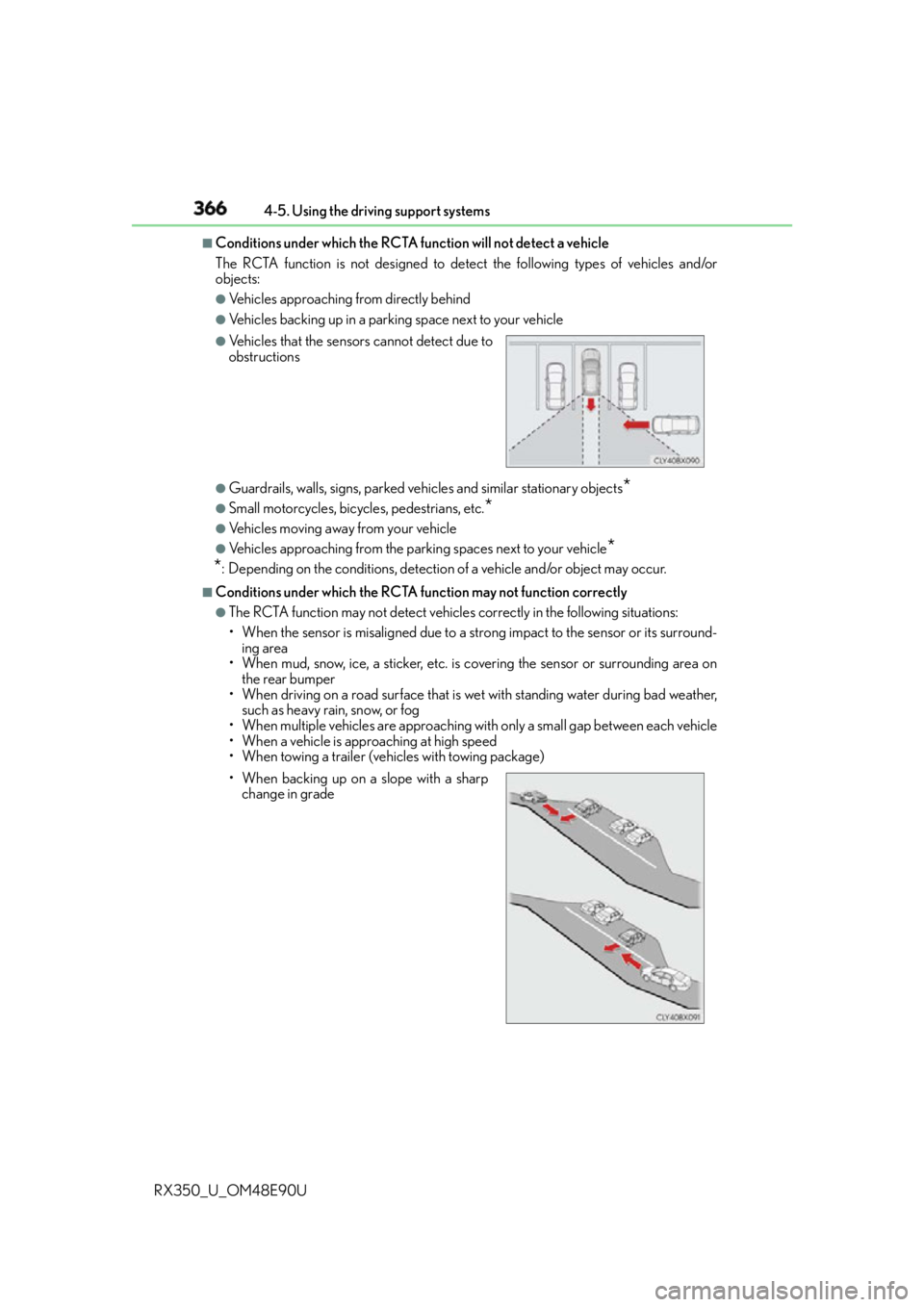
Conditions under which the RCTA function will not detect a vehicle
The RCTA function is not designed to detect the following types of vehicles and/or
objects: ●
Vehicles approaching from directly behind ●
Vehicles backing up in a parking space next to your vehicle
●
Guardrails, walls, signs, parked vehi cles and similar stationary objects
*●
Small motorcycles, bicycles, pedestrians, etc.
*●
Vehicles moving away from your vehicle ●
Vehicles approaching from the parking spaces next to your vehicle
*
* : Depending on the conditions, detection of a vehicle and/or object may occur. ■
Conditions under which the RCTA fu nction may not function correctly●
The RCTA function may not detect vehicles correctly in the following situations:
• When the sensor is misaligned due to a strong impact to the sensor or its surround-
ing area
• When mud, snow, ice, a sticker, etc. is covering the sensor or surrounding area on
the rear bumper
• When driving on a road surface that is wet with standing water during bad weather,
such as heavy rain, snow, or fog
• When multiple vehicles are approaching wi th only a small gap between each vehicle
• When a vehicle is approaching at high speed
• When towing a trailer (veh icles with towing package)●
Vehicles that the sensors cannot detect due to
obstructions
• When backing up on a slope with a sharp
change in grade
Page 515 of 748
5156-4. Using the storage features
6
Interior features
RX350_U_OM48E90U ●
When storing a bottle, close the cap. ●
The bottle may not be stored depending on its size or shape. NOTICE
To prevent damage to the rear cup holder, stow the cup holder before stowing the arm-
rest.
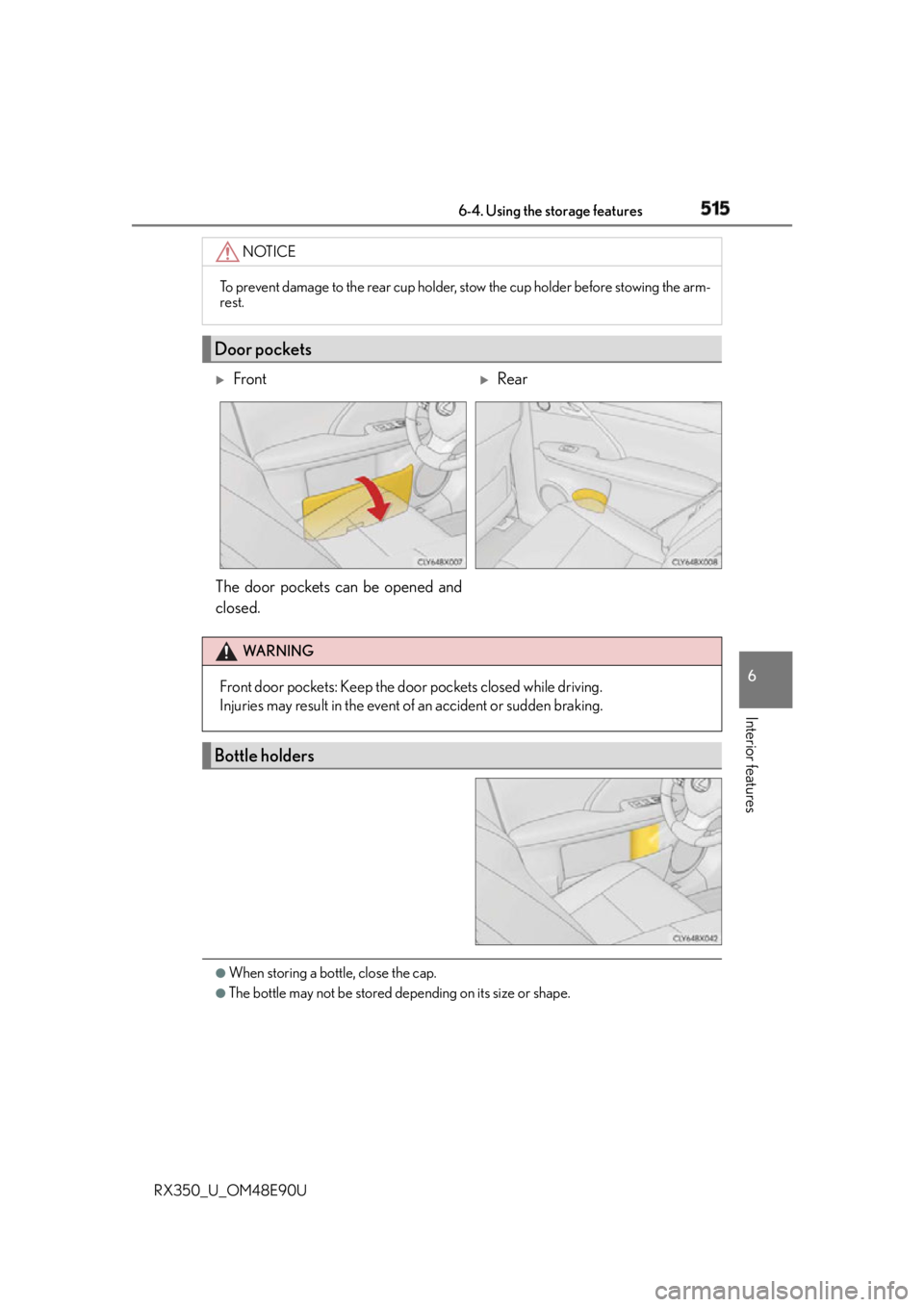
Door pockets
Front
Rear
The door pockets can be opened and
closed. WA R N I N G
Front door pockets: Keep the door pockets closed while driving.
Injuries may result in the event of an accident or sudden braking.
Bottle holders