EPS LEXUS RX350 2016 Owners Manual
[x] Cancel search | Manufacturer: LEXUS, Model Year: 2016, Model line: RX350, Model: LEXUS RX350 2016Pages: 748, PDF Size: 12.36 MB
Page 4 of 748

TABLE OF CONTENTS
4
RX350_U_OM48E90U 5-1. Basic Operations
Lexus Display Audio
system .......................................... 390
Steering wheel audio
switches ...................................... 396
Mobile Assistant..........................397
USB/AUX ports ......................... 399
5-2. Setup
Setup menu .................................. 402
General settings......................... 403
Voice settings .............................. 406
Display settings........................... 407
5-3. Using the audio system
Selecting the audio
source ..........................................408
Optimal use of the audio
system .......................................... 409
Audio settings .............................. 410
Audio menu screen
operation ......................................413
5-4. Using the radio
Radio operation............................416
5-5. Playing an audio CD and
MP3/WMA/AAC discs
CD player operation ................ 422
5-6. Using an external device
Listening to an iPod................... 429
Using USB memory
device .......................................... 433
Using the AUX port ..................437 5-7. Connecting Bluetooth ®
Steps for using Bluetooth ®
devices ........................................ 438
Registering a Bluetooth ®
device .......................................... 440
Selecting a Bluetooth ®
device ............................................ 441
Connecting a Bluetooth ®
audio player .............................. 442
Connecting a Bluetooth ®
phone ........................................... 443
Displaying a Bluetooth ®
device details ............................ 444
Detailed Bluetooth ®
settings ........................................ 445
5-8. Bluetooth ®
Audio
Listening to Bluetooth ®
Audio ........................................... 448
5-9. Bluetooth ®
Phone
Using a Bluetooth ®
Phone........................................... 450
Making a call.................................452
Receiving a call ........................... 455
Speaking on the phone ........... 456
Using a Bluetooth ®
phone message ....................... 458
Using the steering wheel
switches ...................................... 460
Bluetooth ®
phone settings...... 461
5-10. Phonebook
Contact settings ......................... 463
Messaging setting ..................... 4665
Lexus Display Audio system
Page 6 of 748

TABLE OF CONTENTS
6
RX350_U_OM48E90U 7-1. Maintenance and care
Cleaning and protecting
the vehicle exterior ................ 556
Cleaning and protecting
the vehicle inte rior.................... 561
7-2. Maintenance
Maintenance
requirements ............................ 564
General maintenance.............. 566
Emission inspection and
maintenance (I/M)
programs .................................... 569
7-3. Do-it-yourself
maintenance
Do-it-yourself service
precautions................................ 570
Hood ................................................572
Positioning a floor jack..............573
Engine compartment ................ 574
Tires.................................................. 584
Tire inflation pressure ............... 593
Wheels ........................................... 596
Air conditioning filter ............... 598
Windshield wiper inserts ......... 601
Electronic key battery.............. 603
Checking and replacing
fuses.............................................. 605
Headlight aim ..............................608
Light bulbs ......................................610 8-1. Essential information
Emergency flashers ...................624
If your vehicle has to be
stopped in an
emergency ................................ 625
8-2. Steps to take in an
emergency
If your vehicle needs to
be towed ......................................626
If you think something is
wrong........................................... 632
Fuel pump shut off
system .......................................... 633
If a warning light turns
on or a warning buzzer
sounds ......................................... 634
If a warning message is
displayed ...................................... 641
If you have a flat tire .................. 646
If the engine will not start ........ 658
If the shift lever cannot be
shifted from P ........................... 660
If the electronic key does
not operate properly ............... 661
If the vehicle battery is
discharged ................................. 665
If your vehicle overheats ......... 668
If the vehicle becomes
stuck ............................................... 6717
Maintenance and care 8
When trouble arises
Page 12 of 748
12
RX350_U_OM48E90U WA R N I N G :
Explains something that, if not obeyed , could cause death or serious injury
to people.
NOTICE:
Explains something that, if not obey ed, could cause damage to or a mal-
function in the vehicle or its equipment.
Indicates operating or working procedures. Follow the steps in
numerical order.
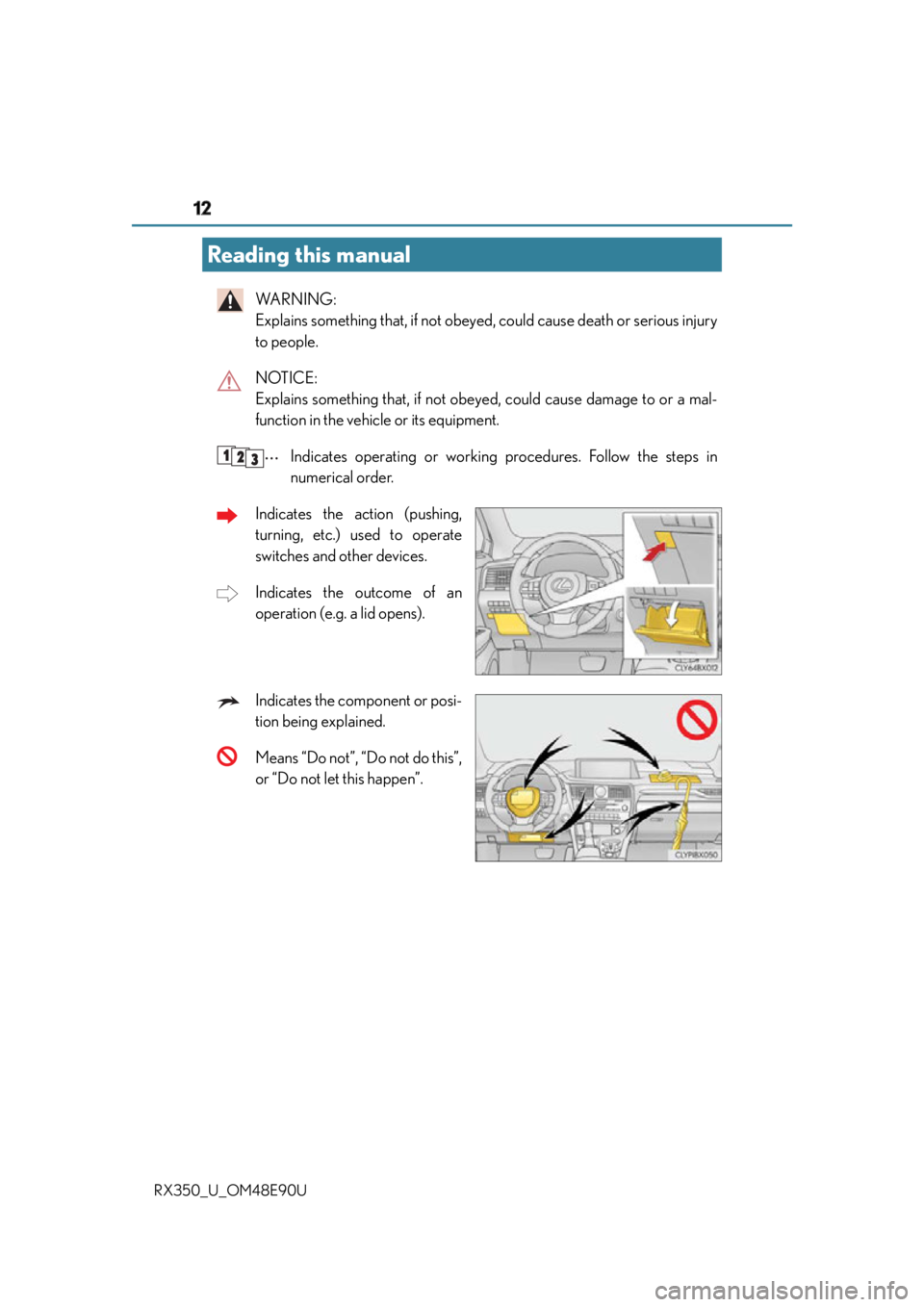
Indicates the action (pushing,
turning, etc.) used to operate
switches and other devices.
Indicates the outcome of an
operation (e.g. a lid opens).
Indicates the component or posi-
tion being explained.
Means “Do not”, “Do not do this”,
or “Do not let this happen”.Reading this manual
Page 128 of 748
128 3-2. Opening, closing and locking the doors
RX350_U_OM48E90U ■
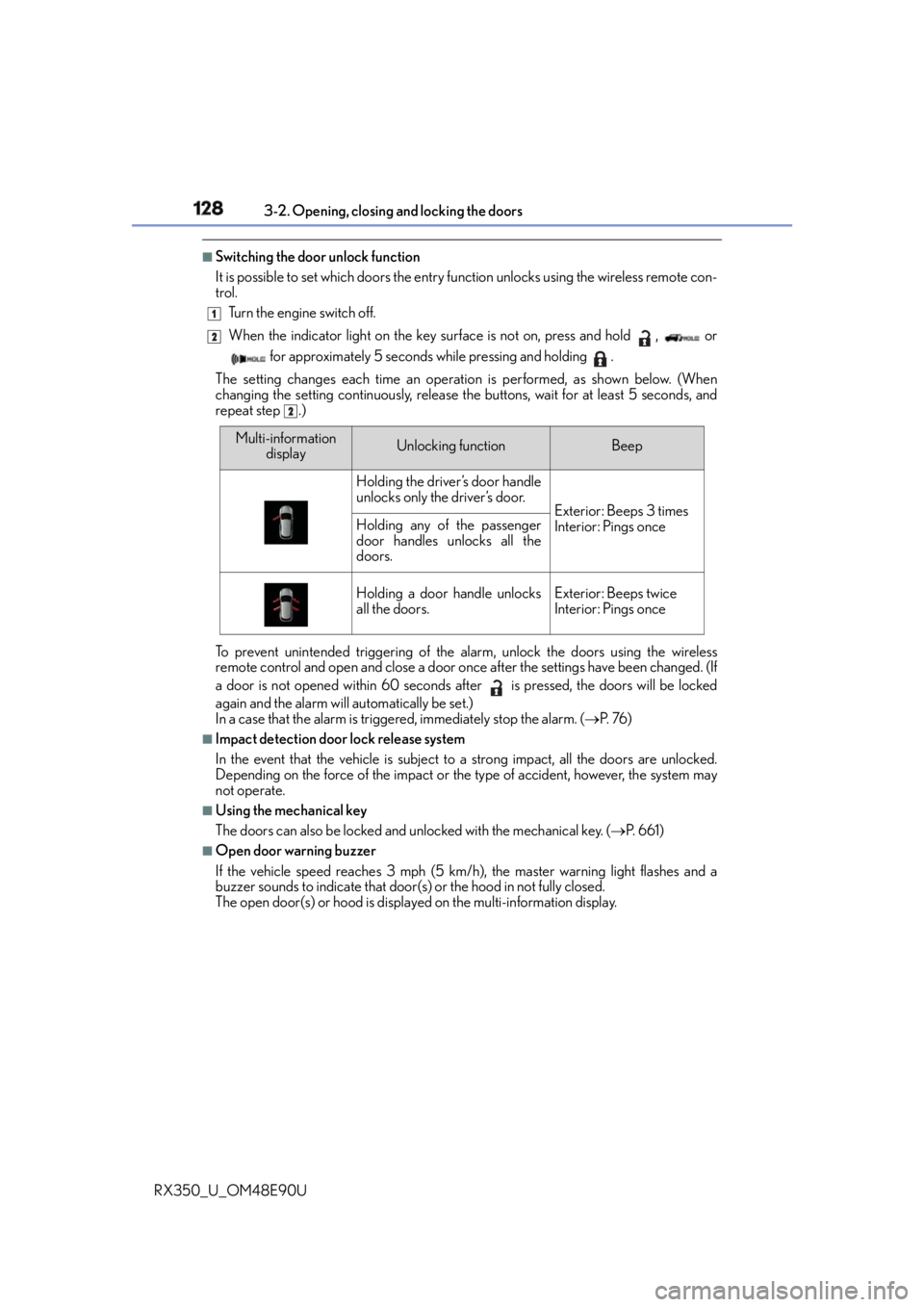
Switching the door unlock function
It is possible to set which doors the entry fu nction unlocks using the wireless remote con-
trol.
Turn the engine switch off.
When the indicator light on the key surface is not on, press and hold , or
for approximately 5 seconds while pressing and holding .
The setting changes each time an operatio n is performed, as shown below. (When
changing the setting continuously, release the buttons, wait for at least 5 seconds, and
repeat step .)
To prevent unintended triggering of the alarm, unlock the doors using the wireless
remote control and open and close a door once after the settings have been changed. (If
a door is not opened within 60 seconds after is pressed, the doors will be locked
again and the alarm will automatically be set.)
In a case that the alarm is triggered, immediately stop the alarm. ( P. 76 )■
Impact detection door lock release system
In the event that the vehicle is subject to a strong impact, all the doors are unlocked.
Depending on the force of the impact or the type of accident, however, the system may
not operate. ■
Using the mechanical key
The doors can also be locked and unlocked with the mechanical key. ( P. 6 6 1 )■
Open door warning buzzer
If the vehicle speed reaches 3 mph (5 km/h), the master warning light flashes and a
buzzer sounds to indicate that door (s) or the hood in not fully closed.
The open door(s) or hood is displa yed on the multi-information display.1
2
2
Multi-information
display Unlocking function Beep
Holding the driver’s door handle
unlocks only the driver’s door.
Exterior: Beeps 3 times
Interior: Pings onceHolding any of the passenger
door handles unlocks all the
doors.
Holding a door handle unlocks
all the doors. Exterior: Beeps twice
Interior: Pings once
Page 200 of 748

200 4-1. Before driving
RX350_U_OM48E90U Cargo capacity depends on the to tal weight of the occupants.
(Cargo capacity) = (Total load capaci ty) — (Total weight of occupants)
Steps for Determining Correct Load Limit —
(1) Locate the statement “The combined weight of occupants and cargo should
never exceed XXX kg or XXX lbs.” on your vehicle’s placard.
(2) Determine the combined weight of the driver and passengers that will be
riding in your vehicle.
(3) Subtract the combined weight of the driver and passengers from XXX kg or
XXX lbs.
(4) The resulting figure equals the ava ilable amount of cargo and luggage load
capacity.
For example, if the “XXX” amount equals 1400 lbs. and there will be five 150
lb passengers in your vehicle, the am ount of available cargo and luggage load
capacity is 650 lbs. (1400 750 (5 150) = 650 lbs.)
(5) Determine the combined weight of luggage and cargo being loaded on the
vehicle. That weight may not safely exceed the available cargo and luggage
load capacity calculated in Step 4.
(6) If your vehicle will be towing a trailer, load from your trailer will be transferred
to your vehicle. Consult this manual to determine how this reduces the avail-
able cargo and luggage load capacity of your vehicle.
( P. 2 0 4 ) Vehicles without towing package: Lexus does not recommend towing a trailer with
your vehicle. Your vehicle is not designed for trailer towing.Cargo and luggage Take notice of the following information about storage precautions, cargo
capacity and load.
Capacity and distribution
Page 239 of 748
2394-2. Driving procedures
4
Driving
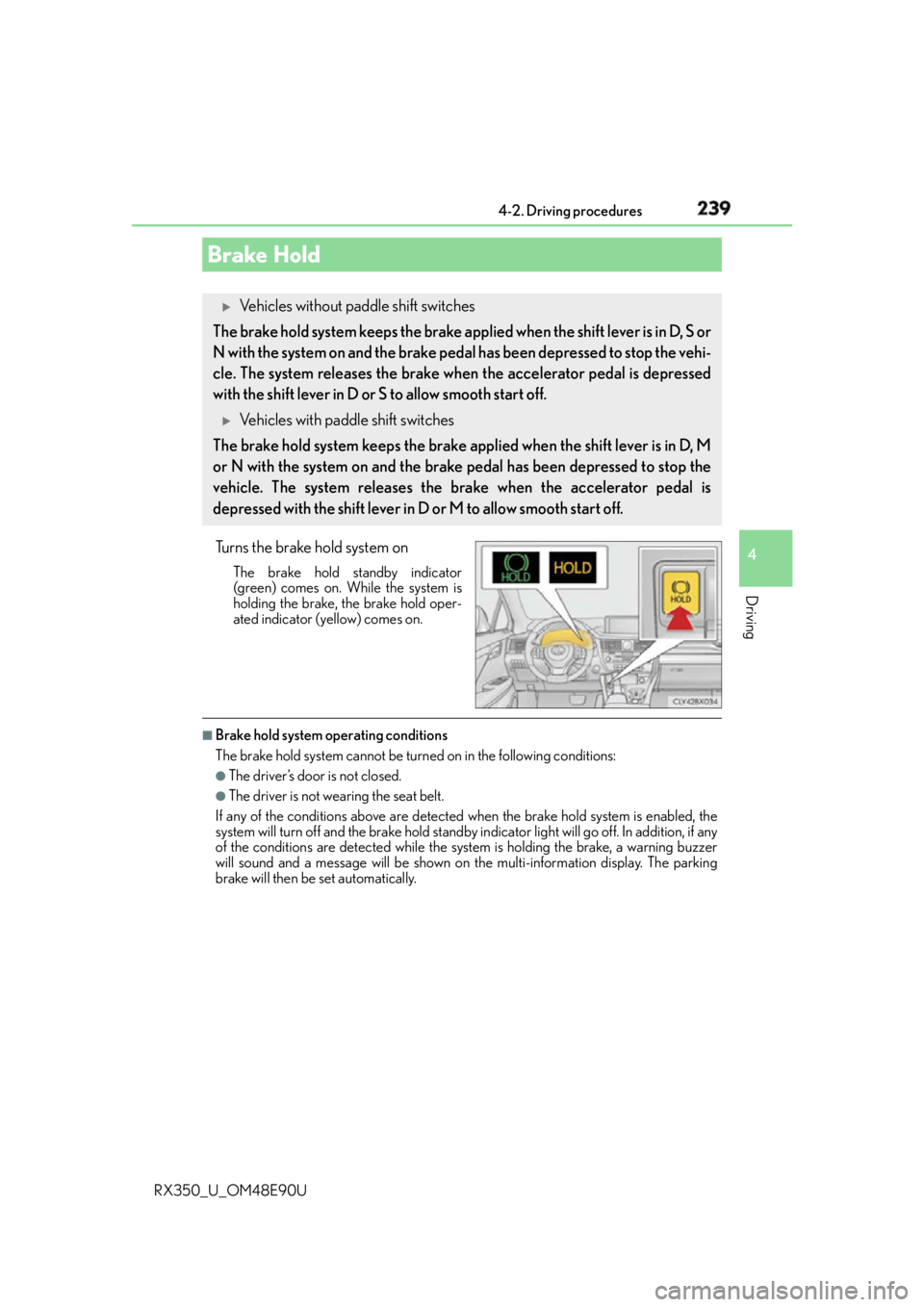
RX350_U_OM48E90U Turns the brake hold system on The brake hold standby indicator
(green) comes on. While the system is
holding the brake, the brake hold oper-
ated indicator (yellow) comes on.
■
Brake hold system operating conditions
The brake hold system cannot be turn ed on in the following conditions:●
The driver’s door is not closed. ●
The driver is not wearing the seat belt.
If any of the conditions above are detected when the brake hold system is enabled, the
system will turn off and the brake hold standby in dicator light will go of f. In addition, if any
of the conditions are detected while the sy stem is holding the brake, a warning buzzer
will sound and a message will be shown on th e multi-information display. The parking
brake will then be set automatically.Brake Hold
Vehicles without paddle shift switches
The brake hold system keeps the brake applied when the shift lever is in D, S or
N with the system on and the brake pedal has been depressed to stop the vehi-
cle. The system releases the brake when the accelerator pedal is depressed
with the shift lever in D or S to allow smooth start off.
Vehicles with paddle shift switches
The brake hold system keeps the brake applied when the shift lever is in D, M
or N with the system on and the brake pedal has been depressed to stop the
vehicle. The system releases the brake when the accelerator pedal is
depressed with the shift lever in D or M to allow smooth start off.
Page 258 of 748

258
RX350_U_OM48E90U 4-4. Refueling
●
Close all the doors and windows, and turn the engine switch off. ●
Confirm the type of fuel. ■
Fuel types
P. 6 8 3 ■
Fuel tank opening for unleaded gasoline
To help prevent incorrect fueling, your vehicle has a fuel tank opening that only accom-
modates the special nozzle on unleaded fuel pumps.
Opening the fuel tank cap Perform the following steps to open the fuel tank cap:
Before refueling the vehicle
Page 278 of 748
278 4-5. Using the driving support systems
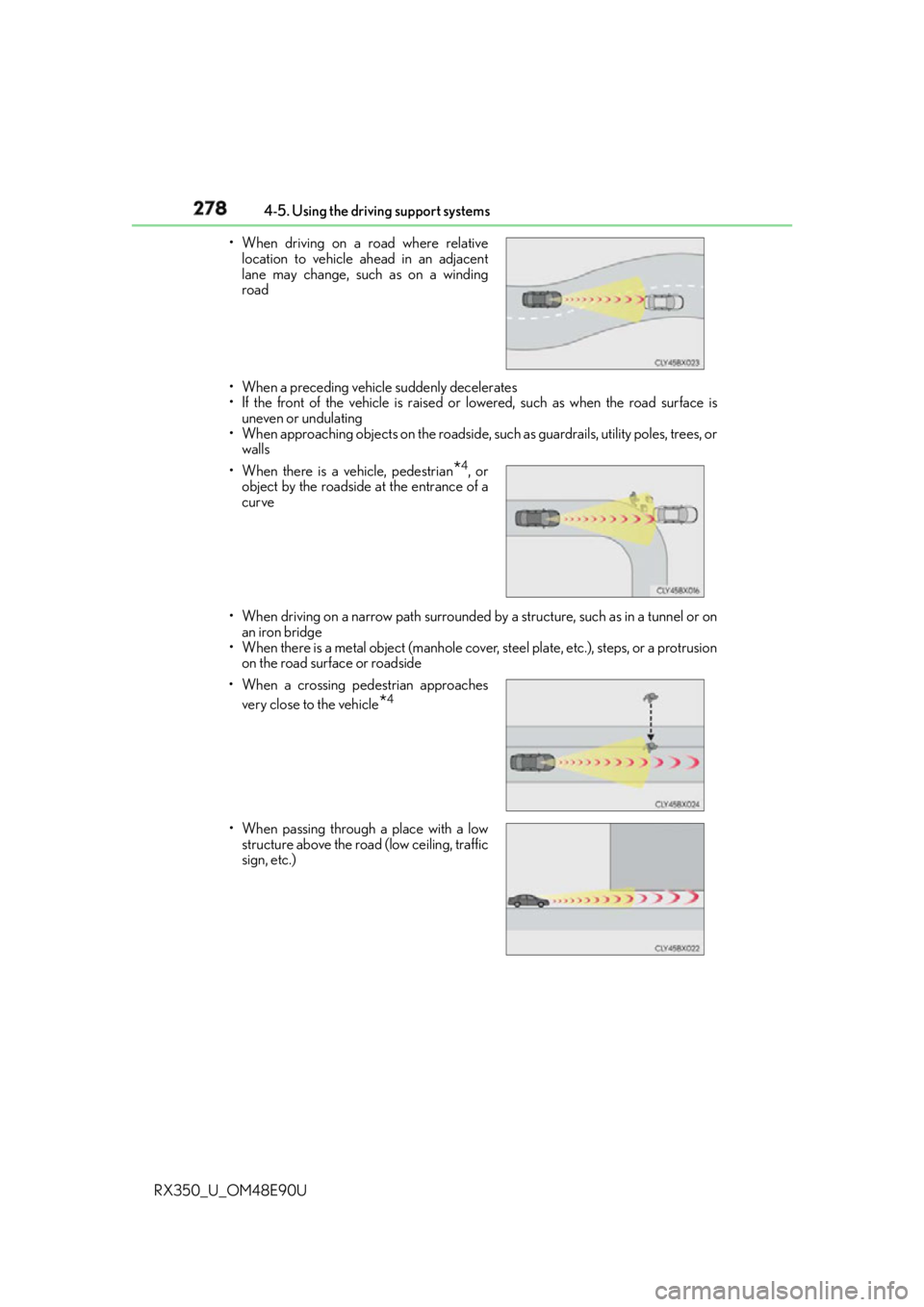
RX350_U_OM48E90U • When a preceding vehicle suddenly decelerates
• If the front of the vehicle is raised or lowered, such as when the road surface is
uneven or undulating
• When approaching objects on the roadside, su ch as guardrails, utility poles, trees, or
walls
• When driving on a narrow path surrounded by a structure, such as in a tunnel or on
an iron bridge
• When there is a metal object (manhole cover, steel plate, etc.), steps, or a protrusion
on the road surface or roadside• When driving on a road where relative
location to vehicle ahead in an adjacent
lane may change, such as on a winding
road
• When there is a vehicle, pedestrian
* 4
, or
object by the roadside at the entrance of a
curve
• When a crossing pedestrian approaches
very close to the vehicle
* 4
• When passing through a place with a low
structure above the road (low ceiling, traffic
sign, etc.)
Page 334 of 748
334 4-5. Using the driving support systems
RX350_U_OM48E90U * 1
: The images may differ from that shown in the illustrations. ( P. 3 3 1 )
* 2
: Multi-information display
* 3
: Audio system screen
* 4
: Lexus Display Audio or navigation system (8-inch display) screen ■
Buzzer operation and distance to an obstacle
A buzzer sounds when the sensors are operating. ●
The buzzer sounds faster as the vehicle approaches an obstacle.
When the vehicle comes within the follo wing distance of the obstacle, the
buzzer sounds continuously: Approximately 1.2 ft. (35 cm).●
When 2 or more obstacles are detected simultaneously, the buzzer system
responds to the nearest obstacle. If one or both come within the above dis-
tances, the beep will repeat a long tone, followed by fast beeps.
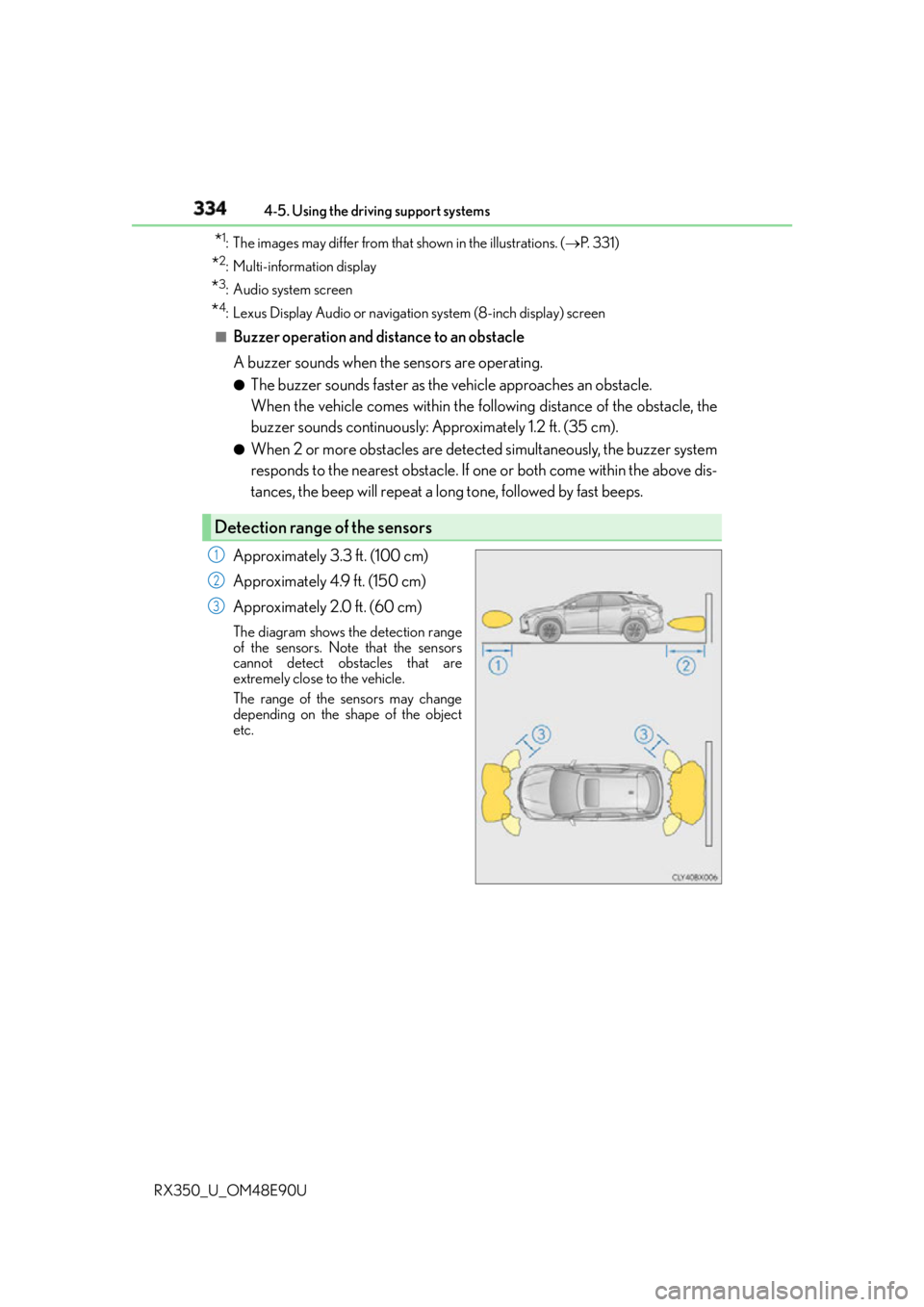
Approximately 3.3 ft. (100 cm)
Approximately 4.9 ft. (150 cm)
Approximately 2.0 ft. (60 cm) The diagram shows th e detection range
of the sensors. Note that the sensors
cannot detect obstacles that are
extremely close to the vehicle.
The range of the sensors may change
depending on the shape of the object
etc.Detection range of the sensors 1
2
3
Page 337 of 748

3374-5. Using the driving support systems
4
Driving
RX350_U_OM48E90U ●
The shape of the obstacle may prevent a sensor from detecting it. Pay particular atten-
tion to the following obstacles:
• Wires, fences, ropes, etc.
• Cotton, snow and other materials that absorb sound waves
• Sharply-angled objects
•Low obstacles
• Tall obstacles with upper sections projecting outwards in the direction of your vehi-
cle ●
The following situations may occur during use.
• Depending on the shape of the obstacle and other factors, the detection distance
may shorten, or detect ion may be impossible.
• Obstacles may not be detected if they are too close to the sensor.
• There will be a short delay between obst acle detection and display. Even at slow
speeds, there is a possibility that the obstacle w ill come within the sensor’s detection
areas before the display is shown and the buzzer sounds.
• Thin posts or objects lower than the sensor may not be detected when approached,
even if they have been detected once.
• It might be difficult to hear beeps due to th e volume of audio system or air flow noise
of the air conditioning system.■
If “Clean Parking Assist Sensor” is di splayed on the multi-information display
A sensor may be dirty or covered with snow or ice. In such cases, if it is removed from the
sensor, the system should return to normal.
Also, due to the sensor being frozen at low temperatures, a malfunction display may
appear or an obstacle may no t be detected. If the sensor thaws out, the system should
return to normal. ■
If “Parking Assist Malfunction” is di splayed on the multi-information display
Depending on the malfunction of the sensor, the device may not be working normally.
Have the vehicle inspected by your Lexus dealer. ■
Certification
For vehicles sold in Canada
This ISM device complies with Canadian ICES-001.
Cet appareil ISM est conforme a la norme NMB-001 du Canada. ■
Customization
Some functions can be customized. ( P. 335, 699)