engine LEXUS RX350 2019 Owners Manual
[x] Cancel search | Manufacturer: LEXUS, Model Year: 2019, Model line: RX350, Model: LEXUS RX350 2019Pages: 777, PDF Size: 12.44 MB
Page 245 of 777
244 4-2. Driving procedures
RX350/RX350L_U ■
If the shift lever cannot be shifted from P
First, check whether the brak e pedal is being depressed.
If the shift lever cannot be shifted with your foot on the brake pedal, there may be a prob-
lem with the shift lock system. Have the vehi cle inspected by your Lexus dealer immedi-
ately.
The following steps may be used as an emergency measure to ensure that the shift lever
can be shifted.
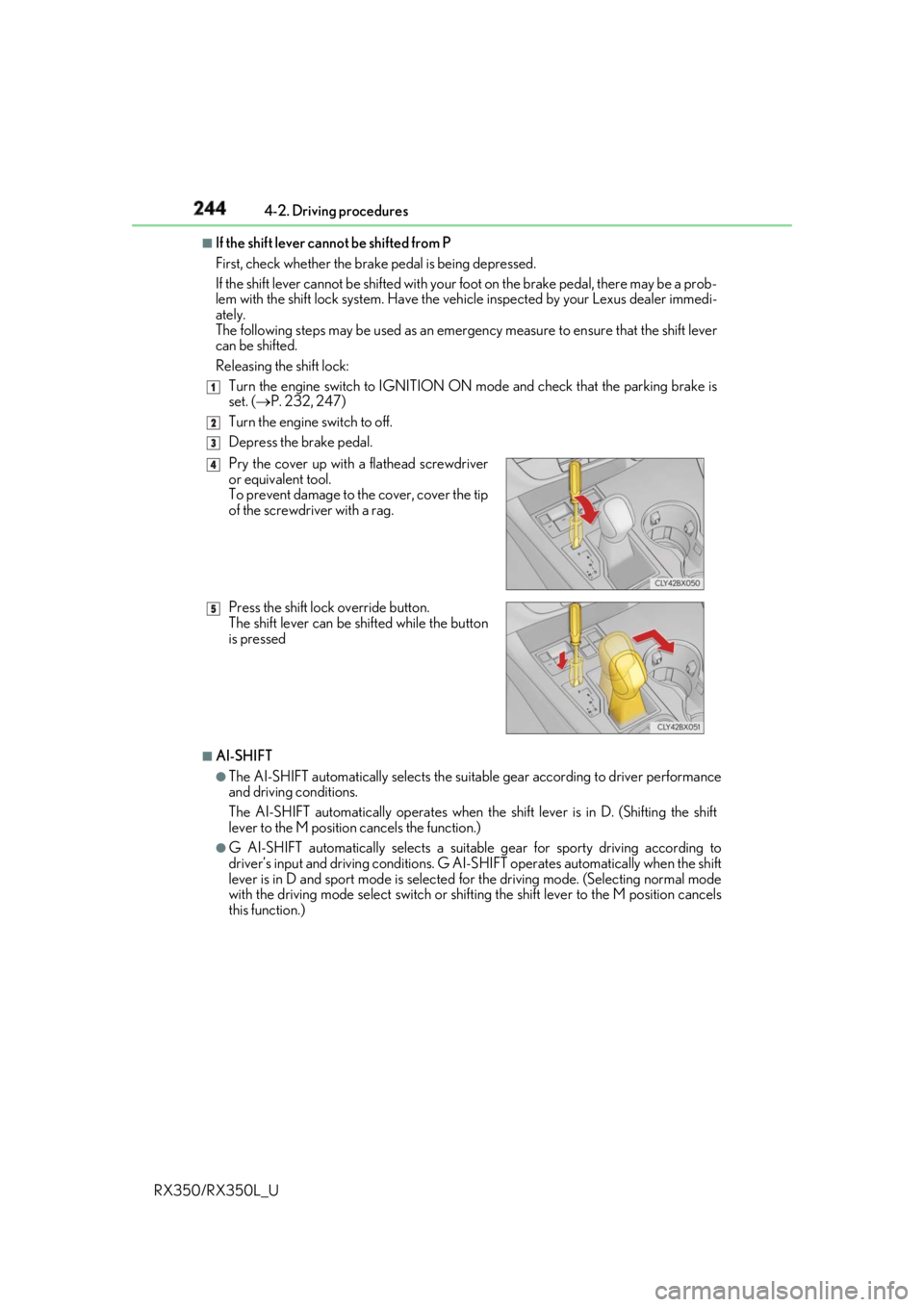
Releasing the shift lock:
Turn the engine switch to IGNITION ON mode and check that the parking brake is
set. ( P. 232, 247)
Turn the engine switch to off.
Depress the brake pedal.
■
AI-SHIFT ●
The AI-SHIFT automatically selects the suitab le gear according to driver performance
and driving conditions.
The AI-SHIFT automatically operates when th e shift lever is in D. (Shifting the shift
lever to the M position cancels the function.) ●
G AI-SHIFT automatically selects a suitable gear for sporty driving according to
driver’s input and driving conditions. G AI-S HIFT operates automatically when the shift
lever is in D and sport mode is selected for the driving mode. (Selecting normal mode
with the driving mode select switch or shifting the shift lever to the M position cancels
this function.) 1
2
3
Pry the cover up with a flathead screwdriver
or equivalent tool.
To prevent damage to the cover, cover the tip
of the screwdriver with a rag.
Press the shift lock override button.
The shift lever can be shifted while the button
is pressed 4
5
Page 247 of 777
246 4-2. Driving procedures
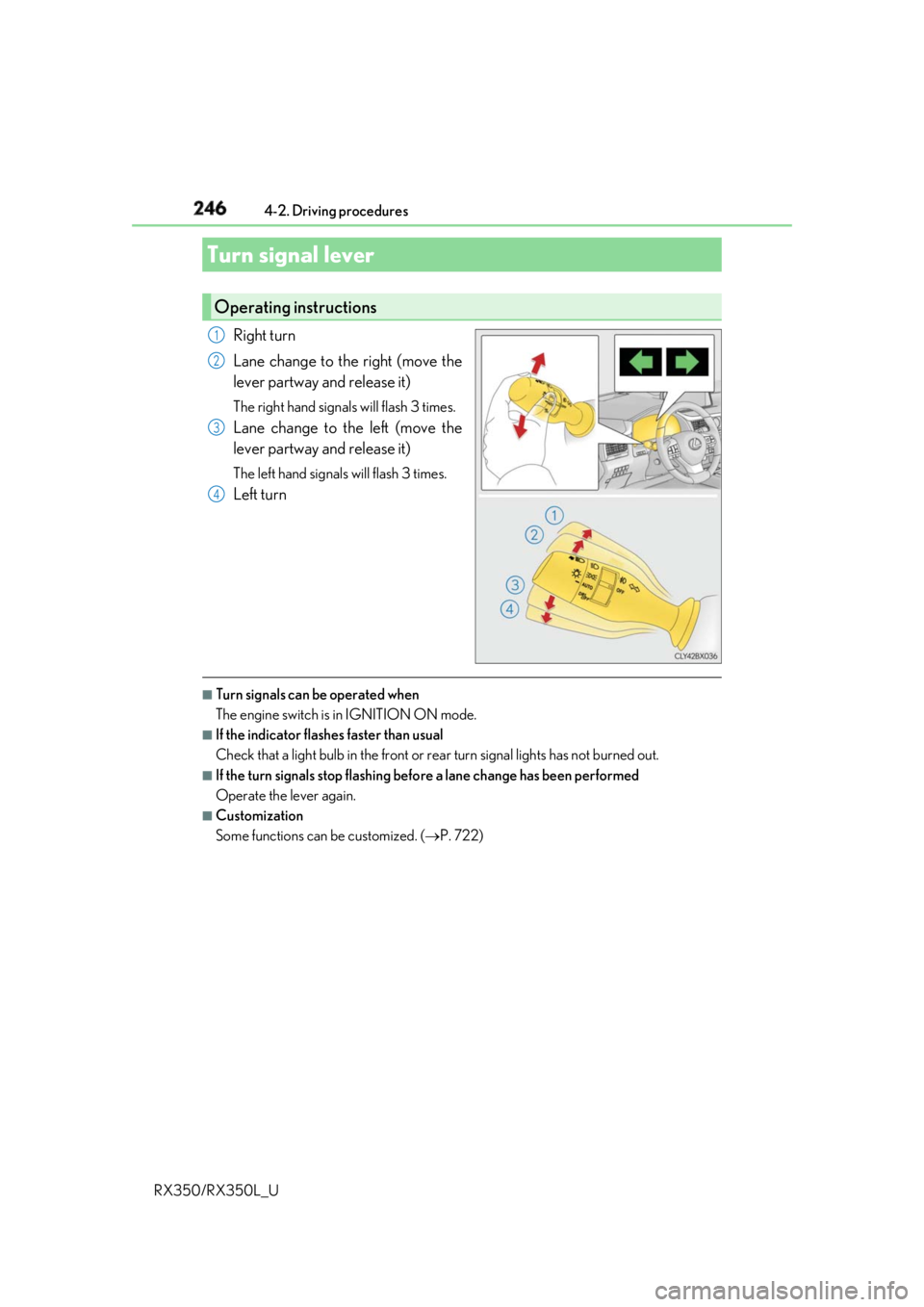
RX350/RX350L_U Right turn
Lane change to the right (move the
lever partway and release it) The right hand signals will flash 3 times.
Lane change to the left (move the
lever partway and release it) The left hand signals will flash 3 times.
Left turn
■
Turn signals can be operated when
The engine switch is in IGNITION ON mode. ■
If the indicator flashes faster than usual
Check that a light bulb in the front or rear turn signal lights has not burned out.■
If the turn signals stop flashing befo re a lane change has been performed
Operate the lever again. ■
Customization
Some functions can be customized. ( P. 722)Turn signal lever Operating instructions 1
2
3
4
Page 249 of 777
248 4-2. Driving procedures
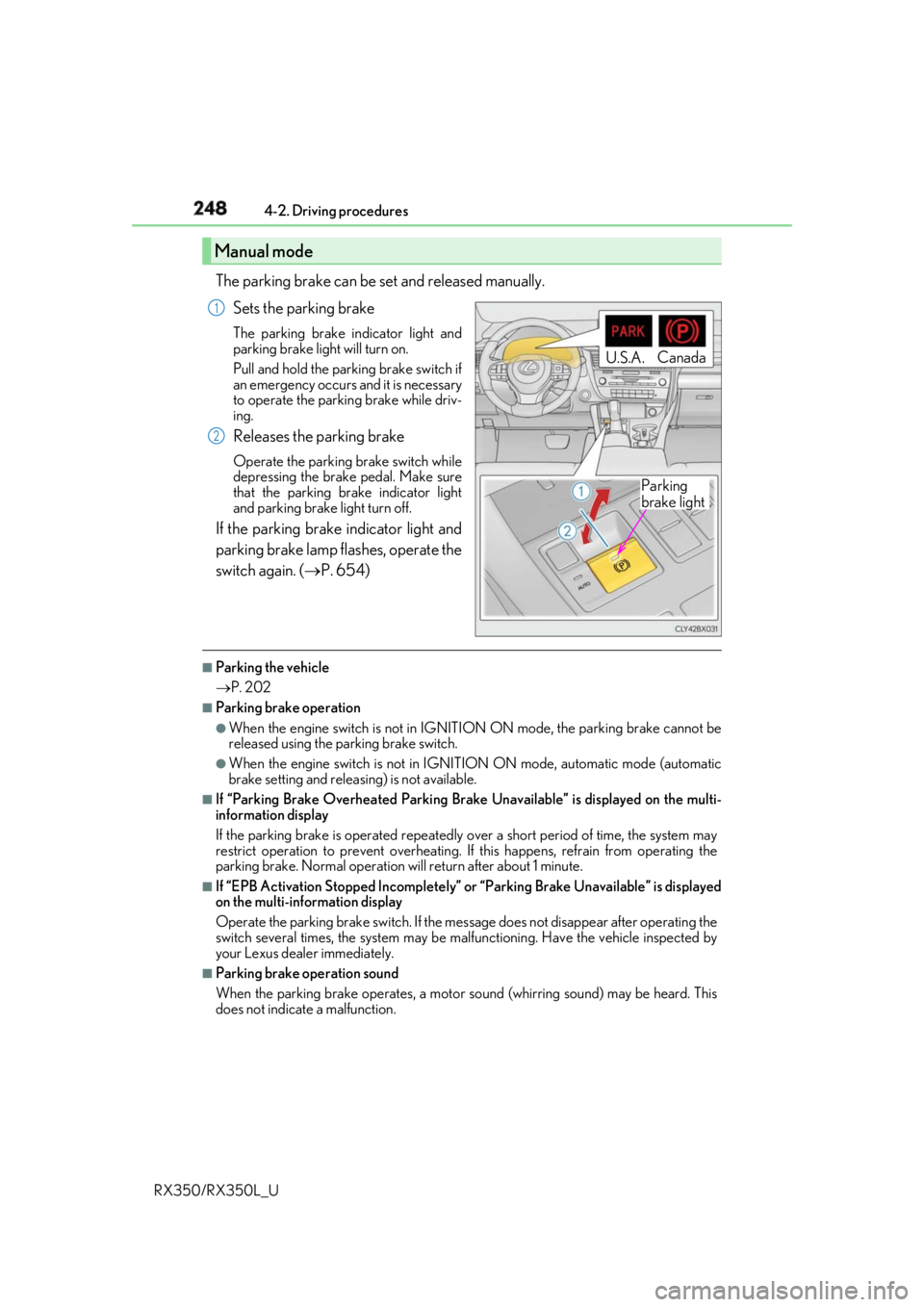
RX350/RX350L_U The parking brake can be set and released manually.
Sets the parking brake The parking brake indicator light and
parking brake light will turn on.
Pull and hold the parking brake switch if
an emergency occurs and it is necessary
to operate the parking brake while driv-
ing.
Releases the parking brake Operate the parking brake switch while
depressing the brake pedal. Make sure
that the parking brake indicator light
and parking brake light turn off.
If the parking brake indicator light and
parking brake lamp flashes, operate the
switch again. ( P. 654)■
Parking the vehicle
P. 202 ■
Parking brake operation ●
When the engine switch is not in IGNITION ON mode, the parking brake cannot be
released using the parking brake switch. ●
When the engine switch is not in IGNITION ON mode, automatic mode (automatic
brake setting and releasing) is not available. ■
If “Parking Brake Overheated Parking Brak e Unavailable” is displayed on the multi-
information display
If the parking brake is operated repeatedly over a short period of time, the system may
restrict operation to prevent overheating. If this happens, refrain from operating the
parking brake. Normal operation wi ll return after about 1 minute.■
If “EPB Activation Stopped Incompletely” or “Parking Brake Unavailable” is displayed
on the multi-information display
Operate the parking brake switch. If the message does not disappear after operating the
switch several times, the system may be ma lfunctioning. Have th e vehicle inspected by
your Lexus dealer immediately. ■
Parking brake operation sound
When the parking brake operates, a motor so und (whirring sound) may be heard. This
does not indicate a malfunction.Manual mode U.S.A. Canada
Parking
brake light1
2
Page 250 of 777
2494-2. Driving procedures
4
Driving
RX350/RX350L_U ■
Parking brake indicator light and parking brake light ●
Depending on the engine switch mode, the parking brake indicator light and parking
brake light will turn on and stay on as described below:
IGNITION ON mode: Comes on unt il the parking brake is released.
Not in IGNITION ON mode: Stays on for approximat ely 15 seconds.●
When the engine switch is turned off with the parking brake set, the parking brake indi-
cator light and parking brake light will stay on for about 15 seconds. This does not indi-
cate a malfunction. ■
Changing the mode
When changing the automatic mode on/off , the message will be shown on the multi-
information display and the buzzer sounds. ■
Parking brake engaged warning buzzer
A buzzer will sound if the vehicle is driv en with the parking brake engaged. “Release
Parking Brake” is displayed on the multi-information display.■
Warning messages and buzzers
Warning messages and buzzers are used to indicate a system malfunction or to inform
the driver of the need for caution. If a warn ing message is shown on the multi-information
display, read the message and follow the instructions.■
If the brake system warning light comes on
P. 654 ■
Usage in winter time
P. 385
WARNING ■
When parking the vehicle
Do not leave a child in the vehicle alone. The parking brake may be released uninten-
tionally and there is the danger of the ve hicle moving that may lead to an accident
resulting in death or serious injury. ■
Parking brake switch
Do not set any objects near the parking br ake switch. Objects may interfere with the
switch and may lead the parking brake to unexpectedly operate.
NOTICE ■
When parking the vehicle
Before you leave the vehicle, shift the shif t lever to P, set the parking brake and make
sure that the vehicle does not move. ■
When the system malfunctions
Stop the vehicle in a safe place and check the warning messages.■
When the parking brake cannot be released due to a malfunction
Driving the vehicle with the parking brake se t will lead to brake components overheat-
ing, which may affect bra king performance and increase brake wear. Contact your
Lexus dealer immediately if this occurs.
Page 252 of 777
2514-2. Driving procedures
4
Driving
RX350/RX350L_U ■
When the parking brake is set automatically while the system is holding the brakes
Perform any of the following operat ions to release the parking brake.●
Depress the accelerator pedal. (The parking brake will not be released automatically if
the seat belt is not fastened.) ●
Operate the parking brake switch with the brake pedal depressed.
Make sure that the parking brake indicator light goes off. ( P. 247) ■
When an inspection at your Lexus dealer is necessary
When the brake hold standby indicator (green) does not illu minate even when the brake
hold switch is pressed with the brake hold system operating conditions met, the system
may be malfunctioning. Ha ve the vehicle inspected at your Lexus dealer. ■
If “Brake Hold Fault Depress Brake to Deacti vate Visit Your Dealer” is displayed on the
multi-information display
The system may be malfunctioning. Have th e vehicle inspected by your Lexus dealer.■
Warning messages and buzzers
Warning messages and buzzers are used to indicate a system malfunction or to inform
the driver of the need for caution. If a warn ing message is shown on the multi-information
display, read the message and follow the instructions.■
If the brake hold operated indicator flashes
P. 654
WARNING ■
When the vehicle is on a steep incline
When using the brake hold system on a steep incline exercise caution. The brake hold
function may not hold the vehicle in such a situation. ■
When stopped on a slippery road
The system cannot stop the vehicle when the gripping ability of the tires has been
exceeded. Do not use the system when stopped on a slippery road.
NOTICE ■
When parking the vehicle
The brake hold system is not designed for use when parking the vehicle for a long
period of time. Turning the engine switch off while the system is holding the brakes may
release the brakes, which would cause the ve hicle to move. When operating the engine
switch, depress the brake pedal, shift the shift lever to P and set the parking brake.
Page 253 of 777
252
RX350/RX350L_U 4-3. Operating the lights and wipers
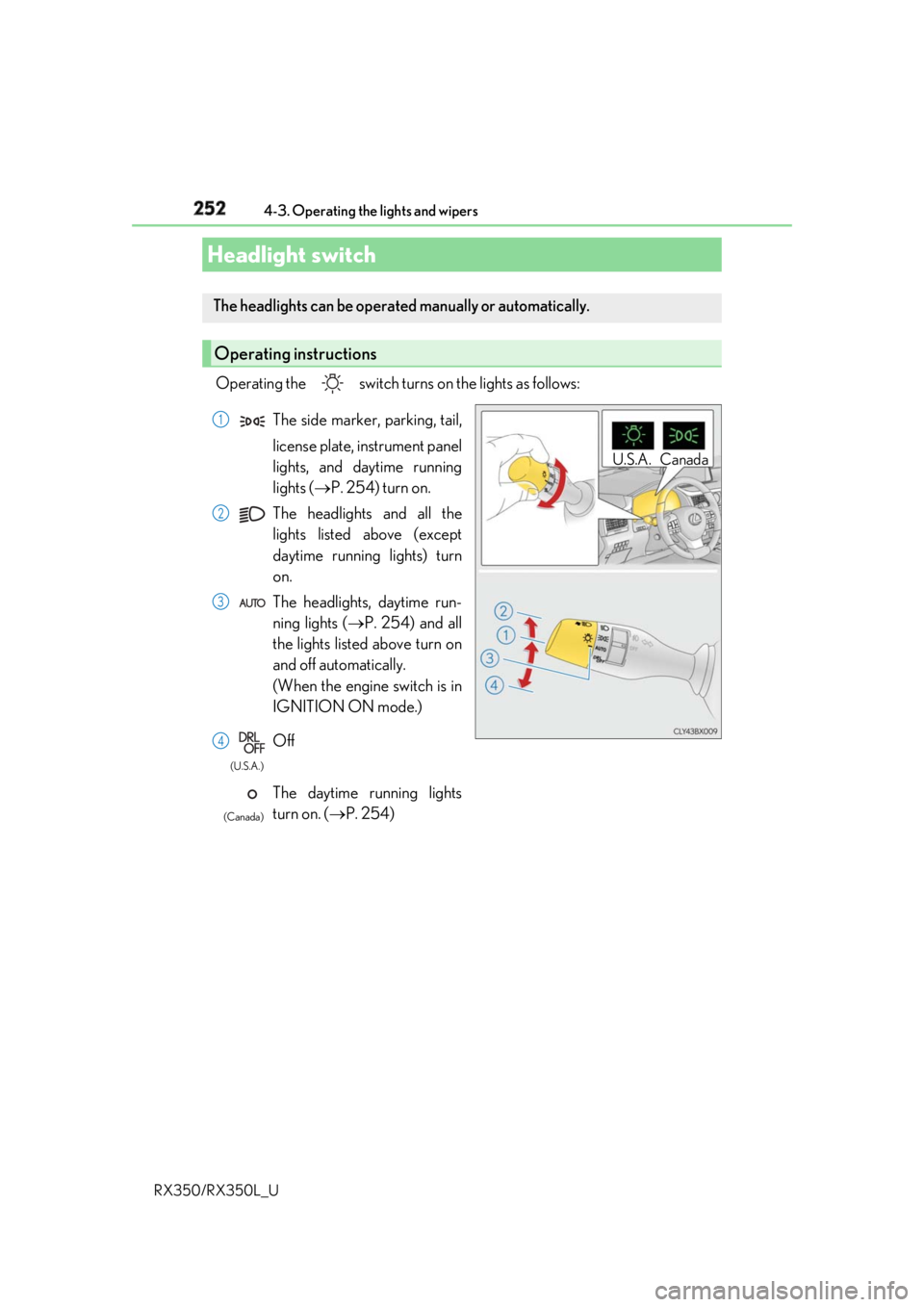
Operating the switch turn s on the lights as follows:
Headlight switch The headlights can be operated manually or automatically.
Operating instructions U.S.A. CanadaThe side marker, parking, tail,
license plate, instrument panel
lights, and daytime running
lights ( P. 254) turn on.
The headlights and all the
lights listed above (except
daytime running lights) turn
on.
The headlights, daytime run-
ning lights ( P. 254) and all
the lights listed above turn on
and off automatically.
(When the engine switch is in
IGNITION ON mode.)
Off
The daytime running lights
turn on. ( P. 254) 1
2
3
4 (U.S.A.)
(Canada)
Page 255 of 777
254 4-3. Operating the lights and wipers
RX350/RX350L_U ■
Daytime running light system ●
The daytime running lights illuminate using th e same lights as the parking lights and illu-
minate brighter than the parking lights. ●
To make your vehicle more visible to other drivers during daytime driving, the daytime
running lights turn on automatically when a ll of the following conditions are met. (The
daytime running lights are not designed for use at night.)
• The engine is running
• The parking brake is released
• The headlight switch is in the (Canada only), or
* position
* : When the surroundings are bright
The daytime running lights remain on after they illuminate, even if the parking brake is set
again. ●
For the U.S.A.: Daytime running lights can be turned off by operating the switch.●
Compared to turning on the headlights, the daytime running light system offers greater
durability and consumes less electricity, so it can help improve fuel economy.■
Cornering lights (if equipped)
When the cornering lights are on for more than 30 minutes, they will turn off automati-
cally. ■
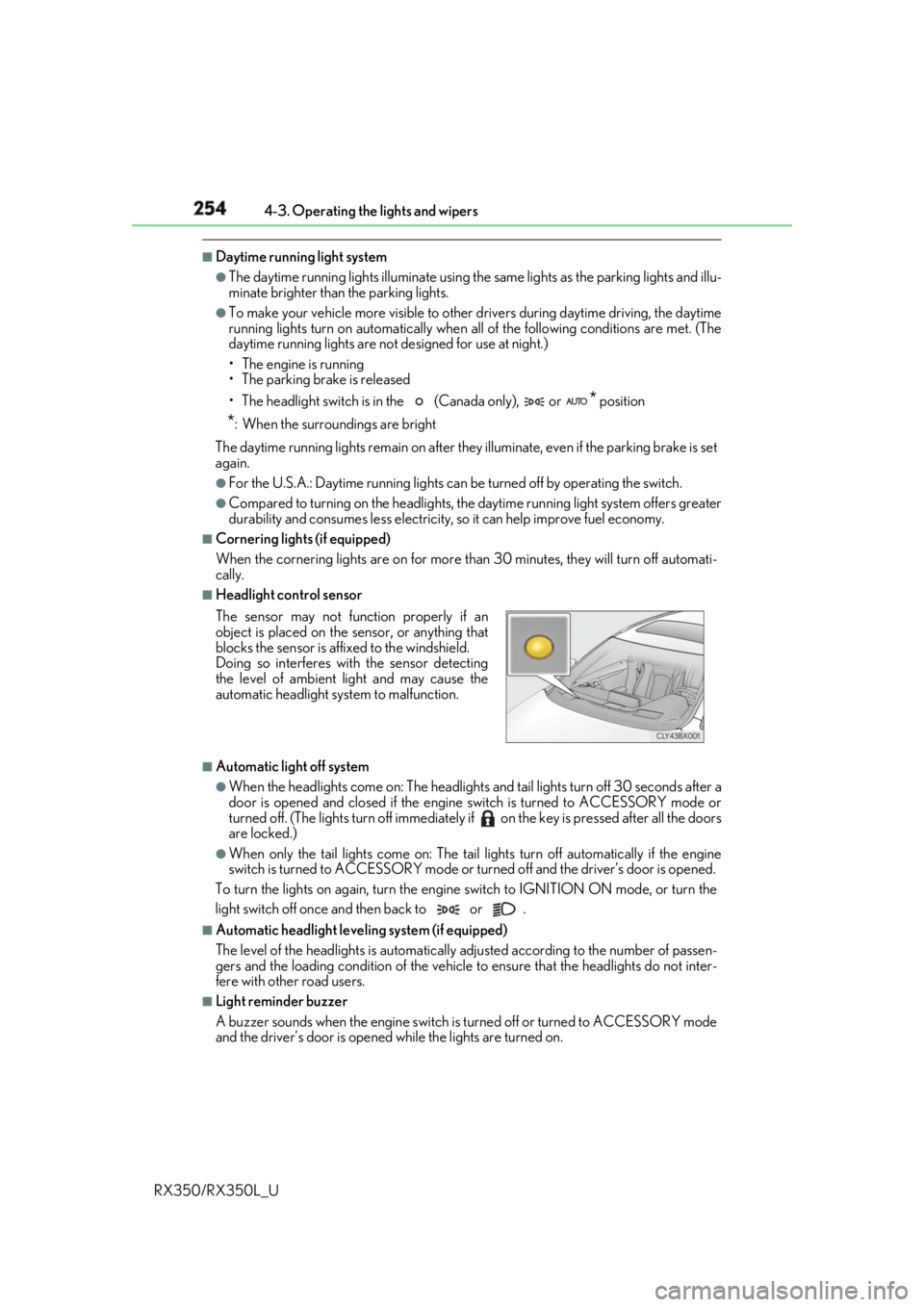
Headlight control sensor
■
Automatic light off system ●
When the headlights come on: The headlights and ta il lights turn off 30 seconds after a
door is opened and closed if the engine switch is turned to ACCESSORY mode or
turned off. (The lights turn off immediately if on the key is pre ssed after all the doors
are locked.) ●
When only the tail lights come on: The tail lights turn off automatically if the engine
switch is turned to ACCESSORY mode or tu rned off and the driver’s door is opened.
To turn the lights on again, turn the engine switch to IGNITION ON mode, or turn the
light switch off once and then back to or . ■
Automatic headlight leve ling system (if equipped)
The level of the headlights is automatically adjusted accordi ng to the number of passen-
gers and the loading condition of the vehicle to ensure that the headlights do not inter-
fere with other road users. ■
Light reminder buzzer
A buzzer sounds when the engine switch is turned off or turned to ACCESSORY mode
and the driver’s door is opened while the lights are turned on.The sensor may not function properly if an
object is placed on the sensor, or anything that
blocks the sensor is affixed to the windshield.
Doing so interferes with the sensor detecting
the level of ambient li ght and may cause the
automatic headlight system to malfunction.
Page 256 of 777
2554-3. Operating the lights and wipers
4
Driving
RX350/RX350L_U ■
Welcome lighting
If the headlight switch is turned to and the surrounding area is dark, unlocking the
doors using the smart access system with pu sh-button start or wireless remote control
will turn the parking lights and tail lights on automatically. ■
Windshield wiper linked headlight illumination
When driving during daytime with the headlight switch tu rned to , if the windshield
wipers are used, the headlights will turn on automatically after several seconds to help
enhance the visibility of your vehicle. ■
Battery-saving function
In order to prevent the battery of the vehicle from discharging, if the headlights and/or tail
lights are on when the engine switch is turned off the battery saving function will operate
and automatically turn off all the lights after approximately 20 minutes. When the engine
switch is turned to IGNITION ON mode, the battery-saving function will be disabled.
When any of the following are performed, th e battery-saving function is canceled once
and then reactivated. All the lights will turn off automatically 20 minutes after the bat-
tery-saving function has been reactivated: ●
When the headlight switch is operated●
When a door is opened or closed ■
Customization
Some functions can be customized. ( P. 722)
NOTICE ■
To prevent battery discharge
Do not leave the lights on longer than necessary when the engine is off.
Page 260 of 777

2594-3. Operating the lights and wipers
4
Driving
RX350/RX350L_U ●
In the following situations the system may not be able to correctly detect the surround-
ing brightness level. This may cause the lo w beams to remain on or the high beams to
flash or dazzle pedestrians or vehicles ahead. In such a case, it is necessary to manually
switch between the high and low beams.
• When driving in inclement weather (heavy ra in, snow, fog, sandstorms, etc.)
• When the windshield is obscured by fog, mist, ice, dirt, etc.
• When the windshield is cracked or damaged
• When the camera sensor is deformed or dirty
• When the temperature of the camera sensor is extremely high
• When the surrounding brightness level is equal to that of he adlights, tail lights or fog
lights
• When headlights or tail lights of vehicles ahead are turned off, dirty, changing color,
or not aimed properly
• When the vehicle is hit by water, snow, dust, etc. from a preceding vehicle
• When driving through an area of intermittently changi ng brightness and darkness
• When frequently and repeated ly driving ascendin g/descending roads, or roads with
rough, bumpy or uneven surfaces (such as stone-paved roads, gravel roads, etc.)
• When frequently and repeatedly taking curves or driving on a winding road
• When there is a highly reflective object ahea d of the vehicle, such as a sign or mirror
• When the back of a preceding vehicle is highly reflective, such as a container on a
truck
• When the vehicle's headlights are damaged or dirty, or are not aimed properly
• When the vehicle is listing or titling due to a flat tire, a trailer being towed, etc.
• When the headlights are changed between the high beams and low beams repeat-
edly in an abnormal manner
• When the driver believes that the high beams may be flashing or dazzling pedestri-
ans or other drivers■
Temporarily lowering sensor sensitivity
The sensitivity of the sensor can be temporarily lowered.
Turn the engine switch off while the following conditions are met.
• The headlight switch is in or .
• The headlight switch lever is in high beam position.
• Automatic High Beam switch is on.
Turn the engine switch to IGNITION ON mode.
Within 30 seconds after , repeat pulling th e headlight switch lever to the original
position then pushing it to the high beam position quickly 10 times, then leave the lever
in high beam position.
If the sensitivity is changed, the Automatic High Beam indicator is turn on and off 3
times.
Automatic High Beam (headlights) may turn on even when the vehicle is stopped. 1
2
3 2
4
Page 263 of 777
262 4-3. Operating the lights and wipers
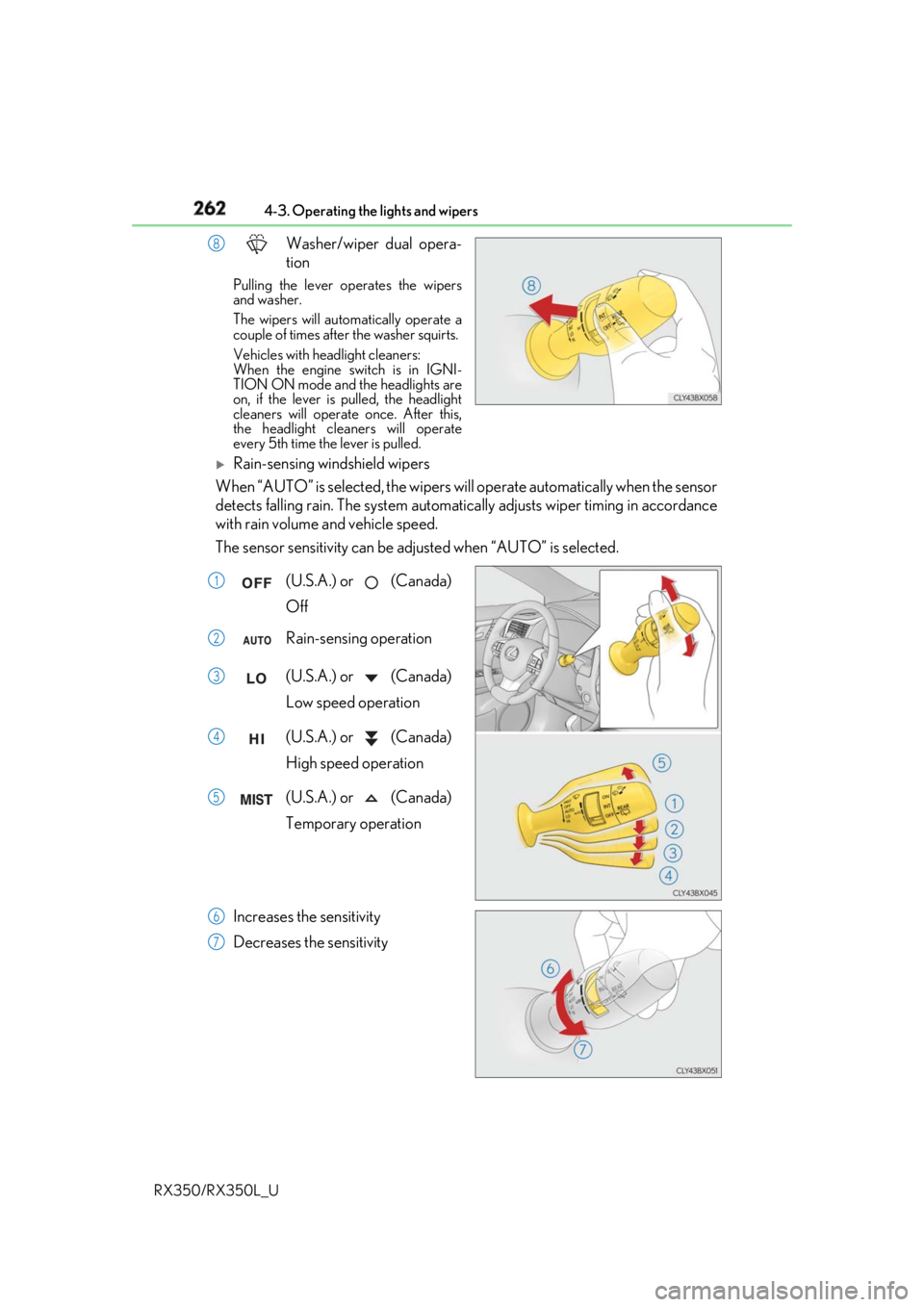
RX350/RX350L_U Washer/wiper dual opera-
tionPulling the lever op erates the wipers
and washer.
The wipers will automatically operate a
couple of times afte r the washer squirts.
Vehicles with headlight cleaners:
When the engine switch is in IGNI-
TION ON mode and the headlights are
on, if the lever is pulled, the headlight
cleaners will operate once. After this,
the headlight cleaners will operate
every 5th time the lever is pulled.
Rain-sensing windshield wipers
When “AUTO” is selected, the wipers will operate automatically when the sensor
detects falling rain. The system automatically adjusts wiper timing in accordance
with rain volume and vehicle speed.
The sensor sensitivity can be adju sted when “AUTO” is selected.
(U.S.A.) or (Canada)
Off
Rain-sensing operation
(U.S.A.) or (Canada)
Low speed operation
(U.S.A.) or (Canada)
High speed operation
(U.S.A.) or (Canada)
Temporary operation
Increases the sensitivity
Decreases the sensitivity 8
1
2
3
4
5
6
7