Sound LEXUS RX350 2021 Owners Manual
[x] Cancel search | Manufacturer: LEXUS, Model Year: 2021, Model line: RX350, Model: LEXUS RX350 2021Pages: 508, PDF Size: 10.33 MB
Page 4 of 508
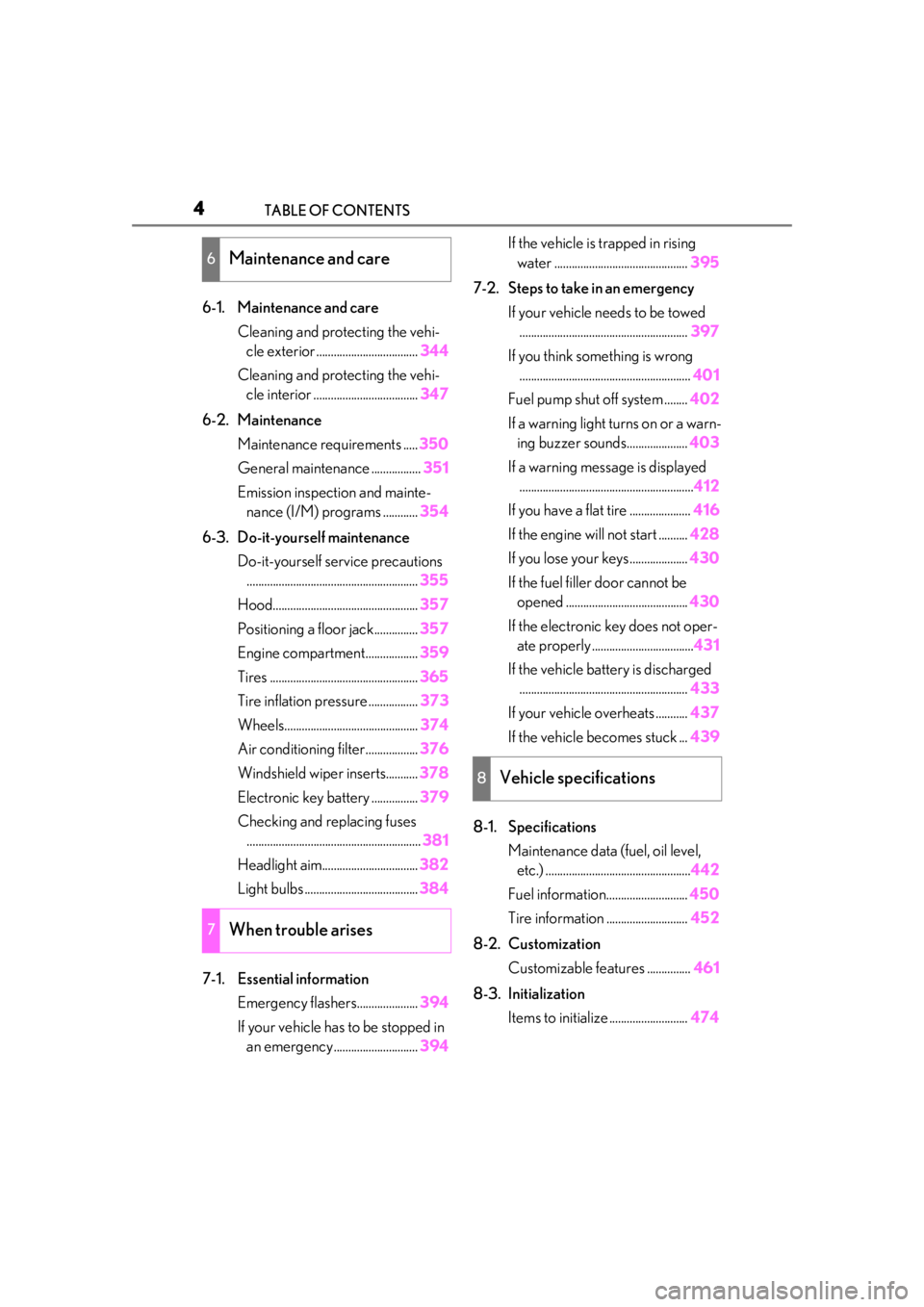
4TABLE OF CONTENTS
6-1. Maintenance and careCleaning and protecting the vehi-cle exterior ................................... 344
Cleaning and protecting the vehi- cle interior .................................... 347
6-2. Maintenance Maintenance requirements ..... 350
General maintenance ................. 351
Emission inspection and mainte- nance (I/M) programs ............ 354
6-3. Do-it-yourself maintenance Do-it-yourself service precautions........................................................... 355
Hood.................................................. 357
Positioning a floor jack............... 357
Engine compartment.................. 359
Tires ................................................... 365
Tire inflation pressure ................. 373
Wheels.............................................. 374
Air conditioning filter..................376
Windshield wiper inserts........... 378
Electronic key battery ................ 379
Checking and replacing fuses ............................................................ 381
Headlight aim................................. 382
Light bulbs ....................................... 384
7-1. Essential information Emergency flashers..................... 394
If your vehicle has to be stopped in an emergency ............................. 394If the vehicle is trapped in rising
water .............................................. 395
7-2. Steps to take in an emergency If your vehicle needs to be towed.......................................................... 397
If you think something is wrong ........................................................... 401
Fuel pump shut off system ........ 402
If a warning light turns on or a warn- ing buzzer sounds..................... 403
If a warning messa ge is displayed
............................................................ 412
If you have a flat tire ..................... 416
If the engine will not start .......... 428
If you lose your keys.................... 430
If the fuel filler door cannot be opened .......................................... 430
If the electronic key does not oper- ate properly ................................... 431
If the vehicle battery is discharged .......................................................... 433
If your vehicle overheats ........... 437
If the vehicle becomes stuck ... 439
8-1. Specifications Maintenance data (fuel, oil level, etc.) .................................................. 442
Fuel information............................ 450
Tire information ............................ 452
8-2. Customization Customizable features ............... 461
8-3. Initialization Items to initialize ........................... 474
6Maintenance and care
7When trouble arises
8Vehicle specifications
Page 6 of 508
6
Please note that this manual applies to
all models and explains all equipment,
including options. Therefore, you may
find some explanations for equipment
not installed on your vehicle.
All specifications provided in this man-
ual are current at the time of printing.
However, because of the Lexus policy
of continual product improvement, we
reserve the right to make changes at
any time without notice.
Depending on specifications, the vehi-
cle shown in the illustrations may differ
from your vehicle in terms of color and
equipment.
Approximately five hours after the
engine is turned off, you may hear
sound coming from under the vehicle
for several minutes. This is the sound of
a fuel evaporation leakage check and,
it does not indicate a malfunction.
A wide variety of non-genuine spare
parts and accessories for Lexus vehi-
cles are currently available in the mar-
ket. You should know that Toyota does
not warrant these products and is not
responsible for their performance, repair, or replacement, or for any dam-
age they may cause to, or adverse
effect they may have on, your Lexus
vehicle.
This vehicle should not be modified
with non-genuine Lexus products.
Modification with non-genuine Lexus
products could affect its performance,
safety or durability, and may even vio-
late governmental regulations. In addi-
tion, damage or performance
problems resulting from the modifica-
tion may not be covered under war-
ranty.
The installation of a mobile two-way
radio system in your vehicle could
affect electronic systems such as:
Multiport fuel injection sys-
tem/sequential multiport fuel injec-
tion system
Lexus Safety System + 2.0
Anti-lock brake system
Vehicle dynamics integrated man-
agement
SRS airbag system
Seat belt pretensioner system
Be sure to check with your Lexus
dealer for precautionary measures or
special instructions regarding installa-
tion of a mobile two-way radio system.
The vehicle is equipped with sophisti-
For your information
Main Owner’s Manual
Noise from under vehicle after
turning off the engine
Accessories, spare parts and
modification of your Lexus
Installation of a mobile two-way
radio system
Vehicle data recording
Page 7 of 508
7
cated computers that will record cer-
tain data, such as:
• Engine speed/Electric motor speed (traction motor speed)
• Accelerator status
•Brake status
• Vehicle speed
• Operation status of the driving assist systems
• Images from the cameras Your vehicle is equipped with cam-
eras. Contact your Lexus dealer for
the location of recording cameras.
The recorded data varies according to
the vehicle grade level and options
with which it is equipped.
These computers do not record con-
versations or sounds, and only record
images outside of the vehicle in certain
situations.
Data Transmission
Your vehicle may transmit the data
recorded in these computers to Lexus
without notification to you.
Data usage
Lexus may use the data recorded in this
computer to diagnose malfunctions, con-
duct research and development, and
improve quality.
Lexus will not disclose the recorded data to
a third party except:
• With the consent of the vehicle owner or with the consent of the lessee if the vehi-
cle is leased
• In response to an of ficial request by the
police, a court of law or a government
agency
• For use by Lexus in a lawsuit
• For research purposes where the data is not tied to a specific vehicle or vehicle
owner
Recorded image information can be
erased by your Lexus dealer.
The image recording function can be dis-
abled. However, if the function is disabled,
data from when the system operates will
not be available.
To learn more abou t the vehicle data
collected, used and shared by
Lexus, please visit
www.lexus.com/privacyvts/
.
If your Lexus has Lexus Enform and if
you have subscribed to those services,
please refer to the Lexus Enform
Telematics Subscription Service
Agreement for information on data
collected and its usage.
To learn more about the vehicle data
collected, used and shared by Lexus,
please visit
www.lexus.com/privacyvts/
.
This vehicle is equipped with an event
data recorder (EDR). The main pur-
pose of an EDR is to record, in certain
crash or near crash-like situations, such
as an air bag deployment or hitting a
road obstacle, data that will assist in
understanding how a vehicle’s systems
performed. The EDR is designed to
record data related to vehicle dynam-
ics and safety systems for a short
Usage of data collected through
Lexus Enform (U.S. mainland on-
ly)
Event data recorder
Page 11 of 508

11
■Searching by name
Alphabetical index: P.493
■Searching by inst allation position
Pictorial index: P.12
■Searching by symptom or sound
What to do if... (Troubleshooting):
P.490
■Searching by title
Table of contents: P.2
How to search
Page 28 of 508
281-1. For safe use
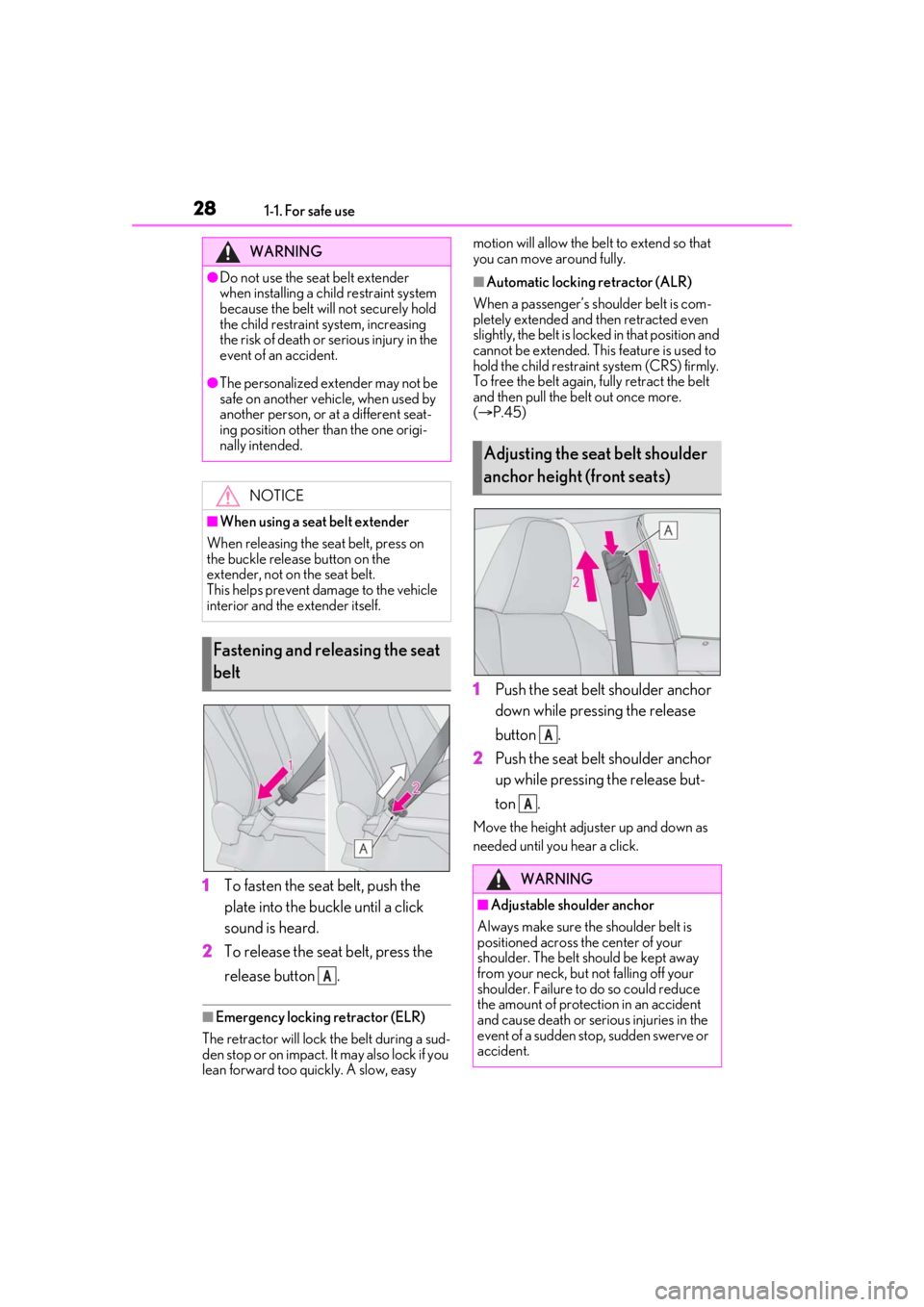
1To fasten the seat belt, push the
plate into the buckle until a click
sound is heard.
2 To release the seat belt, press the
release button .
■Emergency locking retractor (ELR)
The retractor will lock the belt during a sud-
den stop or on impact. It may also lock if you
lean forward too quickly. A slow, easy motion will allow the belt to extend so that
you can move around fully.
■Automatic locking retractor (ALR)
When a passenger’s shoulder belt is com-
pletely extended and then retracted even
slightly, the belt is lock ed in that position and
cannot be extended. This feature is used to
hold the child restraint system (CRS) firmly.
To free the belt again, fully retract the belt
and then pull the belt out once more.
( P.45)
1 Push the seat belt shoulder anchor
down while pressing the release
button .
2 Push the seat belt shoulder anchor
up while pressing the release but-
ton .
Move the height adjuster up and down as
needed until you hear a click.
WARNING
●Do not use the seat belt extender
when installing a child restraint system
because the belt will not securely hold
the child restraint system, increasing
the risk of death or serious injury in the
event of an accident.
●The personalized extender may not be
safe on another vehicle, when used by
another person, or at a different seat-
ing position other than the one origi-
nally intended.
NOTICE
■When using a seat belt extender
When releasing the se at belt, press on
the buckle release button on the
extender, not on the seat belt.
This helps prevent damage to the vehicle
interior and the extender itself.
Fastening and releasing the seat
belt
A
Adjusting the seat belt shoulder
anchor height (front seats)
WARNING
■Adjustable shoulder anchor
Always make sure the shoulder belt is
positioned across the center of your
shoulder. The belt should be kept away
from your neck, but not falling off your
shoulder. Failure to do so could reduce
the amount of protection in an accident
and cause death or serious injuries in the
event of a sudden stop, sudden swerve or
accident.
A
A
Page 68 of 508

681-4. Theft deterrent system
■Items to check before locking the
vehicle
To prevent unexpected triggering of
the alarm and vehicle theft, make sure
of the following:
Nobody is in the vehicle.
The windows, moon roof (if
equipped) and panoramic moon
roof (if equipped) are closed before
the alarm is set.
No valuables or other personal
items are left in the vehicle.
■Setting
Close the doors and hood, and lock all
the doors. The system will be set auto-
matically after 30 seconds.
The indicator light changes from being on
to flashing when the system is set.
■Canceling or stopping
Do one of the following to deactivate
or stop the alarm:
Unlock the doors.
Turn the engine switch to ACCES-
SORY or IGNITION ON mode, or
start the engine. (The alarm will be
deactivated or stopped after a few
seconds.)
■System maintenance
The vehicle has a maintenance-free type
alarm system.
■Triggering of the alarm
The alarm may be triggered in the following
situations:
(Stopping the alarm deactivates the alarm
system.)
●For Canada: The doors are unlocked
using the mechanical key.
Alarm
The alarm uses light and sound to
give an alert when an intrusion is
detected.
The alarm is triggered in the follow-
ing situations when the alarm is set:
Except for Canada: A locked
door is unlocked or opened in any
way other than using the entry
function, wireless remote control
or mechanical key. (The doors will
lock again automatically.)
For Canada: A locked door is
unlocked or opened in any way
other than using the entry func-
tion or wireless remote control.
(The doors will lock again auto-
matically.)
The hood is opened.
Setting/canceling/stopping the
alarm system
Page 96 of 508

963-1. Key information
3-1.Key information
The following keys are provided with
the vehicle.
Electronic keys
• Operating the smart access system with push-button start ( P.115)
• Operating the wireless remote control function ( P.97)
Mechanical keys
Key number plate
■When riding in an aircraft
When bringing an elec tronic key onto an
aircraft, make sure you do not press any
buttons on the electronic key while inside
the aircraft cabin. If you are carrying an
electronic key in your bag, etc., ensure that
the buttons are not likely to be pressed acci-
dentally. Pressing a button may cause the
electronic key to em it radio waves that
could interfere with the operation of the air-
craft.
■Electronic key battery depletion
●The standard battery life is 1 to 2 years.
●If the battery becomes low, an alarm will
sound in the cabin when the engine is
stopped.
●To reduce key battery depletion when the
electronic key is to not be used for long
periods of time, set the electronic key to
the battery-saving mode. ( P.116)
●As the electronic key always receives
radio waves, the battery will become
depleted even if the electronic key is not
used. The following symptoms indicate
that the electronic key battery may be
depleted. Replace the battery when nec-
essary.
• The smart access system with push-but- ton start or the wireless remote control
does not operate.
• The detection area becomes smaller.
• The LED indicator on the key surface does not turn on.
●To avoid serious dete rioration, do not
leave the electronic key within 3 ft. (1 m)
of the following electrical appliances that
produce a magnetic field:
•TVs
• Personal computers
• Cellular phones, cordless phones and battery chargers
• Recharging cellular phones or cordless
phones
•Table lamps
• Induction cookers
■Replacing the battery
P.379
■Confirmation of the registered key
number
The number of keys already registered to
the vehicle can be confirmed. Ask your
Lexus dealer for details.
■If “A New Key has been Registered
Contact Your Dealer for Details” is
shown on the multi-information display
This message will be displayed each time
the driver’s door is opened when the doors
are unlocked from the outside for approxi-
mately one week after a new electronic key
has been registered.
If this message is disp layed but you have not
had a new electronic key registered, ask
your Lexus dealer to check if an unknown
electronic key (other than those in your
possession) has be en registered.
Keys
The keys
A
B
C
Page 97 of 508
973-1. Key information
3
Before driving
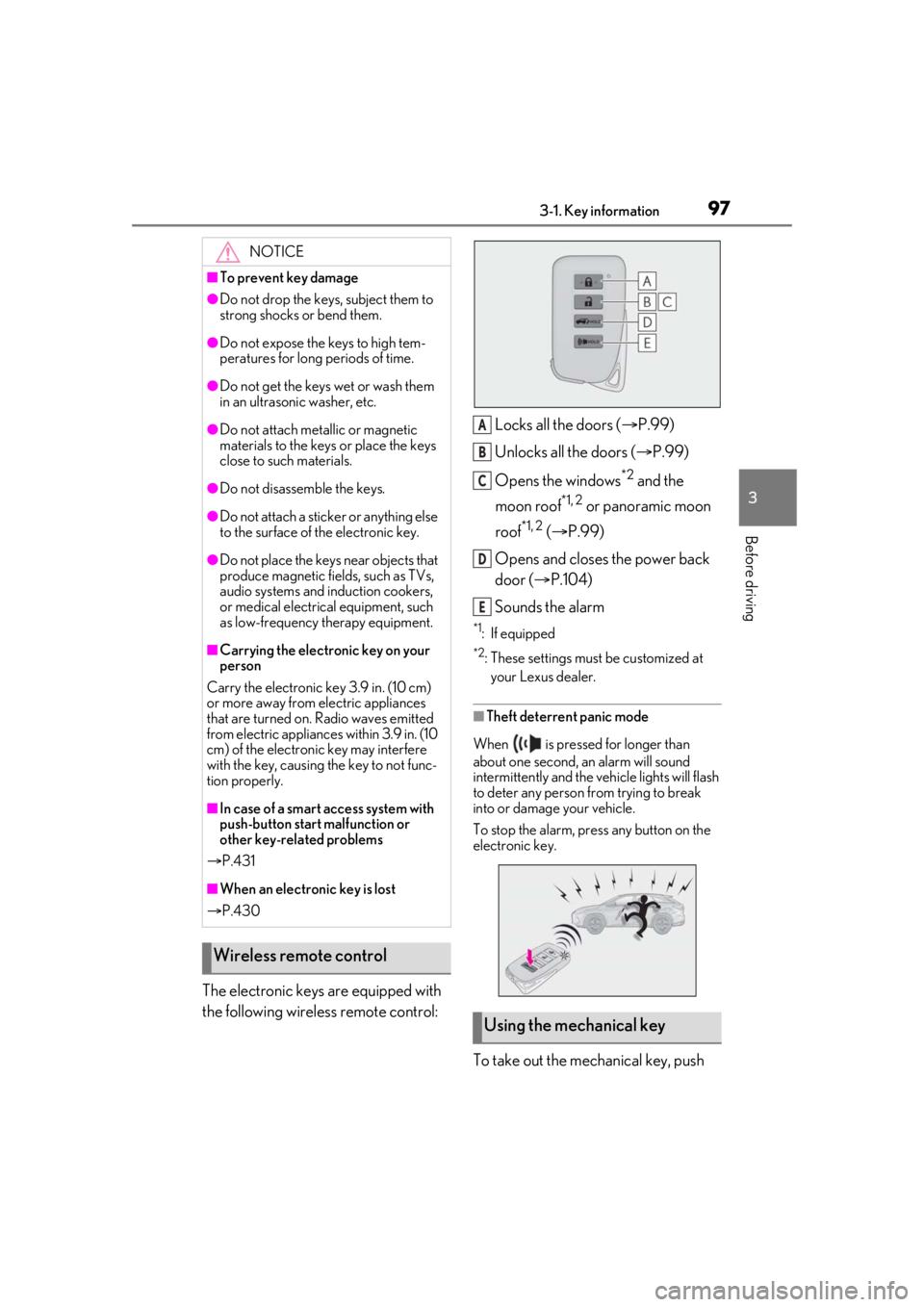
The electronic keys are equipped with
the following wireless remote control:Locks all the doors (
P.99)
Unlocks all the doors ( P.99)
Opens the windows
*2 and the
moon roof
*1, 2 or panoramic moon
roof
*1, 2 ( P.99)
Opens and closes the power back
door ( P.104)
Sounds the alarm
*1: If equipped
*2: These settings must be customized at
your Lexus dealer.
■Theft deterrent panic mode
When is pressed for longer than
about one second, an alarm will sound
intermittently and the vehicle lights will flash
to deter any person from trying to break
into or damage your vehicle.
To stop the alarm, press any button on the
electronic key.
To take out the mechanical key, push
NOTICE
■To prevent key damage
●Do not drop the keys, subject them to
strong shocks or bend them.
●Do not expose the keys to high tem-
peratures for long periods of time.
●Do not get the keys wet or wash them
in an ultrasonic washer, etc.
●Do not attach metallic or magnetic
materials to the keys or place the keys
close to such materials.
●Do not disassemb le the keys.
●Do not attach a sticker or anything else
to the surface of the electronic key.
●Do not place the keys near objects that
produce magnetic fields, such as TVs,
audio systems and induction cookers,
or medical electrical equipment, such
as low-frequency therapy equipment.
■Carrying the electronic key on your
person
Carry the electronic key 3.9 in. (10 cm)
or more away from electric appliances
that are turned on. Radio waves emitted
from electric applianc es within 3.9 in. (10
cm) of the electronic key may interfere
with the key, causing the key to not func-
tion properly.
■In case of a smart access system with
push-button start malfunction or
other key-related problems
P.431
■When an electronic key is lost
P.430
Wireless remote control
Using the mechanical key
A
B
C
D
E
Page 100 of 508

1003-2. Opening, closing and locking the doors
To prevent unintended triggering of the
alarm, unlock the doors using the wireless
remote control and open and close a door
once after the settings have been changed.
(If a door is not opened within 60 seconds
after is pressed, the doors will be
locked again and the alarm will automati-
cally be set.)
In a case that the alarm is triggered, imme-
diately stop the alarm. (P.68)
■Impact detection door lock release sys-
tem
In the event that the vehicle is subject to a
strong impact, all the doors are unlocked.
Depending on the force of the impact or the
type of accident, however, the system may
not operate.
■Operation signals
Doors:
A buzzer sounds and the emergency flash-
ers flash to indicate that the doors have
been locked/unlocked. (Locked: Once;
Unlocked: Twice)
Windows and moon roof or panoramic
moon roof:
A buzzer sounds.
■Security feature
If a door is not opened within approximately
60 seconds after the vehicle is unlocked,
the security feature automatically locks the
vehicle again.
■When the door cannot be locked by the
lock sensor on the surface of the door
handle
When the door cannot be locked even if the
lock sensor on the surface of the door han-
dle is touched by a finger, touch the lock
sensor with the palm.
When gloves are being worn, remove the
gloves.
■Door lock buzzer
If an attempt to lock the doors using the
smart key system is made when a door is
not fully closed, a buzzer will sound continu-
ously for 5 seconds. Fully close the door to
stop the buzzer, and lock the doors again.
■Setting the alarm
Locking the doors will set the alarm system.
( P.68)
■Conditions affecting the operation of
the smart access system with push-but-
ton start or wireless remote control
P.116
■If the smart access system with
push-button start or the wireless remote
control does not operate properly
Use the mechanical key to lock and unlock
the doors. ( P.431)
Replace the key battery with a new one if it
is depleted. ( P.379)
■If the battery is discharged
The doors cannot be locked and unlocked
using the smart access system with
push-button start or wireless remote con-
trol. Lock or unlock the doors using the
Multi-information display/BeepUnlocking function
Exterior: Beeps 3 times
Interior: Pings once
Holding the driver’s
door handle unlocks
only the driver’s
door.
Holding any of the
passenger door
handles unlocks all
the doors.
Exterior: Beeps twice
Interior: Pings once
Holding a door han-
dle unlocks all the
doors.
Page 102 of 508

1023-2. Opening, closing and locking the doors
When the door is unlocked, the inside lock
button will pop up.
■Locking the doors from the outside with-
out a key
1 Push down the inside lock button.
2 Close the door.
The door cannot be locked if the engine
switch is in ACCESSORY or IGNITION
ON mode, or the electronic key is left
inside the vehicle. However, the key may not
be detected correctly and the door may be
locked.
■Open door warning buzzer
If the vehicle speed reaches 3 mph (5
km/h), the master warning light flashes and
a buzzer sounds to indicate that door(s) or
the hood in not fully closed.
The open door(s) or h ood is displayed on
the multi-information display.
The door cannot be opened from
inside the vehicle when the lock is set.
1 Unlock 2
Lock
These locks can be set to prevent children
from opening the rear doors. Push down
on each rear door switch to lock both rear
doors.
The following functions can be set or
canceled:
For instructions on customizing, refer to
P.461.
Rear door child-protector lock
Automatic door locking and
unlocking systems
FunctionOperation
Speed linked
door locking
function
All doors are automati-
cally locked when vehi-
cle speed is
approximately 12 mph
(20 km/h) or higher.
Shift position
linked door lock-
ing functionAll doors are automati-
cally locked when shift-
ing the shift lever out of
P.
Shift position
linked door
unlocking func-
tionAll doors are automati-
cally unlocked when
shifting the shift lever
to P.
Driver’s door
linked door
unlocking func-
tionAll doors are automati-
cally unlocked when
driver’s door is
opened.