LEXUS RX450h 2015 Owners Manual
RX450h 2015
LEXUS
LEXUS
https://www.carmanualsonline.info/img/36/58963/w960_58963-0.png
LEXUS RX450h 2015 Owners Manual
Page 357 of 878
3573-2. Using the air conditio ning system and defogger
3
Interior features CAUTION■
To prevent the windshield from fogging up
Do not use
during cool air operation in extremely humid weather. The differ-
ence between the temperature of the outs ide air and that of the windshield can
cause the outer surface of the windshield to fog up, blocking your vision.
NOTICE■
To prevent 12-volt battery discharge
Do not leave the air conditioning system on longer than necessary when the hybrid
system is off.
Page 391 of 878
3913-3. Using the Lexus Display Audio system
3
Interior features Listening to an iPod Connecting an iPod enables you to enjoy music from the vehicle speakers.
Press the “MEDIA” button or the “AUDIO” button on the Lexus Display
Audio controller and then select “iPod” with an iPod connected.
■ Connecting an iPod
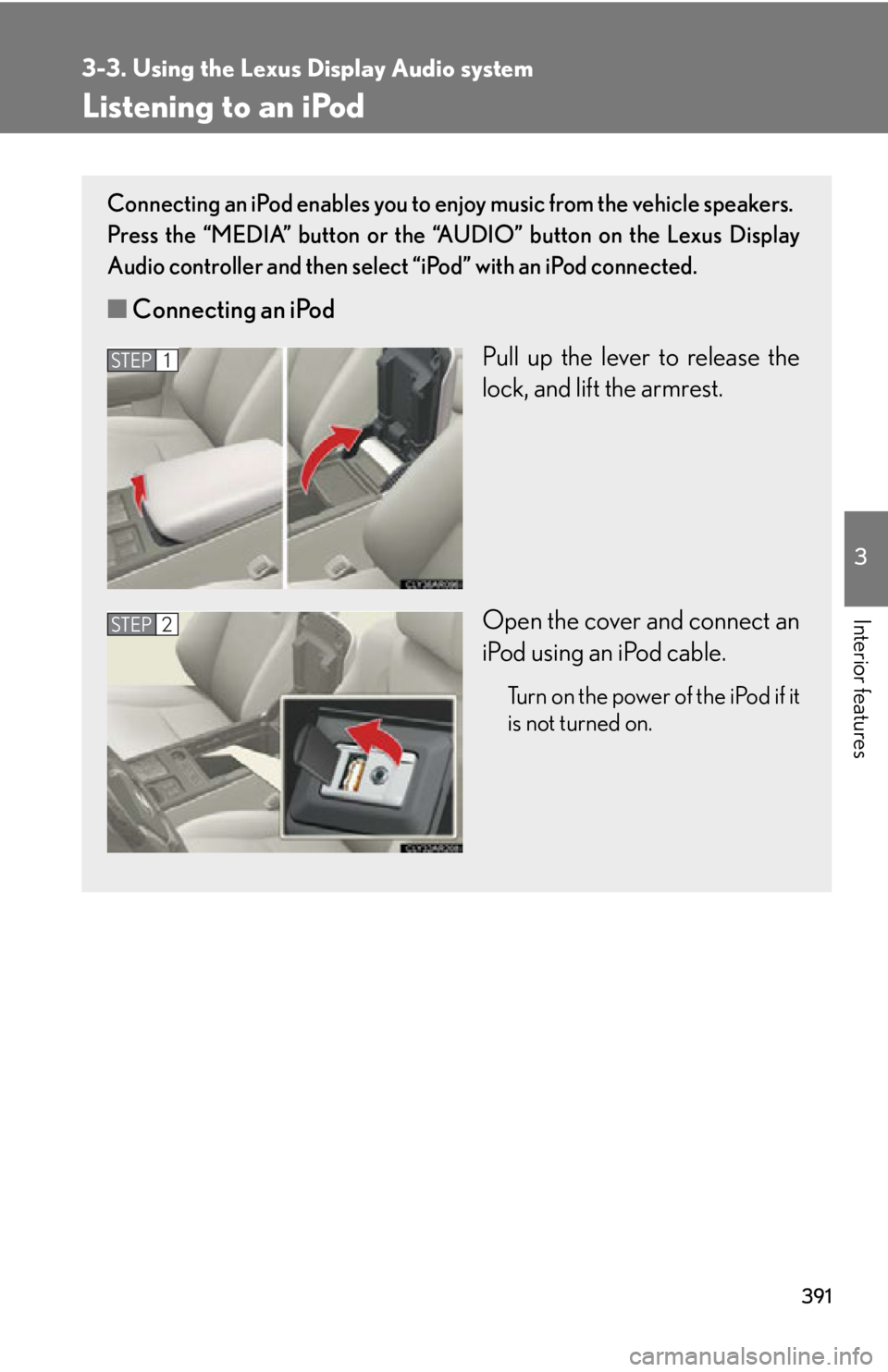
Pull up the lever to release the
lock, and lift the armrest.
Open the cover and connect an
iPod using an iPod cable. Turn on the power of the iPod if it
is not turned on.STEP 1
STEP 2
Page 399 of 878
3993-3. Using the Lexus Display Audio system
3
Interior features Listening to a USB memory Connecting a USB memory enables you to enjoy music from the vehicle
speakers.
Press the “MEDIA” button or the “AUDIO” button on the Lexus Display
Audio controller and then select “USB” with a USB memory connected.
■ Connecting a USB memory
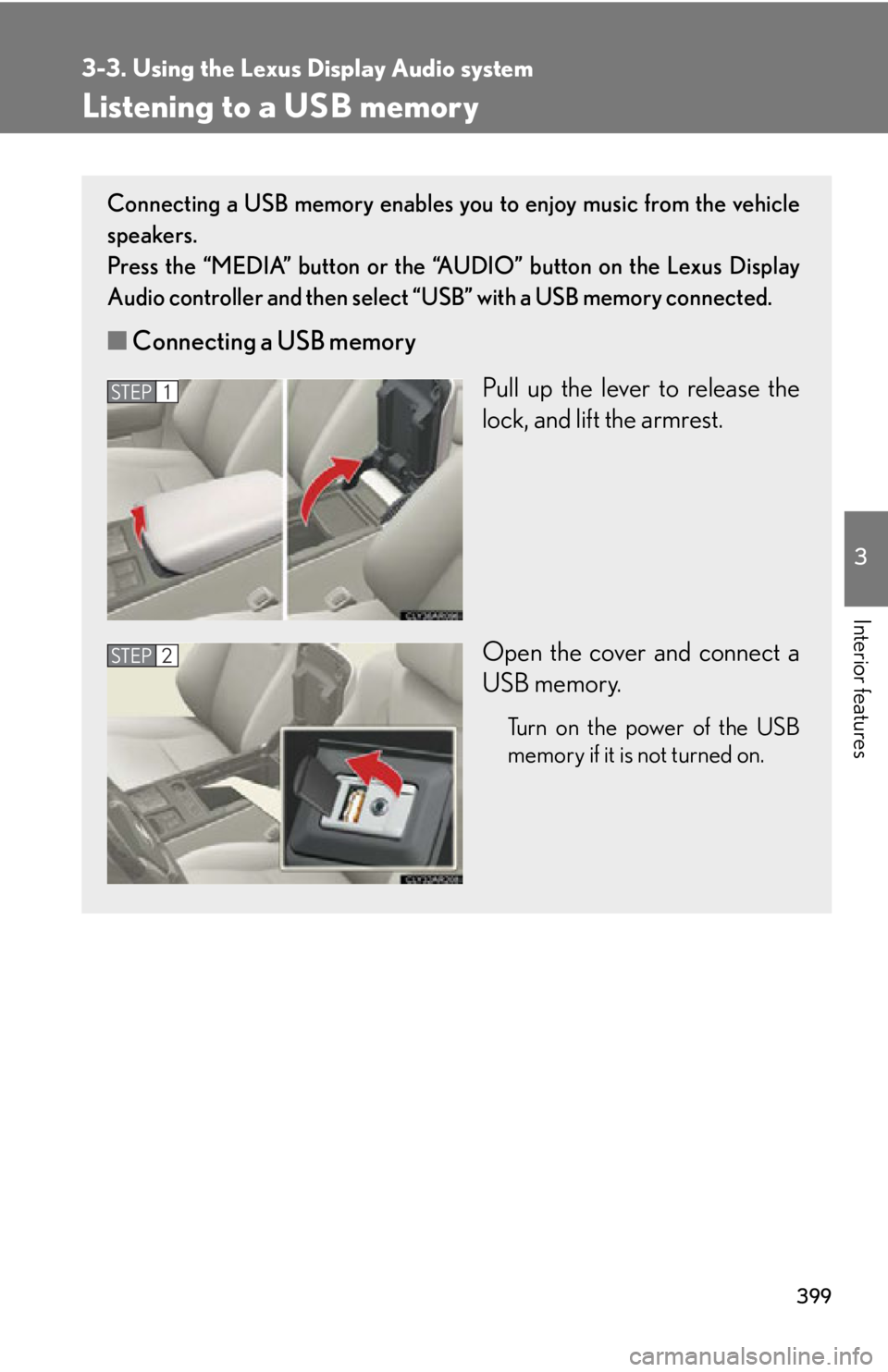
Pull up the lever to release the
lock, and lift the armrest.
Open the cover and connect a
USB memory. Turn on the power of the USB
memory if it is not turned on.STEP 1
STEP 2
Page 408 of 878
4083-3. Using the Lexus Display Audio system
Using the AUX port
■
Operating portable audio devices connected to the audio system
The volume can be adjusted using the vehicle’s audio controls. All other adjust-
ments must be made on the portable audio device itself.
■
When using a portable audio devi ce connected to the power outlet
Noise may occur during playback. Use the power source of the portable audio
device.This port can be used to connect a po rtable audio device and listen to it
through the vehicle’s speakers.
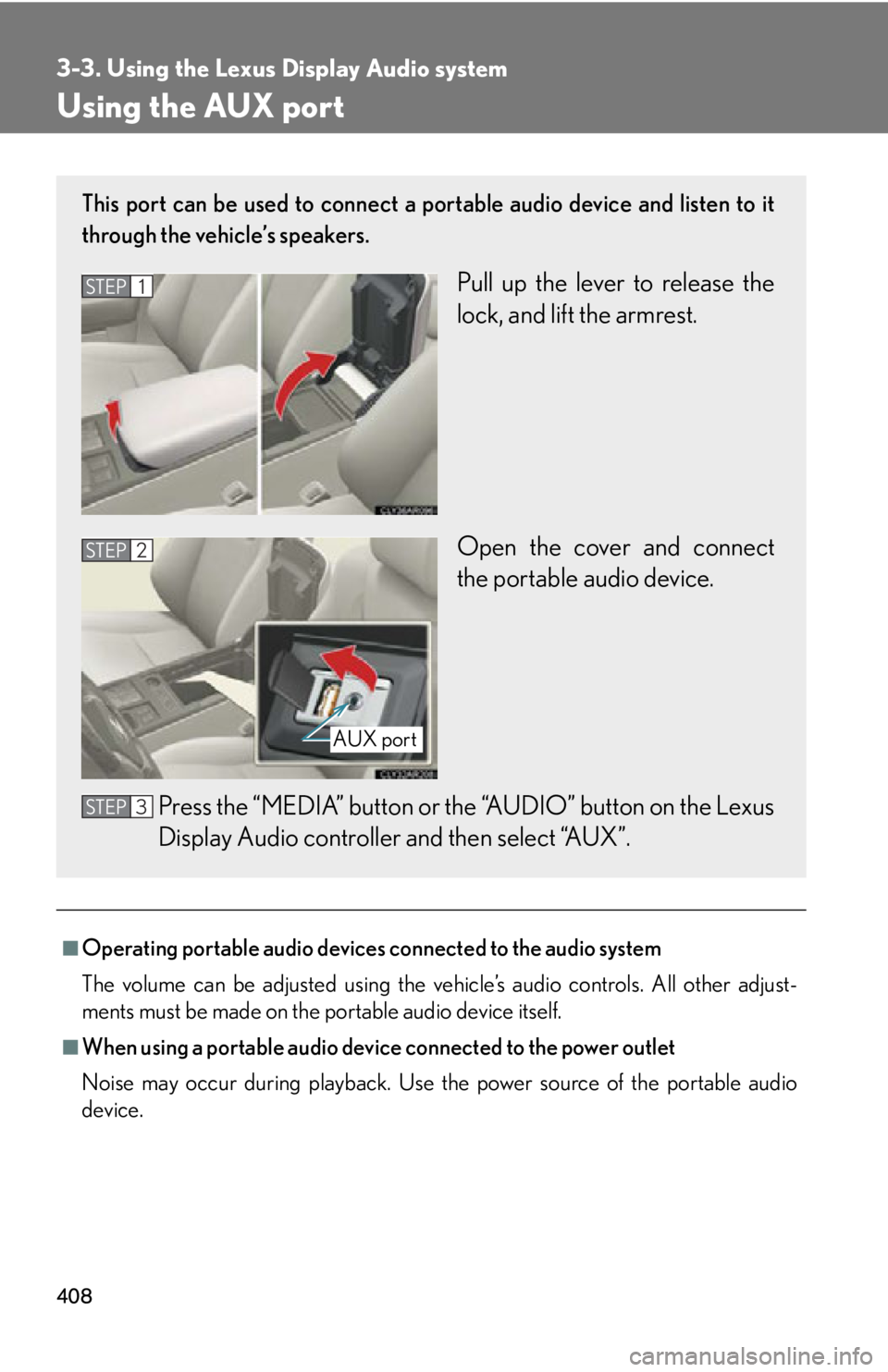
Pull up the lever to release the
lock, and lift the armrest.
Open the cover and connect
the portable audio device.
Press the “MEDIA” button or th e “AUDIO” button on the Lexus
Display Audio controller and then select “AUX”.STEP 1
STEP 2
AUX port
STEP 3
Page 501 of 878
5013-4. Using the audio system
3
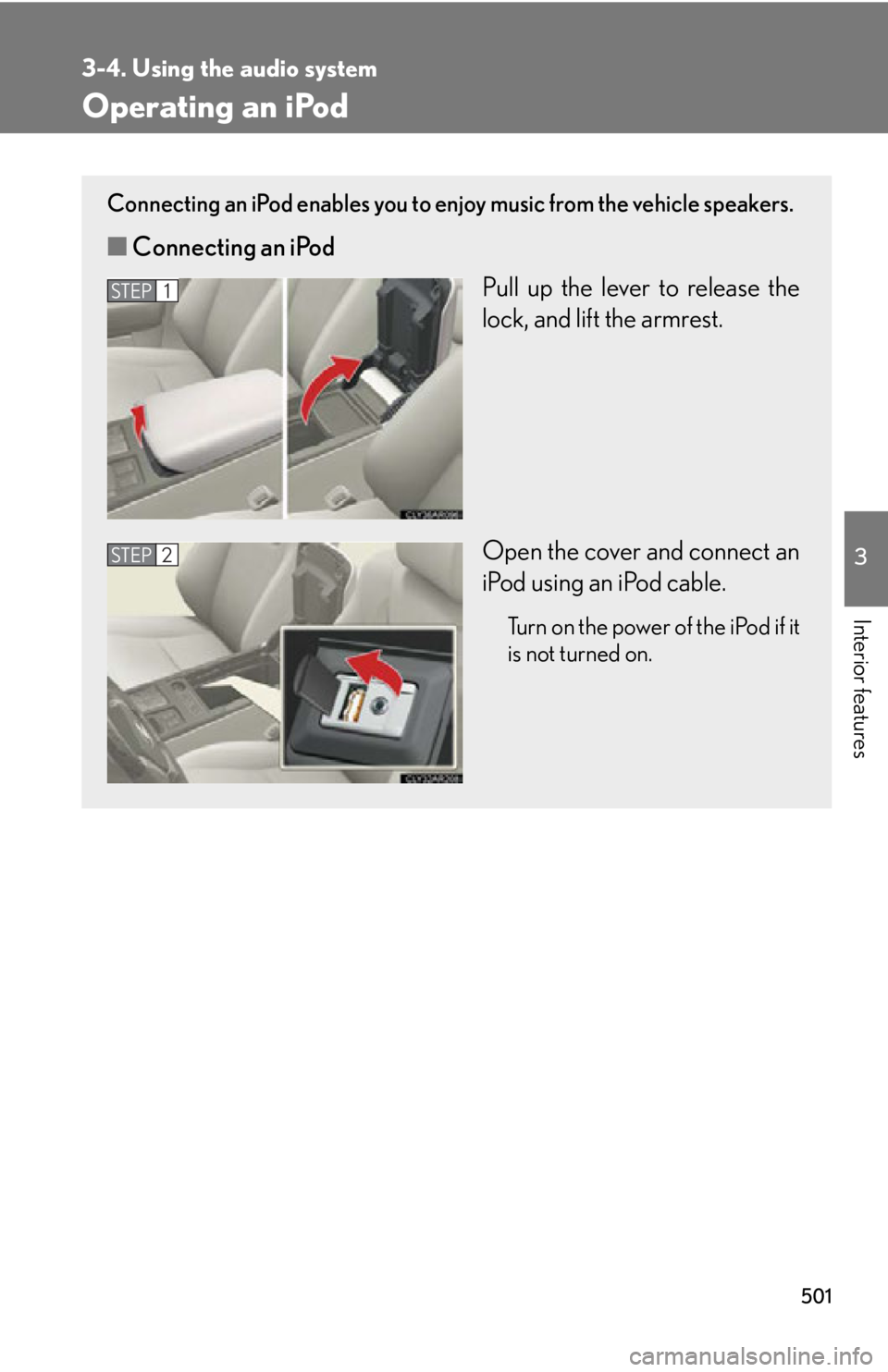
Interior features Operating an iPod Connecting an iPod enables you to enjoy music from the vehicle speakers.
■ Connecting an iPod
Pull up the lever to release the
lock, and lift the armrest.
Open the cover and connect an
iPod using an iPod cable. Turn on the power of the iPod if it
is not turned on.STEP 1
STEP 2
Page 510 of 878
5103-4. Using the audio system
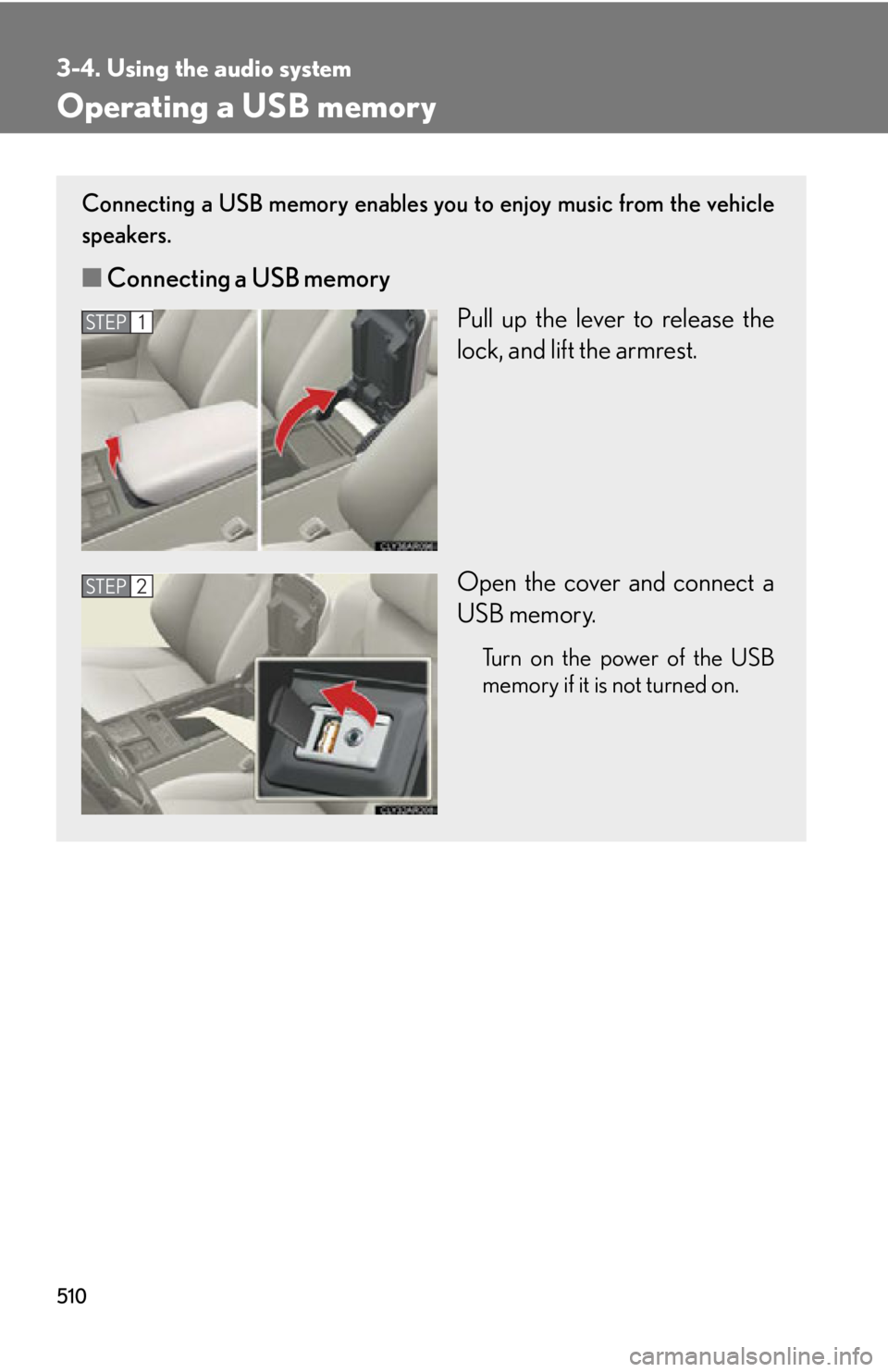
Operating a USB memory Connecting a USB memory enables you to enjoy music from the vehicle
speakers.
■ Connecting a USB memory
Pull up the lever to release the
lock, and lift the armrest.
Open the cover and connect a
USB memory. Turn on the power of the USB
memory if it is not turned on.STEP 1
STEP 2
Page 540 of 878
5403-4. Using the audio system
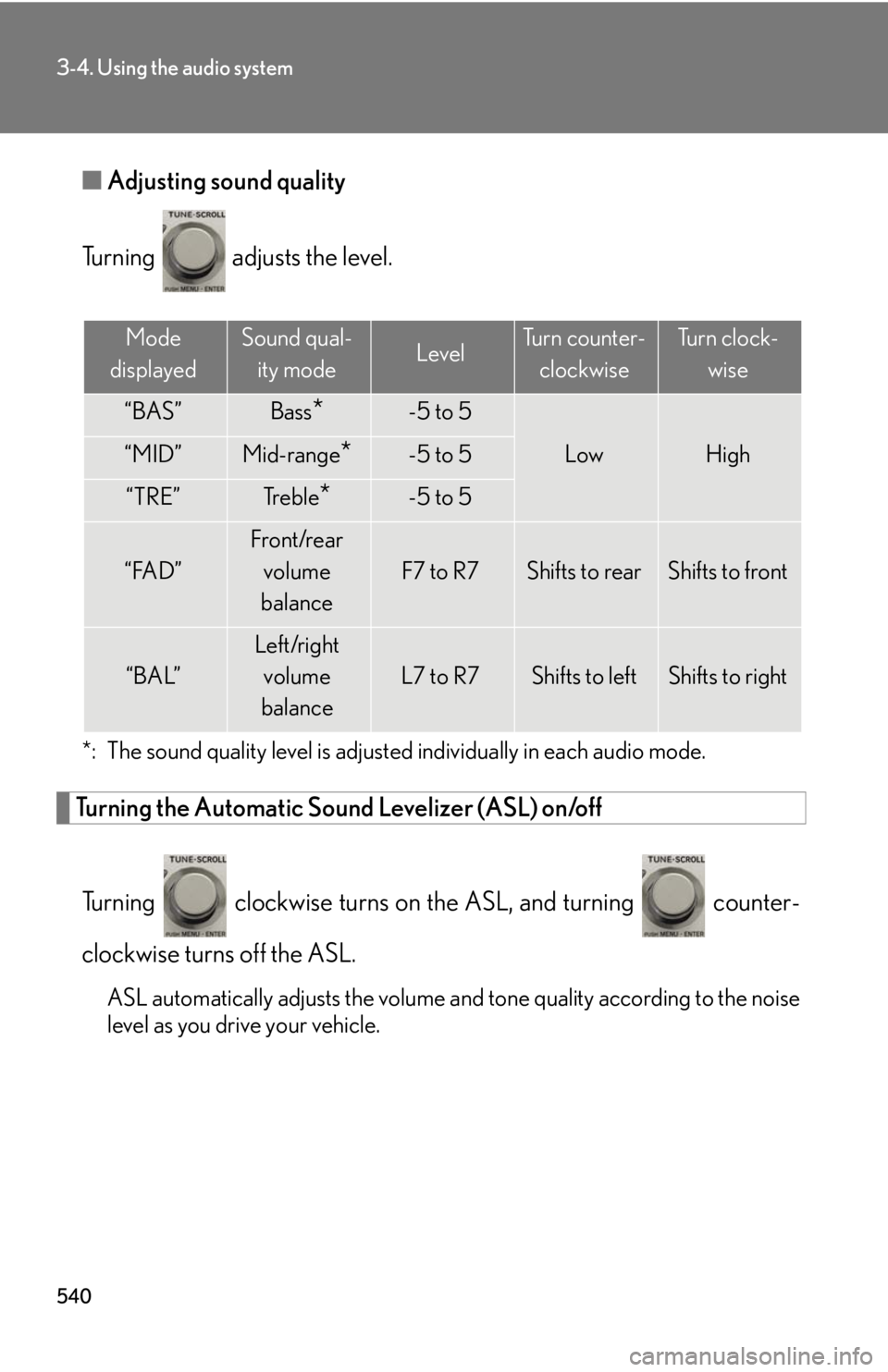
■ Adjusting sound quality
Turning adjusts the level.
*: The sound quality level is adjusted individually in each audio mode.
Turning the Automatic Sound Levelizer (ASL) on/off
Turning clockwise turns on the ASL, and turning counter-
clockwise turns off the ASL.
ASL automatically adjusts the volume an d tone quality according to the noise
level as you drive your vehicle. Mode
displayed Sound qual-
ity mode Level Turn counter-
clockwise Tu r n c l o c k -
wise
“BAS” Bass
* -5 to 5
Low High“MID” Mid-range
* -5 to 5
“TRE” Tr e b l e
* -5 to 5
“FAD” Front/rear
volume
balance F7 to R7 Shifts to rear Shifts to front
“BAL” Left/right
volume
balance L7 to R7 Shifts to left Shifts to right
Page 541 of 878
5413-4. Using the audio system
3
Interior features Using the AUX port
■
Operating portable audio devices connected to the audio system
The volume can be adjusted using the vehicle's audio controls. All other adjust-
ments must be made on the portable audio device itself.■
When using a portable audio devi ce connected to the power outlet
Noise may occur during playback. Use the power source of the portable audio
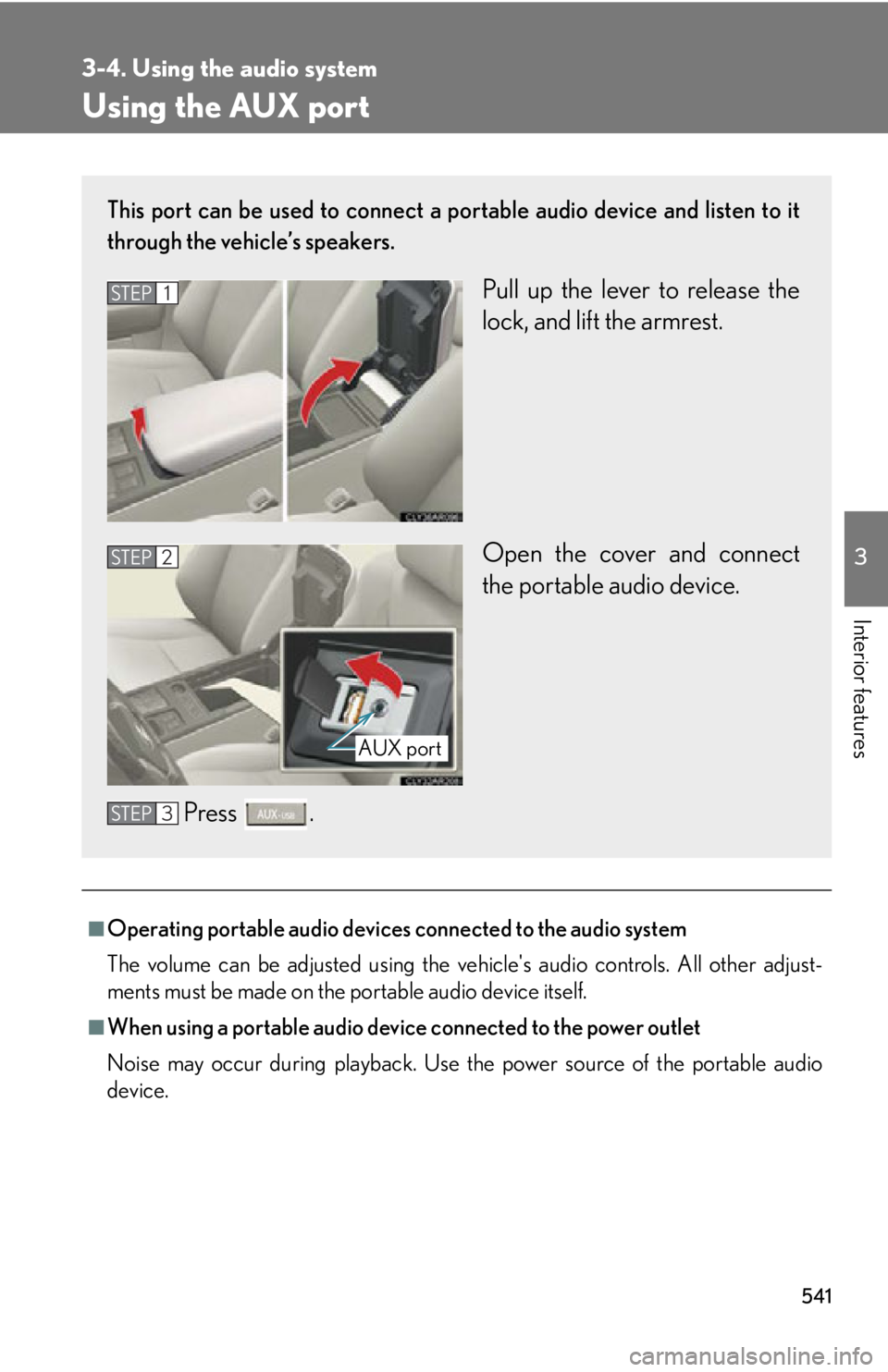
device.This port can be used to connect a po rtable audio device and listen to it
through the vehicle’s speakers.
Pull up the lever to release the
lock, and lift the armrest.
Open the cover and connect
the portable audio device.
Press .STEP 1
STEP 2
AUX port
STEP 3
Page 557 of 878
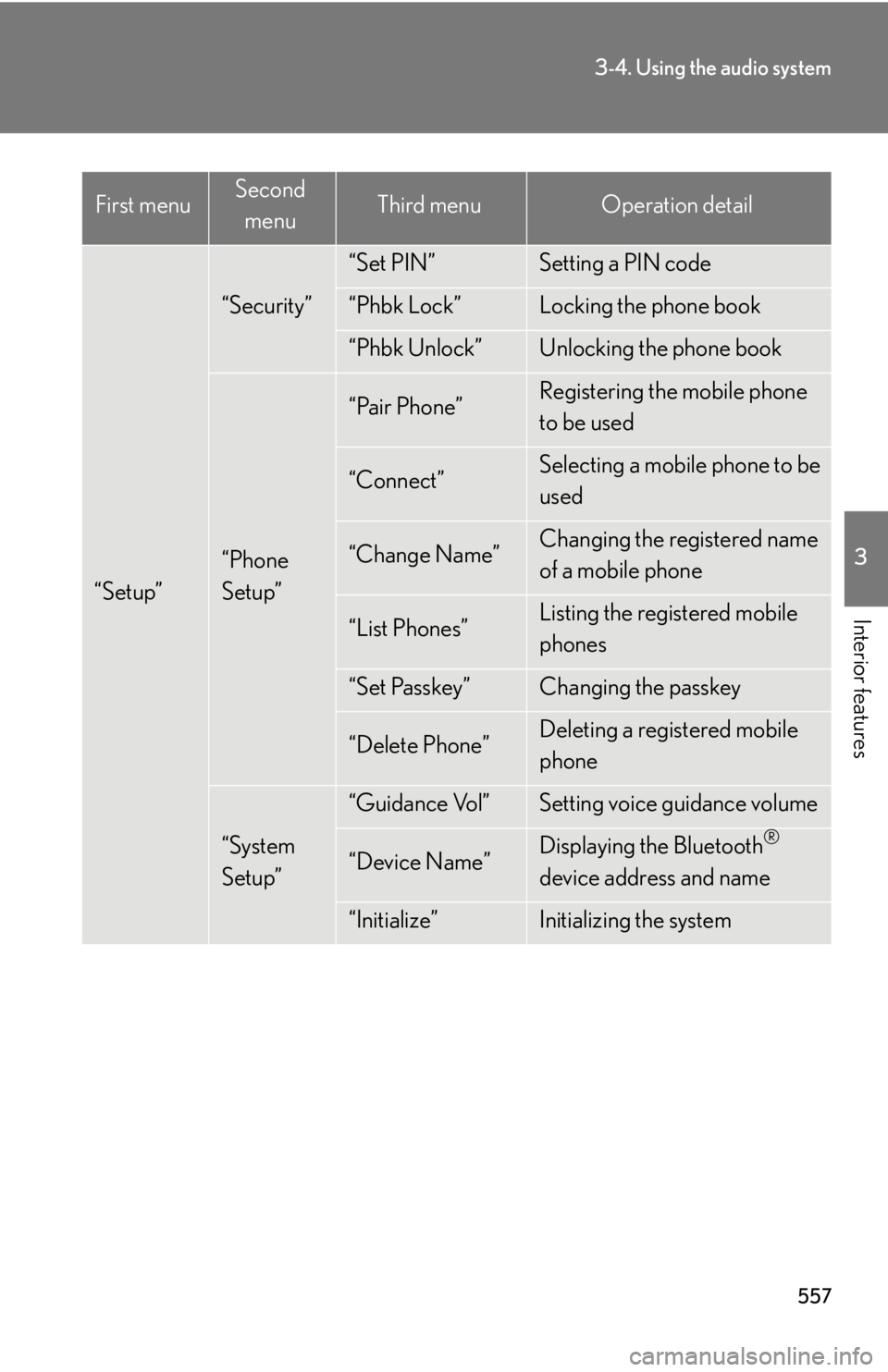
5573-4. Using the audio system
3
Interior features
“Setup” “Security” “Set PIN” Setting a PIN code
“Phbk Lock” Locking the phone book
“Phbk Unlock” Unlocking the phone book
“Phone
Setup” “Pair Phone” Registering the mobile phone
to be used
“Connect” Selecting a mobile phone to be
used
“Change Name” Changing the registered name
of a mobile phone
“List Phones” Listing the registered mobile
phones
“Set Passkey” Changing the passkey
“Delete Phone” Deleting a registered mobile
phone
“System
Setup” “Guidance Vol” Setting voice guidance volume
“Device Name” Displaying the Bluetooth ®
device address and name
“Initialize” Initializing the systemFirst menu Second
menu Third menu Operation detail
Page 558 of 878
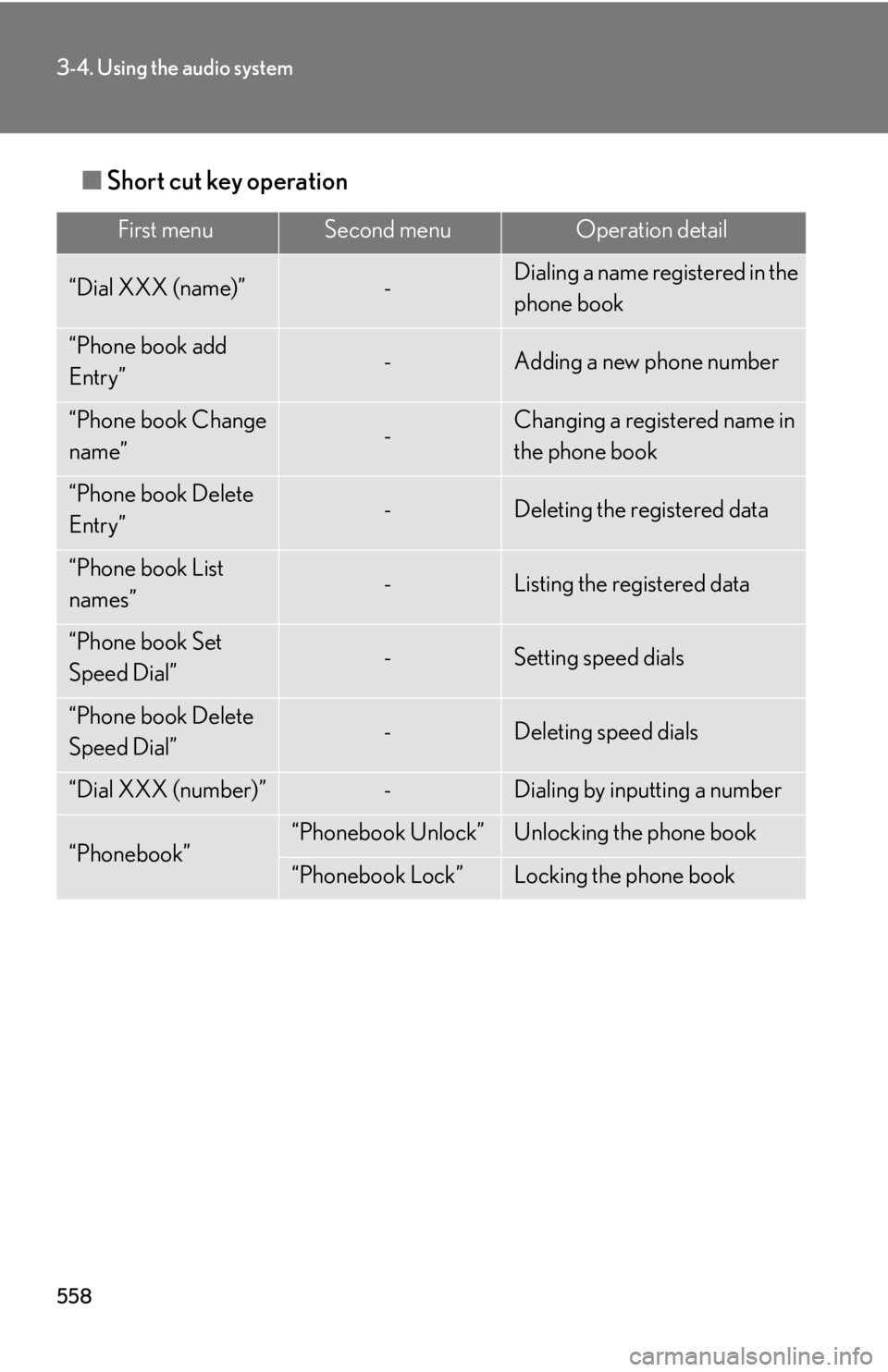
5583-4. Using the audio system
■ Short cut key operation First menu Second menu Operation detail
“Dial XXX (name)” - Dialing a name registered in the
phone book
“Phone book add
Entry” - Adding a new phone number
“Phone book Change
name” - Changing a registered name in
the phone book
“Phone book Delete
Entry” - Deleting the registered data
“Phone book List
names” - Listing the registered data
“Phone book Set
Speed Dial” - Setting speed dials
“Phone book Delete
Speed Dial” - Deleting speed dials
“Dial XXX (number)” - Dialing by inputting a number
“Phonebook” “Phonebook Unlock” Unlocking the phone book
“Phonebook Lock” Locking the phone book