lock LEXUS RX450h 2015 Workshop Manual
[x] Cancel search | Manufacturer: LEXUS, Model Year: 2015, Model line: RX450h, Model: LEXUS RX450h 2015Pages: 878, PDF Size: 11.62 MB
Page 95 of 878
951-4. Adjustable components (seats, mirrors, steering wheel)
1
Before driving Power easy access system
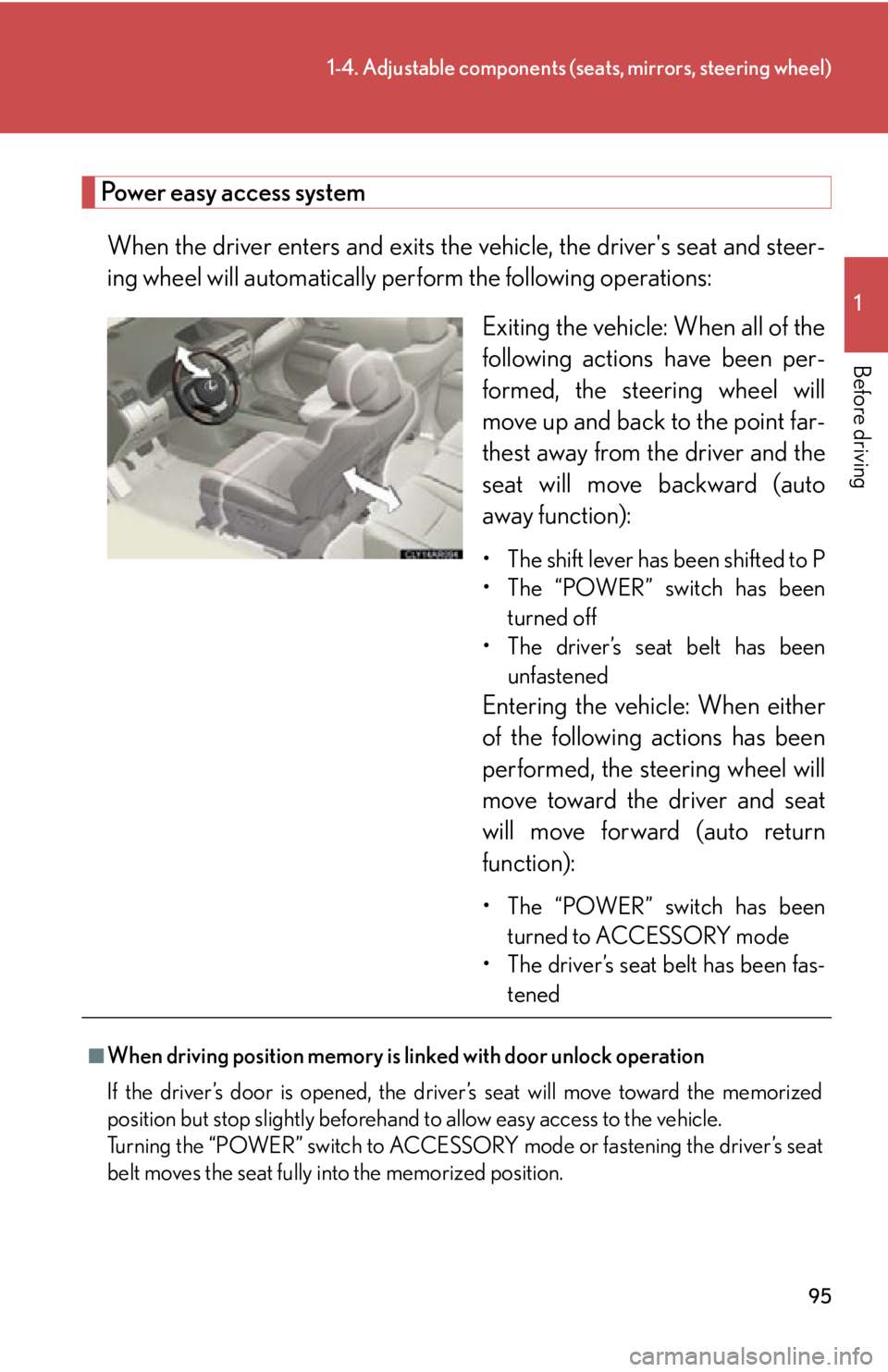
When the driver enters and exits the vehicle, the driver's seat and steer-
ing wheel will automatically perf orm the following operations:
Exiting the vehicle: When all of the
following actions have been per-
formed, the steering wheel will
move up and back to the point far-
thest away from the driver and the
seat will move backward (auto
away function): • The shift lever has been shifted to P
• The “POWER” switch has been
turned off
• The driver’s seat belt has been
unfastened
Entering the vehi cle: When either
of the following actions has been
performed, the steering wheel will
move toward the driver and seat
will move forward (auto return
function):
• The “POWER” switch has been
turned to ACCESSORY mode
• The driver’s seat belt has been fas-
tened
■
When driving position memory is li nked with door unlock operation
If the driver’s door is opened, the driver’s seat will move toward the memorized
position but stop slightly beforehand to allow easy access to the vehicle.
Turning the “POWER” switch to ACCESSORY mode or fastening the driver’s seat
belt moves the seat fully into the memorized position.
Page 96 of 878
961-4. Adjustable components (s eats, mirrors, steering wheel)
■
Canceling the linked do or unlock operation
Turn the “POWER” switch to ON mode and close the driver's door.
While pressing the “SET” button, press the driver’s door lock switches
(either lock or unlock) until the signal beeps.■
Operating the driving position memory after turning the “POWER” switch off
Memorized positions (except for the steeri ng wheel position) can be activated up
to 180 seconds after the driver’s door is opened and another 60 seconds after it is
closed again, even after turning the “POWER” switch off.■
Stopping seat position op eration part-way through
Perform any of the following operations: ●
Press the “SET” button.●
Press button “1”, “2” or “3”.●
Adjust the seat using the switches (only cancels seat position recall).●
Adjust the steering wheel using the tilt and telescopic steering control switch
(only cancels steering wheel position recall).■
Correct seat position
When the seat is in the most forward or most backward position, and the seat is
being moved in those directions, the syst em may not correctly recognize the cur-
rent position and the memorized posi tion will not be correctly recalled.■
The auto away function for exiting the driver seat
If the seat is already close to the rearmost position, the auto away function may not
operate when the driver exits the vehicle.■
Customization
The distance that the driver’s seat move s backward during the auto away function
can be changed. (Customizable features P. 825)
CAUTION
■
Seat adjustment caution
Take care during seat adjustment so that th e seat does not strike the rear passenger
or squeeze your body against the steering wheel. STEP 1
STEP 2
Page 97 of 878
9711-4. Adjustable components (s eats, mirrors, steering wheel)
Before driving Head restraints
■
Removing the head restraints
■
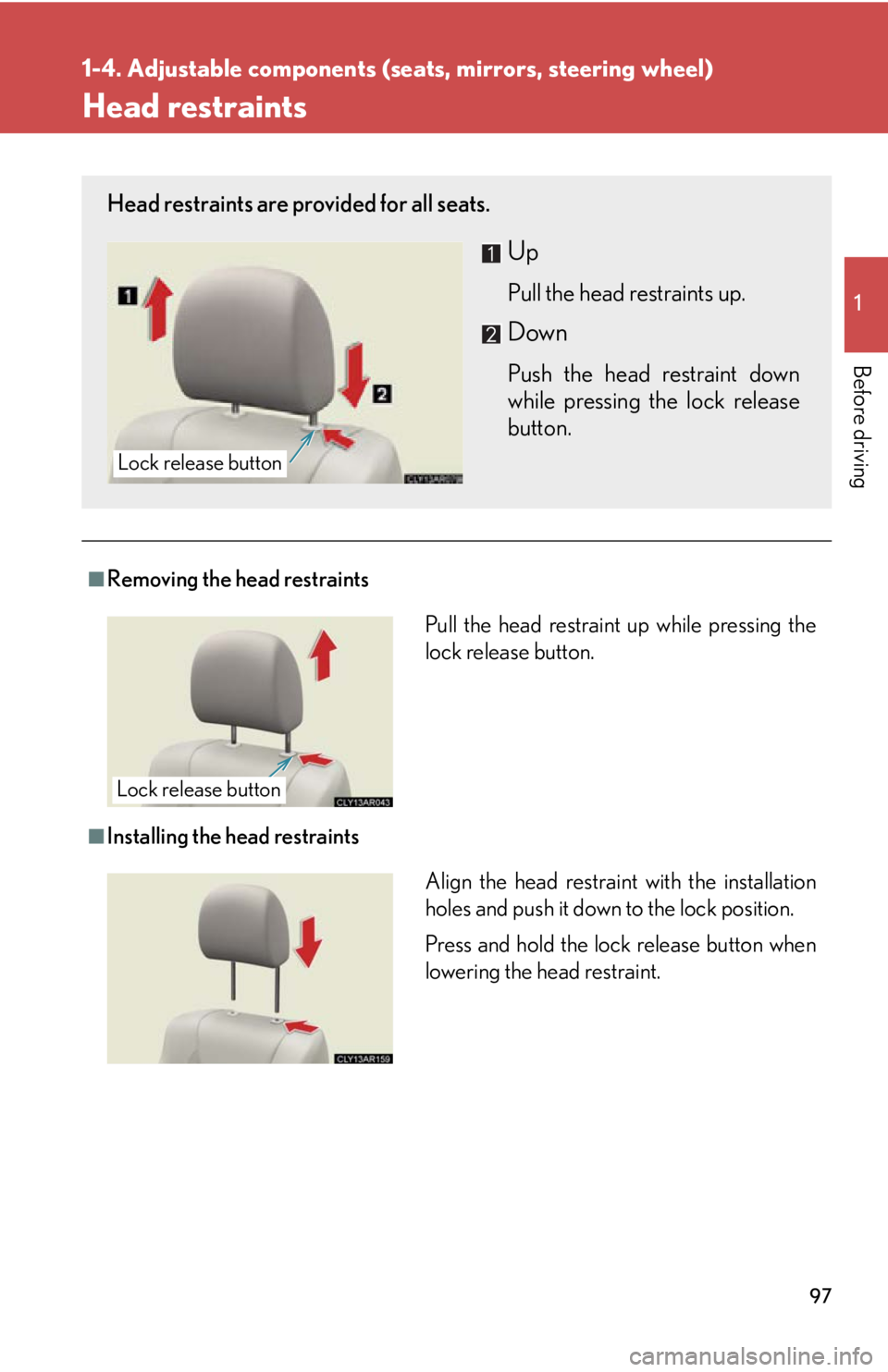
Installing the head restraintsHead restraints are provided for all seats.
Up Pull the head restraints up.
Down Push the head restraint down
while pressing the lock release
button.Lock release button
Pull the head restraint up while pressing the
lock release button.
Lock release button
Align the head restrain t with the installation
holes and push it down to the lock position.
Press and hold the lock release button when
lowering the head restraint.
Page 98 of 878

981-4. Adjustable components (s eats, mirrors, steering wheel)
■
Adjusting the height of the head restraints (front seats)
■
Adjusting the rear seat head restraints
Always raise the head restraints to th e uppermost lock position during use.
CAUTION■
Head restraint precautions
Observe the following precautions regarding the head restraints. Failure to do so
may result in death or serious injury. ●
Use the head restraints design ed for each respective seat.●
Adjust the head restraints to the correct position at all times.●
After adjusting the head restraints, push down on them and make sure they are
locked in position.●
Do not drive with the head restraints removed. Make sure that the head restraints are
adjusted so that the center of the head
restraint is closest to the top of your ears.
Page 101 of 878
1011-4. Adjustable components (seats, mirrors, steering wheel)
1
Before driving ■
Emergency locking retractor (ELR)
The retractor will lock the belt during a sudd en stop or on impact. It may also lock if
you lean forward too quickly. To allow the belt to extend, retract the belt and then
pull it slowly.■
Automatic locking retractor (ALR)
When a passenger's shoulder belt is completely extended and then retracted even
slightly, the belt is locked in that position and cannot be extended. This feature is
used to hold the child restraint system (CRS) firmly. To free the belt again, fully
retract the belt and then pull the belt out once more. ( P. 1 5 4 )■
Child seat belt usage
The seat belts of your vehicle were princi pally designed for persons of adult size. ●
Use a child restraint system appropriate for the child, until the child becomes
large enough to properly wear the vehicle's seat belt. ( P. 1 5 0 )●
When the child becomes large enough to properly wear the vehicle's seat belt,
follow the instructions on P. 99 regarding seat belt usage.■
Replacing the belt after the pretensioner has been activated
If the vehicle is involved in multiple collisions, the pretensioner will activate for the
first collision, but will not activate for the second or subsequent collisions.■
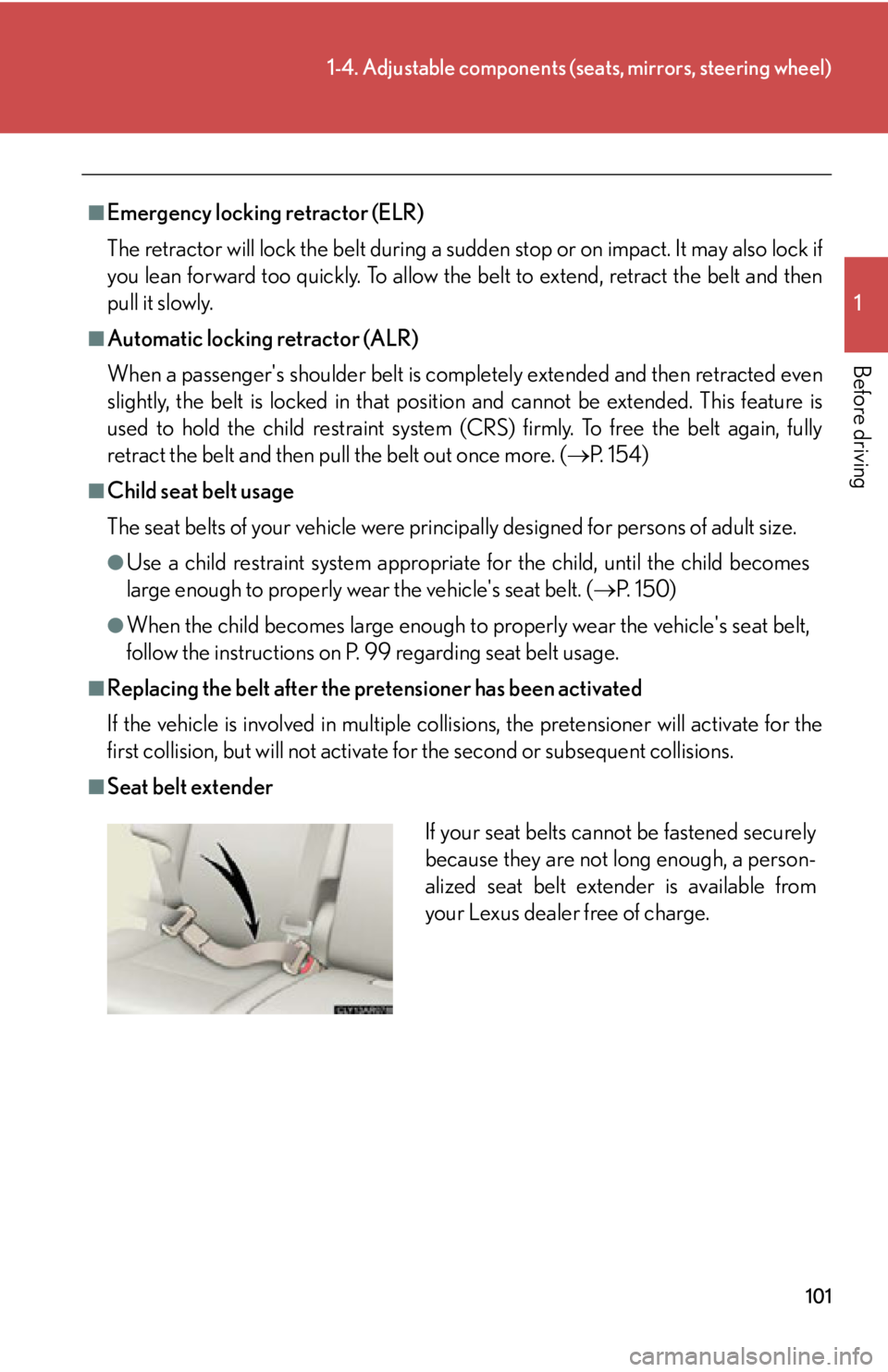
Seat belt extender
If your seat belts cann ot be fastened securely
because they are not long enough, a person-
alized seat belt extender is available from
your Lexus dealer free of charge.
Page 110 of 878
1101-4. Adjustable components (s eats, mirrors, steering wheel)
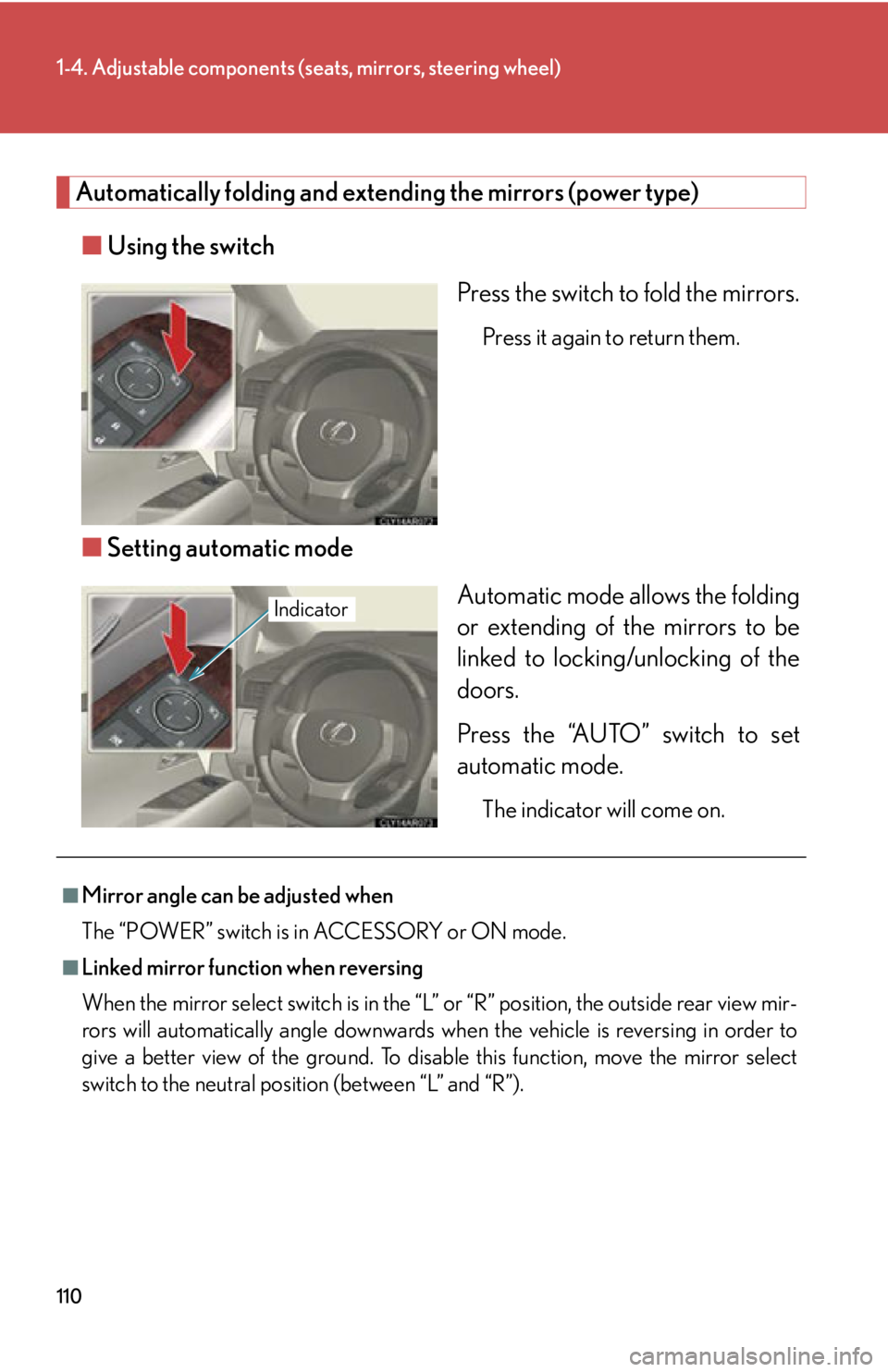
Automatically folding and extending the mirrors (power type)
■ Using the switch
Press the switch to fold the mirrors. Press it again to return them.
■ Setting automatic mode
Automatic mode allows the folding
or extending of the mirrors to be
linked to locking/unlocking of the
doors.
Press the “AUTO” switch to set
automatic mode. The indicator will come on.Indicator
■
Mirror angle can be adjusted when
The “POWER” switch is in ACCESSORY or ON mode.■
Linked mirror function when reversing
When the mirror select switch is in the “L ” or “R” position, the outside rear view mir-
rors will automatically angl e downwards when the vehicle is reversing in order to
give a better view of the ground. To disable this function, move the mirror select
switch to the neutral positi on (between “L” and “R”).
Page 112 of 878
1121-5. Opening and closing th e windows and moon roof
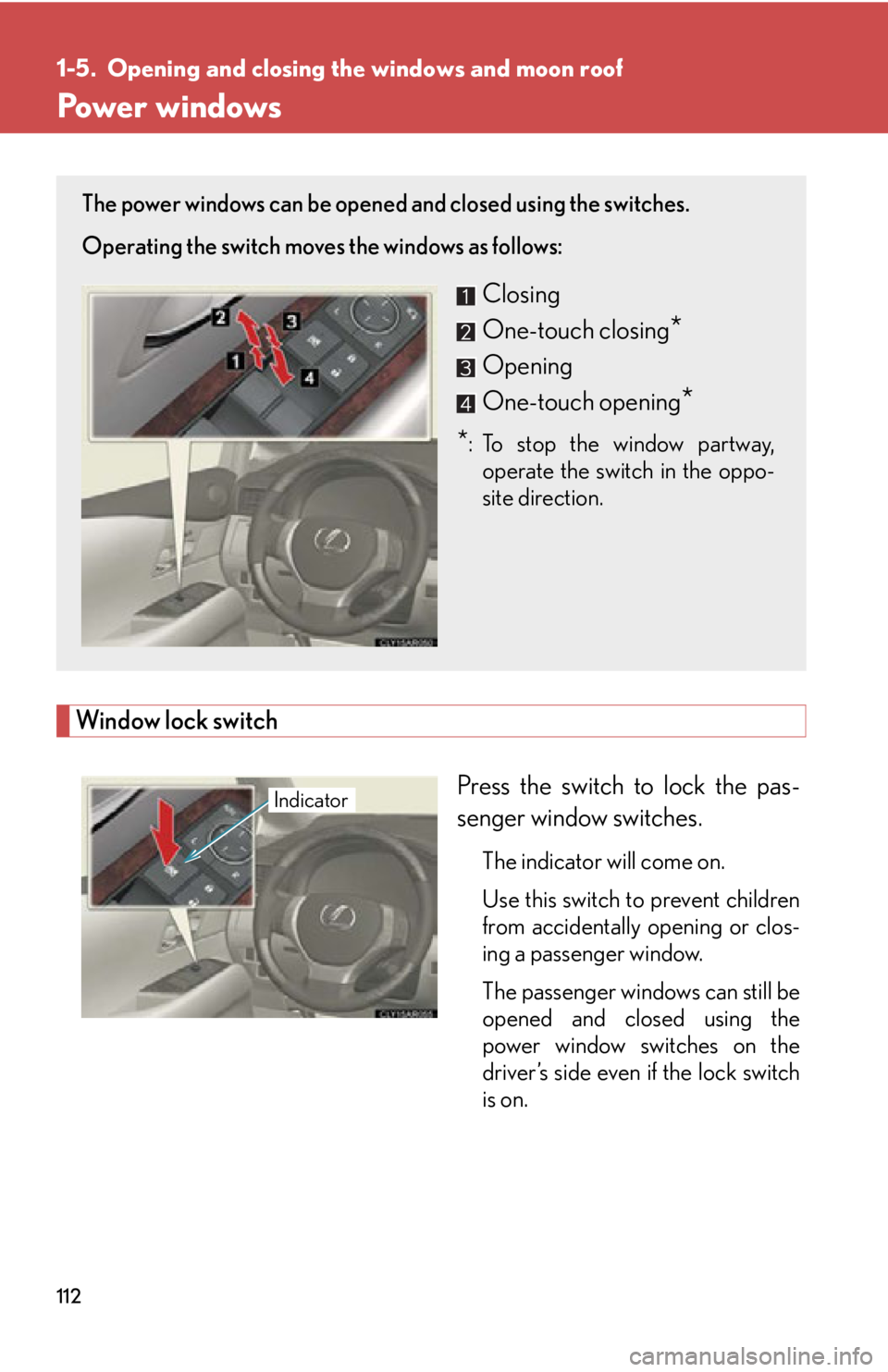
Power windows
Window lock switch
Press the switch to lock the pas-
senger window switches. The indicator will come on.
Use this switch to prevent children
from accidentally opening or clos-
ing a passenger window.
The passenger windows can still be
opened and closed using the
power window switches on the
driver’s side even if the lock switch
is on.The power windows can be opened and closed using the switches.
Operating the switch moves the windows as follows:
Closing
One-touch closing
*Opening
One-touch opening
** :To stop the window partway,
operate the switch in the oppo-
site direction.
Indicator
Page 114 of 878
1141-5. Opening and closing the windows and moon roof
■
Door lock linked window operation ●
The power windows can be opened and closed using the mechanical key.
( P. 7 8 1 )●
The power windows can be opened using the wireless remote control.
( P. 6 9 )■
When the 12-volt battery is disconnected
The window lock switch is disabled. If necessary, press the window lock switch after
reconnecting the battery.■
Customization
Settings (e.g. linked door lock operation) can be changed.
(Customizable features P. 825)
CAUTION■
Closing the windows
Observe the following precautions.
Failing to do so may result in death or serious injury. ●
Check to make sure that all passengers do not have any part of their body in a
position where it could be caught when a window is being operated.●
Do not allow children to operate the power windows.
Closing a power window on someone can cause death or serious injury.
The driver is responsible for instructin g children not to operate the power win-
dows.■
Jam protection function ●
Never use any part of your body to intent ionally activate the jam protection func-
tion.●
The jam protection function may not work if something gets caught just before
the window fully closes. Also, the jam protection does not operate when the
power window switch is pulled up continually to close the windows.
Page 116 of 878

1161-5. Opening and closing the windows and moon roof
■
The moon roof can be operated when
The “POWER” switch is in ON mode. ■
Operating the moon roof after turning the hybrid system off
The moon roof can be operated for ap proximately 45 seconds even after the
“POWER” switch is turned to ACCESSORY mode or turned off. It cannot, how-
ever, be operated once either front door is opened. ■
Jam protection function
If an object is detected between the moon roof and the frame while the moon roof is
closing or tilting down, travel is stopped and the moon roof opens slightly.■
Sunshade
The sunshade can be opened and closed manually. However, the sunshade will
open automatically when the moon roof is opened. ■
Door lock linked moon roof operation ●
The moon roof can be opened and closed using the mechanical key. ( P. 7 8 1 )●
The moon roof can be opened using the wireless remote control. ( P. 6 9 )
Page 117 of 878
1171-5. Opening and closing the windows and moon roof
1
Before driving ■
When the moon roof does not close normally
Perform the following procedure: ●
If the moon roof closes but then re-opens slightly
Stop the vehicle.
Press and hold the “CLOSE” switch.* 1
The moon roof will close, reopen and pause for approximately 10 sec-
onds.* 2
Then it will close again, tilt up and pause for approximately 1 sec-
ond. Finally, it will tilt down, open and close.
Check to make sure that the moon roof is completely closed and then
release the switch.●
If the moon roof tilts down but then tilts back up
Stop the vehicle.
Press and hold the “UP” switch* 1
until the moon roof moves into the tilt up
position and stops.
Release the “UP” switch once and th en press and hold the “UP” switch
again.* 1
The moon roof will pause for approximately 10 seconds in the tilt up posi-
tion.* 2
Then it will adjust slightly and pause for approximately 1 second.
Finally, it will tilt down, open and close.
Check to make sure that the moon roof is completely closed and then
release the switch.
* 1
: If the switch is released at the incorrect time, the procedure will have
to be performed again from the beginning.
* 2
: If the switch is released after the above mentioned 10 second pause,
automatic operation will be disabled. In that case, press and hold the
“CLOSE” or “UP” switch, and the moon roof will tilt up and pause for
approximately 1 second. Then it will tilt down, open and close. Check
to make sure that the moon roof is completely closed and then release
the switch.
If the moon roof does not fully close even after performing the above procedure
correctly, have the vehicle inspected by your Lexus dealer.
■
Customization
Settings (e.g. linked door lock operation) can be changed.
(Customizable features P. 825)STEP 1
STEP 2
STEP 3
STEP 1
STEP 2
STEP 3
STEP 4