light LEXUS RX450h 2015 Repair Manual
[x] Cancel search | Manufacturer: LEXUS, Model Year: 2015, Model line: RX450h, Model: LEXUS RX450h 2015Pages: 878, PDF Size: 11.62 MB
Page 204 of 878

2042-2. Instrument cluster
* 1
: These lights turn on when the “POWER” switch is turned to ON mode to
indicate that a system check is being performed. They will turn off after
the hybrid system is on, or after a few seconds. There may be a malfunc-
tion in a system if a light does not co me on, or if the lig hts do not turn off.
Have the vehicle inspected by your Lexus dealer.
* 2
: The light flashes to indicate that the system is operating.
* 3
: The light comes on when the system is turned off. The light flashes faster
than usual to indicate that the system is operating.
* 4
: In order to confirm operation, the BSM outside rear view mirror indica-
tors illuminate in the following situations:
• When the “POWER” switch is turned to ON mode while the BSM
main switch is set to ON.
• When the BSM main switch is set to ON while the “POWER” switch is
in ON mode.
If the system is functioning correctly, the BSM outside rear view mirror
indicators will turn off after a few seconds.
If the BSM outside rear view mirror indicators do not illuminate or do not
turn off, there may be a malfunction with the system.
If this occurs, have the vehicle inspected by your Lexus dealer. (if equipped)
SRS airbag on-off indica-
tor ( P. 1 4 5 ) (if equipped)
SRS airbag on-off indica-
tor ( P. 1 4 5 )
* 1
* 1
Page 205 of 878
2052-2. Instrument cluster
2
When driving
CAUTION■
If a safety system warning light does not come on
Should a safety system light such as the ABS and SRS warning light not come on
when you start the hybrid system, this could mean that these systems are not avail-
able to help protect you in an accident, wh ich could result in death or serious injury.
Have the vehicle inspected by your Lexus dealer immediately if this occurs.■ Warning lights
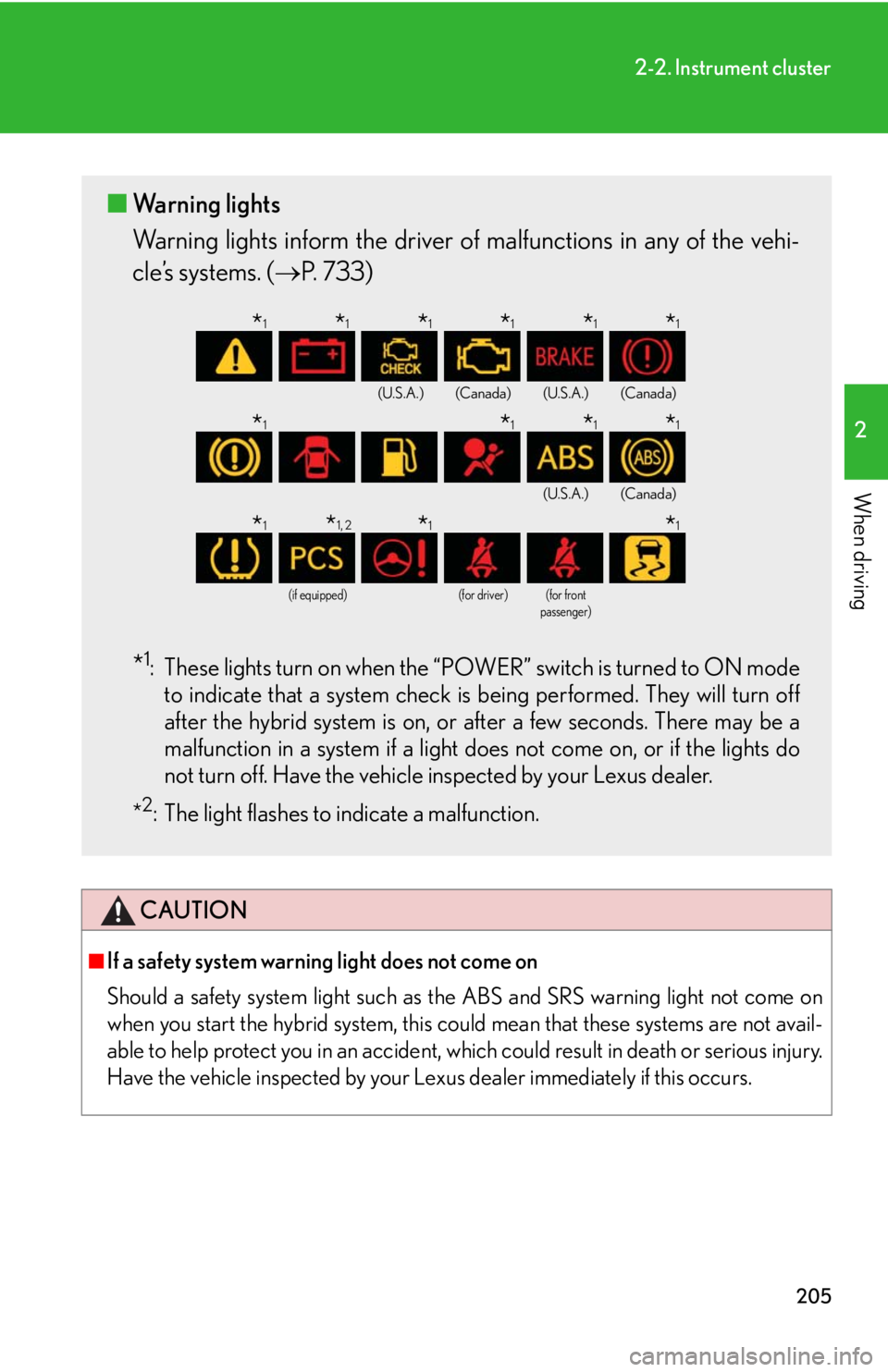
Warning lights inform the driver of malfunctions in any of the vehi-
cle’s systems. ( P. 733)
* 1
: These lights turn on when the “POWER” switch is turned to ON mode
to indicate that a system check is being performed. They will turn off
after the hybrid system is on, or after a few seconds. There may be a
malfunction in a system if a light do es not come on, or if the lights do
not turn off. Have the vehicle inspected by your Lexus dealer.
* 2
: The light flashes to indicate a malfunction. (U.S.A.) (Canada) (U.S.A.) (Canada)
(U.S.A.) (Canada)
(if equipped) (for driver) (for front
passenger)
* 1
* 1
* 1
* 1
* 1
* 1
* 1
* 1
* 1
* 1
* 1
* 1, 2
* 1
* 1
Page 209 of 878
2092-2. Instrument cluster
2
When driving
Trip information
■ Energy monitor
Displays the status of the hybrid system ( P. 4 0 )
■ Current fuel consumption
Displays the current ra te of fuel consumption
■ Average fuel consumption after refueling
Displays the average fuel consumptio n since the vehicle was last refu-
eled
Use the displayed average fuel consumption as a reference.
■ Average fuel consumption
Displays the average fuel consumpti on since the function was reset
• The function can be reset by pushing the “ENTER” switch for longer
than one second when the average fuel consumption is displayed.
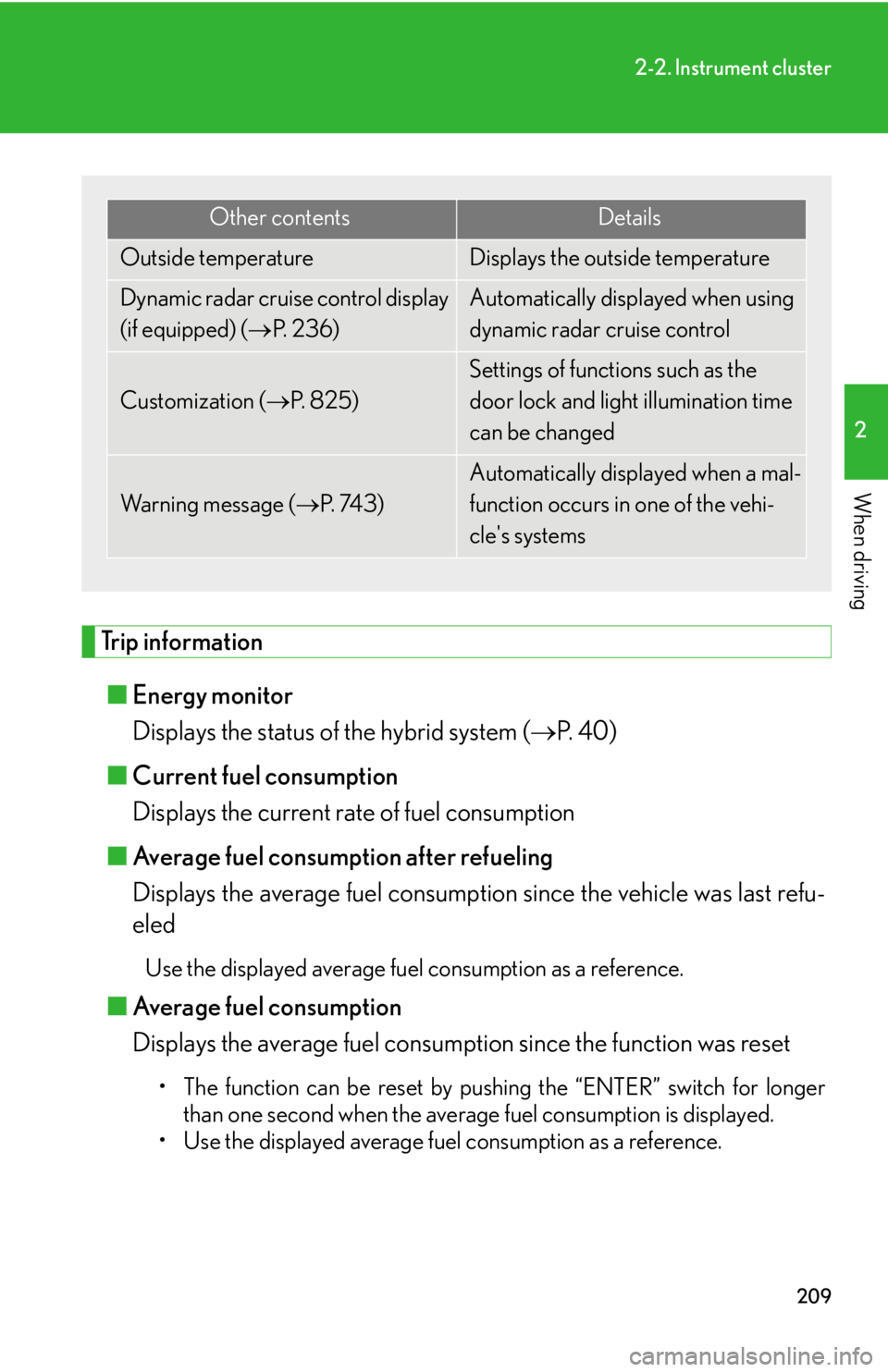
• Use the displayed average fuel consumption as a reference. Other contents Details
Outside temperature Displays the outside temperature
Dynamic radar cruise control display
(if equipped) ( P. 2 3 6 ) Automatically displayed when using
dynamic radar cruise control
Customization ( P. 8 2 5 ) Settings of functions such as the
door lock and light illumination time
can be changed
Wa r n i n g m e s s a g e ( P. 74 3 ) Automatically displayed when a mal-
function occurs in one of the vehi-
cle's systems
Page 210 of 878

2102-2. Instrument cluster
■ Average vehicle speed
Displays the average vehicle speed since the function was reset The function can be reset by pushing the “ENTER” switch for longer than
one second when the average vehicle speed is displayed.
■ Cruising range
Displays the estimated maximum distan ce that can be driven with the
quantity of fuel remaining • This distance is computed based on your average fuel consumption. As
a result, the actual distance that can be driven may differ from that dis-
played.
• When only a small amount of fuel is added to the tank, the display may
not be updated.
When refueling, turn the “POWER” switch off. If the vehicle is refueled
without turning the “POWER” switch off, the display may not be
updated.
■ Tire inflation pressure
Displays inflation pressure of each tire. There is no correlation between
the order of the displayed values and the tire positions. If the inflation pressure of any tire drops a certain amount below the tire infla-
tion pressure value currently memorized in the system, the displayed values
will be highlighted.
It may take a few minutes to display the tire inflation pressure after the
“POWER” switch is turned to ON mode. It may also take a few minutes to
display the tire inflation pressure after inflation pressure has been adjusted.
If the tire pressure warning light is on or flashing, a message describing the
situation will be displayed.
Page 215 of 878
2152-2. Instrument cluster
2
When driving Display customization
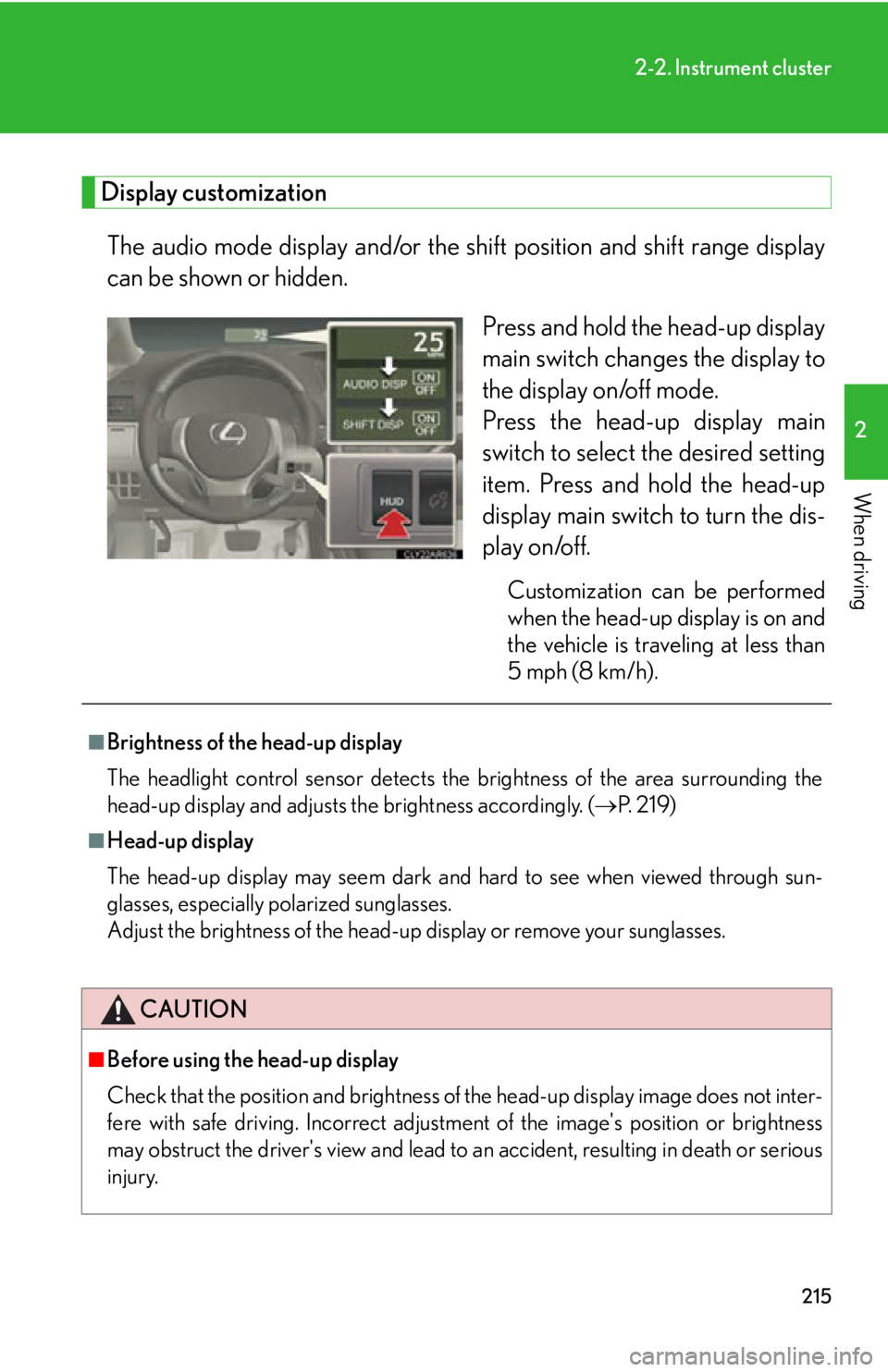
The audio mode display and/or the sh ift position and shift range display
can be shown or hidden.
Press and hold the head-up display
main switch change s the display to
the display on/off mode.
Press the head-up display main
switch to select the desired setting
item. Press and hold the head-up
display main switch to turn the dis-
play on/off. Customization can be performed
when the head-up display is on and
the vehicle is traveling at less than
5 mph (8 km/h).■
Brightness of the head-up display
The headlight control sensor detects the brightness of the area surrounding the
head-up display and adjusts th e brightness accordingly. ( P. 2 1 9 )■
Head-up display
The head-up display may seem dark and hard to see when viewed through sun-
glasses, especially polarized sunglasses.
Adjust the brightness of the head-up display or remove your sunglasses.
CAUTION
■
Before using the head-up display
Check that the position and brightness of the head-up display image does not inter-
fere with safe driving. Incorrect adjustme nt of the image's po sition or brightness
may obstruct the driver's view and lead to an accident, resulting in death or serious
injury.
Page 217 of 878
2172
When driving 2-3. Operating the lights and windshield wipers
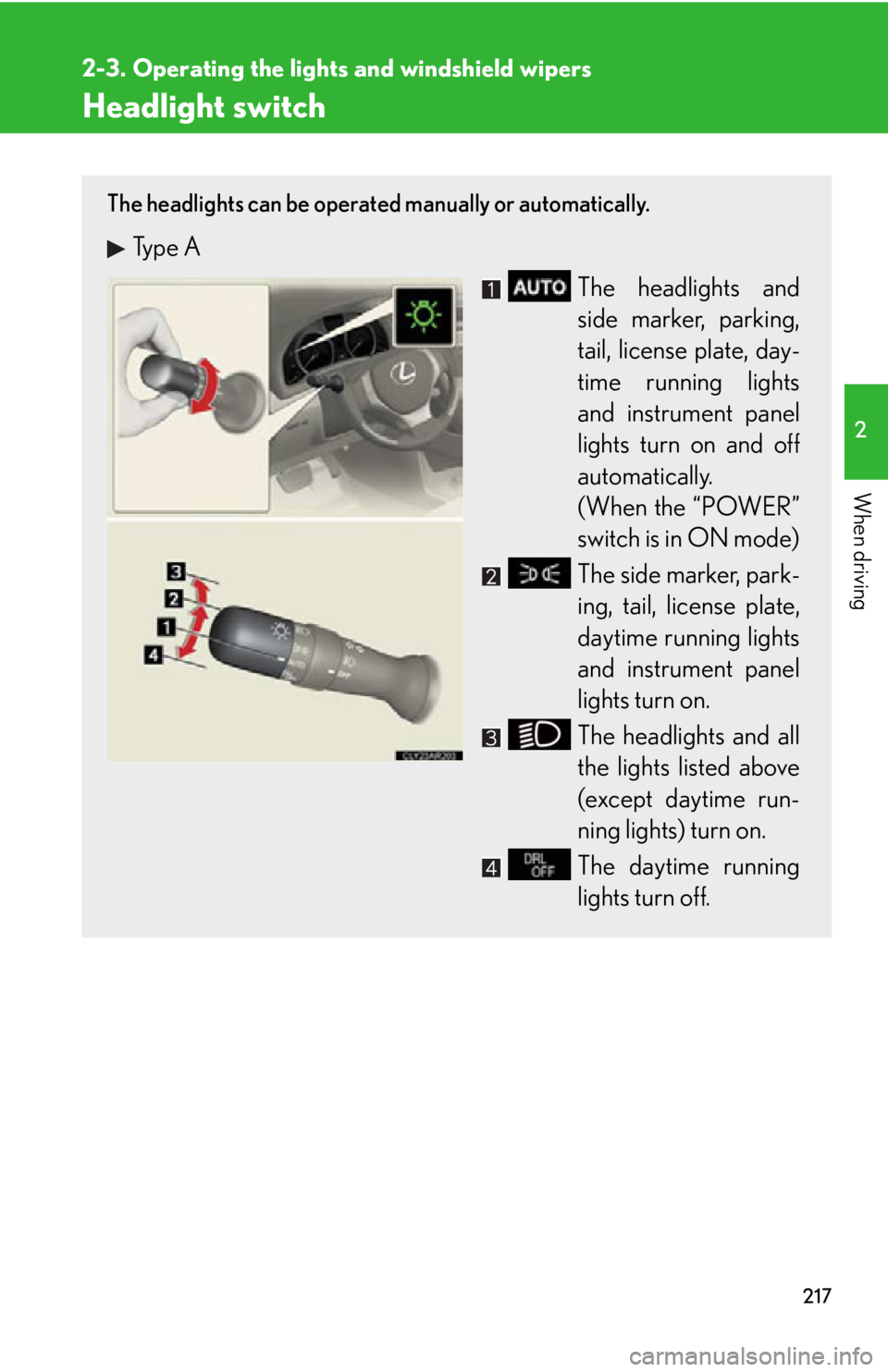
Headlight switch The headlights can be operated manually or automatically.
Type A
The headlights and
side marker, parking,
tail, license plate, day-
time running lights
and instrument panel
lights turn on and off
automatically.
(When the “POWER”
switch is in ON mode)
The side marker, park-
ing, tail, license plate,
daytime running lights
and instrument panel
lights turn on.
The headlights and all
the lights listed above
(except daytime run-
ning lights) turn on.
The daytime running
lights turn off.
Page 218 of 878
2182-3. Operating the lights and windshield wipers
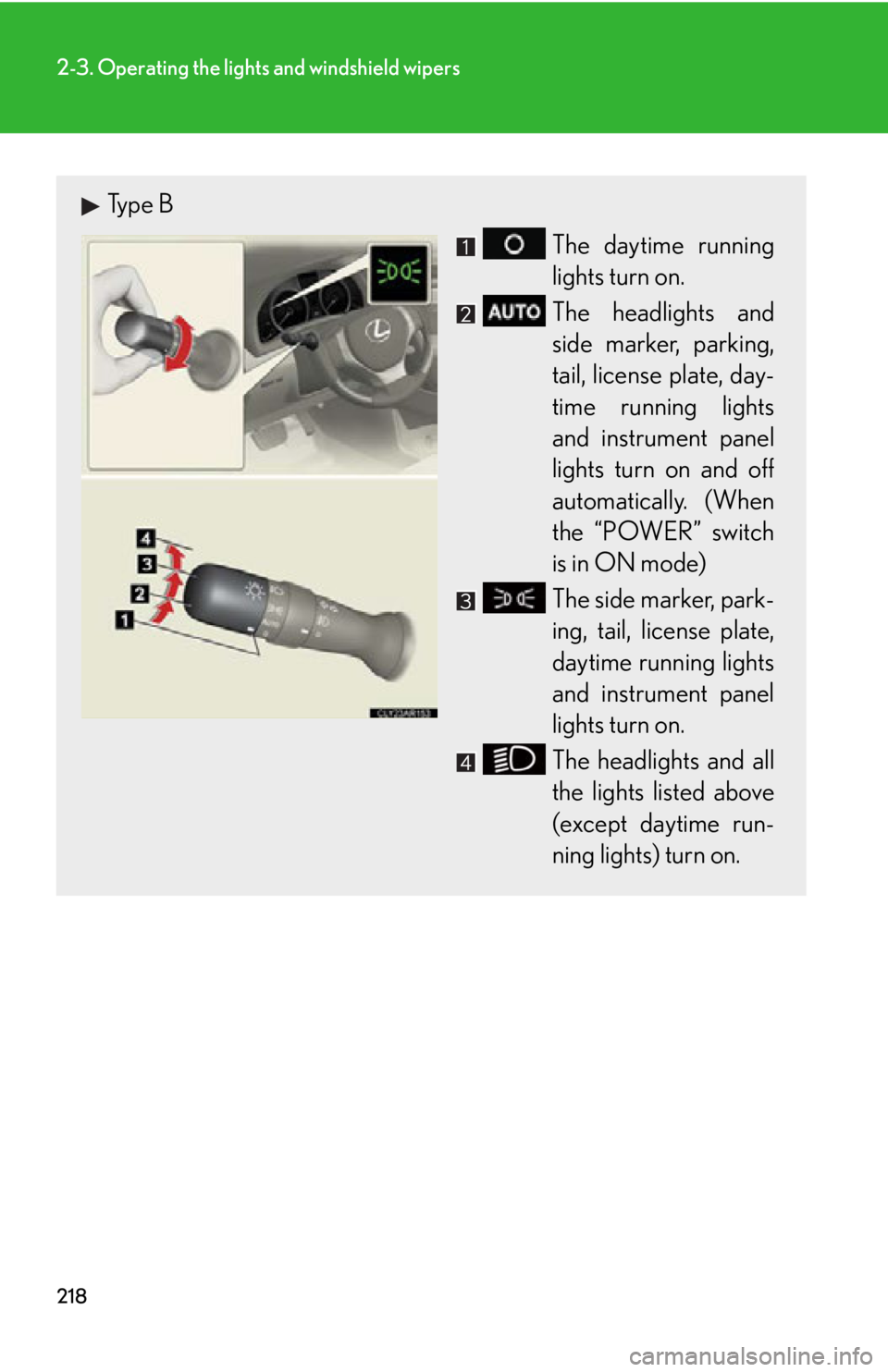
Type B
The daytime running
lights turn on.
The headlights and
side marker, parking,
tail, license plate, day-
time running lights
and instrument panel
lights turn on and off
automatically. (When
the “POWER” switch
is in ON mode)
The side marker, park-
ing, tail, license plate,
daytime running lights
and instrument panel
lights turn on.
The headlights and all
the lights listed above
(except daytime run-
ning lights) turn on.
Page 219 of 878
2192-3. Operating the light s and windshield wipers
2
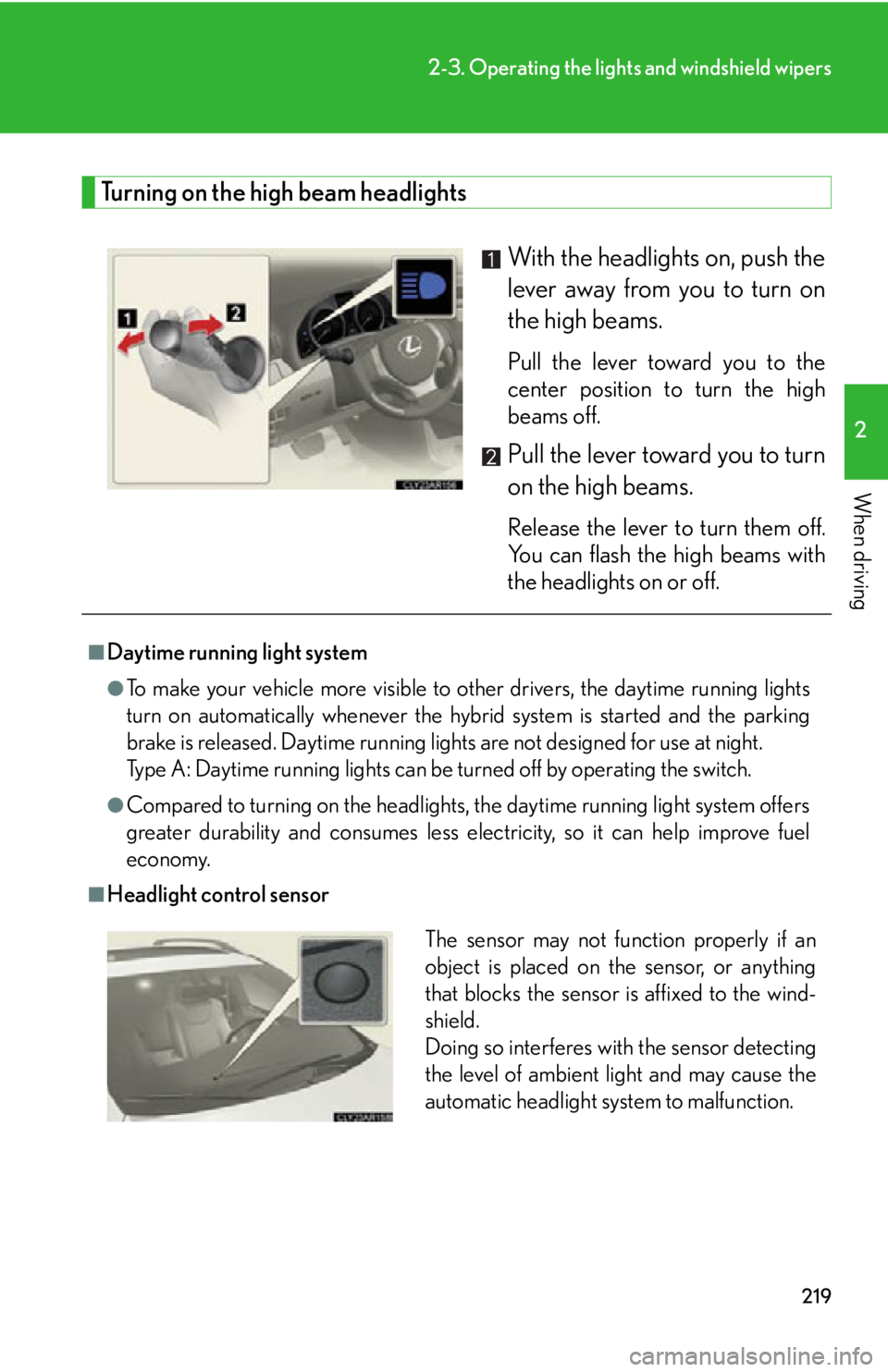
When driving Turning on the high beam headlights
With the headlights on, push the
lever away from you to turn on
the high beams. Pull the lever toward you to the
center position to turn the high
beams off.
Pull the lever toward you to turn
on the high beams. Release the lever to turn them off.
You can flash the high beams with
the headlights on or off.■
Daytime running light system ●
To make your vehicle more visible to other drivers, the daytime running lights
turn on automatically whenever the hybrid system is started and the parking
brake is released. Daytime running lights are not designed for use at night.
Type A: Daytime running lights can be turned off by operating the switch.●
Compared to turning on th e headlights, the daytime running light system offers
greater durability and consumes less electricity, so it can help improve fuel
economy.■
Headlight control sensor
The sensor may not function properly if an
object is placed on the sensor, or anything
that blocks the sensor is affixed to the wind-
shield.
Doing so interferes with the sensor detecting
the level of ambient light and may cause the
automatic headlight system to malfunction.
Page 220 of 878
2202-3. Operating the lights and windshield wipers
■
Automatic light off system ●
When the headlights are on: The headlights and tail lights turn off 30 seconds
after a door is opened and closed if the “POWER” switch is turned to ACCES-
SORY mode or turned off. (The lights turn off immediately if on the key is
pressed after all the doors are locked.)●
When only the tail lights ar e on: The tail lights turn off automatically if the
“POWER” switch is turned to ACCESSORY mode or turned off and the
driver’s door is opened.
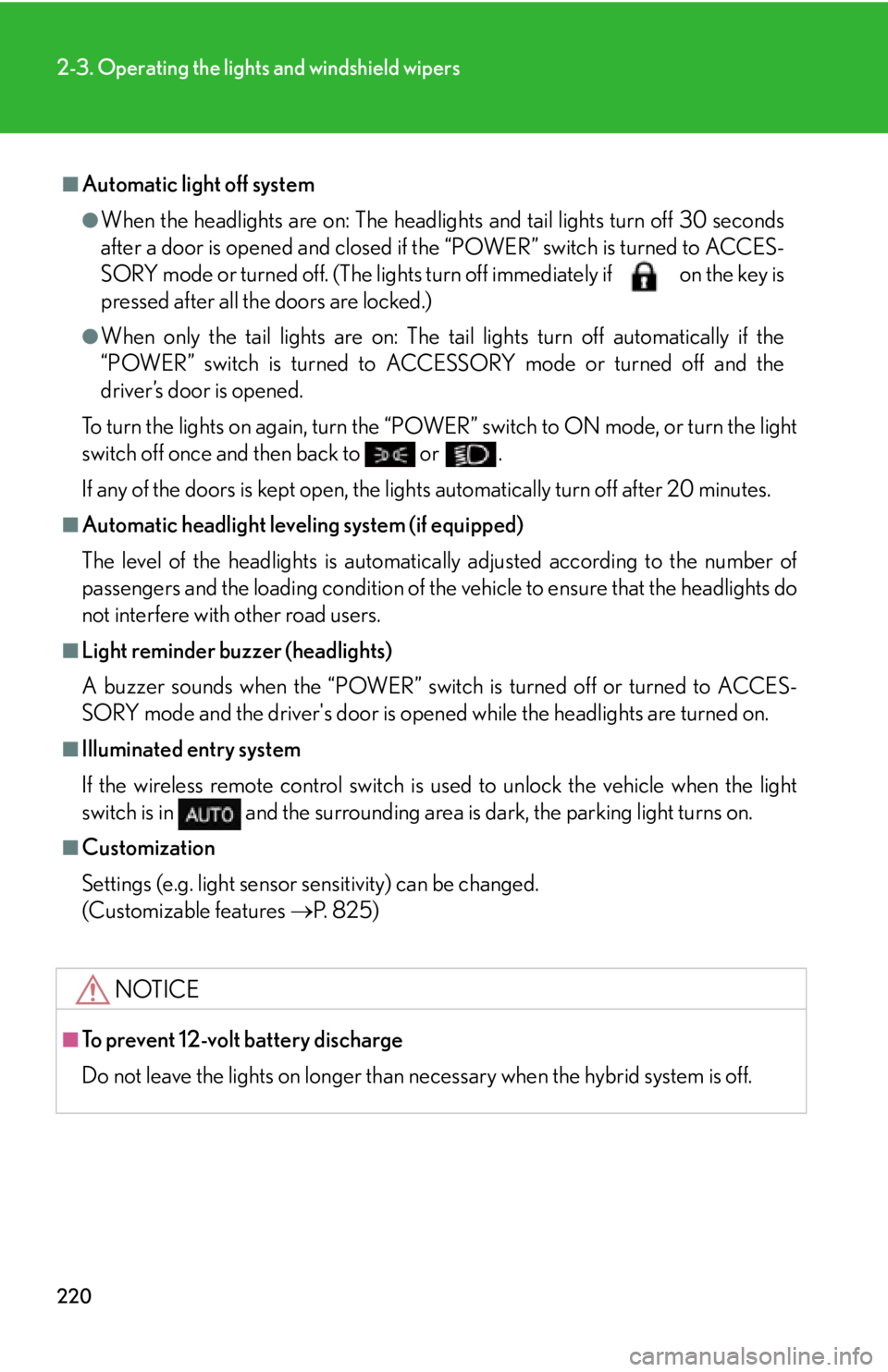
To turn the lights on again, turn the “POWER” switch to ON mode, or turn the light
switch off once and then back to or .
If any of the doors is kept open, the ligh ts automatically turn off after 20 minutes.■
Automatic headlight leveling system (if equipped)
The level of the headlights is automatica lly adjusted according to the number of
passengers and the loading condition of the vehicle to ensure that the headlights do
not interfere with other road users. ■
Light reminder buzzer (headlights)
A buzzer sounds when the “POWER” switch is turned off or turned to ACCES-
SORY mode and the driver's door is open ed while the headlights are turned on.■
Illuminated entry system
If the wireless remote control switch is used to unlock the vehicle when the light
switch is in and the surrounding area is dark, the parking light turns on.■
Customization
Settings (e.g. light sensor sensitivity) can be changed.
(Customizable features P. 825)
NOTICE■
To prevent 12-volt battery discharge
Do not leave the lights on longer than necessary when the hybrid system is off.
Page 221 of 878
2212-3. Operating the lights and windshield wipers
2
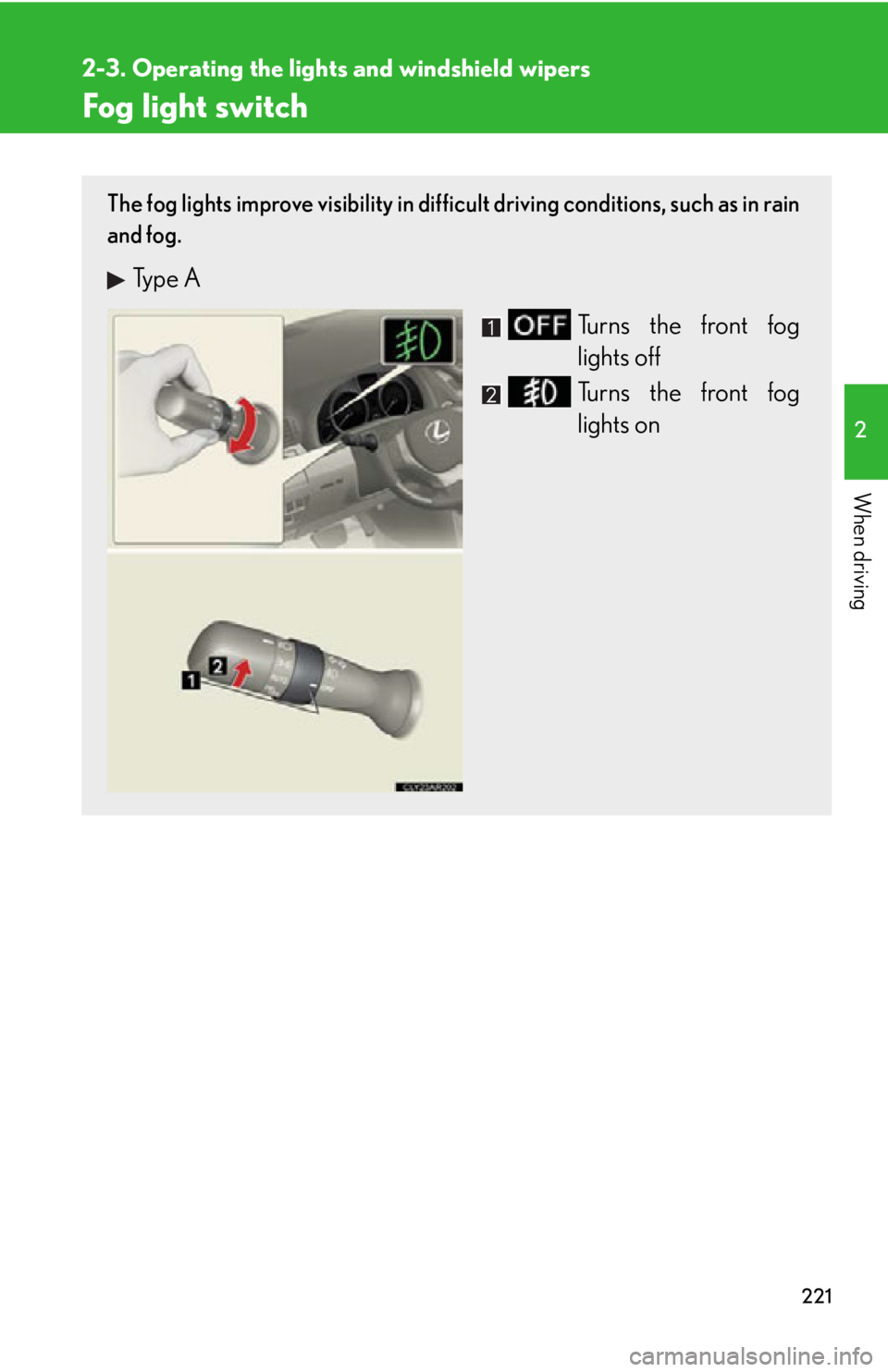
When driving Fog light switch The fog lights improve visibility in difficult driving conditions, such as in rain
and fog.
Type A
Turns the front fog
lights off
Turns the front fog
lights on