ESP LEXUS RX450h 2016 User Guide
[x] Cancel search | Manufacturer: LEXUS, Model Year: 2016, Model line: RX450H, Model: LEXUS RX450H 2016Pages: 660, PDF Size: 10.15 MB
Page 86 of 660
86 1-4. Theft deterrent system
RX450h_U_OM0E013U ■
Certification for the immobilizer system
For vehicles sold in the U.S.A.
FCC ID: NI4TMIMB-3
This device complies with part 15 of the FC C Rules. Operation is subject to the following
two conditions: (1) This device may not caus e harmful interference, and (2) this device
must accept any interference received, incl uding interference that may cause undesired
operation.
Changes or modifications not expressly approved by the party responsible for compli-
ance could void the user’s authority to operate the equipment.
For vehicles sold in Canada
This device complies with Industry Canada licence-exempt RSSs. Operation is subject
to the following two conditions: (1) This de vice may not cause interference; and (2) This
device must accept any interference, includ ing interference that may cause undesired
operation of the device.
WA R N I N G ■
Certifications for the immobilizer system
Changes or modifications not expressly approved by the party responsible for compli-
ance could void the user’s authority to operate the equipment.
NOTICE ■
To ensure the system operates correctly
Do not modify or remove the system. If modified or removed, the proper operation of
the system cannot be guaranteed.
Page 113 of 660
1132. Instrument cluster
2
Instrument cluster
RX450h_U_OM0E013U ■
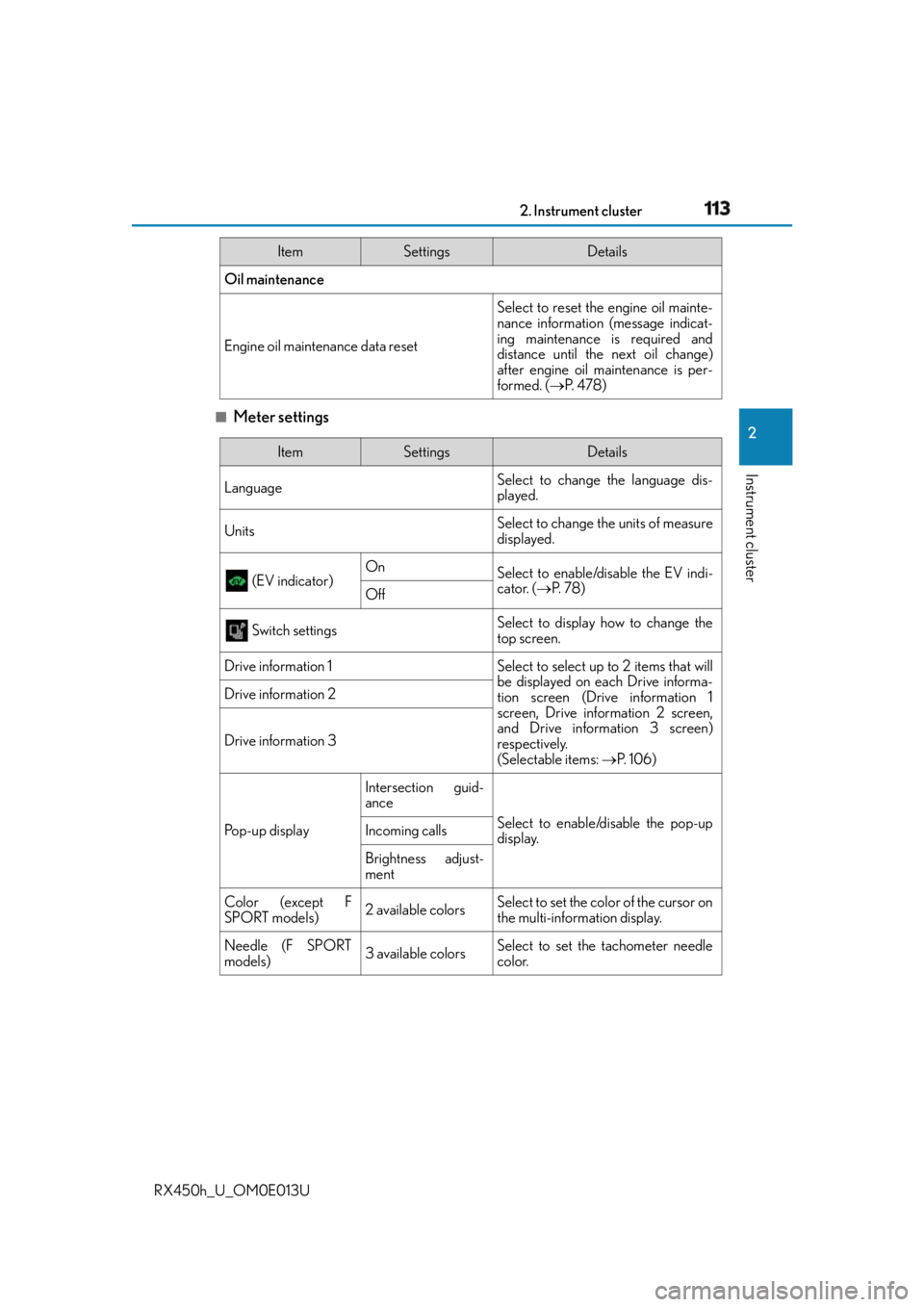
Meter settings Oil maintenance
Engine oil maintenance data reset Select to reset the engine oil mainte-
nance information (message indicat-
ing maintenance is required and
distance until the next oil change)
after engine oil maintenance is per-
formed. ( P. 4 7 8 )Item Settings Details
Item Settings Details
Language Select to change the language dis-
played.
Units Select to change the units of measure
displayed.
(EV indicator) On
Select to enable/disable the EV indi-
cator. ( P. 7 8 )
Off
Switch settings Select to display how to change the
top screen.
Drive information 1 Select to select up to 2 items that will
be displayed on each Drive informa-
tion screen (Drive information 1
screen, Drive information 2 screen,
and Drive inform ation 3 screen)
respectively.
(Selectable items: P. 1 0 6 )Drive information 2
Drive information 3
Po p - u p d i s p l a y Intersection guid-
ance
Select to enable/disable the pop-up
display.Incoming calls
Brightness adjust-
ment
Color (except F
SPORT models) 2 available colors Select to set the color of the cursor on
the multi-information display.
Needle (F SPORT
models) 3 available colors Select to set the tachometer needle
color.
Page 116 of 660
116 2. Instrument cluster
RX450h_U_OM0E013U Displays suggestions to the driver in the following situations. To select a response
to a displayed suggestion, use the meter control switches. The suggestion function can be turn ed on/off. (Customizable features: P. 6 0 7 )■
Suggestion to enable the power back door
If the power back door system is disabled (setting on set to off) and the
power back door switch on the instru ment panel is operated, a suggestion
message will be displayed asking if yo u wish to enable the power back door
system. To enable the power back door system, select “Yes”. After enabling the power back door syst em, press the power back door switch
again to open or close the power back door.■
Suggestion to turn off the headlights
If the headlights are left on for a certain amount of time after the power switch
has been turned off, a suggestion message will be displayed asking if you wish
to turn the headlights off. To turn the headlights off, select “Yes”.If a front door is opened after the power sw itch is turned off, this suggestion mes-
sage will not be displayed.■
Background color of the indicator/shift position display area (except F SPORT models)
The background color of the indicator/shift position display area is changed according to
the driving mode as follows ( P. 377):●
Eco drive mode: Blue ●
Sport mode: Red ■
G-force display (if equipped) ●
The G-force values may not be zero even when the vehicle is parked, such as when it is
parked on an incline. ●
Depending on the vehicle usage conditions, the brake fluid pressure display may not
reach its maximum reading even though the brake pedal is fully depressed.●
If a 12-volt battery terminal is disconnected and reconnected, the steering amount dis-
play may be disabled temporarily. After driv ing the vehicle for a while, the display will
be enabled. ■
Suspension of the settings display ●
Some settings cannot be changed while driv ing. When changing settings, park the
vehicle in a safe place. ●
If a warning message is displayed, operation of the settings displa y will be suspended.Suggestion function
Page 117 of 660
1172. Instrument cluster
2
Instrument cluster
RX450h_U_OM0E013U ■
Tire pressure ●
It may take a few minutes to display the tire inflation pressure after the power switch is
turned to ON mode. It may also take a few minutes to display the tire inflation pressure
after inflation pressure has been adjusted. ●
“---” may be displayed if the tire position information cannot be determined due to
unfavorable radio wave conditions. ●
Tire inflation pressure changes with temperat ure. The displayed values may also be dif-
ferent from the values measured using a tire pressure gauge.■
Liquid crystal display
Small spots or light spots may appear on the display. This phenomenon is characteristic
of liquid crystal displays, and there is no problem continuing to use the display.■
Customization
Some functions can be customized. ( P. 1 0 9 , 6 0 7 )
WA R N I N G ■
Caution for use while driving ●
When operating the multi-information display while driving, pay extra attention to the
safety of the area around the vehicle. ●
Do not look continuously at the multi-info rmation display while driving as you may fail
to see pedestrians, objects on the road, etc. ahead of the vehicle. ■
The information display at low temperatures
Allow the interior of the vehicle to warm up before using the liquid crystal information
display. At extremely low temperatures, th e information display monitor may respond
slowly, and display changes may be delayed.
For example, there is a lag between the driver’s shifting and the new gear number
appearing on the display. This lag could cau se the driver to downshift again, causing
rapid and excessive engine braking and po ssibly an accident resulting in death or
injury. ■
Cautions during setting up the display
As the hybrid system needs to be operating during setting up the display, ensure that
the vehicle is parked in a place with adequate ventilation. In a closed area such as a
garage, exhaust gases includin g harmful carbon monoxide (CO) may collect and enter
the vehicle. This may lead to death or a serious health hazard.
NOTICE ■
While setting up the display
To prevent 12-volt battery discharge, ensure that the hybrid syst em is operating while
setting up the display features.
Page 122 of 660
122 2. Instrument cluster
RX450h_U_OM0E013U ■
Head-up display
The head-up display may seem dark or hard to see when viewed through sunglasses,
especially polarized sunglasses.
Adjust the brightness of the head-up display or remove your sunglasses.■
When the 12-volt battery is disconnected
The customize settings of the head-up display will be reset.■
Display brightness
The brightness of the head-up display can be adjusted on of the multi-information
display. Also, it is automa tically adjusted according to the ambient brightness.■
Enabling/disabling of the head-up display
If the head-up display is disabled, it will rema in disabled when the power switch is turned
off then back to ON mode. ■
Street name display (vehicles with a navigation system)
Only street names which are included in the map data will be displayed.
WA R N I N G ■
Before using the head-up display ●
Check that the position and brightness of the head-up display image does not inter-
fere with safe driving. Incorrect adjustment of the image’s position or brightness may
obstruct the driver’s view and lead to an accident, resulting in death or serious injury. ●
Do not continuously look at the head-up di splay while driving as you may fail to see
pedestrians, objects on the road, etc. ahead of the vehicle. ■
Caution for changing settings of the head-up display
As the hybrid system needs to be operating while changing the settings of the head-up
display, ensure that the vehicle is parked in a place with adequate ventilation. In a
closed area such as a garage, exhaust gases including harmful carbon monoxide (CO)
may collect and enter the vehicle. This may lead to death or a serious health hazard.
Page 141 of 660
1413-2. Opening, closing and locking the doors
3
Operation of each component
RX450h_U_OM0E013U ■
Conditions affecting the operation of the sm art access system with push-button start
or wireless remote control
P. 1 6 0 ■
Customization
Some functions can be customized. ( P. 6 0 7 )
WA R N I N G ■
To prevent an accident
Observe the following precautions while driving the vehicle.
Failure to do so may result in a door open ing and an occupant falling out, resulting in
death or serious injury. ●
Ensure that all doors are properly closed and locked. ●
Do not pull the inside handle of the doors while driving.
Be especially careful for the front doors, as the doors may be opened even if the
inside lock buttons ar e in locked position.●
Set the rear door child-protector locks wh en children are seated in the rear seats.■
When opening or closing a door
Check the surroundings of the vehicle such as whether the vehicle is on an incline,
whether there is enough space for a door to open and whether a strong wind is blow-
ing. When opening or closing the door, hold the door handle tightly to prepare for any
unpredictable movement.
Page 148 of 660
148 3-2. Opening, closing and locking the doors
RX450h_U_OM0E013U ■
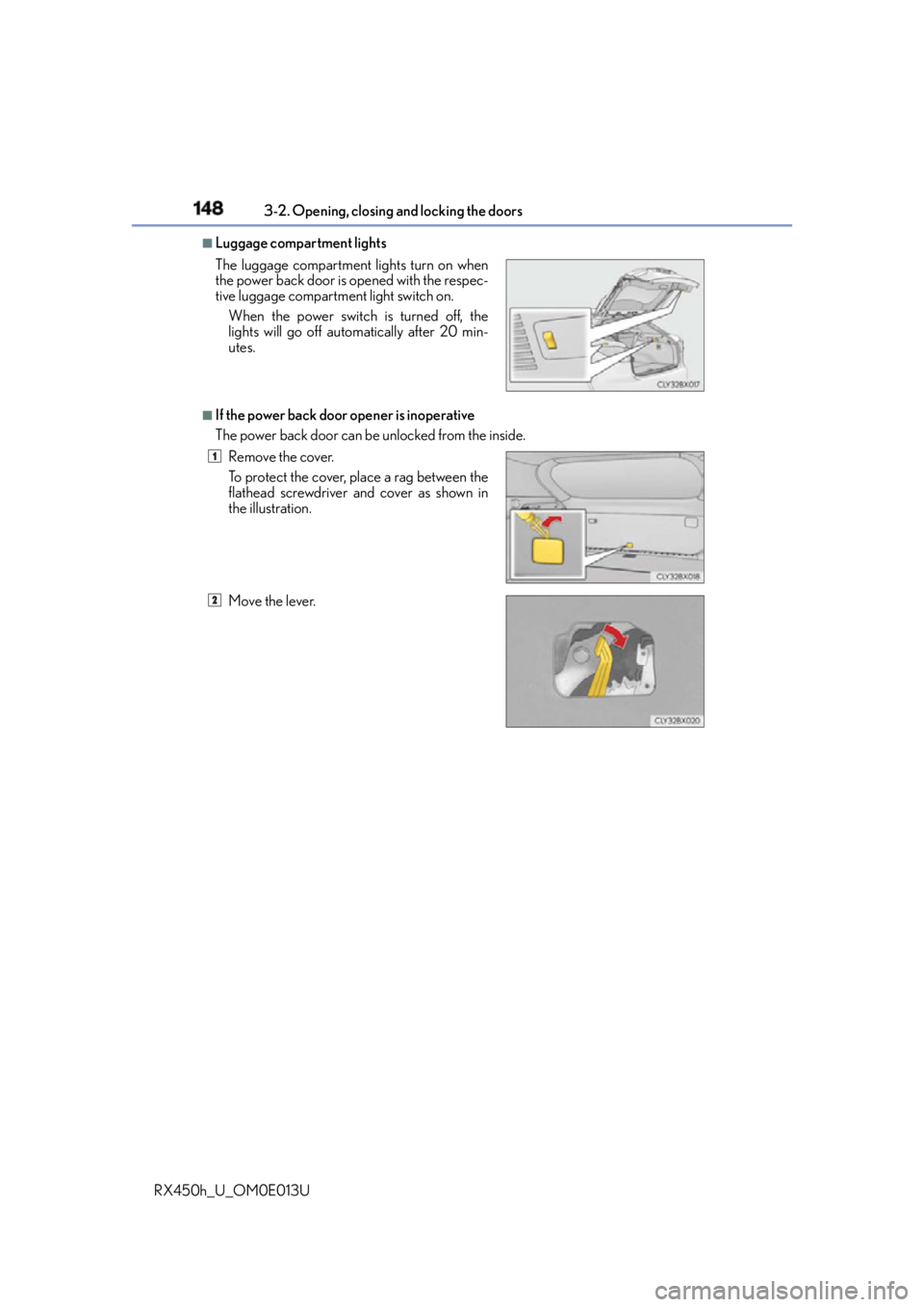
Luggage compartment lights
■
If the power back door opener is inoperative
The power back door can be unlocked from the inside.The luggage compartment lights turn on when
the power back door is opened with the respec-
tive luggage compartment light switch on.
When the power switch is turned off, the
lights will go off automatically after 20 min-
utes.
Remove the cover.
To protect the cover, place a rag between the
flathead screwdriver and cover as shown in
the illustration.
Move the lever. 1
2
Page 159 of 660
1593-2. Opening, closing and locking the doors
3
Operation of each component
RX450h_U_OM0E013U ■
Alarms and warning messages
A combination of exterior and interior alarms as well as warning messages shown on the
multi-information display are used to prevent theft of the vehicle and accidents resulting
from erroneous operation. Take appropriate measures in response to any warning mes-
sage on the multi-information display. ( P. 5 4 3 )
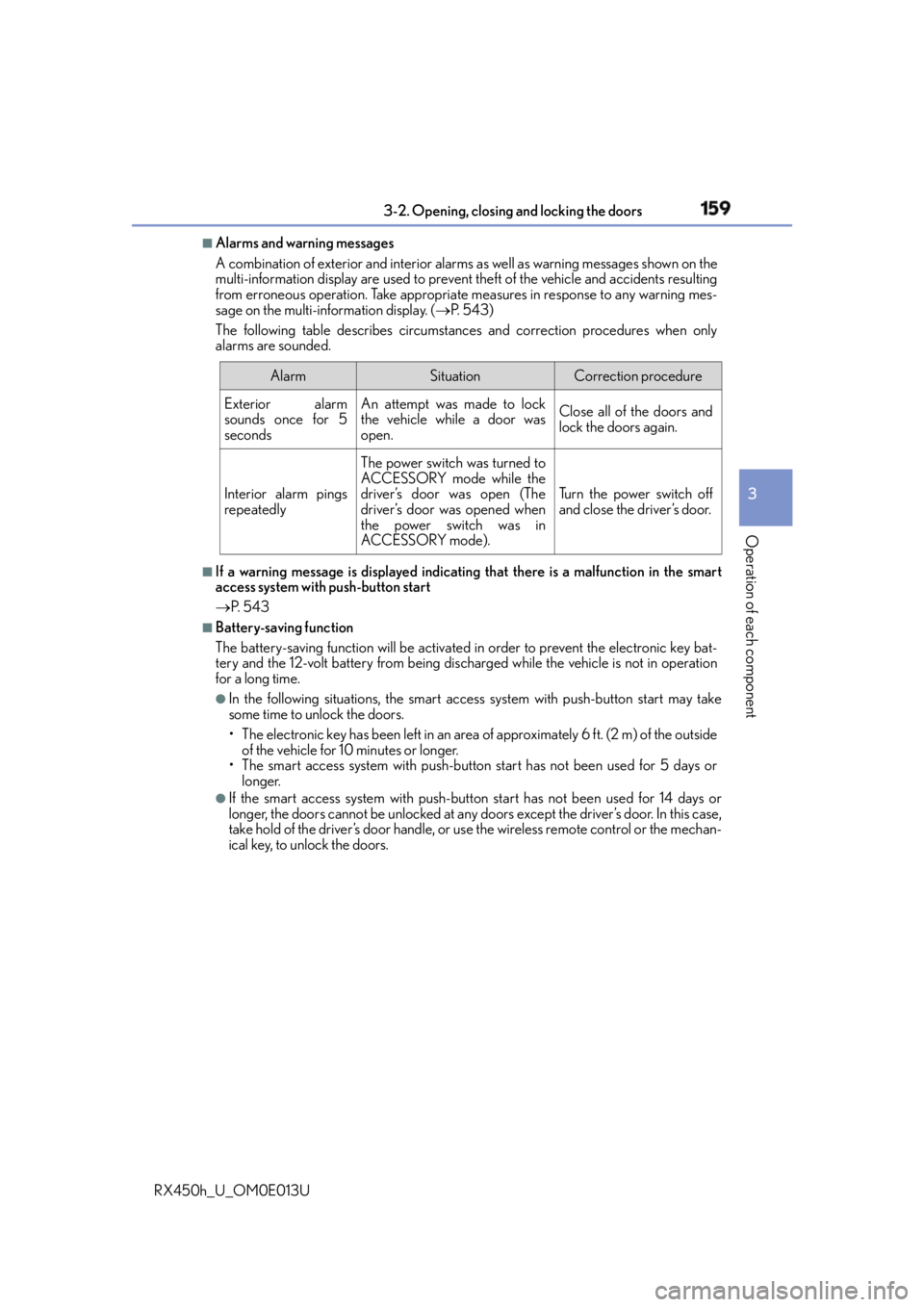
The following table describes circumstance s and correction procedures when only
alarms are sounded.
■
If a warning message is displayed indicating that there is a malf unction in the smart
access system with push-button start
P. 5 4 3 ■
Battery-saving function
The battery-saving function will be activated in order to prevent the electronic key bat-
tery and the 12-volt battery from being discha rged while the vehicle is not in operation
for a long time. ●
In the following situations, the smart access system with push-button start may take
some time to unlock the doors.
• The electronic key has been left in an area of approximately 6 ft. (2 m) of the outside
of the vehicle for 10 minutes or longer.
• The smart access system with push-butto n start has not been used for 5 days or
longer. ●
If the smart access system with push-butto n start has not been used for 14 days or
longer, the doors cannot be unlocked at any doors except the driver’s door. In this case,
take hold of the driver’s door handle, or us e the wireless remote control or the mechan-
ical key, to unlock the doors. Alarm Situation Correction procedure
Exterior alarm
sounds once for 5
seconds An attempt was made to lock
the vehicle while a door was
open. Close all of the doors and
lock the doors again.
Interior alarm pings
repeatedly The power switch was turned to
ACCESSORY mode while the
driver’s door was open (The
driver’s door was opened when
the power switch was in
ACCESSORY mode). Tu r n t h e p o w e r s w i t c h o f f
and close the driver’s door.
Page 160 of 660
160 3-2. Opening, closing and locking the doors
RX450h_U_OM0E013U ■
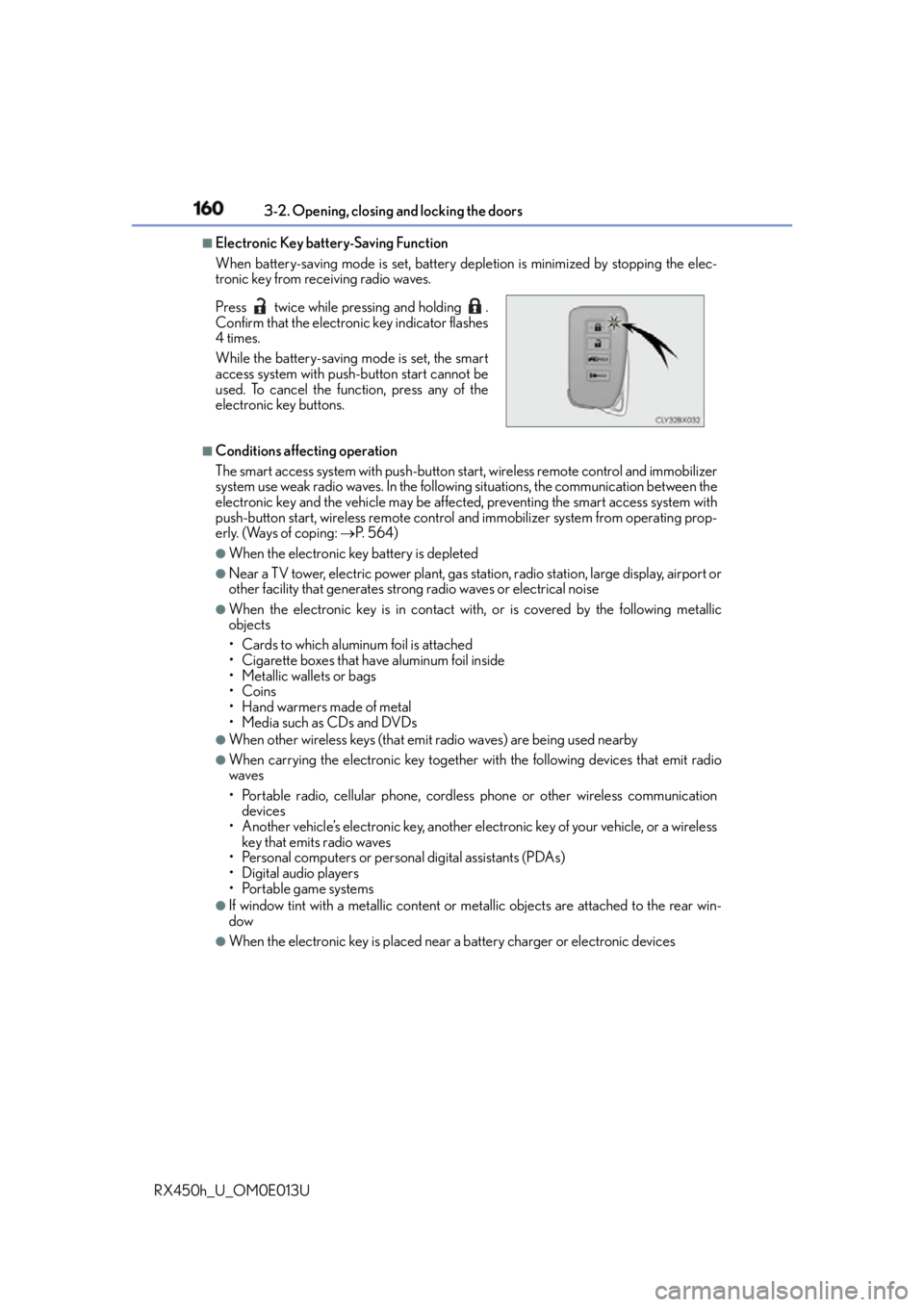
Electronic Key battery-Saving Function
When battery-saving mode is set, battery depletion is minimized by stopping the elec-
tronic key from receiving radio waves.
■
Conditions affe cting operation
The smart access system with push-button star t, wireless remote control and immobilizer
system use weak radio waves. In the followi ng situations, the communication between the
electronic key and the vehicle may be affected, preventing the smart access system with
push-button start, wireless remote control and immobilizer system from operating prop-
erly. (Ways of coping: P. 5 6 4 )●
When the electronic key battery is depleted ●
Near a TV tower, electric powe r plant, gas station, radio stat ion, large display, airport or
other facility that generates strong radio waves or electrical noise ●
When the electronic key is in contact wi th, or is covered by the following metallic
objects
• Cards to which aluminum foil is attached
• Cigarette boxes that have aluminum foil inside
• Metallic wallets or bags
•Coins
•Hand warmers made of metal
• Media such as CDs and DVDs ●
When other wireless keys (that emit radio waves) are being used nearby ●
When carrying the electronic key together with the following devices that emit radio
waves
• Portable radio, cellular phone, cordless phone or other wireless communication
devices
• Another vehicle’s electronic key, another el ectronic key of your vehicle, or a wireless
key that emits radio waves
• Personal computers or person al digital assistants (PDAs)
• Digital audio players
• Portable game systems ●
If window tint with a metallic content or me tallic objects are attached to the rear win-
dow ●
When the electronic key is placed near a battery charger or electronic devicesPress twice while pressing and holding .
Confirm that the electronic key indicator flashes
4 times.
While the battery-saving mode is set, the smart
access system with push-button start cannot be
used. To cancel the function, press any of the
electronic key buttons.
Page 163 of 660
1633-2. Opening, closing and locking the doors
3
Operation of each component
RX450h_U_OM0E013U ■
Certification for the smart access system with push-button start
For vehicles sold in the U.S.A.
FCC ID: HYQ23AAP
FCC ID: HYQ14FBB
FCC ID: NI4TMLF15-2
NOTE:
This device complies with part 15 of the FC C Rules. Operation is subject to the following
two conditions: (1) This device may not caus e harmful interference, and (2) this device
must accept any interference received, incl uding interference that may cause undesired
operation.
FCC WARNING:
Changes or modifications not expressly approved by the party responsible for compli-
ance could void the user’s authority to operate the equipment.
For vehicles sold in Canada
NOTE:
This device complies with Industry Canada licence-exempt RSSs. Operation is subject
to the following two conditions: (1) This de vice may not cause interference; and (2) This
device must accept any interference, includ ing interference that may cause undesired
operation of the device.
NOTE:
This device complies with Industry Canada licence-exempt RSS st andard(s). Operation
is subject to the following two conditions: (1) this device may not cause interference, and
(2) this device must accept any interference, including interference that may cause
undesired operation of the device.
WA R N I N G ■
Caution regarding interference with electronic devices ●
People with implantable cardiac pacemakers, cardiac resynchronization therapy-
pacemakers or implantable cardioverter de fibrillators should keep away from the
smart access system with pu sh-button start antennas. ( P. 1 5 8 )
The radio waves may affect the operation of such devices. If necessary, the entry
function can be disabled. Ask your Lexus dealer for details, such as the frequency of
radio waves and timing of the emitted radio waves. Then, consult your doctor to see if
you should disable the entry function. ●
Users of any electrical medical device other than implantable cardiac pacemakers,
cardiac resynchronization therapy-pacemakers or implantable cardioverter defibril-
lators should consult the ma nufacturer of the device for information about its opera-
tion under the influence of radio waves.
Radio waves could have unexpected effe cts on the operation of such medical
devices.
Ask your Lexus dealer for details on disabling the entry function.