ESP LEXUS RX450h 2016 Service Manual
[x] Cancel search | Manufacturer: LEXUS, Model Year: 2016, Model line: RX450H, Model: LEXUS RX450H 2016Pages: 660, PDF Size: 10.15 MB
Page 346 of 660
346 4-5. Using the driving support systems
RX450h_U_OM0E013U ■
If “Clean Parking Assist Sensor” is di splayed on the multi-information display
A sensor may be dirty or covered with snow or ice. In such cases, if it is removed from the
sensor, the system should return to normal.
Also, due to the sensor being frozen at low temperatures, a malfunction display may
appear or an obstacle may no t be detected. If the sensor thaws out, the system should
return to normal. ■
If “Parking Assist Malfunction” is di splayed on the multi-information display
Depending on the malfunction of the sensor, the device may not be working normally.
Have the vehicle inspected by your Lexus dealer. ■
Certification
For vehicles sold in Canada
This ISM device complies with Canadian ICES-001.
Cet appareil ISM est conforme a la norme NMB-001 du Canada. ■
Customization
Some functions can be customized. ( P. 344, 607)
WA R N I N G ■
When using the intuitive parking assist
Observe the following precautions.
Failing to do so may result in the vehicle being unable to be driven safely and possibly
cause an accident. ●
Do not use the sensor at speeds in excess of 6 mph (10 km/h).●
The sensors’ detection areas and reaction times are limited. When moving forward or
reversing, check the areas surrounding the vehicle (especially the sides of the vehi-
cle) for safety, and drive slowly, using the brake to control the vehicle’s speed. ●
Do not install accessories within the sensors’ detection areas.
NOTICE ■
When using intuitive parking assist
In the following situations, the system may not function correctly due to a sensor mal-
function, etc. Have the vehicle checked by your Lexus dealer. ●
The intuitive parking assist operation display flashes, and a buzzer sounds when no
obstacles are detected. ●
If the area around a sensor collides with so mething, or is subjec ted to strong impact.●
If the bumper collides with something. ●
If the display shows continuously withou t beeping, except when the buzzer mute
switch has been turned on. ●
If a display error occurs, first check the sensor.
If the error occurs even if there is no ice, snow or mud on the sensor, it is likely that the
sensor is malfunctioning. ■
Notes when washing the vehicle
Do not apply intensive bursts of water or steam to the sensor area.
Doing so may result in th e sensor malfunctioning.
Page 365 of 660
3654-5. Using the driving support systems
4
Driving
RX450h_U_OM0E013U Press “ ” or “ ” of the meter control switches, select .
Press “ ” or “ ” of the meter control switches, select “BSM”.
Press “ ” or “ ” of the meter control switches, select “BSM” or “RCTA”.■
Outside rear view mirror indicator visibility
In strong sunlight, the outside rear view mirror indicator may be difficult to see.■
Hearing the RCTA buzzer
The RCTA buzzer may be difficult to hear ov er loud noises, such as if the audio system
volume is high. ■
When there is a malfunction in the Blind Spot Monitor
If a system malfunction is de tected due to any of the following, a warning message will be
displayed: ( P. 5 4 3 )●
A sensor is malfunctioning ●
A sensor is dirty or covered with snow or a sticker ●
The outside temperature is extremely high or low ●
Sensor voltage is abnormal ●
A sensor is misaligned ■
Certification for the Blind Spot Monitor
For vehicles sold in the U.S.A.
FCC ID : OAYSRR3A
This device complies with part 15 of the FC C Rules. Operation is subject to the following
two conditions:
(1) This device may not cause harmful interference, and
(2) this device must accept any interference received, including in terference that may
cause undesired operation.
FCC Warning
Changes or modifications not expressly approved by the party responsible for compli-
ance could void the user's authority to operate the equipment.
For vehicles sold in Canada
Applicable law : Canada 310
This device complies with Industry Canada licence-exempt RSS st andard(s). Operation
is subject to the following two conditions: (1) this device may not cause interference, and
(2) this device must accept any interference, including interference that may cause
undesired operation of the device.
Frequency bands : 24.05 - 24.25GHz
Output power : less than 20 milliwatts ■
Customization
Some functions can be customized. (P. 376, 607)Turning the BSM function/RCTA function on/off 1
2
3
Page 366 of 660
366 4-5. Using the driving support systems
RX450h_U_OM0E013U WA R N I N G ■
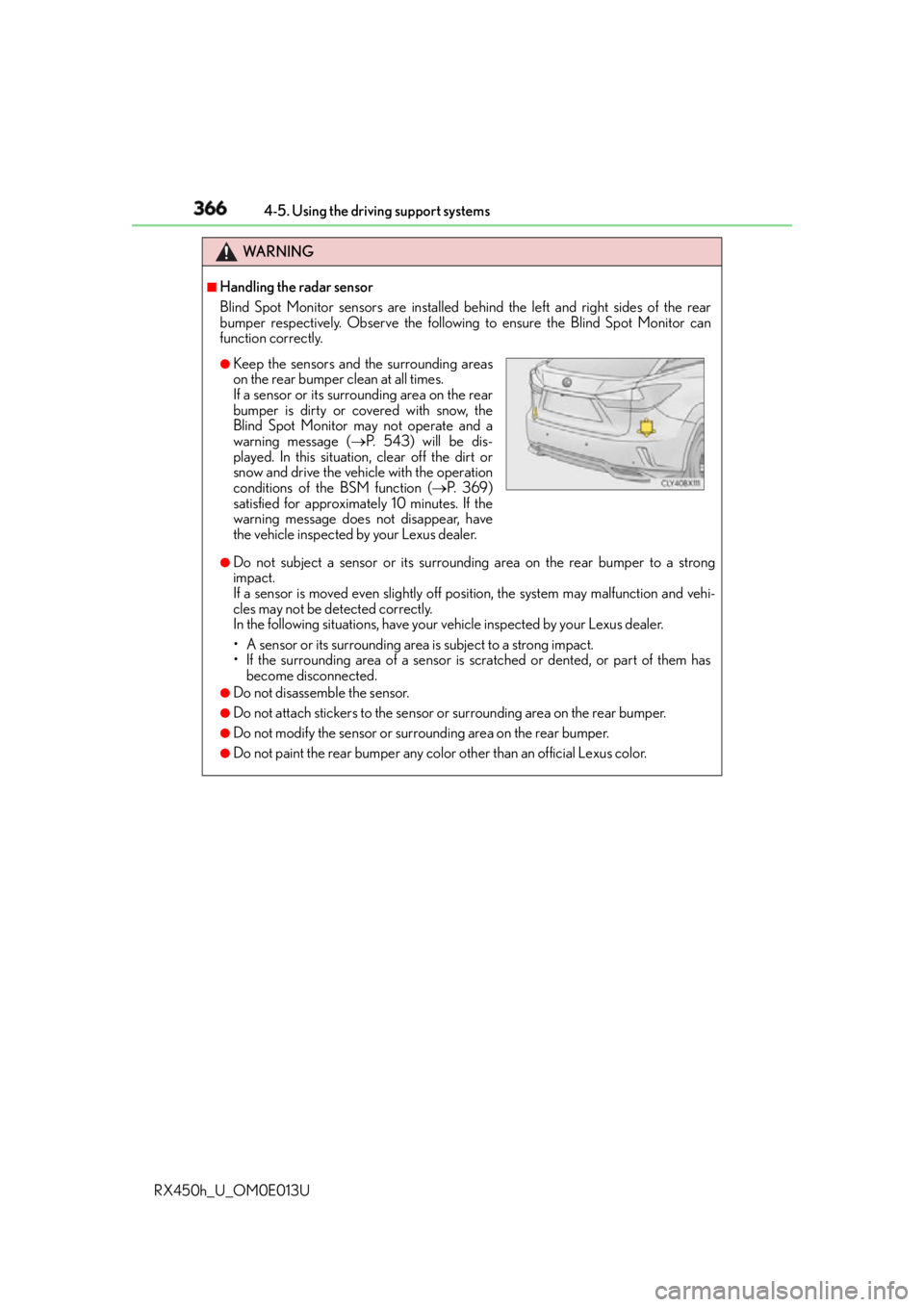
Handling the radar sensor
Blind Spot Monitor sensors are installed be hind the left and right sides of the rear
bumper respectively. Observe the following to ensure the Blind Spot Monitor can
function correctly.
●
Do not subject a sensor or its surrounding area on the rear bumper to a strong
impact.
If a sensor is moved even slightly off po sition, the system may malfunction and vehi-
cles may not be detected correctly.
In the following situations, have your vehicle inspected by your Lexus dealer.
• A sensor or its surrounding area is subject to a strong impact.
• If the surrounding area of a sensor is sc ratched or dented, or part of them has
become disconnected. ●
Do not disassemble the sensor. ●
Do not attach stickers to the sensor or surrounding area on the rear bumper.●
Do not modify the sensor or surr ounding area on the rear bumper.●
Do not paint the rear bumper any color other than an official Lexus color. ●
Keep the sensors and the surrounding areas
on the rear bumper clean at all times.
If a sensor or its surrounding area on the rear
bumper is dirty or covered with snow, the
Blind Spot Monitor ma y not operate and a
warning message ( P. 5 4 3 ) w i l l b e d i s -
played. In this situation, clear off the dirt or
snow and drive the vehicle with the operation
conditions of the BSM function ( P. 3 6 9 )
satisfied for approximately 10 minutes. If the
warning message does not disappear, have
the vehicle inspected by your Lexus dealer.
Page 368 of 660
368 4-5. Using the driving support systems
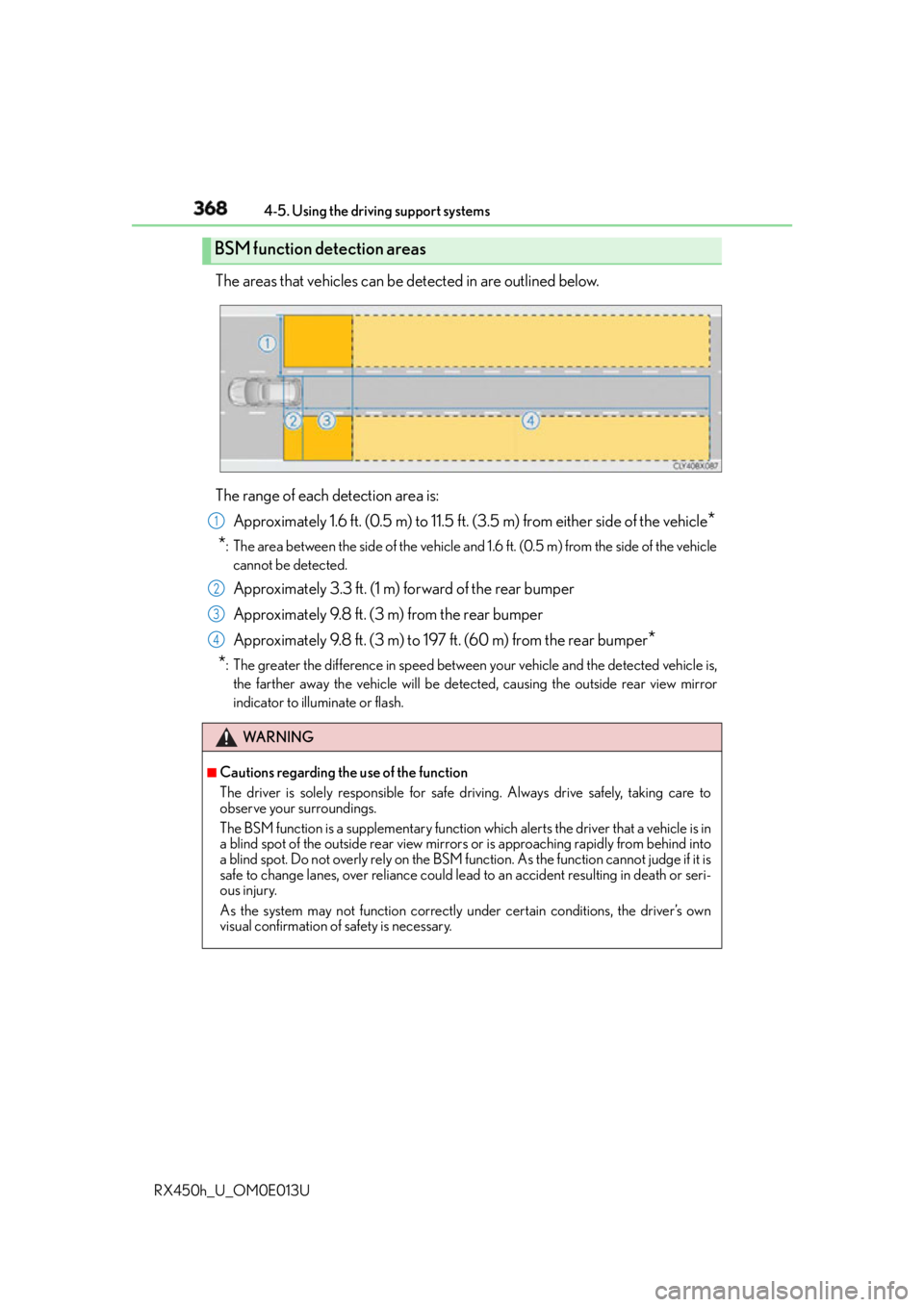
RX450h_U_OM0E013U The areas that vehicles can be detected in are outlined below.
The range of each detection area is:
Approximately 1.6 ft. (0.5 m) to 11.5 ft. (3.5 m) from either side of the vehicle
*
* : The area between the side of the vehicle and 1.6 ft. (0.5 m) from the side of the vehicle
cannot be detected.
Approximately 3.3 ft. (1 m) forward of the rear bumper
Approximately 9.8 ft. (3 m) from the rear bumper
Approximately 9.8 ft. (3 m) to 197 ft. (60 m) from the rear bumper
*
* : The greater the difference in speed between your vehicle and the detected vehicle is,
the farther away the vehicle will be detected, causing th e outside rear view mirror
indicator to illuminate or flash.BSM function detection areas
WA R N I N G ■
Cautions regarding the use of the function
The driver is solely responsible for safe driving. Always drive safely, taking care to
observe your surroundings.
The BSM function is a supplementary function which alerts the driver that a vehicle is in
a blind spot of the outside rear view mirror s or is approaching rapidly from behind into
a blind spot. Do not overly rely on the BSM fu nction. As the function cannot judge if it is
safe to change lanes, over reliance could le ad to an accident resulting in death or seri-
ous injury.
As the system may not function correctly under certain conditions, the driver’s own
visual confirmation of safety is necessary. 1
2
3
4
Page 372 of 660
372 4-5. Using the driving support systems
RX450h_U_OM0E013U ■
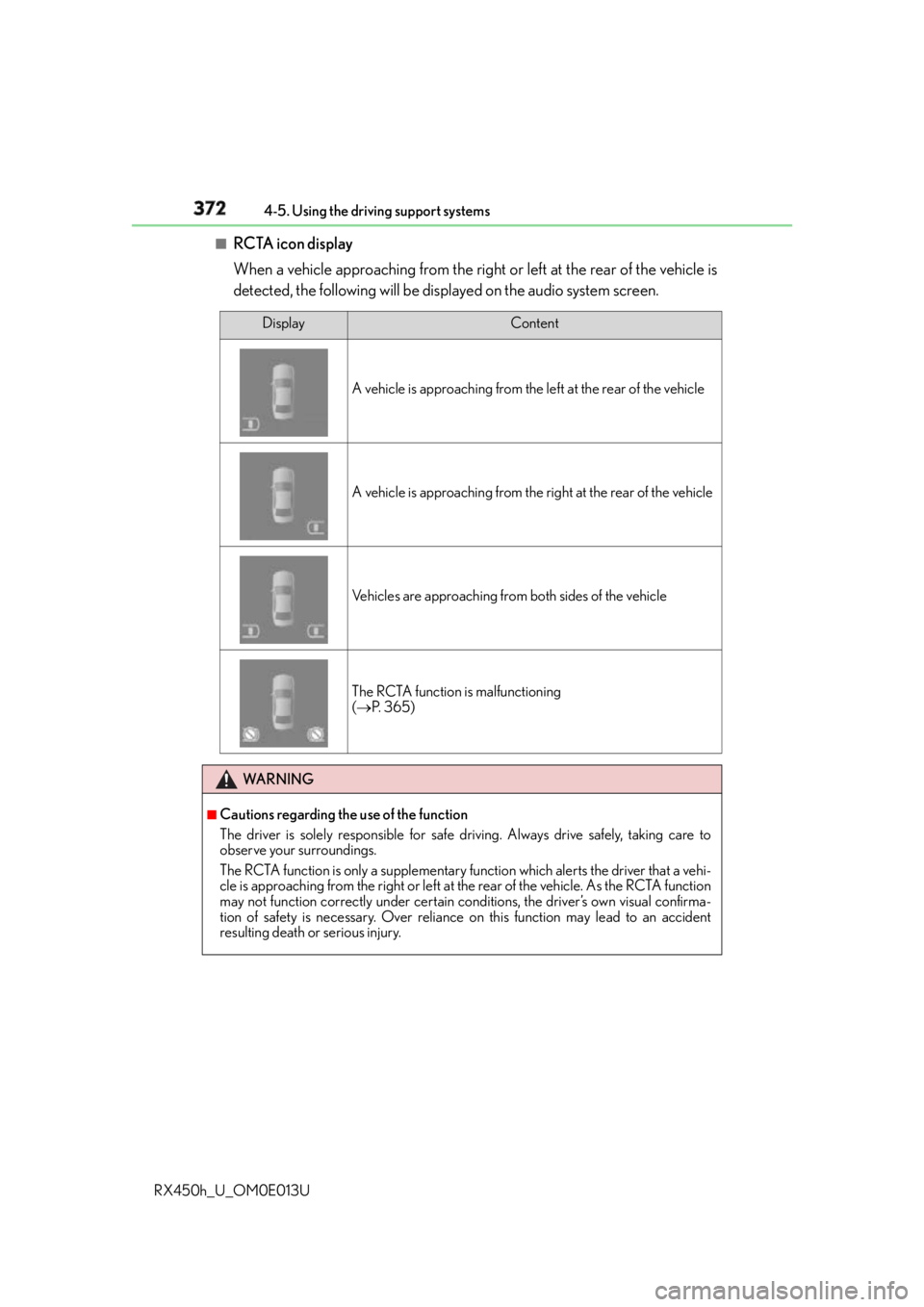
RCTA icon display
When a vehicle approaching from the right or left at the rear of the vehicle is
detected, the following will be displayed on the audio system screen. Display Content
A vehicle is approaching from the left at the rear of the vehicle
A vehicle is approaching from the right at the rear of the vehicle
Vehicles are approaching from both sides of the vehicle
The RCTA function is malfunctioning
( P. 3 6 5 )
WA R N I N G ■
Cautions regarding the use of the function
The driver is solely responsible for safe driving. Always drive safely, taking care to
observe your surroundings.
The RCTA function is only a supplementary fu nction which alerts the driver that a vehi-
cle is approaching from the right or left at the rear of the vehicle. As the RCTA function
may not function correctly under certain conditions, the driver’s own visual confirma-
tion of safety is necessary. Over reliance on this function may lead to an accident
resulting death or serious injury.
Page 377 of 660
3774-5. Using the driving support systems
4
Driving
RX450h_U_OM0E013U
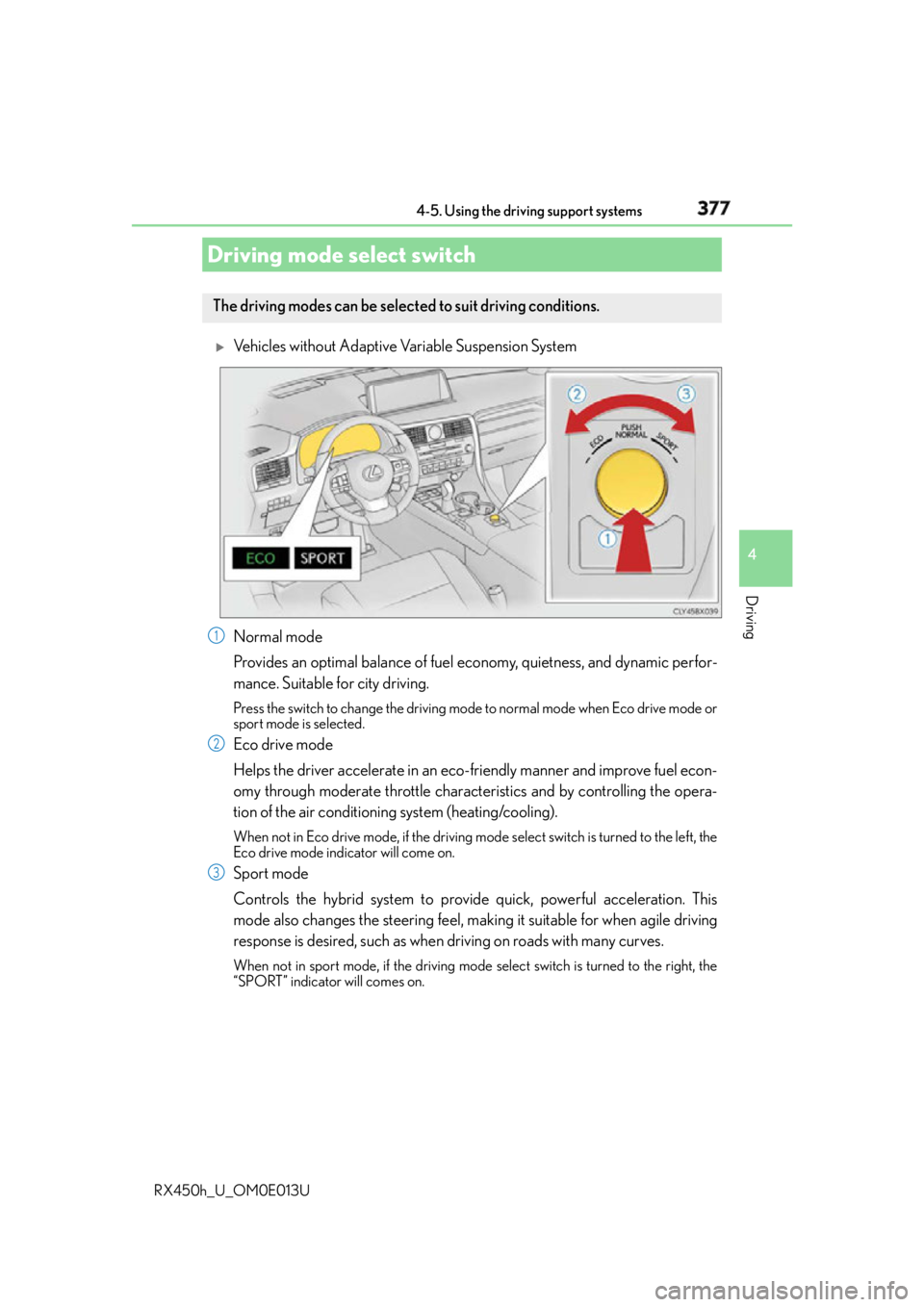
Vehicles without Adaptive Variable Suspension System
Normal mode
Provides an optimal balance of fuel economy, quietness, and dynamic perfor-
mance. Suitable for city driving. Press the switch to change the driving mode to normal mode when Eco drive mode or
sport mode is selected.
Eco drive mode
Helps the driver accelerate in an eco- friendly manner and improve fuel econ-
omy through moderate throttle characteristics and by controlling the opera-
tion of the air conditioning system (heating/cooling). When not in Eco drive mode, if the driving mode select switch is tu rned to the left, the
Eco drive mode indicator will come on.
Sport mode
Controls the hybrid system to provide quick, powerful acceleration. This
mode also changes the steering feel, maki ng it suitable for when agile driving
response is desired, such as when driving on roads with many curves.When not in sport mode, if the driving mode select switch is turned to the right, the
“SPORT” indicator will comes on.Driving mode select switch The driving modes can be selected to suit driving conditions.
1
2
3
Page 379 of 660
3794-5. Using the driving support systems
4
Driving
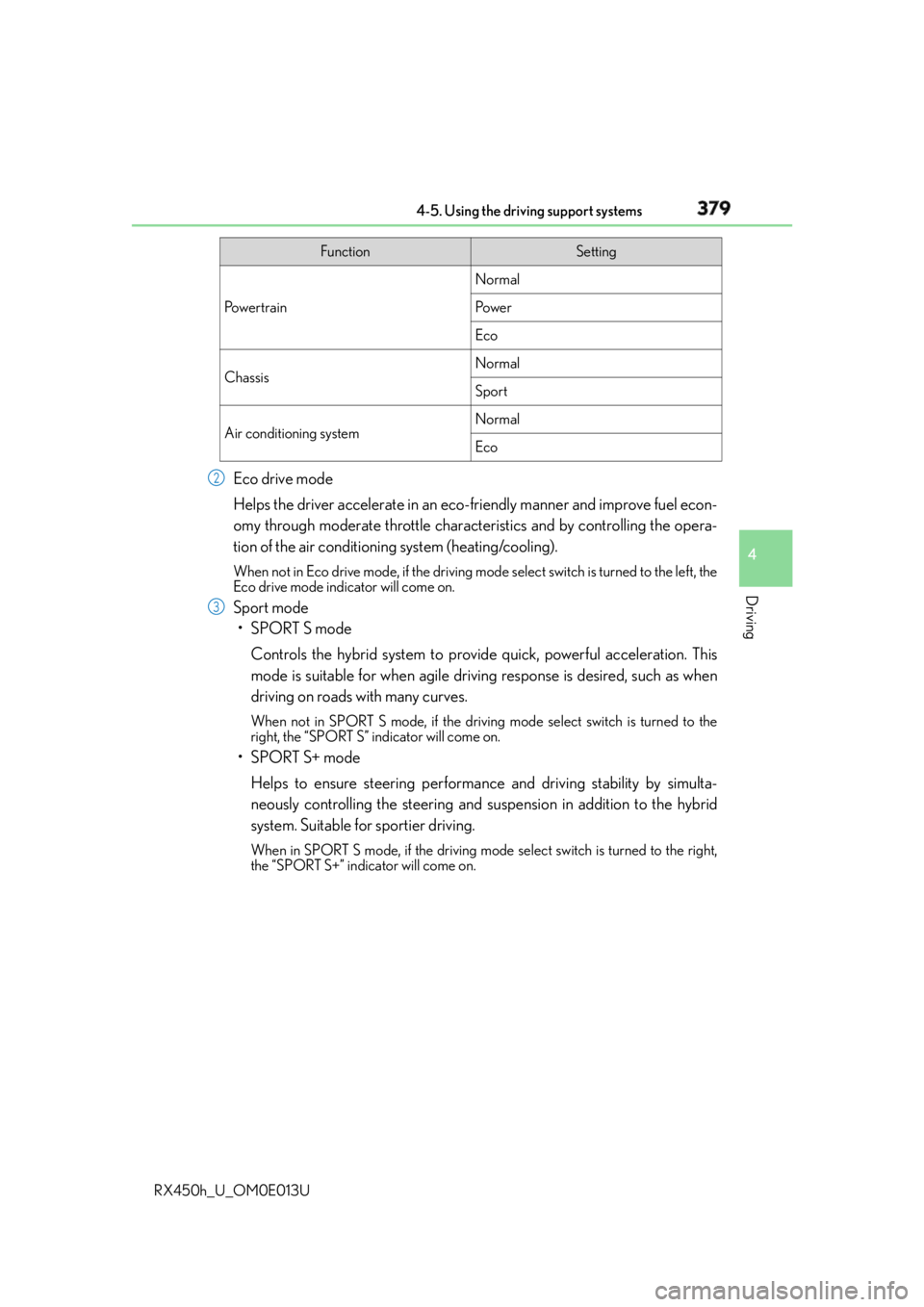
RX450h_U_OM0E013U Eco drive mode
Helps the driver accelerate in an eco- friendly manner and improve fuel econ-
omy through moderate throttle characteristics and by controlling the opera-
tion of the air conditioning system (heating/cooling). When not in Eco drive mode, if the driving mode select switch is tu rned to the left, the
Eco drive mode indicator will come on.
Sport mode
•SPORT S mode
Controls the hybrid system to provide quick, powerful acceleration. This
mode is suitable for when agile drivin g response is desired, such as when
driving on roads with many curves. When not in SPORT S mode, if the driving mode select switch is turned to the
right, the “SPORT S” indicator will come on.
•SPORT S+ mode
Helps to ensure steering performanc e and driving stability by simulta-
neously controlling the steering and su spension in addition to the hybrid
system. Suitable for sportier driving. When in SPORT S mode, if the driving mode select switch is turned to the right,
the “SPORT S+” indicator will come on. Function Setting
Po w e r t r a i n Normal
Po w e r
Eco
Chassis Normal
Sport
Air conditioning system Normal
Eco2
3
Page 381 of 660
3814-5. Using the driving support systems
4
Driving
RX450h_U_OM0E013U ◆ ECB (Electronically Controlled Brake System)
The electronically controlled system generates braking force corresponding
to the brake operation
◆ ABS (Anti-lock Brake System)
Helps to prevent wheel lock when the brakes are applied suddenly, or if the
brakes are applied while drivin g on a slippery road surface
◆ Brake assist
Generates an increased level of braking force after the brake pedal is
depressed when the system detects a panic stop situation
◆ VSC (Vehicle Stability Control)
Helps the driver to control skidding when swerving suddenly or turning on
slippery road surfaces
◆ Enhanced VSC (Enhanced Vehicle Stability Control)
Provides cooperative control of the ABS, TRAC, VSC and EPS.
Helps to maintain directional stability when swerving on slippery road sur-
faces by controlling steering performance.
◆ TRAC (Traction Control)
Helps to maintain drive power and prevent the drive wheels from spinning
when starting the vehicle or accelerating on slippery roads
◆ Hill-start assist control
Prevents the vehicle from rolling backward when starting on an incline or slip-
pery slope
◆ EPS (Electric Power Steering)
Employs an electric motor to reduce the amount of effort needed to turn the
steering wheelDriving assist systems To help enhance driving safety and performance, the following systems oper-
ate automatically in response to various driving situations. Be aware, however,
that these systems are supplementary and should not be relied upon too
heavily when operating the vehicle.
Page 385 of 660
3854-5. Using the driving support systems
4
Driving
RX450h_U_OM0E013U ■
Reactivation of the TRAC system linked to vehicle speed
When only the TRAC system is turned off, the TRAC system will turn on when vehicle
speed increases. However, when TRAC, VS C and Trailer Sway Control systems are
turned off, the systems will not turn on even when vehicle speed increases.■
Reduced effectiveness of the EPS system
The effectiveness of the EPS system is reduced to prevent the system from overheating
when there is frequent steering input over an extended period of time. The steering
wheel may feel heavy as a result. Should this occur, refrain from excessive steering input
or stop the vehicle and turn the hybrid system off. The EPS system should return to nor-
mal within 10 minutes. ■
Operating conditions of hill-start assist control
When the following four conditions are met, the hill-start assist control will operate:●
The shift lever is in a position other than P or N (when starting off forward/backward on
an upward incline). ●
The vehicle is stopped. ●
The accelerator pedal is not depressed. ●
The parking brake is not engaged. ■
Automatic system cancelation of hill-start assist control
The hill-start assist control will turn off in any of the following situations: ●
The shift lever is moved to P or N. ●
The accelerator pedal is depressed. ●
The parking brake is engaged. ●
Approximately 2 seconds elapse after the brake pedal is released.
WA R N I N G ■
The ABS does not operate effectively when ●
The limits of tire gripping performance have been exceeded (such as excessively
worn tires on a snow covered road). ●
The vehicle hydroplanes while driving at high speed on wet or slick roads. ■
Stopping distance when the ABS is operat ing may exceed that of normal conditions
The ABS is not designed to shorten the vehicle’s stopping distance. Always maintain a
safe distance from the vehicle in front of you, especially in the following situations:●
When driving on dirt, gravel or snow-covered roads ●
When driving with tire chains ●
When driving over bumps in the road ●
When driving over roads with potholes or uneven surfaces ■
TRAC may not operate effectively when
Directional control and power may not be achievable while drivin g on slippery road
surfaces, even if the TRAC system is operating.
Drive the vehicle carefully in conditions where stability and power may be lost.
Page 386 of 660
386 4-5. Using the driving support systems
RX450h_U_OM0E013U WA R N I N G ■
Hill-start assist control does not operate effectively when ●
Do not overly rely on the hill-start assist control. The hill-start assist control may not
operate effectively on steep inclines and roads covered with ice. ●
Unlike the parking brake, hill-start assist control is not intended to hold the vehicle
stationary for an extended period of time. Do not attempt to use hill-start assist con-
trol to hold the vehicle on an incline, as doing so may lead to an accident. ■
When the VSC/Trailer Sway Control is activated
The slip indicator light flashes. Always drive carefully. Reckless driving may cause an
accident. Exercise particular care when the indicator light flashes. ■
When the TRAC/VSC/Trailer Sway Control systems are turned off
Be especially careful and drive at a speed ap propriate to the road conditions. As these
are the systems to help ensure vehicle st ability and driving force, do not turn the
TRAC/VSC/Trailer Sway Control systems off unless necessary. ■
Replacing tires
Make sure that all tires are of the specified size, brand, tread pattern and total load
capacity. In addition, make sure that the tires are inflated to the recommended tire infla-
tion pressure level.
The ABS, TRAC, VSC and Trailer Sway Control systems will not function correctly if
different tires are installed on the vehicle.
Contact your Lexus dealer for further information when replacing tires or wheels. ■
Handling of tires and the suspension
Using tires with any kind of problem or modi fying the suspension will affect the driving
assist systems, and may caus e a system to malfunction.■
Trailer Sway Control precaution
The Trailer Sway Control system is not able to reduce trailer sway in all situations.
Depending on many factors such as the condit ions of the vehicle, trailer, road surface,
and driving environment, the Trailer Sway Co ntrol system may not be effective. Refer to
your trailer owner’s manual for information on how to tow your trailer properly. ■
If trailer sway occurs
Observe the following precautions.
Failing to do so may caus e death or serious injury.●
Firmly grip the steering wh eel. Steer straight ahead.
Do not try to control trailer swaying by turning the steering wheel. ●
Begin releasing the accelerator pedal i mmediately but very gradually to reduce
speed.
Do not increase speed. Do not apply vehicle brakes.
If you make no extreme correction with the steering or brakes, your vehicle and trailer
should stabilize. ( P. 2 2 7 )