clock LEXUS RX450h 2016 User Guide
[x] Cancel search | Manufacturer: LEXUS, Model Year: 2016, Model line: RX450H, Model: LEXUS RX450H 2016Pages: 660, PDF Size: 10.15 MB
Page 517 of 660
5176-3. Do-it-yourself maintenance
6
Maintenance and care
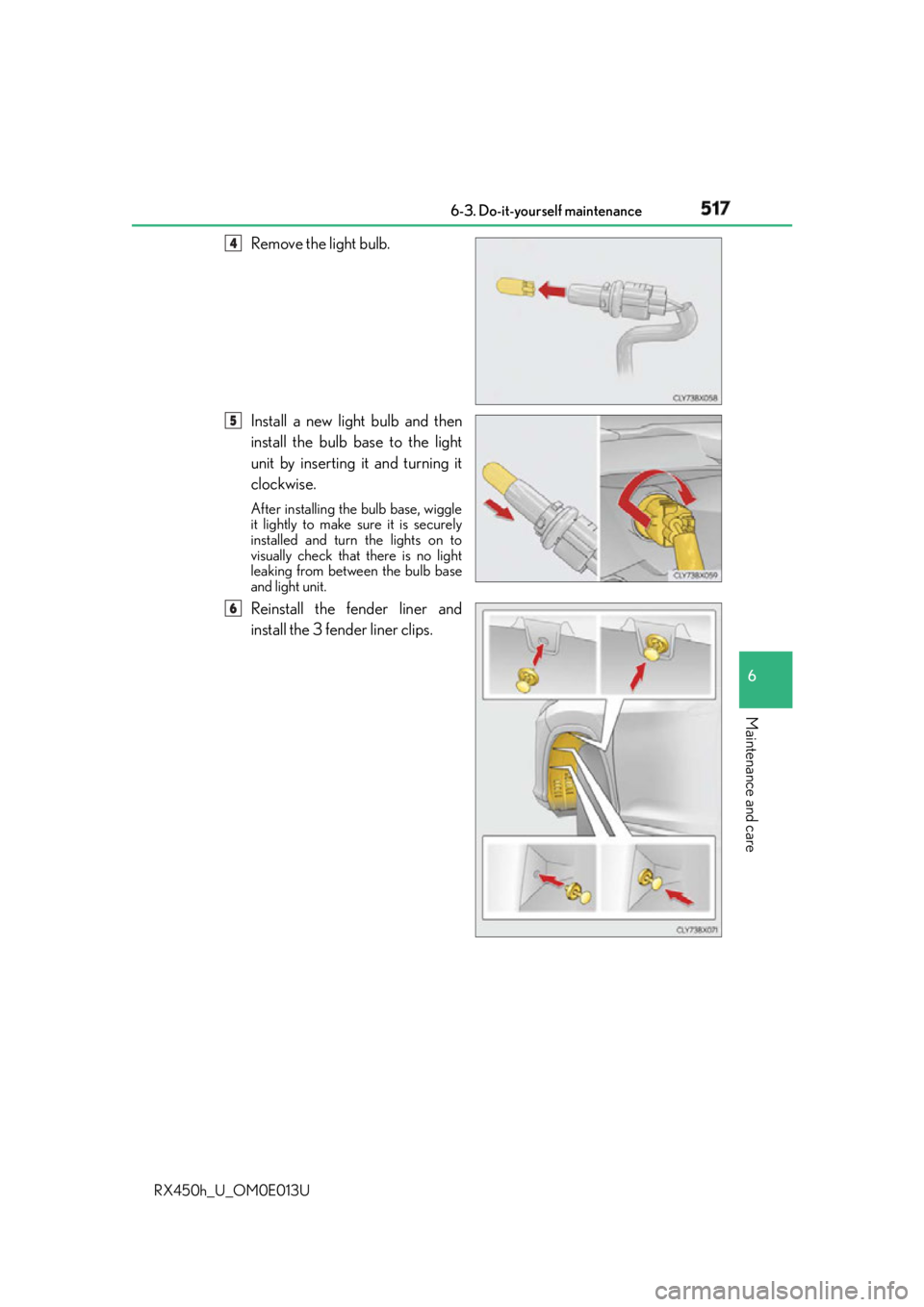
RX450h_U_OM0E013U Remove the light bulb.
Install a new light bulb and then
install the bulb base to the light
unit by inserting it and turning it
clockwise. After installing the bulb base, wiggle
it lightly to make sure it is securely
installed and turn the lights on to
visually check that there is no light
leaking from between the bulb base
and light unit.
Reinstall the fender liner and
install the 3 fender liner clips. 4
5
6
Page 518 of 660
518 6-3. Do-it-yourself maintenance
RX450h_U_OM0E013U ■
Front turn signal lights (vehic les with single-beam headlights)
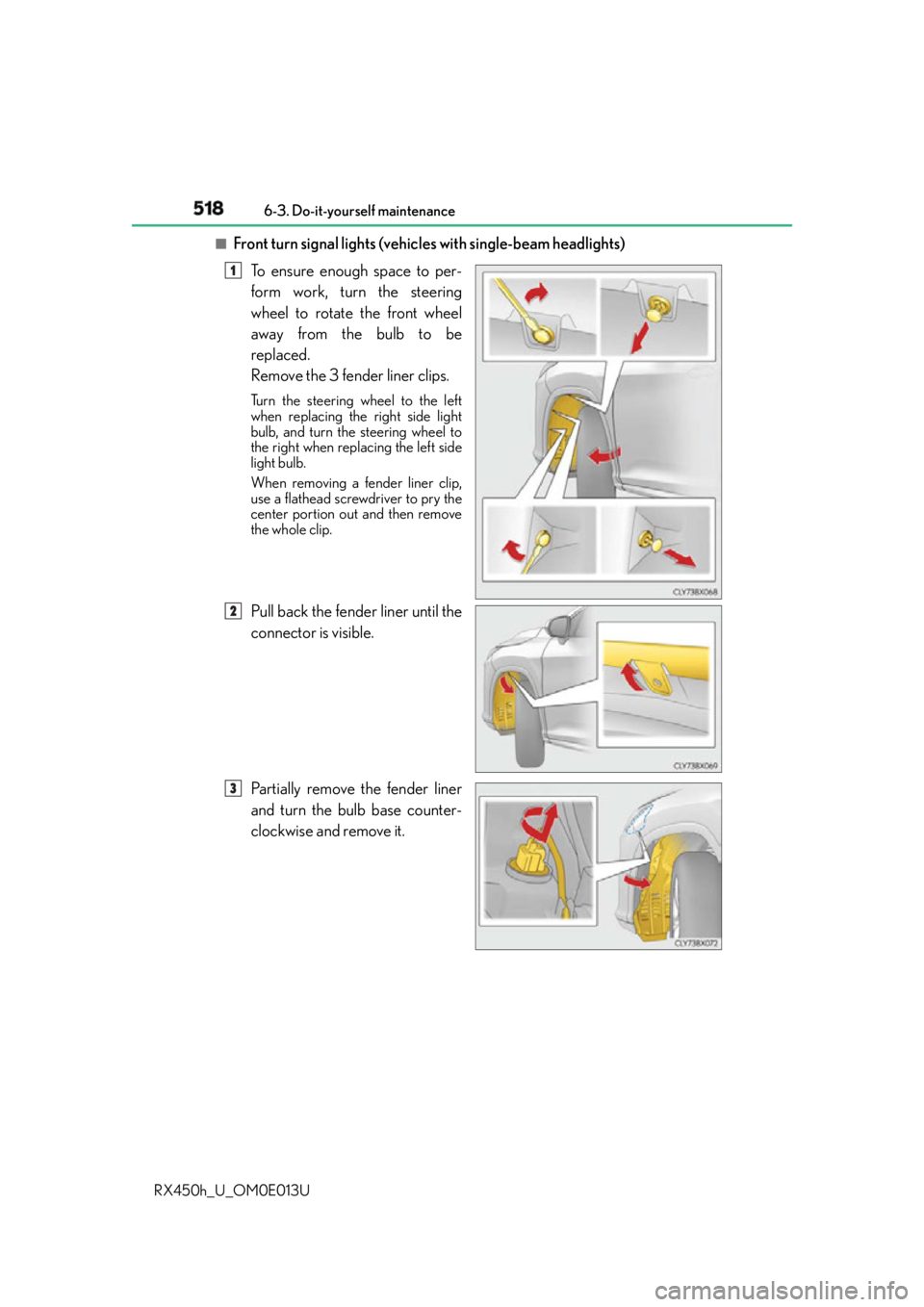
To ensure enough space to per-
form work, turn the steering
wheel to rotate the front wheel
away from the bulb to be
replaced.
Remove the 3 fender liner clips. Turn the steering wheel to the left
when replacing the right side light
bulb, and turn the steering wheel to
the right when replacing the left side
light bulb.
When removing a fender liner clip,
use a flathead screwdriver to pry the
center portion out and then remove
the whole clip.
Pull back the fender liner until the
connector is visible.
Partially remove the fender liner
and turn the bulb base counter-
clockwise and remove it. 1
8 2
3
Page 519 of 660
5196-3. Do-it-yourself maintenance
6
Maintenance and care
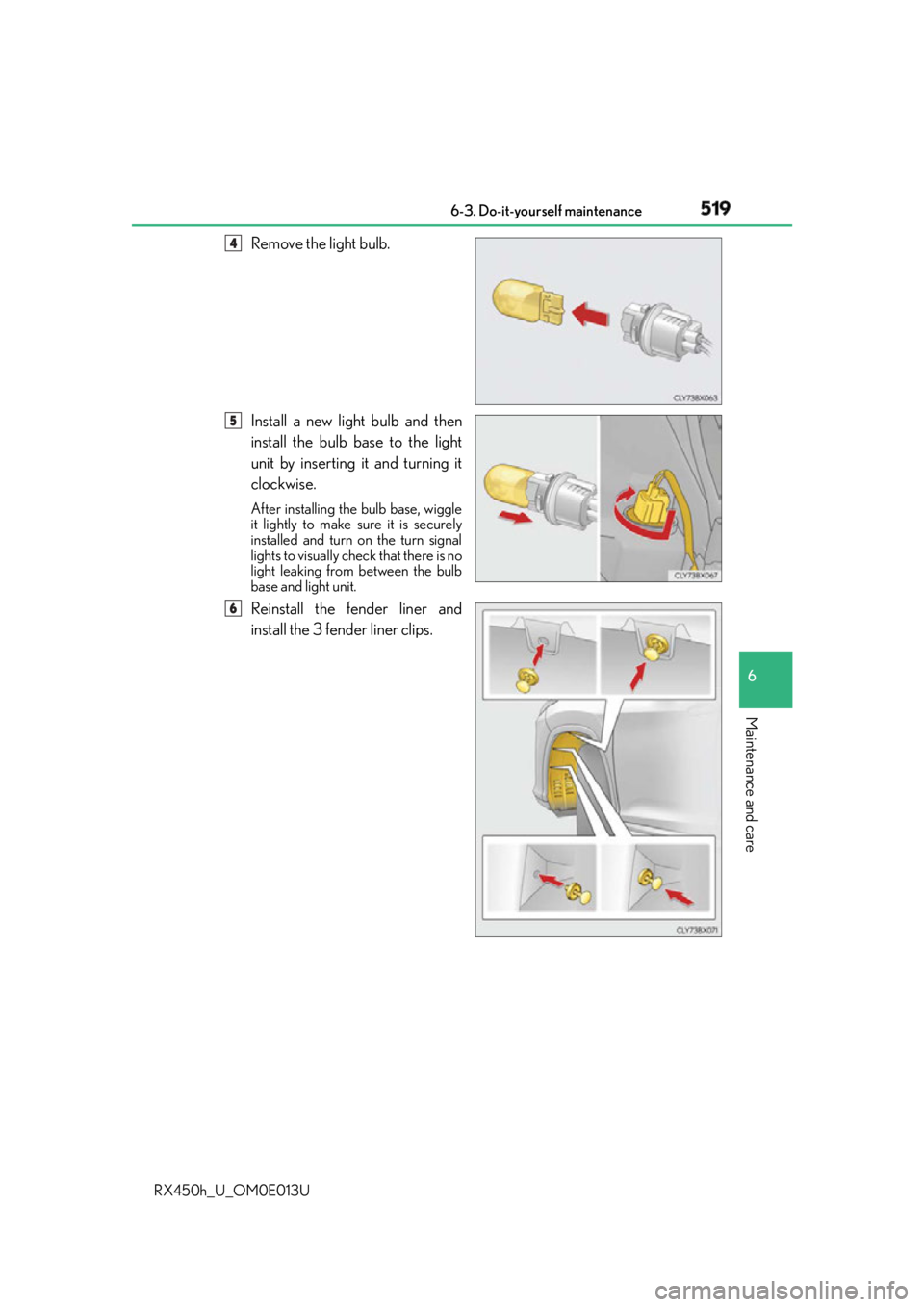
RX450h_U_OM0E013U Remove the light bulb.
Install a new light bulb and then
install the bulb base to the light
unit by inserting it and turning it
clockwise. After installing the bulb base, wiggle
it lightly to make sure it is securely
installed and turn on the turn signal
lights to visually check that there is no
light leaking from between the bulb
base and light unit.
Reinstall the fender liner and
install the 3 fender liner clips. 4
5
6
Page 521 of 660
5216-3. Do-it-yourself maintenance
6
Maintenance and care
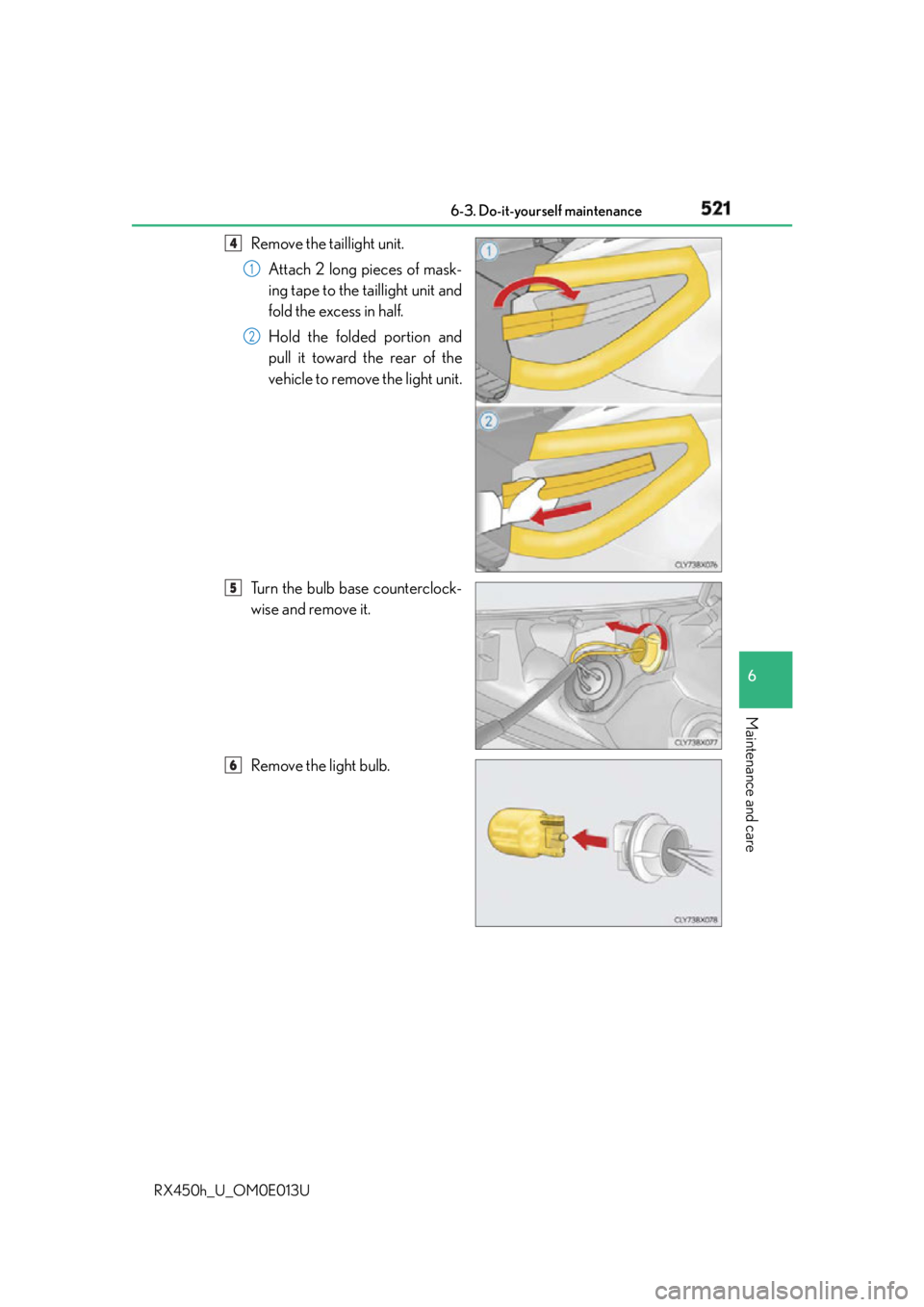
RX450h_U_OM0E013U Remove the taillight unit.
Attach 2 long pieces of mask-
ing tape to the taillight unit and
fold the excess in half.
Hold the folded portion and
pull it toward the rear of the
vehicle to remove the light unit.
Turn the bulb base counterclock-
wise and remove it.
Remove the light bulb. 4
1
2
5
6
Page 522 of 660
522 6-3. Do-it-yourself maintenance
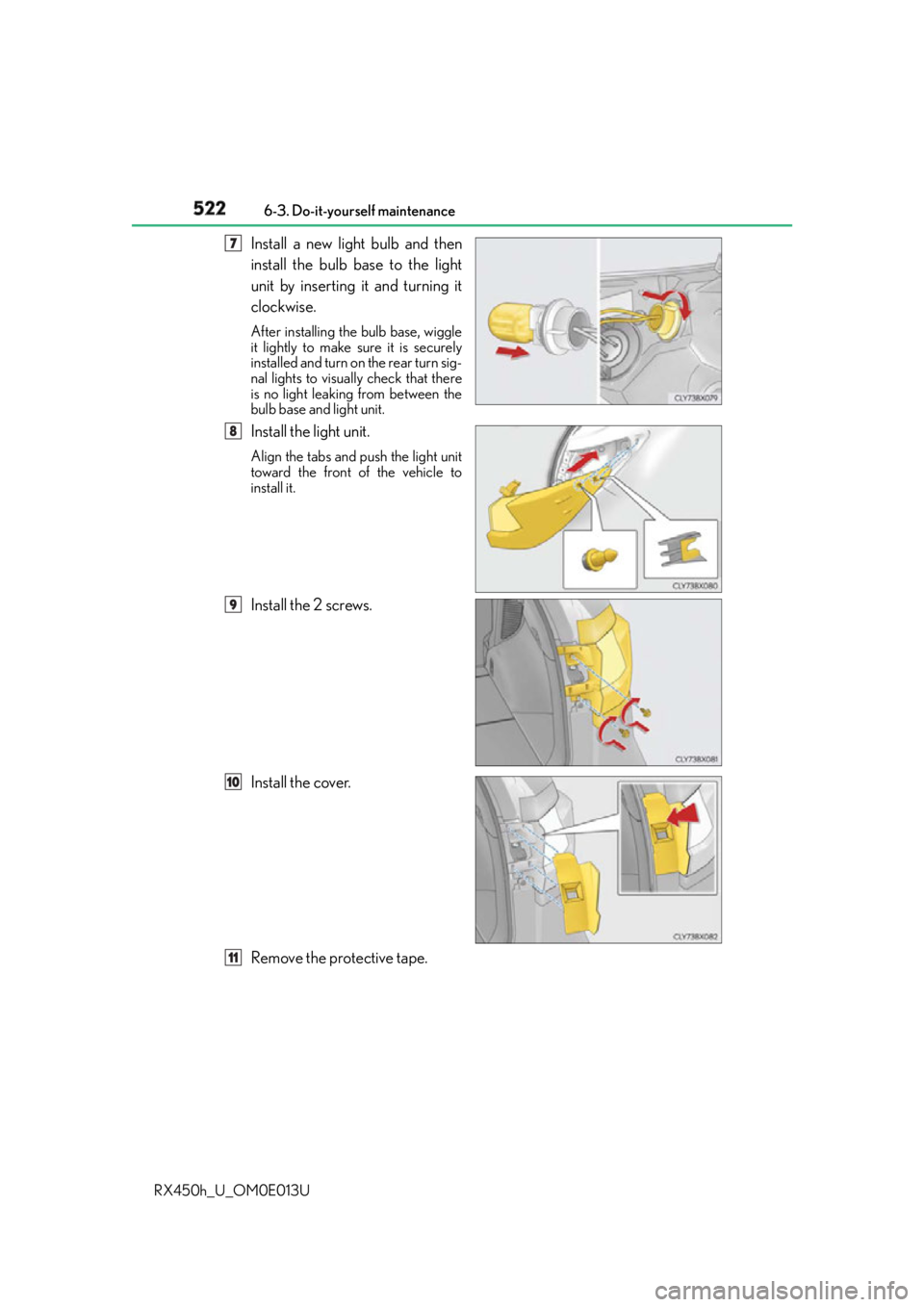
RX450h_U_OM0E013U Install a new light bulb and then
install the bulb base to the light
unit by inserting it and turning it
clockwise. After installing the bulb base, wiggle
it lightly to make sure it is securely
installed and turn on the rear turn sig-
nal lights to visually check that there
is no light leaking from between the
bulb base and light unit.
Install the light unit. Align the tabs and push the light unit
toward the front of the vehicle to
install it.
Install the 2 screws.
Install the cover.
Remove the protective tape. 47
8
9
10
11
Page 523 of 660
5236-3. Do-it-yourself maintenance
6
Maintenance and care
RX450h_U_OM0E013U ■
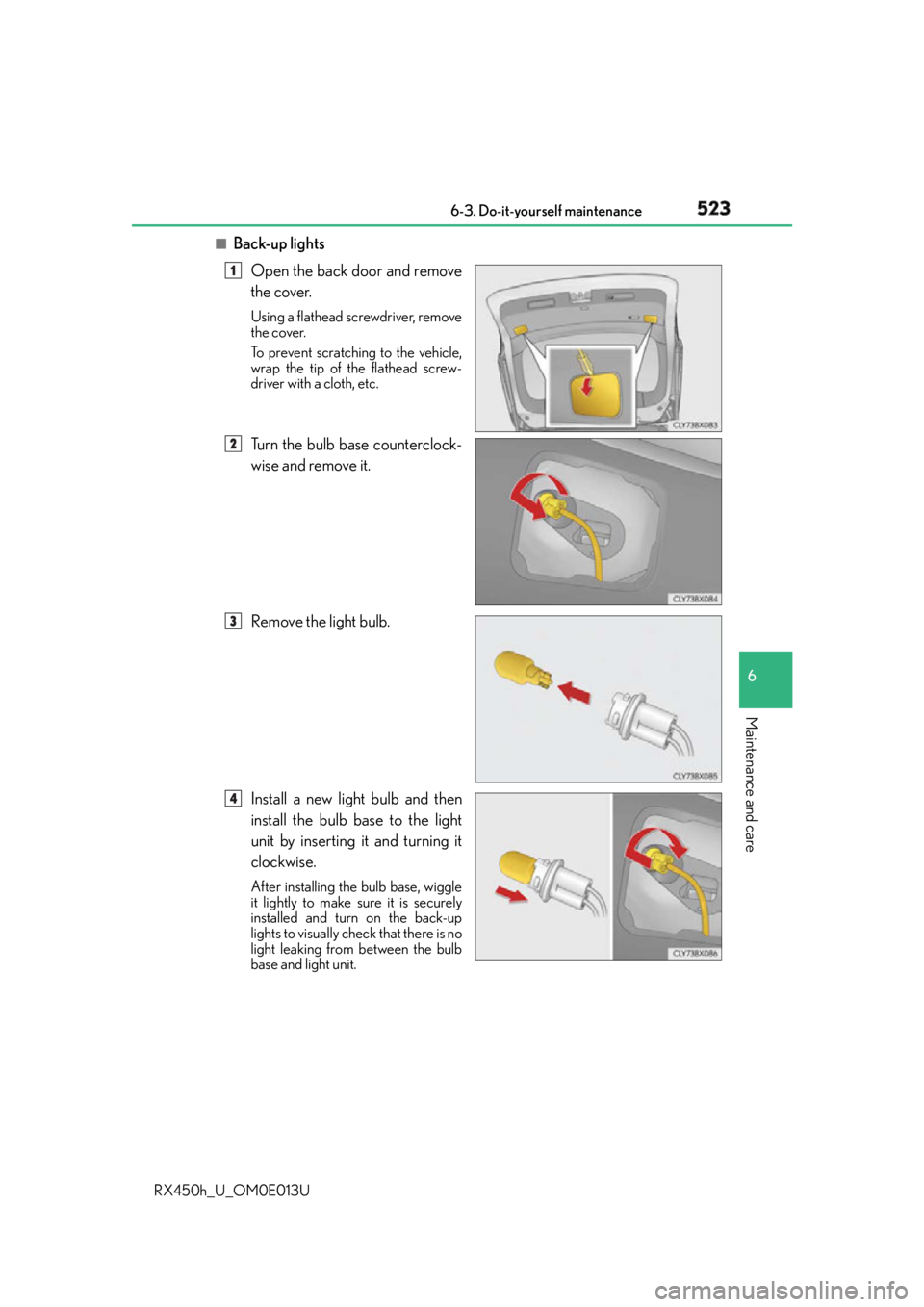
Back-up lights
Open the back door and remove
the cover. Using a flathead screwdriver, remove
the cover.
To prevent scratching to the vehicle,
wrap the tip of the flathead screw-
driver with a cloth, etc.
Turn the bulb base counterclock-
wise and remove it.
Remove the light bulb.
Install a new light bulb and then
install the bulb base to the light
unit by inserting it and turning it
clockwise. After installing the bulb base, wiggle
it lightly to make sure it is securely
installed and turn on the back-up
lights to visually check that there is no
light leaking from between the bulb
base and light unit. 1
2
3
4
Page 642 of 660
642 Alphabetical index
RX450h_U_OM0E013U Care
Aluminum wheels ............................. 459
Exterior................................................... 458
Interior ..................................................... 462
Seat belts ................................................463
Self-restoring coat ............................ 458
Cargo capacity............................ 212, 582
Cargo hooks ...........................................427
Cargo net hooks ....................................427
Chains .........................................................391
Child restraint system............................ 59
Booster seats installation...................68
Convertible seats
installation..............................................66
Front passenger occupant
classification system ...........................51
Infant seats definition ...........................65
Infant seats installation ..........................61
Installing CRS with LATCH
anchors ..................................................... 71
Installing CRS with seat
belts ..........................................................65
Installing CRS with top tether
strap.......................................................... 73
LATCH anchors ..................................... 71 Child safety .................................................... 58
12-volt battery
precautions ...........................485, 572
Airbag precautions................................ 41
Child restraint system......................... 59
How your child should
wear the seat belt .............................. 34
Installing child restraints .................... 59
Moon roof precautions ....................196
Panoramic moon roof
precautions .......................................200
Power back door
precautions ......................................... 152
Power window lock switch............ 189
Power window precautions ........... 192
Rear door child-p rotectors ............139
Removed key battery
precautions ....................................... 507
Seat belt extender
precautions .......................................... 36
Seat belt precautions .......................... 36
Seat heater precautions ................... 414
Child-protectors .................................... 139
Cleaning ....................................... 458, 462
Aluminum wheels .............................. 459
Exterior ...................................................458
Interior ..................................................... 462
Seat belts................................................ 463
Clock................................................. 97, 433
Coat hooks ..............................................444
Condenser .............................................. 480
Console box ............................................422
Consumption screen .................. 106, 124C
Page 650 of 660
650 Alphabetical index
RX450h_U_OM0E013U Multi-information display
AWD Control display ...................... 107
Clock........................................................... 97
Drive information ................................ 106
Dynamic radar cruise control...... 323
Dynamic radar cruise control
with full-speed range ....................... 311
Energy monitor .....................................124
G-force display....................................108
Language .................................................. 113
LDA (Lane Departure Alert
with steering control) .................. 306
LKA (Lane-Keeping Assist) ......... 297
Outside temperature .......................... 97
Settings ..................................................... 109
Suggestion function ............................. 116
Sway warning display ....................... 107
Warning messages...........................543
Navigation system
*Noise from under vehicle ....................... 8 Odometer .................................................. 115
Oil
Engine oil .............................................. 585
Rear differential oil ........................... 588
Opener
Fuel filler door...................................... 269
Hood........................................................ 473
Power back door ................................ 143
Outside rear view mirrors ..................185
Adjusting and folding ....................... 185
Blind Spot Monitor (BSM) ........... 363
Linked mirror function
when reversing..................................187
Mirror position memory .................. 174
Outside rear view mirror
defoggers...........................................409
Outside temperature display .............. 97
Overheating............................................574
N O