driver LEXUS RX450H 2016 Owners Manual
[x] Cancel search | Manufacturer: LEXUS, Model Year: 2016, Model line: RX450H, Model: LEXUS RX450H 2016Pages: 660, PDF Size: 14.85 MB
Page 381 of 660
3814-5. Using the driving support systems
4
Driving
RX450h_U_OM0E013U
◆ECB (Electronically Controlled Brake System)
The electronically controlled system generates braking force corresponding
to the brake operation
◆ABS (Anti-lock Brake System)
Helps to prevent wheel lock when the br akes are applied suddenly, or if the
brakes are applied while drivin g on a slippery road surface
◆Brake assist
Generates an increased level of br aking force after the brake pedal is
depressed when the system detects a panic stop situation
◆VSC (Vehicle Stability Control)
Helps the driver to contro l skidding when swerving suddenly or turning on
slippery road surfaces
◆Enhanced VSC (Enhanced Vehicle Stability Control)
Provides cooperative control of the ABS, TRAC, VSC and EPS.
Helps to maintain directional stability when swerving on slippery road sur-
faces by controlling steering performance.
◆TRAC (Traction Control)
Helps to maintain drive power and pr event the drive wheels from spinning
when starting the vehicle or accelerating on slippery roads
◆Hill-start assist control
Prevents the vehicle from rolling backward when starting on an incline or slip-
pery slope
◆EPS (Electric Power Steering)
Employs an electric motor to reduce the amount of effort needed to turn the
steering wheel
Driving assist systems
To help enhance driving safety and perf ormance, the following systems oper-
ate automatically in response to variou s driving situations. Be aware, however,
that these systems are supplementary and should not be relied upon too heav-
ily when operating the vehicle.
Page 382 of 660
3824-5. Using the driving support systems
RX450h_U_OM0E013U
◆E-Four (AWD models)
Electronic On-Demand AWD system. Automatically switches from front-
wheel drive to all-wheel drive (AWD) according to the driving conditions,
helping to ensure reliable handling and st ability. Examples of conditions where
the system will switch to AWD are when cornering, going uphill, starting off or
accelerating, and when the road surface is slippery due to snow, rain, etc.
◆Adaptive Variable Suspension System (if equipped)
Controls the damping force of the shock absorber of each wheel according to
the road and driving conditions, helpin g achieve a comfortable ride, excellent
driveability and a high level of stability.
If SPORT S+ mode is selected using the driving mode select switch, the
damping force will become more su itable for sporty driving. (P. 378)
◆VDIM (Vehicle Dynamics Integrated Management)
Provides integrated control of the ABS, brake assist, TRAC, VSC, hill-start
assist control, and EPS systems
Helps to maintain vehicle stability when swerving on slippery road surfaces by
controlling the brakes and hybrid system output
◆Trailer Sway Control
Helps the driver to control trailer sway by selectively applying brake pressure
for individual wheels and reducing dr iving torque when trailer sway is
detected.
Trailer Sway Control is part of the VSC system and will not operate if VSC
turned off or experiences a malfunction.
Page 384 of 660
3844-5. Using the driving support systems
RX450h_U_OM0E013U
■Turning off TRAC, VSC and Tr ailer Sway Control systems
To turn the TRAC, VSC and Trailer Sway Co ntrol systems off, press and hold for
more than 3 seconds whil e the vehicle is stopped.
The VSC OFF indicator light will come on an d the “Traction Control Turned Off” will be
shown on the multi-information display.
*
Press again to turn the systems back on.
*: On vehicles with PCS (Pre-Collision Sy stem), pre-collision brake assist and pre-
collision braking will also be disabled. ( P. 291)
■When the message is displayed on the mu lti-information display showing that TRAC
has been disabled even if has not been pressed
TRAC and hill-start assist control cannot be operated. Contact your Lexus dealer.
■Sounds and vibrations caused by the ABS, brake assist, TRAC, VSC, Trailer Sway Con-
trol and hill-start assist control systems
Any of the following conditions may occur when the above systems are operating. None
of these indicates that a malfunction has occurred.
●Vibrations may be felt through the vehicle body and steering.
●A motor sound may be heard after the vehicle comes to a stop.
■ECB operating sound
ECB operating sound may be heard in the followi ng cases, but it does not indicate that a
malfunction has occurred.
●Operating sound heard from the engine compartment when the brake pedal is oper-
ated.
●Motor sound of the brake system heard from the front part of the vehicle when the
driver’s door is opened.
●Operating sound heard from the engine compartment when 1 or 2 minutes passed
after the stop of the hybrid system.
■EPS operation sound
When the steering wheel is operated, a motor sound (whirring sound) may be heard.
This does not indicate a malfunction.
■Automatic reactivation of TRAC, VS C and Trailer Sway Control systems
After turning the TRAC, VSC and Trailer Sway Control systems off, the systems will be
automatically re-enabled in the following situations:
●When the power switch is turned off
●If only the TRAC system is turned off, the TRAC will turn on when vehicle speed
increases
If the TRAC, VSC and Trailer Sway Control systems are turned off, automatic re-
enabling will not occur when vehicle speed increases.
Page 394 of 660
3944-6. Driving tips
RX450h_U_OM0E013U
●Specific design characteristics give it a higher center of gravity than ordinary
passenger cars. This vehicle design feature causes this type of vehicle to be
more likely to rollover. And, utility vehicles have a significantly higher rollover
rate than other types of vehicles.
●An advantage of the higher ground cl earance is a better view of the road
allowing you to anticipate problems.
●It is not designed for cornering at the same speeds as ordinary passenger cars
any more than low-slung sports cars are designed to perform satisfactorily
under off-road conditions. Therefore, sharp turns at excessive speeds may
cause the vehicle to rollover.
Utility vehicle precautions
This vehicle belongs to the utility vehicle class, which has higher ground clear-
ance and narrower tread in relation to the height of its center of gravity.
Utility vehicle feature
WARNING
■Utility vehicle precautions
Always observe the following precautions to minimize the risk of death, serious injury
or damage to your vehicle:
●In a rollover crash, an unbelted person is significantly more likely to die than a person
wearing a seat belt. Therefore, the driver and all passengers should always fasten
their seat belts.
●Avoid sharp turns or abrupt maneuvers, if at all possible.
Failure to operate this vehicle correctly may result in loss of control or vehicle rollover
causing death or serious injury.
●Loading cargo on the roof luggage carrier will make the center of the vehicle gravity
higher. Avoid high speeds, sudden starts, sharp turns, sudden braking or abrupt
maneuvers, otherwise it may re sult in loss of control or vehicle rollover due to failure
to operate this vehicle correctly.
●Always slow down in gusty crosswinds. Be cause of its profile and higher center of
gravity, your vehicle is more sensitive to side winds than an ordinary passenger car.
Slowing down will allow you to have better control.
●Do not drive horizontally across steep slopes. Driving straight up or straight down is
preferred. Your vehicle (or any similar off- road vehicle) can tip over sideways much
more easily than forward or backward.
Page 404 of 660
404
RX450h_U_OM0E013U5-2. Using the air conditio
ning system and defogger
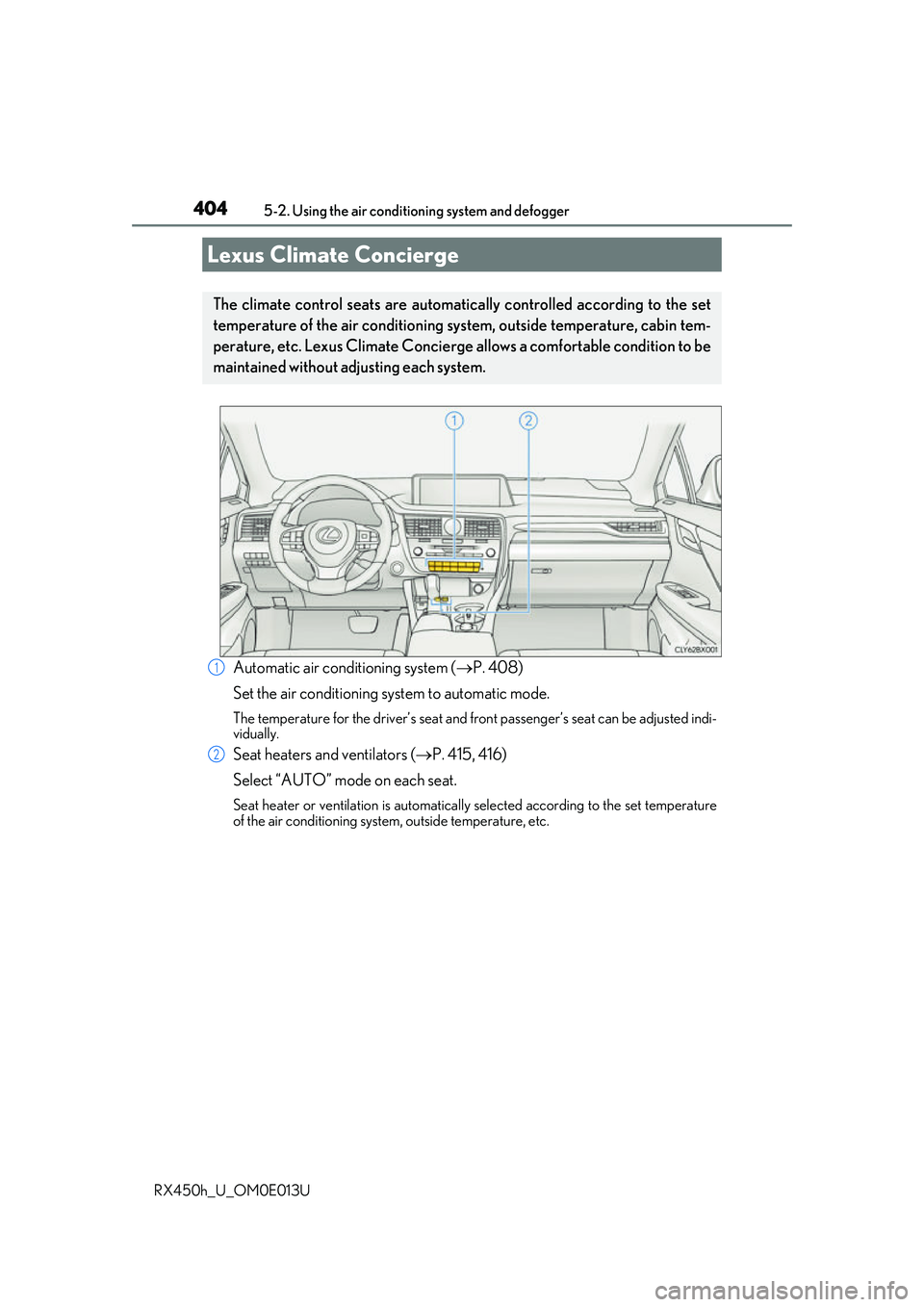
Automatic air conditioning system ( P. 408)
Set the air conditioning system to automatic mode.
The temperature for the driver’s seat and front passenger’s seat can be adjusted indi-
vidually.
Seat heaters and ventilators ( P. 415, 416)
Select “AUTO” mode on each seat.
Seat heater or ventilation is automatically selected according to the set temperature
of the air conditioning system, outside temperature, etc.
Lexus Climate Concierge
The climate control seats are automatica lly controlled according to the set
temperature of the air conditioning sy stem, outside temperature, cabin tem-
perature, etc. Lexus Climate Concierge allows a comfortable condition to be
maintained without adjusting each system.
1
2
Page 406 of 660
4065-2. Using the air conditioning system and defogger
RX450h_U_OM0E013U
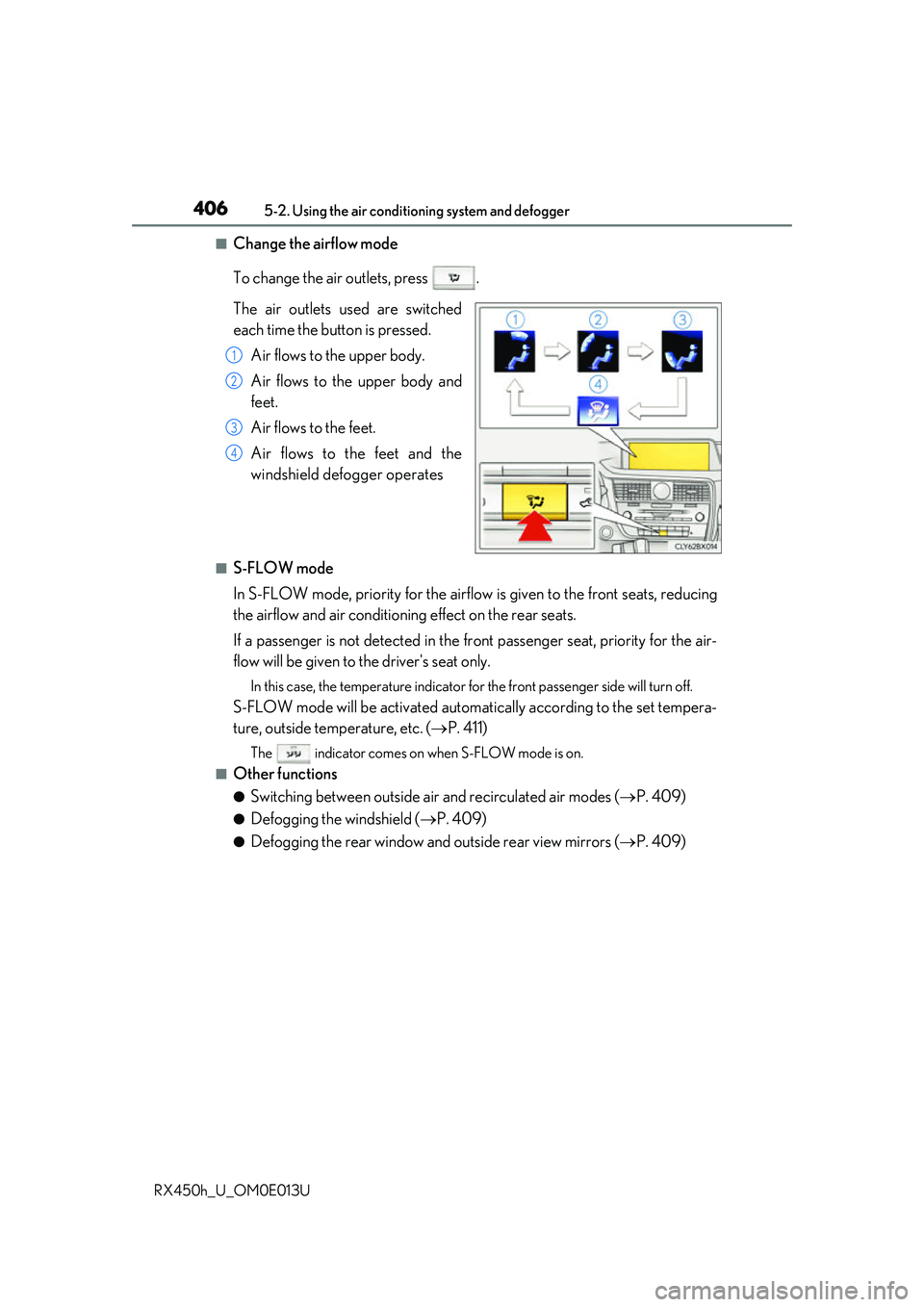
■Change the airflow mode
To change the air outlets, press .
The air outlets used are switched
each time the button is pressed. Air flows to the upper body.
Air flows to the upper body and
feet.
Air flows to the feet.
Air flows to the feet and the
windshield defogger operates
■S-FLOW mode
In S-FLOW mode, priority for the airflo w is given to the front seats, reducing
the airflow and air conditioning effect on the rear seats.
If a passenger is not detected in the fr ont passenger seat, priority for the air-
flow will be given to the driver's seat only.
In this case, the temperature indicator for the front passenger side will turn off.
S-FLOW mode will be activated automa tically according to the set tempera-
ture, outside temperature, etc. ( P. 411)
The indicator comes on when S-FLOW mode is on.
■Other functions
●Switching between outside air and recirculated air modes ( P. 409)
●Defogging the windshield ( P. 409)
●Defogging the rear window and outside rear view mirrors ( P. 409)
1
2
3
4
Page 407 of 660
4075-2. Using the air conditioning system and defogger
5
Interior features
RX450h_U_OM0E013U
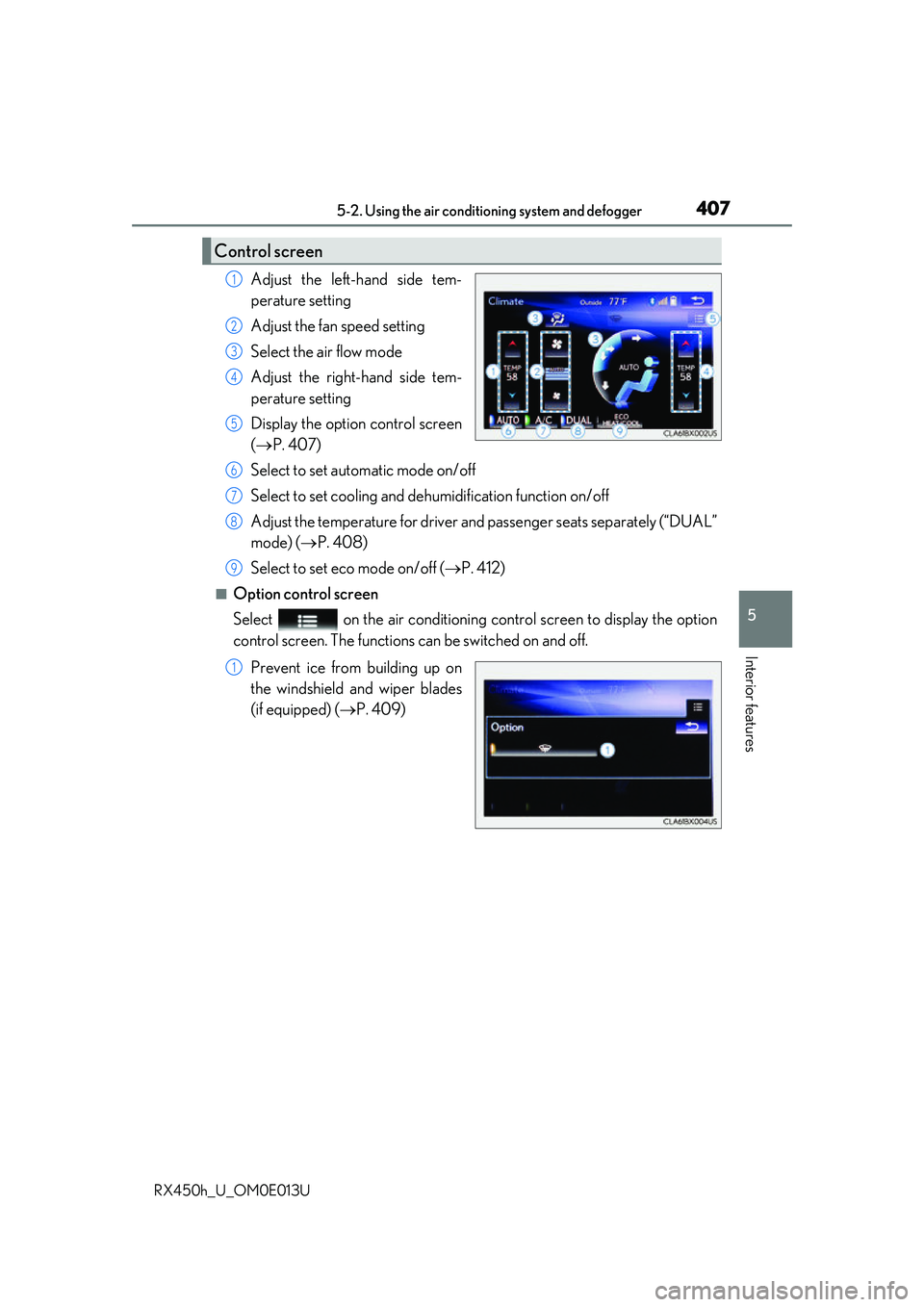
Adjust the left-hand side tem-
perature setting
Adjust the fan speed setting
Select the air flow mode
Adjust the right-hand side tem-
perature setting
Display the option control screen
(P. 407)
Select to set automatic mode on/off
Select to set cooling and dehumidification function on/off
Adjust the temperature for driver an d passenger seats separately (“DUAL”
mode) ( P. 408)
Select to set eco mode on/off ( P. 412)
■Option control screen
Select on the air conditioning control screen to display the option
control screen. The functions can be switched on and off.
Prevent ice from building up on
the windshield and wiper blades
(if equipped) ( P. 409)
Control screen
1
2
3
4
5
6
7
8
9
1
Page 408 of 660
4085-2. Using the air conditioning system and defogger
RX450h_U_OM0E013U
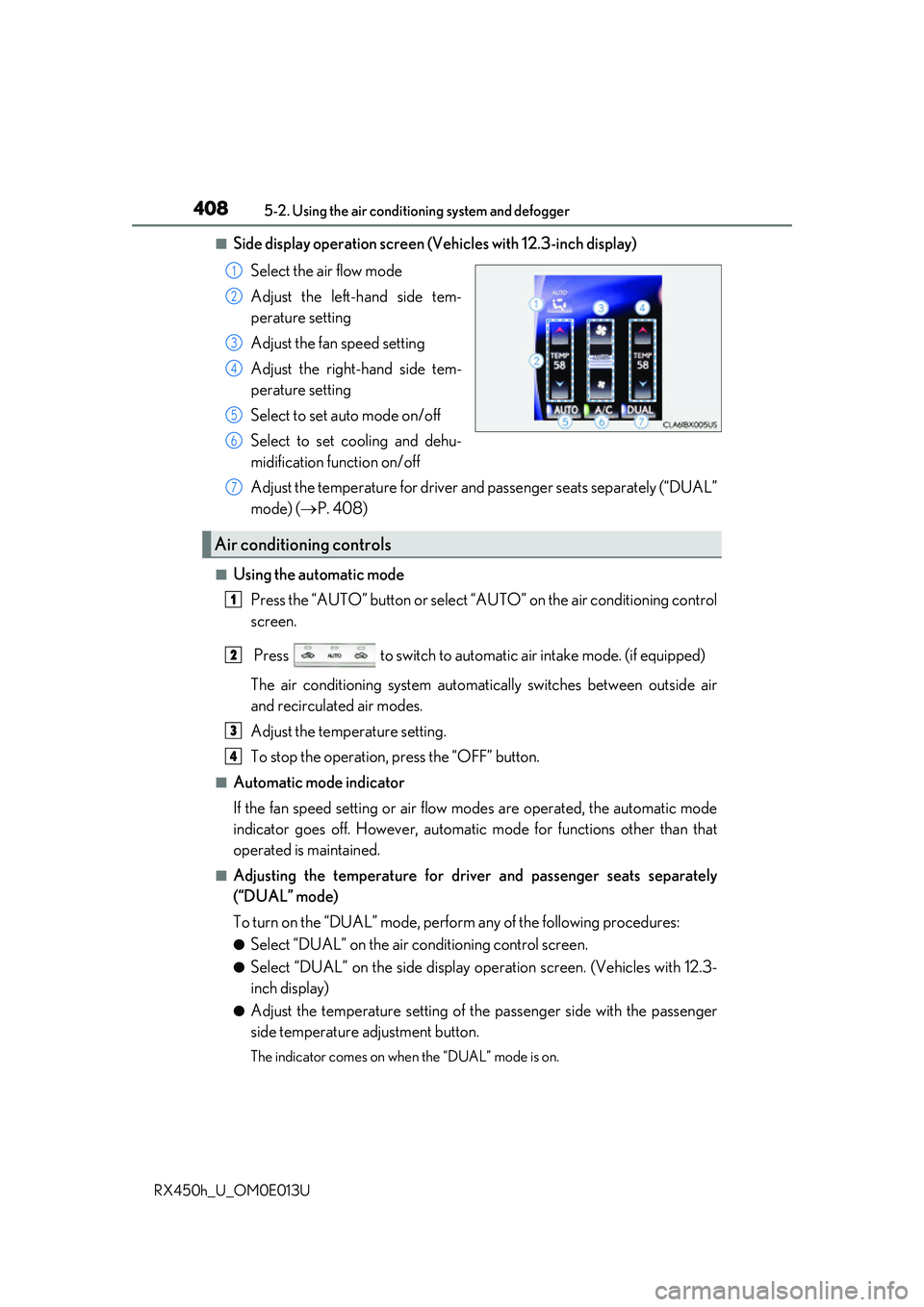
■Side display operation screen (V ehicles with 12.3-inch display)
Select the air flow mode
Adjust the left-hand side tem-
perature setting
Adjust the fan speed setting
Adjust the right-hand side tem-
perature setting
Select to set auto mode on/off
Select to set cooling and dehu-
midification function on/off
Adjust the temperature for driver an d passenger seats separately (“DUAL”
mode) ( P. 408)
■Using the automatic mode
Press the “AUTO” button or select “A UTO” on the air conditioning control
screen.
Press to switch to automatic air intake mode. (if equipped)
The air conditioning system automati cally switches between outside air
and recirculated air modes.
Adjust the temperature setting.
To stop the operation, press the “OFF” button.
■Automatic mode indicator
If the fan speed setting or air flow modes are operated, the automatic mode
indicator goes off. However, automati c mode for functions other than that
operated is maintained.
■Adjusting the temperature for driv er and passenger seats separately
(“DUAL” mode)
To turn on the “DUAL” mode, perfor m any of the following procedures:
●Select “DUAL” on the air conditioning control screen.
●Select “DUAL” on the side display op eration screen. (Vehicles with 12.3-
inch display)
●Adjust the temperature setting of th e passenger side with the passenger
side temperature adjustment button.
The indicator comes on when the “DUAL” mode is on.
1
2
3
4
5
6
Air conditioning controls
7
1
2
3
4
Page 438 of 660
4385-5. Using the other interior features
RX450h_U_OM0E013U
WARNING
■Caution while driving
When charging a portable device while driv ing, for safety reasons, the driver should
not operate the portable device.
■Caution regarding interference with electronic devices
People with implantable card iac pacemakers, cardiac resynchronization therapy pace-
makers or implantable cardioverter defibrilla tors, as well as any other electrical medi-
cal device, should consult their physician about the usage of the wireless charger.
Operations of the wireless charger may have an affect on medical devices.
■To prevent damage or burns
Observe the following precautions.
Failure to do so may result in the possibi lity of fire, equipment failure or damage, or
burns due to heat.
●Do not put any metallic objects between th e charging area and the portable device
while charging.
●Do not attach metallic objects, such as aluminum stickers, to the charging area.
●Do not cover the wireless charger with a cloth or other object while charging.
●Do not attempt to charge portable devi ces which are not compatible with the Qi
wireless charging standard.
●Do not disassemble, modify or remove the wireless charger.
●Do not apply force or impact to the wireless charger.
Page 453 of 660
4535-5. Using the other interior features
5
Interior features
RX450h_U_OM0E013U
Subscribers have the following Safety Connect services available:
●Automatic Collision Notification*
Helps drivers receive necessary response from emergency service providers.
(P. 455)
*: U.S. Patent No. 7,508,298 B2
●Stolen Vehicle Location
Helps drivers in the event of vehicle theft. ( P. 455)
●Emergency Assistance Button (“SOS”)
Connects drivers to resp onse-center support. (P. 455)
●Enhanced Roadside Assistance
Provides drivers various on-road assistance. ( P. 455)
After you have signed the Telematics Subscription Service Agreement and are
enrolled, you can begi n receiving services.
A variety of subscription terms is ava ilable for purchase. Contact your Lexus
dealer, call 1-800-25-LEXUS (1-800-255- 3987) or push the “SOS” button in
your vehicle for furthe r subscription details.
Services
Subscription