brake LEXUS RX450H 2016 User Guide
[x] Cancel search | Manufacturer: LEXUS, Model Year: 2016, Model line: RX450H, Model: LEXUS RX450H 2016Pages: 660, PDF Size: 14.85 MB
Page 95 of 660
952. Instrument cluster
2
Instrument cluster
RX450h_U_OM0E013U
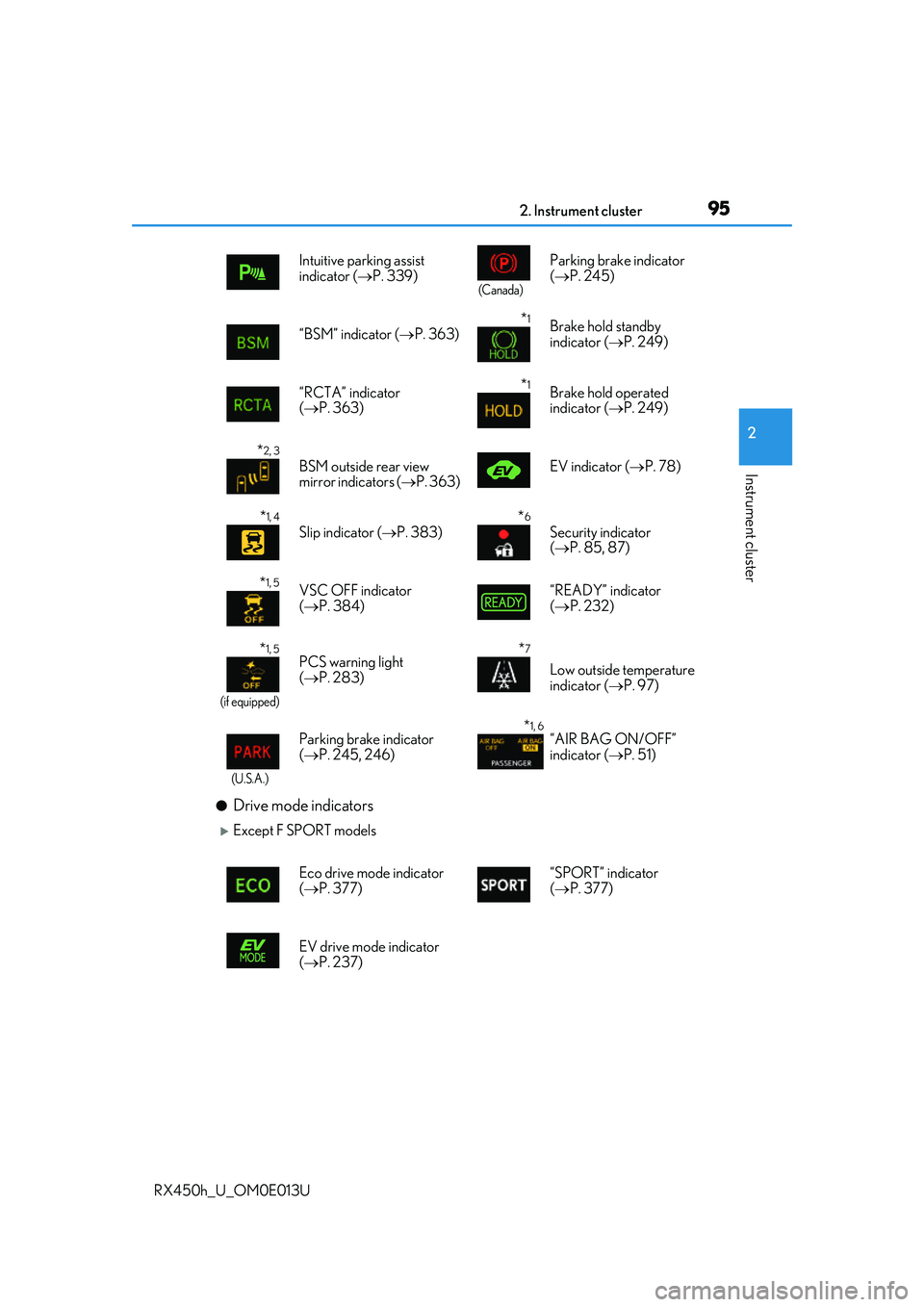
●Drive mode indicators
Except F SPORT modelsIntuitive parking assist
indicator (
P. 339)
(Canada)
Parking brake indicator
( P. 245)
“BSM” indicator ( P. 363)
*1Brake hold standby
indicator ( P. 249)
“RCTA” indicator
( P. 363)
*1Brake hold operated
indicator ( P. 249)
*2, 3
BSM outside rear view
mirror indicators ( P. 363) EV indicator (
P. 78)
*1, 4
Slip indicator ( P. 383)*6
Security indicator
( P. 85, 87)
*1, 5VSC OFF indicator
( P. 384) “READY” indicator
(
P. 232)
*1, 5
(if equipped)
PCS warning light
( P. 283)*7
Low outside temperature
indicator ( P. 97)
(U.S.A.)
Parking brake indicator
( P. 245, 246)*1, 6“AIR BAG ON/OFF”
indicator ( P. 51)
Eco drive mode indicator
( P. 377) “SPORT” indicator
(
P. 377)
EV drive mode indicator
( P. 237)
Page 108 of 660
1082. Instrument cluster
RX450h_U_OM0E013U
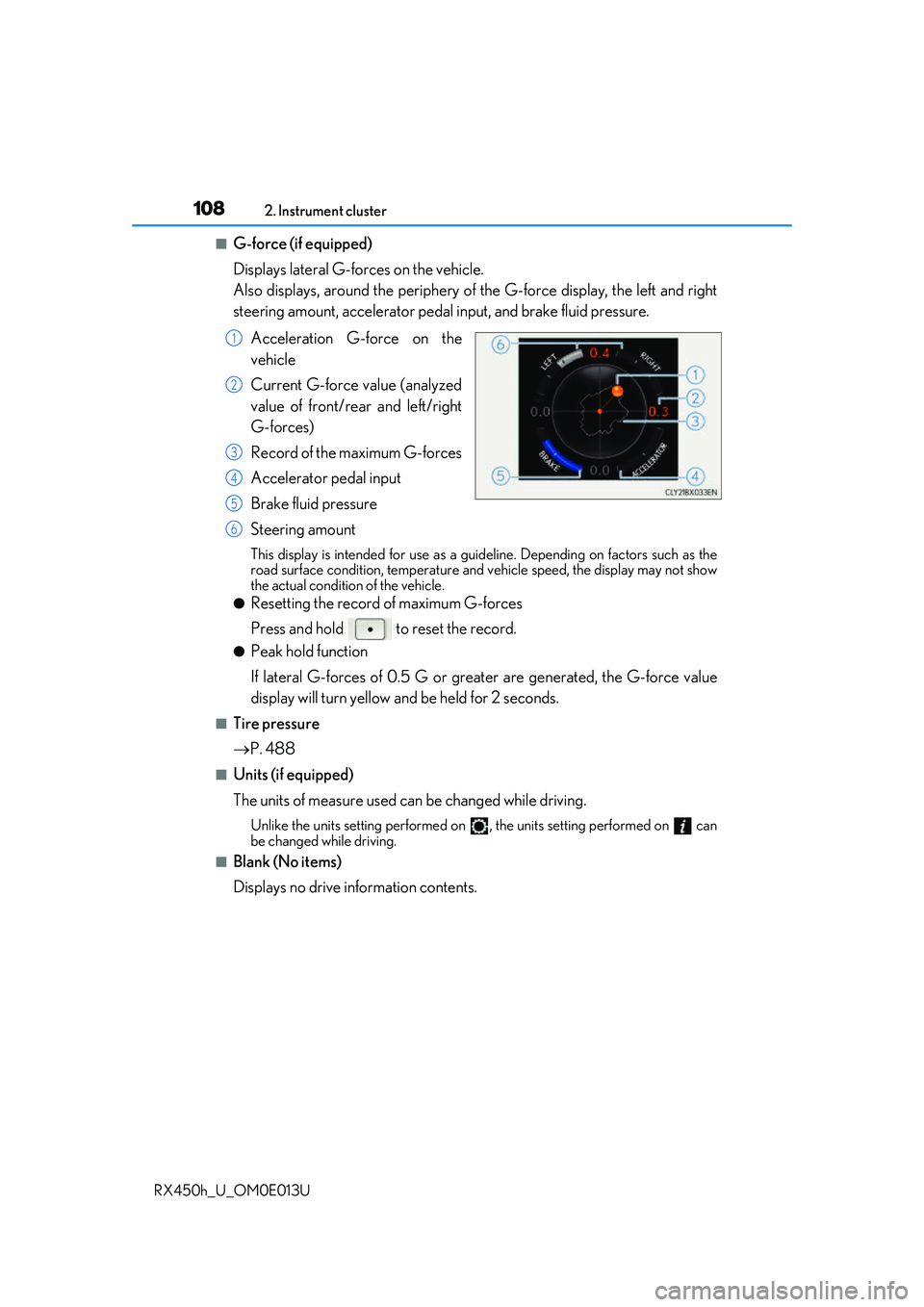
■G-force (if equipped)
Displays lateral G-forces on the vehicle.
Also displays, around the periphery of the G-force display, the left and right
steering amount, accelerator pedal input, and brake fluid pressure.
Acceleration G-force on the
vehicle
Current G-force value (analyzed
value of front/rear and left/right
G-forces)
Record of the maximum G-forces
Accelerator pedal input
Brake fluid pressure
Steering amount
This display is intended for use as a guideline. Depending on factors such as the
road surface condition, temperature and vehicle speed, the display may not show
the actual condition of the vehicle.
●Resetting the record of maximum G-forces
Press and hold to reset the record.
●Peak hold function
If lateral G-forces of 0.5 G or grea ter are generated, the G-force value
display will turn yellow and be held for 2 seconds.
■Tire pressure
P. 488
■Units (if equipped)
The units of measure used can be changed while driving.
Unlike the units setting performed on , the units setting performed on can
be changed while driving.
■Blank (No items)
Displays no drive information contents.
1
2
3
4
5
6
Page 116 of 660
1162. Instrument cluster
RX450h_U_OM0E013U
Displays suggestions to the driver in the following situations. To select a response
to a displayed suggestion, use the meter control switches.
The suggestion function can be turned on/off. (Customizable features: P. 607)
■Suggestion to enable the power back door
If the power back door system is disabled (setting on set to off) and the
power back door switch on the instru ment panel is operated, a suggestion
message will be displayed asking if yo u wish to enable the power back door
system. To enable the power back door system, select “Yes”.
After enabling the power back door syst em, press the power back door switch
again to open or close the power back door.
■Suggestion to turn off the headlights
If the headlights are left on for a certai n amount of time after the power switch
has been turned off, a su ggestion message will be displayed asking if you wish
to turn the headlights off. To turn the headlights off, select “Yes”.
If a front door is opened after the power switch is turned off, this suggestion mes-
sage will not be displayed.
■Background color of the indicator/shift posi tion display area (except F SPORT models)
The background color of the indicator/shift position display area is changed according to
the driving mode as follows ( P. 377):
●Eco drive mode: Blue
●Sport mode: Red
■G-force display (if equipped)
●The G-force values may not be zero even when the vehicle is parked, such as when it is
parked on an incline.
●Depending on the vehicle usage conditions, the brake fluid pressure display may not
reach its maximum reading even though the brake pedal is fully depressed.
●If a 12-volt battery terminal is disconnect ed and reconnected, the steering amount dis-
play may be disabled temporarily. After driv ing the vehicle for a while, the display will
be enabled.
■Suspension of the settings display
●Some settings cannot be changed while driv ing. When changing settings, park the
vehicle in a safe place.
●If a warning message is displa yed, operation of the settings display will be suspended.
Suggestion function
Page 147 of 660
1473-2. Opening, closing and locking the doors
3
Operation of each component
RX450h_U_OM0E013U
■Power back door operating conditions
If the following conditions are met with the power back door operation enabled ( P. 112),
the power back door can be opened and closed automatically.
●When an electronic key is being carried an d the back door opener switch is pressed*
●When the wireless remote control is used*
●When the power switch is in ON mode, the vehicle speed must be lower than 2 mph (3
km/h) and one of the following conditions mu st be met in addition to the above condi-
tions:
• The parking brake is engaged.
• The brake pedal is depressed.
• The shift lever is in P.
*: When the operation of the power back door when it is locked has been disabled by a
customized setting, operate the power back door after it has been unlocked.
( P. 611)
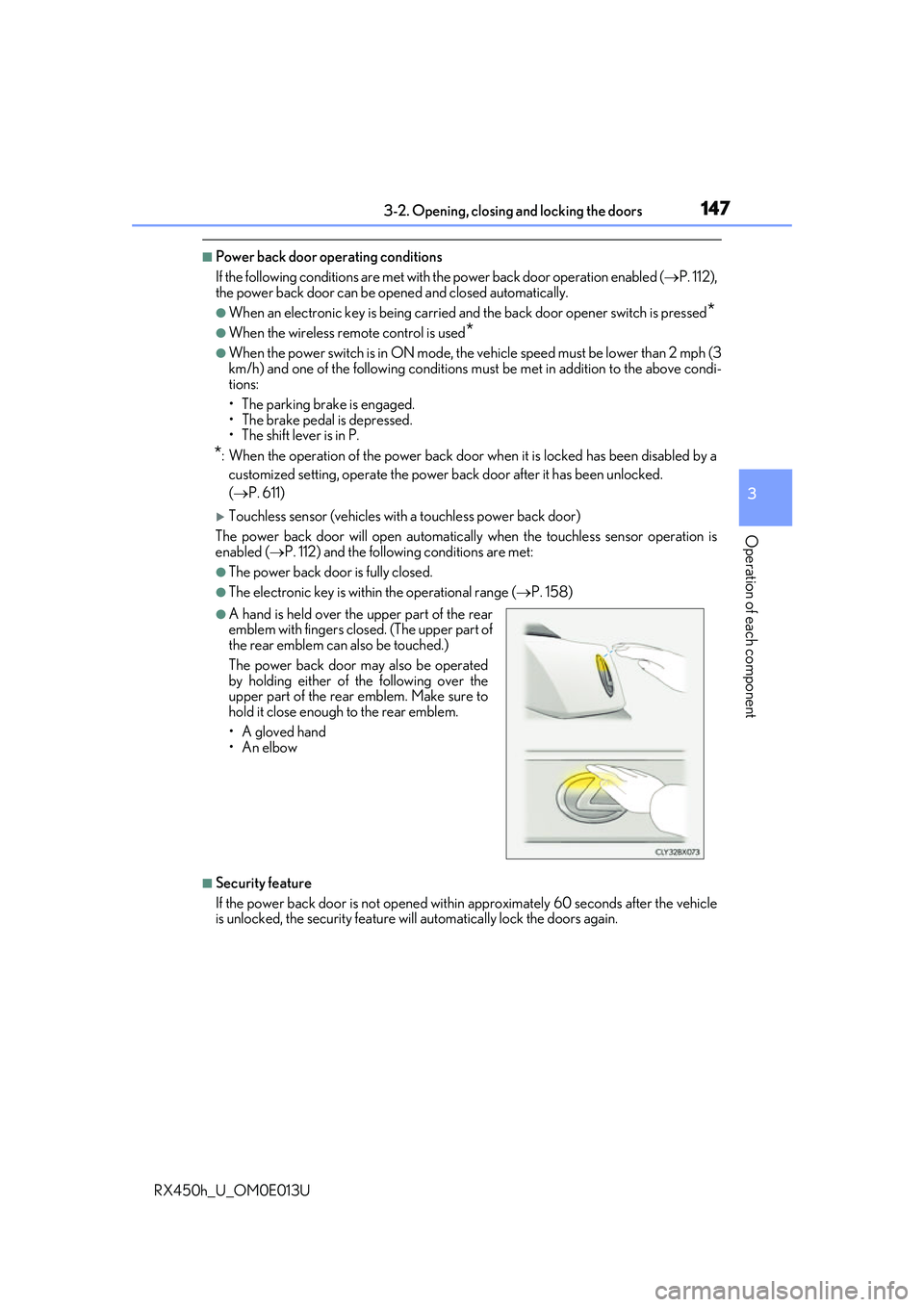
Touchless sensor (vehicles with a touchless power back door)
The power back door will open automatically when the touchless sensor operation is
enabled ( P. 112) and the following conditions are met:
●The power back door is fully closed.
●The electronic key is within the operational range ( P. 158)
■Security feature
If the power back door is not opened within approximately 60 seconds after the vehicle
is unlocked, the security feature will automatically lock the doors again.
●A hand is held over the upper part of the rear
emblem with fingers closed. (The upper part of
the rear emblem can also be touched.)
The power back door may also be operated
by holding either of the following over the
upper part of the rear emblem. Make sure to
hold it close enough to the rear emblem.
•A gloved hand
•An elbow
Page 170 of 660
1703-3. Adjusting the seats
RX450h_U_OM0E013U
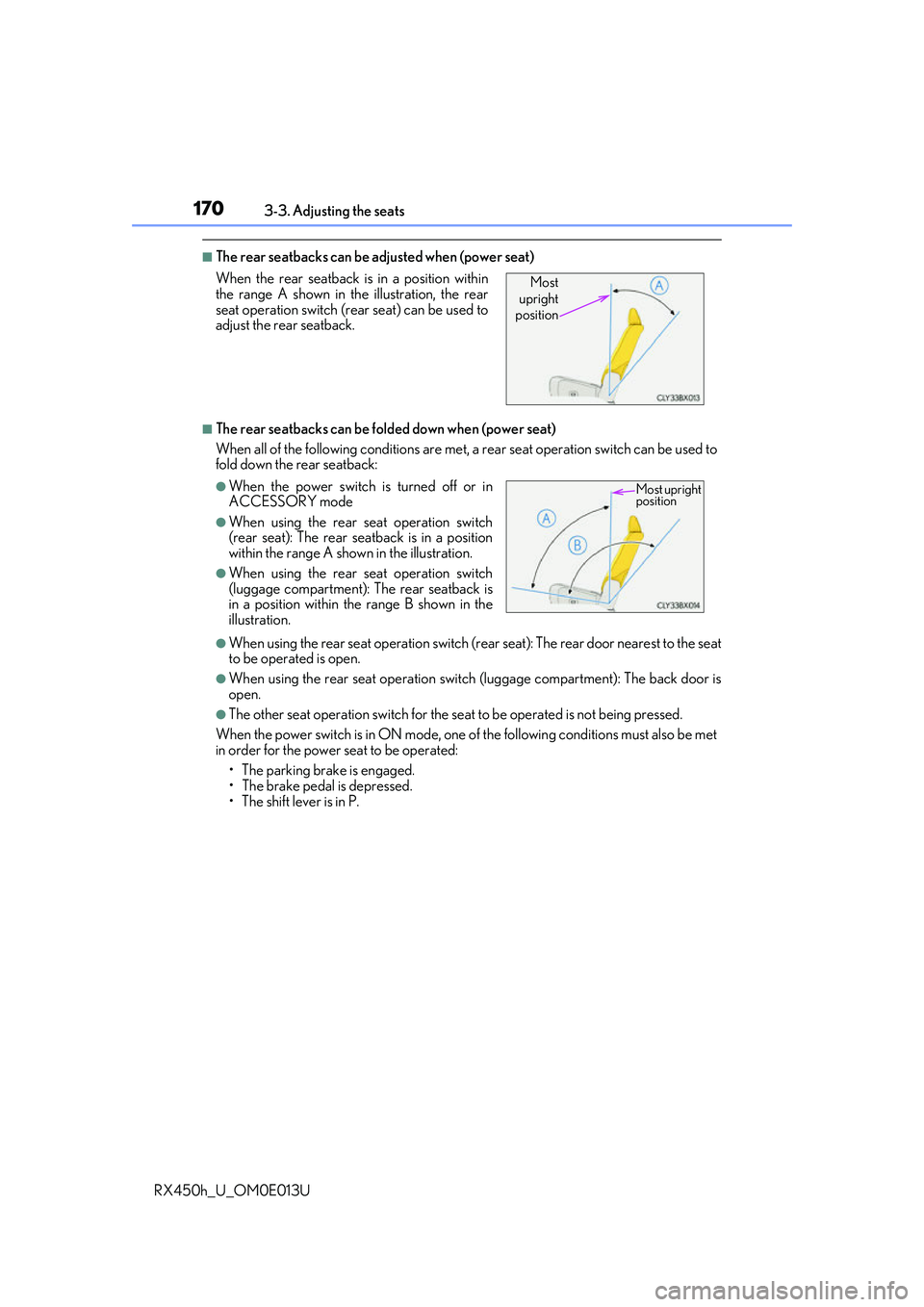
■The rear seatbacks can be adjusted when (power seat)
■The rear seatbacks can be fold ed down when (power seat)
When all of the following conditions are met, a rear seat operation switch can be used to
fold down the rear seatback:
●When using the rear seat operation switch (rear seat): The rear door nearest to the seat
to be operated is open.
●When using the rear seat operation switch (luggage compartment): The back door is
open.
●The other seat operation switch for the se at to be operated is not being pressed.
When the power switch is in ON mode, one of the following conditions must also be met
in order for the power seat to be operated:
• The parking brake is engaged.
• The brake pedal is depressed.
• The shift lever is in P.
When the rear seatback is in a position within
the range A shown in th
e illustration, the rear
seat operation switch (r ear seat) can be used to
adjust the rear seatback.
●When the power switch is turned off or in
ACCESSORY mode
●When using the rear seat operation switch
(rear seat): The rear seatback is in a position
within the range A shown in the illustration.
●When using the rear seat operation switch
(luggage compartment): The rear seatback is
in a position within the range B shown in the
illustration.
Most
upright
position
Most upright
position
Page 171 of 660
1713-3. Adjusting the seats
3
Operation of each component
RX450h_U_OM0E013U
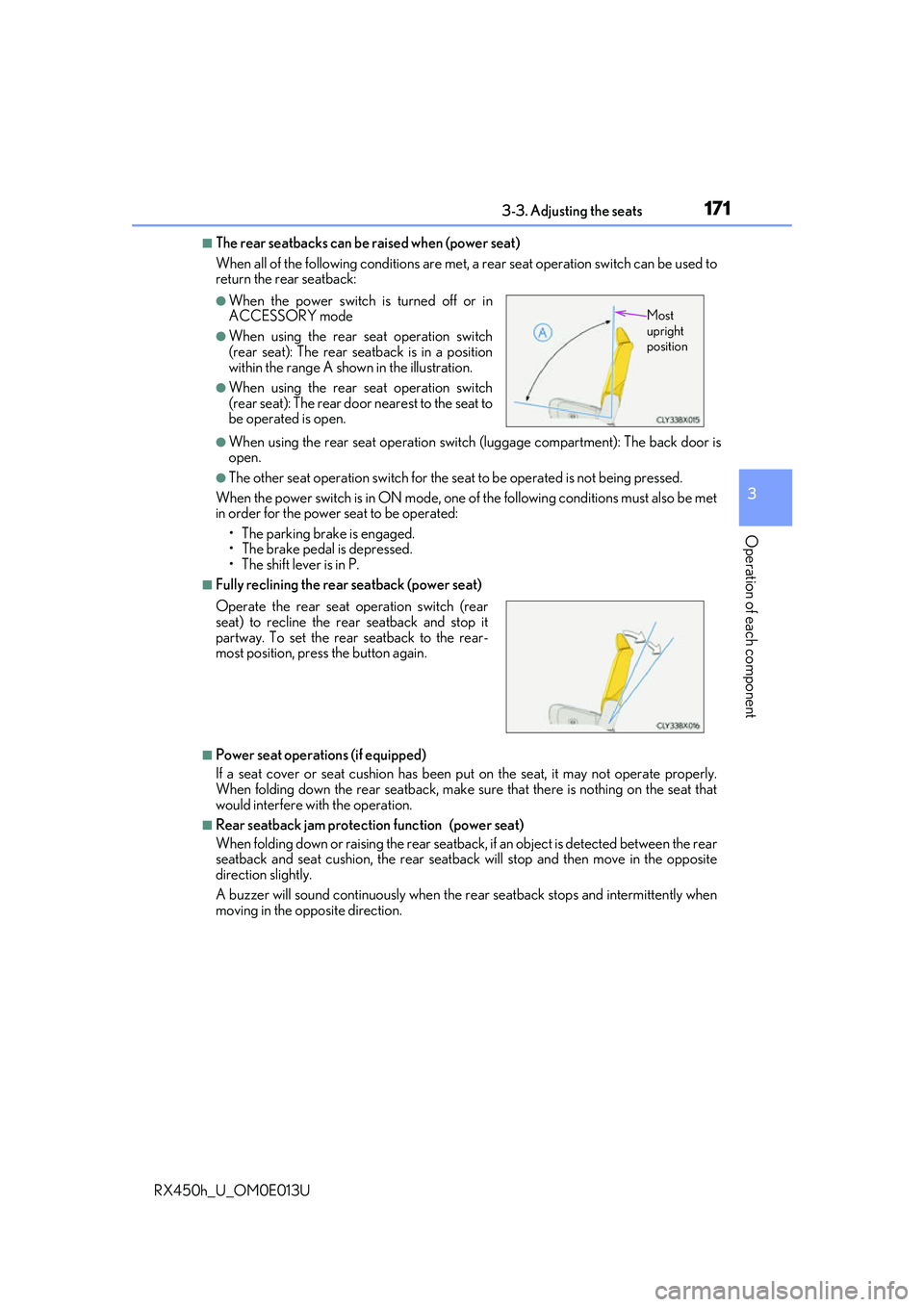
■The rear seatbacks can be raised when (power seat)
When all of the following conditions are met, a rear seat operation switch can be used to
return the rear seatback:
●When using the rear seat operation switch (luggage compartment): The back door is
open.
●The other seat operation switch for the se at to be operated is not being pressed.
When the power switch is in ON mode, one of the following conditions must also be met
in order for the power seat to be operated:
• The parking brake is engaged.
• The brake pedal is depressed.
• The shift lever is in P.
■Fully reclining the rear seatback (power seat)
■Power seat operations (if equipped)
If a seat cover or seat cushion has been pu t on the seat, it may not operate properly.
When folding down the rear seatback, make sure that there is nothing on the seat that
would interfere with the operation.
■Rear seatback jam protection function (power seat)
When folding down or raising th e rear seatback, if an object is detected between the rear
seatback and seat cushion, th e rear seatback will stop and then move in the opposite
direction slightly.
A buzzer will sound continuously when the re ar seatback stops and intermittently when
moving in the opposite direction.
●When the power switch is turned off or in
ACCESSORY mode
●When using the rear seat operation switch
(rear seat): The rear seatback is in a position
within the range A shown in the illustration.
●When using the rear seat operation switch
(rear seat): The rear door nearest to the seat to
be operated is open.
Operate the rear seat operation switch (rear
seat) to recline the rear seatback and stop it
partway. To set the rear seatback to the rear-
most position, press the button again.
Most
upright
position
Page 172 of 660
1723-3. Adjusting the seats
RX450h_U_OM0E013U
WARNING
■When folding down the rear seatbacks and when the rear seatbacks are folded
Observe the following precautions.
Failure to do so may result in death or serious injury.
●Do not fold down the rear seatbacks while driving.
●Stop the vehicle on level grou nd, apply the parking brake and shift the shift lever to P.
●Do not allow anyone to sit on a folded rear seatback or in th e luggage compartment
while driving.
●Do not allow children to enter the luggage compartment.
■When operating the rear seatback
Observe the following precautions.
Failure to do so may result in death or serious injury.
●Keep other passengers from being hit by the rear seatback.
●Do not put your hands between the seats or near the moving parts, or let any part of
your body get caught.
●Power seat: Do not let children operate th e rear seatback. Other passengers may get
caught in the seat.
●Power seat: Check that there are no passengers sitting in a seat before folding it
down. Do not let passengers sit in the seat while it is being folded down.
■Seat adjustment
To reduce the risk of sliding under the lap belt during a collision, do not recline the seat
more than necessary.
If the seat is reclined excessively, the lap belt may slide past the hips and apply restraint
forces directly to the abdomen, or your ne ck may contact the shoulder belt, increasing
the risk of death or serious inju ry in the event of an accident.
Adjustments should not be made while drivin g as the seat may unexpectedly move and
cause the driver to lose control of the vehicle.
■After returning the rear seat back to the upright position
Observe the following precautions.
Failure to do so may result in death or serious injury.
●Make sure that the rear seatback is securely locked in position by lightly pushing it
back and forth.
●Check that the seat belts are not twisted or caught between or behind in the rear
seatback.
Page 202 of 660
202
RX450h_U_OM0E013U
4-1. Before drivingDriving the vehicle..................... 204
Cargo and luggage.....................212
Vehicle load limits........................216
Trailer towing (vehicles with towing package)........................ 217
Trailer towing (vehicles without towing
package).....................................230
Dinghy towing .............................. 231
4-2. Driving procedures Power (ignition) switch ............ 232
EV drive mode ............................ 237
Hybrid transmi ssion .................. 239
Turn signal lever ......................... 244
Parking brake .............................. 245
Brake Hold ................................... 249
4-3. Operating the lights and wipers
Headlight switch.......................... 251
Automatic High Beam ............. 255
Fog light switch ........................... 259
Windshield wipers and washer ......................................... 260
Rear window wiper and washer ......................................... 265
4-4. Refueling Opening the fuel tank cap................................................. 267
4Driving
Page 204 of 660
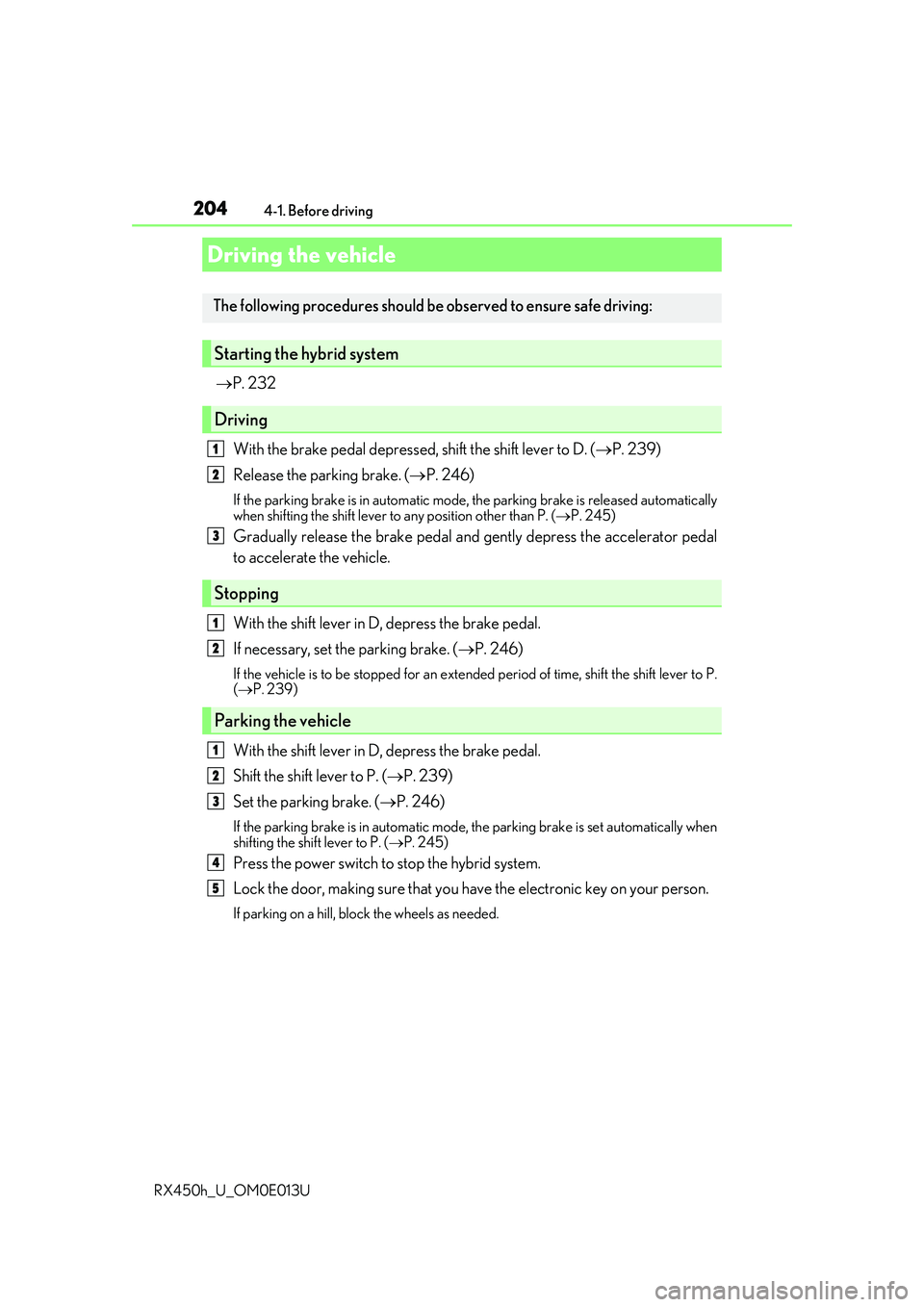
204
RX450h_U_OM0E013U4-1. Before driving
P. 232
With the brake pedal depressed, shift the shift lever to D. ( P. 239)
Release the parking brake. ( P. 246)
If the parking brake is in automatic mode, the parking brake is released automatically
when shifting the shift lever to any position other than P. ( P. 245)
Gradually release the brake pedal and gently depress the accelerator pedal
to accelerate the vehicle.
With the shift lever in D, depress the brake pedal.
If necessary, set the parking brake. ( P. 246)
If the vehicle is to be stopped for an extended period of time, shift the shift lever to P.
( P. 239)
With the shift lever in D, depress the brake pedal.
Shift the shift lever to P. ( P. 239)
Set the parking brake. ( P. 246)
If the parking brake is in automatic mode, the parking brake is set automatically when
shifting the shift lever to P. ( P. 245)
Press the power switch to stop the hybrid system.
Lock the door, making sure that you ha ve the electronic key on your person.
If parking on a hill, block the wheels as needed.
Driving the vehicle
The following procedures should be observed to ensure safe driving:
Starting the hybrid system
Driving
Stopping
Parking the vehicle
1
2
3
1
2
1
2
3
4
5
Page 205 of 660
2054-1. Before driving
4
Driving
RX450h_U_OM0E013U
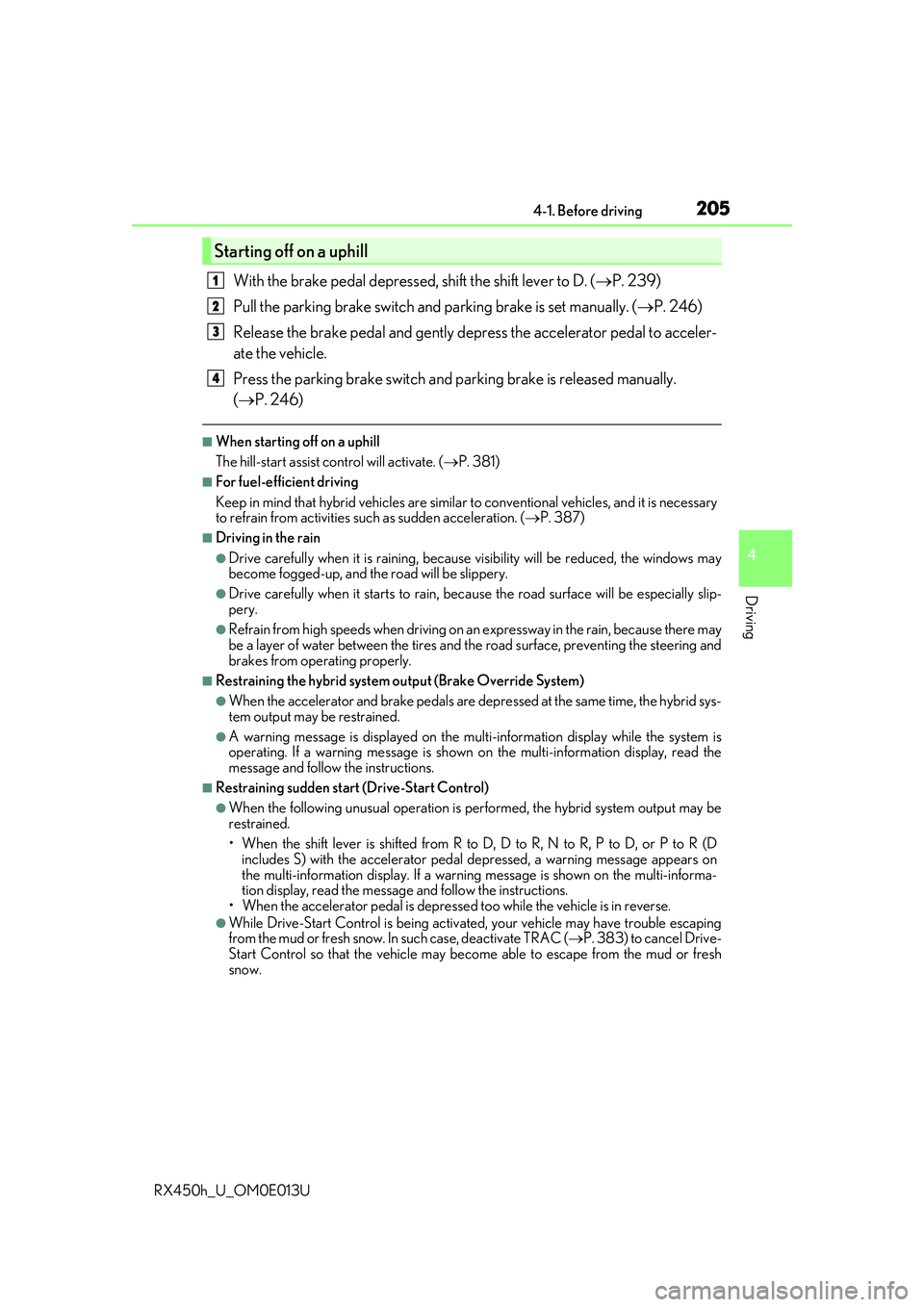
With the brake pedal depressed, shift the shift lever to D. (P. 239)
Pull the parking brake switch and parking brake is set manually. ( P. 246)
Release the brake pedal and gently de press the accelerator pedal to acceler-
ate the vehicle.
Press the parking brake switch and pa rking brake is released manually.
( P. 246)
■When starting off on a uphill
The hill-start assist control will activate. ( P. 381)
■For fuel-efficient driving
Keep in mind that hybrid vehicles are simila r to conventional vehicles, and it is necessary
to refrain from activities su ch as sudden acceleration. ( P. 387)
■Driving in the rain
●Drive carefully when it is ra ining, because visibility will be reduced, the windows may
become fogged-up, and the road will be slippery.
●Drive carefully when it starts to rain, beca use the road surface will be especially slip-
pery.
●Refrain from high speeds when driving on an expressway in the rain, because there may
be a layer of water between the tires and th e road surface, preventing the steering and
brakes from operating properly.
■Restraining the hybrid system output (Brake Override System)
●When the accelerator and brake pedals are depressed at the same time, the hybrid sys-
tem output may be restrained.
●A warning message is displayed on the mult i-information display while the system is
operating. If a warning message is shown on the multi-in formation display, read the
message and follow the instructions.
■Restraining sudden start (Drive-Start Control)
●When the following unusual operation is pe rformed, the hybrid system output may be
restrained.
• When the shift lever is shifted from R to D, D to R, N to R, P to D, or P to R (D includes S) with the acce lerator pedal depressed, a warning message appears on
the multi-information display. If a warning message is shown on the multi-informa-
tion display, read the message and follo w the instructions.
• When the accelerator pedal is depresse d too while the vehicle is in reverse.
●While Drive-Start Control is being activated, your vehicle may have trouble escaping
from the mud or fresh snow. In such case, deactivate TRAC (P. 383) to cancel Drive-
Start Control so that the vehicle may beco me able to escape from the mud or fresh
snow.
Starting off on a uphill
1
2
3
4