change LEXUS RX450H 2016 Manual PDF
[x] Cancel search | Manufacturer: LEXUS, Model Year: 2016, Model line: RX450H, Model: LEXUS RX450H 2016Pages: 660, PDF Size: 14.85 MB
Page 377 of 660
3774-5. Using the driving support systems
4
Driving
RX450h_U_OM0E013U
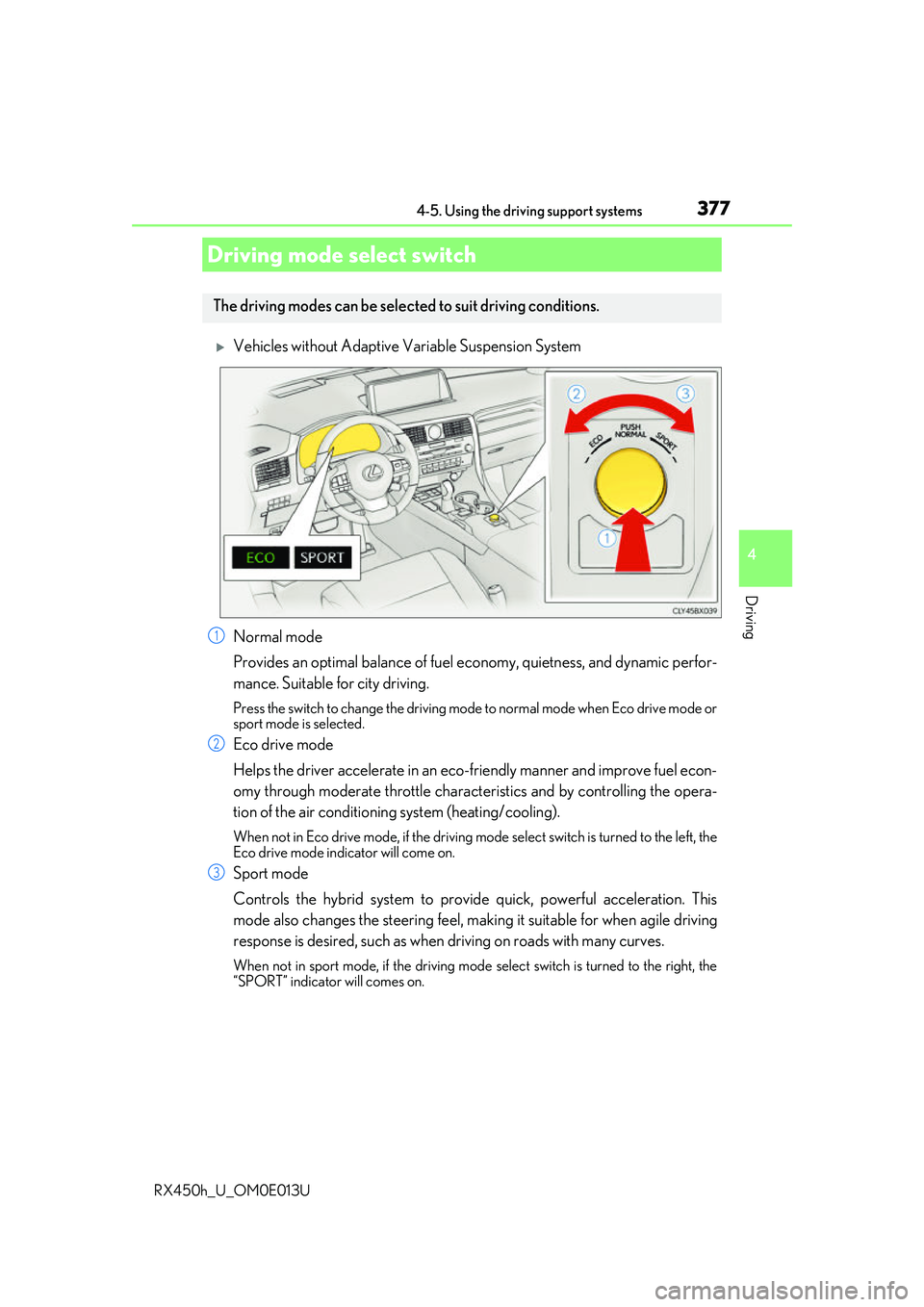
Vehicles without Adaptive Variable Suspension System
Normal mode
Provides an optimal balance of fuel economy, quietness, and dynamic perfor-
mance. Suitable for city driving.
Press the switch to change the driving mode to normal mode when Eco drive mode or
sport mode is selected.
Eco drive mode
Helps the driver accelerate in an eco-fr iendly manner and improve fuel econ-
omy through moderate throttle charact eristics and by controlling the opera-
tion of the air conditioning system (heating/cooling).
When not in Eco drive mode, if the driving mode select switch is turned to the left, the
Eco drive mode indicator will come on.
Sport mode
Controls the hybrid system to provide quick, powerful acceleration. This
mode also changes the steering feel, maki ng it suitable for when agile driving
response is desired, such as when driving on roads with many curves.
When not in sport mode, if the driving mode select switch is turned to the right, the
“SPORT” indicator will comes on.
Driving mode select switch
The driving modes can be selected to suit driving conditions.
1
2
3
Page 378 of 660
3784-5. Using the driving support systems
RX450h_U_OM0E013U
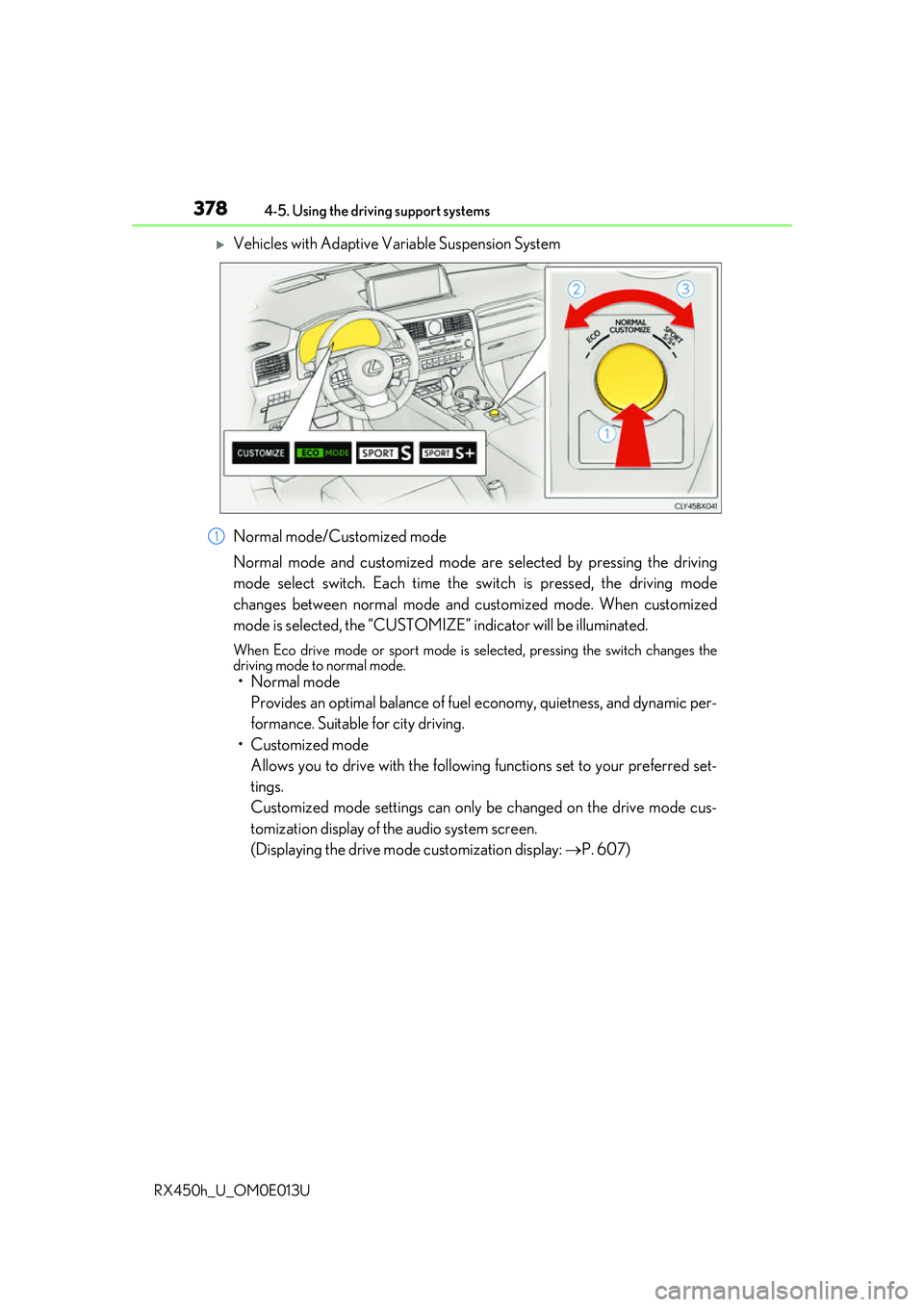
Vehicles with Adaptive Variable Suspension System
Normal mode/Customized mode
Normal mode and customized mode ar e selected by pressing the driving
mode select switch. Each time the switch is pressed, the driving mode
changes between normal mode and customized mode. When customized
mode is selected, the “CUSTOMIZE” indicator will be illuminated.
When Eco drive mode or sport mode is se lected, pressing the switch changes the
driving mode to normal mode.
• Normal mode
Provides an optimal balance of fuel economy, quietness, and dynamic per-
formance. Suitable for city driving.
• Customized mode Allows you to drive with the following functions set to your preferred set-
tings.
Customized mode settings can only be changed on the drive mode cus-
tomization display of the audio system screen.
(Displaying the drive mode customization display: P. 607)
1
Page 380 of 660
3804-5. Using the driving support systems
RX450h_U_OM0E013U
■Operation of the air conditioning system in Eco drive mode
Eco drive mode controls the heating/cooling operations and fan speed of the air condi-
tioning system to enhance fuel efficiency. To improve air conditioning performance,
adjust the fan speed or turn off Eco drive mode.
■Automatic deactivation of sport mode and customized mode
If the power switch is turned off after driv ing in sport mode or customized mode, the
drive mode will be changed to normal mode.
■Driving mode pop-up display (12.3-inch display only)
When the driving mode is changed, the sele cted driving mode will be temporarily dis-
played on the side display. ( P. 402)
Page 392 of 660
3924-6. Driving tips
RX450h_U_OM0E013U
To enable the windshield wi pers to be lifted when heavy snow or icy conditions
are expected, change the rest position of the windshield wipers from the
retracted position below the hood to th e service position using the wiper lever.
(
P. 263)
■Tire chain installation
Observe the following precautions when installing and removing chains:
●Install and remove tire chains in a safe location.
●Install tire chains on the front tires only. Do not install tire chains on the rear tires.
●Install tire chains on front tires as tightly as possible. Retighten chains after driving
1/4 - 1/2 mile (0.5 - 1.0 km).
●Install tire chains following the instru ctions provided with the tire chains.
Windshield wipers
WARNING
■Driving with snow tires
Observe the following precautions to reduce the risk of accidents.
Failure to do so may result in a loss of vehi cle control and cause death or serious injury.
●Use tires of the specified size.
●Maintain the recommended level of air pressure.
●Do not drive in excess of 75 mph (120 km/h ), regardless of the type of snow tires
being used.
●Use snow tires on all, not just some wheels.
■Driving with tire chains
Observe the following precautions to reduce the risk of accidents.
Failure to do so may result in the vehicle being unable to be driven safely, and may
cause death or serious injury.
●Do not drive in excess of the speed limit specified for the tire chains being used, or
30 mph (50 km/h), whichever is lower.
●Avoid driving on bumpy road surfaces or over potholes.
●Avoid sudden acceleration, abrupt steering, sudden braking and shifting operations
that cause sudden engine braking.
●Slow down sufficiently before entering a curve to ensure that vehicle control is main-
tained.
●Do not use the LKA (Lane-Keepin g Assist) system. (if equipped)
●Do not use the LDA (Lane Departure Alert with steering control) system. (if
equipped)
Page 395 of 660
3954-6. Driving tips
4
Driving
RX450h_U_OM0E013U
Your vehicle is not designed to be driven off-road. However, in the event that
off-road driving cannot be avoided, please observe the following precautions to
help avoid the areas prohibited to vehicles.
●Drive your vehicle only in areas wher e off-road vehicles are permitted to
travel.
●Respect private property. Get owner’s permission before entering private
property.
●Do not enter areas that are closed. Honor gates, barriers and signs that
restrict travel.
●Stay on established road s. When conditions are wet, driving techniques
should be changed or travel dela yed to prevent damage to roads.
●AWD models: Avoid driving on very steep , slippery roads and other surfaces,
such as sand, where the tires are liable to lose traction. Your vehicle may not
perform as well as conventional AWD on-road vehicles on these surfaces.
■Additional information for off-road driving
For owners in U.S. mainland, Hawaii and Puerto Rico:
To obtain additional information pertaining to driving your vehicle off-road, consult the
following organizations.
●State and Local Parks and Recreation Departments
●State Motor Vehicle Bureau
●Recreational Vehicle Clubs
●U.S. Forest Service and Bu reau of Land Management
Off-road driving
Page 399 of 660
3995-1. Basic operation of the Remote Touch screen
5
Interior features
RX450h_U_OM0E013U
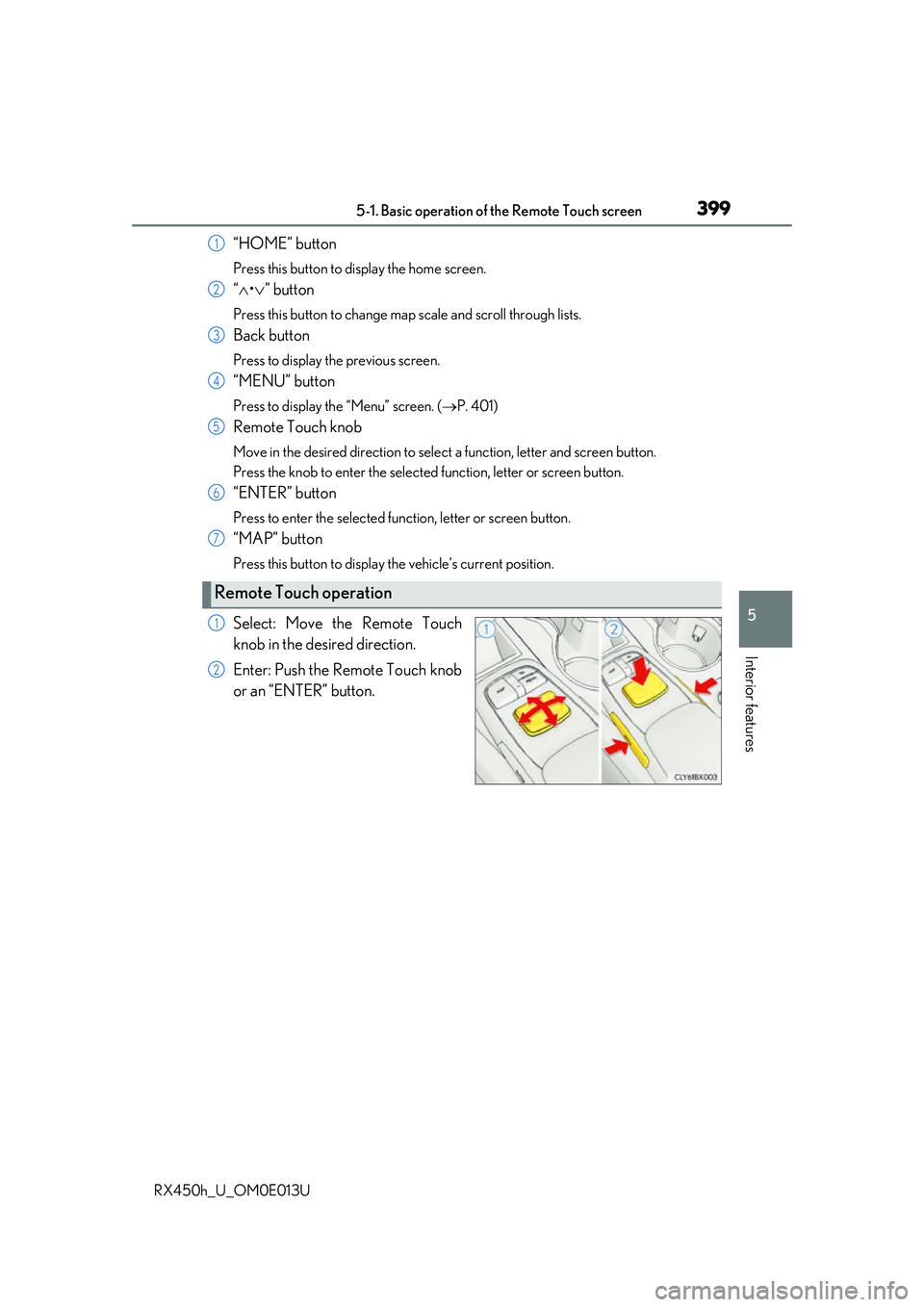
“HOME” button
Press this button to display the home screen.
“ • ” button
Press this button to change map scale and scroll through lists.
Back button
Press to display the previous screen.
“MENU” button
Press to display th e “Menu” screen. ( P. 401)
Remote Touch knob
Move in the desired direction to select a function, letter and screen button.
Press the knob to enter the selected function, letter or screen button.
“ENTER” button
Press to enter the selected function, letter or screen button.
“MAP” button
Press this button to display the vehicle’s current position.
Select: Move the Remote Touch
knob in the desired direction.
Enter: Push the Remote Touch knob
or an “ENTER” button.
Remote Touch operation
1
2
3
4
5
6
7
1
2
Page 400 of 660
4005-1. Basic operation of the Remote Touch screen
RX450h_U_OM0E013U
■Screen display during low temperatures
When the ambient temperature is extremely low, screen response may be delayed even
if the Remote Touch is operated.
WARNING
■When using the Remote Touch
●Do not allow fingers, fingernails or hair to become caught in the Remote Touch as this
may cause an injury.
●Be careful when selecting the Remote Touch in extreme temperatures as it may
become very hot or cold due to the temperature inside the vehicle.
NOTICE
■To prevent damage to the Remote Touch
●Do not allow the Remote Touch to come into contact with food, liquid, stickers or lit
cigarettes as doing so may cause it to change color, emit a strange odor or stop func-
tioning.
●Do not subject the Remote Touch to excessive pressure or strong impact as the knob
may bend or break off.
●Do not allow coins, contact lenses or ot her such items to become caught in the
Remote Touch as this may cause it to stop functioning.
●Items of clothing may rip if they become caught on the Remote Touch knob.
●If your hand or any object is on the Remo te Touch knob when the power switch is in
ACCESSORY mode, the Remote Touch knob may not operate properly.
Page 403 of 660
4035-1. Basic operation of the Remote Touch screen
5
Interior features
RX450h_U_OM0E013U
■Selecting the operation screen
When selecting the main display, move the Remote Touch knob to the left.
When selecting the side display, move the Remote Touch knob to the right.
■Main display
For details about the functions and operation of the main display, refer to the
respective section and “NAVIGATION SYSTEM OWNER’S MANUAL”.
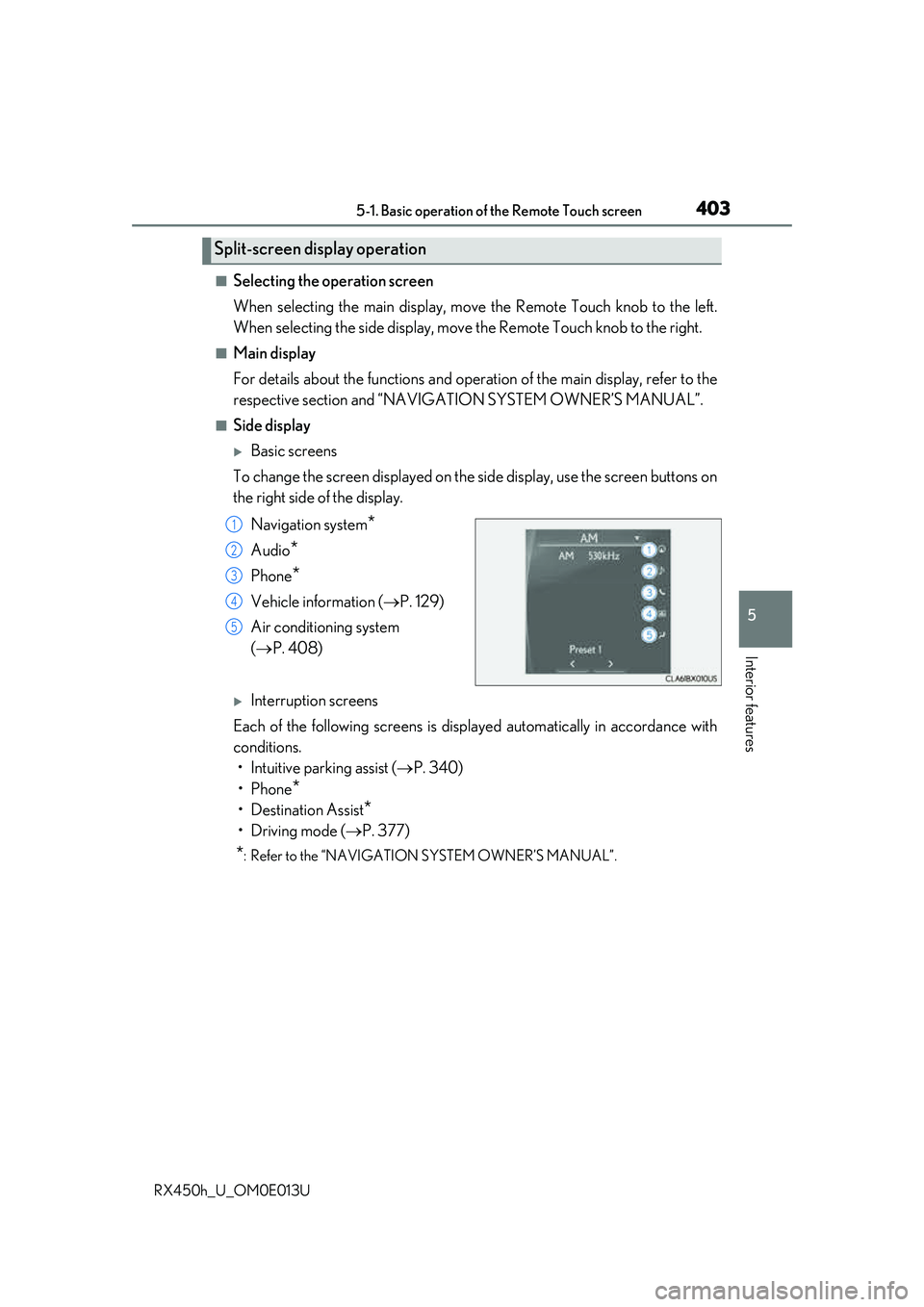
■Side display
Basic screens
To change the screen displayed on the side display, use the screen buttons on
the right side of the display.
Navigation system
*
Audio*
Phone*
Vehicle information ( P. 129)
Air conditioning system
( P. 408)
Interruption screens
Each of the following screens is displayed automatically in accordance with
conditions. • Intuitive parking assist ( P. 340)
•Phone
*
• Destination Assist*
•Driving mode ( P. 377)
*: Refer to the “NAVIGATION SYSTEM OWNER’S MANUAL”.
Split-screen display operation
1
2
3
4
5
Page 406 of 660
4065-2. Using the air conditioning system and defogger
RX450h_U_OM0E013U
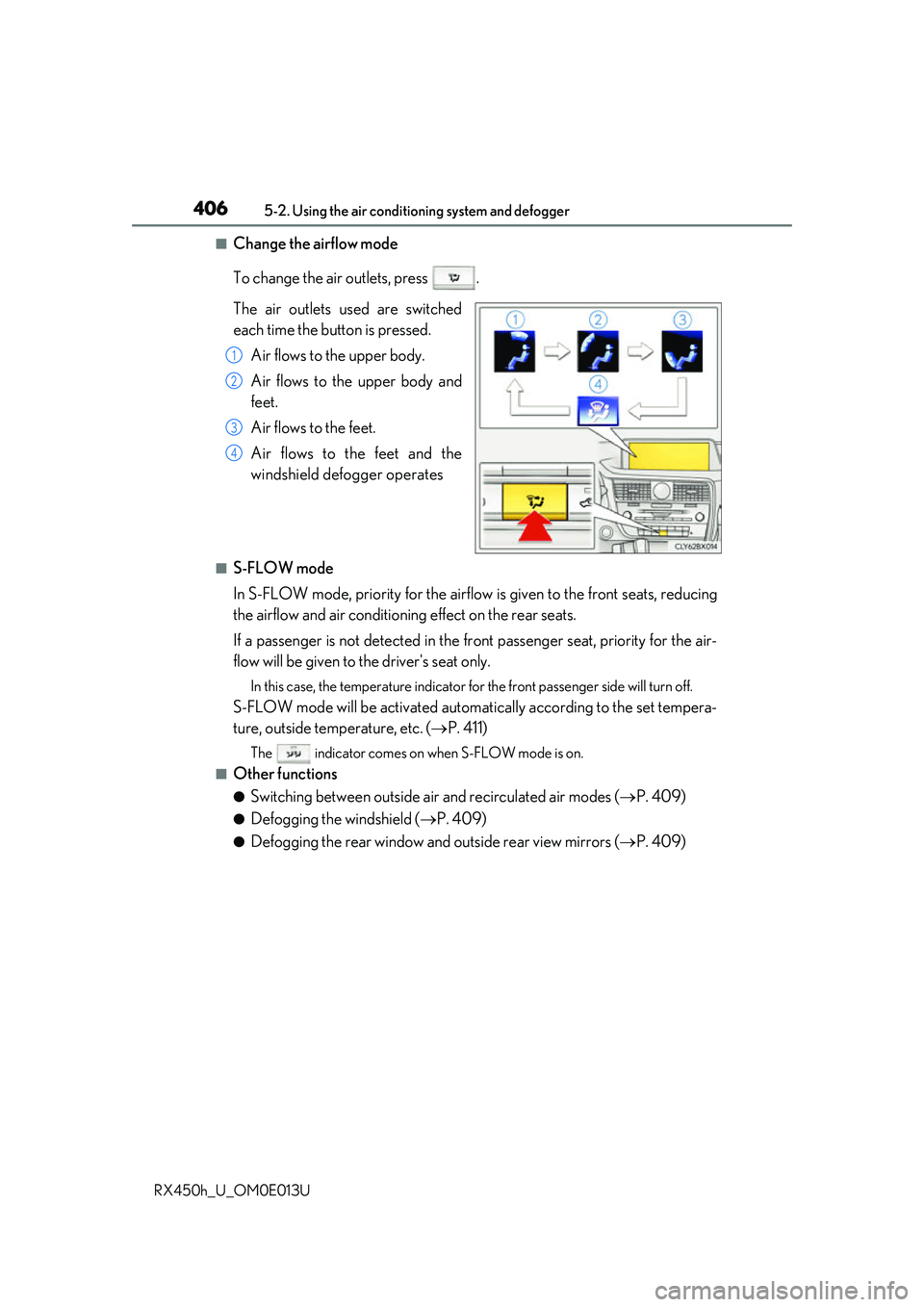
■Change the airflow mode
To change the air outlets, press .
The air outlets used are switched
each time the button is pressed. Air flows to the upper body.
Air flows to the upper body and
feet.
Air flows to the feet.
Air flows to the feet and the
windshield defogger operates
■S-FLOW mode
In S-FLOW mode, priority for the airflo w is given to the front seats, reducing
the airflow and air conditioning effect on the rear seats.
If a passenger is not detected in the fr ont passenger seat, priority for the air-
flow will be given to the driver's seat only.
In this case, the temperature indicator for the front passenger side will turn off.
S-FLOW mode will be activated automa tically according to the set tempera-
ture, outside temperature, etc. ( P. 411)
The indicator comes on when S-FLOW mode is on.
■Other functions
●Switching between outside air and recirculated air modes ( P. 409)
●Defogging the windshield ( P. 409)
●Defogging the rear window and outside rear view mirrors ( P. 409)
1
2
3
4
Page 410 of 660
4105-2. Using the air conditioning system and defogger
RX450h_U_OM0E013U
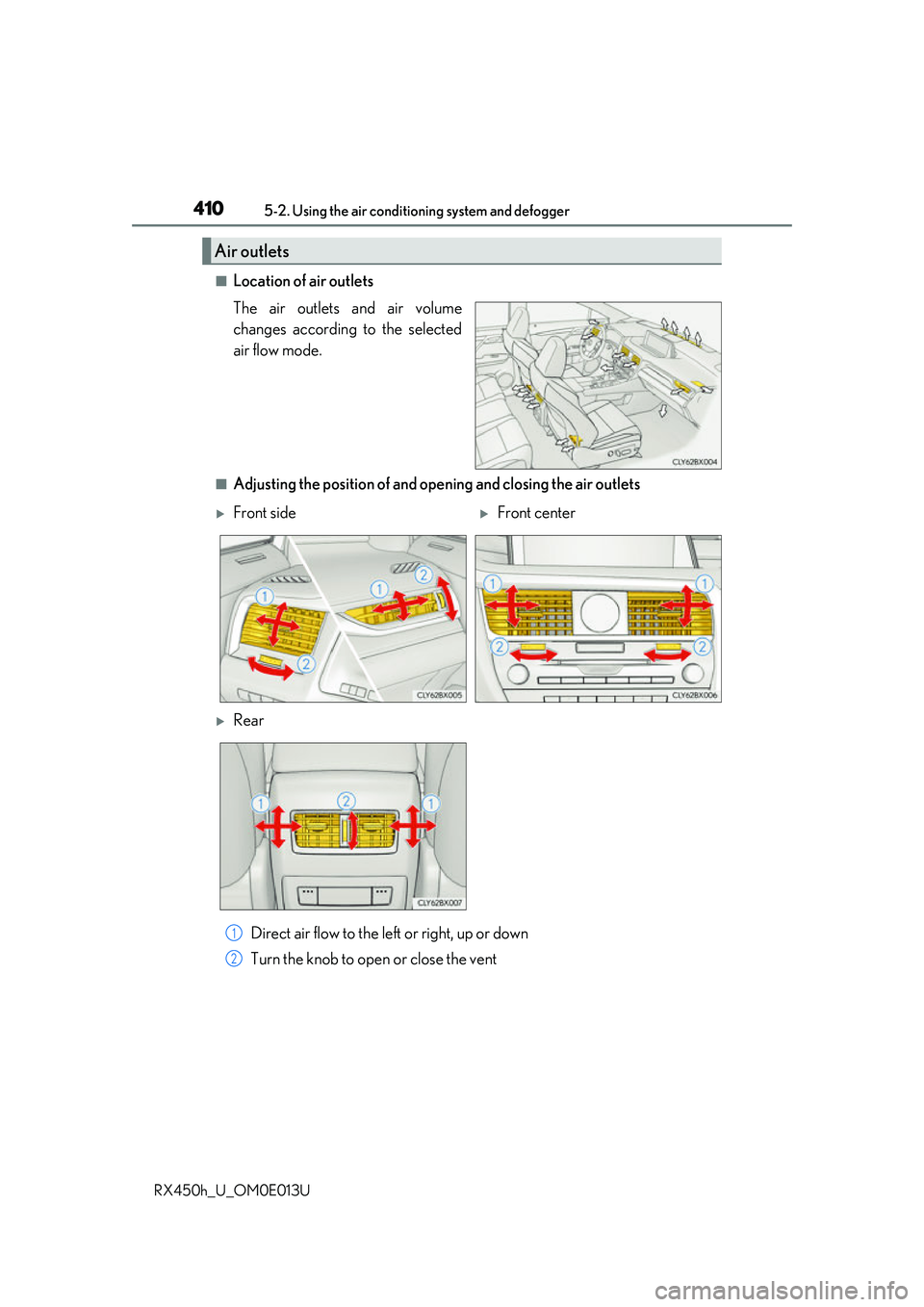
■Location of air outlets
The air outlets and air volume
changes according to the selected
air flow mode.
■Adjusting the position of and opening and closing the air outlets Direct air flow to the left or right, up or down
Turn the knob to open or close the vent
Air outlets
Front sideFront center
Rear
1
2