change LEXUS RX450H 2016 Repair Manual
[x] Cancel search | Manufacturer: LEXUS, Model Year: 2016, Model line: RX450H, Model: LEXUS RX450H 2016Pages: 660, PDF Size: 14.85 MB
Page 343 of 660
3434-5. Using the driving support systems
4
Driving
RX450h_U_OM0E013U
*1: The images may differ from that shown in the illustrations. (P. 340)
*2: Multi-information display
*3: Audio system screen
*4: Navigation system (8-i nch display) screen
■Buzzer operation and distance to an obstacle
A buzzer sounds when the sensors are operating.
●The buzzer sounds faster as the vehicle approaches an obstacle.
When the vehicle comes within the following distance of the obstacle, the
buzzer sounds continuously: Approximately 1.2 ft. (35 cm).
●When 2 or more obstacles are detected simultaneously, the buzzer system
responds to the nearest obstacle. If one or both come within the above dis-
tances, the beep will repeat a lo ng tone, followed by fast beeps.
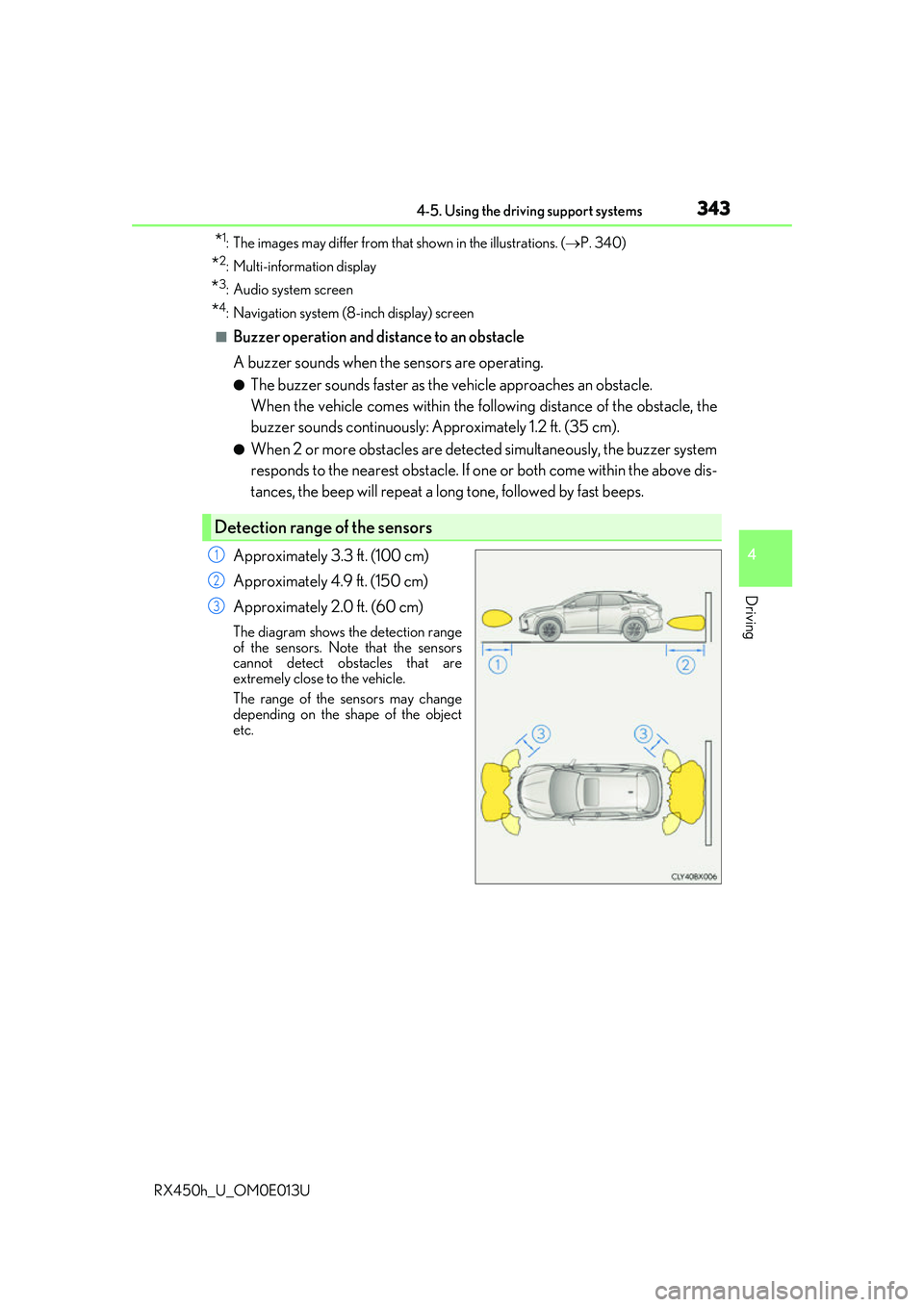
Approximately 3.3 ft. (100 cm)
Approximately 4.9 ft. (150 cm)
Approximately 2.0 ft. (60 cm)
The diagram shows th e detection range
of the sensors. Note that the sensors
cannot detect obstacles that are
extremely close to the vehicle.
The range of the sensors may change
depending on the shape of the object
etc.
Detection range of the sensors
1
2
3
Page 344 of 660
3444-5. Using the driving support systems
RX450h_U_OM0E013U
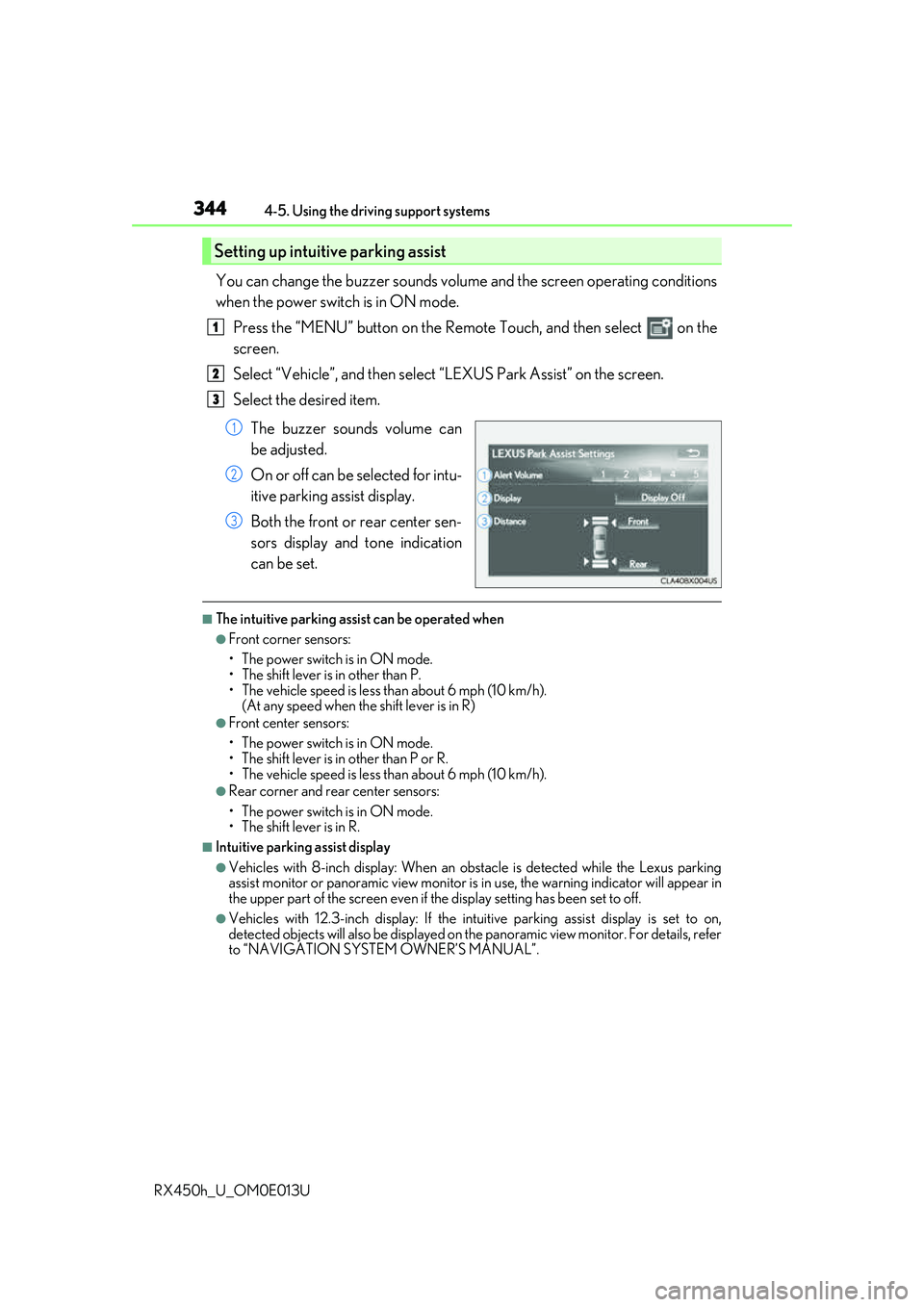
You can change the buzzer sounds volu me and the screen operating conditions
when the power switch is in ON mode.
Press the “MENU” button on the Remote Touch, and then select on the
screen.
Select “Vehicle”, and then select “LEXUS Park Assist” on the screen.
Select the desired item.
The buzzer sounds volume can
be adjusted.
On or off can be selected for intu-
itive parking assist display.
Both the front or rear center sen-
sors display and tone indication
can be set.
■The intuitive parking assist can be operated when
●Front corner sensors:
• The power switch is in ON mode.
• The shift lever is in other than P.
• The vehicle speed is less than about 6 mph (10 km/h).(At any speed when the shift lever is in R)
●Front center sensors:
• The power switch is in ON mode.
• The shift lever is in other than P or R.
• The vehicle speed is less than about 6 mph (10 km/h).
●Rear corner and rear center sensors:
• The power switch is in ON mode.
• The shift lever is in R.
■Intuitive parking assist display
●Vehicles with 8-inch display: When an ob stacle is detected while the Lexus parking
assist monitor or panoramic view monitor is in use, the warning indicator will appear in
the upper part of the screen even if the display setting has been set to off.
●Vehicles with 12.3-inch display: If the intu itive parking assist display is set to on,
detected objects will also be displayed on the panoramic view monitor. For details, refer
to “NAVIGATION SYSTEM OWNER’S MANUAL”.
Setting up intuitive parking assist
1
2
3
1
2
3
Page 349 of 660
3494-5. Using the driving support systems
4
Driving
RX450h_U_OM0E013U
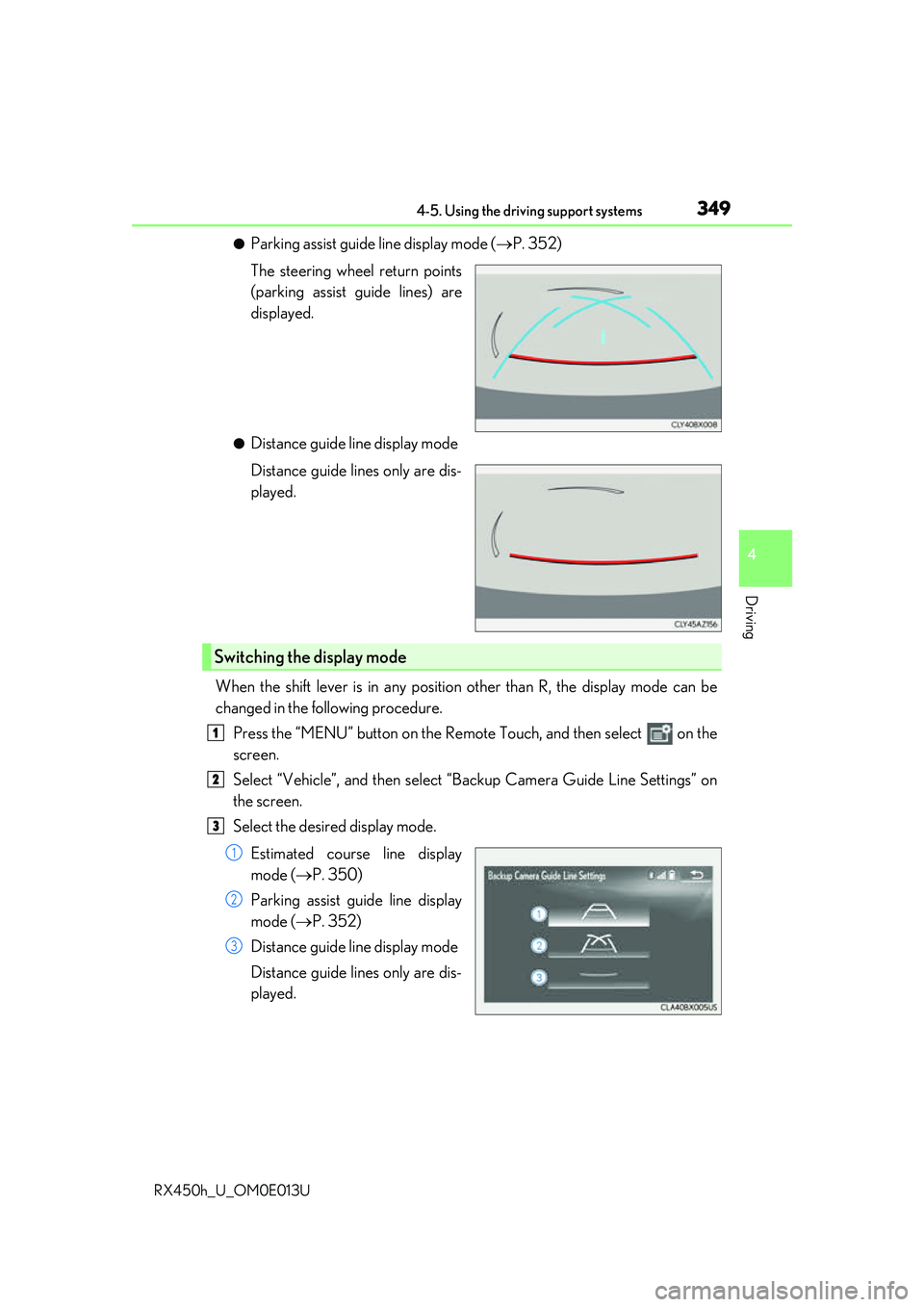
●Parking assist guide line display mode (P. 352)
The steering wheel return points
(parking assist guide lines) are
displayed.
●Distance guide line display mode
Distance guide lines only are dis-
played.
When the shift lever is in any position other than R, the display mode can be
changed in the following procedure. Press the “MENU” button on the Remote Touch, and then select on the
screen.
Select “Vehicle”, and then select “Backup Camera Guide Line Settings” on
the screen.
Select the desired display mode.
Estimated course line display
mode ( P. 350)
Parking assist guide line display
mode ( P. 352)
Distance guide line display mode
Distance guide lines only are dis-
played.
Switching the display mode
1
2
3
1
2
3
Page 361 of 660
3614-5. Using the driving support systems
4
Driving
RX450h_U_OM0E013U
WARNING
■When using the Lexus parking assist monitor system
The parking assist monitor is a supplemental device intended to assist the driver when
backing up. When backing up, be sure to check visually behind and all around the vehi-
cle before proceeding.
Observe the following precautions to avoid an accident that could result in death or
serious injuries.
●Never depend on the parking assist monitor entirely when backing up. The image
and the position of the guide lines displayed on the screen may differ from the actual
state.
Use caution, just as you would when backing up any vehicle.
●Be sure to back up slowly, depressing the brake pedal to control vehicle speed.
●If you seem likely to hit nearby vehicles, obstacles, people or mount the shoulder,
depress the brake pedal to stop the vehicle.
●The instructions given are only guidelines.
When and how much to turn the steering wheel will vary according to traffic condi-
tions, road surface conditions, vehicle condit ion, etc. when parking. It is necessary to
be fully aware of this before using the parking assist system.
●When parking, be sure to check that the parking space will accommodate your vehi-
cle before maneuvering into it.
●Do not use the parking assist monitor in the following cases:
• On icy or slick road surfaces, or in snow
• When using tire chains or emergency tires
• When the back door is not closed completely
• On roads that are not flat or stra ight, such as curves or slopes.
●In low temperatures, the screen may darken or the image may become faint. The
image could distort when the vehicle is movi ng, or you may become unable to see the
image on the screen. Be sure to check dire ct visually and with the mirrors all around
the vehicle before proceeding.
●If the tire sizes are changed, the position of the guide lines displayed on the screen
may change.
●The camera uses a special lens. The distances between objects and pedestrians that
appear in the image displayed on the screen will differ from the actual distances.
( P. 355)
●Estimated course line display mode: If the st eering wheel is straight and the vehicle
width guide lines and the estimated course lines are not in alignment, have the vehicle
inspected by your Lexus dealer.
Page 362 of 660
3624-5. Using the driving support systems
RX450h_U_OM0E013U
NOTICE
■How to use the camera
●The parking assist monitor may not operate properly in the following cases.
• If the back of the vehicle is hit, the position and mounting angle of the camera may change.
• As the camera has a water proof construction, do not detach, disassemble or modify it. This may cause incorrect operation.
• When cleaning the camera lens, flush the camera with a large quantity of water
and wipe it with a soft and wet cloth. Strongly rubbing the camera lens may cause
the camera lens to be scratched and unable to transmit a clear image.
• Do not allow organic solvent, car wax, window cleaner or glass coat to adhere to the camera. If this happens, wi pe it off as soon as possible.
• If the temperature changes rapidly, such as when hot water is poured on the vehi- cle in cold weather, the system may not operate normally.
• When washing the vehicle, do not apply intensive bursts of water to the camera or
camera area. Doing so may result in the camera malfunctioning.
• When the camera is used under fluorescen t lights, sodium light or mercury light
etc., the lights and the illuminated areas may appear to flicker.
●Do not expose the camera to strong impact as this could cause a malfunction.
If this happens, have the vehicle inspected by your Lexus dealer as soon as possible.
Page 365 of 660
3654-5. Using the driving support systems
4
Driving
RX450h_U_OM0E013U
Press “” or “ ” of the meter control switches, select .
Press “ ” or “ ” of the meter control switches, select “BSM”.
Press “ ” or “ ” of the meter control switch es, select “BSM” or “RCTA”.
■Outside rear view mirror indicator visibility
In strong sunlight, the outside rear view mirror indicator may be difficult to see.
■Hearing the RCTA buzzer
The RCTA buzzer may be difficult to hear over loud noises, such as if the audio system
volume is high.
■When there is a malfunction in the Blind Spot Monitor
If a system malfunction is detected due to any of the following, a warning message will be
displayed: ( P. 543)
●A sensor is malfunctioning
●A sensor is dirty or covere d with snow or a sticker
●The outside temperature is extremely high or low
●Sensor voltage is abnormal
●A sensor is misaligned
■Certification for the Blind Spot Monitor
For vehicles sold in the U.S.A.
FCC ID : OAYSRR3A
This device complies with part 15 of the FC C Rules. Operation is subject to the following
two conditions:
(1) This device may not cause harmful interference, and
(2) this device must accept any interference received, including interference that may
cause undesired operation.
FCC Warning
Changes or modifications not expressly approved by the party responsible for compli-
ance could void the user's authority to operate the equipment.
For vehicles sold in Canada
Applicable law : Canada 310
This device complies with Industry Canada licence-exempt RSS standard(s). Operation
is subject to the following two conditions: (1) this device may not cause interference, and
(2) this device must accept any interference, including interference that may cause
undesired operation of the device.
Frequency bands : 24.05 - 24.25GHz
Output power : less than 20 milliwatts
■Customization
Some functions can be customized. (P. 376, 607)
Turning the BSM function/RCTA function on/off
1
2
3
Page 368 of 660
3684-5. Using the driving support systems
RX450h_U_OM0E013U
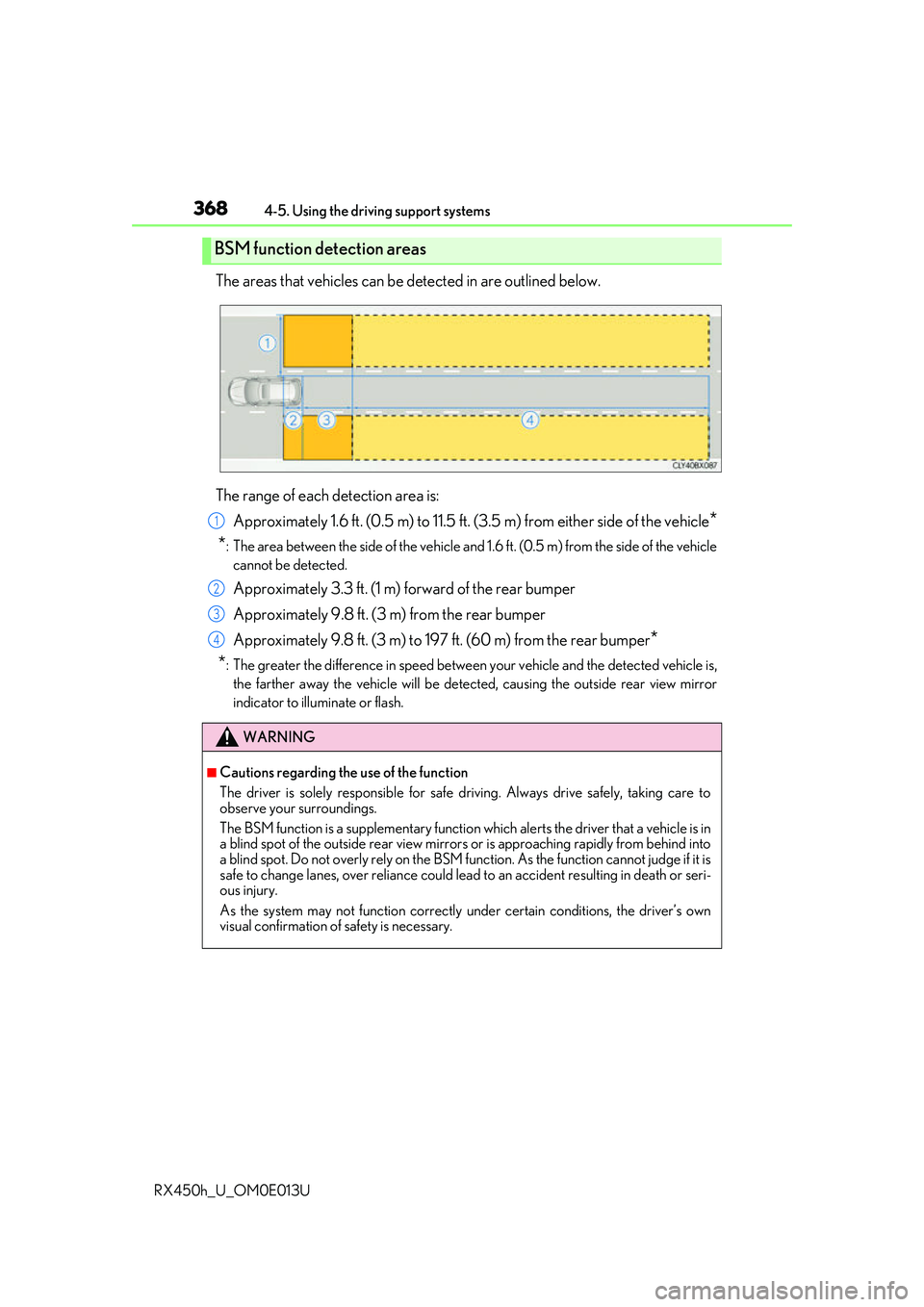
The areas that vehicles can be detected in are outlined below.
The range of each detection area is: Approximately 1.6 ft. (0.5 m) to 11.5 ft. (3.5 m) from either side o\
f the vehicle
*
*
: The area between the side of the vehicle and 1.6 ft. (0.5 m) from the side of the vehicle cannot be detected.
Approximately 3.3 ft. (1 m) forward of the rear bumper
Approximately 9.8 ft. (3 m) from the rear bumper
Approximately 9.8 ft. (3 m) to 197 ft. (60 m) from the rear bumper
*
*
: The greater the difference in speed betwee n your vehicle and the detected vehicle is,
the farther away the vehicle will be detect ed, causing the outside rear view mirror
indicator to illuminate or flash.
BSM function detection areas
WARNING
■Cautions regarding the use of the function
The driver is solely responsible for safe driving. Always drive safely, taking care to
observe your surroundings.
The BSM function is a supplementary function which alerts the driver that a vehicle is in
a blind spot of the outside rear view mirrors or is approaching rapidly from behind into
a blind spot. Do not overly rely on the BSM function. As the function cannot judge if it is
safe to change lanes, over reliance could lead to an accident resulting in death or seri-
ous injury.
As the system may not function correctly under certain conditions, the driver’s own
visual confirmation of safety is necessary.
1
2
3
4
Page 369 of 660
3694-5. Using the driving support systems
4
Driving
RX450h_U_OM0E013U
■The BSM function is operational when
The BSM function is operational when all of the following conditions are met:
●The BSM function is on.
●The shift lever is in a position other than R.
●The vehicle speed is greater than approximately 10 mph (16 km/h).
■The BSM function will detect a vehicle when
The BSM function will detect a vehicle present in the dete ction area in the following situ-
ations:
●A vehicle in an adjacent la ne overtakes your vehicle.
●Another vehicle enters the detection area when it changes lanes.
■Conditions under which the BSM function will not detect a vehicle
The BSM function is not designed to detect the following types of vehicles and/or
objects:
●Small motorcycles, bicycles, pedestrians, etc.*
●Vehicles traveling in the opposite direction
●Guardrails, walls, signs, parked vehi cles and similar stationary objects*
●Following vehicles that are in the same lane*
●Vehicles traveling 2 lanes away from your vehicle*
*
: Depending on the conditions, detection of a vehicle and/or object may occur.
Page 374 of 660
3744-5. Using the driving support systems
RX450h_U_OM0E013U
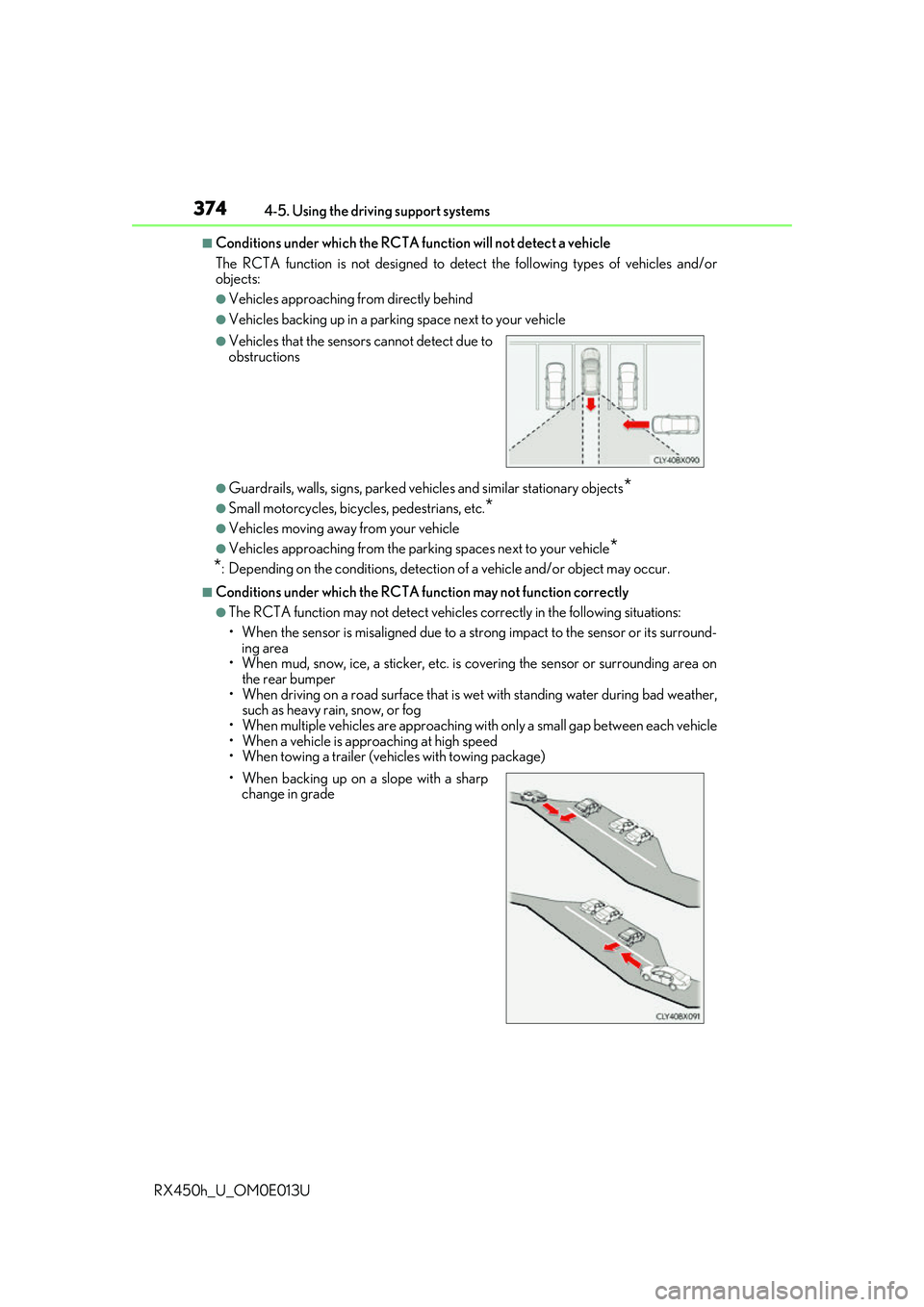
■Conditions under which the RCTA fu nction will not detect a vehicle
The RCTA function is not designed to detect the following types of vehicles and/or
objects:
●Vehicles approaching from directly behind
●Vehicles backing up in a parkin g space next to your vehicle
●Guardrails, walls, signs, parked vehi cles and similar stationary objects*
●Small motorcycles, bicycles, pedestrians, etc.*
●Vehicles moving away from your vehicle
●Vehicles approaching from the parking spaces next to your vehicle*
*
: Depending on the conditions, detection of a vehicle and/or object may occur.
■Conditions under which the RCTA function may not function correctly
●The RCTA function may not detect vehicles correctly in the following situations:
• When the sensor is misaligned due to a stro ng impact to the sensor or its surround-
ing area
• When mud, snow, ice, a sticke r, etc. is covering the sensor or surrounding area on
the rear bumper
• When driving on a road surf ace that is wet with standing water during bad weather,
such as heavy rain, snow, or fog
• When multiple vehicles are approaching wi th only a small gap between each vehicle
• When a vehicle is approaching at high speed
• When towing a trailer (vehicles with towing package)
●Vehicles that the sensors cannot detect due to
obstructions
• When backing up on a slope with a sharp change in grade
Page 376 of 660
3764-5. Using the driving support systems
RX450h_U_OM0E013U
You can change the BSM function/RCTA function settings. Press the “MENU” button on the Remote Touch, and then select on the
screen.
Select “Vehicle”, and then select “Blind Spot Monito r Settings” on the screen.
Select the desired setting. ( P. 615)
Setting up BSM function/RCTA function
1
2
3