change LEXUS RX450H 2016 Manual Online
[x] Cancel search | Manufacturer: LEXUS, Model Year: 2016, Model line: RX450H, Model: LEXUS RX450H 2016Pages: 660, PDF Size: 14.85 MB
Page 411 of 660
4115-2. Using the air conditioning system and defogger
5
Interior features
RX450h_U_OM0E013U
■Registering air conditioning settings to electronic keys
●Unlocking the vehicle using an electronic key and turning the power switch to ON
mode will recall that ke y’s registered air conditioning settings.
●When the power switch is turned off, the cu rrent air conditioning settings will automati-
cally be registered to the electronic key that was used to unlock the vehicle.
●The system may not operate correctly if more th an one electronic key is in the vicinity or
if the smart access system with push-button start is used to unlock a passenger door.
●The doors that can recall the air conditioning setting when unlocked using the smart
access system with push-button start can be changed.
* For details, contact your Lexus
dealer.
*: The doors that can recall the driving positi on memory are changed at the same time.
■Using automatic mode
Fan speed is adjusted automatically according to the temperature setting and the ambi-
ent conditions.
Therefore, the fan may stop for a while until wa rm or cool air is ready to flow immediately
after the “AUTO” button is pressed or “AUTO” is selected.
■Operation of S-FLOW mode
In automatic mode, S-FLOW mode will be turned off if a rear door has been opened and
closed. To activate S-FLOW mode again, press .
■Using the voice command system
Air conditioning system can be operated using voice commands. For details, refer to the
“NAVIGATION SYSTEM OWNER’S MANUAL”.
■When the outside temperature exceeds 75 F (24 C) and the air conditioning system
is on
●In order to reduce the air co nditioning power consumption, the air conditioning system
may switch to recirculated air mode automatically.
This may also reduce fuel consumption.
●Recirculated air mode is selected as a default mode when the power switch is turned to
ON mode.
●It is possible to switch to outside air mode at any time by pressing the outside/recircu-
lated air mode button.
■Automatic mode for air intake control
In automatic mode, the system detects exhaust gas and other pollutants and automati-
cally switches between outside air and recirculated air modes.
When the dehumidification function is off, and the fan is operating, turning automatic
mode on will activate the dehumidification function.
■Fogging up of the windows
●The windows will easily fog up when the humidity in the vehicle is high. Selecting “A/C”
will dehumidify the air from the outlets and defog the windshield effectively.
●If you turn “A/C” off, the windows may fog up more easily.
●The windows may fog up if the recirculated air mode is used.
Page 415 of 660
4155-2. Using the air conditioning system and defogger
5
Interior features
RX450h_U_OM0E013U
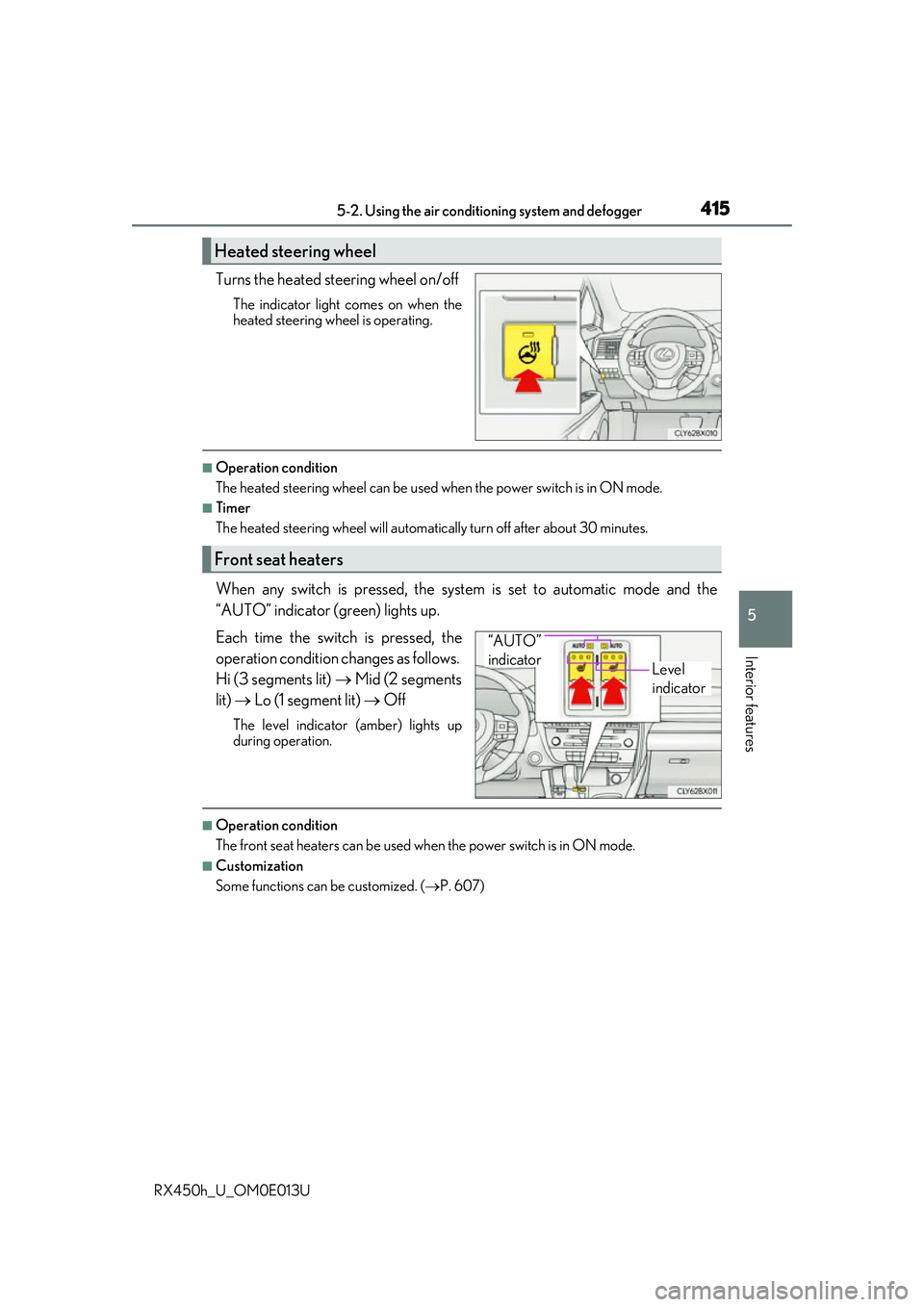
Turns the heated steering wheel on/off
The indicator light comes on when the
heated steering wheel is operating.
■Operation condition
The heated steering wheel can be used when the power switch is in ON mode.
■Timer
The heated steering wheel will automati cally turn off after about 30 minutes.
When any switch is pressed, the system is set to automatic mode and the
“AUTO” indicator (green) lights up.
Each time the switch is pressed, the
operation condition changes as follows.
Hi (3 segments lit) Mid (2 segments
lit) Lo (1 segment lit) Off
The level indicator (amber) lights up
during operation.
■Operation condition
The front seat heaters can be used when the power switch is in ON mode.
■Customization
Some functions can be customized. ( P. 607)
Heated steering wheel
Front seat heaters
Level
indicator
“AUTO”
indicator
Page 416 of 660
4165-2. Using the air conditioning system and defogger
RX450h_U_OM0E013U
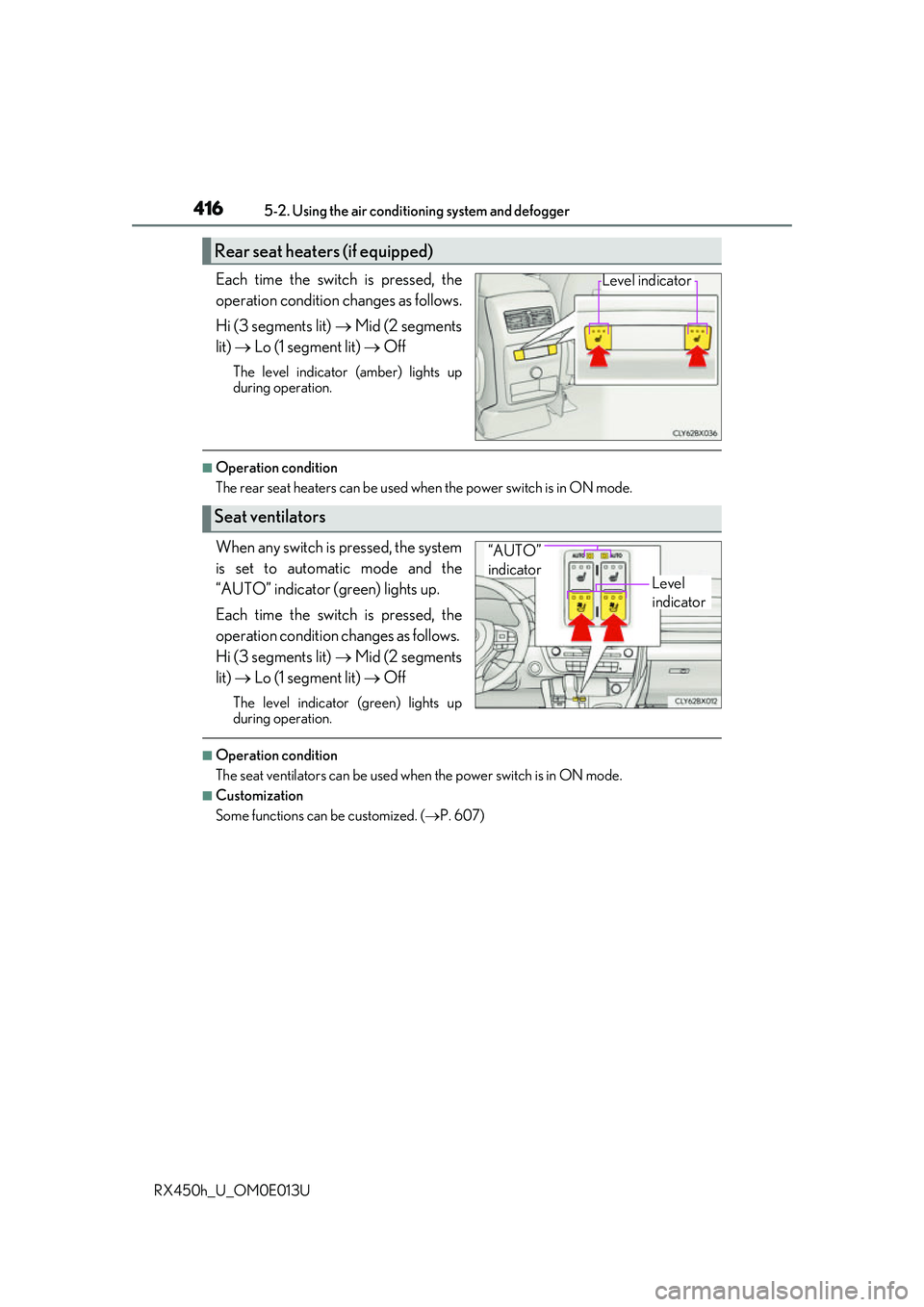
Each time the switch is pressed, the
operation condition changes as follows.
Hi (3 segments lit) Mid (2 segments
lit) Lo (1 segment lit) Off
The level indicator (amber) lights up
during operation.
■Operation condition
The rear seat heaters can be used wh en the power switch is in ON mode.
When any switch is pressed, the system
is set to automatic mode and the
“AUTO” indicator (green) lights up.
Each time the switch is pressed, the
operation condition changes as follows.
Hi (3 segments lit) Mid (2 segments
lit) Lo (1 segment lit) Off
The level indicator (green) lights up
during operation.
■Operation condition
The seat ventilators can be used when the power switch is in ON mode.
■Customization
Some functions can be customized. (P. 607)
Rear seat heaters (if equipped)
Level indicator
Seat ventilators
Level
indicator
“AUTO”
indicator
Page 423 of 660
4235-4. Using the storage features
5
Interior features
RX450h_U_OM0E013U
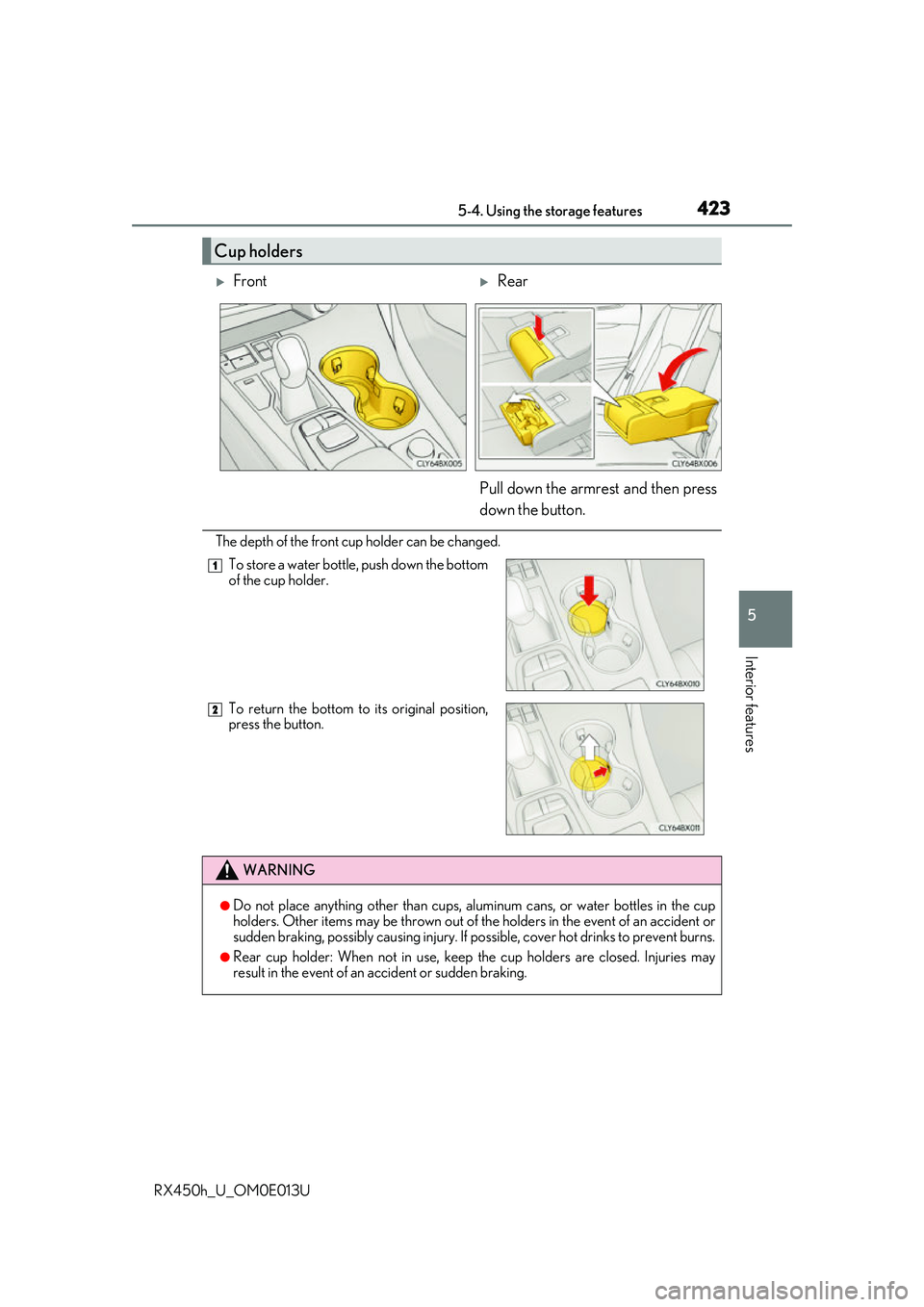
The depth of the front cup holder can be changed.
Cup holders
FrontRear
Pull down the armrest and then press
down the button.
To store a water bottle, push down the bottom
of the cup holder.
To return the bottom to its original position,
press the button.
WARNING
●Do not place anything other than cups, aluminum cans, or water bottles in the cup
holders. Other items may be thrown out of the holders in the event of an accident or
sudden braking, possibly causing injury. If possible, cover hot drinks to prevent burns.
●Rear cup holder: When not in use, keep the cup holders are closed. Injuries may
result in the event of an accident or sudden braking.
1
2
Page 436 of 660
4365-5. Using the other interior features
RX450h_U_OM0E013U
■If a cover or accessory is attached to the portable device
Do not charge a portable device if a cover or accessory which is not Qi compatible is
attached. Depending on the type of cover an d/or accessory attached, it may not be pos-
sible to charge the portable device. If the po rtable device is placed on the charging area
and does not charge, remove the cover and/or accessories.
■If interference is heard in AM radio broadcasts while charging
Turn off the wireless charger and check if the noise is reduced. If noise is reduced, press
and hold the power supply switch of the wireless charger for 2 seconds. The frequency of
the wireless charger is changed and noise may be reduced. When the frequency is
changed, the operation indicator lig ht will blink (orange) 2 times.
■Charging precautions
●If the electronic key cannot be detected in the cabin, charging cannot be performed.
When a door is opened and closed, ch arging may be temporarily suspended.
●While charging, the wireless charger and the po rtable device will become warm. This is
not a malfunction.
If a portable device become s warm while charging and ch arging stops due to the pro-
tection function of the portable device, wait until the portable device cools down and
charge it again.
■Sound generated during operation
When the power supply switch is turned on or while a portable device is being identified,
operation sounds may be heard. This is not a malfunction.
■Cleaning the wireless charger
P. 463
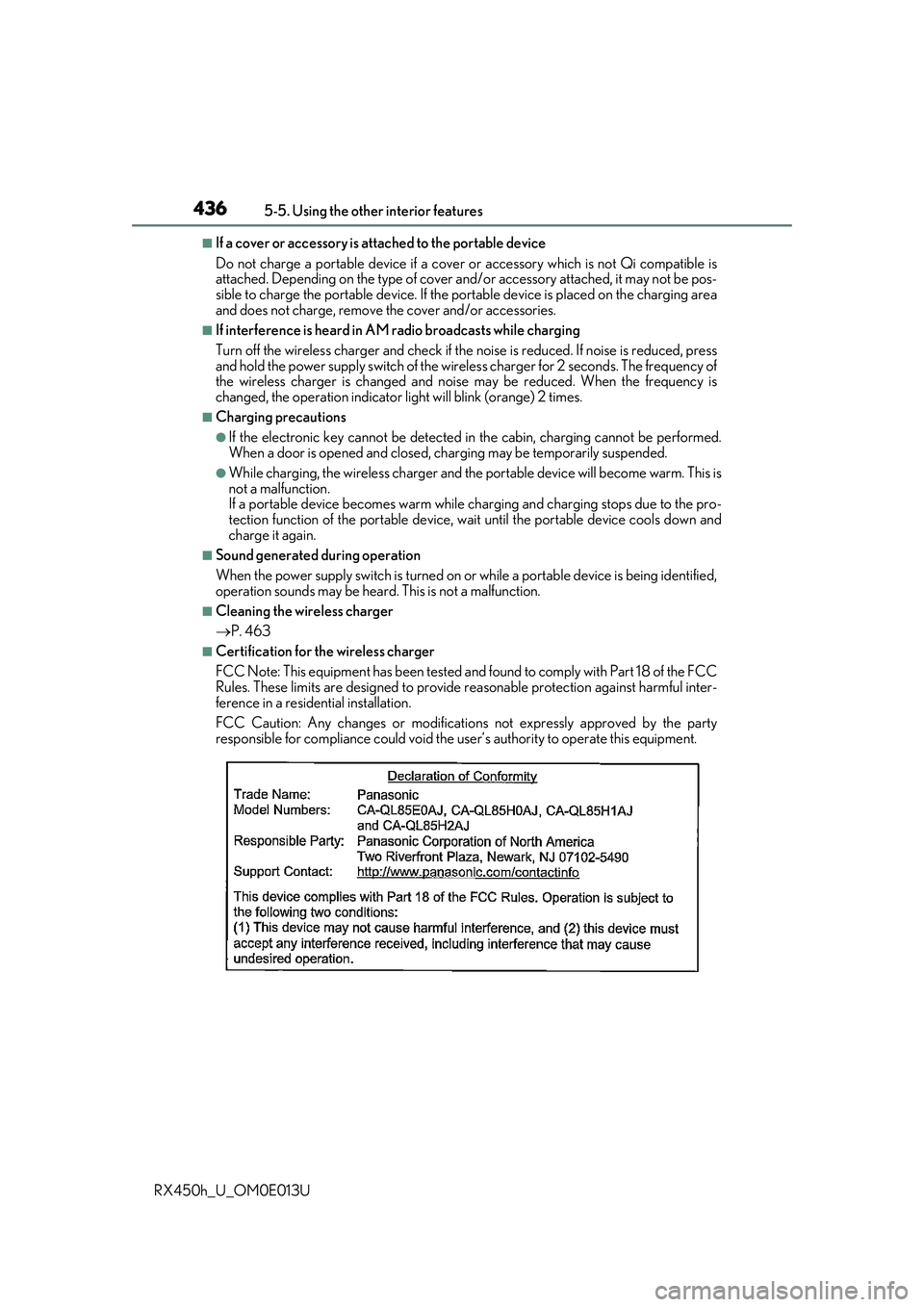
■Certification for the wireless charger
FCC Note: This equipment has been tested and found to comply with Part 18 of the FCC
Rules. These limits are designed to provide re asonable protection against harmful inter-
ference in a reside ntial installation.
FCC Caution: Any changes or modification s not expressly approved by the party
responsible for compliance could void the user’s authority to operate this equipment.
Page 446 of 660
4465-5. Using the other interior features
RX450h_U_OM0E013U
■Programming HomeLink®
Press and release the HomeLink® button you want to program and check
that the HomeLink® indicator light flashes (orange).
Perform within 60 seconds of , or the indicator light will stop flashing and
programming will not be able to be completed.
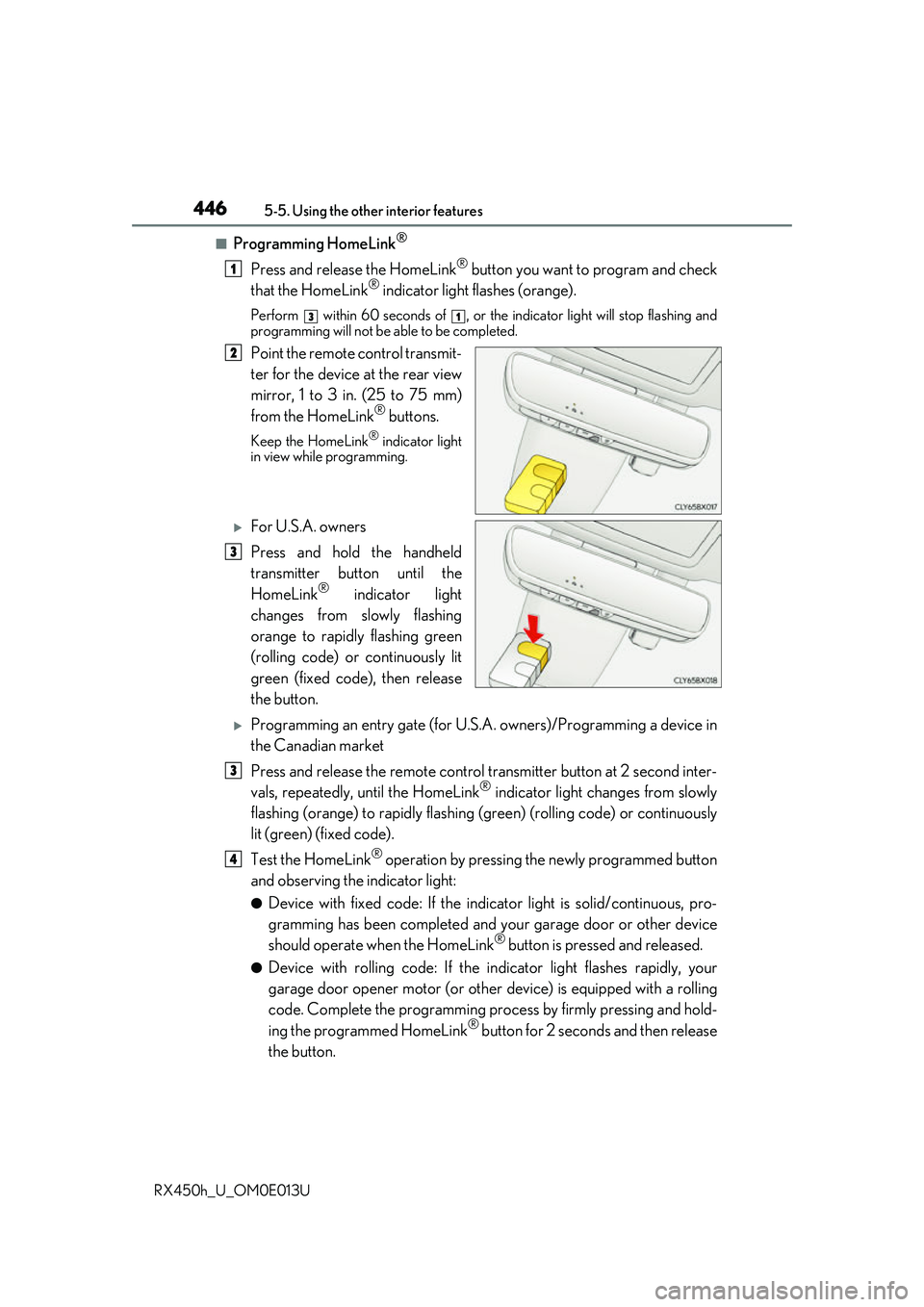
Point the remote control transmit-
ter for the device at the rear view
mirror, 1 to 3 in. (25 to 75 mm)
from the HomeLink
® buttons.
Keep the HomeLink® indicator light
in view while programming.
For U.S.A. owners
Press and hold the handheld
transmitter button until the
HomeLink
® indicator light
changes from slowly flashing
orange to rapidly flashing green
(rolling code) or continuously lit
green (fixed code), then release
the button.
Programming an entry gate (for U.S. A. owners)/Programming a device in
the Canadian market
Press and release the remote control transm itter button at 2 second inter-
vals, repeatedly, until the HomeLink
® indicator light changes from slowly
flashing (orange) to rapidly flashing (green) (rolling code) or continuously
lit (green) (fixed code).
Test the HomeLink
® operation by pressing the newly programmed button
and observing the indicator light:
●Device with fixed code: If the indicator light is solid/continuous, pro-
gramming has been completed and your garage door or other device
should operate when the HomeLink
® button is pressed and released.
●Device with rolling code: If the in dicator light flashes rapidly, your
garage door opener motor (or other device) is equipped with a rolling
code. Complete the programming process by firmly pressing and hold-
ing the programmed HomeLink
® button for 2 seconds and then release
the button.
1
31
2
3
3
4
Page 450 of 660
4505-5. Using the other interior features
RX450h_U_OM0E013U
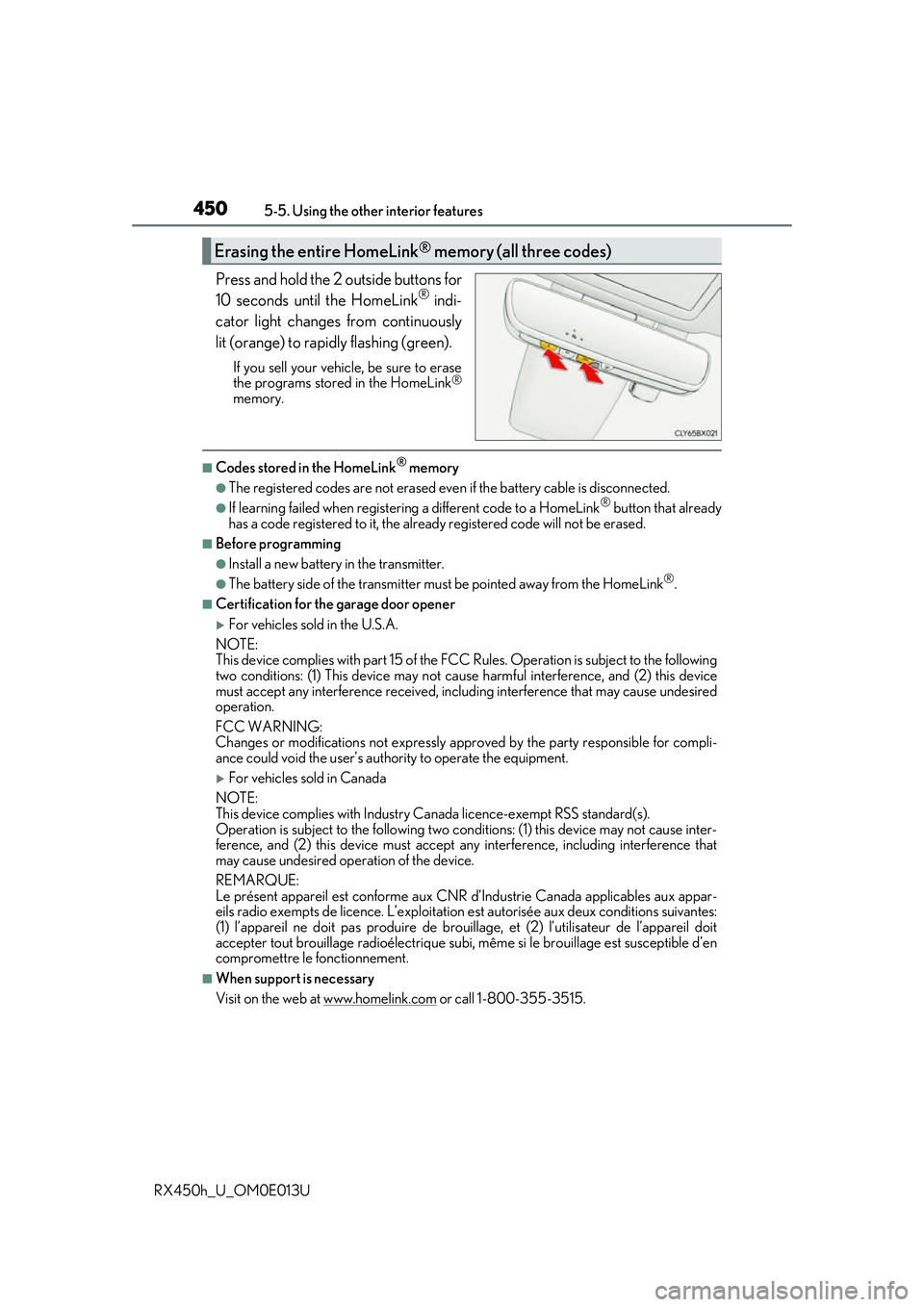
Press and hold the 2 outside buttons for
10 seconds until the HomeLink® indi-
cator light changes from continuously
lit (orange) to rapidly flashing (green).
If you sell your vehicle, be sure to erase
the programs stored in the HomeLink®
memory.
■Codes stored in the HomeLink® memory
●The registered codes are not erased even if the battery cable is disconnected.
●If learning failed when registerin g a different code to a HomeLink® button that already
has a code registered to it, the alread y registered code will not be erased.
■Before programming
●Install a new battery in the transmitter.
●The battery side of the transmitter must be pointed away from the HomeLink®.
■Certification for the garage door opener
For vehicles sold in the U.S.A.
NOTE:
This device complies with part 15 of the FC C Rules. Operation is subject to the following
two conditions: (1) This device may not caus e harmful interference, and (2) this device
must accept any interference received, includ ing interference that may cause undesired
operation.
FCC WARNING:
Changes or modifications not expressly approved by the party responsible for compli-
ance could void the user’s authority to operate the equipment.
For vehicles sold in Canada
NOTE:
This device complies with Industry Ca nada licence-exempt RSS standard(s).
Operation is subject to the following two cond itions: (1) this device may not cause inter-
ference, and (2) this device must accept any interference, including interference that
may cause undesired operation of the device.
REMARQUE:
Le présent appareil est conforme aux CNR d’Industrie Canada applicables aux appar-
eils radio exempts de licence. L’exploitation est autorisée aux deux conditions suivantes:
(1) l’appareil ne doit pas produire de brouil lage, et (2) l’utilisateur de l’appareil doit
accepter tout brouillage radioélectrique subi, même si le brouillage est susceptible d’en
compromettre le fonctionnement.
■When support is necessary
Visit on the web at www.homelink.com
or call 1-800-355-3515.
Erasing the entire HomeLink® memory (all three codes)
Page 488 of 660
4886-3. Do-it-yourself maintenance
RX450h_U_OM0E013U
Your vehicle is equipped with a tire pressure warning system that uses tire pres-
sure warning valves and transmitters to detect low tire inflation pressure before
serious problems arise.
◆Installing tire pressure warning valves and transmitters
When replacing tires or wheels, tire pr essure warning valves and transmitters
must also be installed.
When new tire pressure wa rning valves and transmitters are installed, new ID
codes must be registered in the tire pressure warning computer and the tire
pressure warning system must be initia lized. Have tire pressure warning valve
and transmitter ID codes registered by your Lexus dealer. ( P. 489)
◆Initializing the tire pressure warning system
■The tire pressure warning system must be initialized in the following circum-
stances:
●When the tire inflation pressure is changed such as when changing travel-
ing speed.
●When the tire inflation pressure is changed such as when the tire size is
changed.
●When rotating the tires
When the tire pressure warning system is initialized, the current tire inflation
pressure is set as the benchmark pressure.
Tire pressure warning system
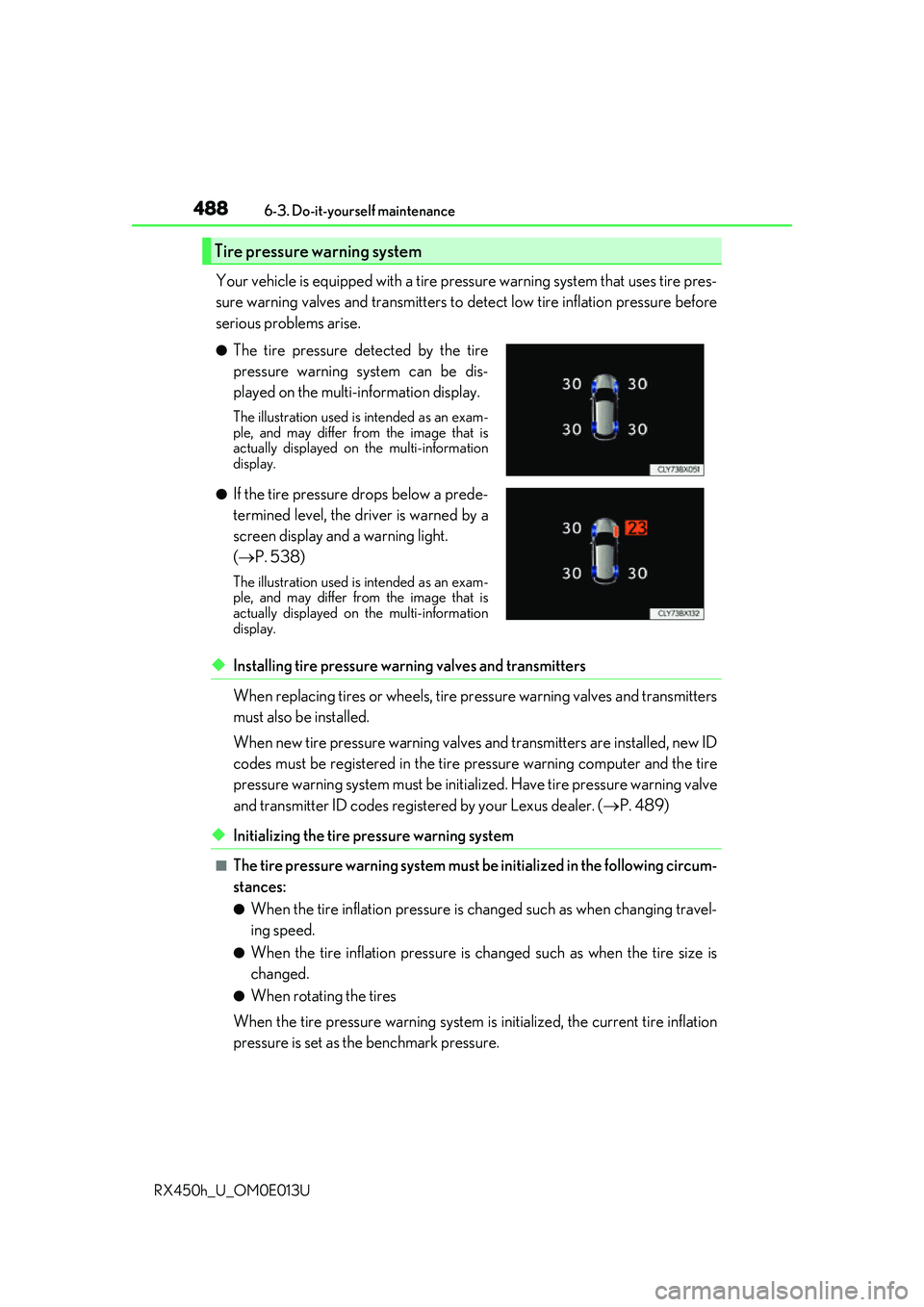
●The tire pressure detected by the tire
pressure warning system can be dis-
played on the multi-information display.
The illustration used is intended as an exam-
ple, and may differ from the image that is
actually displayed on the multi-information
display.
●If the tire pressure drops below a prede-
termined level, the driver is warned by a
screen display and a warning light.
( P. 538)
The illustration used is intended as an exam-
ple, and may differ from the image that is
actually displayed on the multi-information
display.
Page 493 of 660
4936-3. Do-it-yourself maintenance
6
Maintenance and care
RX450h_U_OM0E013U
■Warning performance of the tire pressure warning system
The warning of the tire pressure warning system will change in accordance with the con-
ditions under which it was init ialized. For this reason, the system may give a warning even
if the tire pressure does not reach a low enough level, or if the pressure is higher than the
pressure that was adjusted to when the system was initialized.
■When initialization of the tire pressure warning system has failed
Initialization may take longer to complete if the vehicle is driven on an unpaved road.
When performing initialization, drive on a pa ved road if possible. Depending on the driv-
ing environment and condition of the tires, initialization will be completed in approxi-
mately 10 to 30 minutes. If initialization is not complete after driving approximately 10 to
30 minutes, continue driving for a while.
If the inflation pressure of each tire is not displayed after driving for approximately 1 hour,
perform the following procedure.
●Park the vehicle in a safe place for approxim ately 20 minutes. Then drive straight (with
occasional left and right turns) at appr oximately 25 mph (40 km/h) or more for
approximately 10 to 30 minutes.
However, in the following situations, the tire inflation pressure will not be recorded and
the system will not operate proper ly. Perform initialization again.
●When operating the tire pressure warning reset switch, the tire pressure warning light
does not blink 3 times.
●After performing initia lization, the tire pressure warning light blinks for 1 minute then
stays on while driving.
If the inflation pressure of each tire is still not displayed, have the vehicle inspected by
your Lexus dealer.
Page 501 of 660
5016-3. Do-it-yourself maintenance
6
Maintenance and care
RX450h_U_OM0E013U
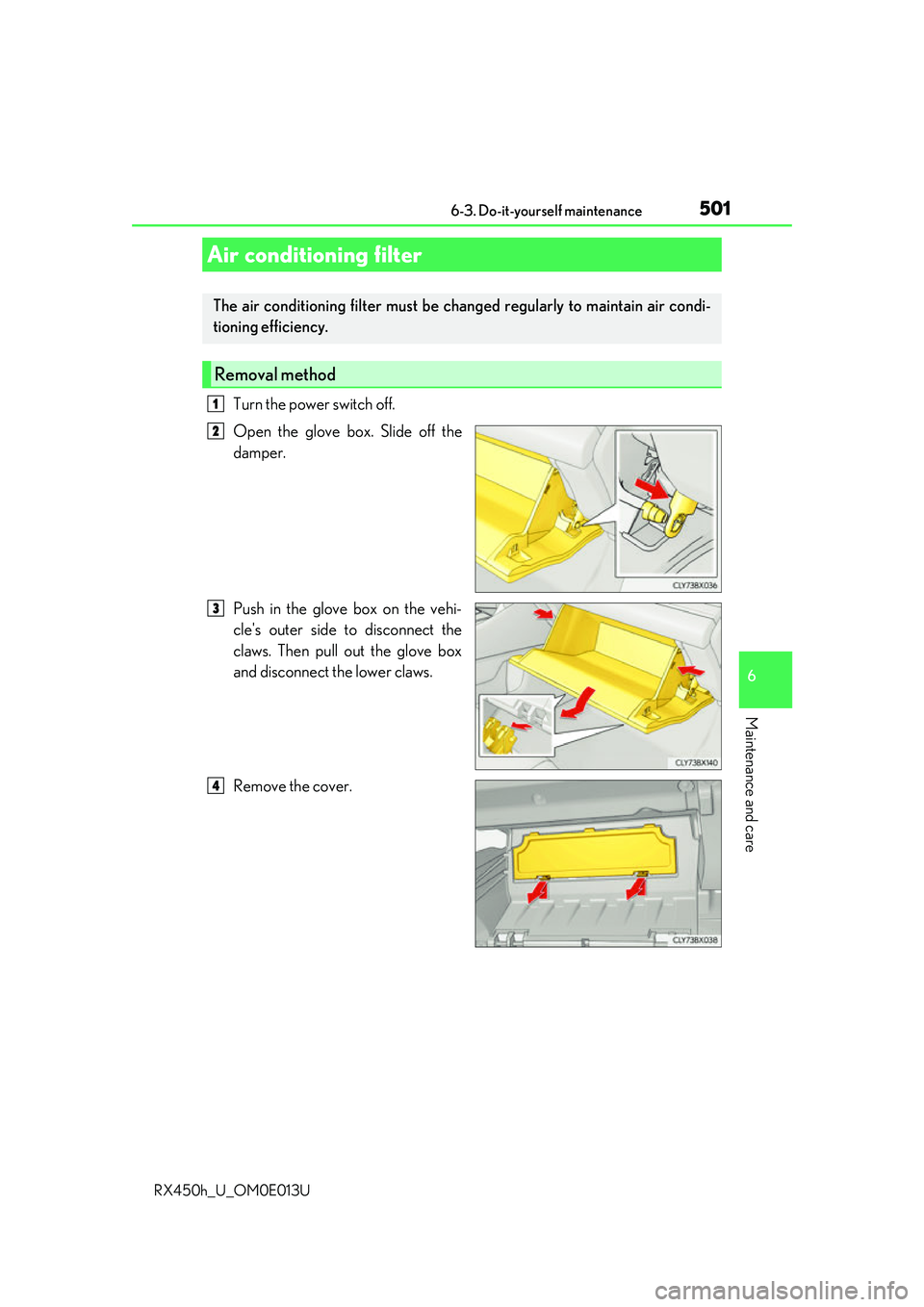
Turn the power switch off.
Open the glove box. Slide off the
damper.
Push in the glove box on the vehi-
cle's outer side to disconnect the
claws. Then pull out the glove box
and disconnect the lower claws.
Remove the cover.
Air conditioning filter
The air conditioning filter must be changed regularly to maintain air condi-
tioning efficiency.
Removal method
1
2
3
4