lock LEXUS RX450h 2018 Owners Manual
[x] Cancel search | Manufacturer: LEXUS, Model Year: 2018, Model line: RX450h, Model: LEXUS RX450h 2018Pages: 792, PDF Size: 12.5 MB
Page 531 of 792
5316-3. Using the interior lights
6
Interior features
RX450h_RX450hL _U_OM48F85U●
Illuminated entry system: The lights automatically turn on/off according to power switch
mode, the presence of the electronic key, whether the doors are locked/unlocked, and
whether the doors are opened/closed. ●
If the interior lights remain on when the power switch is turned off, the lights will go off
automatically after 20 minutes. ●
In the following cases, the interior lights and front personal lights may not respond as
normal.
• When water, dirt, etc., have adhered to the lens surface
• When operated with a wet hand
• When wearing gloves, etc. ●
Some functions can be customized ( → P. 736)
NOTICE ●
Never remove the lens for the front interior light and fron t personal lights. Otherwise,
the lights will be damaged. If the lens need to remove, contact your Lexus dealer.●
To prevent 12-volt battery discharge, do not leave the lights on longer than necessary
when the hybrid system is off.
Page 534 of 792
534 6-4. Using the storage features
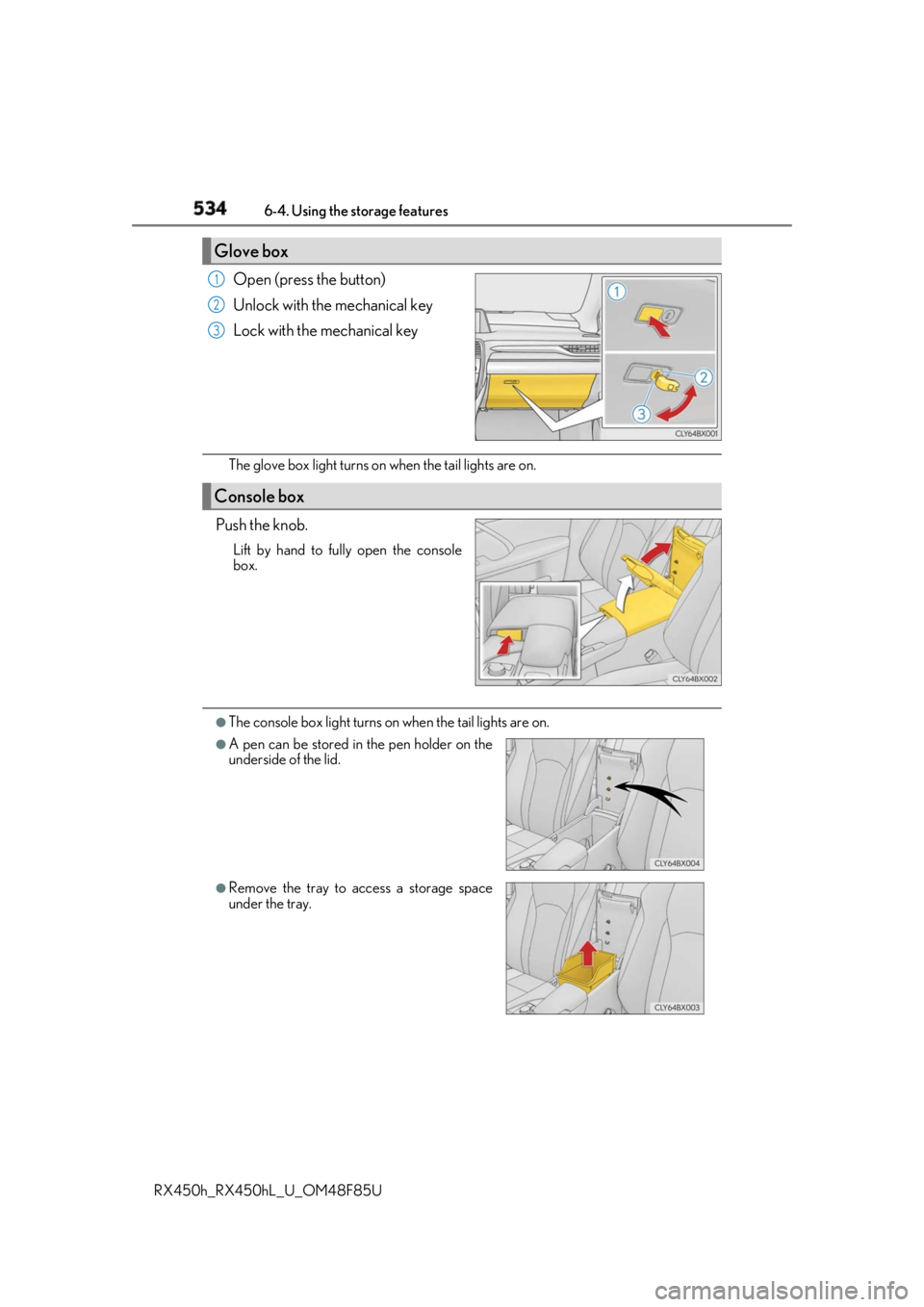
RX450h_RX450hL _U_OM48F85UOpen (press the button)
Unlock with the mechanical key
Lock with the mechanical key
The glove box light turns on when the tail lights are on.
Push the knob. Lift by hand to fully open the console
box.
●
The console box light turns on when the tail lights are on.Glove box 1
2
3
Console box
●
A pen can be stored in the pen holder on the
underside of the lid.
●
Remove the tray to access a storage space
under the tray.
Page 539 of 792
5396-4. Using the storage features
6
Interior features
RX450h_RX450hL _U_OM48F85UAuxiliary boxes
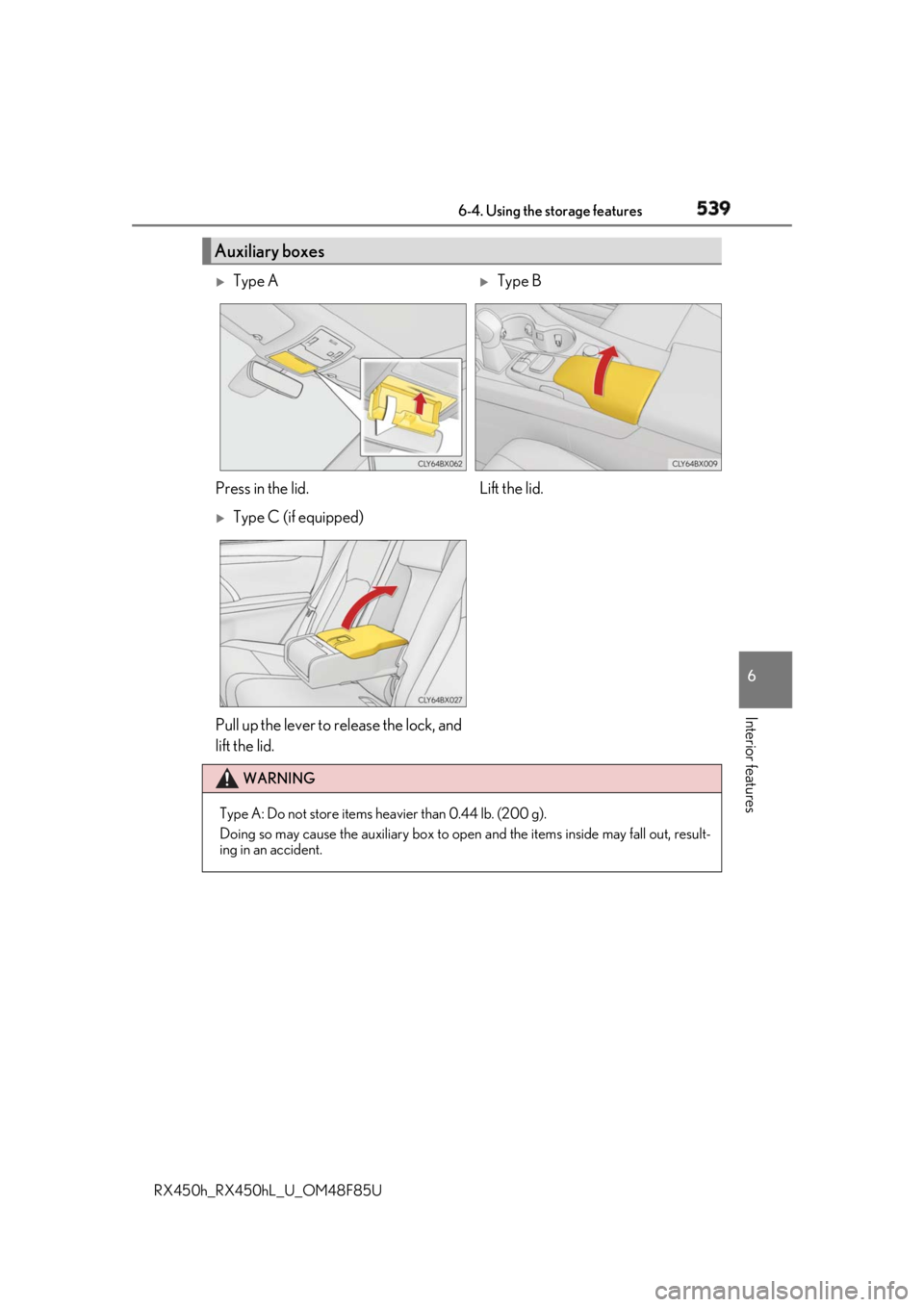
Type A
Type B
Press in the lid. Lift the lid.
Type C (if equipped)
Pull up the lever to release the lock, and
lift the lid. WARNING
Type A: Do not store items he avier than 0.44 lb. (200 g).
Doing so may cause the auxiliary box to open and the items inside may fall out, result-
ing in an accident.
Page 548 of 792
548 6-5. Using the other interior features
RX450h_RX450hL _U_OM48F85U
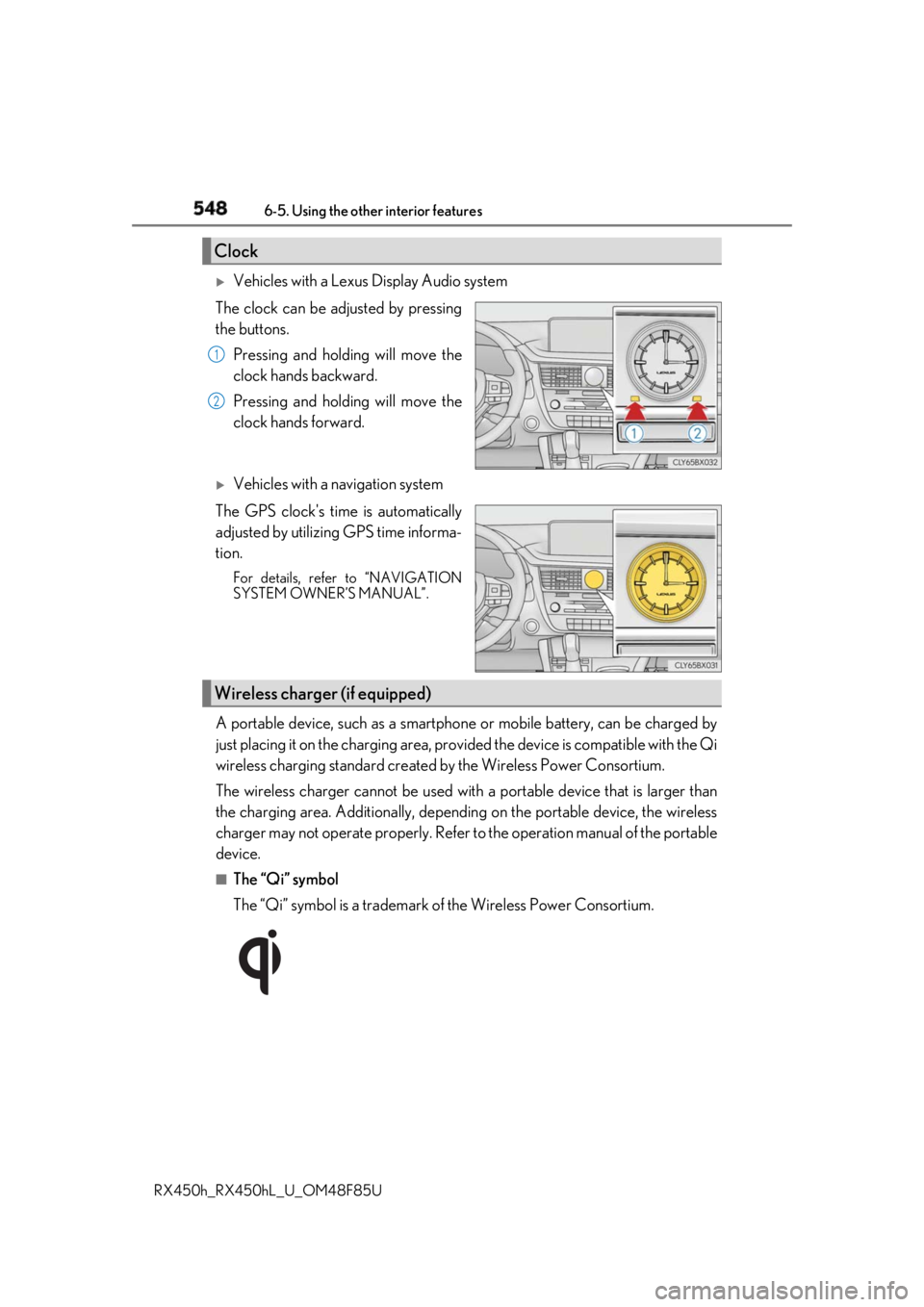
Vehicles with a Lexus Display Audio system
The clock can be adjusted by pressing
the buttons.
Pressing and holding will move the
clock hands backward.
Pressing and holding will move the
clock hands forward.
Vehicles with a navigation system
The GPS clock's time is automatically
adjusted by utilizing GPS time informa-
tion. For details, refer to “NAVIGATION
SYSTEM OWNER’S MANUAL”.
A portable device, such as a smartphone or mobile battery, can be charged by
just placing it on the charging area, prov ided the device is compatible with the Qi
wireless charging standard created by the Wireless Power Consortium.
The wireless charger cannot be used with a portable device that is larger than
the charging area. Additionally, dependin g on the portable device, the wireless
charger may not operate properly. Refer to the operation manual of the portable
device. ■
The “Qi” symbol
The “Qi” symbol is a trademark of the Wireless Power Consortium.Clock 1
2
Wireless charger (if equipped)
Page 558 of 792
558 6-5. Using the other interior features
RX450h_RX450hL _U_OM48F85U
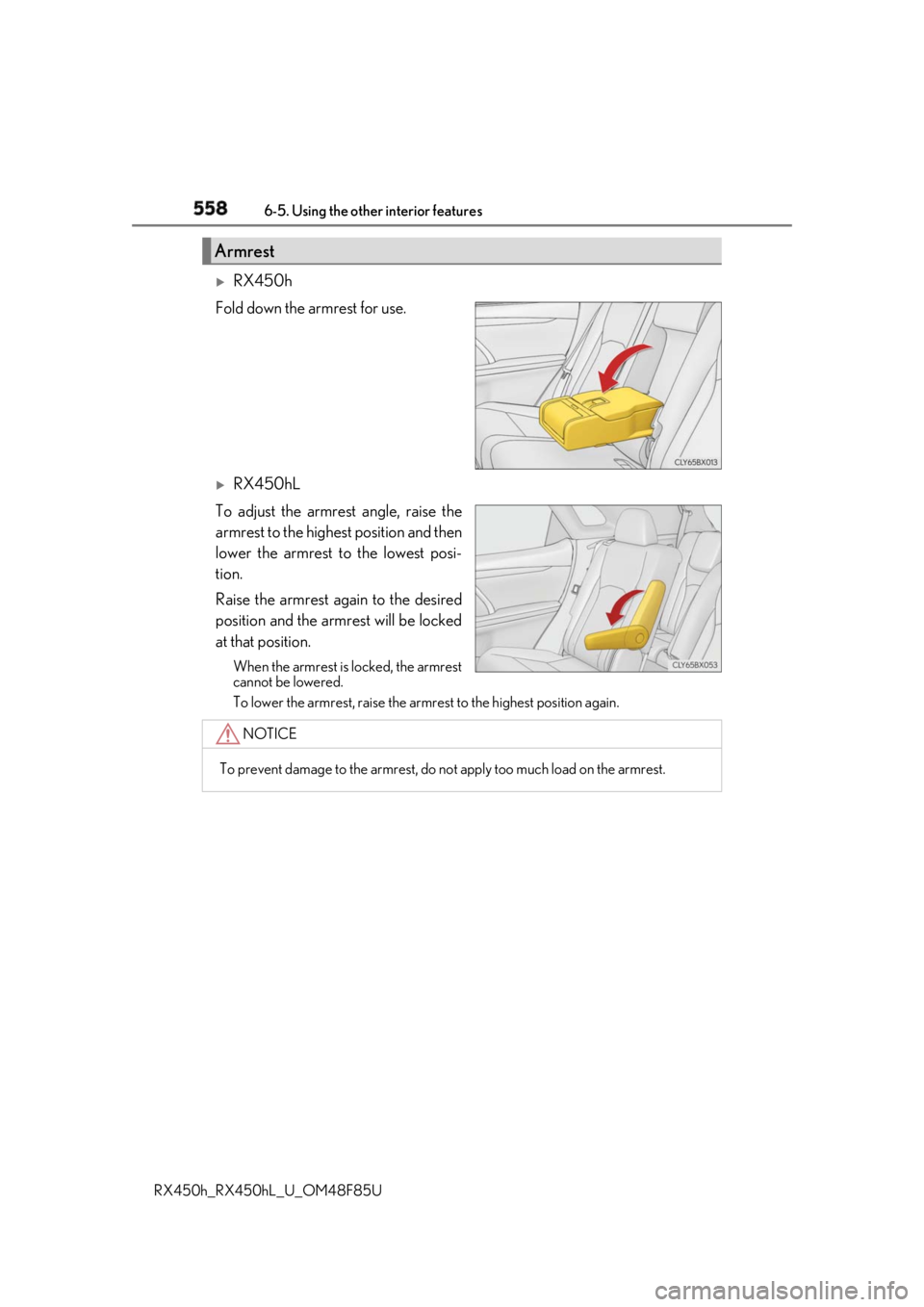
RX450h
Fold down the armrest for use.
RX450hL
To adjust the armrest angle, raise the
armrest to the highest position and then
lower the armrest to the lowest posi-
tion.
Raise the armrest again to the desired
position and the armrest will be locked
at that position. When the armrest is locked, the armrest
cannot be lowered.
To lower the armrest, raise the armrest to the highest position again.Armrest
NOTICE
To prevent damage to the armrest, do not apply too much load on the armrest.
Page 560 of 792
560 6-5. Using the other interior features
RX450h_RX450hL _U_OM48F85UThe HomeLink ®
wireless control system in your vehicle has 3 buttons which can
be programmed to operate 3 different de vices. Refer to the programming meth-
ods on the following pages to determine the method which is appropriate for the
device.
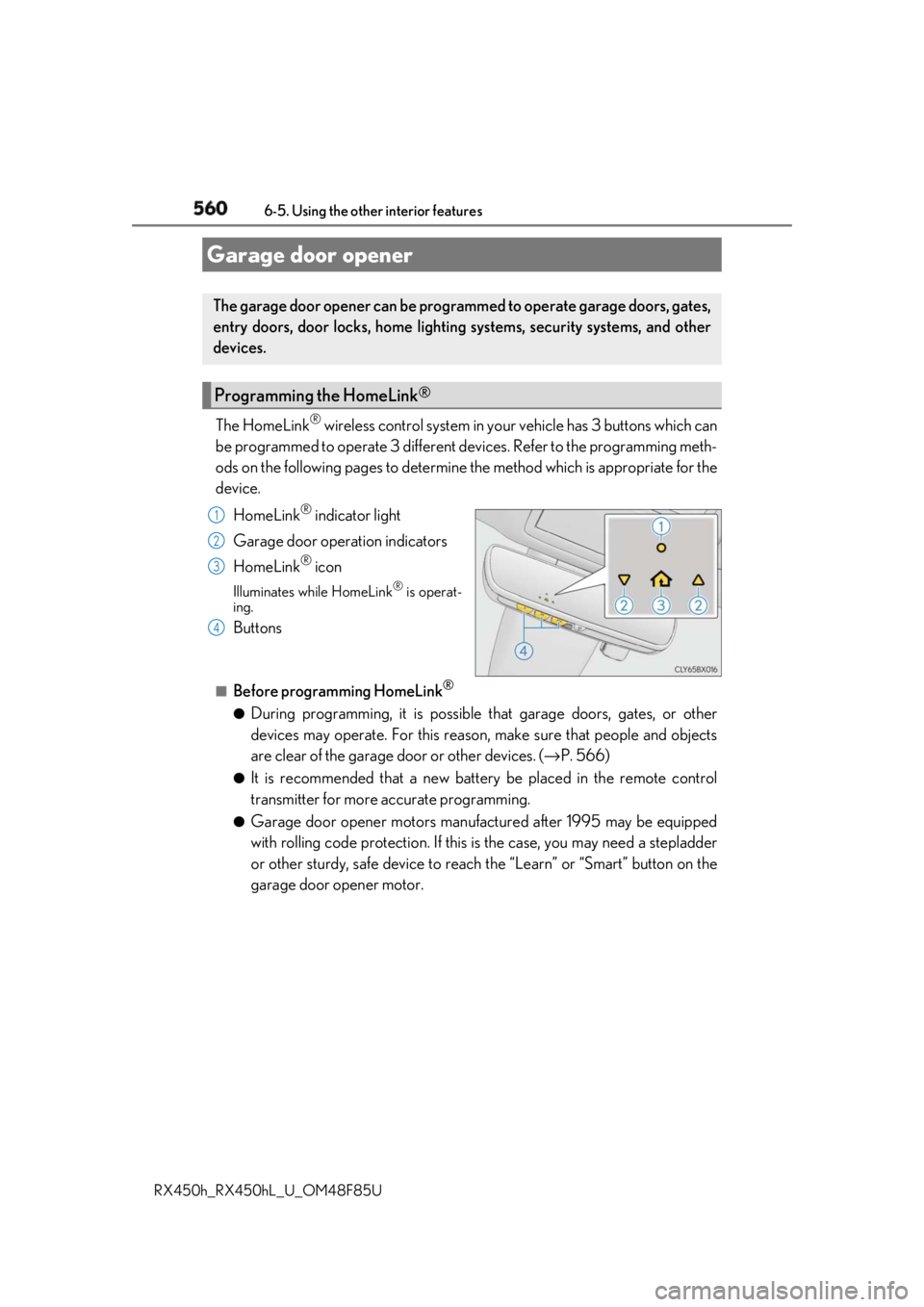
HomeLink ®
indicator light
Garage door operation indicators
HomeLink ®
iconIlluminates while HomeLink ®
is operat-
ing.
Buttons ■
Before programming HomeLink ®
●
During programming, it is possible that garage doors, gates, or other
devices may operate. For this reason, make sure that people and objects
are clear of the garage door or other devices. ( → P. 566)●
It is recommended that a new batter y be placed in the remote control
transmitter for more accurate programming. ●
Garage door opener motors manufa ctured after 1995 may be equipped
with rolling code protection. If this is the case, you may need a stepladder
or other sturdy, safe device to reach the “Learn” or “Smart” button on the
garage door opener motor.Garage door opener The garage door opener can be programmed to operate garage doors, gates,
entry doors, door locks, home lightin g systems, security systems, and other
devices.
Programming the HomeLink ®
1
2
3
4
Page 569 of 792
5696-5. Using the other interior features
6
Interior features
RX450h_RX450hL _U_OM48F85U■
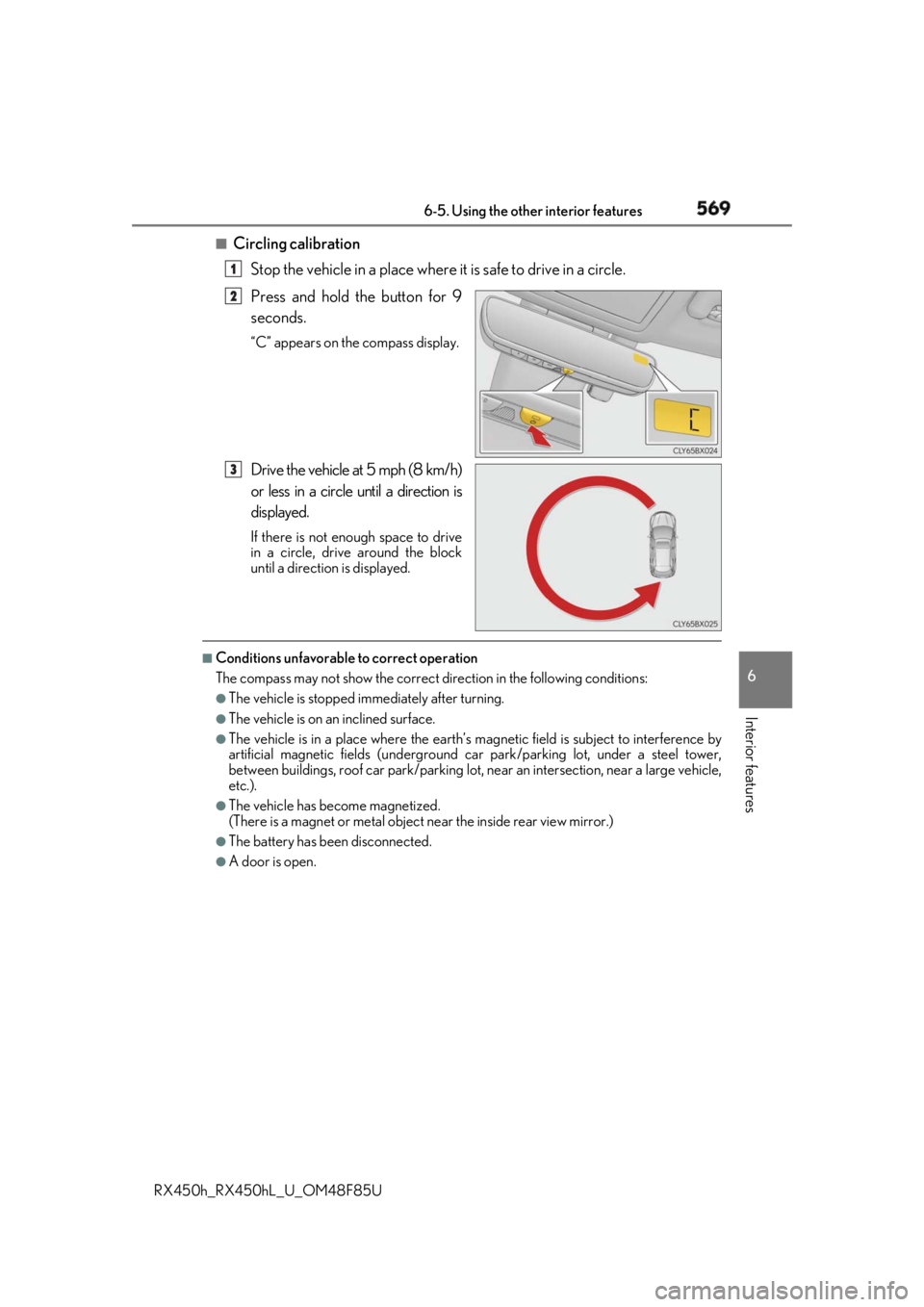
Circling calibration
Stop the vehicle in a place where it is safe to drive in a circle.
Press and hold the button for 9
seconds. “C” appears on the compass display.
Drive the vehicle at 5 mph (8 km/h)
or less in a circle until a direction is
displayed. If there is not enough space to drive
in a circle, drive around the block
until a direction is displayed.■
Conditions unfavorable to correct operation
The compass may not show the correct di rection in the follo wing conditions:●
The vehicle is stopped immediately after turning. ●
The vehicle is on an inclined surface. ●
The vehicle is in a place where the earth’s magnetic field is subject to interference by
artificial magnetic fields (underground car park/parking lot, under a steel tower,
between buildings, roof car park/parking lot, near an intersection, near a large vehicle,
etc.). ●
The vehicle has become magnetized.
(There is a magnet or metal object near the inside rear view mirror.)●
The battery has been disconnected. ●
A door is open. 1
2
3
Page 581 of 792

5817-1. Maintenance and care
7
Maintenance and care
RX450h_RX450hL _U_OM48F85U■
Note for a smart access system with push-button start ●
If the door handle becomes wet while the el ectronic key is within the effective range,
the door may lock and unlock repeatedly. Place the key in a position 6 ft. (2 m) or more
separate from the vehicle while the vehicle is being washed. (Take care to ensure that
the key is not stolen.) ●
If the electronic key is inside the vehicle and a door handle becomes wet during a car
wash, a buzzer will sound outside the vehicle. To turn off the alarm, lock all the doors.●
Set the electronic key to battery-saving mo de to disable the sm art access system with
push-button start. ( → P. 159)■
Aluminum wheels ●
Remove any dirt immediately by using a neutral detergent. ●
Wash detergent off with water immediately after use. ●
To protect the paint from damage, make sure to observe the following precautions.
• Do not use acidic, alkaline or abrasive detergent
• Do not use hard brushes
• Do not use detergent on the wheels when they are hot, such as after driving or park-
ing in hot weather■
Bumpers
Do not scrub with abrasive cleaners. ■
Front side windows water-repellent coating ●
The following precautions can extend the effectiveness of the water-repellent coating.
• Remove any dirt, etc. from the front side windows regularly.
• Do not allow dirt and dust to accumulate on the windows for a long period.
Clean the windows with a soft, damp cloth as soon as possible.
• Do not use wax or glass cleaners that co ntain abrasives when cleaning the windows.
• Do not use any metallic objects to remove condensation build up.●
When the water-repellent performance has become insufficient, the coating can be
repaired. Contact your Lexus dealer.
Page 590 of 792
590 7-2. Maintenance
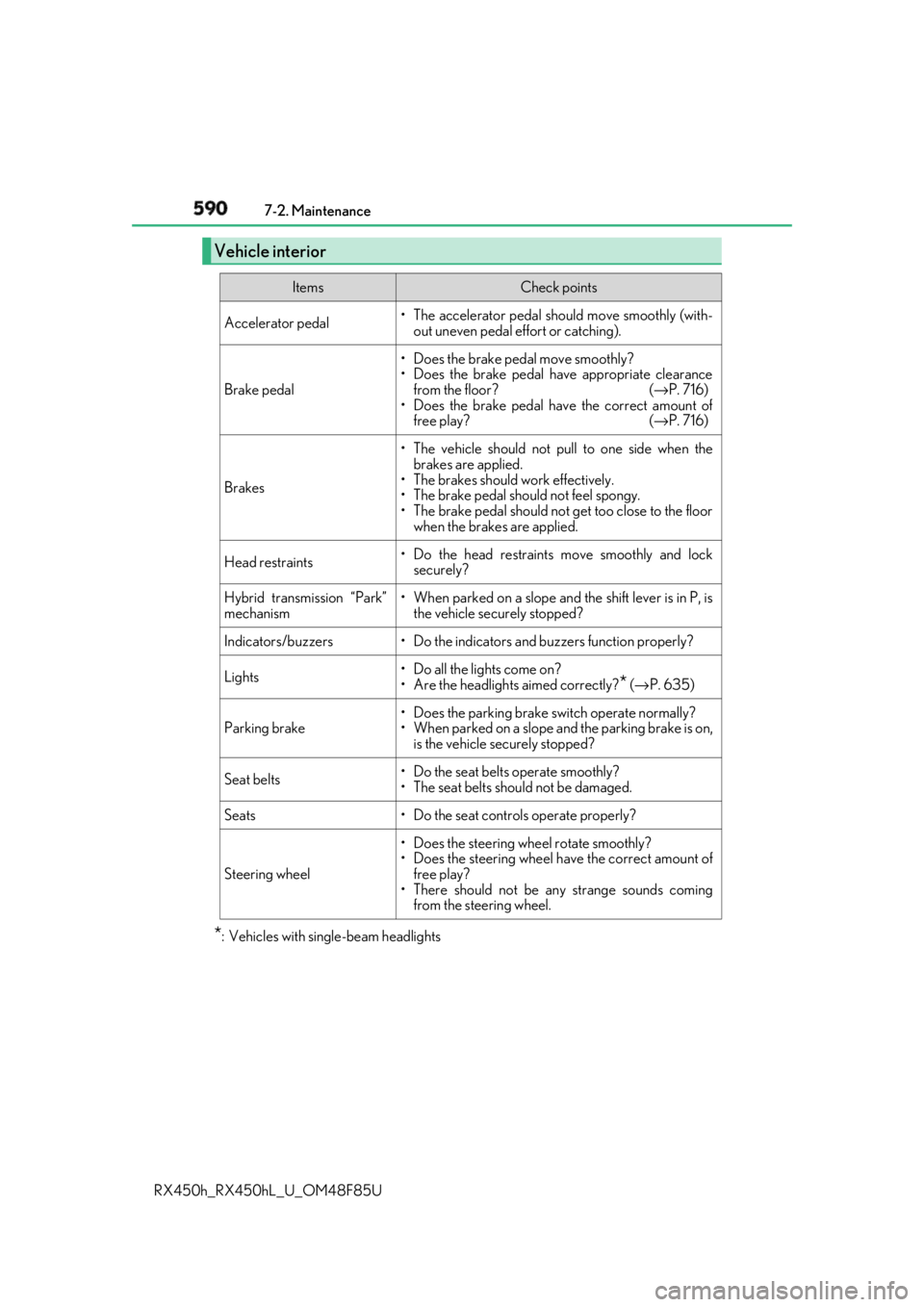
RX450h_RX450hL _U_OM48F85U* : Vehicles with sing le-beam headlightsVehicle interior Items Check points
Accelerator pedal • The accelerator pedal sh ould move smoothly (with-
out uneven pedal effort or catching).
Brake pedal • Does the brake pedal move smoothly?
• Does the brake pedal have appropriate clearance
from the floor? ( → P. 716)
• Does the brake pedal have the correct amount of
free play? ( → P. 716)
Brakes • The vehicle should not pull to one side when the
brakes are applied.
• The brakes should work effectively.
• The brake pedal should not feel spongy.
• The brake pedal should no t get too close to the floor
when the brakes are applied.
Head restraints • Do the head restraints move smoothly and lock
securely?
Hybrid transmission “Park”
mechanism • When parked on a slope and the shift lever is in P, is
the vehicle securely stopped?
Indicators/buzzers • Do the indicators and buzzers function properly?
Lights • Do all the lights come on?
• Are the headlights aimed correctly?
* ( → P. 635)
Parking brake • Does the parking brake switch operate normally?
• When parked on a slope and the parking brake is on,
is the vehicle securely stopped?
Seat belts • Do the seat belts operate smoothly?
• The seat belts should not be damaged.
Seats • Do the seat controls operate properly?
Steering wheel • Does the steering wheel rotate smoothly?
• Does the steering wheel have the correct amount of
free play?
• There should not be any strange sounds coming
from the steering wheel.
Page 591 of 792
5917-2. Maintenance
7
Maintenance and care
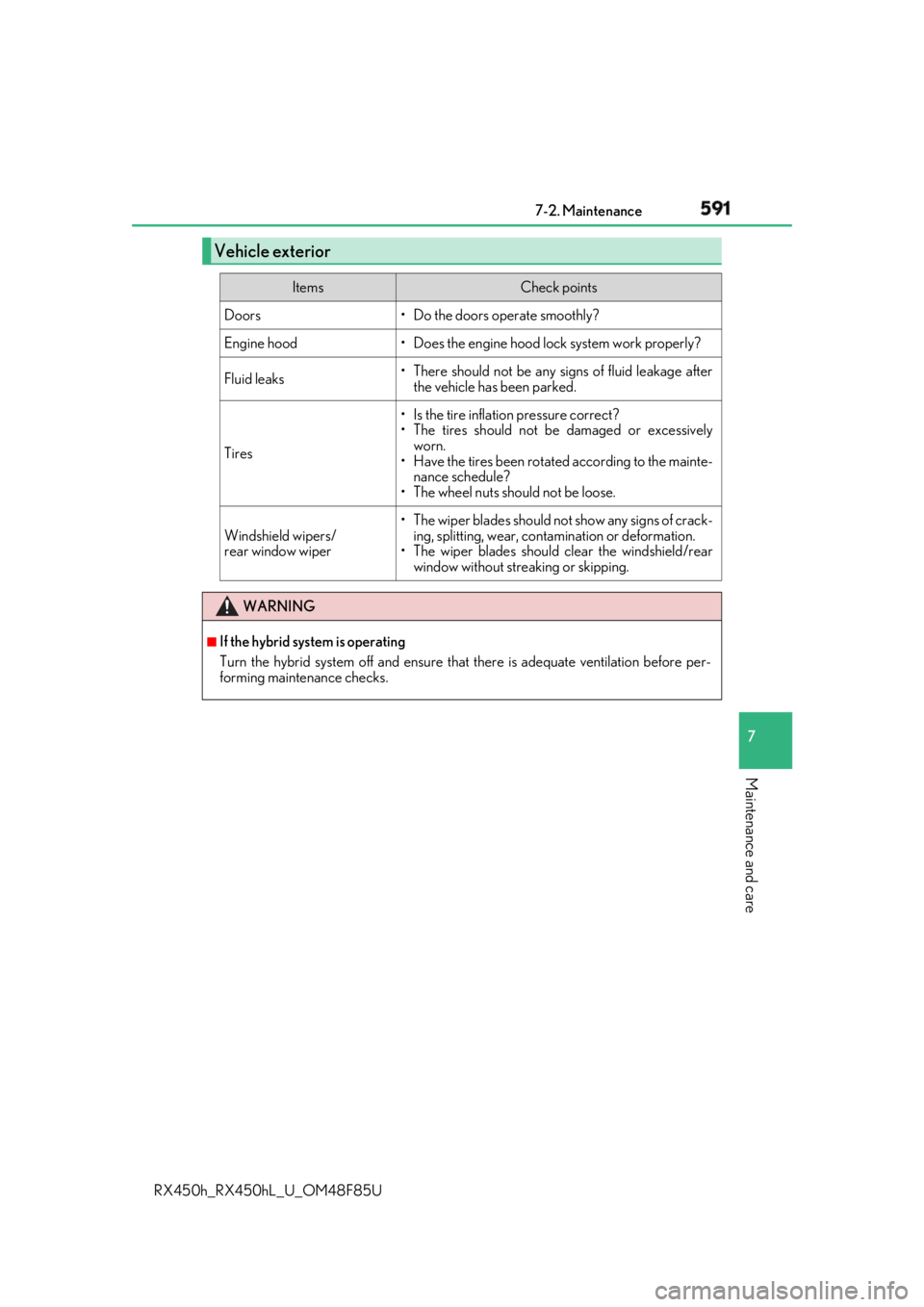
RX450h_RX450hL _U_OM48F85UVehicle exterior Items Check points
Doors • Do the doors operate smoothly?
Engine hood • Does the engine hood lock system work properly?
Fluid leaks • There should not be any si gns of fluid leakage after
the vehicle has been parked.
Tires • Is the tire inflation pressure correct?
• The tires should not be damaged or excessively
worn.
• Have the tires been rotated according to the mainte-
nance schedule?
• The wheel nuts should not be loose.
Windshield wipers/
rear window wiper •The wiper blades should no t show any signs of crack-
ing, splitting, wear, contamination or deformation.
• The wiper blades should clear the windshield/rear
window without streaking or skipping.
WARNING ■
If the hybrid system is operating
Turn the hybrid system off and ensure that there is adequate ventilation before per-
forming maintenance checks.