lock LEXUS RX450h 2018 Repair Manual
[x] Cancel search | Manufacturer: LEXUS, Model Year: 2018, Model line: RX450h, Model: LEXUS RX450h 2018Pages: 792, PDF Size: 12.5 MB
Page 172 of 792
172 3-3. Adjusting the seats
RX450h_RX450hL _U_OM48F85U■
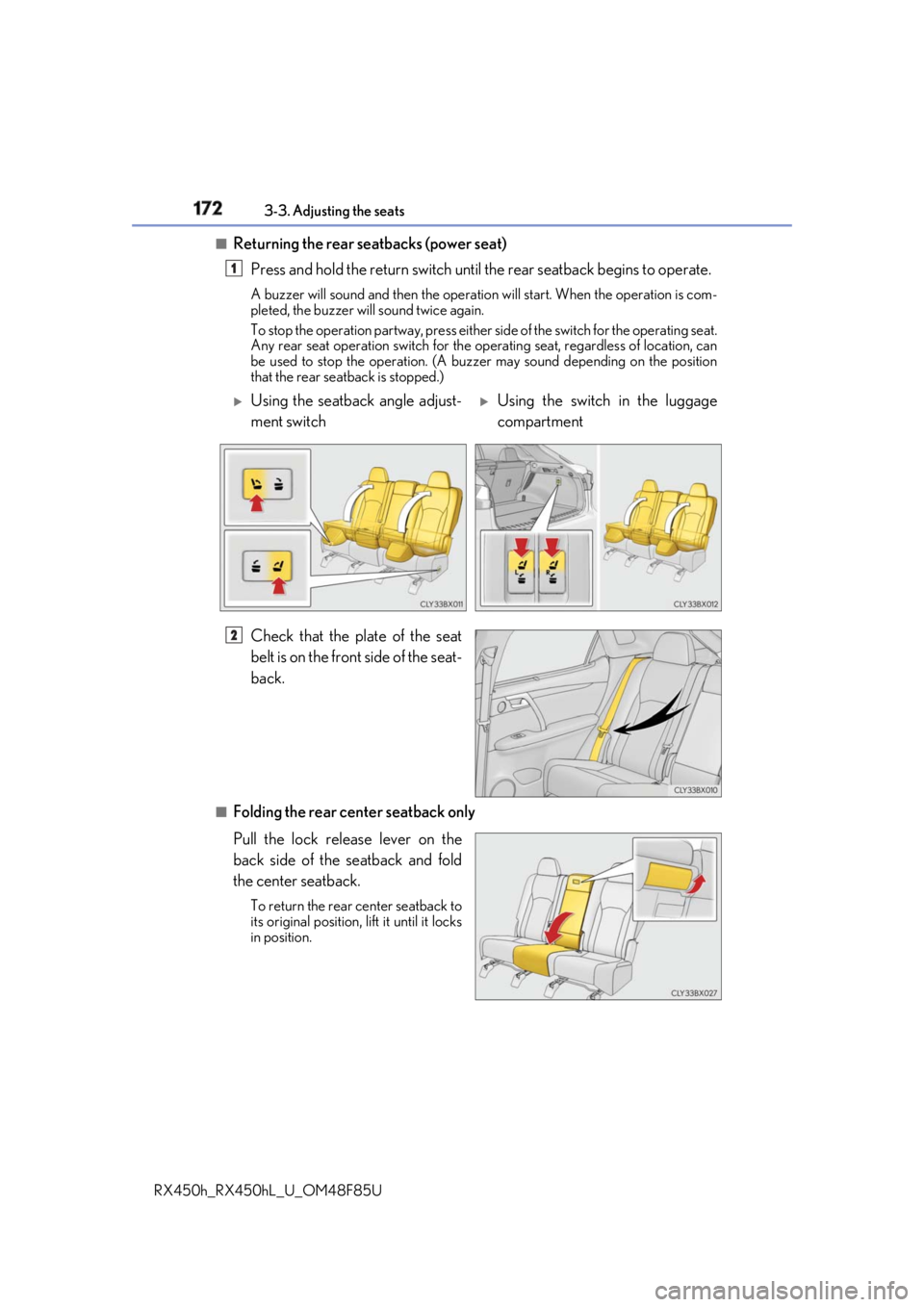
Returning the rear seatbacks (power seat)
Press and hold the return switch until the rear seatback begins to operate.A buzzer will sound and then the operation will start. When the operation is com-
pleted, the buzzer will sound twice again.
To stop the operation partway, press either side of the switch for the operating seat.
Any rear seat operation switch for the op erating seat, regardless of location, can
be used to stop the operation. (A buzzer may sound depending on the position
that the rear seatback is stopped.)
Check that the plate of the seat
belt is on the front side of the seat-
back.
■
Folding the rear center seatback only
Pull the lock release lever on the
back side of the seatback and fold
the center seatback. To return the rear center seatback to
its original position, li ft it until it locks
in position. 1
Using the seatback angle adjust-
ment switch
Using the switch in the luggage
compartment
2
Page 174 of 792
174 3-3. Adjusting the seats
RX450h_RX450hL _U_OM48F85U■
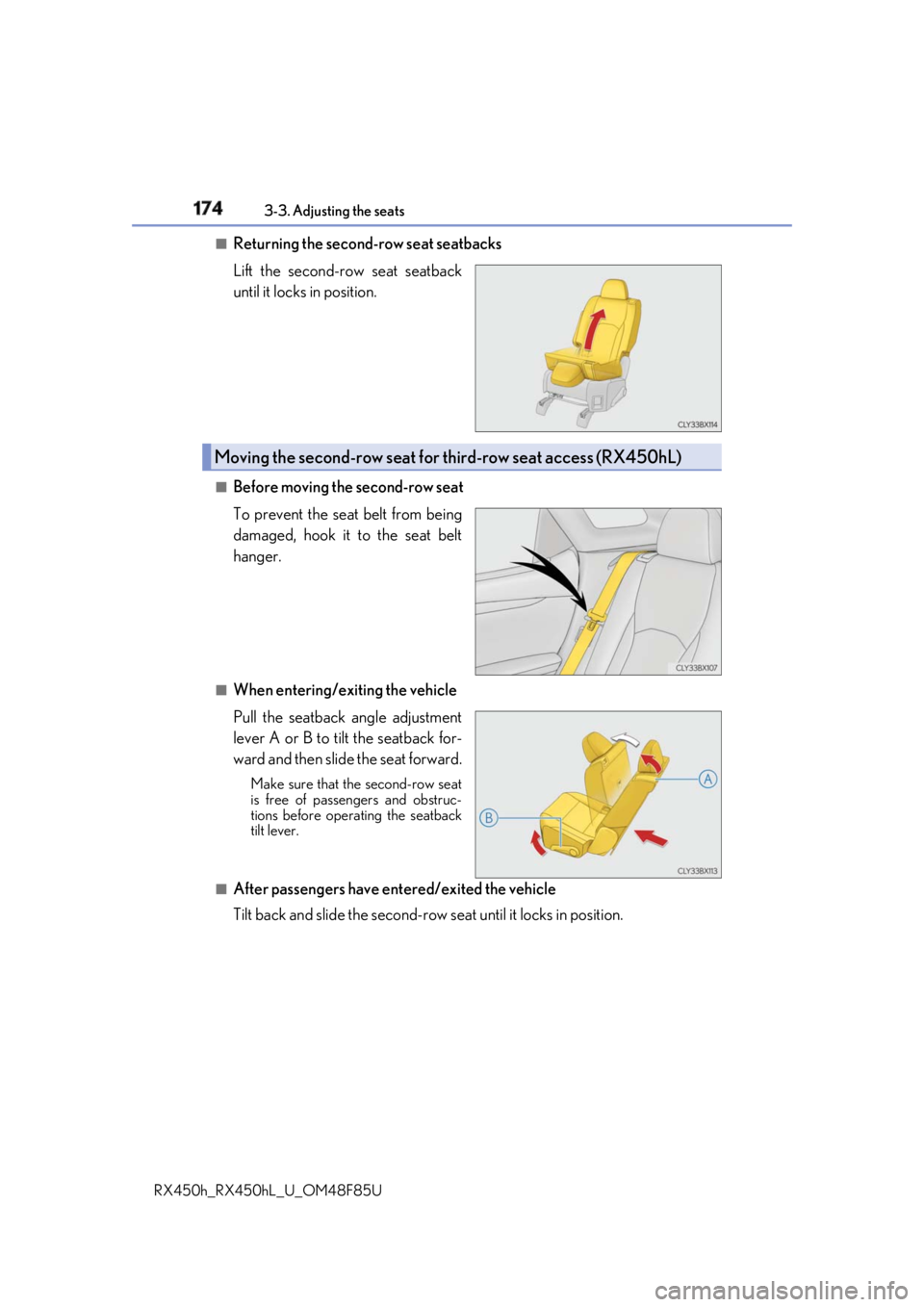
Returning the second-row seat seatbacks
Lift the second-row seat seatback
until it locks in position.
■
Before moving the second-row seat
To prevent the seat belt from being
damaged, hook it to the seat belt
hanger.
■
When entering/exiting the vehicle
Pull the seatback angle adjustment
lever A or B to tilt the seatback for-
ward and then slide the seat forward. Make sure that th e second-row seat
is free of passengers and obstruc-
tions before operating the seatback
tilt lever.
■
After passengers have entered/exited the vehicle
Tilt back and slide the second-row seat until it locks in position.Moving the second-row seat for third-row seat access (RX450hL)
Page 179 of 792
1793-3. Adjusting the seats
3
Operation of each component
RX450h_RX450hL _U_OM48F85UWARNING ■
When a rear seatback is folded
Observe the following precautions.
Failure to do so may result in death or serious injury.●
Do not fold down the rear seatbacks while driving. ●
Stop the vehicle on level grou nd, apply the parking brake and shift the shift lever to P.●
Do not allow anyone to sit on a folded re ar seatback or in th e luggage compartment
while driving. ●
Do not allow children to enter the luggage compartment. ■
When operating the rear seatback
Observe the following precautions.
Failure to do so may result in death or serious injury.●
Make sure that passengers are clear of the rear seatback before operating it.●
To prevent hands and other body parts from being caught, keep them away from the
gaps in the seats and the moving parts of the seats when operating a rear seatback.●
Power seat: Do not let children operate th e rear seatback. Othe r passengers may get
caught in the seat. ●
Power seat: Make sure that a ll passengers are clear of a seat before folding it. Do not
let passengers sit in the seat while it is being folded.■
Seat adjustment ●
Second-row seats: To reduce the risk of s liding under the lap belt during a collision,
do not recline the seat more than necessary.
If the seat is reclined excessively, the la p belt may slide past the hips and apply
restraint forces directly to the abdomen, or your neck may contact the shoulder belt,
increasing the risk of de ath or serious injury in the event of an accident.●
Adjustments should not be made while dr iving as the seat may unexpectedly move
and cause the driver to lose control of the vehicle. ■
After adjusting the rear seats
Observe the following precautions.
Failure to do so may result in death or serious injury.●
Manual seats: Make sure that the rear se atback is securely locked in position by
lightly pushing it back and forth. ●
Check that the seat belts are not twisted or caught between or behind in the rear
seatback.
Page 184 of 792
184 3-3. Adjusting the seats
RX450h_RX450hL _U_OM48F85UEach electronic key can be registered to recall your preferred driving position.■
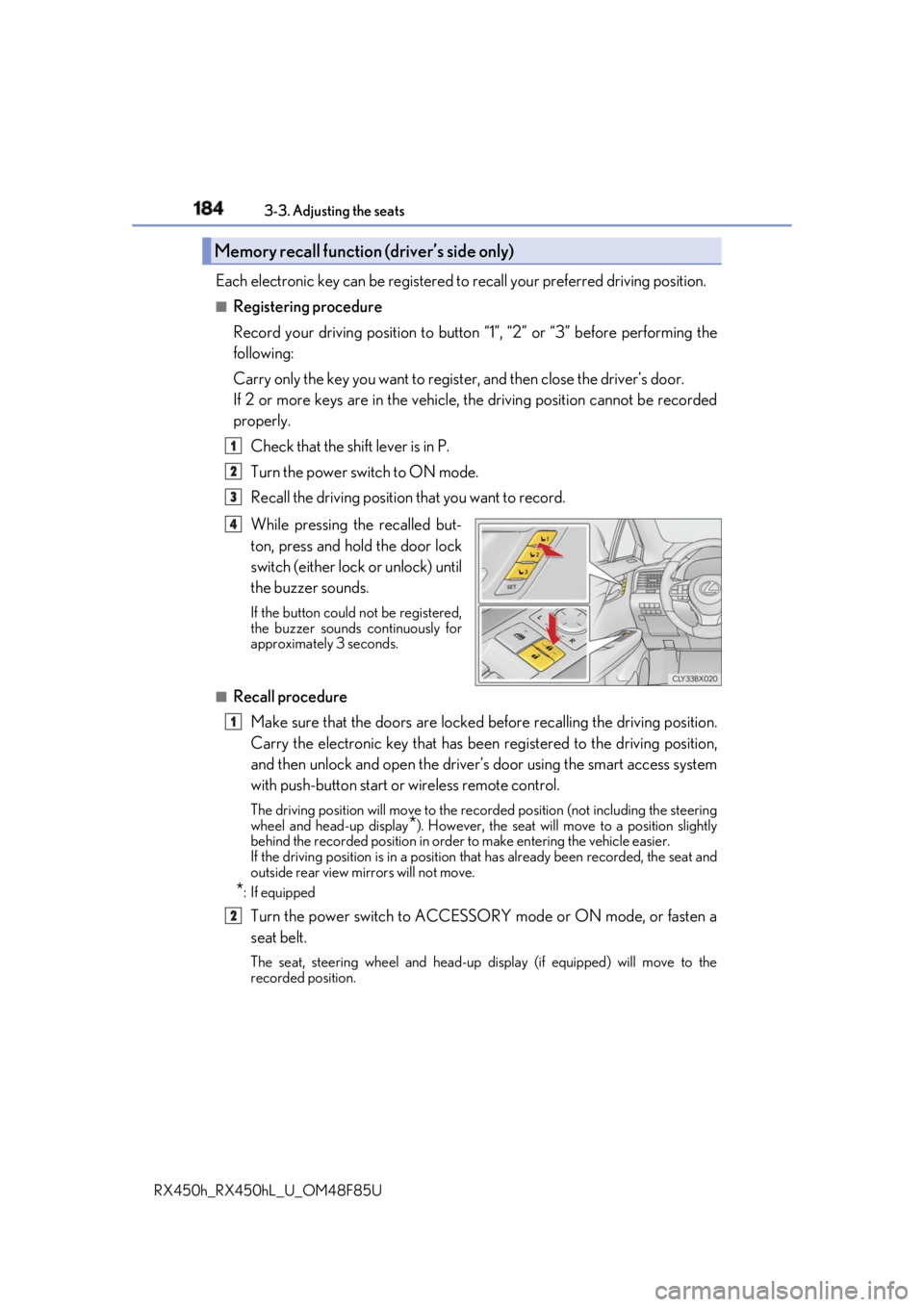
Registering procedure
Record your driving position to button “1”, “2” or “3” before performing the
following:
Carry only the key you want to regist er, and then close the driver’s door.
If 2 or more keys are in the vehicle, the driving position cannot be recorded
properly.
Check that the shift lever is in P.
Turn the power switch to ON mode.
Recall the driving position that you want to record.
While pressing the recalled but-
ton, press and hold the door lock
switch (either lock or unlock) until
the buzzer sounds. If the button could not be registered,
the buzzer sounds continuously for
approximately 3 seconds.
■
Recall procedure
Make sure that the doors are locked before recalling the driving position.
Carry the electronic key that has been registered to the driving position,
and then unlock and open the driver’s door using the smart access system
with push-button start or wireless remote control. The driving position will move to the recorded position (not including the steering
wheel and head-up display
* ). However, the seat will move to a position slightly
behind the recorded position in order to make entering the vehicle easier.
If the driving position is in a position th at has already been recorded, the seat and
outside rear view mirrors will not move.
* : If equipped
Turn the power switch to ACCESSORY mode or ON mode, or fasten a
seat belt. The seat, steering wheel and head-up display (if equipped) will move to the
recorded position.Memory recall function (driver’s side only) 1
2
3
4
1
2
Page 185 of 792
1853-3. Adjusting the seats
3
Operation of each component
RX450h_RX450hL _U_OM48F85U■
Cancelation procedure
Carry only the key you want to cance l and then close the driver’s door.
If 2 or more keys are in the vehicle, the driving position cannot be canceled
properly.
Turn the power switch to ON mode.
While pressing the “SET” button, pr ess and hold the door lock switch
(either lock or unlock) un til the buzzer sounds twice.If it button could not be canceled, the buzzer sounds continuously for approxi-
mately 3 seconds.■
Recalling the driving position using the memory recall function●
Different driving positions can be registered for each electronic key. Therefore, the
driving position that is recalled may be di fferent depending on the key being carried.●
If a door other than the driver’s door is unlocked with the smart access system with
push-button start, the driving position cannot be recalled. In this case, press the driving
position button which has been set. ■
Customization
Some functions can be customized. ( → P. 736)
WARNING ■
Seat adjustment caution
Take care during seat adjustment so that th e seat does not strike the rear passenger or
squeeze your body against the steering wheel. 1
2
Page 186 of 792
186 3-3. Adjusting the seats
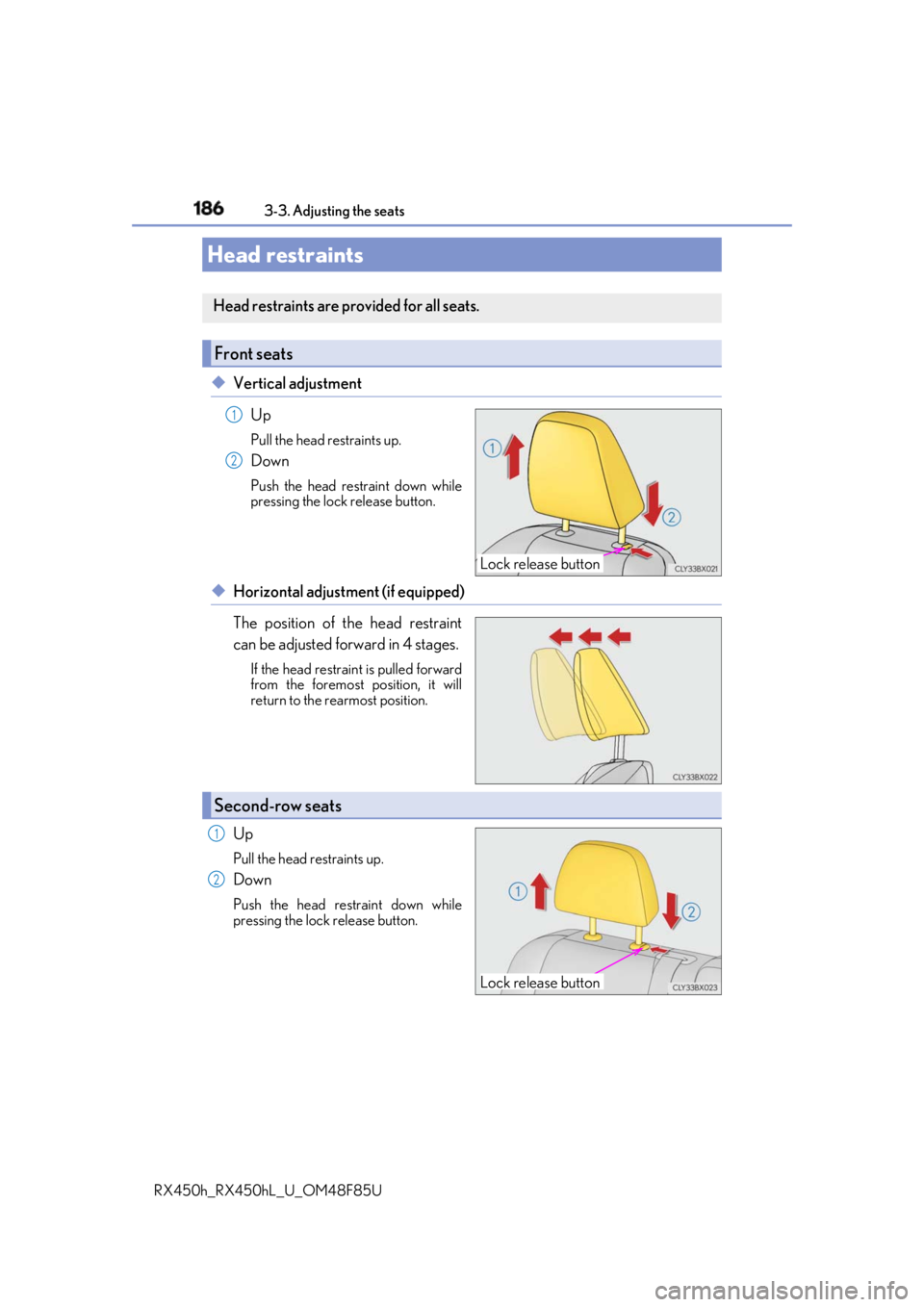
RX450h_RX450hL _U_OM48F85U◆ Vertical adjustment
Up Pull the head restraints up.
Down Push the head restraint down while
pressing the lock release button.
◆ Horizontal adjustment (if equipped)
The position of the head restraint
can be adjusted forward in 4 stages. If the head restrain t is pulled forward
from the foremost position, it will
return to the rearmost position.
Up Pull the head restraints up.
Down Push the head restraint down while
pressing the lock release button.Head restraints Head restraints are provided for all seats.
Front seats
Lock release button1
2
Second-row seats
Lock release button1
2
Page 187 of 792
1873-3. Adjusting the seats
3
Operation of each component
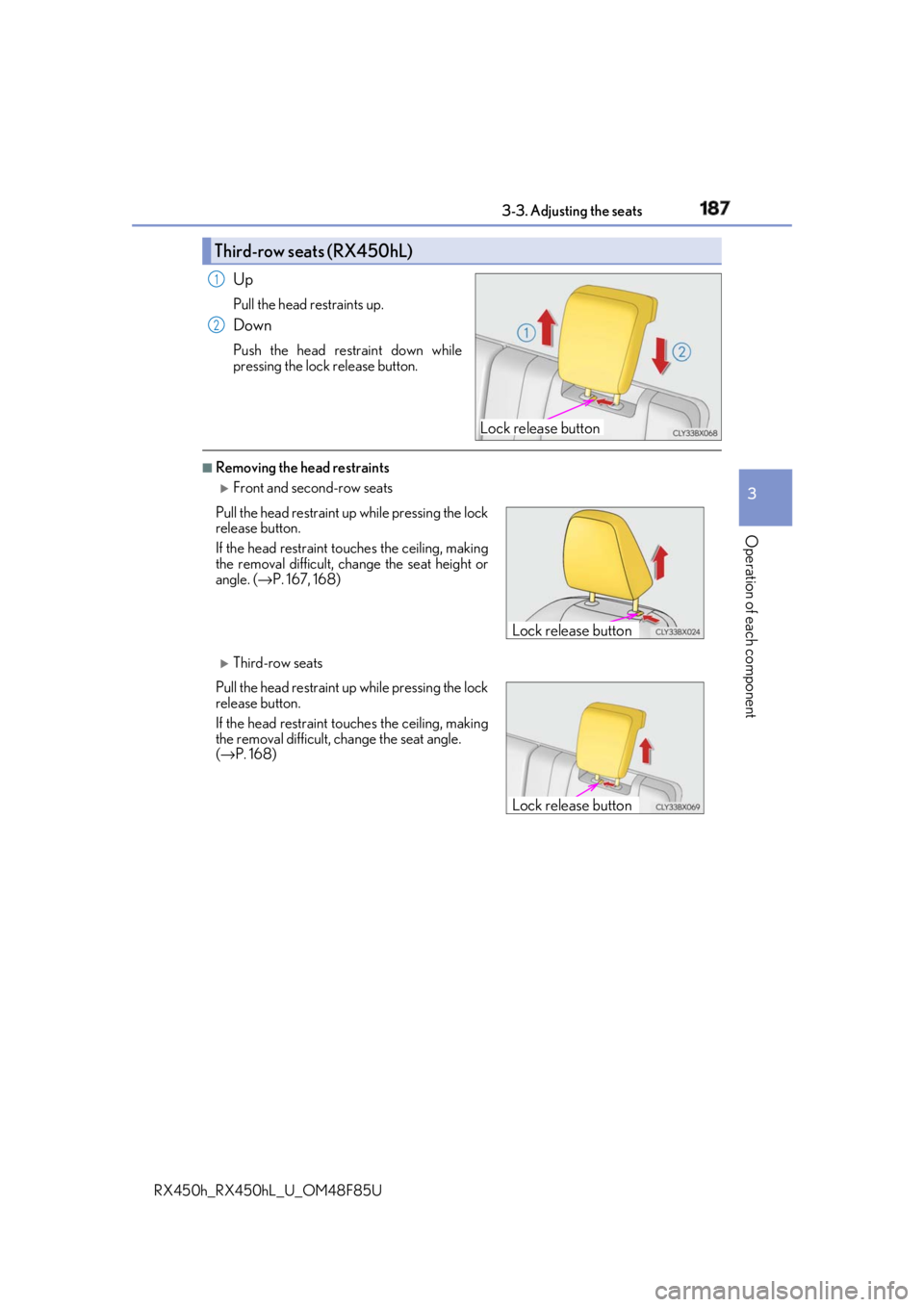
RX450h_RX450hL _U_OM48F85UUp Pull the head restraints up.
Down Push the head restraint down while
pressing the lock release button. ■
Removing the head restraints
Front and second-row seats
Third-row seatsThird-row seats (RX450hL)
Lock release button1
2
Pull the head restraint up while pressing the lock
release button.
If the head restraint to uches the ce iling, making
the removal difficult, change the seat height or
angle. ( → P. 167, 168)
Pull the head restraint up while pressing the lock
release button.
If the head restraint to uches the ce iling, making
the removal difficult, change the seat angle.
( → P. 168) Lock release button
Lock release button
Page 188 of 792
188 3-3. Adjusting the seats
RX450h_RX450hL _U_OM48F85U■
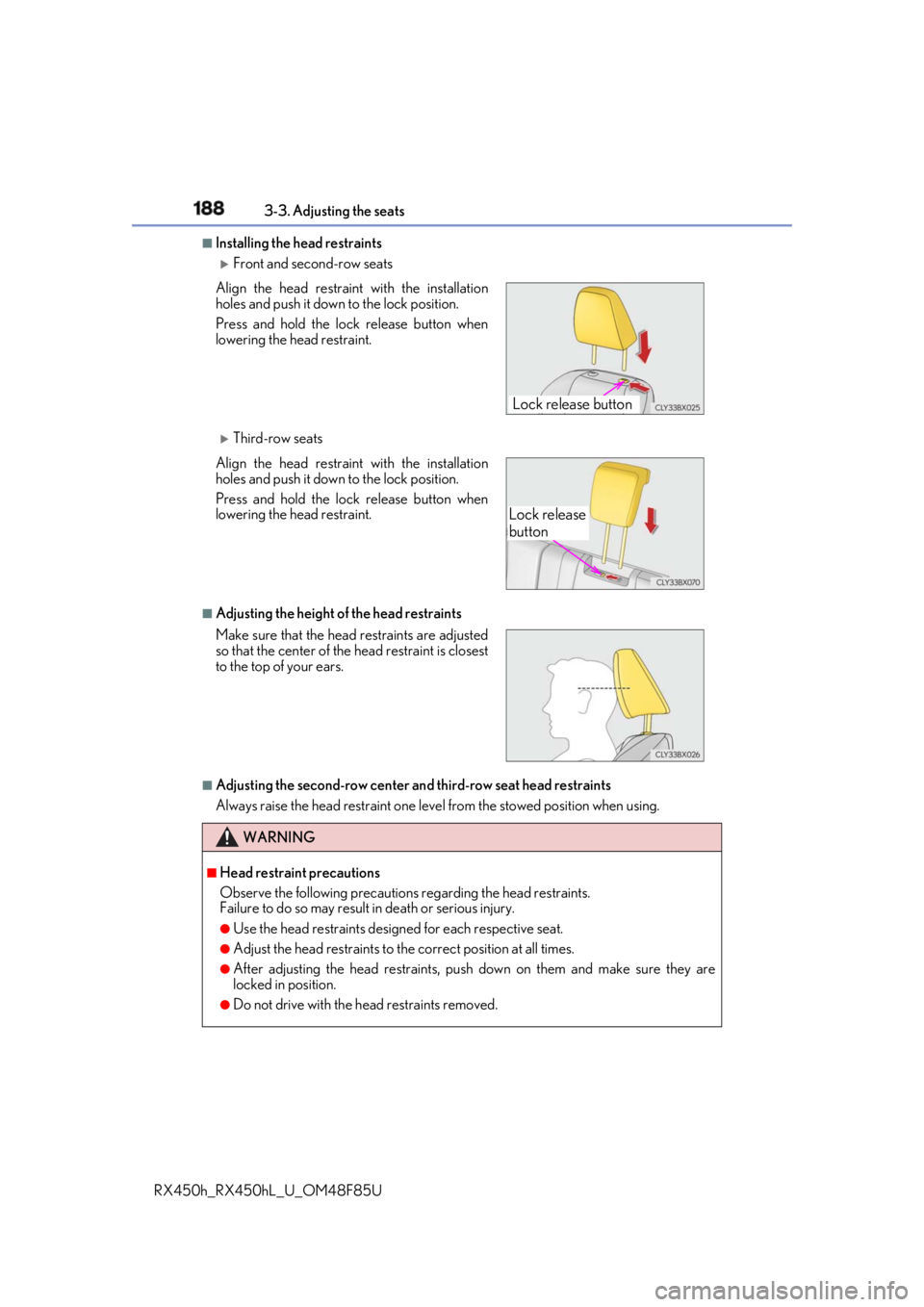
Installing the head restraints
Front and second-row seats
Third-row seats
■
Adjusting the height of the head restraints
■
Adjusting the second-row center an d third-row seat head restraints
Always raise the head restraint one leve l from the stowed position when using.Align the head restrain t with the installation
holes and push it down to the lock position.
Press and hold the lock release button when
lowering the head restraint.
Align the head restrain t with the installation
holes and push it down to the lock position.
Press and hold the lock release button when
lowering the head restraint.
Make sure that the head restraints are adjusted
so that the center of the head restraint is closest
to the top of your ears.
WARNING ■
Head restraint precautions
Observe the following precautions regarding the head restraints.
Failure to do so may result in death or serious injury.●
Use the head restraints design ed for each respective seat.●
Adjust the head restraints to th e correct position at all times.●
After adjusting the head restraints, push down on them and make sure they are
locked in position. ●
Do not drive with the head restraints removed. Lock release button
Lock release
button
Page 194 of 792
194 3-4. Adjusting the steering wheel and mirrors
RX450h_RX450hL _U_OM48F85U■
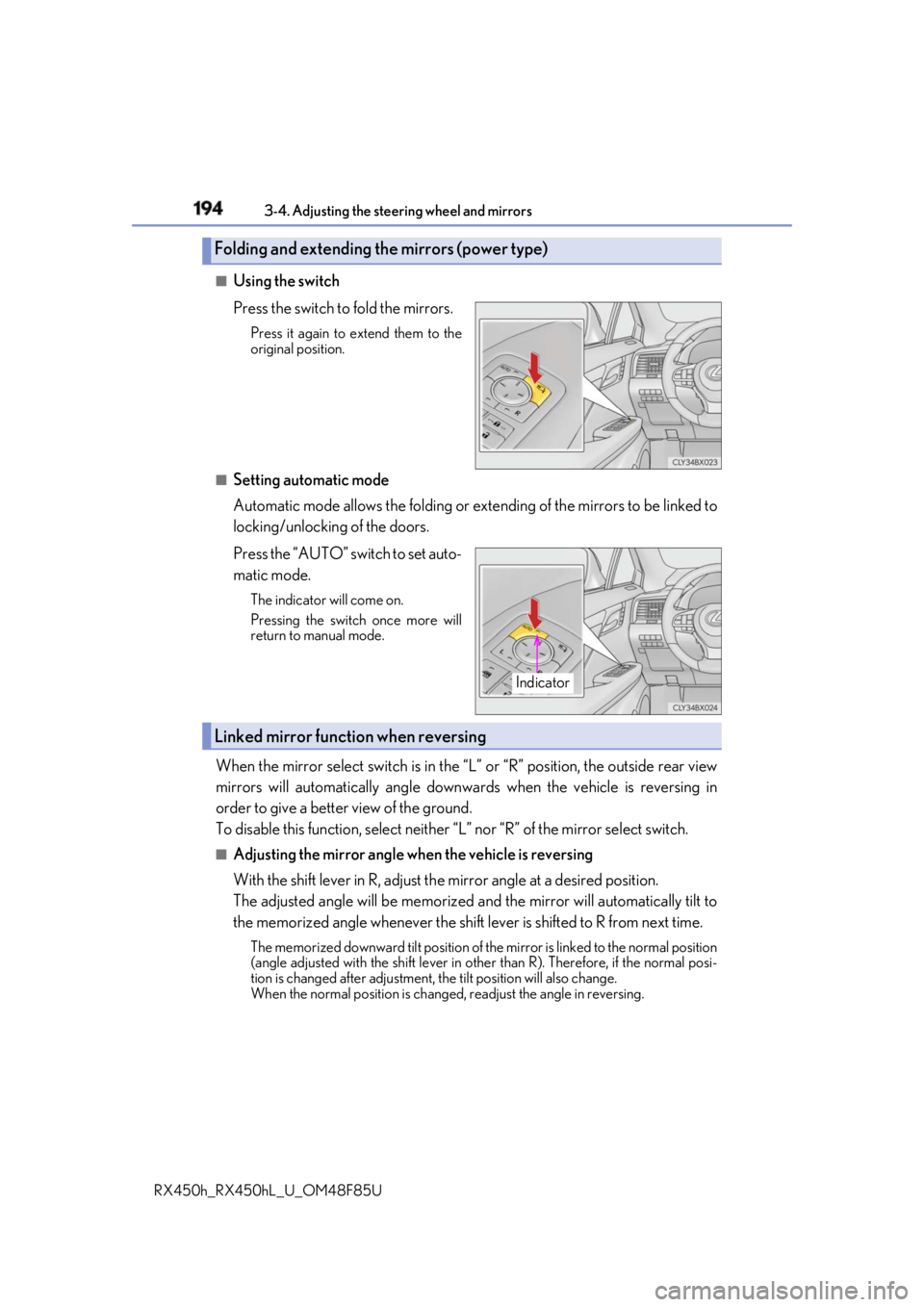
Using the switch
Press the switch to fold the mirrors. Press it again to extend them to the
original position.
■
Setting automatic mode
Automatic mode allows the folding or ex tending of the mirrors to be linked to
locking/unlocking of the doors.
Press the “AUTO” switch to set auto-
matic mode. The indicator will come on.
Pressing the switch once more will
return to manual mode.
When the mirror select switch is in the “L” or “R” position, the outside rear view
mirrors will automatically angle downwa rds when the vehicle is reversing in
order to give a better view of the ground.
To disable this function, select neither “L” nor “R” of the mirror select switch.■
Adjusting the mirror angle when the vehicle is reversing
With the shift lever in R, adjust th e mirror angle at a desired position.
The adjusted angle will be memorized and the mirror will automatically tilt to
the memorized angle whenever the shift lever is shifted to R from next time. The memorized downward tilt position of th e mirror is linked to the normal position
(angle adjusted with the shif t lever in other than R). Ther efore, if the normal posi-
tion is changed after adjustment, the tilt position will also change.
When the normal position is chang ed, readjust the angle in reversing.Folding and extending the mirrors (power type)
Indicator
Linked mirror function when reversing
Page 196 of 792
196
RX450h_RX450hL _U_OM48F85U3-5. Opening, closing the windows and moon roof
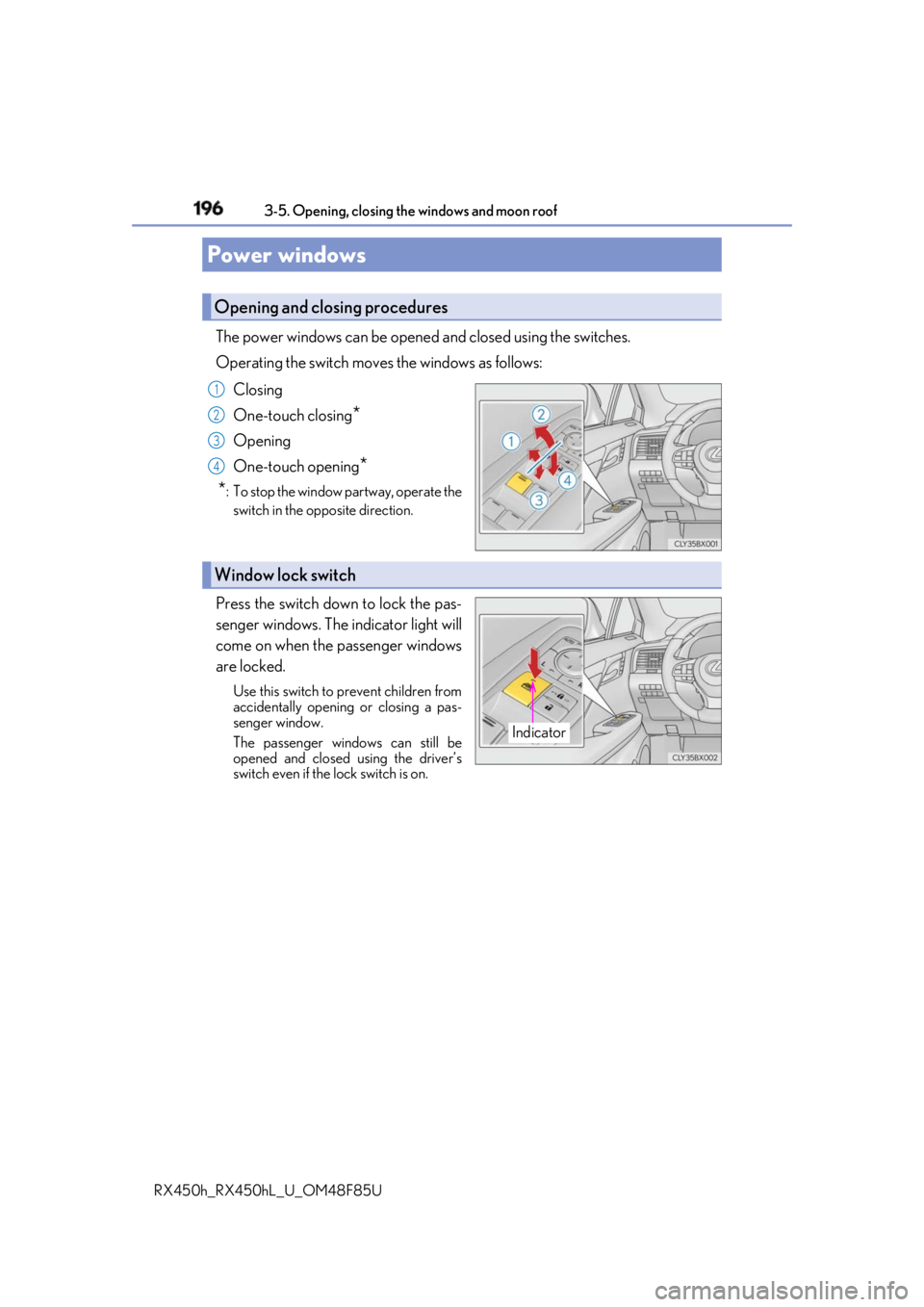
The power windows can be opened and closed using the switches.
Operating the switch move s the windows as follows:
Closing
One-touch closing
*Opening
One-touch opening
*
* : To stop the window partway, operate the
switch in the op posite direction.
Press the switch down to lock the pas-
senger windows. The indicator light will
come on when the passenger windows
are locked. Use this switch to prevent children from
accidentally opening or closing a pas-
senger window.
The passenger windows can still be
opened and closed using the driver’s
switch even if the lock switch is on.Power windows Opening and closing procedures 1
2
3
4
Window lock switch
Indicator