ESP LEXUS RX450h 2018 User Guide
[x] Cancel search | Manufacturer: LEXUS, Model Year: 2018, Model line: RX450h, Model: LEXUS RX450h 2018Pages: 792, PDF Size: 12.5 MB
Page 85 of 792
851-4. Theft deterrent system
1
For safety and security
RX450h_RX450hL _U_OM48F85U
For vehicles sold in Canada
WARNING ■
Certifications for the immobilizer system
Changes or modifications not expressly appr oved by the party responsible for compli-
ance could void the user’s authority to operate the equipment.
NOTICE ■
To ensure the system operates correctly
Do not modify or remove the system. If mo dified or removed, the proper operation of
the system cannot be guaranteed.
Page 113 of 792
1132. Instrument cluster
2
Instrument cluster
RX450h_RX450hL _U_OM48F85U■
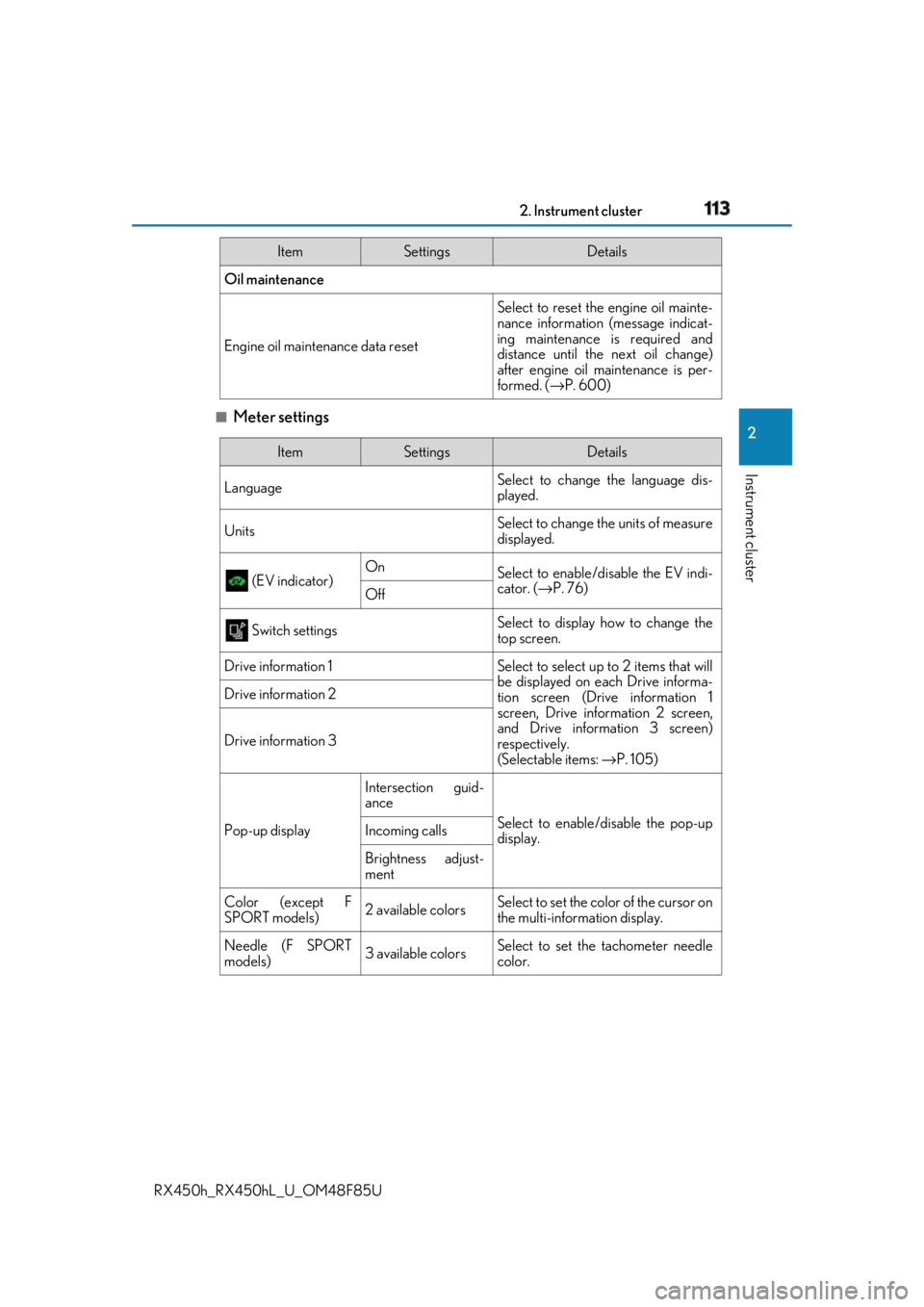
Meter settings Oil maintenance
Engine oil maintenance data reset Select to reset the engine oil mainte-
nance information (message indicat-
ing maintenance is required and
distance until the next oil change)
after engine oil maintenance is per-
formed. ( → P. 600)Item Settings Details
Item Settings Details
Language Select to change the language dis-
played.
Units Select to change the units of measure
displayed.
(EV indicator) On
Select to enable/dis able the EV indi-
cator. ( → P. 76)
Off
Switch settings Select to display how to change the
top screen.
Drive information 1 Select to select up to 2 items that will
be displayed on ea ch Drive informa-
tion screen (Drive information 1
screen, Drive information 2 screen,
and Drive inform ation 3 screen)
respectively.
(Selectable items: → P. 105)Drive information 2
Drive information 3
Pop-up display Intersection guid-
ance
Select to enable/disable the pop-up
display.Incoming calls
Brightness adjust-
ment
Color (except F
SPORT models) 2 available colors Select to set the color of the cursor on
the multi-information display.
Needle (F SPORT
models) 3 available colors Select to set the tachometer needle
color.
Page 116 of 792
116 2. Instrument cluster
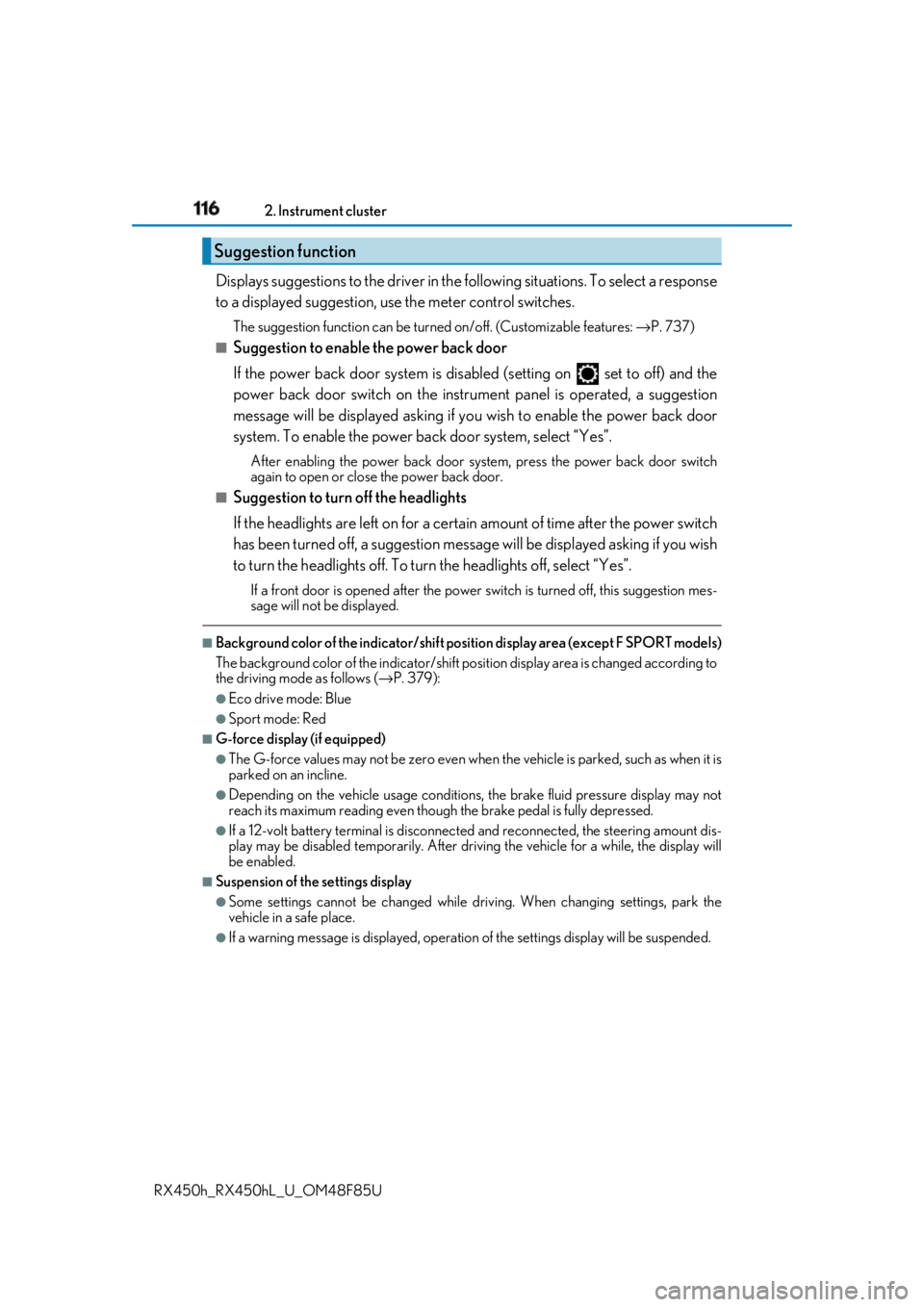
RX450h_RX450hL _U_OM48F85UDisplays suggestions to the driver in the following situations. To select a response
to a displayed suggestion, use the meter control switches. The suggestion function can be turned on/off. (Customizable features: → P. 737)■
Suggestion to enable the power back door
If the power back door system is disabled (setting on set to off) and the
power back door switch on the instru ment panel is operated, a suggestion
message will be displayed asking if yo u wish to enable the power back door
system. To enable the power back door system, select “Yes”. After enabling the power back door syst em, press the power back door switch
again to open or close the power back door.■
Suggestion to turn off the headlights
If the headlights are left on for a certai n amount of time af ter the power switch
has been turned off, a su ggestion message will be displayed asking if you wish
to turn the headlights off. To turn the headlights off, select “Yes”.If a front door is opened after the power switch is turned off, this suggestion mes-
sage will not be displayed.■
Background color of the indicator/shift posi tion display area (except F SPORT models)
The background color of the indicator/shift po sition display area is changed according to
the driving mode as follows ( → P. 379):●
Eco drive mode: Blue ●
Sport mode: Red ■
G-force display (if equipped) ●
The G-force values may not be zero even when the vehicle is parked, such as when it is
parked on an incline. ●
Depending on the vehicle usage conditions, the brake fluid pressure display may not
reach its maximum reading even though the brake pedal is fully depressed. ●
If a 12-volt battery terminal is disconnect ed and reconnected, the steering amount dis-
play may be disabled temporarily. After driv ing the vehicle for a while, the display will
be enabled. ■
Suspension of the settings display ●
Some settings cannot be changed while driv ing. When changing settings, park the
vehicle in a safe place. ●
If a warning message is displa yed, operation of the settin gs display will be suspended.Suggestion function
Page 117 of 792
1172. Instrument cluster
2
Instrument cluster
RX450h_RX450hL _U_OM48F85U■
Tire pressure ●
It may take a few minutes to display the tire inflation pressure after the power switch is
turned to ON mode. It may also take a few minutes to display the tire inflation pressure
after inflation pressure has been adjusted.●
“---” may be displayed if the tire position information cannot be determined due to
unfavorable radio wave conditions. ●
Tire inflation pressure changes with temperat ure. The displayed values may also be dif-
ferent from the values measured using a tire pressure gauge. ■
Liquid crystal display
Small spots or light spots may appear on the display. This phenomenon is characteristic
of liquid crystal displays, and there is no problem continuing to use the display.■
Customization
Some functions can be customized. ( → P. 108, 736)
WARNING ■
Caution for use while driving ●
When operating the multi-information display while driving, pay extra attention to the
safety of the area around the vehicle. ●
Do not look continuously at the multi-info rmation display while dr iving as you may fail
to see pedestrians, objects on the road, etc. ahead of the vehicle. ■
The information display at low temperatures
Allow the interior of the vehicle to warm up before using the liquid crystal information
display. At extremely low temperatures, th e information display monitor may respond
slowly, and display changes may be delayed.
For example, there is a lag between the dr iver’s shifting and the new gear number
appearing on the display. This lag could ca use the driver to downshift again, causing
rapid and excessive engine braking and possibly an accident resulting in death or
injury. ■
Cautions during setting up the display
As the hybrid system needs to be operating during setting up the display, ensure that
the vehicle is parked in a place with adequa te ventilation. In a closed area such as a
garage, exhaust gases including harmful carbon monoxide (CO) may collect and enter
the vehicle. This may lead to dea th or a serious health hazard.
NOTICE ■
While setting up the display
To prevent 12-volt battery discharge, ensure that the hybrid syst em is operating while
setting up the display features.
Page 122 of 792
122 2. Instrument cluster
RX450h_RX450hL _U_OM48F85U■
Head-up display
The head-up display may seem dark or hard to see when viewed through sunglasses,
especially pola rized sunglasses.
Adjust the brightness of the head-up display or remove your sunglasses.■
When the 12-volt battery is disconnected
The customize settings of the head-up display will be reset.■
Display brightness
The brightness of the head-up display can be adjusted on of the multi-information
display. Also, it is automatically adju sted according to th e ambient brightness.■
Enabling/disabling of the head-up display
If the head-up display is disabled, it will remain disabled when the power switch is turned
off then back to ON mode. ■
Automatic adjustment of the head-up display position
A desired head-up display position can be entered to memory and recalled automati-
cally by the driving position memory system. ( → P. 181)■
Street name display (vehicle s with a navigation system)
Only street names which are included in the map data will be displayed.
WARNING ■
Before using the head-up display ●
Check that the position and brightness of the head-up display image does not inter-
fere with safe driving. Inco rrect adjustment of the image’s position or brightness may
obstruct the driver’s view and lead to an acc ident, resulting in de ath or serious injury.●
Do not continuously look at the head-up di splay while driving as you may fail to see
pedestrians, objects on the road, etc. ahead of the vehicle. ■
Caution for changing settings of the head-up display
As the hybrid system needs to be operating while changing the settings of the head-up
display, ensure that the vehicle is parked in a place with adequate ventilation. In a
closed area such as a garage, exhaust gases including harmful carbon monoxide (CO)
may collect and enter the vehicle. This may lead to death or a serious health hazard.
Page 141 of 792
1413-2. Opening, closing and locking the doors
3
Operation of each component
RX450h_RX450hL _U_OM48F85U■
Conditions affecting the oper ation of the smart access sy stem with push-button start
or wireless remote control
→ P. 160 ■
Customization
Some functions can be customized. ( → P. 736)
WARNING ■
To prevent an accident
Observe the following precautions while driving the vehicle.
Failure to do so may result in a door open ing and an occupant falling out, resulting in
death or serious injury. ●
Ensure that all doors are properly closed and locked. ●
Do not pull the inside handle of the doors while driving.
Be especially careful for the front doors, as the doors may be opened even if the
inside lock buttons are in locked position. ●
Set the rear door child-protector locks wh en children are seated in the rear seats.■
When opening or closing a door
Check the surroundings of the vehicle such as whether the vehicle is on an incline,
whether there is enough space for a door to open and whether a strong wind is blow-
ing. When opening or closing the door, hold the door handle tightly to prepare for any
unpredictable movement.
Page 148 of 792
148 3-2. Opening, closing and locking the doors
RX450h_RX450hL _U_OM48F85U■
Luggage compartment lights
●
RX450hL: The luggage compartment lights tu rn on when the back door is opened.●
When the power switch is turned off, the lights will go off automatically after 20 min-
utes. ■
If the power back door opener is inoperative
The power back door can be unlocked from the inside. ●
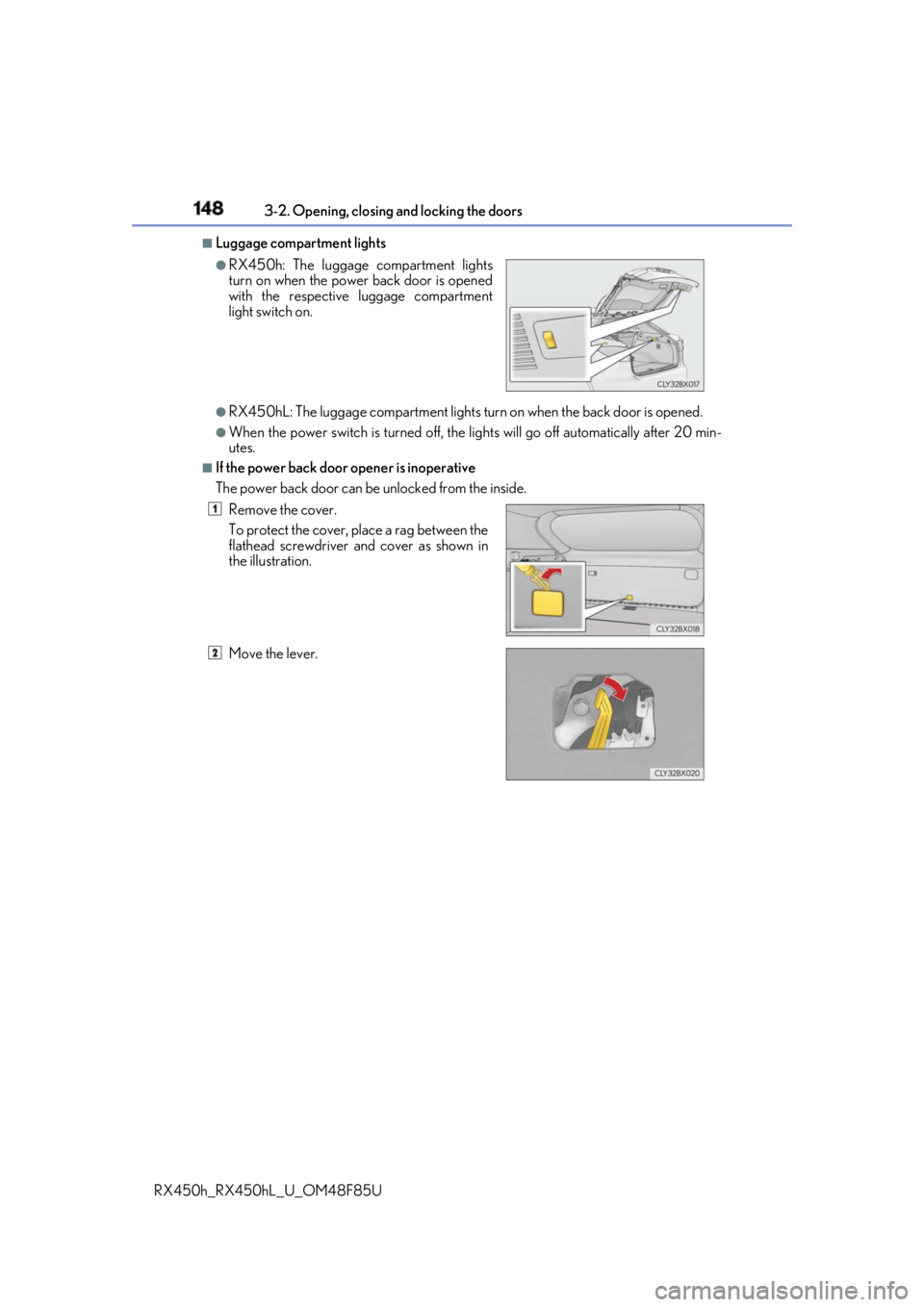
RX450h: The luggage compartment lights
turn on when the power back door is opened
with the respective luggage compartment
light switch on.
Remove the cover.
To protect the cover, place a rag between the
flathead screwdriver and cover as shown in
the illustration.
Move the lever. 1
2
Page 159 of 792
1593-2. Opening, closing and locking the doors
3
Operation of each component
RX450h_RX450hL _U_OM48F85U■
Alarms and warning messages
A combination of exterior and interior alar ms as well as warning messages shown on the
multi-information display are used to prevent theft of the vehicle and accidents resulting
from erroneous operation. Take appropriate measures in response to any warning mes-
sage on the multi-information display. ( → P. 667)
When only an alarm sounds, circumstances and correction procedures are as follows.
■
If a warning message is displayed indicating that there is a malfunction in the smart
access system with push-button start
→ P. 667 ■
Battery-saving function
The battery-saving function w ill be activated in order to pr event the electronic key bat-
tery and the 12-volt battery from being discha rged while the vehicle is not in operation
for a long time. ●
In the following situations, the smart acce ss system with push-button start may take
some time to unlock the doors.
• The electronic key has been le ft in an area of approximatel y 6 ft. (2 m) of the outside
of the vehicle for 10 minutes or longer.
• The smart access system with push-button st art has not been used for 5 days or lon-
ger. ●
If the smart access system with push-button start has not been used for 14 days or lon-
ger, the doors cannot be unlocked at any doors except the driver’s door. In this case,
take hold of the driver’s d oor handle, or use the wireless remote control or the mechan-
ical key, to unlock the doors. Alarm Situation Correction procedure
Exterior alarm
sounds once for 5
seconds An attempt was made to lock
the vehicle while a door was
open. Close all of the doors and
lock the doors again.
Interior alarm pings
repeatedly The power switch was turned to
ACCESSORY mode while the
driver’s door was open (The
driver’s door was opened when
the power switch was in
ACCESSORY mode). Turn the power switch off
and close the driver’s door.
Page 188 of 792
188 3-3. Adjusting the seats
RX450h_RX450hL _U_OM48F85U■
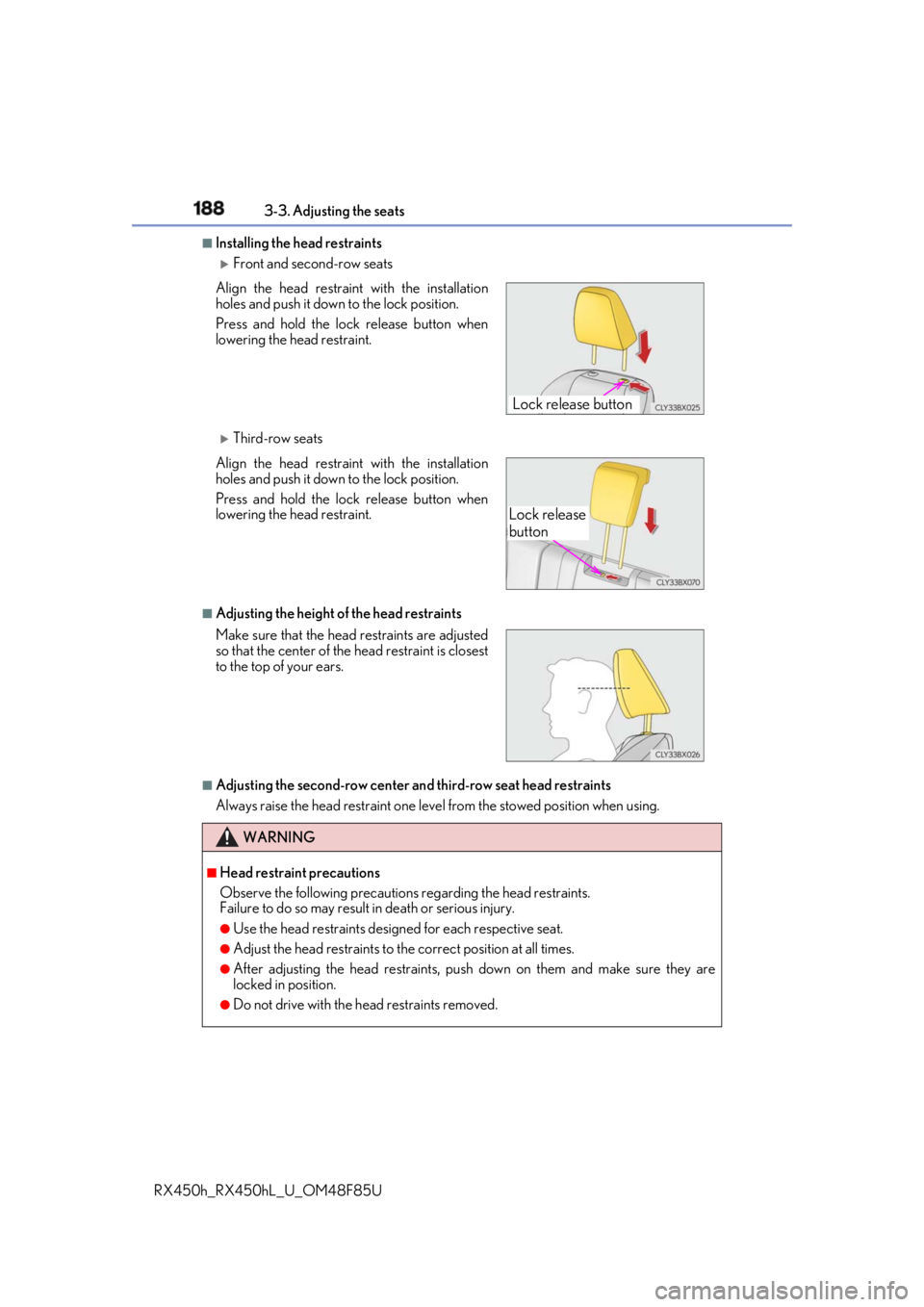
Installing the head restraints
Front and second-row seats
Third-row seats
■
Adjusting the height of the head restraints
■
Adjusting the second-row center an d third-row seat head restraints
Always raise the head restraint one leve l from the stowed position when using.Align the head restrain t with the installation
holes and push it down to the lock position.
Press and hold the lock release button when
lowering the head restraint.
Align the head restrain t with the installation
holes and push it down to the lock position.
Press and hold the lock release button when
lowering the head restraint.
Make sure that the head restraints are adjusted
so that the center of the head restraint is closest
to the top of your ears.
WARNING ■
Head restraint precautions
Observe the following precautions regarding the head restraints.
Failure to do so may result in death or serious injury.●
Use the head restraints design ed for each respective seat.●
Adjust the head restraints to th e correct position at all times.●
After adjusting the head restraints, push down on them and make sure they are
locked in position. ●
Do not drive with the head restraints removed. Lock release button
Lock release
button
Page 191 of 792
1913-4. Adjusting the steering wheel and mirrors
3
Operation of each component
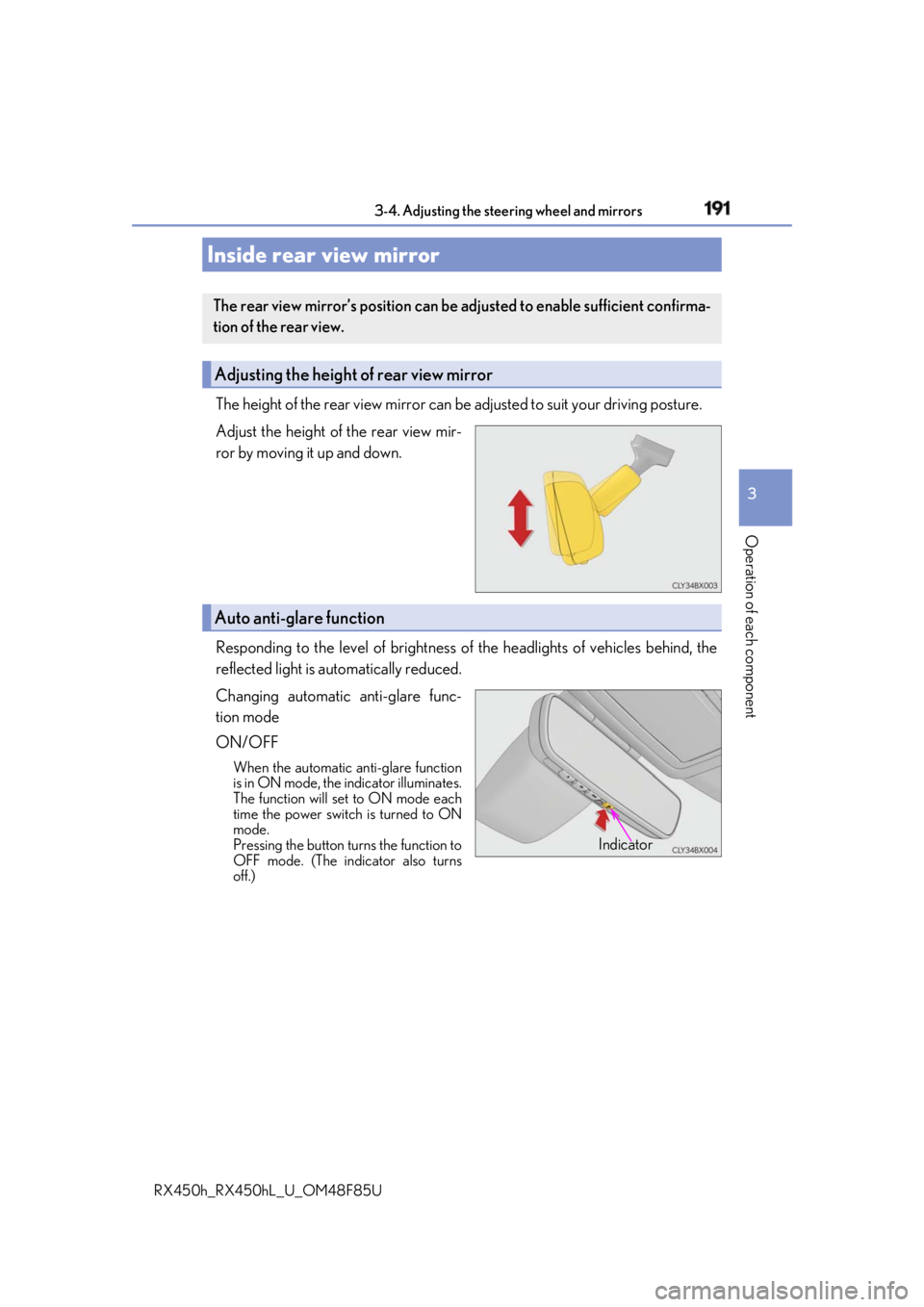
RX450h_RX450hL _U_OM48F85UThe height of the rear view mirror can be adjusted to suit your driving posture.
Adjust the height of the rear view mir-
ror by moving it up and down.
Responding to the level of brightness of the headlights of vehicles behind, the
reflected light is automatically reduced.
Changing automatic anti-glare func-
tion mode
ON/OFF When the automatic anti-glare function
is in ON mode, the indicator illuminates.
The function will set to ON mode each
time the power switch is turned to ON
mode.
Pressing the button turns the function to
OFF mode. (The indicator also turns
off.)Inside rear view mirror The rear view mirror’s position can be adjusted to enable sufficient confirma-
tion of the rear view.
Adjusting the height of rear view mirror
Auto anti-glare function
Indicator