ESP LEXUS RX450h 2018 Workshop Manual
[x] Cancel search | Manufacturer: LEXUS, Model Year: 2018, Model line: RX450h, Model: LEXUS RX450h 2018Pages: 792, PDF Size: 12.5 MB
Page 407 of 792
4075-1. Basic Operations
5
Lexus Display Audio system
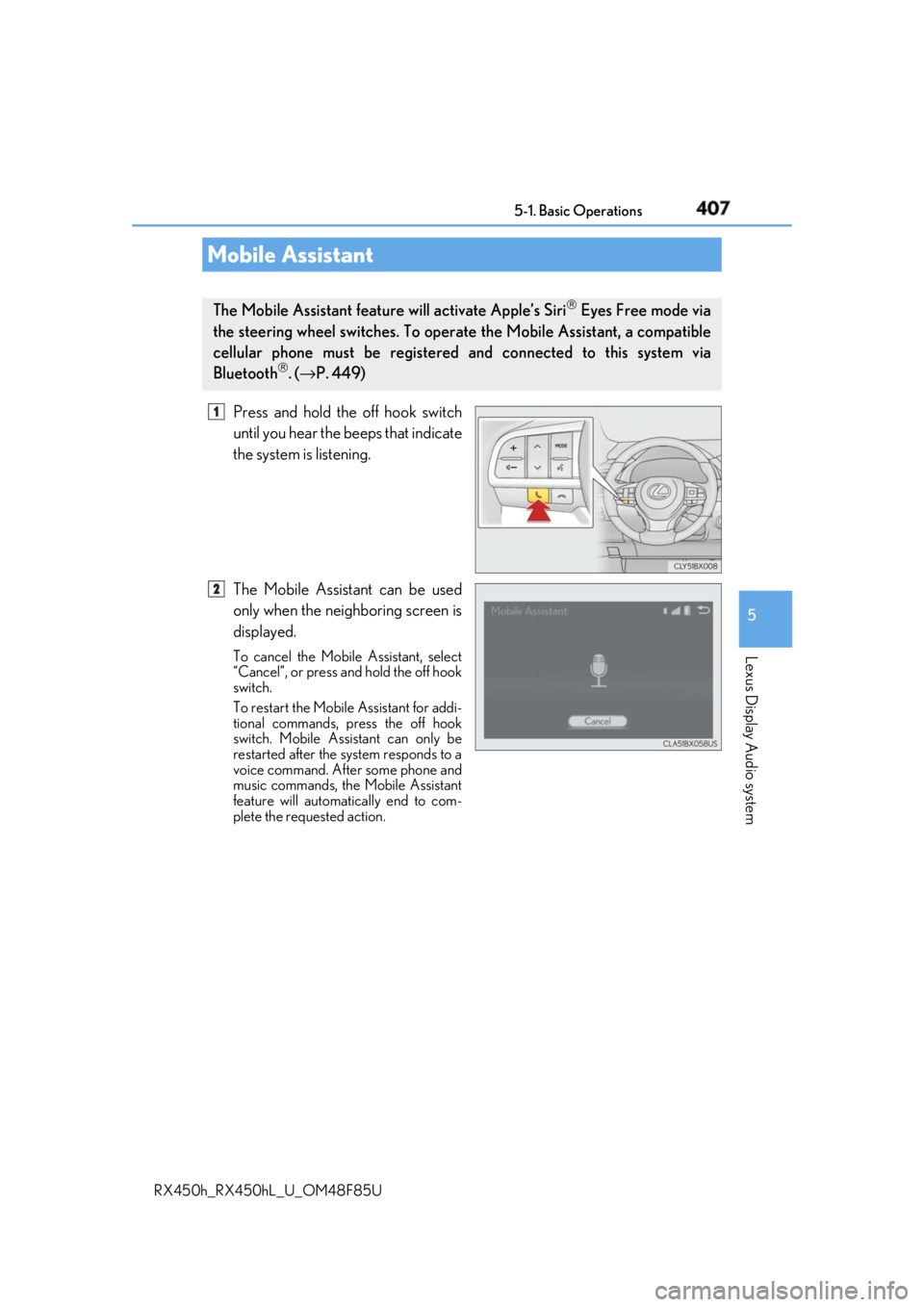
RX450h_RX450hL _U_OM48F85UPress and hold the off hook switch
until you hear the beeps that indicate
the system is listening.
The Mobile Assistant can be used
only when the neighboring screen is
displayed. To cancel the Mobile Assistant, select
“Cancel”, or press and hold the off hook
switch.
To restart the Mobile Assistant for addi-
tional commands, press the off hook
switch. Mobile Assistant can only be
restarted after the sy stem responds to a
voice command. After some phone and
music commands, the Mobile Assistant
feature will automatically end to com-
plete the requested action.Mobile Assistant The Mobile Assistant feature will activate Apple’s Siri
Eyes Free mode via
the steering wheel switches. To operat e the Mobile Assistant, a compatible
cellular phone must be registered and connected to this system via
Bluetooth
. ( → P. 449) 1
2
Page 414 of 792
414 5-2. Setup
RX450h_RX450hL _U_OM48F85UGo to “Customize Images”: “MENU” button → “Setup” → “General” →
“Customize Images”
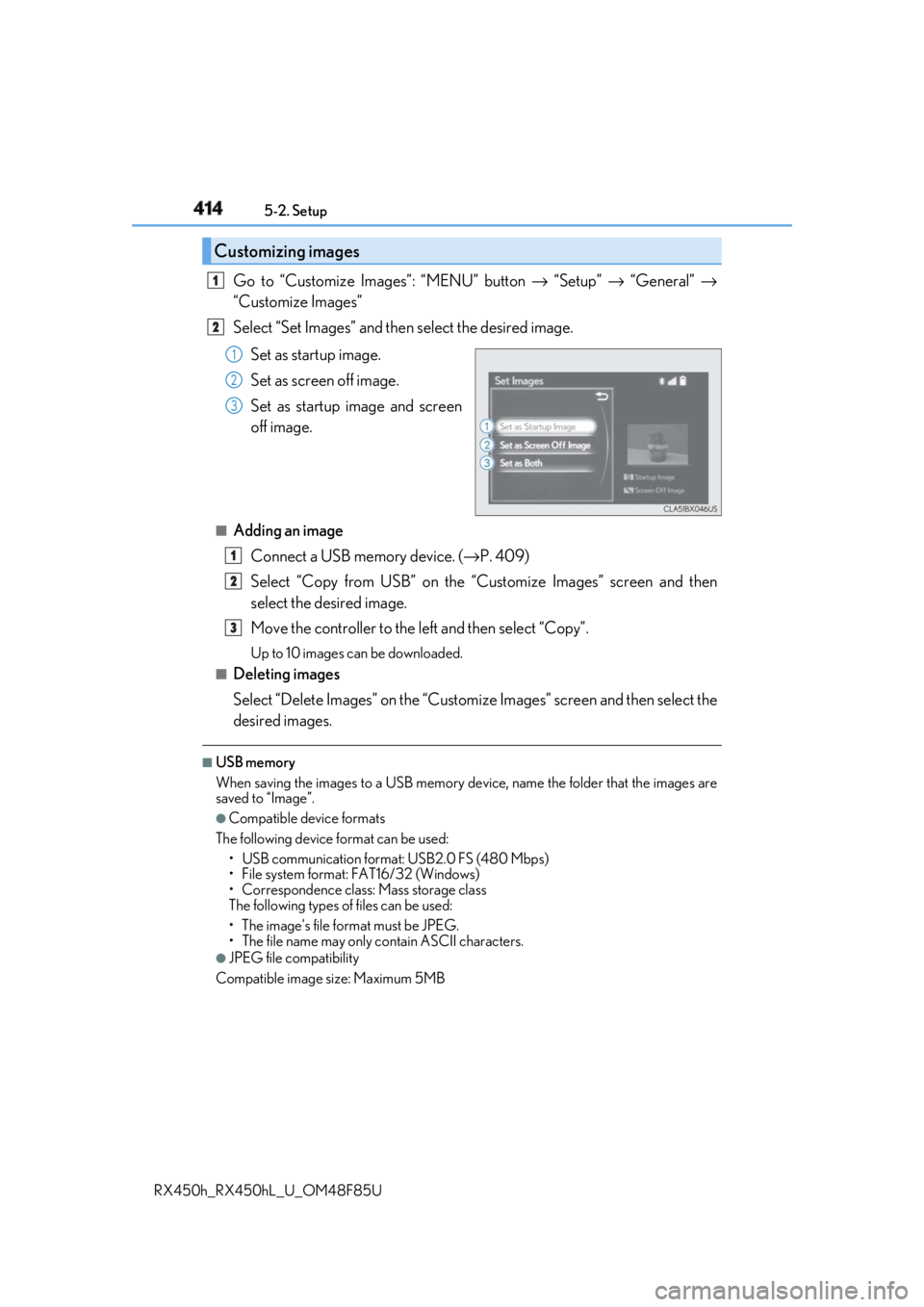
Select “Set Images” and then select the desired image.
Set as startup image.
Set as screen off image.
Set as startup image and screen
off image.■
Adding an image
Connect a USB memory device. ( → P. 409)
Select “Copy from USB” on the “Customize Images” screen and then
select the desired image.
Move the controller to the left and then select “Copy”. Up to 10 images can be downloaded.■
Deleting images
Select “Delete Images” on the “Customize Images” screen and then select the
desired images. ■
USB memory
When saving the images to a USB memory de vice, name the folder that the images are
saved to “Image”. ●
Compatible device formats
The following device format can be used:
• USB communication format: USB2.0 FS (480 Mbps)
• File system format: FAT16/32 (Windows)
• Correspondence class: Mass storage class
The following types of files can be used:
• The image’s file fo rmat must be JPEG.
• The file name may only contain ASCII characters.●
JPEG file compatibility
Compatible image size: Maximum 5MBCustomizing images 1
2
1
2
3
1
2
3
Page 445 of 792
4455-6. Using an external device
5
Lexus Display Audio system
RX450h_RX450hL _U_OM48F85U■
USB memory functions ●
Depending on the USB memory device that is connected to the system, the device
itself may not be operable and certain functions may not be available. If the device is
inoperable or a function is unavailable due to a malfunction (as opposed to a system
specification), disconnecting the device an d reconnecting it may resolve the problem.●
If the USB memory device still does not begin operation after being disconnected and
reconnected, format the device. ■
Error messages for USB memory
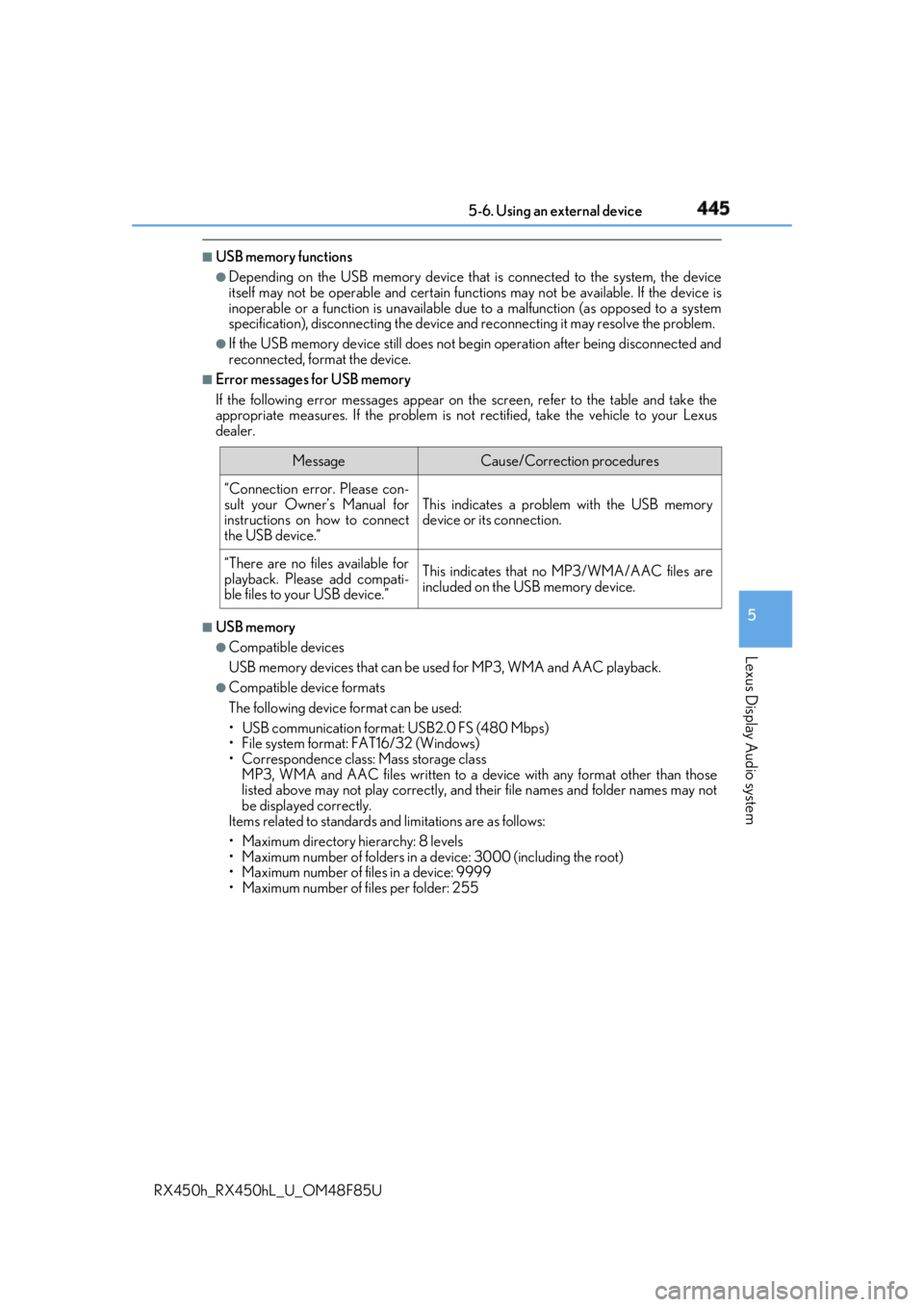
If the following error messages appear on th e screen, refer to the table and take the
appropriate measures. If the pr oblem is not rectified, take the vehicle to your Lexus
dealer.
■
USB memory ●
Compatible devices
USB memory devices that can be used for MP3, WMA and AAC playback. ●
Compatible device formats
The following device format can be used:
• USB communication format: USB2.0 FS (480 Mbps)
• File system format: FAT16/32 (Windows)
• Correspondence class: Mass storage class
MP3, WMA and AAC files written to a devi ce with any format other than those
listed above may not play correctly, and their file names and folder names may not
be displayed correctly.
Items related to standards an d limitations are as follows:
• Maximum directory hierarchy: 8 levels
• Maximum number of folders in a device: 3000 (including the root)
• Maximum number of files in a device: 9999
• Maximum number of files per folder: 255 Message Cause/Correction procedures
“Connection error. Please con-
sult your Owner’s Manual for
instructions on how to connect
the USB device.” This indicates a problem with the USB memory
device or its connection.
“There are no files available for
playback. Please add compati-
ble files to your USB device.” This indicates that no MP3/WMA/AAC files are
included on the USB memory device.
Page 483 of 792
4835-11. Bluetooth ®
5
Lexus Display Audio system
RX450h_RX450hL _U_OM48F85U■
Bluetooth ®
antenna
The antenna is built into the display.
If the portable audio player is behind the se at or in the glove box or console box, or is
touching or covered by metal objects, the connection status may deteriorate.
If the cellular phone is behind the seat or in the console box, or touching or covered by
metal objects, the connection status may deteriorate. ■
Battery charge/signal status ●
This display may not correspond exactly wi th the portable audio player or cellular
phone itself. ●
This system does not have a charging function. ●
The portable audio player or cellular phone battery will be deplet ed quickly when the
device is connected to Bluetooth ®
.■
When using the Bluetooth ®
audio and hands-free system at the same time
The following problems may occur. ●
The Bluetooth ®
audio connection may be interrupted.●
Noise may be heard during Bluetooth ®
audio playback.■
About the contact in this system
The following data is stored for every registered cellular phone. When another phone is
connecting, you cannot read the registered data. ●
Contact data ●
Call history ●
Favorite ●
Message
When removing a Bluetooth ®
phone from the system, the above-mentioned data is also
deleted. ■
About Bluetooth ®
Page 491 of 792
4915-12. Other function
5
Lexus Display Audio system
RX450h_RX450hL _U_OM48F85U■
USB memory functions
→ P. 445 ■
USB memory ●
Compatible devices
USB memory device that can be used for JPEG display.●
Compatible device formats
The following device format can be used:
• USB communication format: USB2.0 FS (480 Mbps)
• File system format: FAT16/32 (Windows)
• Correspondence class: Mass storage class●
JPEG file compatibility
• Compatible image size: Maximum 10MB
• Compatible pixel size: Maximum 10,000,000 pixels
NOTICE ■
To prevent damage to the USB me mory device or its terminals
→ P. 447
Page 493 of 792
4935-12. Other function
5
Lexus Display Audio system
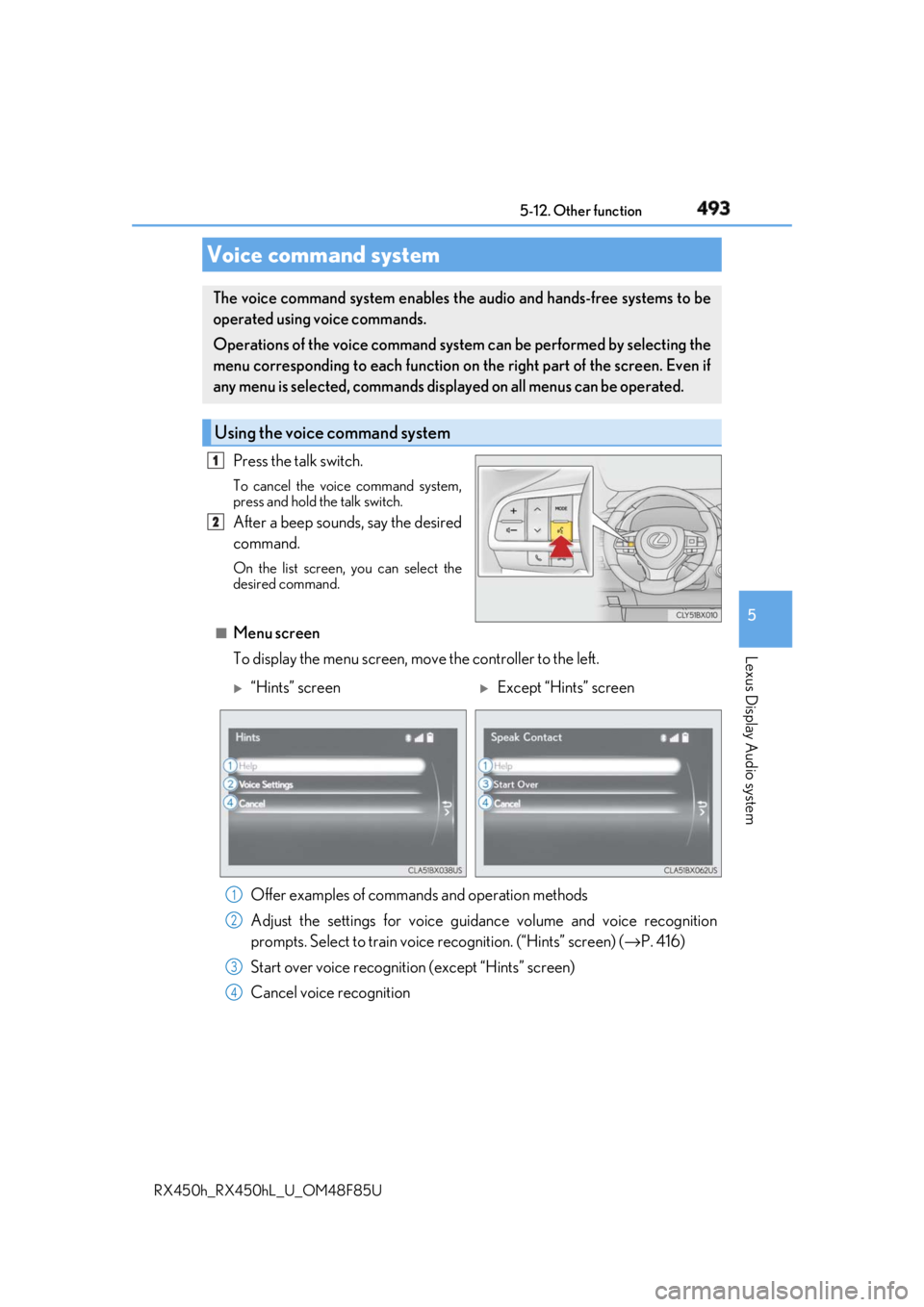
RX450h_RX450hL _U_OM48F85UPress the talk switch. To cancel the voice command system,
press and hold the talk switch.
After a beep sounds, say the desired
command. On the list screen, you can select the
desired command.
■
Menu screen
To display the menu screen, m ove the controller to the left.Voice command system The voice command system enables the audio and hands-free systems to be
operated using voice commands.
Operations of the voice command system can be performed by selecting the
menu corresponding to each function on the right part of the screen. Even if
any menu is selected, commands displayed on all menus can be operated.
Using the voice command system 1
2
“Hints” screen
Except “Hints” screen
Offer examples of commands and operation methods
Adjust the settings for voice guidance volume and voice recognition
prompts. Select to train voice recognition. (“Hints” screen) ( → P. 416)
Start over voice recognition (except “Hints” screen)
Cancel voice recognition 1
2
3
4
Page 502 of 792
502 6-1. Basic operation of the Remote Touch screen
RX450h_RX450hL _U_OM48F85U■
Screen display during low temperatures
When the ambient temperature is extremely low, screen response may be delayed even
if the Remote Touch is operated.
WARNING ■
When using the Remote Touch ●
Do not allow fingers, fingernails or hair to become caught in the Remote Touch as this
may cause an injury. ●
Be careful when selecting the Remote Touch in extreme temperatures as it may
become very hot or cold due to the temperature inside the vehicle.
NOTICE ■
To prevent damage to the Remote Touch ●
Do not allow the Remote Touch to come into contact with food, liquid, stickers or lit
cigarettes as doing so may cause it to change color, emit a strange odor or stop func-
tioning. ●
Do not subject the Remote Touch to excessive pressure or strong impact as the knob
may bend or break off. ●
Do not allow coins, contact lenses or ot her such items to be come caught in the
Remote Touch as this may cause it to stop functioning. ●
Items of clothing may rip if they become caught on the Remote Touch knob. ●
If your hand or any object is on the Remo te Touch knob when th e power switch is in
ACCESSORY mode, the Remote Touch knob may not operate properly.
Page 505 of 792
5056-1. Basic operation of the Remote Touch screen
6
Interior features
RX450h_RX450hL _U_OM48F85U■
Selecting the operation screen
When selecting the main display, move the Remote Touch knob to the left.
When selecting the side display, move the Remote Touch knob to the right. ■
Main display
For details about the functions and operat ion of the main display, refer to the
respective section and “NAVIG ATION SYSTEM OWNER’S MANUAL”.■
Side display
Basic screens
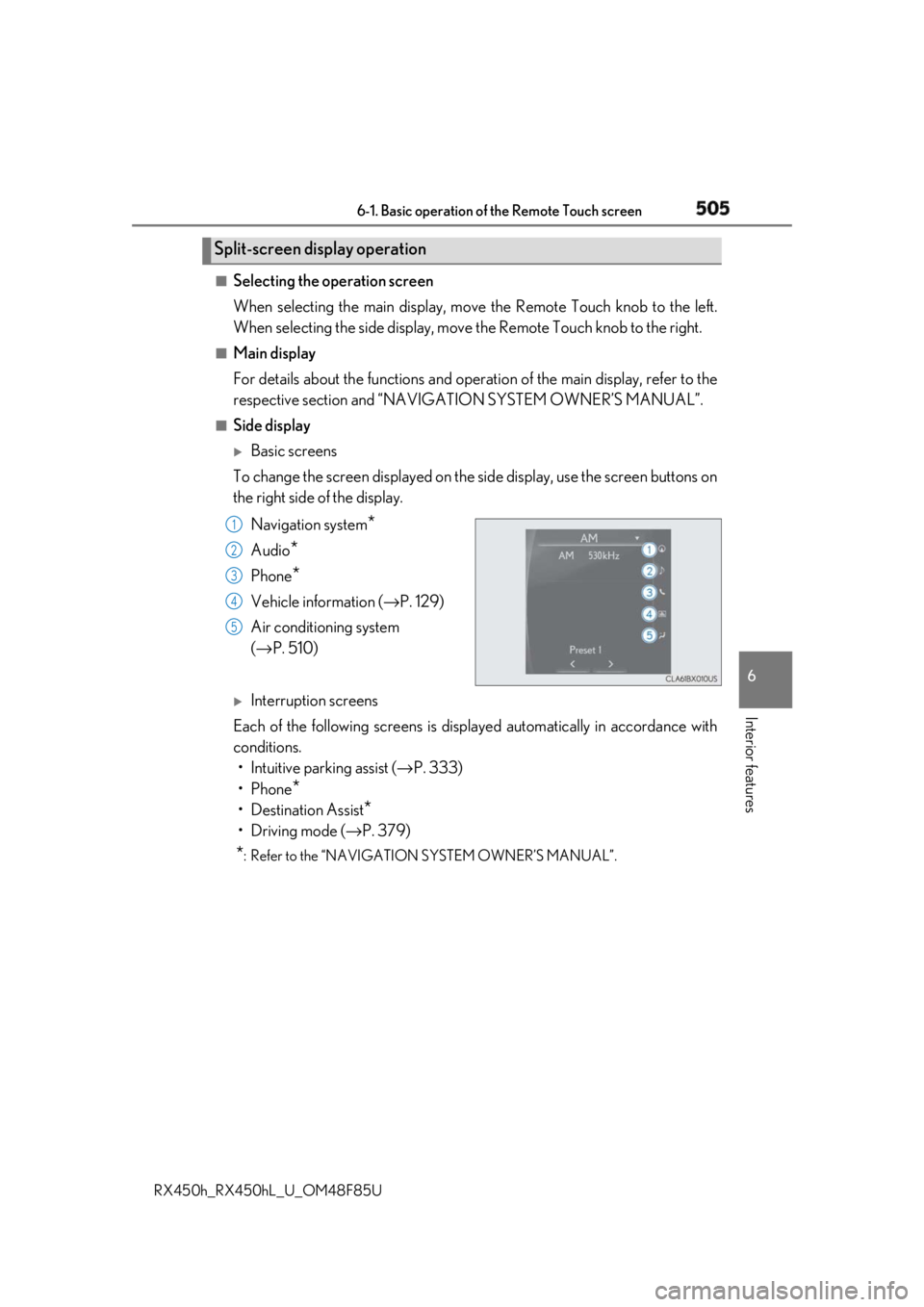
To change the screen displayed on the side display, use the screen buttons on
the right side of the display.
Navigation system
*Audio
* Phone
* Vehicle information ( → P. 129)
Air conditioning system
( → P. 510)
Interruption screens
Each of the following screens is displayed automatically in accordance with
conditions.
• Intuitive parking assist ( → P. 333)
•Phone
*• Destination Assist
*•Driving mode ( → P. 379)
* : Refer to the “NAVIGATION SYSTEM OWNER’S MANUAL”.Split-screen display operation
1
2
3
4
5
Page 525 of 792
5256-2. Using the air conditioning system and defogger
RX450h_RX450hL _U_OM48F85U 6
Interior features
Heated steering wheel ∗
/seat heaters ∗
/seat ventila-
tors ∗
∗ : If equippedHeated steering wheel and seat heaters heat the side grips of the steering
wheel and seats, respectively. Seat ventilators maintain good airflow by blow-
ing air from the seats. WARNING ●
Care should be taken to prevent injury if anyone in the following categories comes in
contact with the steering wheel and seats when the heater is on:
• Babies, small children, the elderly, the sick and the ph ysically challenged
• Persons with sensitive skin
• Persons who are fatigued
• Persons who have taken alcohol or drugs that induce sleep (sleeping drugs, cold
remedies, etc.) ●
Observe the following precautions to prevent minor burns or overheating:
• Do not cover the seat with a blanket or cushion when using the seat heater.
• Do not use seat heater more than necessary.
NOTICE ●
Do not put heavy objects that have an unev en surface on the seat and do not stick
sharp objects (needles, nails, etc.) into the seat. ●
To prevent 12-volt battery discharge, do not use the functions when the hybrid system
is off.
Page 531 of 792
5316-3. Using the interior lights
6
Interior features
RX450h_RX450hL _U_OM48F85U●
Illuminated entry system: The lights automatically turn on/off according to power switch
mode, the presence of the electronic key, whether the doors are locked/unlocked, and
whether the doors are opened/closed. ●
If the interior lights remain on when the power switch is turned off, the lights will go off
automatically after 20 minutes. ●
In the following cases, the interior lights and front personal lights may not respond as
normal.
• When water, dirt, etc., have adhered to the lens surface
• When operated with a wet hand
• When wearing gloves, etc. ●
Some functions can be customized ( → P. 736)
NOTICE ●
Never remove the lens for the front interior light and fron t personal lights. Otherwise,
the lights will be damaged. If the lens need to remove, contact your Lexus dealer.●
To prevent 12-volt battery discharge, do not leave the lights on longer than necessary
when the hybrid system is off.