ESP LEXUS RX450h 2018 Owner's Guide
[x] Cancel search | Manufacturer: LEXUS, Model Year: 2018, Model line: RX450h, Model: LEXUS RX450h 2018Pages: 792, PDF Size: 12.5 MB
Page 307 of 792
3074-5. Using the driving support systems
4
Driving
RX450h_RX450hL _U_OM48F85UWARNING ■
Before using dynamic radar cruise control with full-speed range
Driving safely is the sole responsibility of th e driver. Do not rely solely on the system,
and drive safely by always paying careful attention to your surroundings.
The dynamic radar cruise cont rol with full-speed range prov ides driving assistance to
reduce the driver's burden. However, there are limitations to the assistance provided.
Set the speed appropriately depending on the speed limit, traffic flow, road conditions,
weather conditions, etc. The driver is responsible for chec king the set speed.
Even when the system is functioning norma lly, the condition of the preceding vehicle as
detected by the system may differ from the condition observed by the driver. There-
fore, the driver must always remain alert, assess the danger of each situation and drive
safely. Relying on this system or assuming the system ensures safety while driving can
lead to an accident, resultin g in death or serious injury.■
Cautions regarding the driving assist systems
Observe the following precautions, as there are limitations to the assistance provided
by the system.
Failure to do so may cause an accident resulting in death or serious injury.●
Assisting the driver to measure following distance
The dynamic radar cruise cont rol with full-speed range is only intended to help the
driver in determining the following distan ce between the driver’s own vehicle and a
designated vehicle traveling ahead. It is no t a mechanism that allows careless or inat-
tentive driving, and it is not a system that can assist the driver in low-visibility condi-
tions. It is still necessary for driver to pa y close attention to the vehicle’s surroundings.●
Assisting the driver to judg e proper following distance
The dynamic radar cruise control with full-speed range determines whether the fol-
lowing distance between the driver’s own vehicle and a designated vehicle traveling
ahead is within a set range. It is not capable of making any other type of judgement.
Therefore, it is absolutely necessary for the driver to remain vigilant and to determine
whether or not there is a possibility of danger in any given situation.●
Assisting the driver to operate the vehicle
The dynamic radar cruise control with full-speed range has limited capability to pre-
vent or avoid a collision with a vehicle trave ling ahead. Therefore, if there is ever any
danger, the driver must take immediate and direct control of the vehicle and act
appropriately in order to ensure the safety of all involved.■
To avoid inadvertent dynamic radar cruise control with full-speed range activation
Switch the dynamic radar cruise control wi th full-speed range off using the “ON/OFF”
button when not in use.
Page 309 of 792
3094-5. Using the driving support systems
4
Driving
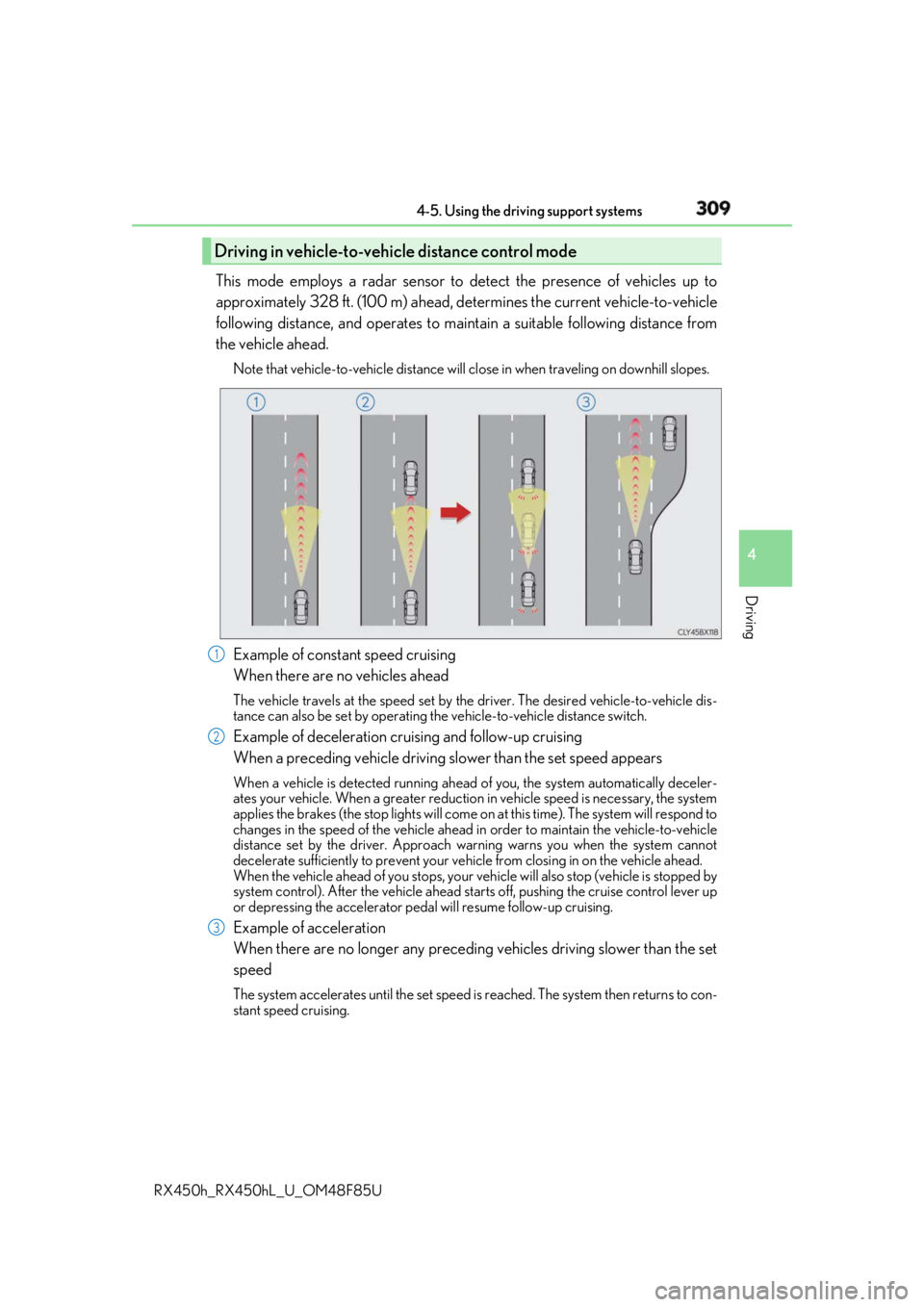
RX450h_RX450hL _U_OM48F85UThis mode employs a radar sensor to detect the presence of vehicles up to
approximately 328 ft. (100 m) ahead, de termines the current vehicle-to-vehicle
following distance, and operates to main tain a suitable following distance from
the vehicle ahead. Note that vehicle-to-vehicle distance will cl ose in when traveling on downhill slopes.
Example of constant speed cruising
When there are no vehicles ahead The vehicle travels at the speed set by the driver. The desired vehicle-to-vehicle dis-
tance can also be set by operating the vehicle-to-vehicle distance switch.
Example of deceleration cruising and follow-up cruising
When a preceding vehicle driving sl ower than the set speed appearsWhen a vehicle is detected running ahead of you, the system automatically deceler-
ates your vehicle. When a greater reduction in vehicle speed is necessary, the system
applies the brakes (the stop lights will come on at this time). Th e system will respond to
changes in the speed of the vehicle ahead in order to maintain the vehicle-to-vehicle
distance set by the driver. Approach warning warns you when the system cannot
decelerate sufficie ntly to prevent your vehicle from closing in on the vehicle ahead.
When the vehicle ahead of you stops, your vehicle will also stop (vehicle is stopped by
system control). After the vehicle ahead starts off, pushing the cruise control lever up
or depressing the accelerator pedal will resume follow-up cruising.
Example of acceleration
When there are no longer any preceding vehicles driving slower than the set
speed The system accelerates until the set speed is reached. The system then returns to con-
stant speed cruising.Driving in vehicle-to-vehicle distance control mode
1
2
3
Page 322 of 792
322 4-5. Using the driving support systems
RX450h_RX450hL _U_OM48F85U■
Customization
Some functions can be customized. ( → P. 331, 667)
WARNING ■
Handling the radar sensor
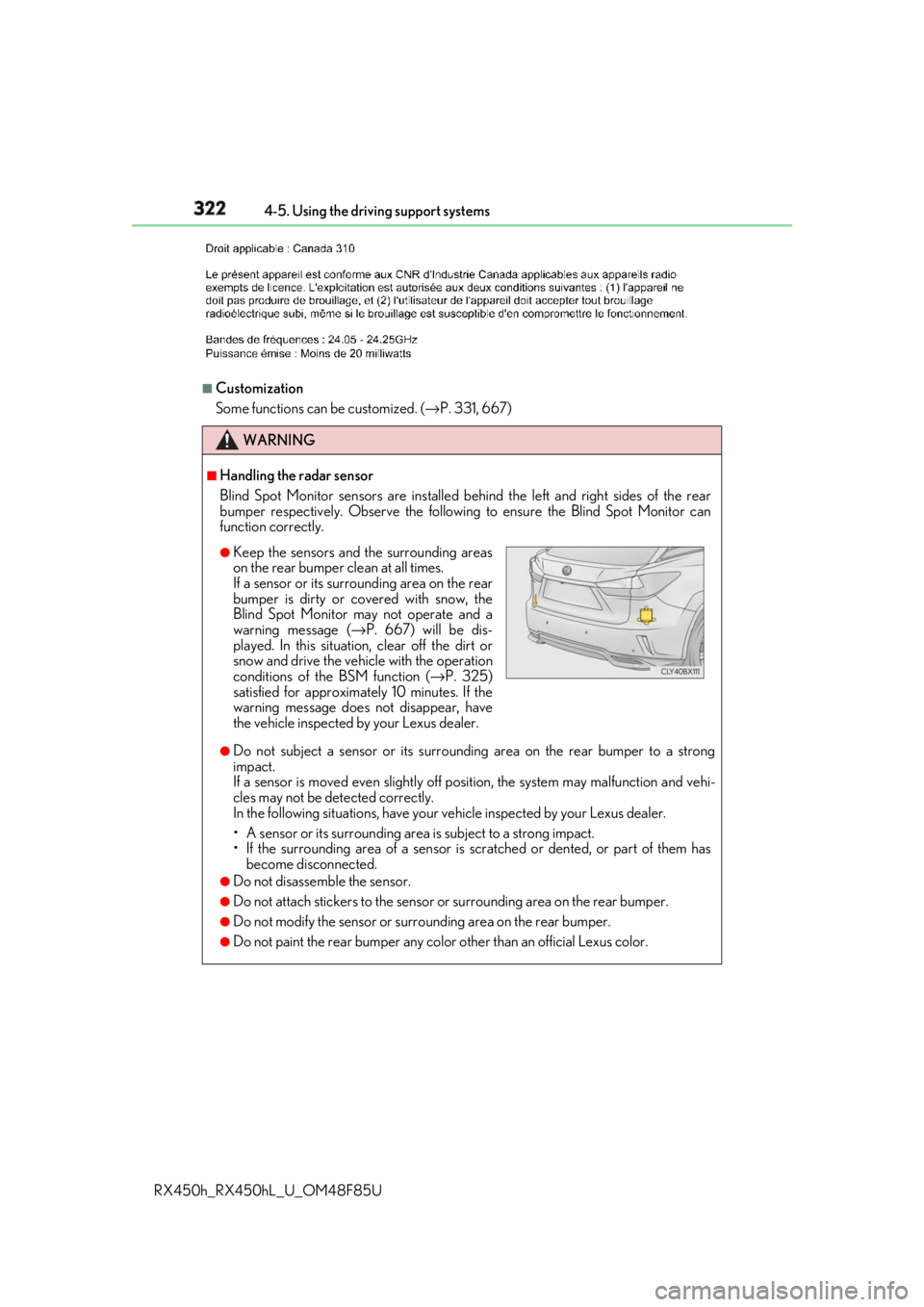
Blind Spot Monitor sensors ar e installed behind the left and right sides of the rear
bumper respectively. Observe the following to ensure the Blind Spot Monitor can
function correctly.
●
Do not subject a sensor or its surrounding area on the rear bumper to a strong
impact.
If a sensor is moved even slightly off po sition, the system may malfunction and vehi-
cles may not be detected correctly.
In the following situations , have your vehicle inspected by your Lexus dealer.
• A sensor or its surrounding area is subject to a strong impact.
• If the surrounding area of a sensor is sc ratched or dented, or part of them has
become disconnected. ●
Do not disassemble the sensor. ●
Do not attach stickers to the sensor or surrounding area on the rear bumper.●
Do not modify the sensor or surro unding area on the rear bumper.●
Do not paint the rear bumper any colo r other than an official Lexus color.●
Keep the sensors and the surrounding areas
on the rear bumper clean at all times.
If a sensor or its surrounding area on the rear
bumper is dirty or covered with snow, the
Blind Spot Monitor may not operate and a
warning message ( → P. 667) will be dis-
played. In this situation, clear off the dirt or
snow and drive the vehicle with the operation
conditions of the BSM function ( → P. 325)
satisfied for approximately 10 minutes. If the
warning message does not disappear, have
the vehicle inspected by your Lexus dealer.
Page 324 of 792
324 4-5. Using the driving support systems
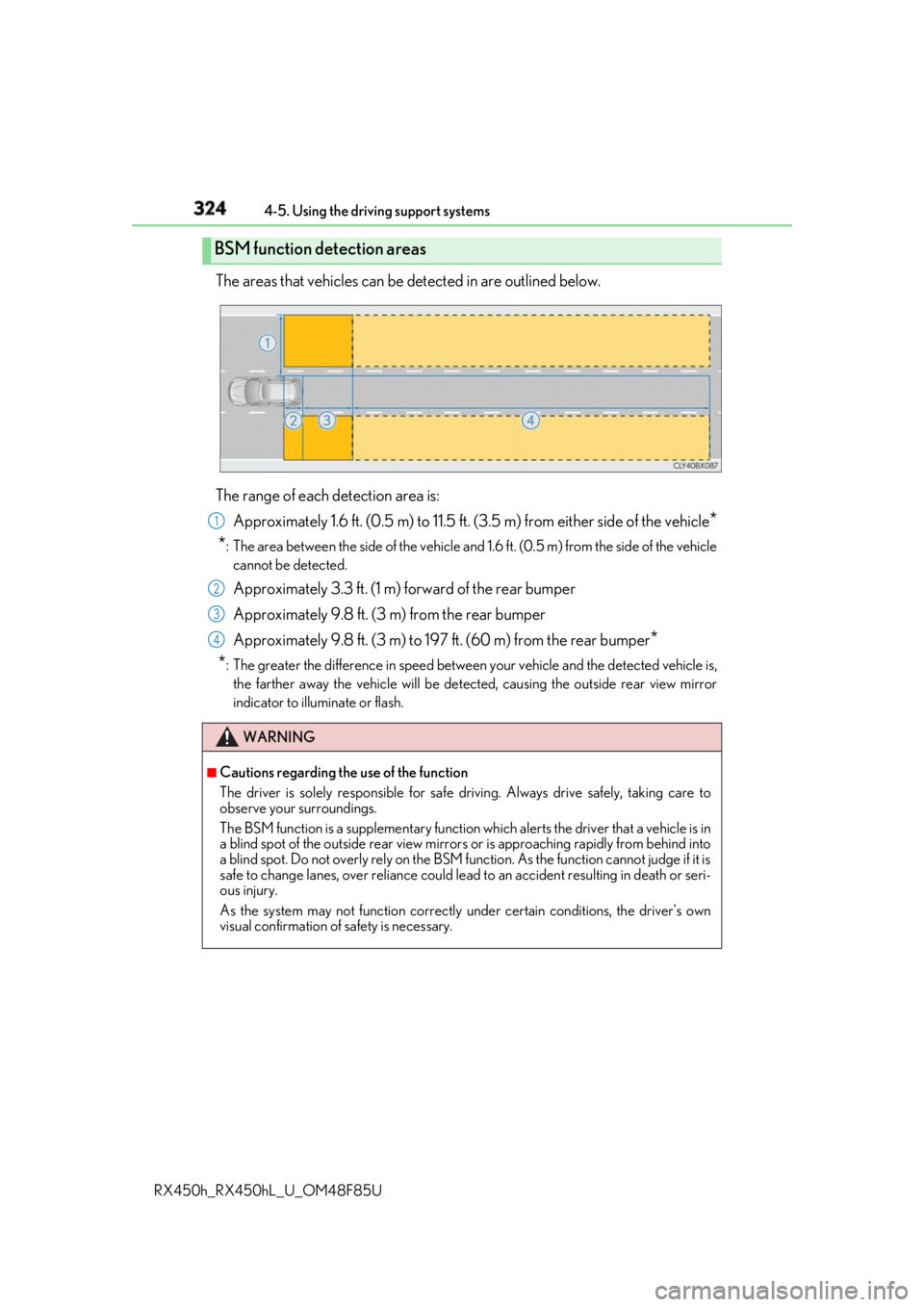
RX450h_RX450hL _U_OM48F85UThe areas that vehicles can be detected in are outlined below.
The range of each detection area is:
Approximately 1.6 ft. (0.5 m) to 11.5 ft. (3 .5 m) from either side of the vehicle
*
* : The area between the side of the vehicle and 1.6 ft. (0.5 m) from the side of the vehicle
cannot be detected.
Approximately 3.3 ft. (1 m) forward of the rear bumper
Approximately 9.8 ft. (3 m) from the rear bumper
Approximately 9.8 ft. (3 m) to 197 ft. (60 m) from the rear bumper
*
* : The greater the difference in speed betwee n your vehicle and the detected vehicle is,
the farther away the vehicle will be detect ed, causing the outside rear view mirror
indicator to illuminate or flash.BSM function detection areas
WARNING ■
Cautions regarding the use of the function
The driver is solely responsible for safe driving. Always drive safely, taking care to
observe your surroundings.
The BSM function is a supplementary function which alerts the driver that a vehicle is in
a blind spot of the outside rear view mirrors or is approaching rapidly from behind into
a blind spot. Do not overly rely on the BSM function. As the function cannot judge if it is
safe to change lanes, over reliance could lead to an accident resulting in death or seri-
ous injury.
As the system may not function correctly under certain conditions, the driver’s own
visual confirmation of safety is necessary. 1
2
3
4
Page 328 of 792
328 4-5. Using the driving support systems
RX450h_RX450hL _U_OM48F85U■
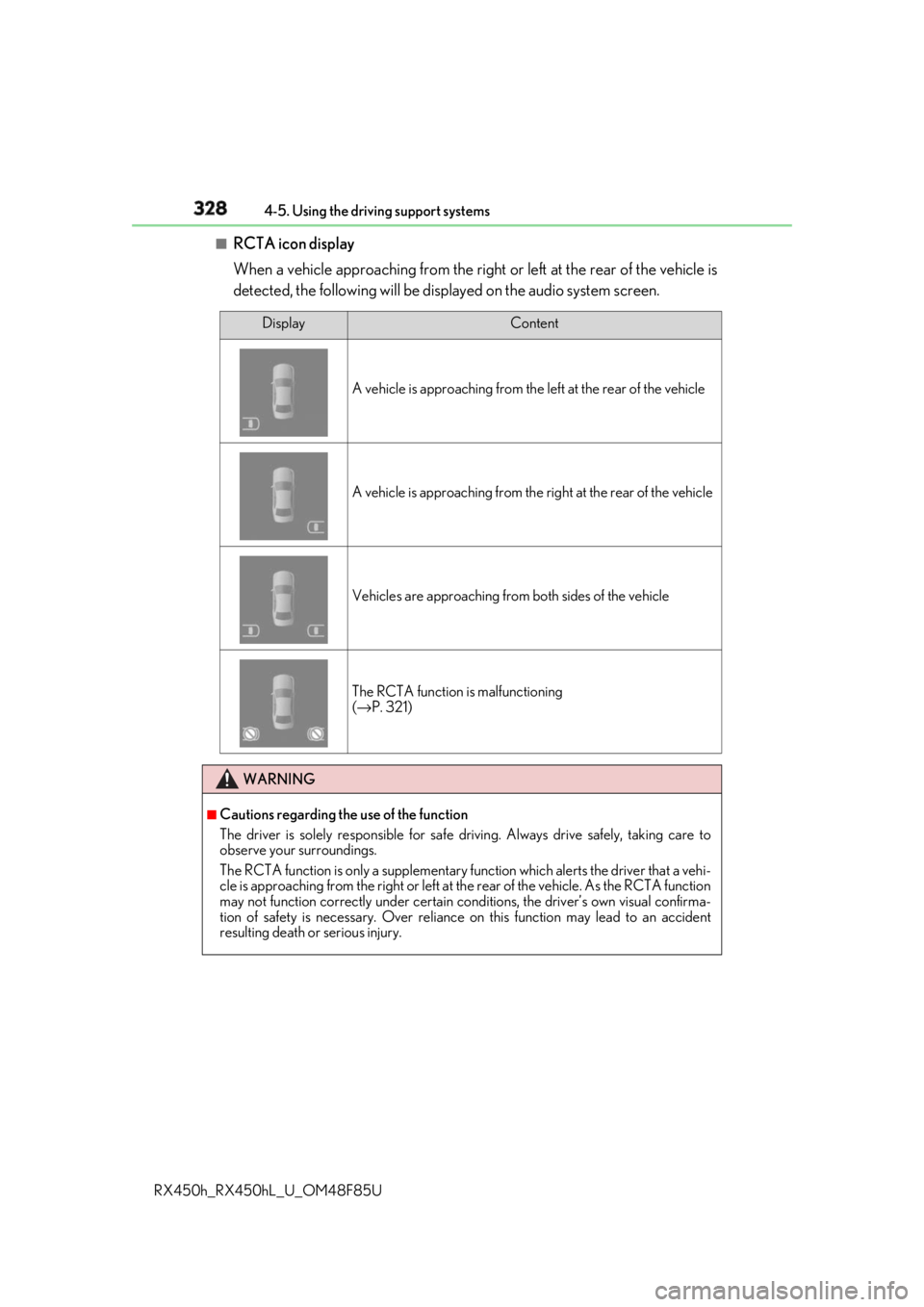
RCTA icon display
When a vehicle approaching from the right or left at the rear of the vehicle is
detected, the following will be displayed on the audio system screen. Display Content
A vehicle is approaching from the left at the rear of the vehicle
A vehicle is approaching from the right at the rear of the vehicle
Vehicles are approaching from both sides of the vehicle
The RCTA function is malfunctioning
( → P. 321)
WARNING ■
Cautions regarding the use of the function
The driver is solely responsible for safe driving. Always drive safely, taking care to
observe your surroundings.
The RCTA function is only a supplementary function which alerts the driver that a vehi-
cle is approaching from the right or left at the rear of the vehicle. As the RCTA function
may not function correctly under certain cond itions, the driver’s own visual confirma-
tion of safety is necessary. Over reliance on this function may lead to an accident
resulting death or serious injury.
Page 336 of 792
336 4-5. Using the driving support systems
RX450h_RX450hL _U_OM48F85U* 1
: The images may differ from th ose shown in the illustrations. ( → P. 333)
* 2
: Multi-information display
* 3
: Audio system screen
* 4
: Lexus Display Audio or navigation system (8-inch display) screen ■
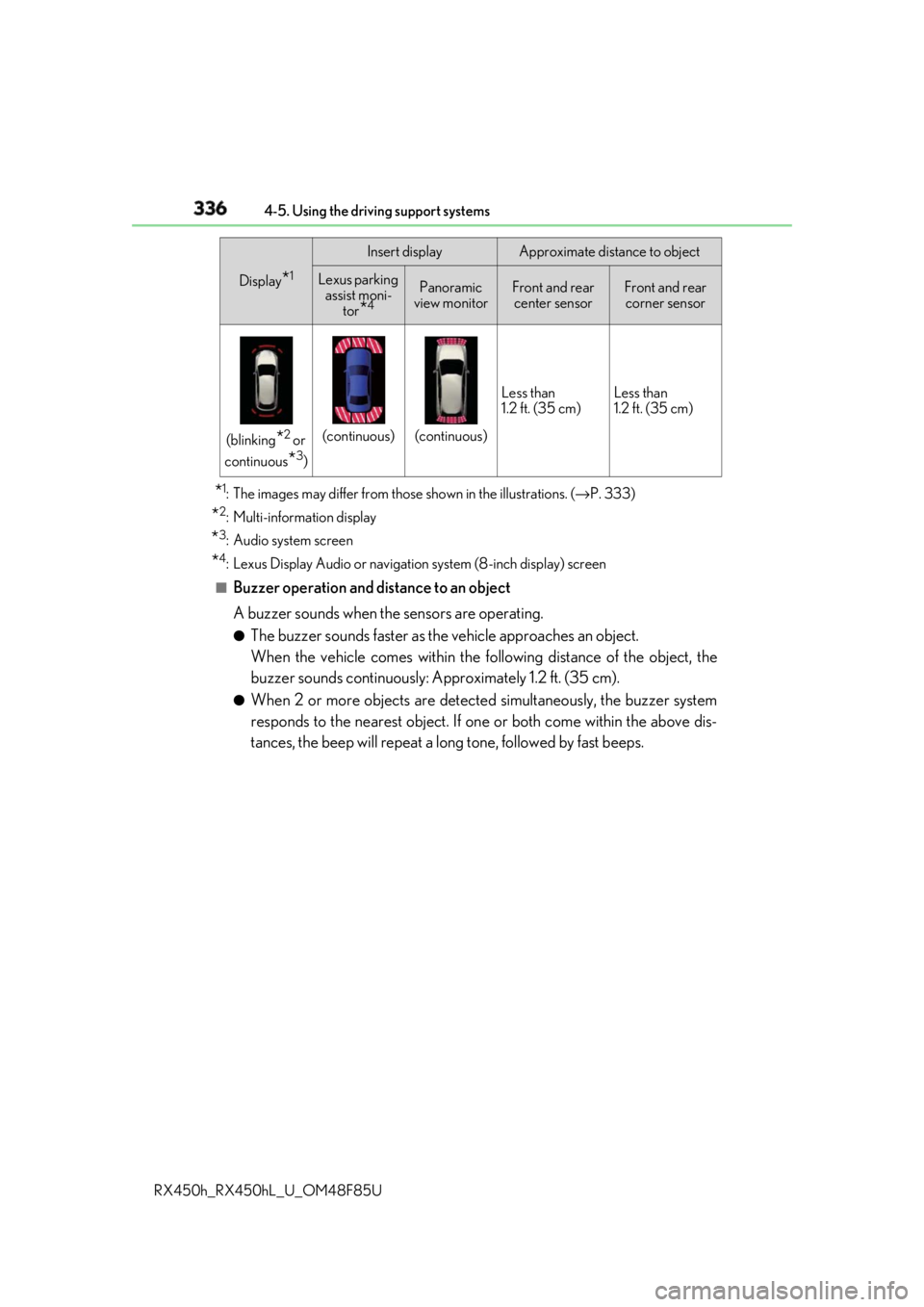
Buzzer operation and distance to an object
A buzzer sounds when the sensors are operating. ●
The buzzer sounds faster as th e vehicle approaches an object.
When the vehicle comes within the following distance of the object, the
buzzer sounds continuously: Approximately 1.2 ft. (35 cm). ●
When 2 or more objects are detected simultaneously, the buzzer system
responds to the nearest object. If on e or both come within the above dis-
tances, the beep will repeat a lo ng tone, followed by fast beeps.(blinking
* 2
or
continuous
* 3
) (continuous) (continuous) Less than
1.2 ft. (35 cm) Less than
1.2 ft. (35 cm)Display
* 1
Insert display Approximate distance to object
Lexus parking
assist moni-
tor
* 4
Panoramic
view monitor Front and rear
center sensor Front and rear
corner sensor
Page 339 of 792
3394-5. Using the driving support systems
4
Driving
RX450h_RX450hL _U_OM48F85U●
Vehicles with a navigation system (12.3-inch display): If the intuit ive parking assist dis-
play is set to on, detected objects will also be displayed on the panoramic view monitor.
For details, refer to “NAVIGATION SYSTEM OWNER’S MANUAL”. ■
Sensor detectio n information●
The sensor’s detection areas are limited to the areas around the vehicle’s bumper. ●
Certain vehicle conditions and the surrounding environment may affect the ability of a
sensor to correctly detect an object. Particular instances where this may occur are
listed below.
• There is dirt, snow or ice on the sensor . (Wiping the sensors will resolve this prob-
lem.)
• The sensor is frozen. (Thawing th e area will resolve this problem.)
In especially cold weather, if a sensor is frozen the screen may show an abnormal
display, or obstacles may not be detected.
• The sensor is covered in any way.
• The vehicle is leaning considerably to one side.
• When a sensor or the area around a sensor is extremely hot or cold.
• On an extremely bumpy road, on an incline, on gravel, or on grass.
• The vicinity of the vehicle is noisy due to vehicle horns, motorcycle engines, air
brakes of large vehicles, or other loud noises producing ultrasonic waves.
• There is another vehicle equipped with parking assist sensors in the vicinity.
• The sensor is coated with a sheet of spray or heavy rain.
• The bumper or sensor re ceives a strong impact.
• If the vehicle is significantly tilted.
• The vehicle is approaching a tall or curved curb.
• In harsh sunlight or intense cold weather.
• The area directly under the bumpers is not detected.
• If objects draw too close to the sensor.
• People may not be detected if they are wearing certain types of clothing.
In addition to the examples above, there ar e instances in which, because of their shape,
signs and other objects may be judged by a sensor to be closer than they are. ●
The shape of the object may prevent a sensor from detecting it. Pay particular attention
to the following objects:
• Wires, fences, ropes, etc.
• Cotton, snow and other materi als that absorb sound waves
• Sharply-angled objects
• Low obstacles
• Tall obstacles with upper sections projecting outwards in the direction of your vehi-
cle ●
The following situations may occur during use.
• Depending on the shape of the object and other factors, the detection distance may
shorten, or detectio n may be impossible.
• Objects may not be detected if they are too close to the sensor.
• There will be a short dela y between object detection and display. Even at slow
speeds, there is a possibility that the obje ct will come within the sensor’s detection
areas before the display is shown and the buzzer sounds.
• Thin posts or objects lower than the sens or may not be detected when approached,
even if they have been detected once.
• It might be difficult to hear beeps due to th e volume of audio system or air flow noise
of the air conditioning system.
Page 340 of 792
340 4-5. Using the driving support systems
RX450h_RX450hL _U_OM48F85U■
If “Clean Parking Assist Sensor” is di splayed on the multi- information display
A sensor may be dirty or covered with snow or ic e. In such cases, if it is removed from the
sensor, the system should return to normal.
Also, due to the sensor being frozen at low temperatures, a malfunction display may
appear or an object may not be detected. If the sensor thaws out, the system should
return to normal. ■
If “Parking Assist Malfunction” is di splayed on the multi- information display
Depending on the malfunction of the sensor, the device may not be working normally.
Have the vehicle inspected by your Lexus dealer. ■
Certification
For vehicles sold in Canada
This ISM device complies with Canadian ICES-001.
Cet appareil ISM est conforme a la norme NMB-001 du Canada. ■
Customization
Some functions can be customized. ( → P. 338, 736)
WARNING ■
When using the intuitive parking assist
Observe the following precautions.
Failing to do so may result in the vehicle be ing unable to be driv en safely and possibly
cause an accident. ●
Do not use the sensor at speeds in excess of 6 mph (10 km/h). ●
The sensors’ detection areas and reaction ti mes are limited. When moving forward or
reversing, check the areas surrounding the vehicle (especially th e sides of the vehi-
cle) for safety, and drive slowly, using the brake to control the vehicle’s speed. ●
Do not install accessories within the sensors’ detection areas.●
The vehicle is equipped with a fender pole or wireless antenna. ●
The front or rear bumper or a se nsor receives a strong impact.●
A non-genuine Lexus suspension (lower ed suspension, etc.) is installed.●
Towing eyelets are installed. ●
A backlit licence plate is installed. ■
When using intuitive parking assist
In the following situations, the system may not function correctly due to a sensor mal-
function, etc. Have the vehicle checked by your Lexus dealer. ●
The intuitive parking assist operation disp lay flashes, and a buzzer sounds when no
obstacles are detected. ●
If the area around a sensor co llides with something, or is subjected to strong impact.●
If the bumper collides with something. ●
If the display shows continuously withou t beeping, except when the buzzer mute
switch has been turned on. ●
If a display error occurs , first check the sensor.
If the error occurs even if there is no ice, sn ow or mud on the sensor, it is likely that the
sensor is malfunctioning.
Page 351 of 792
3514-5. Using the driving support systems
4
Driving
RX450h_RX450hL _U_OM48F85U■
Situations in which the Intelligent Clearance Sonar function may operate even if there
is no possibility of a collision
In some situations such as the following, the Intelligent Clearanc e Sonar function may
operate even though there is no possibility of a collision. ●
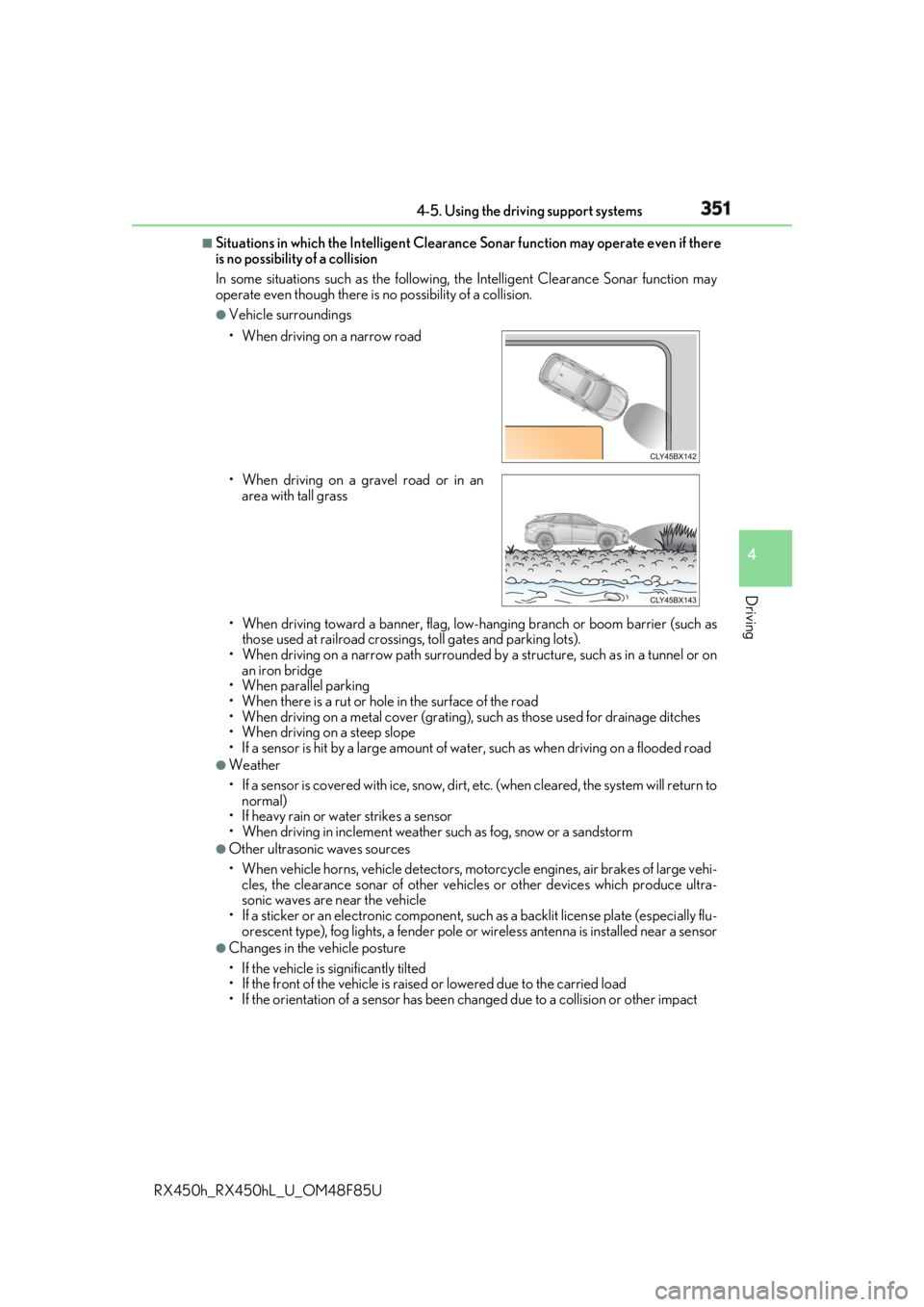
Vehicle surroundings
• When driving toward a banner, flag, low- hanging branch or boom barrier (such as
those used at railroad crossing s, toll gates and parking lots).
• When driving on a narrow path surrounded by a structure, such as in a tunnel or on
an iron bridge
• When parallel parking
• When there is a rut or hole in the surface of the road
• When driving on a metal cover (grating), such as those used for drainage ditches
• When driving on a steep slope
• If a sensor is hit by a large amount of wa ter, such as when driving on a flooded road●
Weather
• If a sensor is covered with ice, snow, dirt, etc. (when cleared, the system will return to
normal)
• If heavy rain or water strikes a sensor
• When driving in inclemen t weather such as fog, snow or a sandstorm●
Other ultrasonic waves sources
• When vehicle horns, vehicle detectors, motorcycle engines, air brakes of large vehi-
cles, the clearance sonar of other vehicles or other devices which produce ultra-
sonic waves are near the vehicle
• If a sticker or an electronic component, su ch as a backlit license plate (especially flu-
orescent type), fog lights, a fender pole or wireless antenna is installed near a sensor●
Changes in the vehicle posture
• If the vehicle is significantly tilted
• If the front of the vehicle is raised or lowered due to the carried load
• If the orientation of a sens or has been changed due to a collision or other impact• When driving on a narrow road
• When driving on a gravel road or in an
area with tall grass
Page 352 of 792
352 4-5. Using the driving support systems
RX450h_RX450hL _U_OM48F85U■
If the Intelligent Clearance Sonar function operates unnecessarily such as at a railroad
crossing
Even in the event that the Intelligent Cleara nce Sonar function operates unnecessarily,
such as at a railroad crossing, brake cont rol will be canceled afte r approximately 2 sec-
onds, allowing you to proceed forward and leave the area, Brake control can also be
canceled by depressing the brake pedal. Depressing the accelerator pedal again will
allow you to proceed forward and leave the area. ■
Situations in which the Intelligent Cleara nce Sonar Brake function may not operate
properly
In some situations such as the following , this function may not operate properly.●
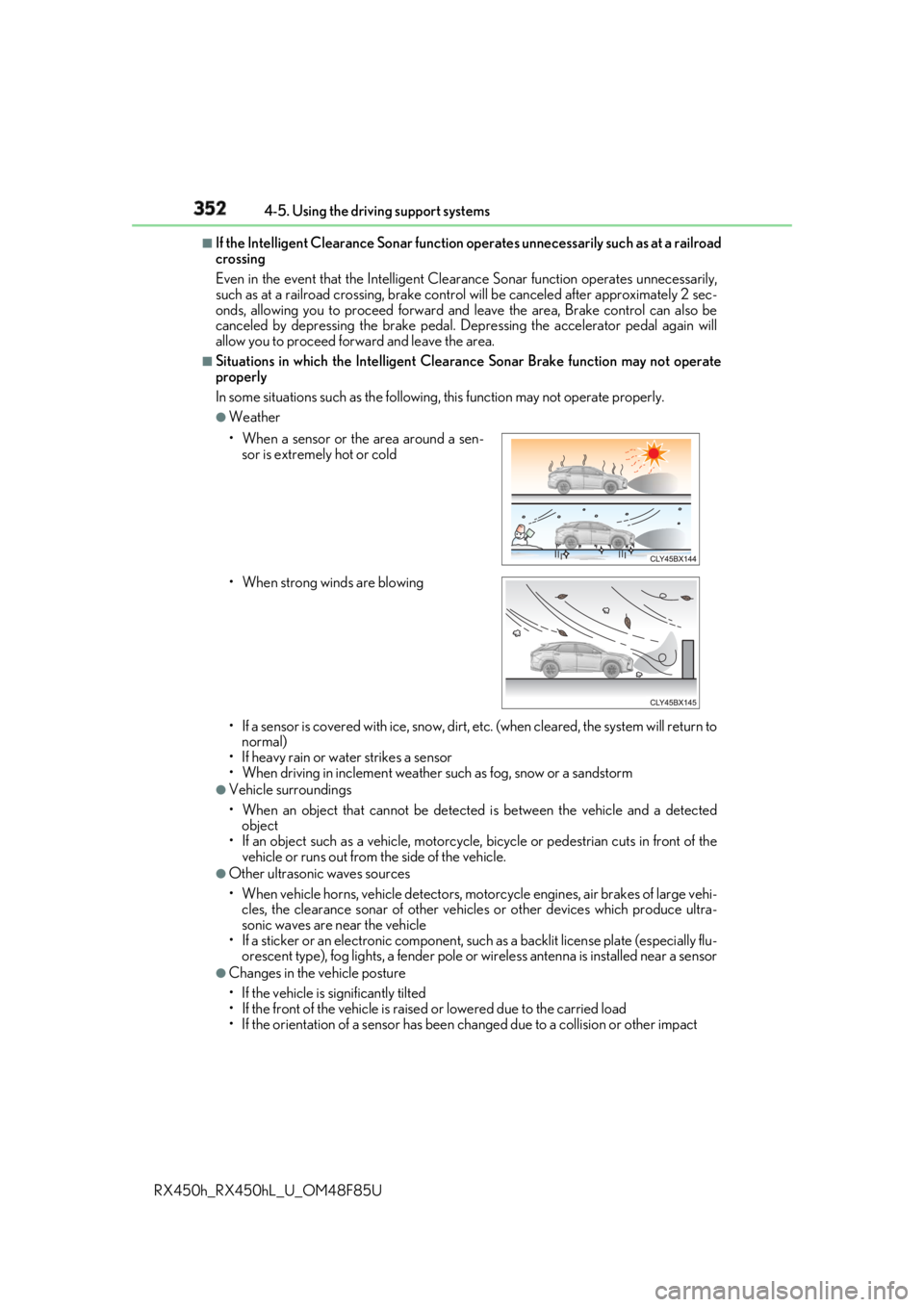
Weather
• If a sensor is covered with ice, snow, dirt, etc. (when cleared, the system will return to
normal)
• If heavy rain or water strikes a sensor
• When driving in inclemen t weather such as fog, snow or a sandstorm●
Vehicle surroundings
• When an object that cannot be detected is between the vehicle and a detected
object
• If an object such as a vehicle, motorcycle, bicycle or pedestrian cuts in front of the
vehicle or runs out from the side of the vehicle. ●
Other ultrasonic waves sources
• When vehicle horns, vehicle detectors, motorcycle engines, air brakes of large vehi-
cles, the clearance sonar of other vehicles or other devices which produce ultra-
sonic waves are near the vehicle
• If a sticker or an electronic component, su ch as a backlit license plate (especially flu-
orescent type), fog lights, a fender pole or wireless antenna is installed near a sensor●
Changes in the vehicle posture
• If the vehicle is significantly tilted
• If the front of the vehicle is raised or lowered due to the carried load
• If the orientation of a sens or has been changed due to a collision or other impact• When a sensor or the area around a sen-
sor is extremely hot or cold
• When strong winds are blowing