rear LEXUS RX450H 2019 Owners Manual
[x] Cancel search | Manufacturer: LEXUS, Model Year: 2019, Model line: RX450H, Model: LEXUS RX450H 2019Pages: 792, PDF Size: 13.48 MB
Page 327 of 792
3274-5. Using the driving support systems
4
Driving
RX450h_RX450hL_U
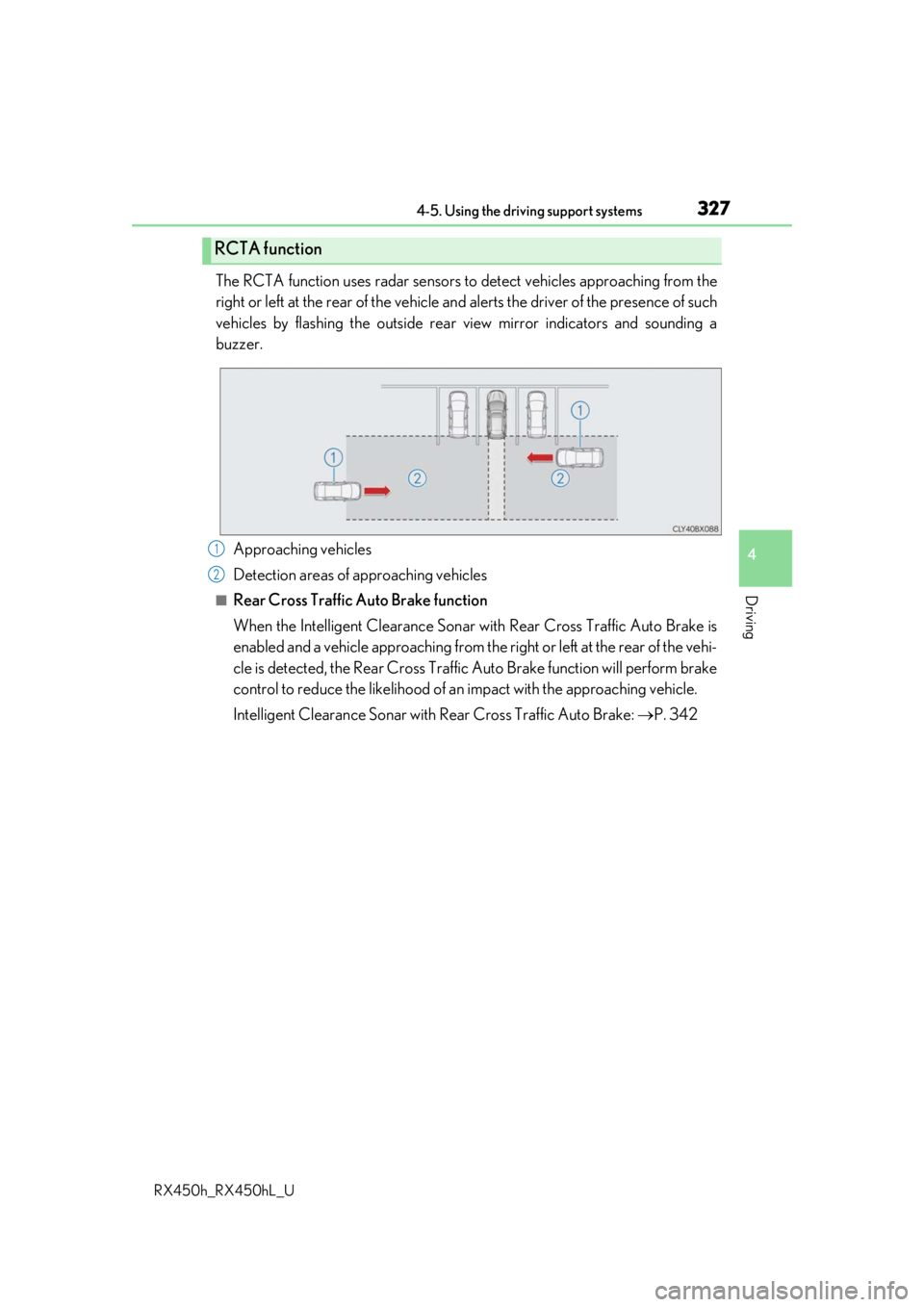
The RCTA function uses radar sensors to detect vehicles approaching from the
right or left at the rear of the vehicle and alerts the driver of the presence of such
vehicles by flashing the outside rear view mirror indicators and sounding a
buzzer.
Approaching vehicles
Detection areas of approaching vehicles
■Rear Cross Traffic Auto Brake function
When the Intelligent Clearance Sonar wi th Rear Cross Traffic Auto Brake is
enabled and a vehicle approaching from the right or left at the rear of the vehi-
cle is detected, the Rear Cross Traffic Auto Brake function will perform brake
control to reduce the likelihood of an impact with the approaching vehicle.
Intelligent Clearance Sonar with Re ar Cross Traffic Auto Brake: P. 342
RCTA function
1
2
Page 328 of 792
3284-5. Using the driving support systems
RX450h_RX450hL_U
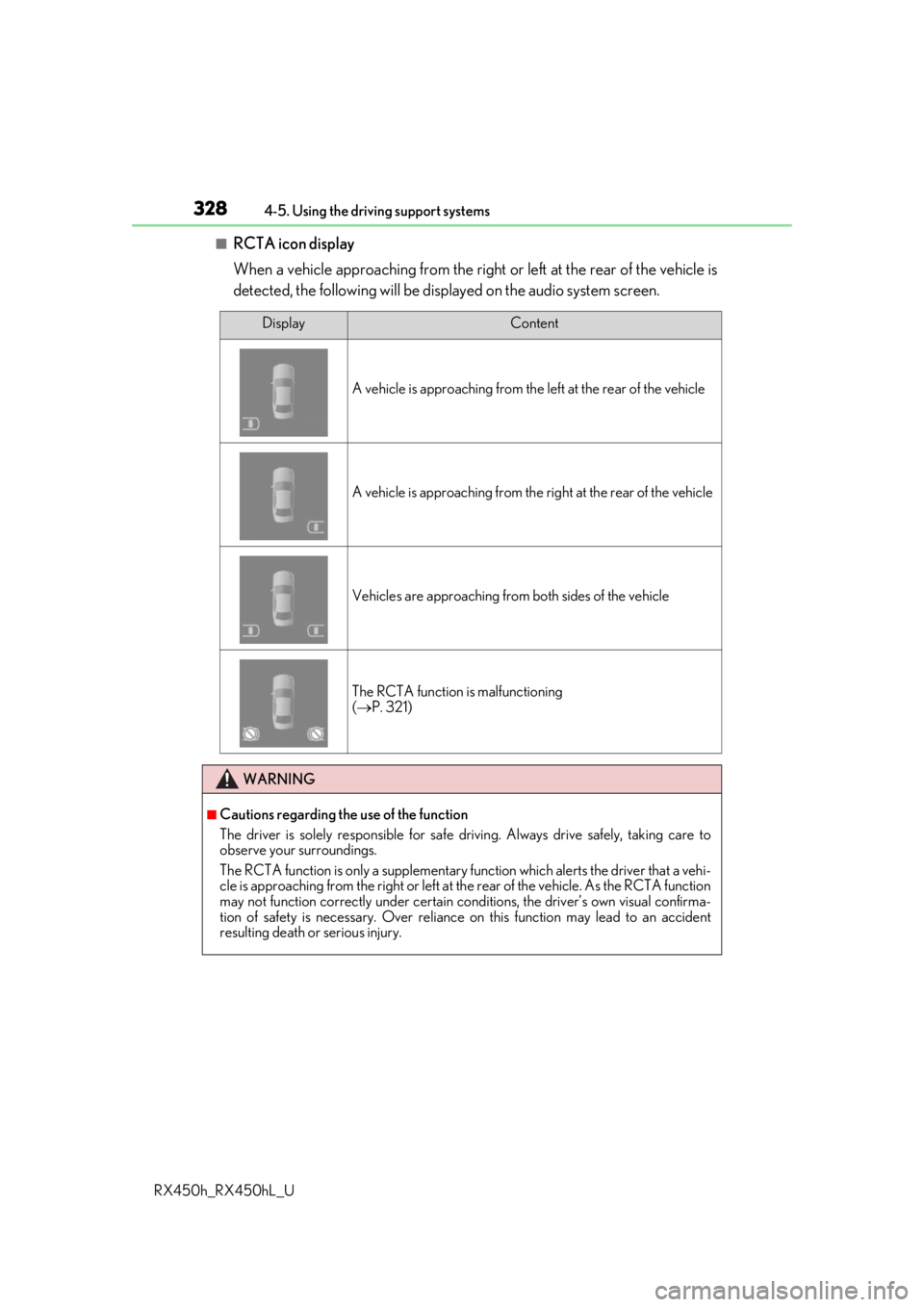
■RCTA icon display
When a vehicle approaching from the right or left at the rear of the vehicle is
detected, the following will be displayed on the audio system screen.
DisplayContent
A vehicle is approaching from the left at the rear of the vehicle
A vehicle is approaching from the right at the rear of the vehicle
Vehicles are approaching from both sides of the vehicle
The RCTA function is malfunctioning
( P. 321)
WARNING
■Cautions regarding the use of the function
The driver is solely responsible for safe driving. Always drive safely, taking care to
observe your surroundings.
The RCTA function is only a supplementary function which alerts the driver that a vehi-
cle is approaching from the right or left at the rear of the vehicle. As the RCTA function
may not function correctly under certain cond itions, the driver’s own visual confirma-
tion of safety is necessary. Over reliance on this function may lead to an accident
resulting death or serious injury.
Page 330 of 792
3304-5. Using the driving support systems
RX450h_RX450hL_U
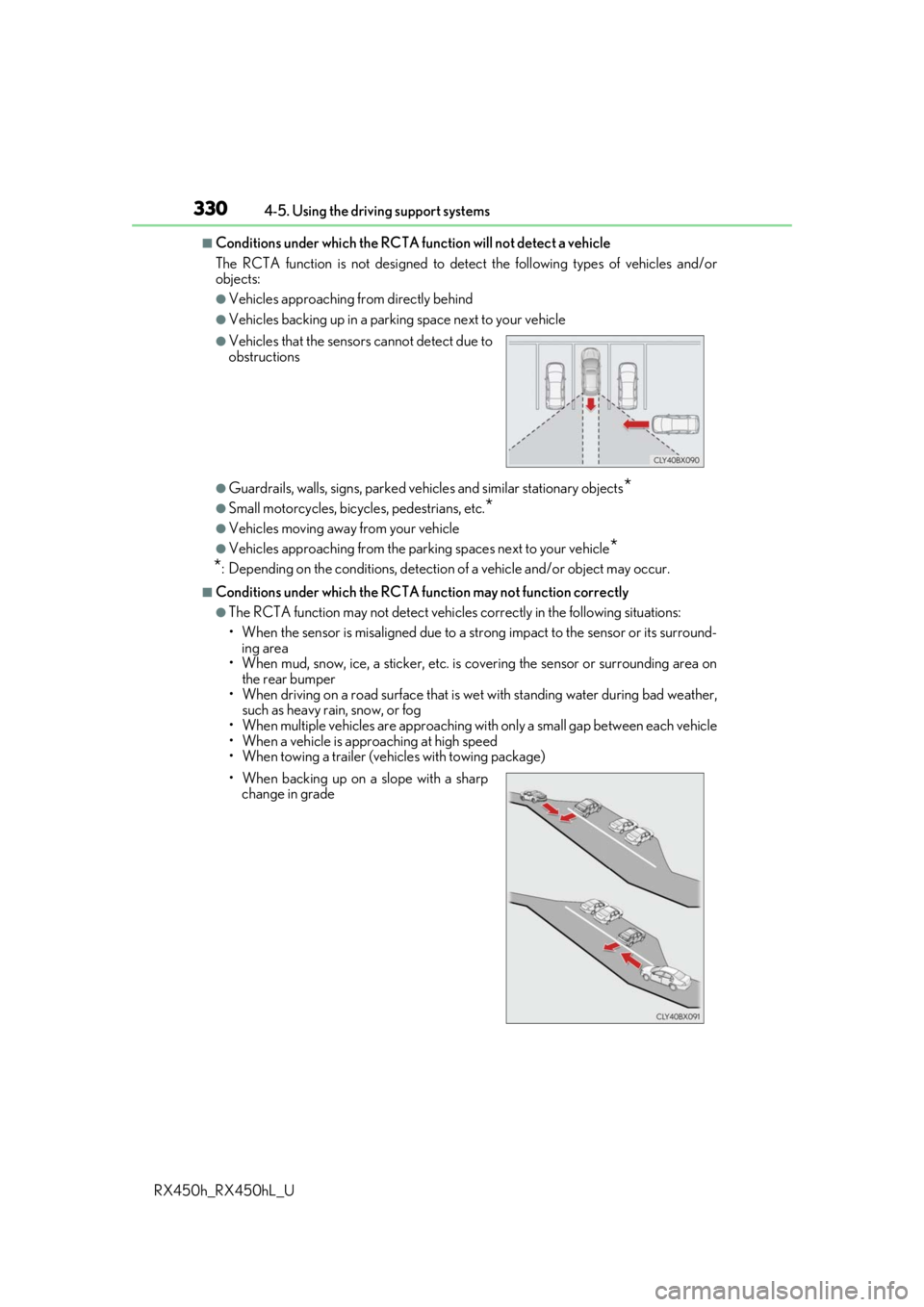
■Conditions under which the RCTA fu nction will not detect a vehicle
The RCTA function is not designed to detect the following types of vehicles and/or
objects:
●Vehicles approaching from directly behind
●Vehicles backing up in a parkin g space next to your vehicle
●Guardrails, walls, signs, parked vehi cles and similar stationary objects*
●Small motorcycles, bicycles, pedestrians, etc.*
●Vehicles moving away from your vehicle
●Vehicles approaching from the parking spaces next to your vehicle*
*
: Depending on the conditions, detection of a vehicle and/or object may occur.
■Conditions under which the RCTA function may not function correctly
●The RCTA function may not detect vehicles correctly in the following situations:
• When the sensor is misaligned due to a stro ng impact to the sensor or its surround-
ing area
• When mud, snow, ice, a sticke r, etc. is covering the sensor or surrounding area on
the rear bumper
• When driving on a road surf ace that is wet with standing water during bad weather,
such as heavy rain, snow, or fog
• When multiple vehicles are approaching wi th only a small gap between each vehicle
• When a vehicle is approaching at high speed
• When towing a trailer (vehicles with towing package)
●Vehicles that the sensors cannot detect due to
obstructions
• When backing up on a slope with a sharp change in grade
Page 331 of 792
3314-5. Using the driving support systems
4
Driving
RX450h_RX450hL_U• Immediately after the RCTA function is turned on
• Immediately after the hybrid system is started with the RCTA function on
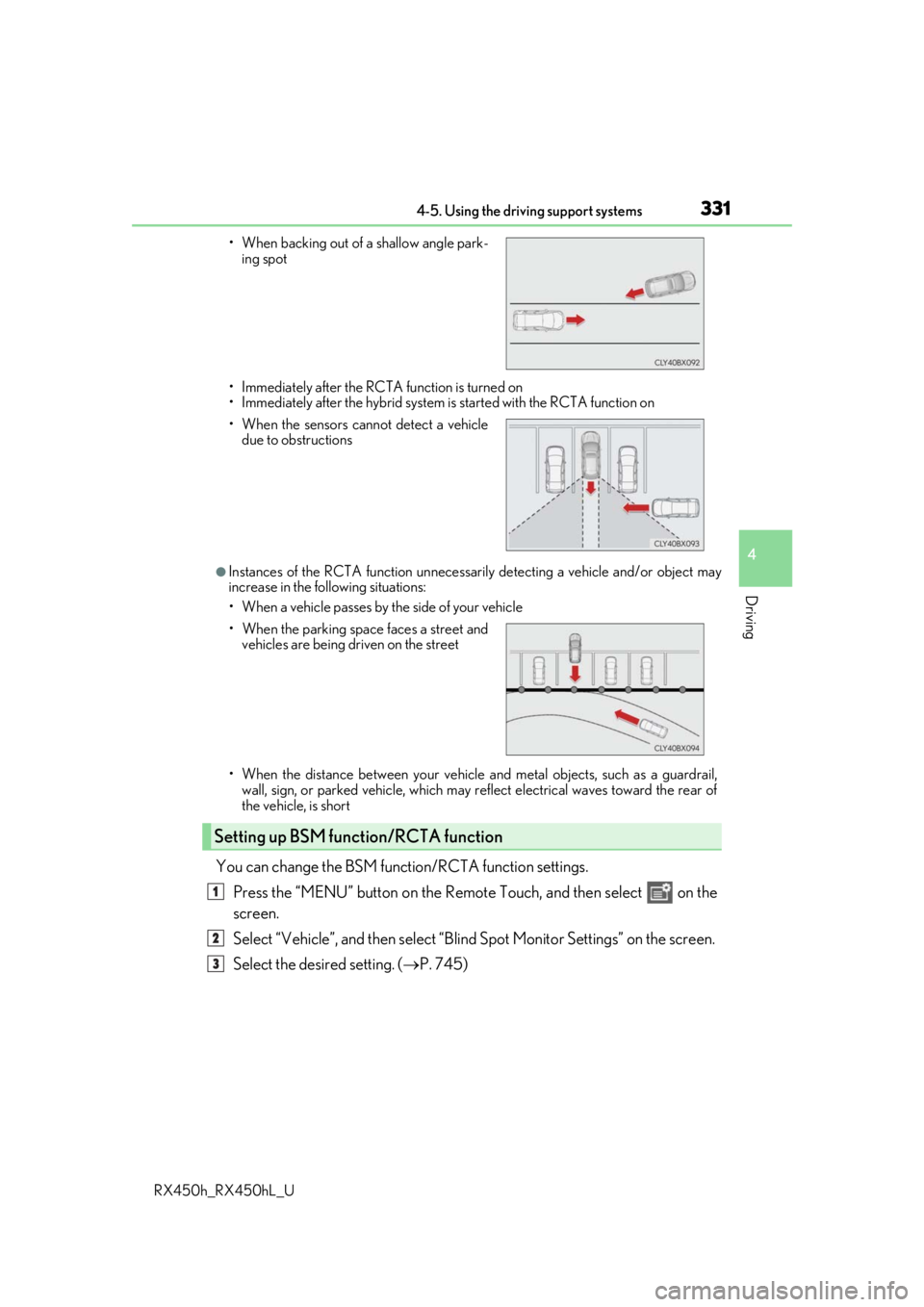
●Instances of the RCTA function unnecessari
ly detecting a vehicle and/or object may
increase in the following situations:
• When a vehicle passes by th e side of your vehicle
• When the distance between your vehicle and metal objects, such as a guardrail,
wall, sign, or parked vehicle, which may re flect electrical waves toward the rear of
the vehicle, is short
You can change the BSM function/RCTA function settings.
Press the “MENU” button on the Remote Touch, and then select on the
screen.
Select “Vehicle”, and then select “Blind Spot Monito r Settings” on the screen.
Select the desired setting. ( P. 745)
• When backing out of a shallow angle park-
ing spot
• When the sensors cannot detect a vehicle due to obstructions
• When the parking space faces a street and vehicles are being driven on the street
Setting up BSM function/RCTA function
1
2
3
Page 332 of 792
3324-5. Using the driving support systems
RX450h_RX450hL_U
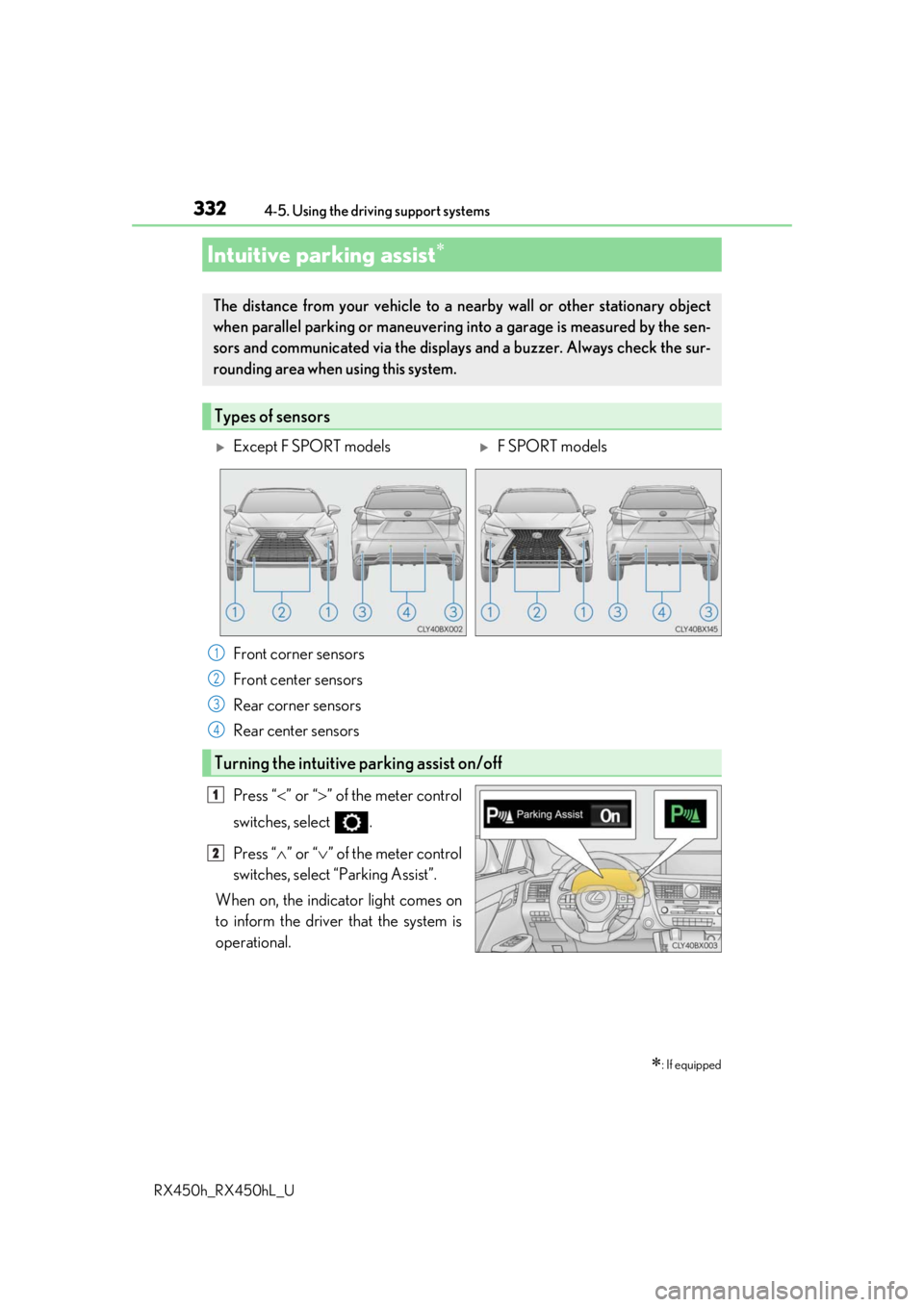
Press “ ” or “ ” of the meter control
switches, select .
Press “ ” or “ ” of the meter control
switches, select “Parking Assist”.
When on, the indicator light comes on
to inform the driver that the system is
operational.
Intuitive parking assist
: If equipped
The distance from your vehicle to a ne arby wall or other stationary object
when parallel parking or maneuvering into a garage is measured by the sen-
sors and communicated via the displays and a buzzer. Always check the sur-
rounding area when using this system.
Types of sensors
Except F SPORT modelsF SPORT models
Front corner sensors
Front center sensors
Rear corner sensors
Rear center sensors
Turning the intuitive parking assist on/off
1
2
3
4
1
2
Page 333 of 792
3334-5. Using the driving support systems
4
Driving
RX450h_RX450hL_U
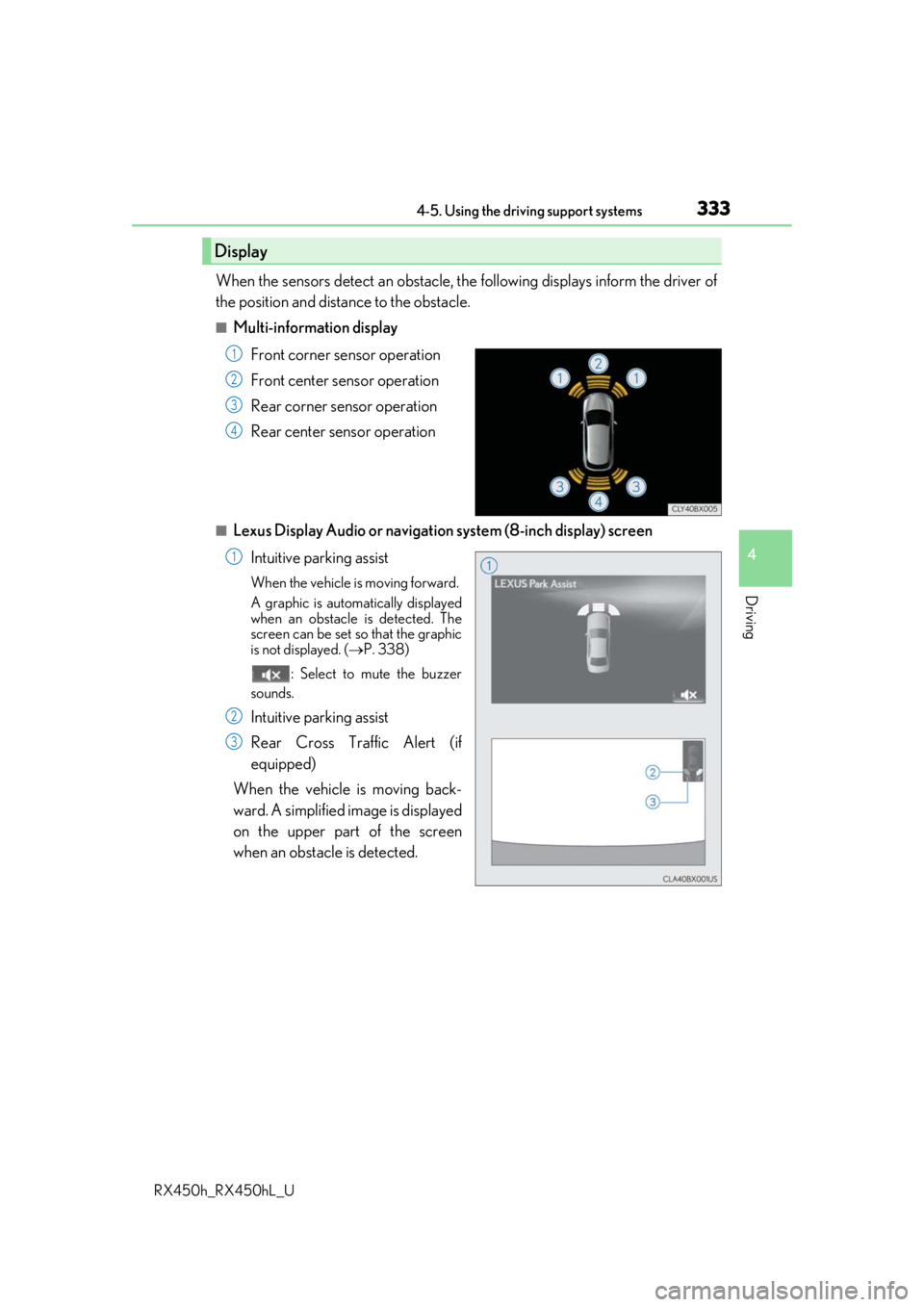
When the sensors detect an obstacle, the following displays inform the driver of
the position and distance to the obstacle.
■Multi-information display
Front corner sensor operation
Front center sensor operation
Rear corner sensor operation
Rear center sensor operation
■Lexus Display Audio or navigation system (8-inch display) screen
Intuitive parking assist
When the vehicle is moving forward.
A graphic is automatically displayed
when an obstacle is detected. The
screen can be set so that the graphic
is not displayed. ( P. 338)
: Select to mute the buzzer
sounds.
Intuitive parking assist
Rear Cross Traffic Alert (if
equipped)
When the vehicle is moving back-
ward. A simplified image is displayed
on the upper part of the screen
when an obstacle is detected.
Display
1
2
3
4
1
2
3
Page 334 of 792
3344-5. Using the driving support systems
RX450h_RX450hL_U
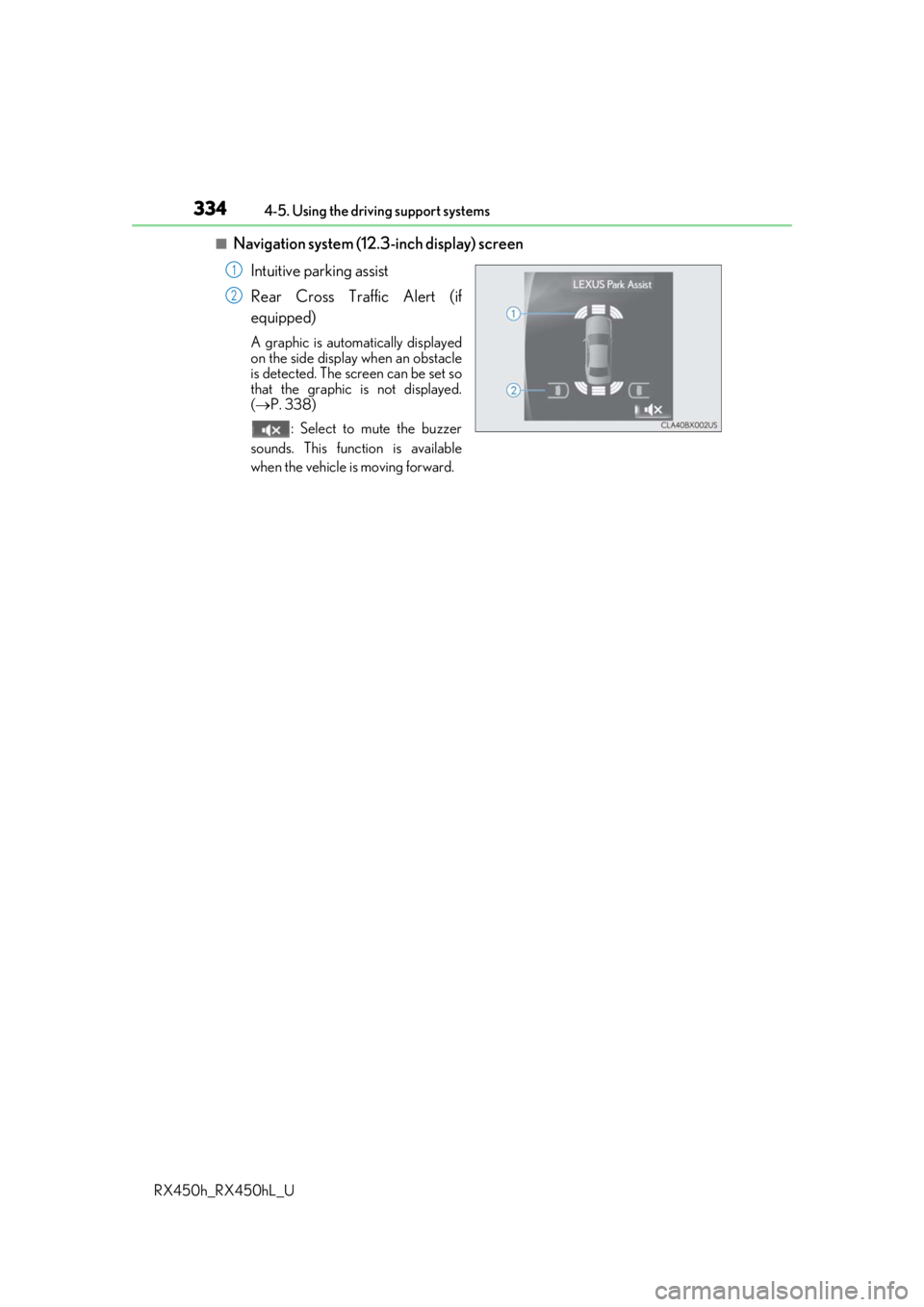
■Navigation system (12.3 -inch display) screen
Intuitive parking assist
Rear Cross Traffic Alert (if
equipped)
A graphic is automatically displayed
on the side display when an obstacle
is detected. The screen can be set so
that the graphic is not displayed.
( P. 338)
: Select to mute the buzzer
sounds. This function is available
when the vehicle is moving forward.
1
2
Page 335 of 792
3354-5. Using the driving support systems
4
Driving
RX450h_RX450hL_U
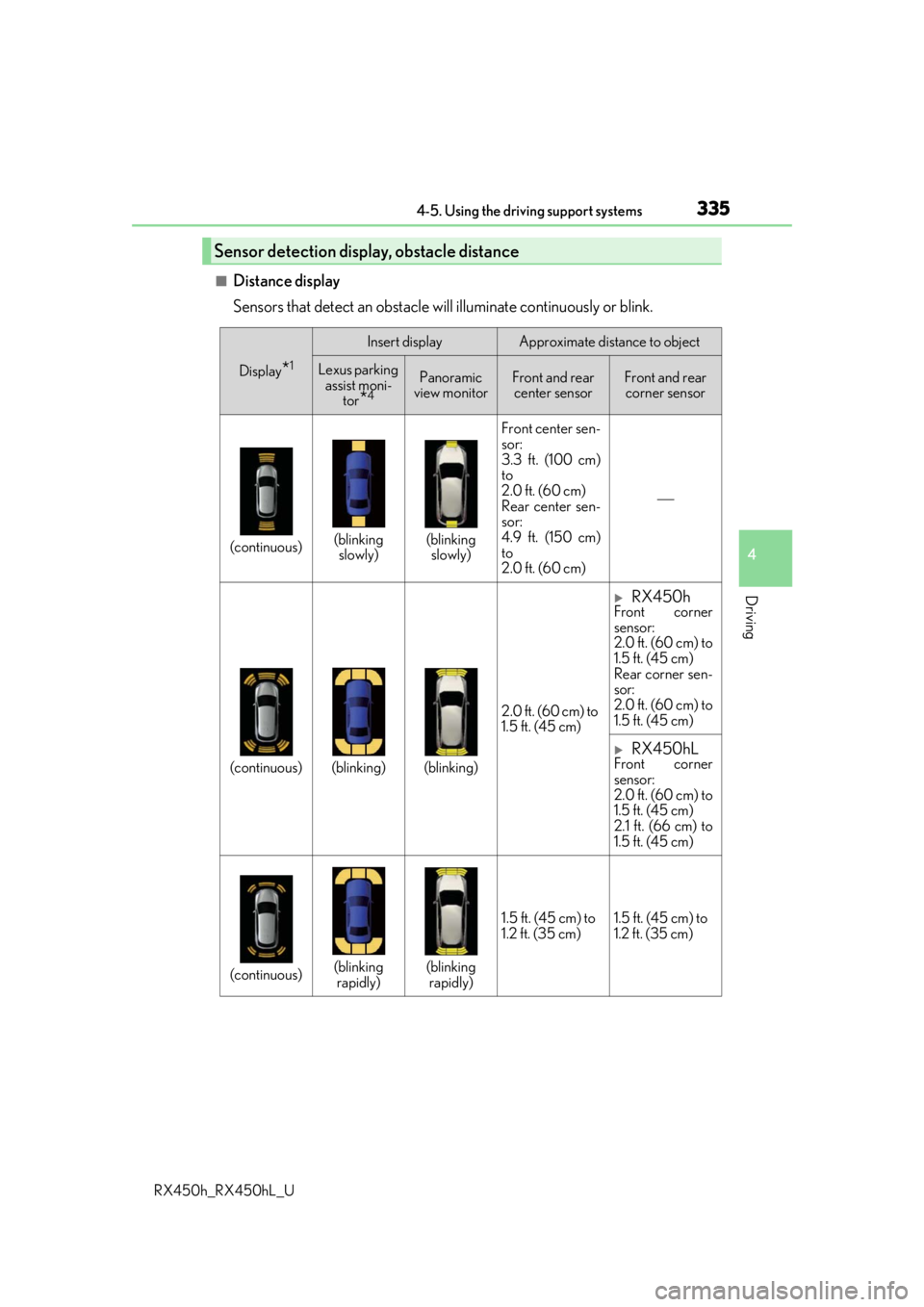
■Distance display
Sensors that detect an obstacle will illuminate continuously or blink.
Sensor detection display, obstacle distance
Display*1
Insert displayApproximate distance to object
Lexus parking assist moni- tor
*4
Panoramic
view monitorFront and rear center sensorFront and rear corner sensor
(continuous)(blinking slowly)(blinking slowly) Front center sen-
sor:
3.3 ft. (100 cm)
to
2.0 ft. (60 cm)
Rear center sen-
sor:
4.9 ft. (150 cm)
to
2.0 ft. (60 cm)
(continuous)(blinking)(blinking)
2.0 ft. (60 cm) to
1.5 ft. (45 cm)
RX450hFront corner
sensor:
2.0 ft. (60 cm) to
1.5 ft. (45 cm)
Rear corner sen-
sor:
2.0 ft. (60 cm) to
1.5 ft. (45 cm)
RX450hLFront corner
sensor:
2.0 ft. (60 cm) to
1.5 ft. (45 cm)
2.1 ft. (66 cm) to
1.5 ft. (45 cm)
(continuous)(blinking
rapidly)(blinking rapidly) 1.5 ft. (45 cm) to
1.2 ft. (35 cm)
1.5 ft. (45 cm) to
1.2 ft. (35 cm)
Page 336 of 792
3364-5. Using the driving support systems
RX450h_RX450hL_U
*1: The images may differ from th ose shown in the illustrations. (P. 333)
*2: Multi-information display
*3: Audio system screen
*4: Lexus Display Audio or navigation system (8-inch display) screen
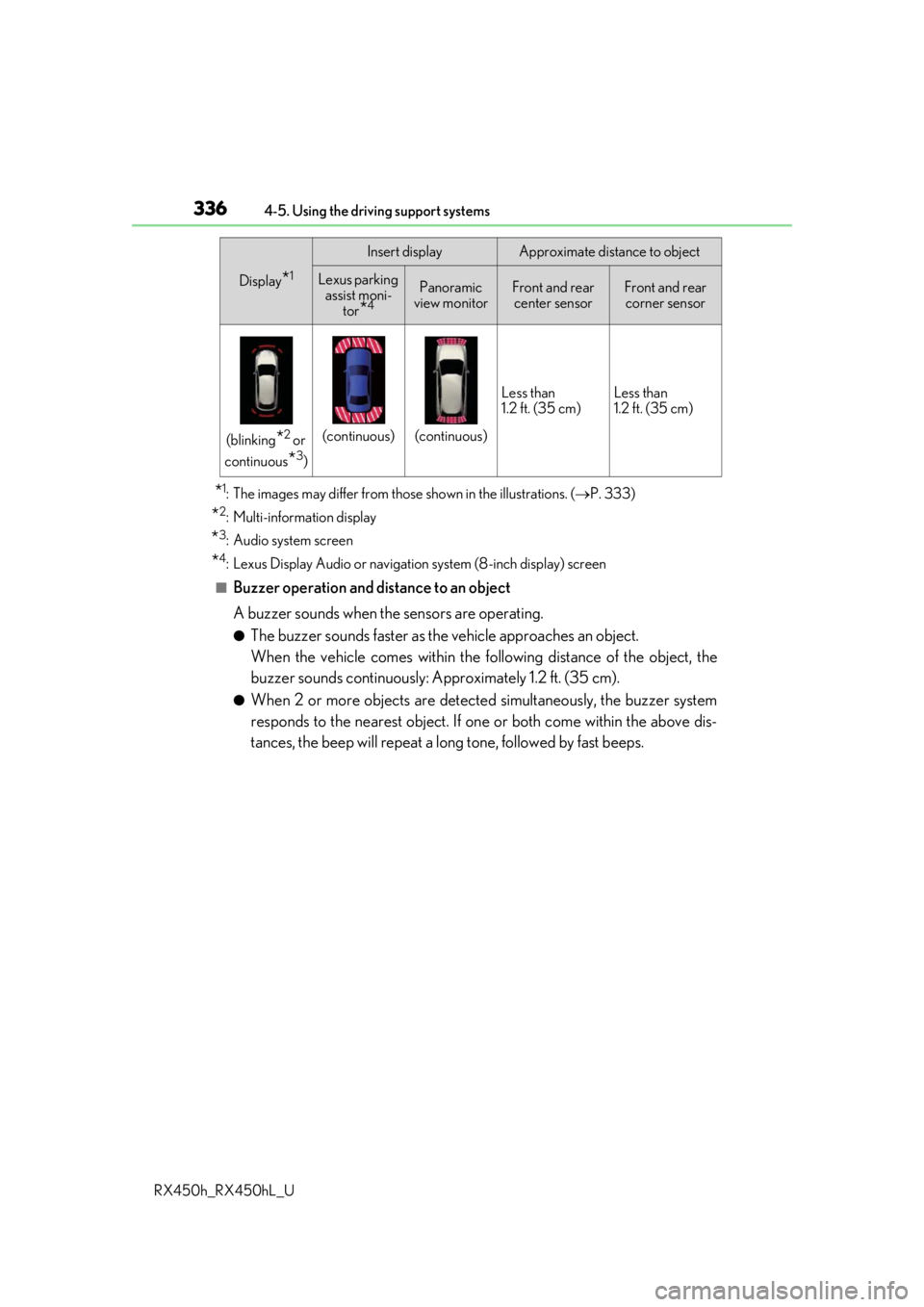
■Buzzer operation and distance to an object
A buzzer sounds when the sensors are operating.
●The buzzer sounds faster as the vehicle approaches an object.
When the vehicle comes within the following distance of the object, the
buzzer sounds continuously: Approximately 1.2 ft. (35 cm).
●When 2 or more objects are detected simultaneously, the buzzer system
responds to the nearest object. If on e or both come within the above dis-
tances, the beep will repeat a lo ng tone, followed by fast beeps.
(blinking*2 or
continuous
*3)
(continuous)(continuous) Less than
1.2 ft. (35 cm)
Less than
1.2 ft. (35 cm)
Display*1
Insert displayApproximate distance to object
Lexus parking
assist moni-
tor
*4
Panoramic
view monitorFront and rear center sensorFront and rear corner sensor
Page 338 of 792
3384-5. Using the driving support systems
RX450h_RX450hL_U
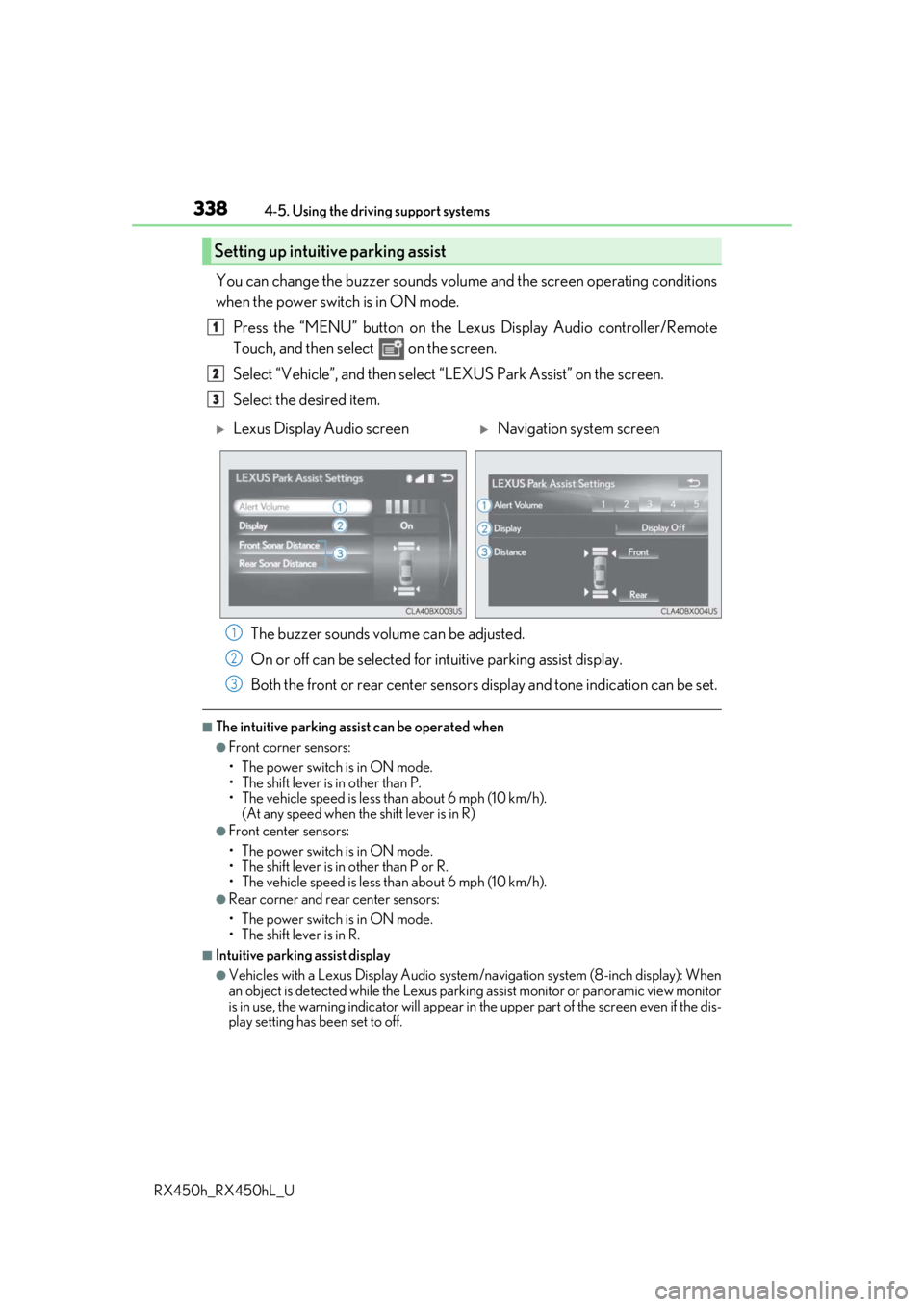
You can change the buzzer sounds volu me and the screen operating conditions
when the power switch is in ON mode.
Press the “MENU” button on the Le xus Display Audio controller/Remote
Touch, and then select on the screen.
Select “Vehicle”, and then select “LEXUS Park Assist” on the screen.
Select the desired item.
The buzzer sounds volume can be adjusted.
On or off can be selected for intuitive parking assist display.
Both the front or rear center sensors display and tone indication can be set.
■The intuitive parking assist can be operated when
●Front corner sensors:
• The power switch is in ON mode.
• The shift lever is in other than P.
• The vehicle speed is less than about 6 mph (10 km/h).
(At any speed when the shift lever is in R)
●Front center sensors:
• The power switch is in ON mode.
• The shift lever is in other than P or R.
• The vehicle speed is less than about 6 mph (10 km/h).
●Rear corner and rear center sensors:
• The power switch is in ON mode.
• The shift lever is in R.
■Intuitive parking assist display
●Vehicles with a Lexus Display Audio system/navigation system (8-inch display): When
an object is detected while the Lexus parking assist monito r or panoramic view monitor
is in use, the warning indicator will appear in the upper part of the screen even if the dis-
play setting has been set to off.
Setting up intuitive parking assist
1
2
3
Lexus Display Audio screenNavigation system screen
1
2
3