rear LEXUS RX450H 2019 Owners Manual
[x] Cancel search | Manufacturer: LEXUS, Model Year: 2019, Model line: RX450H, Model: LEXUS RX450H 2019Pages: 792, PDF Size: 13.48 MB
Page 340 of 792
3404-5. Using the driving support systems
RX450h_RX450hL_U
■If “Clean Parking Assist Sensor” is di splayed on the multi-information display
A sensor may be dirty or covered with snow or ic e. In such cases, if it is removed from the
sensor, the system should return to normal.
Also, due to the sensor being frozen at low temperatures, a malfunction display may
appear or an object may not be detected. If the sensor thaws out, the system should
return to normal.
■If “Parking Assist Malfunction” is di splayed on the multi-information display
Depending on the malfunction of the sensor, the device may not be working normally.
Have the vehicle inspected by your Lexus dealer.
■Certification
For vehicles sold in Canada
This ISM device complies with Canadian ICES-001.
Cet appareil ISM est conforme a la norme NMB-001 du Canada.
■Customization
Some functions can be customized. ( P. 338, 736)
WARNING
■When using the intuitive parking assist
Observe the following precautions.
Failing to do so may result in the vehicle be ing unable to be driven safely and possibly
cause an accident.
●Do not use the sensor at speeds in excess of 6 mph (10 km/h).
●The sensors’ detection areas and reaction ti mes are limited. When moving forward or
reversing, check the areas surrounding the vehicle (especially the sides of the vehi-
cle) for safety, and drive slowly, using the brake to control the vehicle’s speed.
●Do not install accessories within the sensors’ detection areas.
●The vehicle is equipped with a fender pole or wireless antenna.
●The front or rear bumper or a se nsor receives a strong impact.
●A non-genuine Lexus suspension (lower ed suspension, etc.) is installed.
●Towing eyelets are installed.
●A backlit license plate is installed.
■When using intuitive parking assist
In the following situations, the system may not function correctly due to a sensor mal-
function, etc. Have the vehicle checked by your Lexus dealer.
●The intuitive parking assist operation disp lay flashes, and a buzzer sounds when no
obstacles are detected.
●If the area around a sensor co llides with something, or is subjected to strong impact.
●If the bumper collides with something.
●If the display shows continuously without beeping, except when the buzzer mute
switch has been turned on.
●If a display error occurs, first check the sensor.
If the error occurs even if there is no ice, sn ow or mud on the sensor, it is likely that the
sensor is malfunctioning.
Page 344 of 792
3444-5. Using the driving support systems
RX450h_RX450hL_U
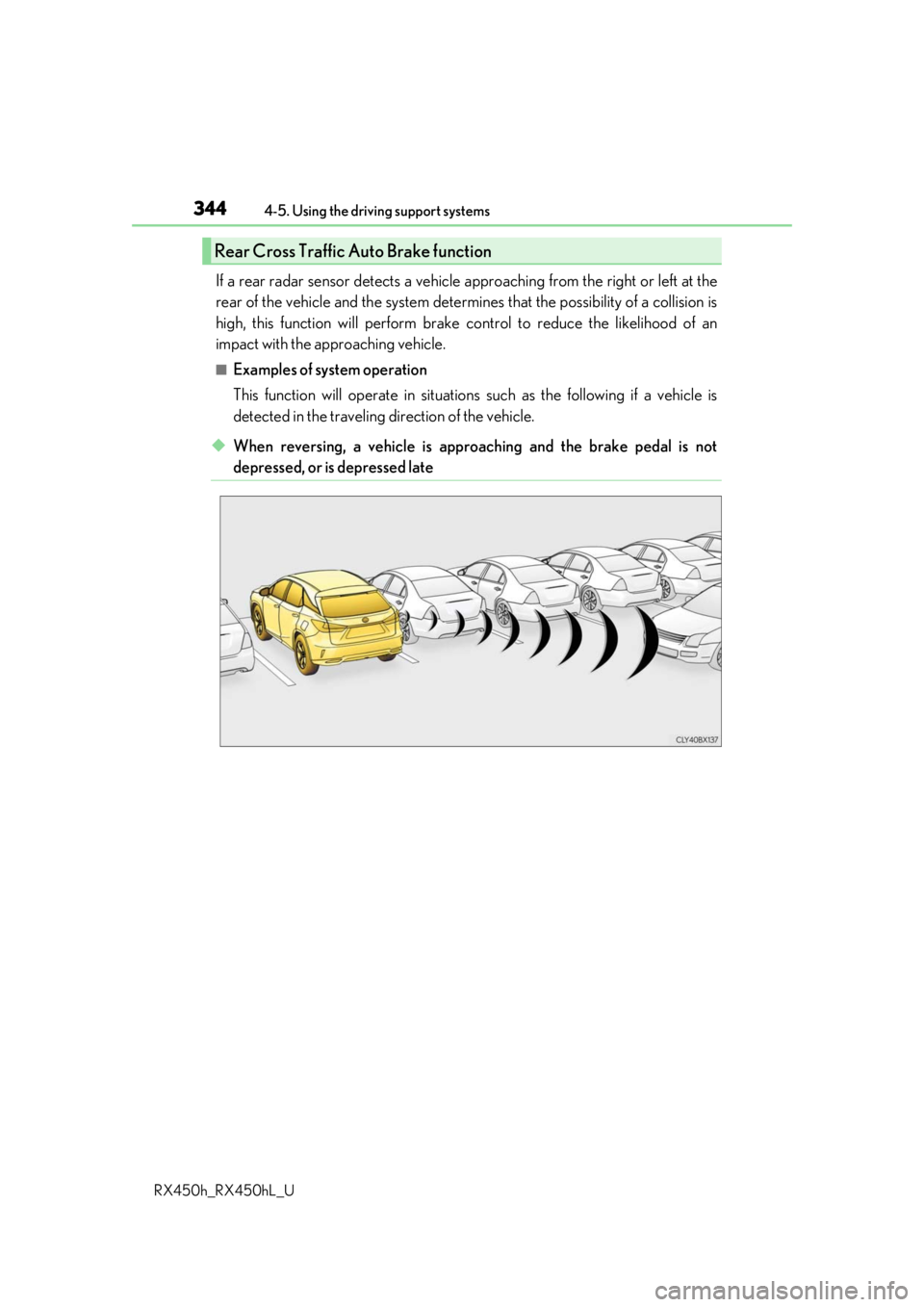
If a rear radar sensor detects a vehicle ap proaching from the right or left at the
rear of the vehicle and the system determ ines that the possibility of a collision is
high, this function will perform brake control to reduce the likelihood of an
impact with the approaching vehicle.
■Examples of system operation
This function will operate in situations such as the following if a vehicle is
detected in the traveling direction of the vehicle.
◆When reversing, a vehicle is approaching and the brake pedal is not
depressed, or is depressed late
Rear Cross Traffic Auto Brake function
Page 345 of 792
3454-5. Using the driving support systems
4
Driving
RX450h_RX450hL_U
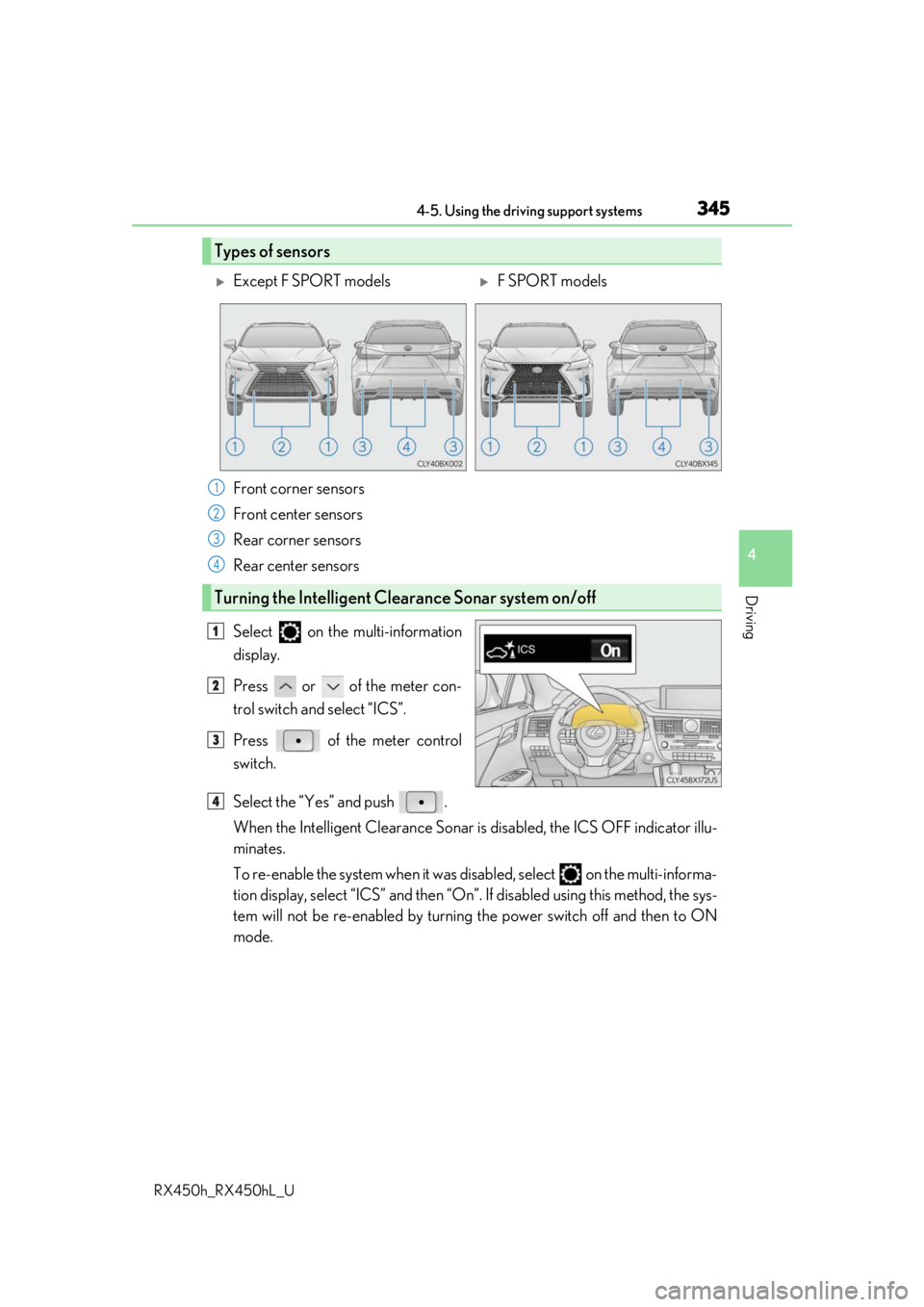
Select on the multi-information
display.
Press or of the meter con-
trol switch and select “ICS”.
Press of the meter control
switch.
Select the “Yes” and push .
When the Intelligent Clearance Sonar is disabled, the ICS OFF indicator illu-
minates.
To re-enable the system when it was disabled, select on the multi-informa-
tion display, select “ICS” and then “On”. If disabled using this method, the sys-
tem will not be re-enabled by turning the power switch off and then to ON
mode.
Types of sensors
Except F SPORT modelsF SPORT models
Front corner sensors
Front center sensors
Rear corner sensors
Rear center sensors
Turning the Intelligent Cle arance Sonar system on/off
1
2
3
4
1
2
3
4
Page 350 of 792
3504-5. Using the driving support systems
RX450h_RX450hL_U
■Re-enabling the Intelligent Clearance Sonar system
To re-enable the Intelligent Clearance Sonar system when it is disabled due to operation
of the Intelligent Clearance Sonar function, either enable the system again ( P. 345), or
turn the power switch off an d then back to ON mode.
Additionally, if the object becomes no longer in the traveling direction of the vehicle or if
the traveling direction of the vehicle change s (such as changing from moving forward to
backing up, or from backing up to moving fo rward), the system will be re-enabled auto-
matically.
■Objects that the Intelligent Clearance Sonar function may not detect
The sensors may not be able to detect certain objects, such as the following.
●Cotton cloth, snow, and other materials that are poor reflectors of ultrasonic waves.
(People may also not be detected depending on the type of clothing they are wearing.)
●Objects which are not perpendicular to the ground, are not perpendicular to the travel-
ing direction of the vehicle, are uneven or are waving.
●Low objects
●Thin objects such as wires, fences, ropes and signposts
●Objects that are extremely close to the bumper
■Intuitive parking assist buzzer
Regardless of whether the in tuitive parking assist system is enabled or not ( P. 332), if
the Intelligent Clearance Sonar system is enabled ( P. 345), the front or rear sensors
detect an object and brake control is performed, the intuitive parking assist buzzer will
sound to notify the driver of the approximate distance to the object.
Page 356 of 792

3564-5. Using the driving support systems
RX450h_RX450hL_U
If the Rear Cross Traffic Auto Brake function detects that a collision with an
approaching vehicle is possible, the hybrid system output will be restricted to
restrain any increase in vehicle speed. (Hybrid system output restriction control:
See A below.)
Additionally, if the accelerator pedal continues to be depressed, the brakes will
be applied automatically to reduce the vehicle speed. (Brake control: See B
below.)
Rear Cross Traffic Auto Brake function (if equipped)
Page 358 of 792
3584-5. Using the driving support systems
RX450h_RX450hL_U
■The Rear Cross Traffic Auto Brake function will operate when
The function will operate when the ICS OFF indicator is not illuminated or flashing ( P.
345, 353) and all of the fo llowing conditions are met:
●Hybrid system output restriction control
• The Intelligent Clearance Son ar with Rear Cross Traffic Auto Brake is enabled.
• The vehicle speed is 10 mph (15 km/h) or less.
• The shift lever is in R.
• The system determines that a stronger than normal brake operation is necessary to
avoid a collision with an approaching vehicle.
●Brake control
• Hybrid system output restri ction control is operating.
• The system determines that an emergenc y brake operation is necessary to avoid a
collision with an approaching vehicle.
■The Rear Cross Traffic Auto Brake function will stop operating when
The function will stop operating if an y of the following conditions are met:
●Hybrid system output restriction control
• The Intelligent Clearance Sonar with Rear Cross Traffic Auto Brake is disabled.
• The collision becomes avoidable with normal brake operation.
• A vehicle is no longer approaching from th e right or left at the rear of the vehicle.
●Brake control
• The Intelligent Clearance Sonar with Rear Cross Traffic Auto Brake is disabled.
• Approximately 2 seconds elapse after the vehicle is stopped by brake control.
• The brake pedal is depressed after the vehicle is stopped by brake control.
• A vehicle is no longer approaching from the right or left at the rear of the vehicle.
■Detection area of the Rear Cross Traffic Auto Brake function
The detection area of the Rear Cross Traffic Auto Brake function differs from the detec-
tion area of the RCTA function. ( P. 329)
Therefore, even if the RCTA function detect s a vehicle and provides an alert, the Rear
Cross Traffic Auto Brake function may not start operating.
■If the Rear Cross Traffic Auto Brake function has operated
If the vehicle is stopped due to operation of the Rear Cross Traffic Auto Brake function,
the Rear Cross Traffic Auto Brake function will be disabled and the ICS OFF indicator
will illuminate.
Page 359 of 792
3594-5. Using the driving support systems
4
Driving
RX450h_RX450hL_U
■Re-enabling the Rear Cross Traffic Auto Brake function
To re-enable the Rear Cross Traffic Auto Brake function when it is disabled during opera-
tion of the Rear Cross Traffic Auto Brake function, either enable the system again (P.
345), or turn the power switch off and then back to ON mode.
Additionally, if there is no longer a vehicle ap proaching from the right or left at the rear of
the vehicle, or if the traveling direction of the vehicle changes (such as changing from
moving forward to backing up or from backin g up to moving forward), the system will be
re-enabled automatically.
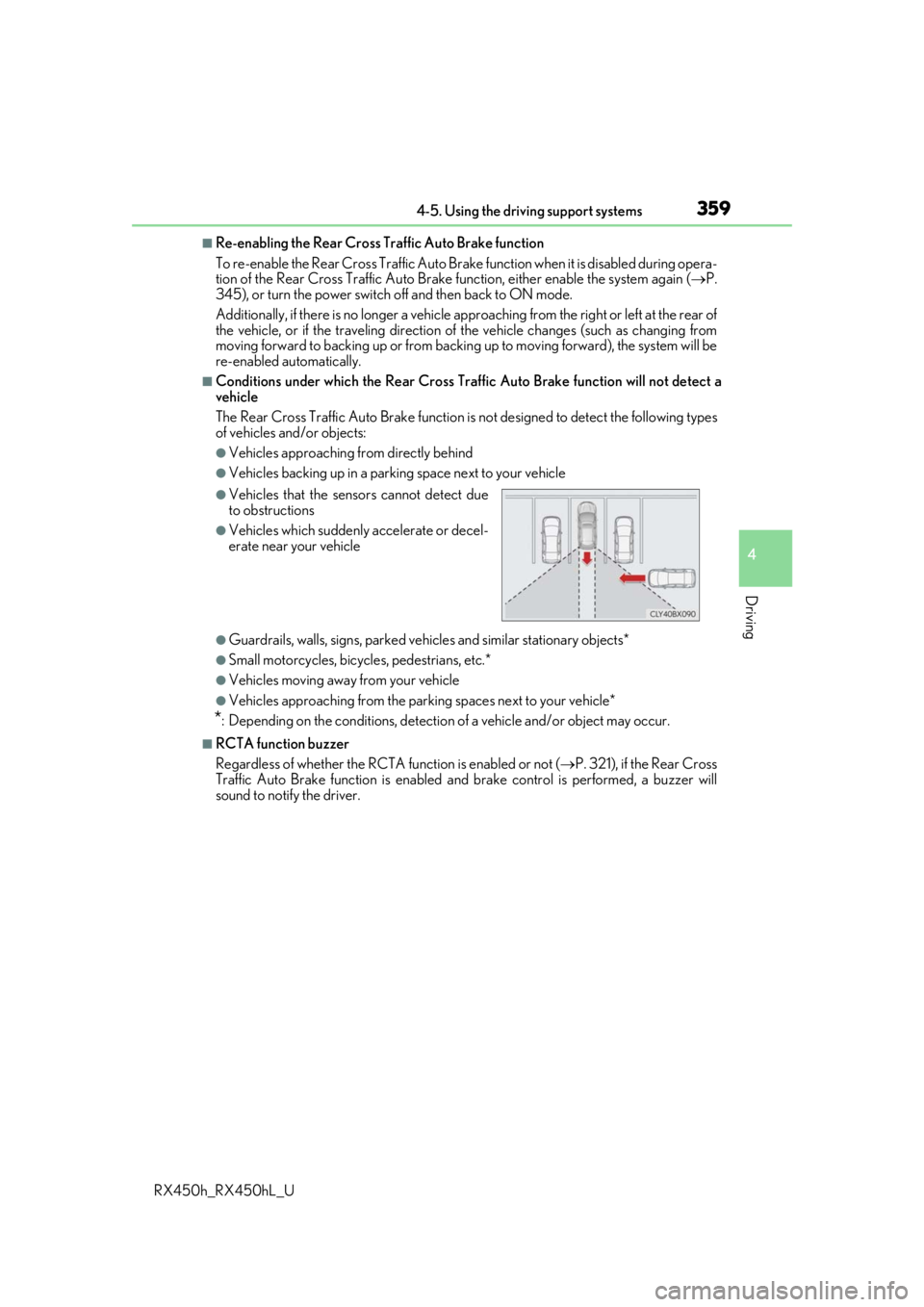
■Conditions under which the Rear Cross Traffic Auto Brake function will not detect a
vehicle
The Rear Cross Traffic Auto Brake function is not designed to detect the following types
of vehicles and/or objects:
●Vehicles approaching from directly behind
●Vehicles backing up in a parkin g space next to your vehicle
●Guardrails, walls, signs, parked vehi cles and similar stationary objects*
●Small motorcycles, bicycles, pedestrians, etc.*
●Vehicles moving away from your vehicle
●Vehicles approaching from the parking spaces next to your vehicle*
*: Depending on the conditions, detection of a vehicle and/or object may occur.
■RCTA function buzzer
Regardless of whether the RCTA function is enabled or not ( P. 321), if the Rear Cross
Traffic Auto Brake function is enabled and brake control is performed, a buzzer will
sound to notify the driver.
●Vehicles that the sensors cannot detect due
to obstructions
●Vehicles which suddenly accelerate or decel-
erate near your vehicle
Page 360 of 792
3604-5. Using the driving support systems
RX450h_RX450hL_U
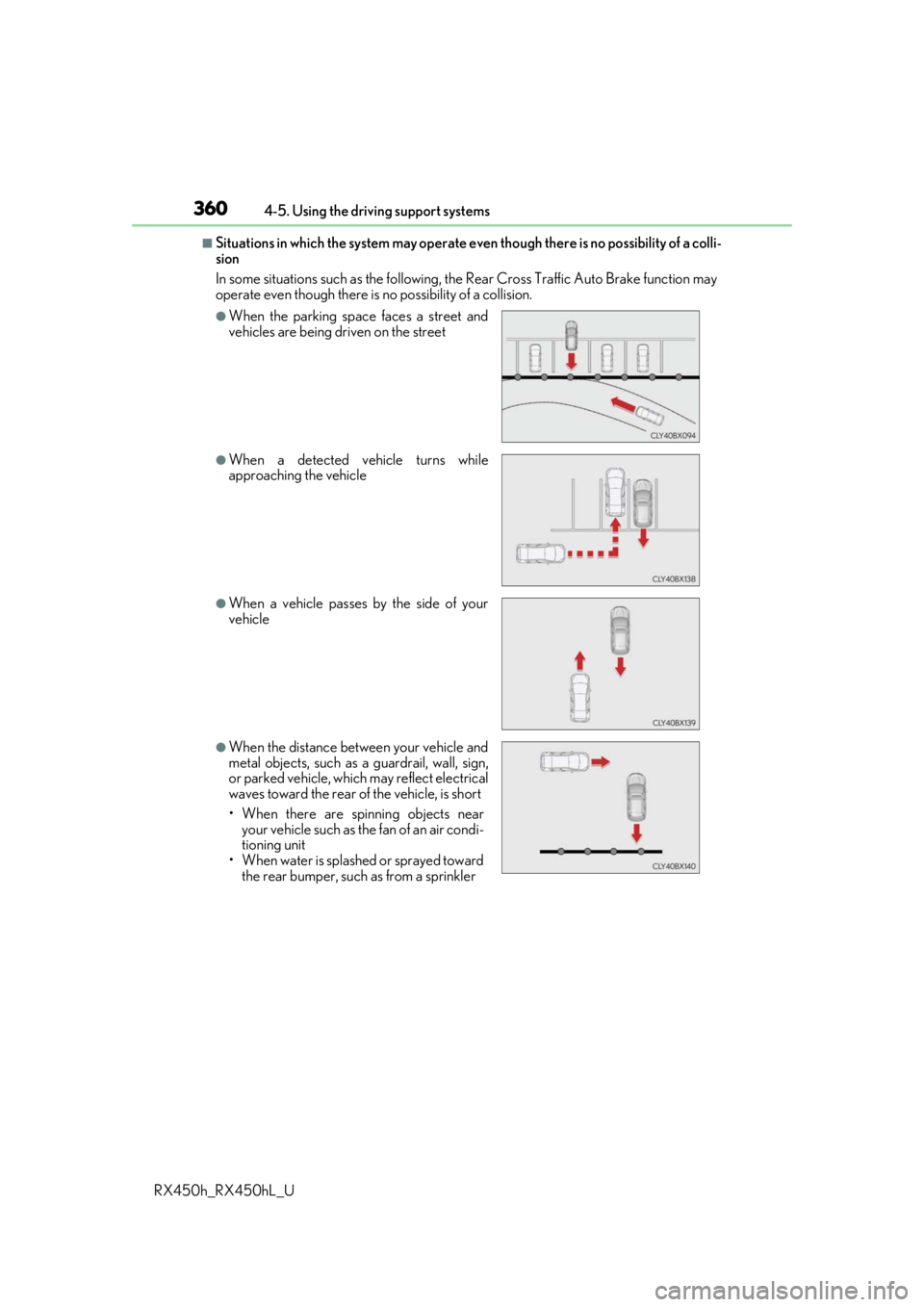
■Situations in which the system may operate ev en though there is no possibility of a colli-
sion
In some situations such as the following, th e Rear Cross Traffic Auto Brake function may
operate even though there is no possibility of a collision.
●When the parking space faces a street and
vehicles are being driven on the street
●When a detected vehicle turns while
approaching the vehicle
●When a vehicle passes by the side of your
vehicle
●When the distance between your vehicle and
metal objects, such as a guardrail, wall, sign,
or parked vehicle, which may reflect electrical
waves toward the rear of the vehicle, is short
• When there are spinning objects near your vehicle such as the fan of an air condi-
tioning unit
• When water is splashed or sprayed toward the rear bumper, such as from a sprinkler
Page 361 of 792
3614-5. Using the driving support systems
4
Driving
RX450h_RX450hL_U
■Situations in which the Rear Cross Traffic Auto Brake function may not operate prop-
erly
In some situations such as the following , this function may not operate properly.
●Objects and vehicles which the radar sensors are not designed to detect
• Stationary objects
• Vehicles which are moving away from your vehicle
• Pedestrians, motorcycles, bicycles, etc.*
• Objects which are extremely close to a radar sensor
• Vehicles which are approaching from the right or left at the rear of the vehicle at a
traveling speed of less than approximately 5 mph (8 km/h)
• Vehicles which are approaching from the right or left at the rear of the vehicle at a
traveling speed of more than approximately 15 mph (24 km/h)
*: Depending on conditions, detection of a vehicle and/or object may occur.
●Situations in which the radar sensors may not be able to detect an object
• When a sensor or the area around a sensor is extremely hot or cold
• If the rear bumper is covere d with ice, snow, dirt, etc.
• If heavy rain or water strikes the vehicle
• When the detection area of a radar sensor is obstructed by an adjacent vehicle
• If the vehicle is significantly tilted
• If towing eyelets are installed
• If the suspension has been modified or tires of a size othe r than specified are
installed
• If the front of the vehicle is raised or lowered due to the carried load
• If a sticker or an electronic component, su ch as a backlit license plate (especially flu-
orescent type), fog lights, a fender pole or wireless antenna is installed near a radar
sensor
• If the orientation of a rada r sensor has been changed due to a collision or other
impact or removal and installation
• When multiple vehicles are approaching wi th only a small gap between each vehicle
• When a vehicle is approaching at high speed
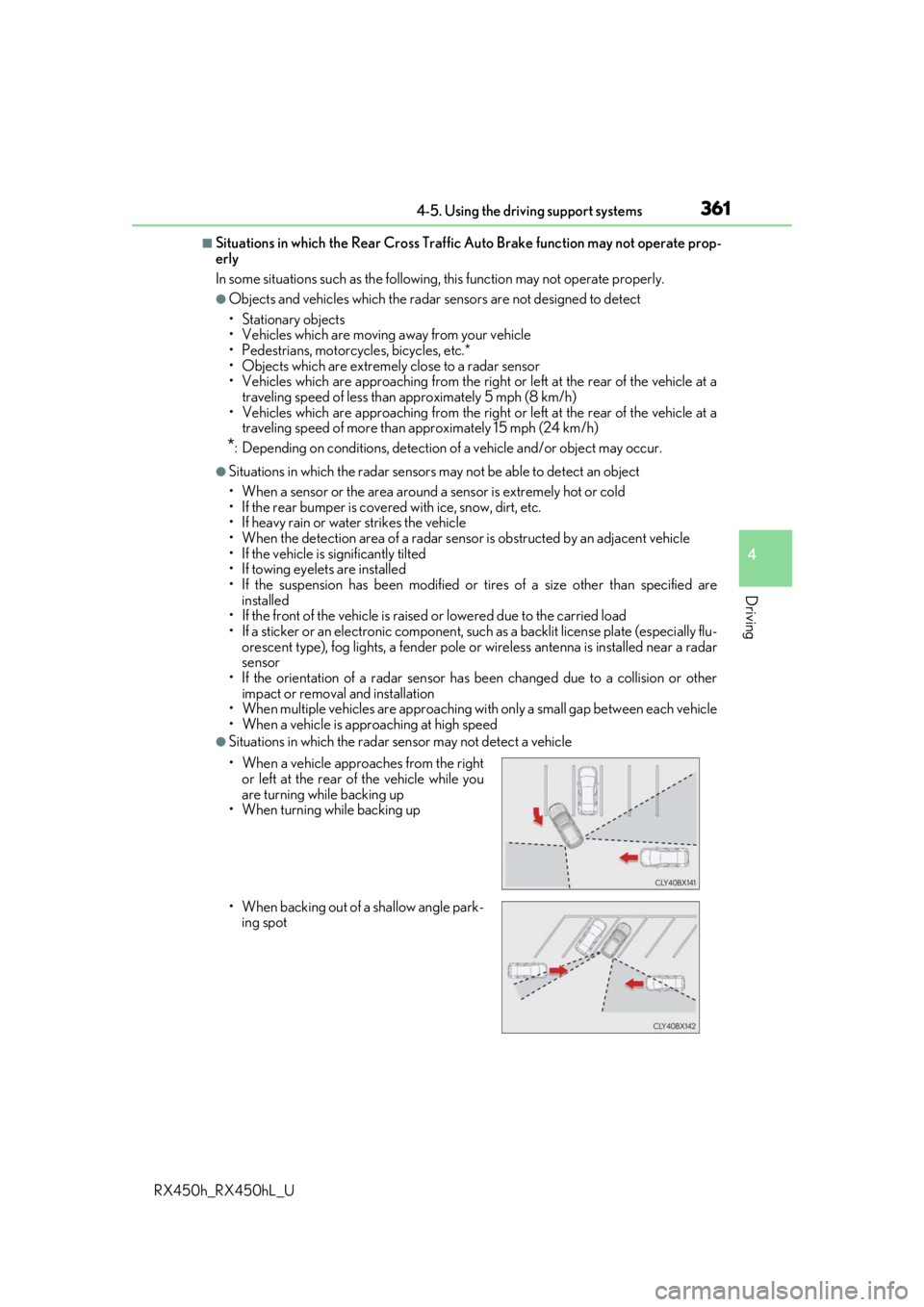
●Situations in which the radar sensor may not detect a vehicle
• When a vehicle approaches from the right or left at the rear of the vehicle while you
are turning while backing up
• When turning while backing up
• When backing out of a shallow angle park- ing spot
Page 363 of 792
3634-5. Using the driving support systems
4
Driving
RX450h_RX450hL_U
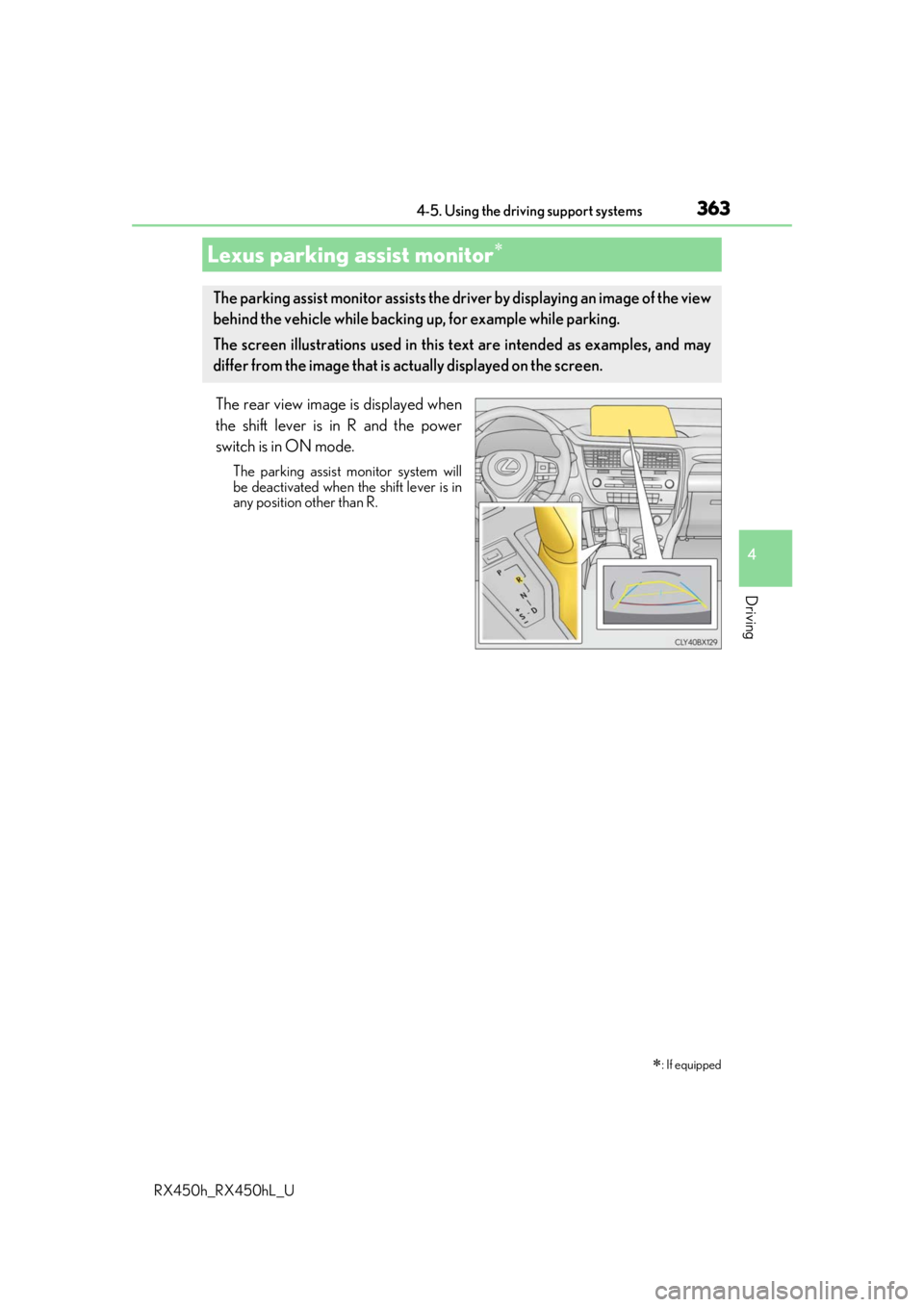
The rear view image is displayed when
the shift lever is in R and the power
switch is in ON mode.
The parking assist monitor system will
be deactivated when the shift lever is in
any position other than R.
Lexus parking assist monitor
: If equipped
The parking assist monitor assists the driv er by displaying an image of the view
behind the vehicle while backing up, for example while parking.
The screen illustrations used in this text are intended as examples, and may
differ from the image that is ac tually displayed on the screen.