rear LEXUS RX450H 2019 Owners Manual
[x] Cancel search | Manufacturer: LEXUS, Model Year: 2019, Model line: RX450H, Model: LEXUS RX450H 2019Pages: 792, PDF Size: 13.48 MB
Page 518 of 792
5186-2. Using the air conditioning system and defogger
RX450h_RX450hL_U
■Registering air conditioning settings to electronic keys
●Unlocking the vehicle using an electronic key and turning the power switch to ON
mode will recall that ke y’s registered air conditioning settings.
●When the power switch is turned off, the cu rrent air conditioning settings will automati-
cally be registered to the electronic key that was used to unlock the vehicle.
●The system may not operate correctly if more th an one electronic key is in the vicinity or
if the smart access system with push-button start is used to unlock a passenger door.
●The doors that can recall the air conditioning setting when unlocked using the smart
access system with push-button start can be changed.
* For details, contact your Lexus
dealer.
*: The doors that can recall the driving positi on memory are changed at the same time.
■Using automatic mode
Fan speed is adjusted automatically according to the temperature setting and the ambi-
ent conditions.
Therefore, the fan may stop for a while until wa rm or cool air is ready to flow immediately
after the “AUTO” button is pressed or “AUTO” is selected.
■How the system judges if a passenger is in the vehicle when in S-FLOW mode
In S-FLOW mode, the system judges if a passenger is in the vehicle as follows:
• Front passenger seat: A passeng er is judged to be in the front passenger seat when the
system detects an object on the front passenger seat, fastening of the front passenger
seat belt, changing of the set temperature for the front passenger seat or the opening
and closing of the front passenger door. (However, when only opening and closing of
the front passenger door is detected, the sy stem will judge that a passenger is not in
the front passenger seat after the vehicl e speed reaches approximately 12 mph (20
km/h) or more.)
• Rear seats (automatic S-FLOW mode only): A passenger is judged to be in a rear seat
when the system detects the opening and closin g of a rear door or the operation of the
rear air conditioning system (RX450hL).
If a passenger is judged to be in the vehicl e, the system will retain the judgement for a
certain amount of time after th e power switch is turned off.
■Operation of automatic S-FLOW mode
When the system is operating in automati c S-FLOW mode, if the system detects the
opening and closing of a rear door or the op eration of the rear air conditioning system
(RX450hL), S-FLOW mode will be disabled. To enable S-FLOW mode, select
on the option control screen. (In this case , the system will operate in manual S-FLOW
mode.)
■Changing from manual S-FLOW mode to automatic S-FLOW mode
Select on the option control screen to disable S-FLOW mode.
Turn the power switch off.
Wait for 60 minutes or more and change the power switch to ON mode.
■Using the voice command system
Air conditioning system can be operated using voice commands. For details, refer to the
“NAVIGATION SYSTEM OWNER’S MANUAL”.
1
2
3
Page 520 of 792
5206-2. Using the air conditioning system and defogger
RX450h_RX450hL_U
■Ventilation and air conditioning odors
●To let fresh air in, set the air conditioning system to the outside air mode.
●During use, various odors from inside and outside the vehicle may enter into and accu-
mulate in the air conditioning system. This may then cause odor to be emitted from the
vents.
●To reduce potential odors from occurring:
• It is recommended that the air conditioning system be set to outside air mode prior
to turning the vehicle off.
• The start timing of the blower may be dela yed for a short period of time immediately
after the air conditioning system is started in automatic mode.
■Air conditioning filter
P. 625
■Customization
Some functions can be customized ( P. 736)
WARNING
■To prevent the windshield from fogging up
●Do not use during cool air operation in extremely humid weather. The differ-
ence between the temperature of the outside air and that of the windshield can cause
the outer surface of the windshield to fog up, blocking your vision.
■To prevent burns
●Do not touch the rear view mirror surfaces when the outside rear view mirror defog-
gers are on.
●Do not touch the glass at lower part of the windshield or to the side of the front pillars
when the windshield wiper de-icer is on. (if equipped)
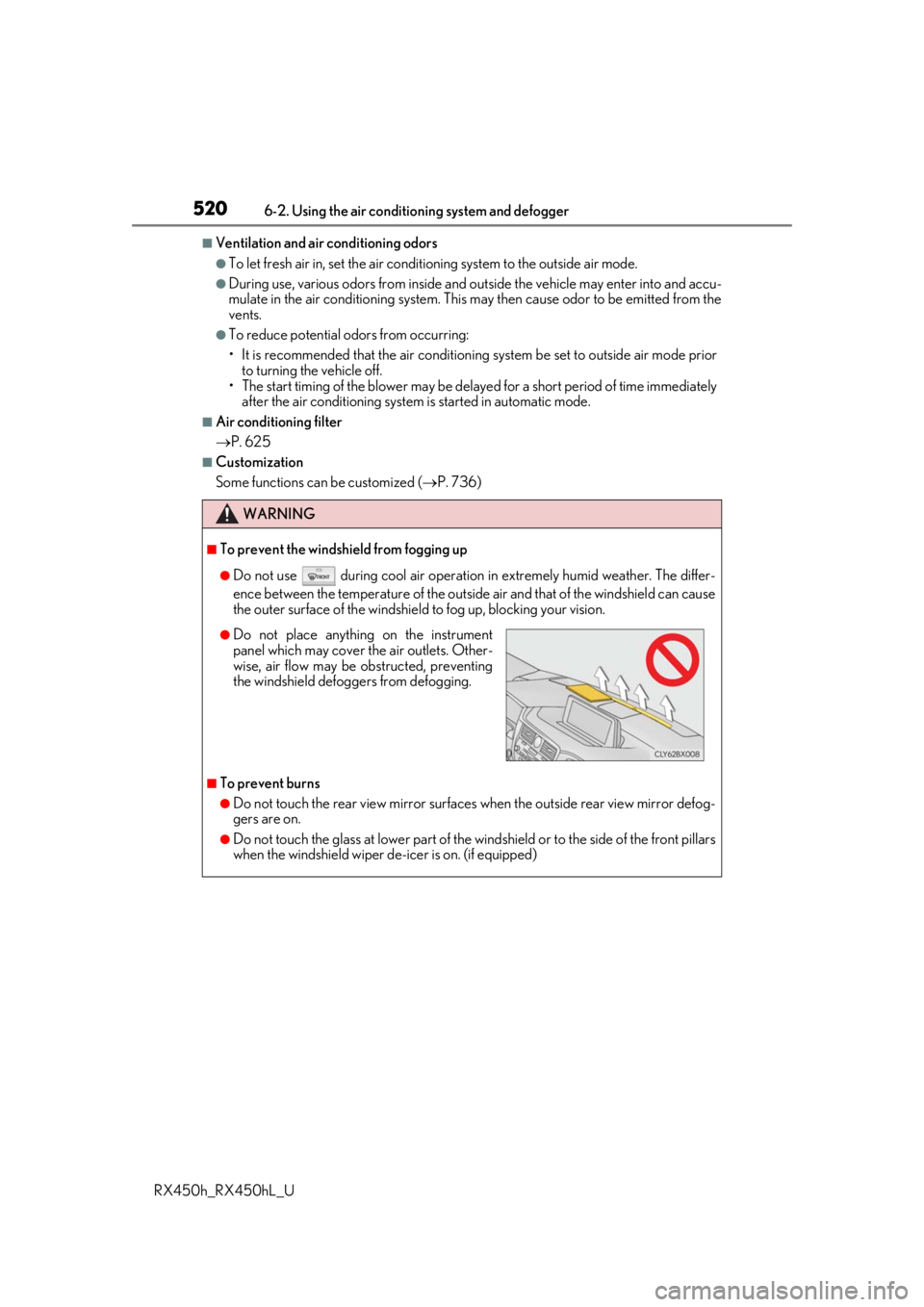
●Do not place anything on the instrument
panel which may cover th e air outlets. Other-
wise, air flow may be obstructed, preventing
the windshield defoggers from defogging.
Page 522 of 792
5226-2. Using the air conditioning system and defogger
RX450h_RX450hL_U
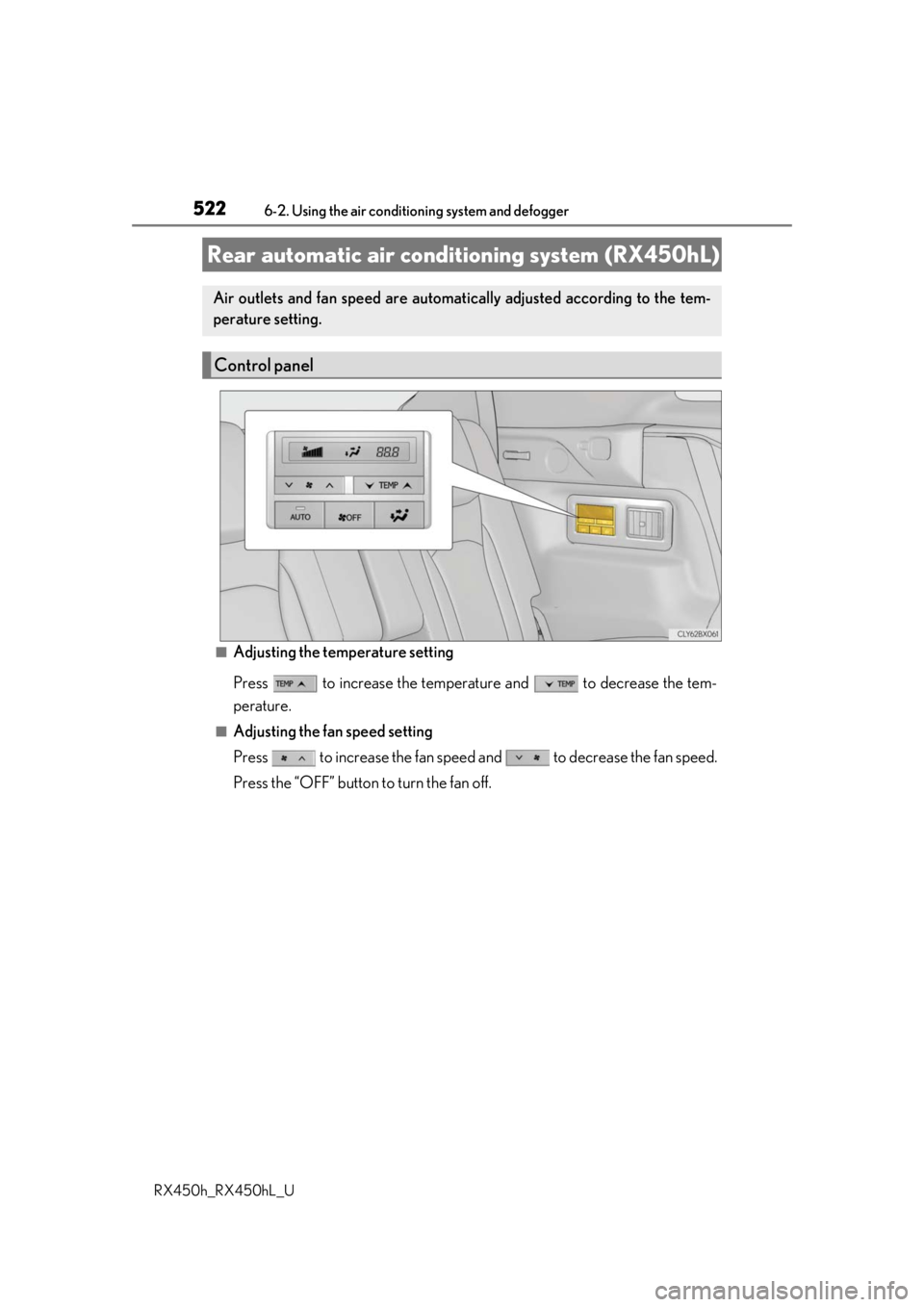
■Adjusting the temperature setting
Press to increase the temperature and to decrease the tem-
perature.
■Adjusting the fan speed setting
Press to increase the fan speed and to decrease the fan speed.
Press the “OFF” button to turn the fan off.
Rear automatic air cond itioning system (RX450hL)
Air outlets and fan speed are automati cally adjusted according to the tem-
perature setting.
Control panel
Page 527 of 792
5276-2. Using the air conditioning system and defogger
RX450h_RX450hL_U
6
Interior features
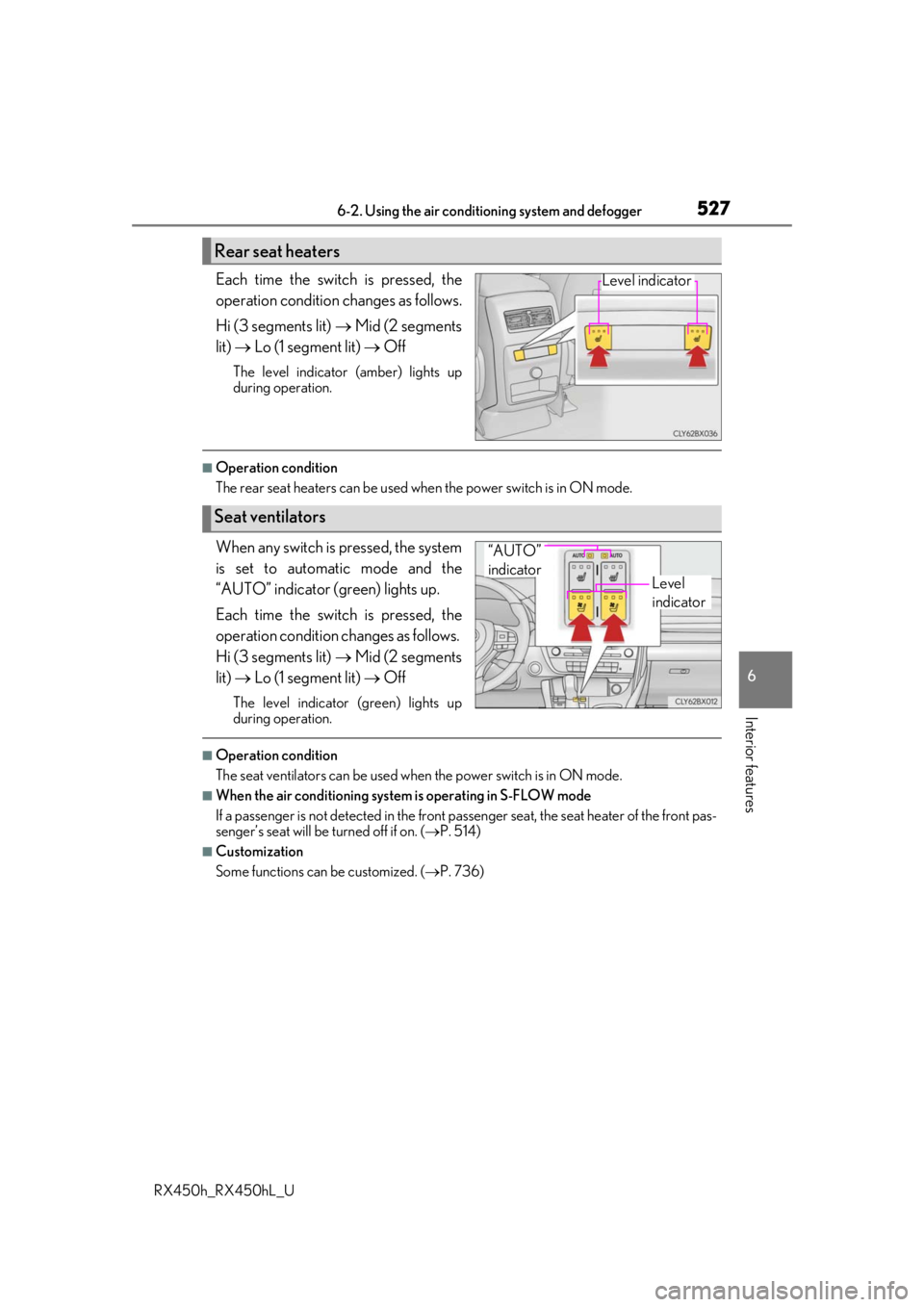
Each time the switch is pressed, the
operation condition changes as follows.
Hi (3 segments lit) Mid (2 segments
lit) Lo (1 segment lit) Off
The level indicator (amber) lights up
during operation.
■Operation condition
The rear seat heaters can be used wh en the power switch is in ON mode.
When any switch is pressed, the system
is set to automatic mode and the
“AUTO” indicator (green) lights up.
Each time the switch is pressed, the
operation condition changes as follows.
Hi (3 segments lit) Mid (2 segments
lit) Lo (1 segment lit) Off
The level indicator (green) lights up
during operation.
■Operation condition
The seat ventilators can be used when the power switch is in ON mode.
■When the air conditioning system is operating in S-FLOW mode
If a passenger is not detected in the front pa ssenger seat, the seat heater of the front pas-
senger’s seat will be turned off if on. ( P. 514)
■Customization
Some functions can be customized. ( P. 736)
Rear seat heaters
Level indicator
Seat ventilators
Level
indicator
“AUTO”
indicator
Page 528 of 792
528
RX450h_RX450hL_U6-3. Using the interior lights
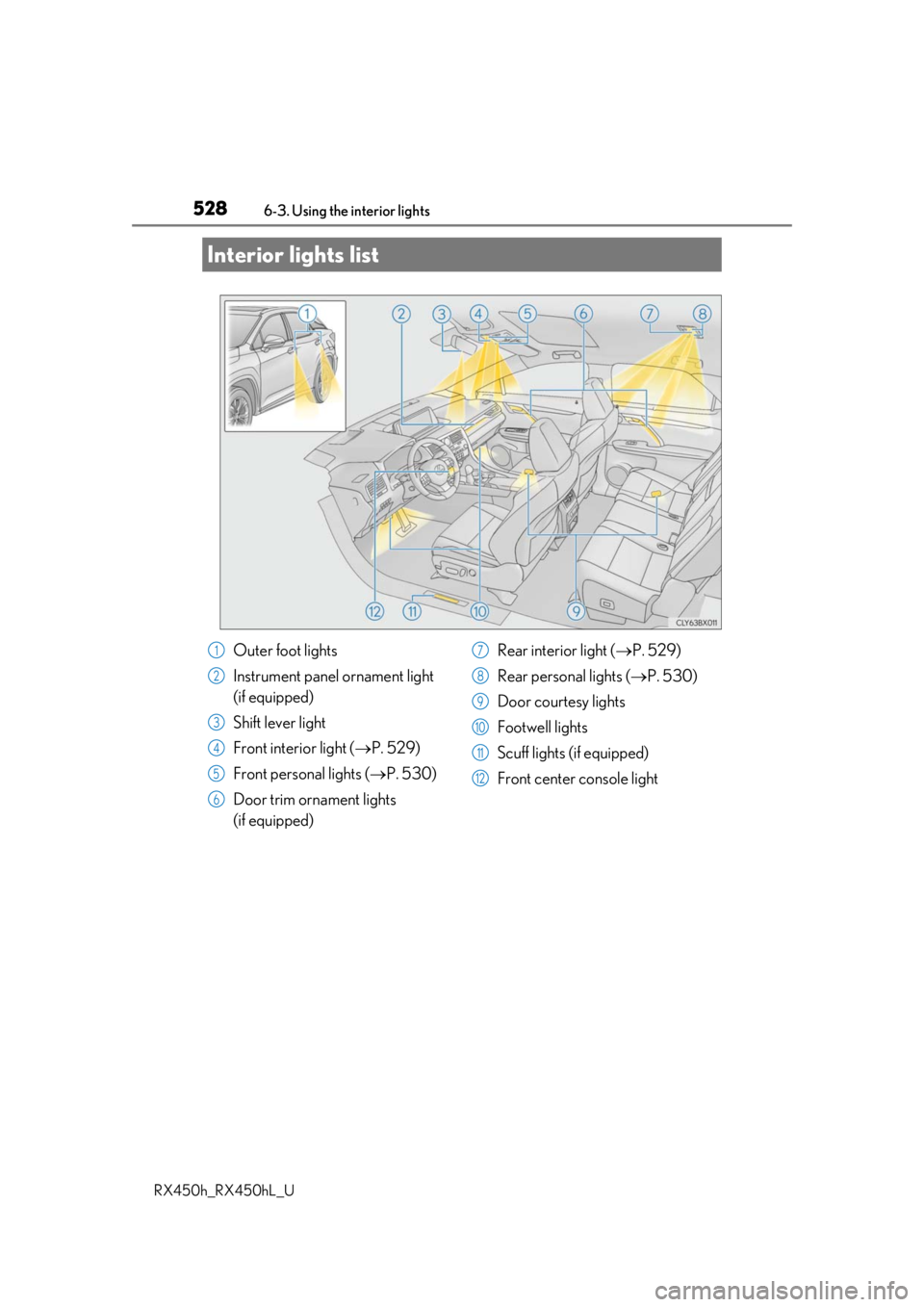
Interior lights list
Outer foot lights
Instrument panel ornament light
(if equipped)
Shift lever light
Front interior light (
P. 529)
Front personal lights ( P. 530)
Door trim ornament lights
(if equipped) Rear interior light (
P. 529)
Rear personal lights ( P. 530)
Door courtesy lights
Footwell lights
Scuff lights (if equipped)
Front center console light1
2
3
4
5
6
7
8
9
10
11
12
Page 529 of 792
5296-3. Using the interior lights
6
Interior features
RX450h_RX450hL_U
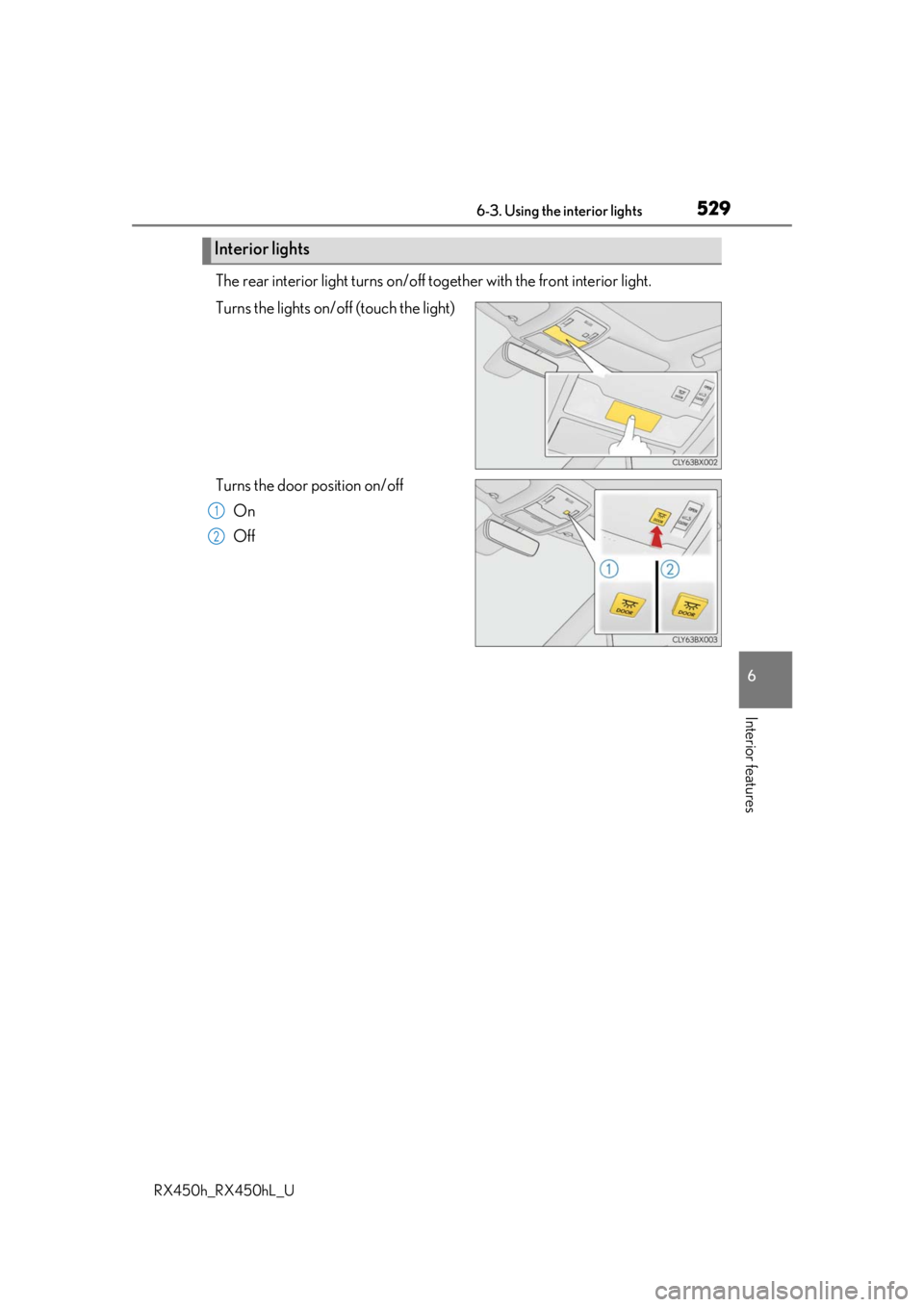
The rear interior light turns on/off together with the front interior light.
Turns the lights on/off (touch the light)
Turns the door position on/off On
Off
Interior lights
1
2
Page 530 of 792
5306-3. Using the interior lights
RX450h_RX450hL_U
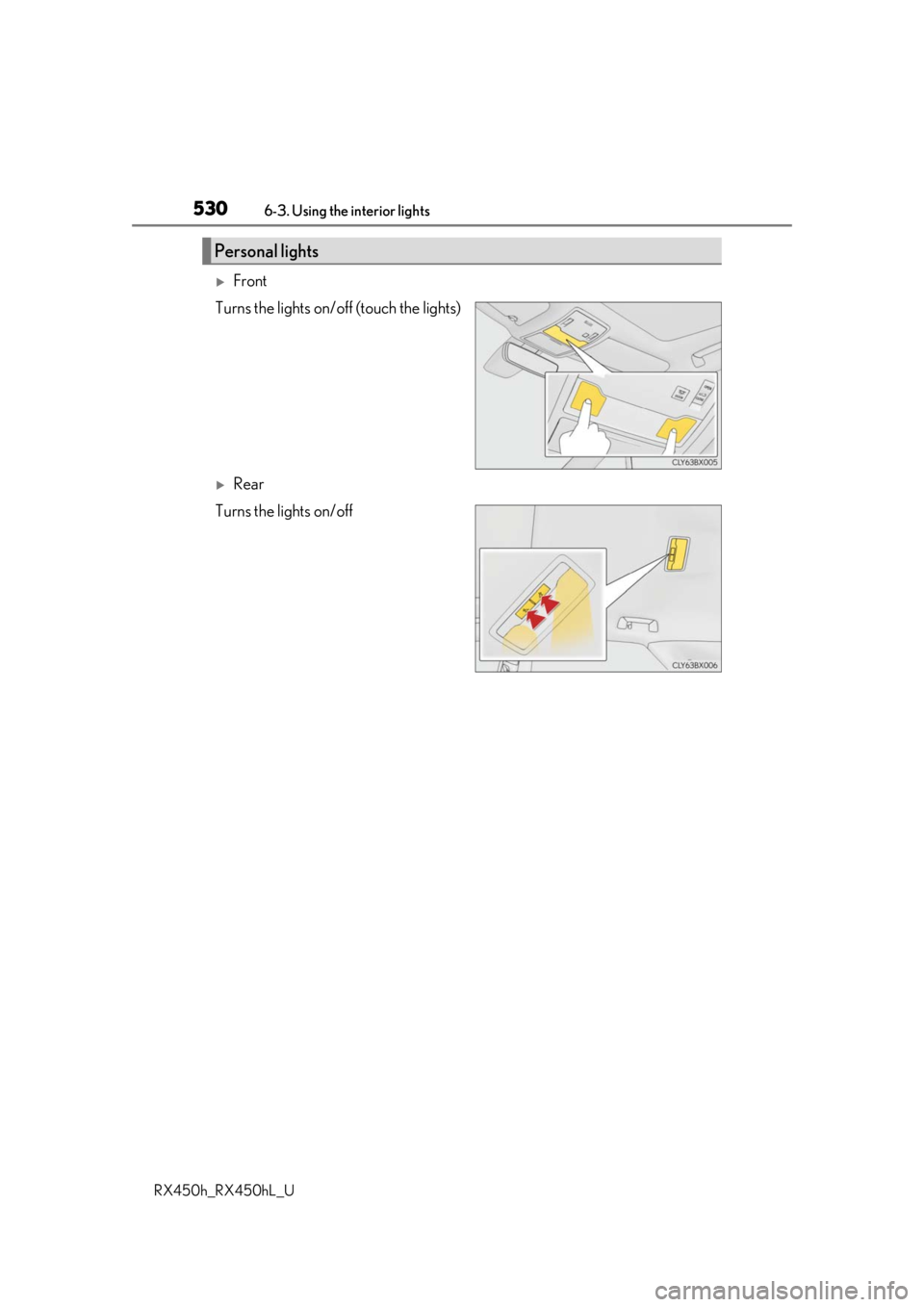
Front
Turns the lights on/off (touch the lights)
Rear
Turns the lights on/off
Personal lights
Page 536 of 792
5366-4. Using the storage features
RX450h_RX450hL_U
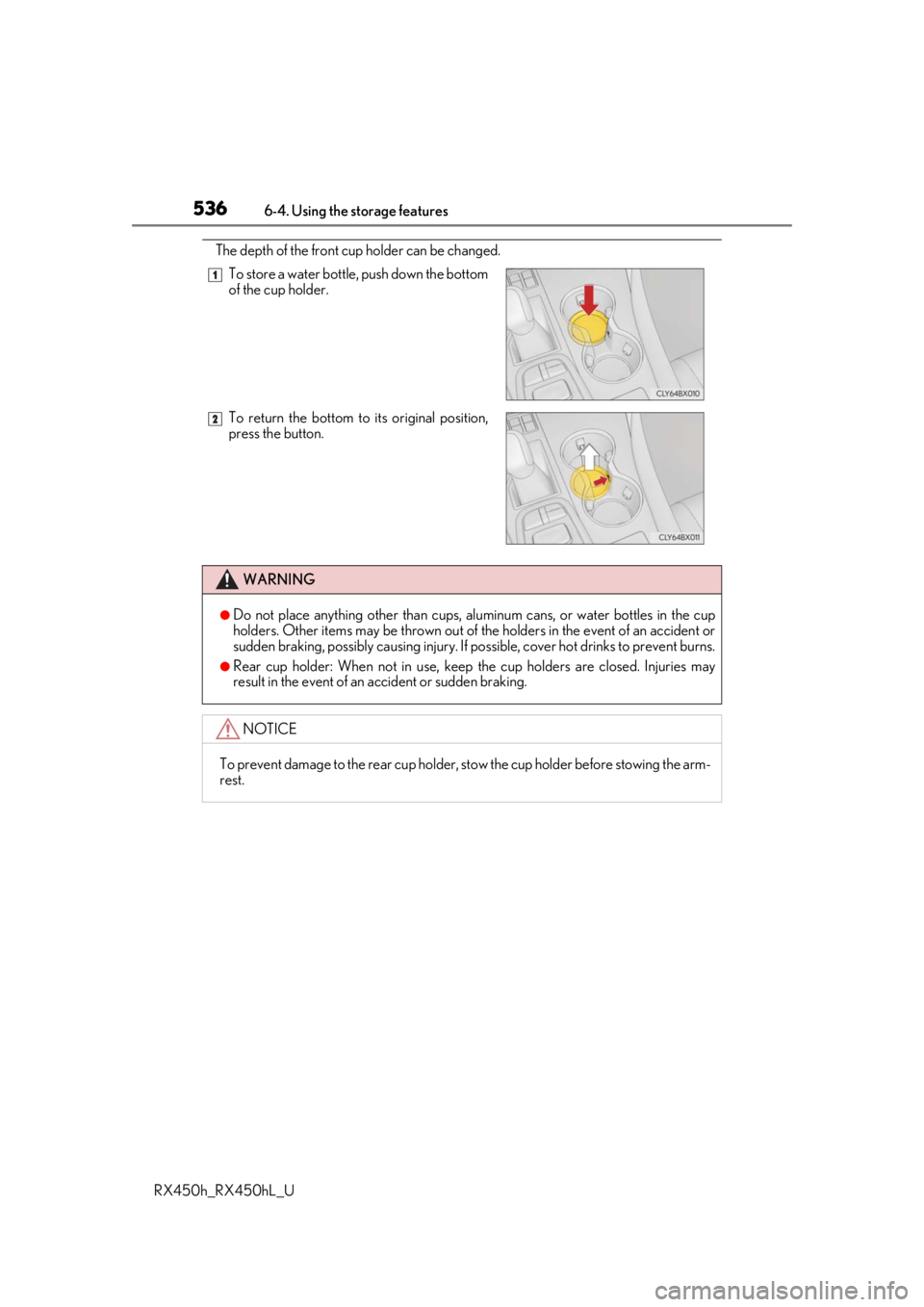
The depth of the front cup holder can be changed. To store a water bottle, push down the bottom
of the cup holder.
To return the bottom to its original position,
press the button.
WARNING
●Do not place anything other than cups, aluminum cans, or water bottles in the cup
holders. Other items may be thrown out of the holders in the event of an accident or
sudden braking, possibly causing injury. If possible, cover hot drinks to prevent burns.
●Rear cup holder: When not in use, keep the cup holders are closed. Injuries may
result in the event of an accident or sudden braking.
NOTICE
To prevent damage to the rear cup holder, stow the cup holder before stowing the arm-
rest.
1
2
Page 537 of 792
5376-4. Using the storage features
6
Interior features
RX450h_RX450hL_U
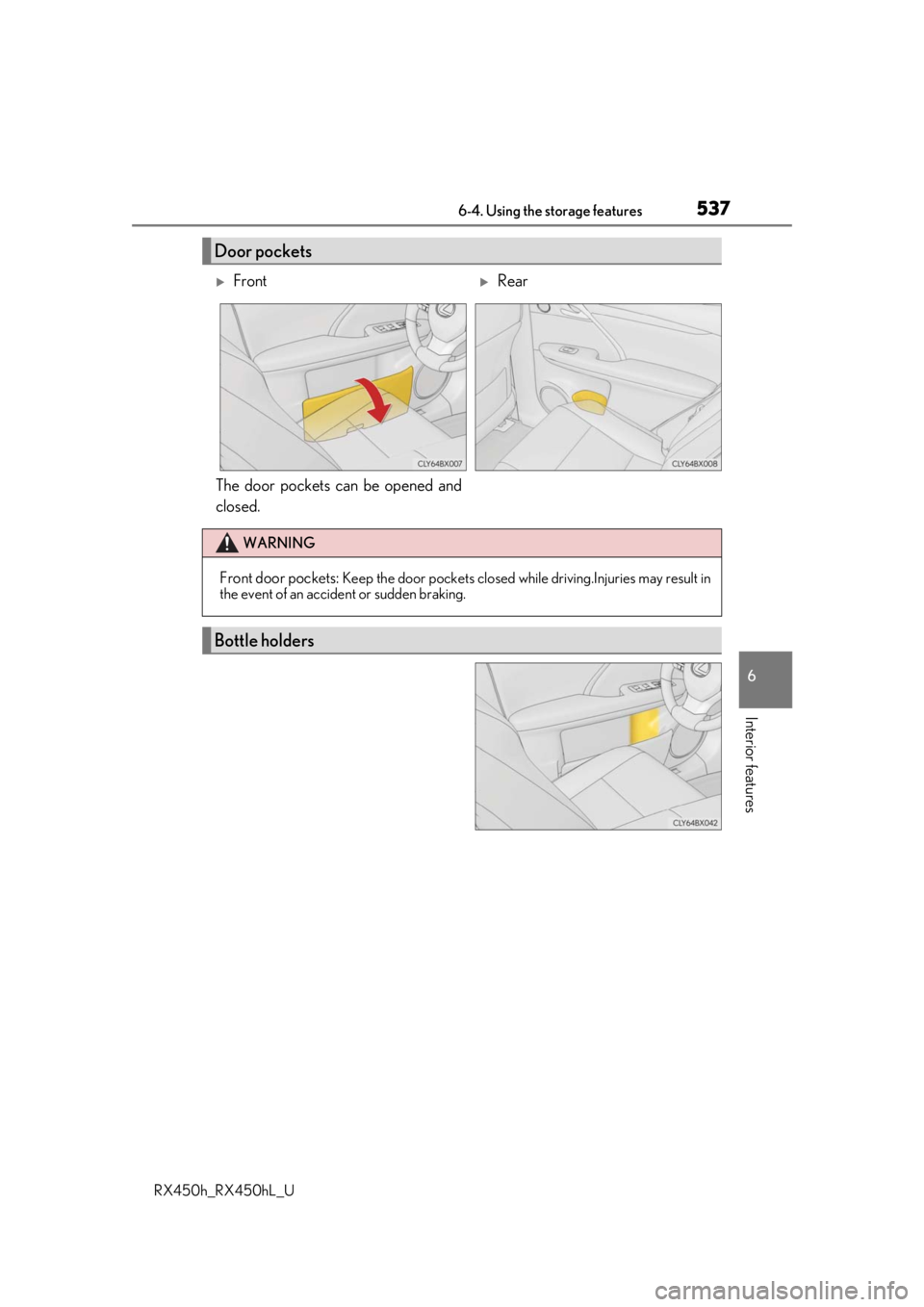
The door pockets can be opened and
closed.
Door pockets
FrontRear
WARNING
Front door pockets: Keep the door pockets closed while driving.Injuries may result in
the event of an accident or sudden braking.
Bottle holders
Page 540 of 792
5406-4. Using the storage features
RX450h_RX450hL_U
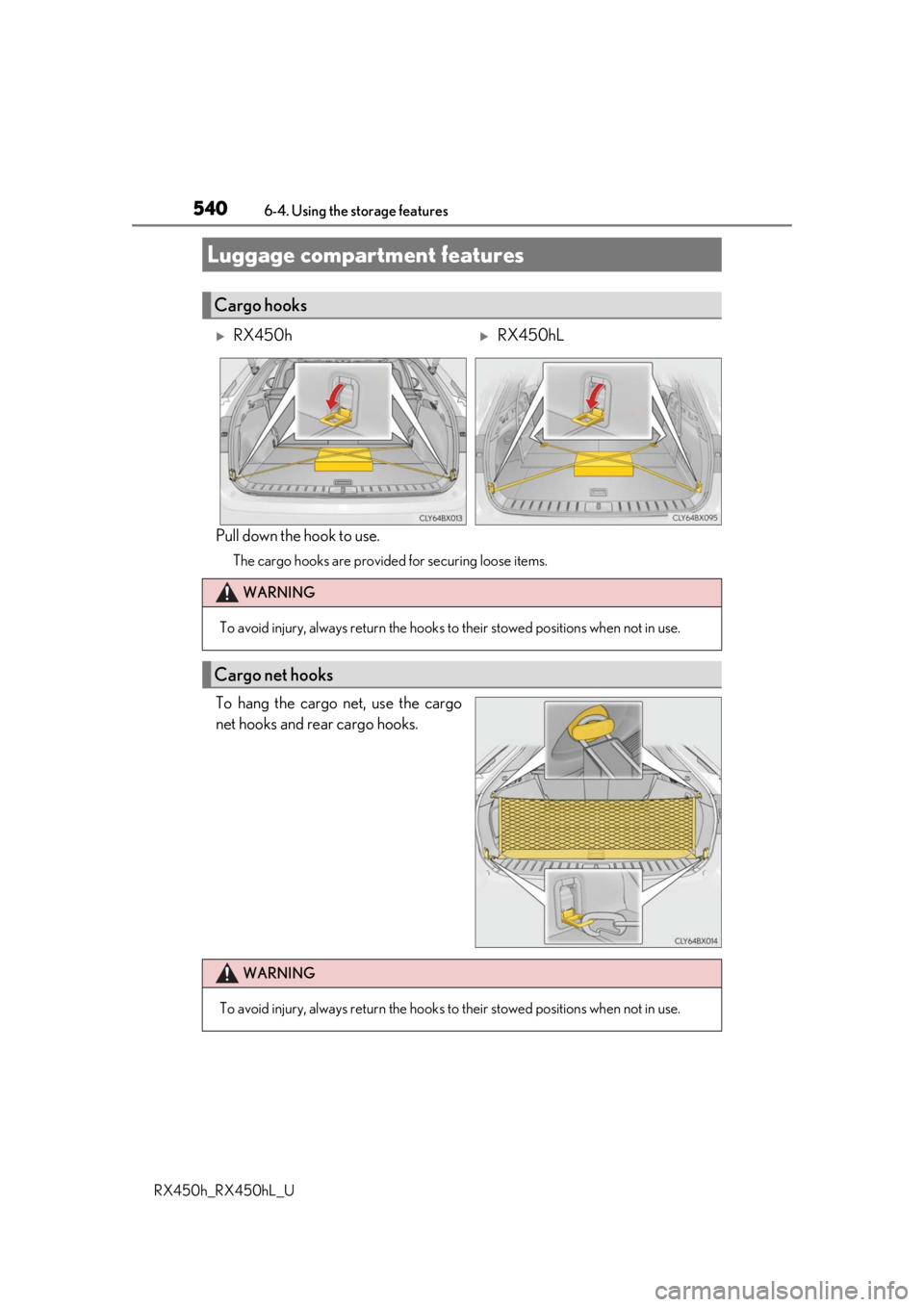
Pull down the hook to use.
The cargo hooks are provided for securing loose items.
To hang the cargo net, use the cargo
net hooks and rear cargo hooks.
Luggage compartment features
Cargo hooks
RX450hRX450hL
WARNING
To avoid injury, always return the hooks to their stowed positions when not in use.
Cargo net hooks
WARNING
To avoid injury, always return the hooks to their stowed positions when not in use.