open LEXUS RX450H 2019 Owners Manual
[x] Cancel search | Manufacturer: LEXUS, Model Year: 2019, Model line: RX450H, Model: LEXUS RX450H 2019Pages: 792, PDF Size: 13.48 MB
Page 556 of 792
5566-5. Using the other interior features
RX450h_RX450hL_U
●The power outlets can be used when the power switch is in ACCESSORY or ON
mode.
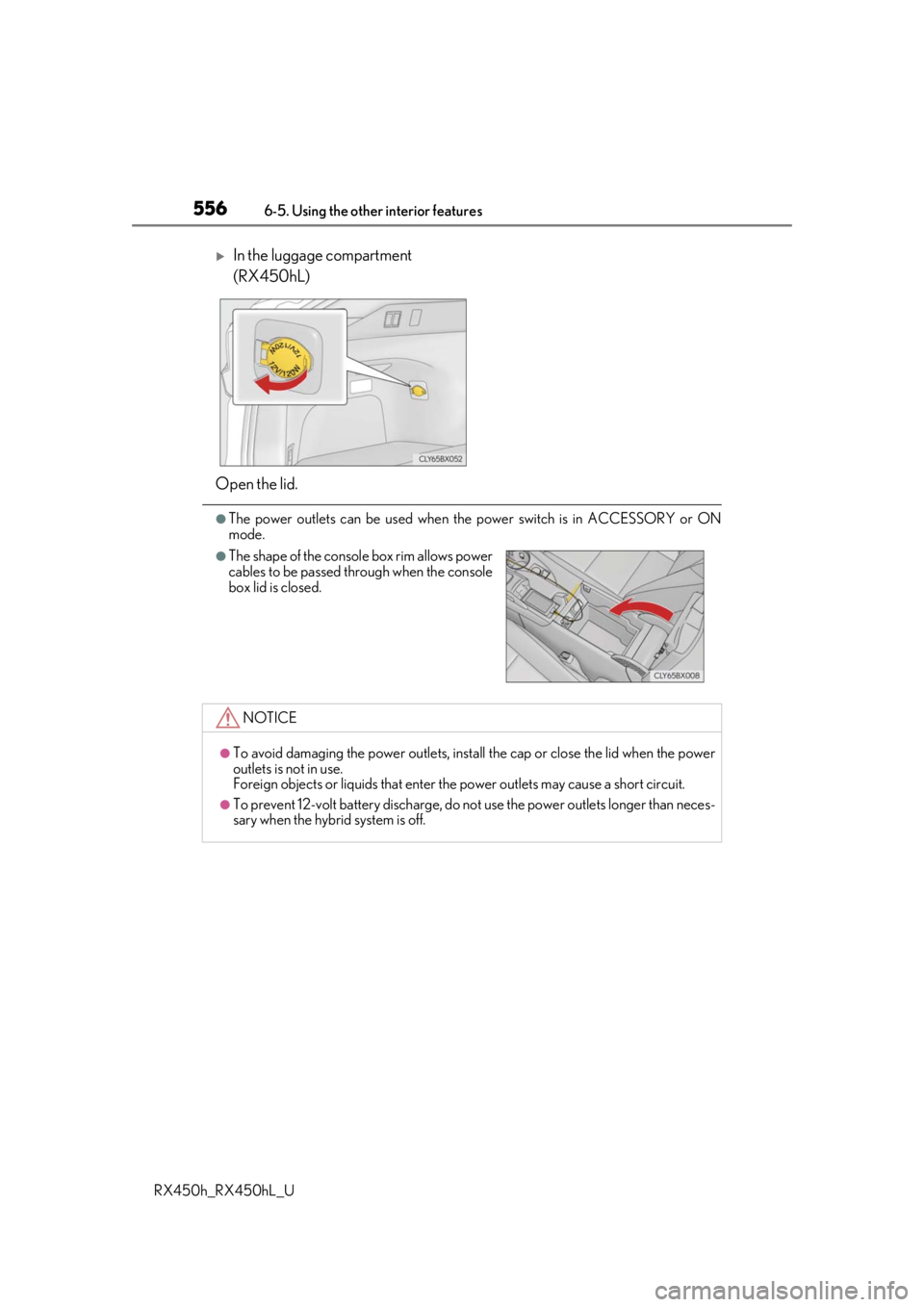
In the luggage compartment
(RX450hL)
Open the lid.
●The shape of the console box rim allows power
cables to be passed through when the console
box lid is closed.
NOTICE
●To avoid damaging the power outlets, insta ll the cap or close the lid when the power
outlets is not in use.
Foreign objects or liquids that enter the power outlets may cause a short circuit.
●To prevent 12-volt battery discharge, do not use the power outlets longer than neces-
sary when the hybrid system is off.
Page 560 of 792
5606-5. Using the other interior features
RX450h_RX450hL_U
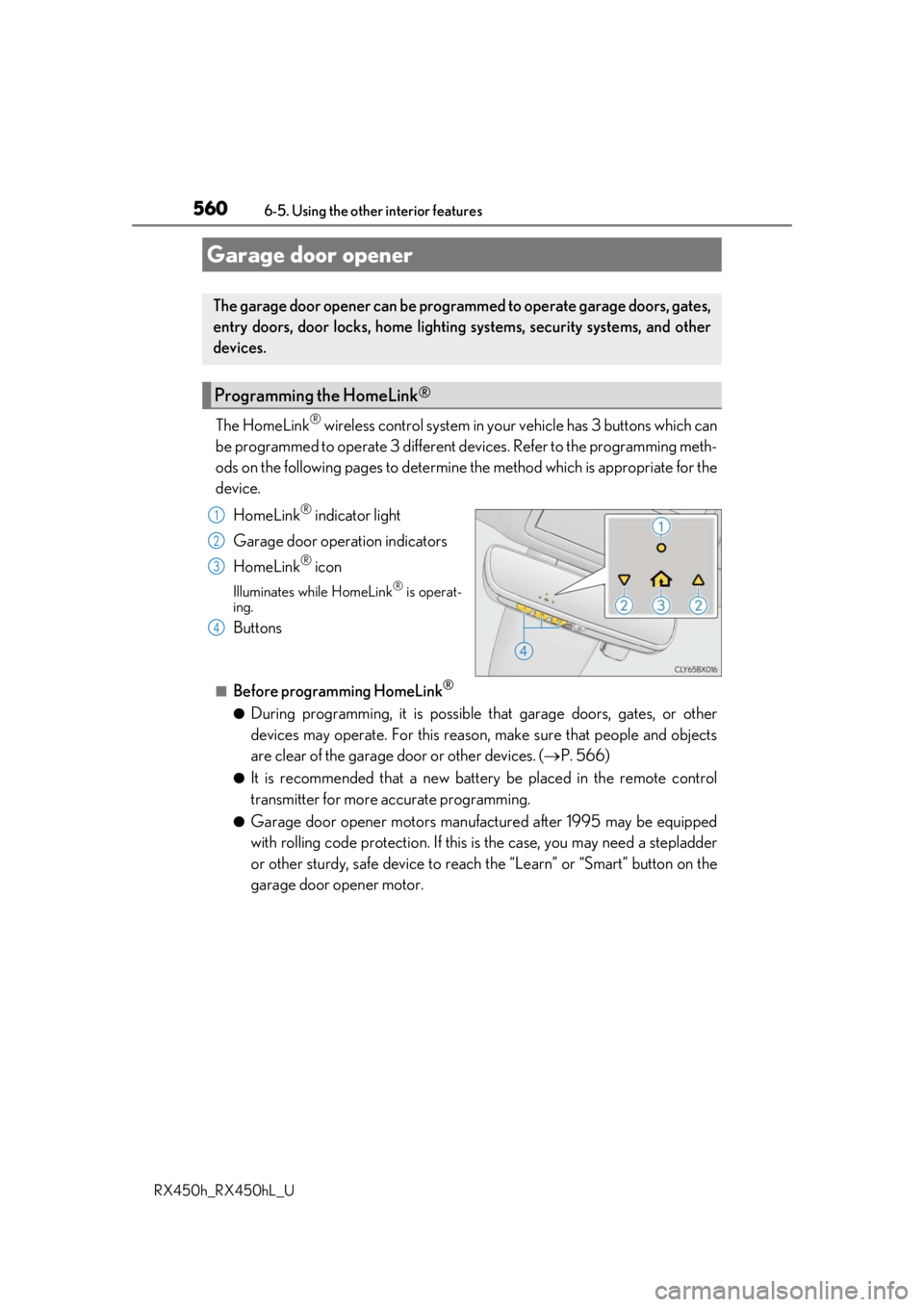
The HomeLink® wireless control system in your vehicle has 3 buttons which can
be programmed to operate 3 different de vices. Refer to the programming meth-
ods on the following pages to determine the method which is appropriate for the
device.
HomeLink
® indicator light
Garage door operation indicators
HomeLink
® icon
Illuminates while HomeLink® is operat-
ing.
Buttons
■Before programming HomeLink®
●During programming, it is possible that garage doors, gates, or other
devices may operate. For this reason, make sure that people and objects
are clear of the garage door or other devices. ( P. 566)
●It is recommended that a new batter y be placed in the remote control
transmitter for more accurate programming.
●Garage door opener motors manufa ctured after 1995 may be equipped
with rolling code protection. If this is the case, you may need a stepladder
or other sturdy, safe device to reach the “Learn” or “Smart” button on the
garage door opener motor.
Garage door opener
The garage door opener can be programmed to operate garage doors, gates,
entry doors, door locks, home lightin g systems, security systems, and other
devices.
Programming the HomeLink®
1
2
3
4
Page 562 of 792
5626-5. Using the other interior features
RX450h_RX450hL_U
●Indicator light flashes rapidly: The garage door opener motor or other
device is equipped with a rolling co de. To complete programming, firmly
press and hold the HomeLink
® button for 2 seconds then release it.
●If the garage door or other device does not operate, proceed to “Pro-
gramming a rollin g code system”.
Repeat the steps above to program anot her device for any of the remaining
HomeLink
® buttons.
■Programming a rolling code system
2 or more people may be necessary to complete rolling code programming.
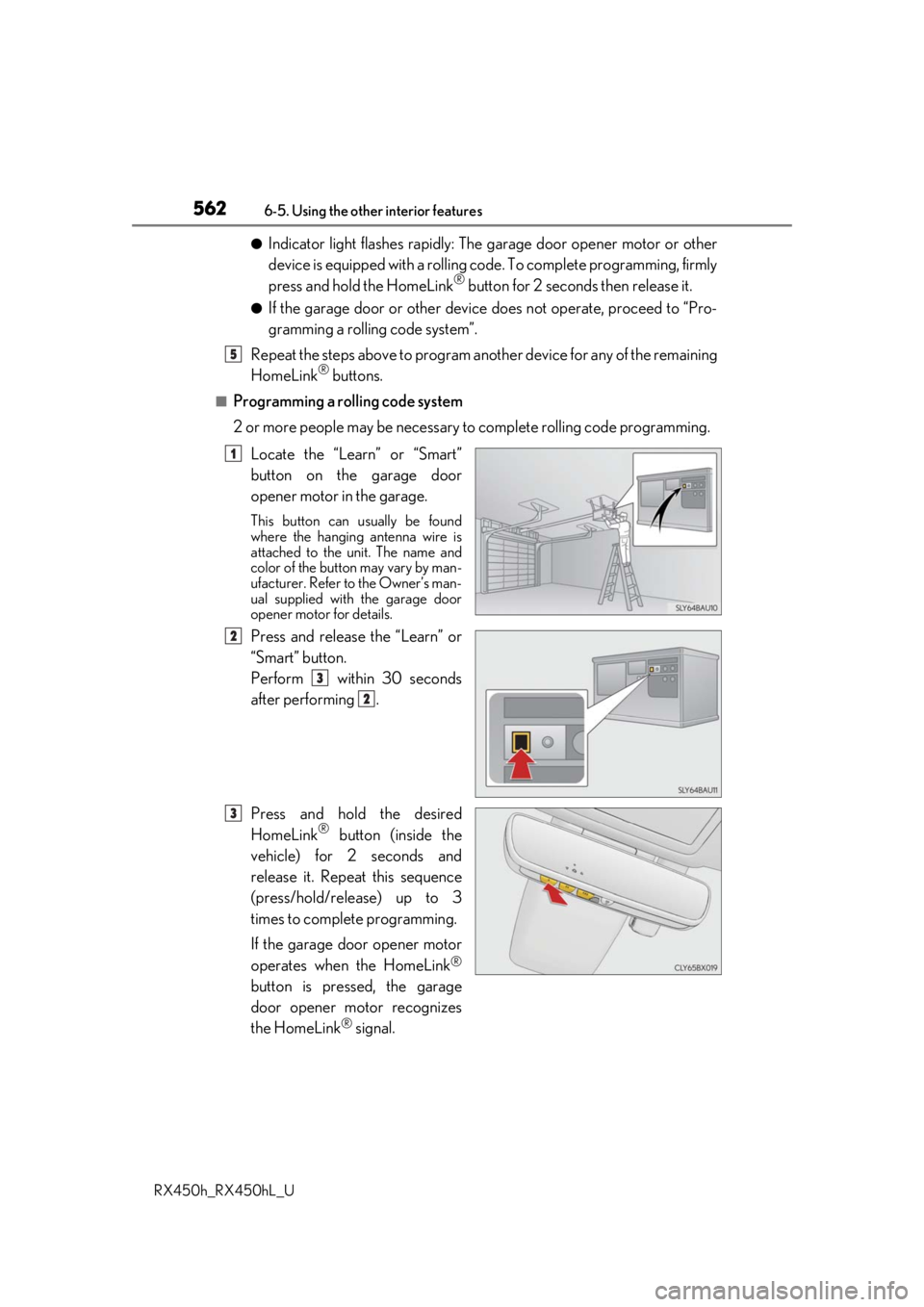
Locate the “Learn” or “Smart”
button on the garage door
opener motor in the garage.
This button can usually be found
where the hanging antenna wire is
attached to the unit. The name and
color of the button may vary by man-
ufacturer. Refer to the Owner’s man-
ual supplied with the garage door
opener motor for details.
Press and release the “Learn” or
“Smart” button.
Perform within 30 seconds
after performing .
Press and hold the desired
HomeLink
® button (inside the
vehicle) for 2 seconds and
release it. Repeat this sequence
(press/hold/release) up to 3
times to complete programming.
If the garage door opener motor
operates when the HomeLink
®
button is pressed, the garage
door opener motor recognizes
the HomeLink
® signal.
5
1
2
3
2
3
Page 563 of 792
5636-5. Using the other interior features
6
Interior features
RX450h_RX450hL_U
■Enabling 2-way communication with a garage door (only available for com-
patible devices)
When enabled, 2-way communication allows you to check the status of the
opening and closing of a garage door through indicators in your vehicle.
2-way communication is only available if the garage door opener motor used
is a compatible device. (To check devi ce compatibility, refer to www.Home-
Link.com.)
Within 5 seconds after programming the garage door opener has been
completed, if the garage door op ener motor is trained to HomeLink
®,
both garage door operation indicator s will flash rapidly (green) and the
light on the garage door opener moto r will blink twice, indicating that 2-
way communication is enabled.
If the indicators do not flash, perform and within the first 10 presses of
the HomeLink
® button after programming has been completed.
Press a programmed HomeLink
® button to operate a garage door.
Within 1 minute of pressing the HomeLink
® button, after the garage door
operation has stopped, press the “Learn” or “Smart” button on the garage
door opener motor. Within 5 seconds of the establishment of 2-way com-
munication with the garage door opener, both garage door operation indi-
cators in the vehicle will flash rapidly (green) and the light on the garage
door opener motor will blink twice, indicating that 2-way communication is
enabled.
■Reprogramming a single HomeLink® button
When the following procedure is performed, buttons which already have
devices registered to them can be overwritten: With one hand, press and hold the desired HomeLink
® button.
When the HomeLink
® indicator starts flashing (orange), continue to hold
the HomeLink® button and perform “Programming HomeLink®” (it
takes 20 seconds for the HomeLink® indicator to start flashing).
Press the appropriate HomeLink
® button. The HomeLink® indicator light
should turn on.
Operating HomeLink®
1
23
2
3
1
2
1
Page 564 of 792
5646-5. Using the other interior features
RX450h_RX450hL_U
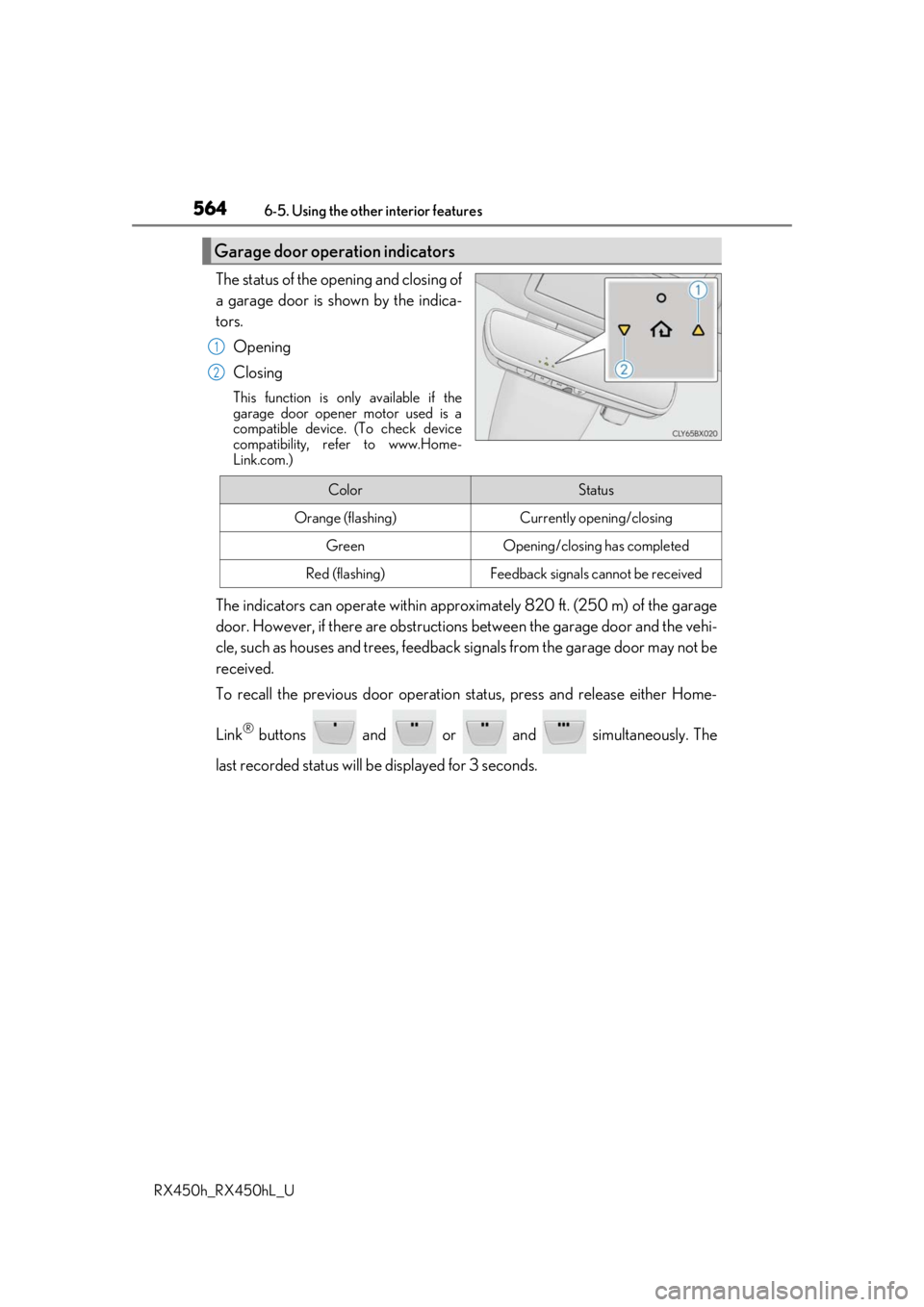
The status of the opening and closing of
a garage door is shown by the indica-
tors. Opening
Closing
This function is only available if the
garage door opener motor used is a
compatible device. (To check device
compatibility, refer to www.Home-
Link.com.)
The indicators can operate wi thin approximately 820 ft. (250 m) of the garage
door. However, if there are obstructions between the garage door and the vehi-
cle, such as houses and trees, feedback signals from the garage door may not be
received.
To recall the previous door operation status, press and release either Home-
Link
® buttons and or and simultaneously. The
last recorded status will be displayed for 3 seconds.
Garage door operation indicators
1
2
ColorStatus
Orange (flashing)Currently opening/closing
GreenOpening/closing has completed
Red (flashing)Feedback signals cannot be received
Page 565 of 792
5656-5. Using the other interior features
6
Interior features
RX450h_RX450hL_U
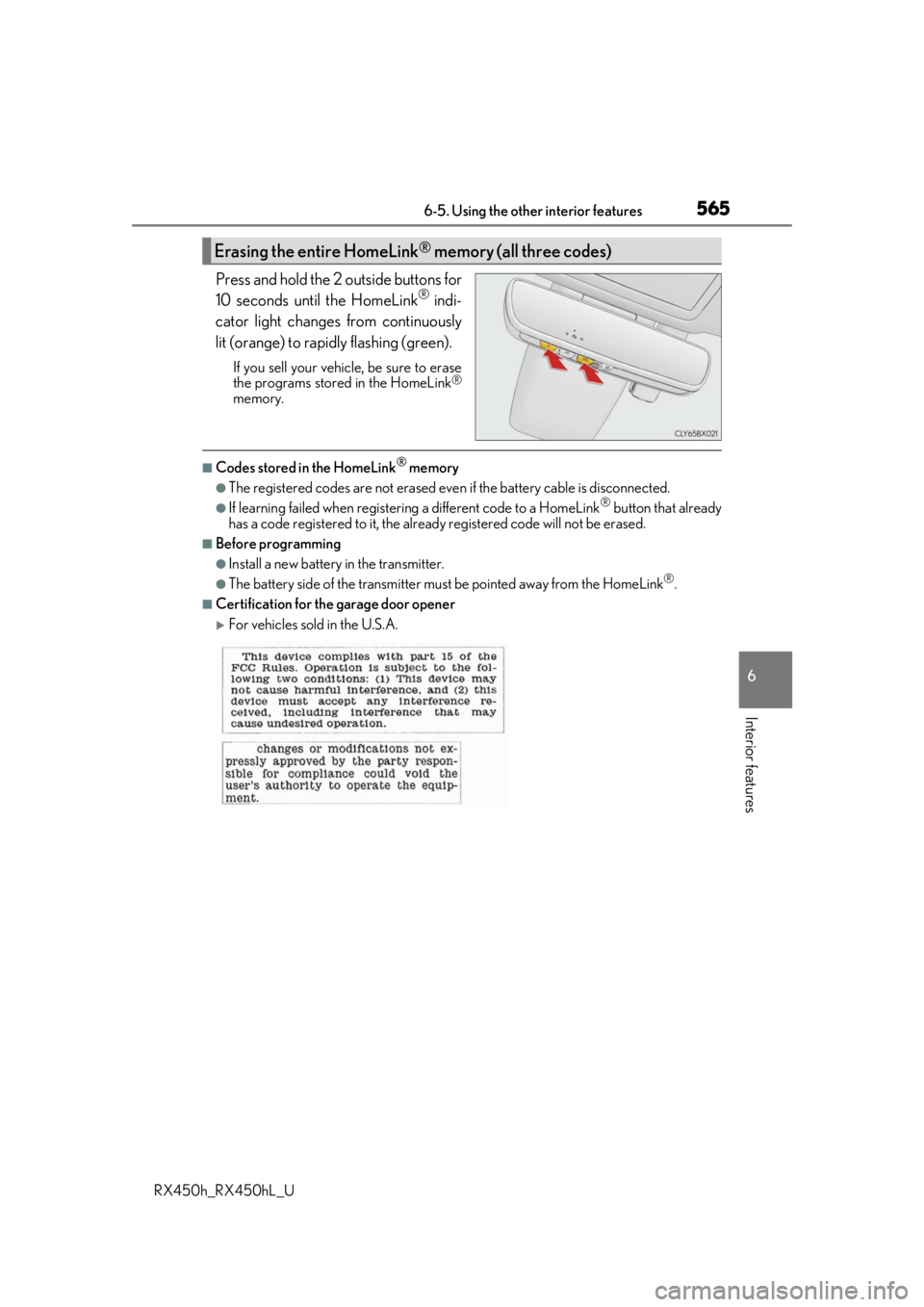
Press and hold the 2 outside buttons for
10 seconds until the HomeLink® indi-
cator light changes from continuously
lit (orange) to rapidly flashing (green).
If you sell your vehicle, be sure to erase
the programs stored in the HomeLink®
memory.
■Codes stored in the HomeLink® memory
●The registered codes are not erased even if the battery cable is disconnected.
●If learning failed when registerin g a different code to a HomeLink® button that already
has a code registered to it, the alread y registered code will not be erased.
■Before programming
●Install a new battery in the transmitter.
●The battery side of the transmitter must be pointed away from the HomeLink®.
■Certification for the garage door opener
For vehicles sold in the U.S.A.
Erasing the entire HomeLink® memory (all three codes)
Page 566 of 792
5666-5. Using the other interior features
RX450h_RX450hL_U
For vehicles sold in Canada
■When support is necessary
Visit on the web at www.homelink.com/lexus
or call 1-800-355-3515.
WARNING
■When programming a garage door or other remote control device
The garage door or other device may operat e, so ensure people and objects are out of
danger to prevent injury or potential harm.
■Conforming to federal safety standards
Do not use the HomeLink® compatible transceiver with any garage door opener or
device that lacks safety stop and reverse features as requ ired by federal safety stan-
dards.
This includes any garage door that canno t detect an interfering object. A door or
device without these features increases the risk of death or serious injury.
■When operating or programming HomeLink®
Never allow a child to operat e or play with the HomeLink® buttons.
Page 569 of 792
5696-5. Using the other interior features
6
Interior features
RX450h_RX450hL_U
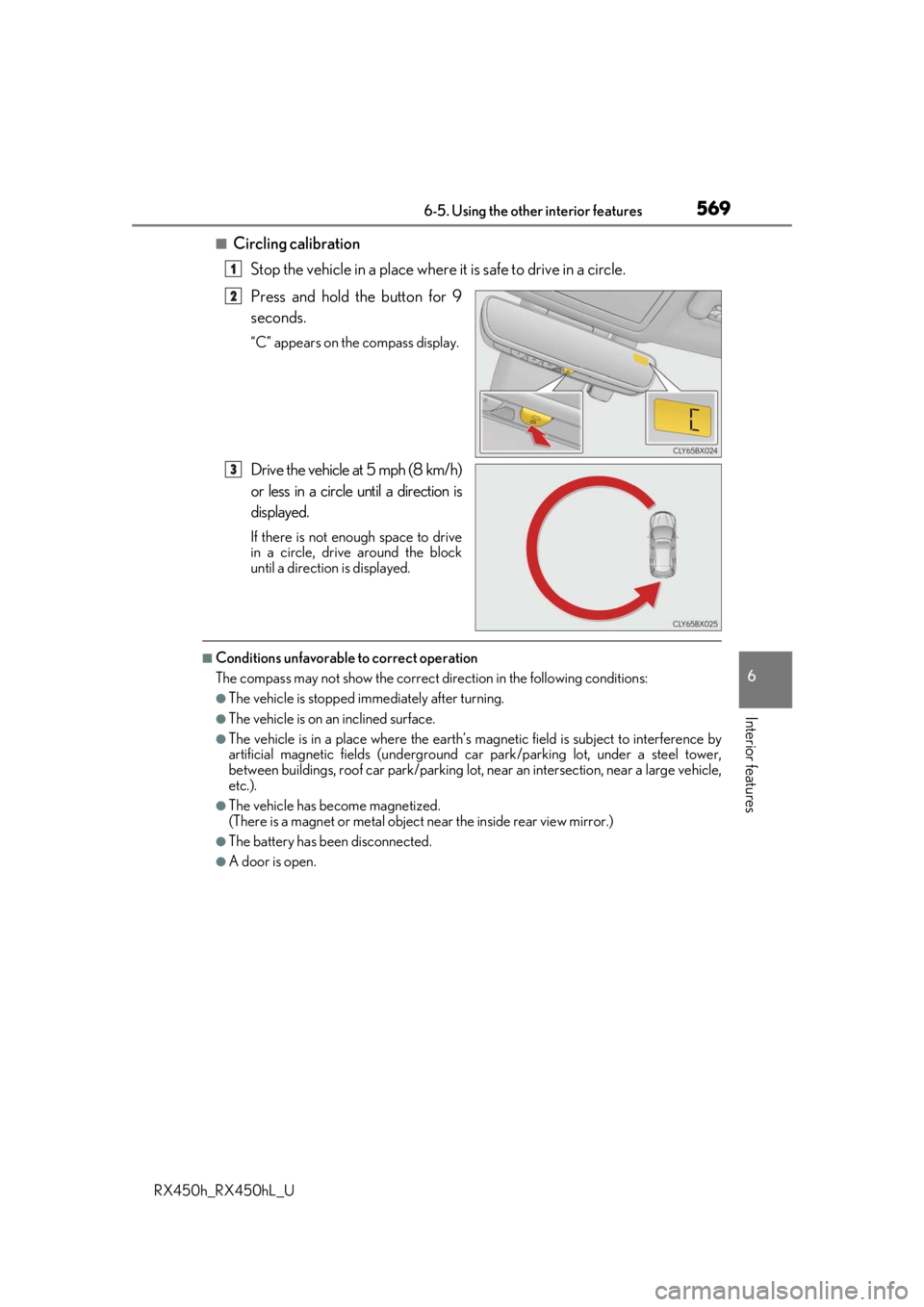
■Circling calibrationStop the vehicle in a place where it is safe to drive in a circle.
Press and hold the button for 9
seconds.
“C” appears on the compass display.
Drive the vehicle at 5 mph (8 km/h)
or less in a circle until a direction is
displayed.
If there is not enough space to drive
in a circle, drive around the block
until a direction is displayed.
■Conditions unfavorable to correct operation
The compass may not show the correct di rection in the following conditions:
●The vehicle is stopped immediately after turning.
●The vehicle is on an inclined surface.
●The vehicle is in a place where the earth’s magnetic field is subject to interference by
artificial magnetic fields (underground car park/parking lot, under a steel tower,
between buildings, roof car park/parking lot, near an intersection, near a large vehicle,
etc.).
●The vehicle has become magnetized.
(There is a magnet or metal object near the inside rear view mirror.)
●The battery has been disconnected.
●A door is open.
1
2
3
Page 594 of 792
5947-3. Do-it-yourself maintenance
RX450h_RX450hL_U
*: Vehicles with sing le-beam headlights
Washer fluid
( P. 604)• Water or washer fluid containing antifreeze (for winter use)
• Funnel (used only for adding water or washer fluid)
WARNING
The engine compartment contains many mechan isms and fluids that may move suddenly,
become hot, or become electrically energize d. To avoid death or serious injury, observe
the following precautions.
■When working on the engine compartment
●Make sure that the “ACCESSORY” or “I GNITION ON” on the multi-information
display and the “READY” indicator are both off.
●Keep hands, clothing and tools away from the moving fan and engine drive belt.
●Be careful not to touch the engine, power co ntrol unit, radiator, exhaust manifold, etc.
right after driving as they may be hot. Oil and other fluids may also be hot.
●Do not leave anything that may burn easily, such as paper and rags, in the engine
compartment.
●Do not smoke, cause sparks or expose an open flame to fuel. Fuel fumes are flamma-
ble.
■When working near the electric cooling fans or radiator grille
Be sure the power switch is off.
With the power switch in ON mode, the electric cooling fans may automatically start to
run if the air conditioning is on and/ or the coolant temperature is high. ( P. 602)
■Safety glasses
Wear safety glasses to prevent flying or falling material, fluid spray, etc. from getting in
your eyes.
NOTICE
■If you remove the air cleaner filter
Driving with the air cleaner f ilter removed may cause excessive engine wear due to dirt
in the air.
ItemsParts and tools
Page 595 of 792
5957-3. Do-it-yourself maintenance
7
Maintenance and care
RX450h_RX450hL_U
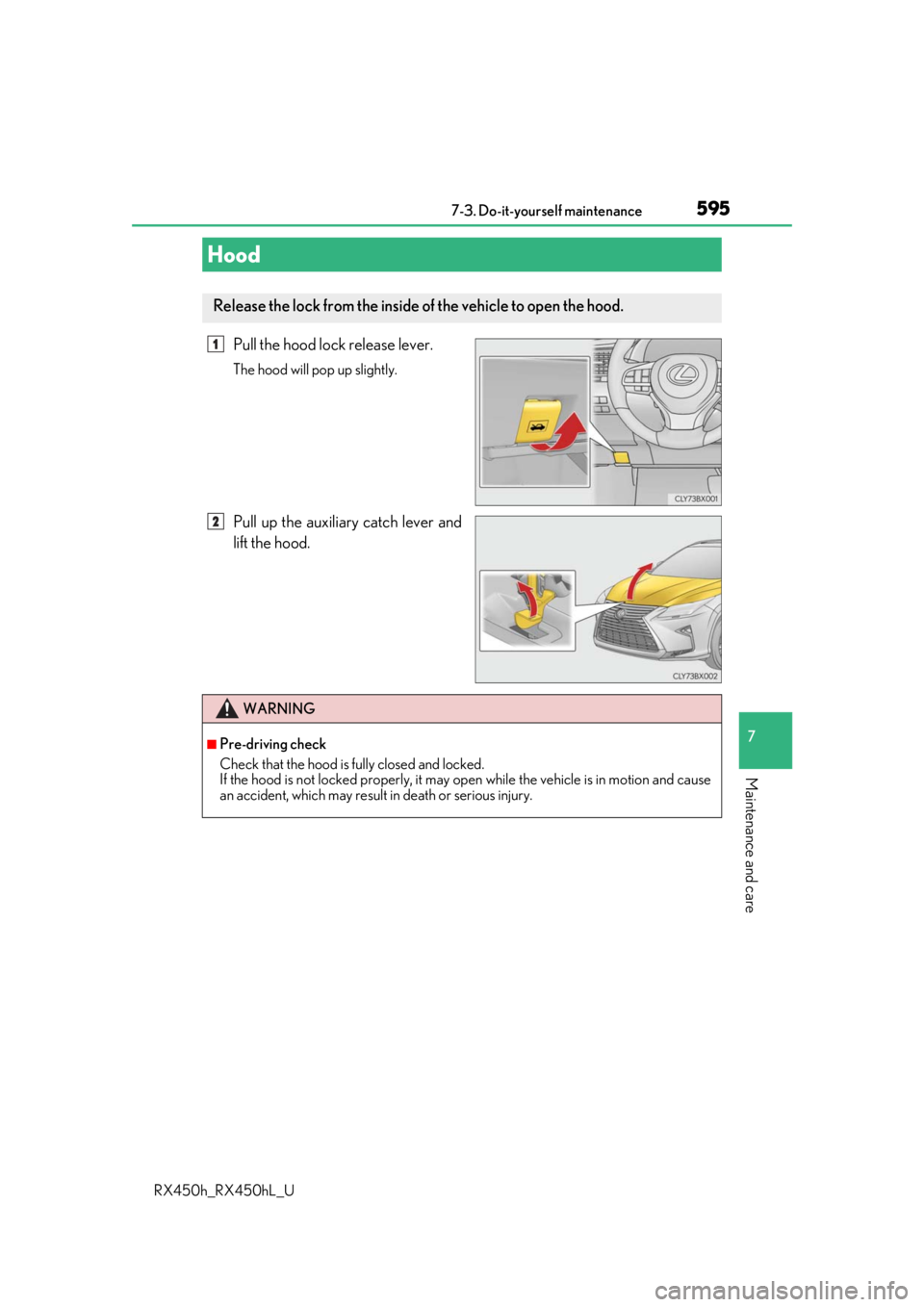
Pull the hood lock release lever.
The hood will pop up slightly.
Pull up the auxiliary catch lever and
lift the hood.
Hood
Release the lock from the inside of the vehicle to open the hood.
1
2
WARNING
■Pre-driving check
Check that the hood is fully closed and locked.
If the hood is not locked properly, it may op en while the vehicle is in motion and cause
an accident, which may result in death or serious injury.