open LEXUS RX450H 2019 Owners Manual
[x] Cancel search | Manufacturer: LEXUS, Model Year: 2019, Model line: RX450H, Model: LEXUS RX450H 2019Pages: 792, PDF Size: 13.48 MB
Page 413 of 792
4135-2. Setup
5
Lexus Display Audio system
RX450h_RX450hL_U
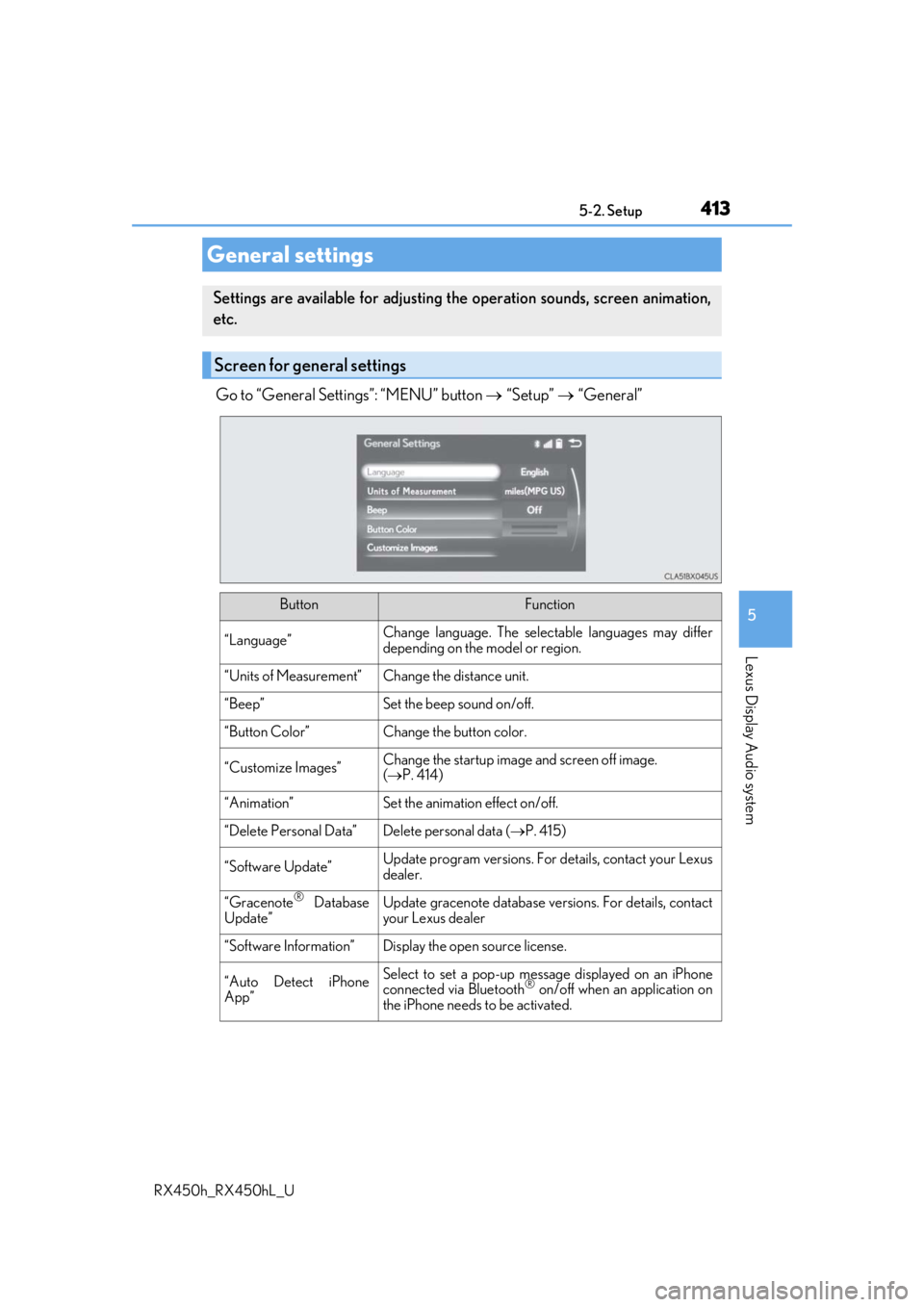
Go to “General Settings”: “MENU” button “Setup” “General”
General settings
Settings are available for adjusting th e operation sounds, screen animation,
etc.
Screen for general settings
ButtonFunction
“Language”Change language. The select able languages may differ
depending on the model or region.
“Units of Measurement”Change the distance unit.
“Beep”Set the beep sound on/off.
“Button Color”Change the button color.
“Customize Images”Change the startup image and screen off image.
( P. 414)
“Animation”Set the animation effect on/off.
“Delete Personal Data”Delete personal data ( P. 415)
“Software Update”Update program versions. For details, contact your Lexus
dealer.
“Gracenote® Database
Update”Update gracenote database versions. For details, contact
your Lexus dealer
“Software Information”Display the open source license.
“Auto Detect iPhone
App”Select to set a pop-up message displayed on an iPhone
connected via Bluetooth® on/off when an application on
the iPhone needs to be activated.
Page 482 of 792

4825-11. Bluetooth®
RX450h_RX450hL_U
■When using the Bluetooth® audio system
●In the following situations, the system may not function.
• If the portable audio player is turned off
• If the portable audio player is not connected
• If the portable audio player’s battery is low
●There may be a delay if a cellular phone connection is made during Bluetooth® audio
play.
●Depending on the type of portable audio play er that is connected to the system, opera-
tion may differ slight ly and certain functions may not be available.
■When using the hands-free system
●The audio system is mu ted when making a call.
●If both parties speak at the same time, it may be difficult to hear.
●If the received call volume is over ly loud, an echo may be heard.
If the Bluetooth® phone is too close to the system, quality of the sound may deteriorate
and connection status may deteriorate.
●In the following situations, it may be difficult to hear the other party:
• When driving on unpaved roads
• When driving at high speeds
• If a window is open
• If the air conditioning is blow ing directly on the microphone
• If there is interference from the network of the cellular phone
●Depending on the type phone, certain functions may not be available.
■Conditions under which the system will not operate
●If using a cellular phone that does not support Bluetooth®
●If the cellular phone is turned off
●If you are outside of cellular phone service coverage
●If the cellular phone is not connected
●If the cellular phone’s battery is low
●When outgoing calls are controlled, due to heavy traffic on phone lines, etc.
●When the cellular phone itself cannot be used
●When transferring phonebook da ta from the cellular phone
Bluetooth®
Page 494 of 792
4945-12. Other function
RX450h_RX450hL_U
■Microphone
P. 462
■When using the microphone
●It is unnecessary to speak directly into the microphone when giving a command.
●Wait for the confirmation beep before speaking a command.
●Voice commands may not be recognized if:
• Spoken too quickly.
• Spoken at a low or high volume.
• The roof or windows are open.
• Passengers are talking while voice commands are spoken.
• The air conditioning speed is set high.
• The air conditioning vents are turned towards the microphone.
●In the following conditions, the system ma y not recognize the command properly and
using voice commands may not be possible:
• The command is incorrect or unclear. No te that certain words, accents or speech
patterns may be difficult for the system to recognize.
• There is excessive background noise, such as wind noise.
■When searching for a track
●A USB memory or iPod must be connected to enable track searching and playback.
( P. 409)
●When a USB memory or iPod is connected, recognition data is created so tracks can
be searched using voice commands.
●Recognition data is updated un der the following conditions:
• When the USB memory or iPod data has changed.
• When the voice recognition language is changed. ( P. 413)
●While the recognition data is being created or being updated, a track search cannot be
performed using a voice command.
■The Gracenote® media database
Page 499 of 792
499
6Interior features
RX450h_RX450hL_U
6-1. Basic operation of the Remote Touch screen
Remote Touch ............................ 500
12.3-inch display........................ 504
6-2. Using the air conditioning system and defogger
Lexus Climate Concierge ................................. 506
Front automatic air conditioning system ...............507
Rear automatic air conditioning system ...............522
Heated steering wheel/ seat heaters/
seat ventilators .........................525
6-3. Using the interior lights Interior lights list......................... 528
• Interior lights ..........................529
• Personal lights ...................... 530
6-4. Using the storage features List of storage features.............532
• Glove box ...............................534
• Console box ...........................534
• Cup holders........................... 535
• Door pockets .........................537 • Bottle holders ........................ 537
• Coin box ..................................538
• Auxiliary boxes .....................539
Luggage compartment features .......................................540
6-5. Using the other interior features
Other interior features ............ 547 • Sun visors ................................ 547
• Vanity mirrors ....................... 547
• Clock ........................................548
• Wireless charger .................548
• Power outlets.........................555
• Front passenger footwell hooks ....................... 557
• Rear door sunshades ......... 557
• Armrest ................................... 558
• Assist grips..............................559
• Coat hooks .............................559
Garage door opener ...............560
Compass ....................................... 567
LEXUS Enform Safety Connect ........................................571
LEXUS Enform Remote ......... 576
LEXUS Enform Service Connect ...................................... 577
Page 514 of 792
5146-2. Using the air conditioning system and defogger
RX450h_RX450hL_U
■S-FLOW mode
In S-FLOW mode, priority for the airflo w is given to the front seats, reducing
the airflow and air conditioning effect on the rear seats. When in S-FLOW
mode, airflow from the rear air condit ioning system is stopped. (RX450hL)
Operation in S-FLOW mode differs according to the following conditions: • Priority is given to the driver’s se at only when: Manual S-FLOW mode:
When no passenger is judged to be in the front passenger seat.
Automatic S-FLOW mode: When no passeng ers are judged to be in the front
passenger seat or rear seats. • Priority is given to the front seats when: Manual S-FLOW mode is selected
or no passengers are judged to be in the rear seats when in automatic S-
FLOW mode.
• S-FLOW mode will be disa bled when: A passenger is judged to be in a rear
seat when in automatic S-FLOW mode.
Depending on the set temperature, operation in S-FLOW mode may not
change as described above.
When certain conditions are met and priori ty is given to the driver’s seat only,
the temperature indicator for the fr ont passenger side will turn off.
How the system judges if a passenger is in the vehicle: P. 518
The following S-FLOW modes are available:
Automatic S-FLOW mode
In this mode, when a passenger is judg ed to be in a rear seat, S-FLOW mode
will be automatically disabled.
The indicator will illuminate wh en S-FLOW mode is enabled.
To enable/disable S-FLOW mode and enter manual S-FLOW mode, select
on the option control screen.
How the system judges if a passenger is in the vehicle: P. 518
Manual S-FLOW mode
When is selected, S-FLOW mode will be manually enabled/disabled.
The indicator will illuminate when S-FLOW mode is enabled.
In manual S-FLOW mode, as the system does not judge if a passenger is in a rear
seat, S-FLOW mode will not be disabled automatically.
To disable S-FLOW mode automatically by opening and closing a rear door or
operating the rear air conditioning syst em (RX450hL), change to automatic S-
FLOW mode. ( P. 518)
Page 517 of 792
5176-2. Using the air conditioning system and defogger
RX450h_RX450hL_U
6
Interior features
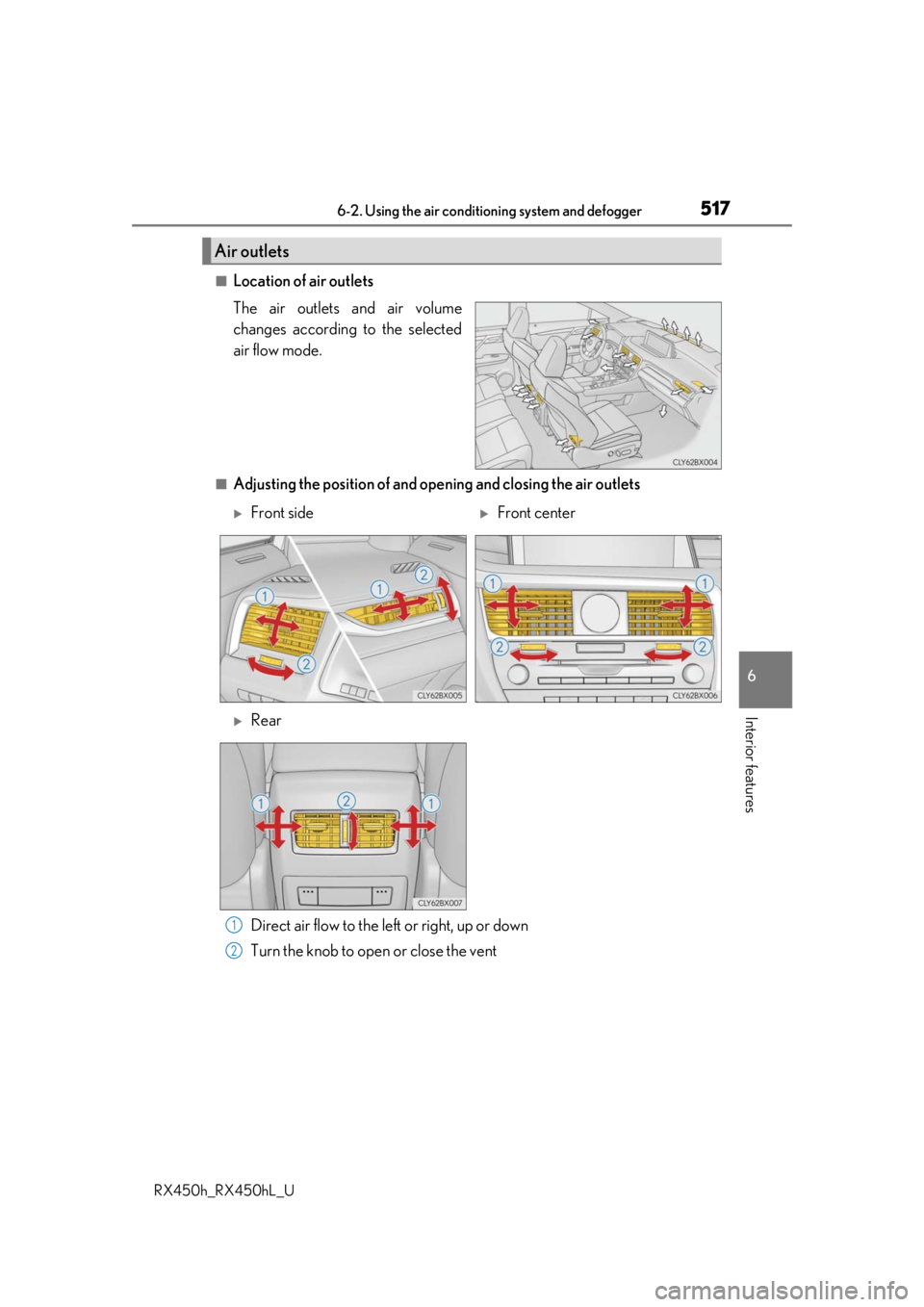
■Location of air outlets
The air outlets and air volume
changes according to the selected
air flow mode.
■Adjusting the position of and opening and closing the air outlets Direct air flow to the left or right, up or down
Turn the knob to open or close the vent
Air outlets
Front sideFront center
Rear
1
2
Page 518 of 792
5186-2. Using the air conditioning system and defogger
RX450h_RX450hL_U
■Registering air conditioning settings to electronic keys
●Unlocking the vehicle using an electronic key and turning the power switch to ON
mode will recall that ke y’s registered air conditioning settings.
●When the power switch is turned off, the cu rrent air conditioning settings will automati-
cally be registered to the electronic key that was used to unlock the vehicle.
●The system may not operate correctly if more th an one electronic key is in the vicinity or
if the smart access system with push-button start is used to unlock a passenger door.
●The doors that can recall the air conditioning setting when unlocked using the smart
access system with push-button start can be changed.
* For details, contact your Lexus
dealer.
*: The doors that can recall the driving positi on memory are changed at the same time.
■Using automatic mode
Fan speed is adjusted automatically according to the temperature setting and the ambi-
ent conditions.
Therefore, the fan may stop for a while until wa rm or cool air is ready to flow immediately
after the “AUTO” button is pressed or “AUTO” is selected.
■How the system judges if a passenger is in the vehicle when in S-FLOW mode
In S-FLOW mode, the system judges if a passenger is in the vehicle as follows:
• Front passenger seat: A passeng er is judged to be in the front passenger seat when the
system detects an object on the front passenger seat, fastening of the front passenger
seat belt, changing of the set temperature for the front passenger seat or the opening
and closing of the front passenger door. (However, when only opening and closing of
the front passenger door is detected, the sy stem will judge that a passenger is not in
the front passenger seat after the vehicl e speed reaches approximately 12 mph (20
km/h) or more.)
• Rear seats (automatic S-FLOW mode only): A passenger is judged to be in a rear seat
when the system detects the opening and closin g of a rear door or the operation of the
rear air conditioning system (RX450hL).
If a passenger is judged to be in the vehicl e, the system will retain the judgement for a
certain amount of time after th e power switch is turned off.
■Operation of automatic S-FLOW mode
When the system is operating in automati c S-FLOW mode, if the system detects the
opening and closing of a rear door or the op eration of the rear air conditioning system
(RX450hL), S-FLOW mode will be disabled. To enable S-FLOW mode, select
on the option control screen. (In this case , the system will operate in manual S-FLOW
mode.)
■Changing from manual S-FLOW mode to automatic S-FLOW mode
Select on the option control screen to disable S-FLOW mode.
Turn the power switch off.
Wait for 60 minutes or more and change the power switch to ON mode.
■Using the voice command system
Air conditioning system can be operated using voice commands. For details, refer to the
“NAVIGATION SYSTEM OWNER’S MANUAL”.
1
2
3
Page 524 of 792
5246-2. Using the air conditioning system and defogger
RX450h_RX450hL_U
■Using the automatic mode Press the “AUTO” button
Adjust the temperature setting.
To stop the operation, press the “OFF” button.
■Automatic mode indicator
If the fan speed setting or air flow modes are operated, the automatic mode
indicator goes off. However, automati c mode for functions other than that
operated is maintained.
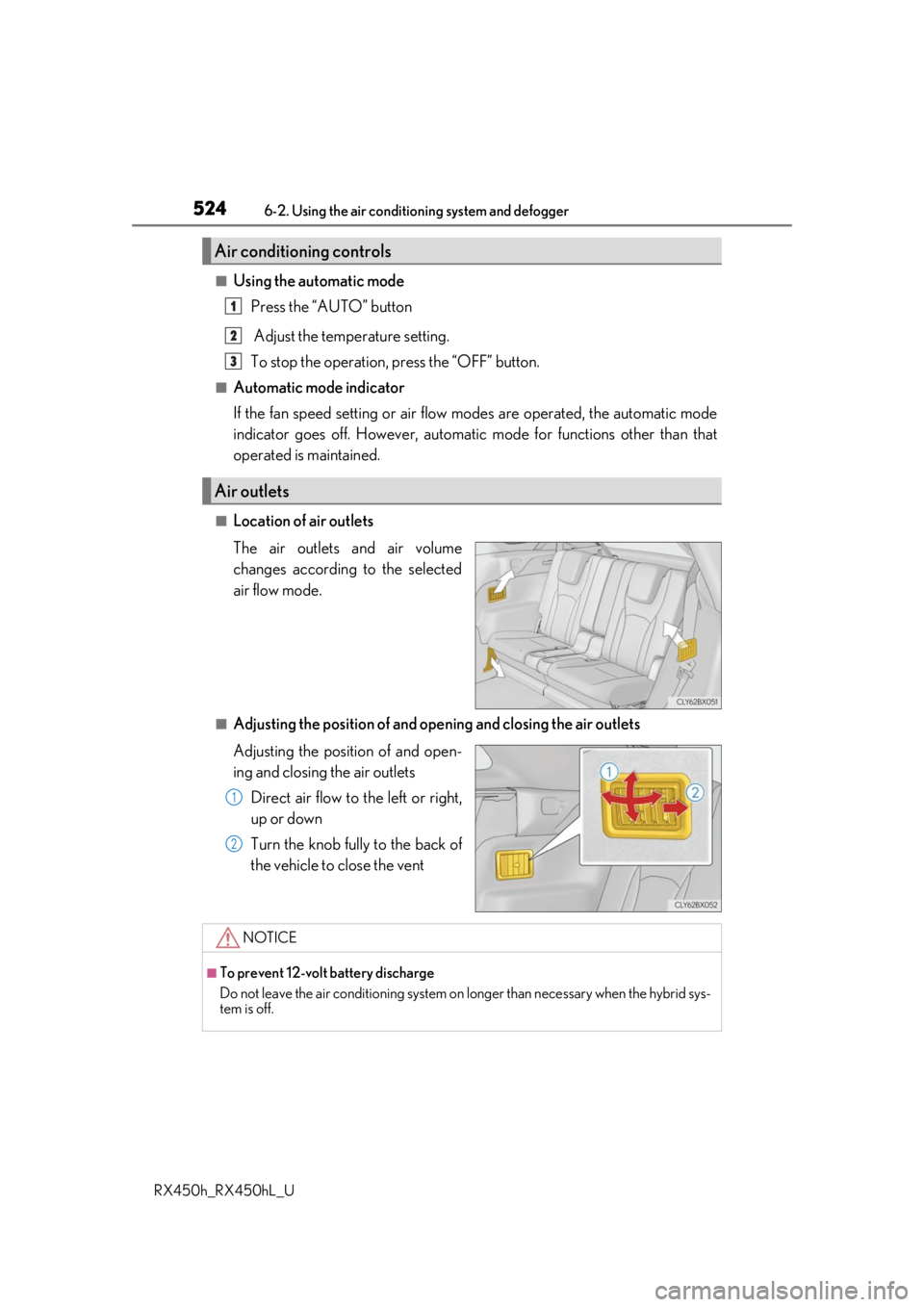
■Location of air outlets
The air outlets and air volume
changes according to the selected
air flow mode.
■Adjusting the position of and opening and closing the air outlets
Adjusting the position of and open-
ing and closing the air outlets
Direct air flow to the left or right,
up or down
Turn the knob fully to the back of
the vehicle to close the vent
Air conditioning controls
Air outlets
1
2
3
1
2
NOTICE
■To prevent 12-volt battery discharge
Do not leave the air conditioning system on longer than necessary when the hybrid sys-
tem is off.
Page 531 of 792
5316-3. Using the interior lights
6
Interior features
RX450h_RX450hL_U
●Illuminated entry system: The lights automatically turn on/off according to power switch
mode, the presence of the electronic key, whether the doors are locked/unlocked, and
whether the doors are opened/closed.
●If the interior lights remain on when the power switch is turned off, the lights will go off
automatically after 20 minutes.
●In the following cases, the interior lights and front personal lights may not respond as
normal.
• When water, dirt, etc., have adhered to the lens surface
• When operated with a wet hand
• When wearing gloves, etc.
●Some functions can be customized ( P. 736)
NOTICE
●Never remove the lens for the front interior light and front personal lights. Otherwise,
the lights will be damaged. If the lens need to remove, contact your Lexus dealer.
●To prevent 12-volt battery discharge, do not leave the lights on longer than necessary
when the hybrid system is off.
Page 533 of 792

5336-4. Using the storage features
6
Interior features
RX450h_RX450hL_U
RX450hL
Glove box (P. 534)
Auxiliary boxes (if equipped)
( P. 539)
Door pockets ( P. 537)
Bottle holders ( P. 537) Console box (
P. 534)
Cup holders ( P. 535)
Coin box ( P. 538)
WARNING
●Do not leave glasses, lighters or spray cans in the storage spaces, as this may cause
the following when cabin temperature becomes high:
• Glasses may be deformed by heat or cracke d if they come into contact with other
stored items.
• Lighters or spray cans may explode. If they come into contact with other stored
items, the lighter may catch fire or the spray can may release gas, causing a fire
hazard.
●When driving or when the storage compartments are not in use, keep the lids closed.
In the event of sudden braking or sudden swerving, an accident may occur due to an
occupant being struck by an open lid or the items stored inside.
1
2
3
4
5
6
7