low LEXUS RX450H 2019 Owners Manual
[x] Cancel search | Manufacturer: LEXUS, Model Year: 2019, Model line: RX450H, Model: LEXUS RX450H 2019Pages: 792, PDF Size: 13.48 MB
Page 248 of 792
2484-2. Driving procedures
RX450h_RX450hL_U
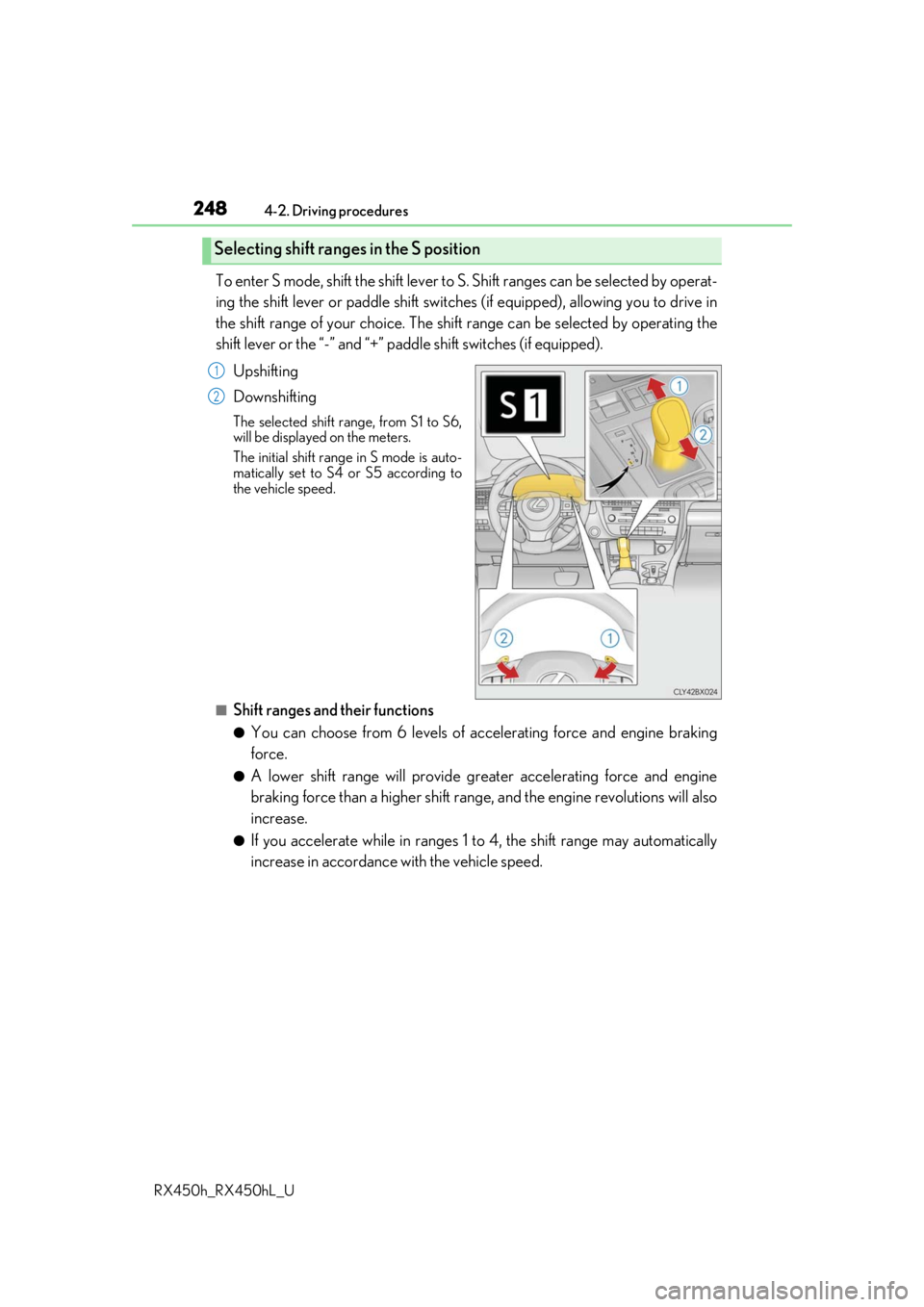
To enter S mode, shift the shift lever to S. Shift ranges can be selected by operat-
ing the shift lever or paddle shift switches (if equipped), allowing you to drive in
the shift range of your choice. The shift range can be selected by operating the
shift lever or the “-” and “+” padd le shift switches (if equipped).
Upshifting
Downshifting
The selected shift range, from S1 to S6,
will be displayed on the meters.
The initial shift range in S mode is auto-
matically set to S4 or S5 according to
the vehicle speed.
■Shift ranges and their functions
●You can choose from 6 levels of acce lerating force and engine braking
force.
●A lower shift range will provide gr eater accelerating force and engine
braking force than a higher shift rang e, and the engine revolutions will also
increase.
●If you accelerate while in ranges 1 to 4, the shift range may automatically
increase in accordance with the vehicle speed.
Selecting shift ranges in the S position
1
2
Page 249 of 792

2494-2. Driving procedures
4
Driving
RX450h_RX450hL_U
■When the “-” paddle shift switch is operated with the shift lever in the D position (vehi-
cles with paddle shift switches)
The shift range is downshifted to a range that enables engine braking force that is suit-
able to driving conditions.
■Automatic deactivation of shif t range selection in the D position (vehicles with paddle
shift switches)
Shift range selection in the D position will be deactivated in the following situations:
●When the vehicle comes to a stop
●If the accelerator pedal is depressed fo r more than a certain period of time
●When the shift lever is shifted to a position other than D
■S mode
●When the shift range is S4 or lower, holding the shift lever toward “+” sets the shift
range to S6.
●Automatically selects a higher shift range before the engine speed becomes too high.
■Downshifting restriction warning buzzer
To help ensure safety and driving performance, downshifti ng operation may sometimes
be restricted. In some circum stances, downshifting may not be possible even when the
shift lever or paddle shift sw itch (if equipped) is operated . (A buzzer will sound twice.)
■When driving with dynamic radar cruise control with full-speed range activated
Even when performing the following actions with the intent of enabling engine braking,
engine braking will not occur because dynamic radar cruise control with full-speed
range will not be canceled.
●Vehicles without paddle shift switches: While driving in S mode, downshifting to 5 or 4.
( P. 306)
●Vehicles with paddle shift sw itches: While driving in D or S mode, downshifting to 5 or
4. ( P. 306)
●When switching the driving mode to spor t mode while driving in the D position
( P. 379)
■Restraining sudden start (Drive-Start Control)
When the following unusual operation is performed, the hybrid system output may be
restrained.
●When the shift lever is shifted from R to D, D to R, N to R, P to D, or P to R (D includes S)
with the accelerator pedal depressed, a wa rning message appears on the multi-infor-
mation display. If a warning message is shown on the multi- information display, read the
message and follow the instructions.
●When the accelerator pedal is depressed too while the vehicle is in reverse.
■Shift lock system
The shift lock system is a system to prevent ac cidental operation of the shift lever in start-
ing.
The shift lever can be shifted from P only wh en the power switch is in ON mode and the
brake pedal is being depressed.
Page 250 of 792
2504-2. Driving procedures
RX450h_RX450hL_U
■If the shift lever cannot be shifted from P
First, check whether the brak e pedal is being depressed.
If the shift lever cannot be shifted with your foot on the brake pedal, there may be a prob-
lem with the shift lock system. Have the vehi cle inspected by your Lexus dealer immedi-
ately.
The following steps may be used as an emergency measure to ensure that the shift lever
can be shifted.
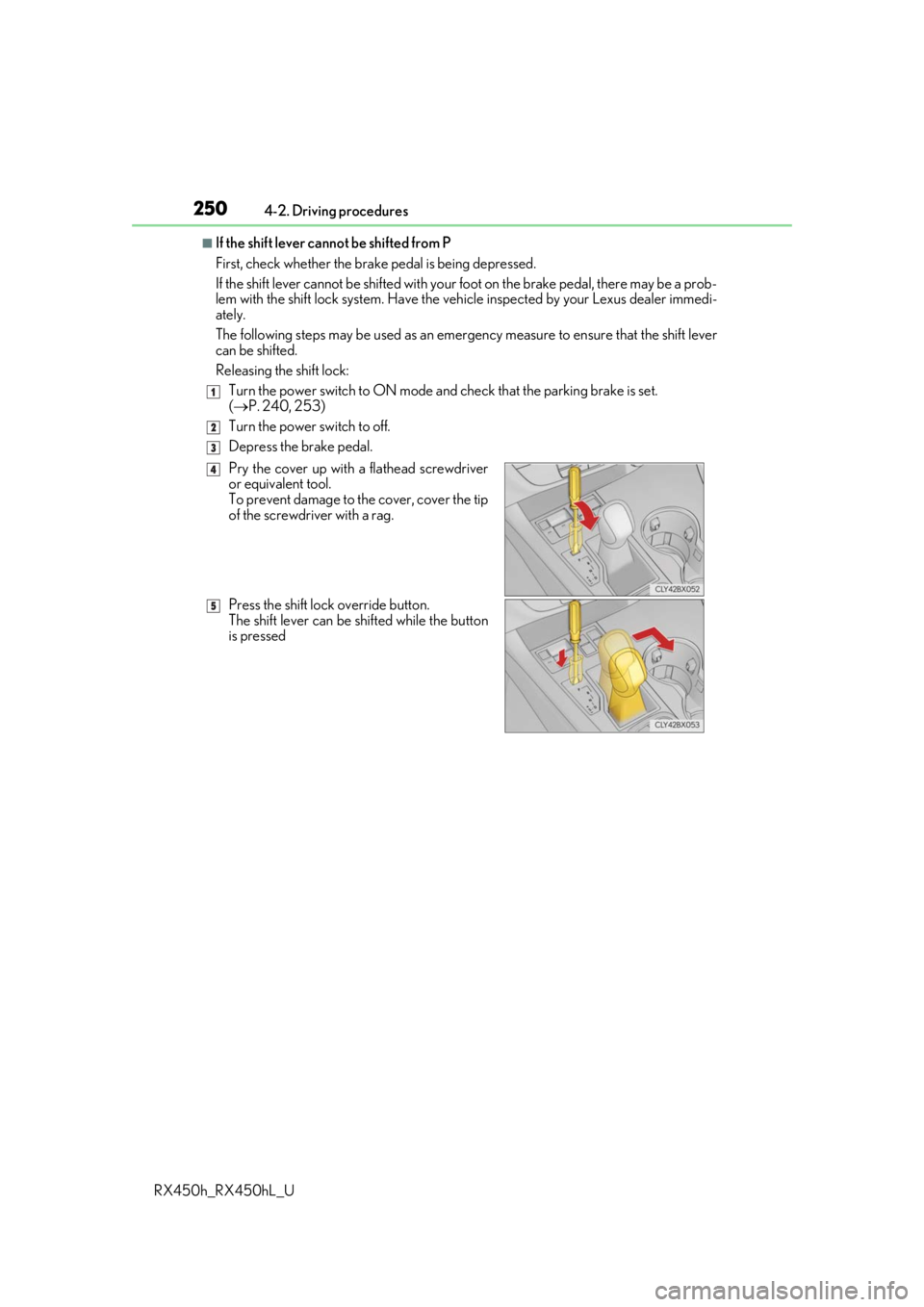
Releasing the shift lock:
Turn the power switch to ON mode and check that the parking brake is set.
( P. 240, 253)
Turn the power switch to off.
Depress the brake pedal.
1
2
3
Pry the cover up with a flathead screwdriver
or equivalent tool.
To prevent damage to the cover, cover the tip
of the screwdriver with a rag.
Press the shift lock override button.
The shift lever can be shifted while the button
is pressed4
5
Page 253 of 792
2534-2. Driving procedures
4
Driving
RX450h_RX450hL_U
The parking brake is set or released automatically according to the shift lever
operation.
Even when in automatic mode, the parkin g brake can be set and released manu-
ally. ( P. 254)
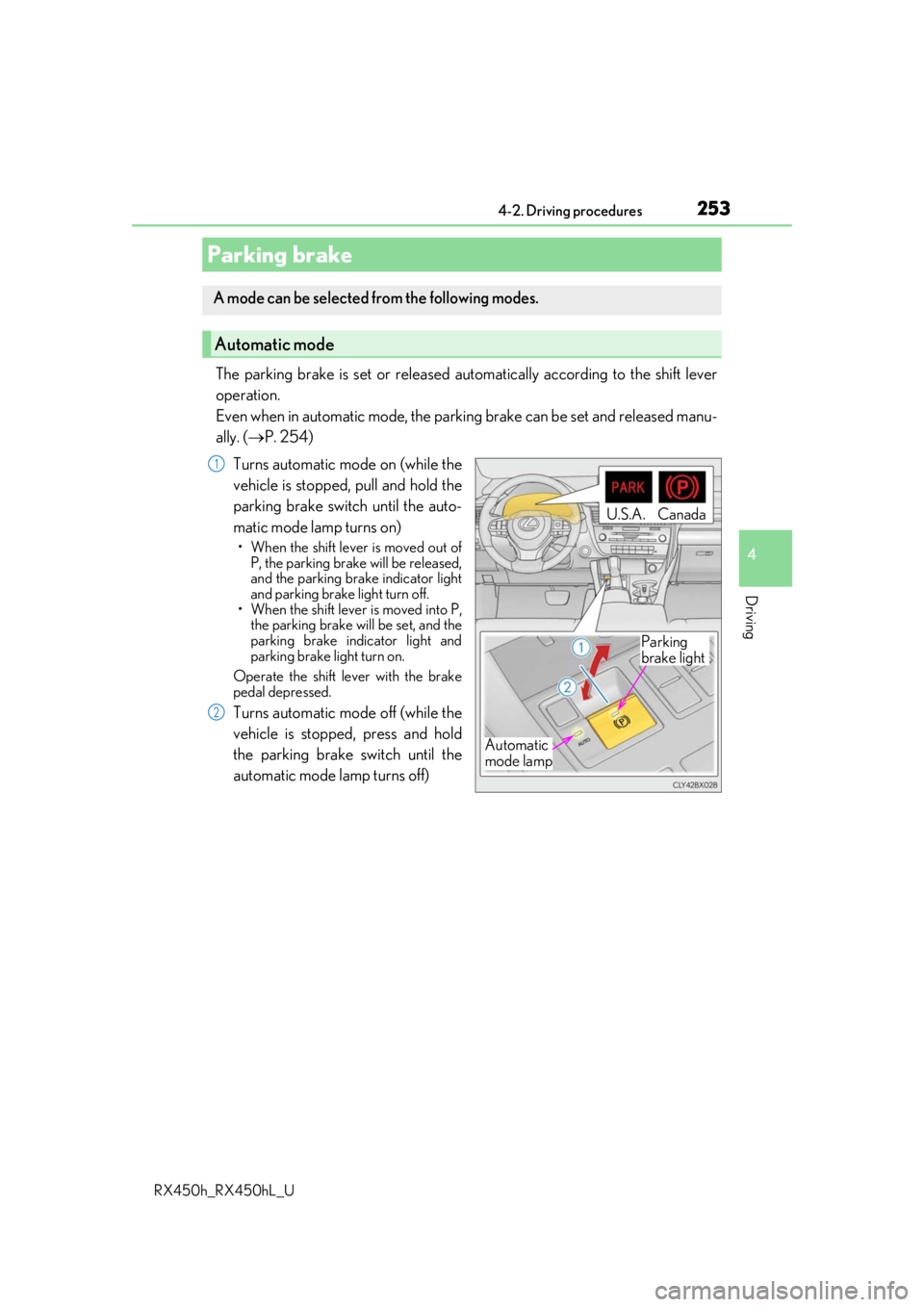
Turns automatic mode on (while the
vehicle is stopped, pull and hold the
parking brake switch until the auto-
matic mode lamp turns on)
• When the shift lever is moved out of P, the parking brake will be released,
and the parking brake indicator light
and parking brake light turn off.
• When the shift lever is moved into P,
the parking brake will be set, and the
parking brake indicator light and
parking brake light turn on.
Operate the shift lever with the brake
pedal depressed.
Turns automatic mode off (while the
vehicle is stopped, press and hold
the parking brake switch until the
automatic mode lamp turns off)
Parking brake
A mode can be selected from the following modes.
Automatic mode
Automatic
mode lamp
U.S.A.Canada
Parking
brake light
1
2
Page 255 of 792
2554-2. Driving procedures
4
Driving
RX450h_RX450hL_U
■Parking brake indicator light and parking brake light
●Depending on the power switch mode, the parking brake indicator light and parking
brake light will turn on and stay on as described below:
ON mode: Comes on until the parking brake is released.
Not in ON mode: Stays on for approximately 15 seconds.
●When the power switch is turned off with th e parking brake set, the parking brake indi-
cator light and parking brake light will stay on for about 15 seconds. This does not indi-
cate a malfunction.
■Changing the mode
When changing the automatic mode on/off , the message will be shown on the multi-
information display and the buzzer sounds.
■Parking brake engaged warning buzzer
A buzzer will sound if the vehicle is driv en with the parking brake engaged. “Release
Parking Brake” is displayed on the multi-information display.
■Warning messages and buzzers
Warning messages and buzzers are used to indicate a system malfunction or to inform
the driver of the need for caution. If a warn ing message is shown on the multi-information
display, read the message and follow the instructions.
■If the brake system warning light comes on
P. 660
■Usage in winter time
P. 391
WARNING
■When parking the vehicle
Do not leave a child in the vehicle alone. The parking brake may be released uninten-
tionally and there is the danger of the ve hicle moving that may lead to an accident
resulting in death or serious injury.
■Parking brake switch
Do not set any objects near the parking br ake switch. Objects may interfere with the
switch and may lead the parking brake to unexpectedly operate.
NOTICE
■When parking the vehicle
Before you leave the vehicle, shift the shif t lever to P, set the parking brake and make
sure that the vehicle does not move.
■When the system malfunctions
Stop the vehicle in a safe place and check the warning messages.
■When the parking brake cannot be released due to a malfunction
Driving the vehicle with the parking brake se t will lead to brake components overheat-
ing, which may affect bra king performance and increase brake wear. Contact your
Lexus dealer immediately if this occurs.
Page 256 of 792
2564-2. Driving procedures
RX450h_RX450hL_U
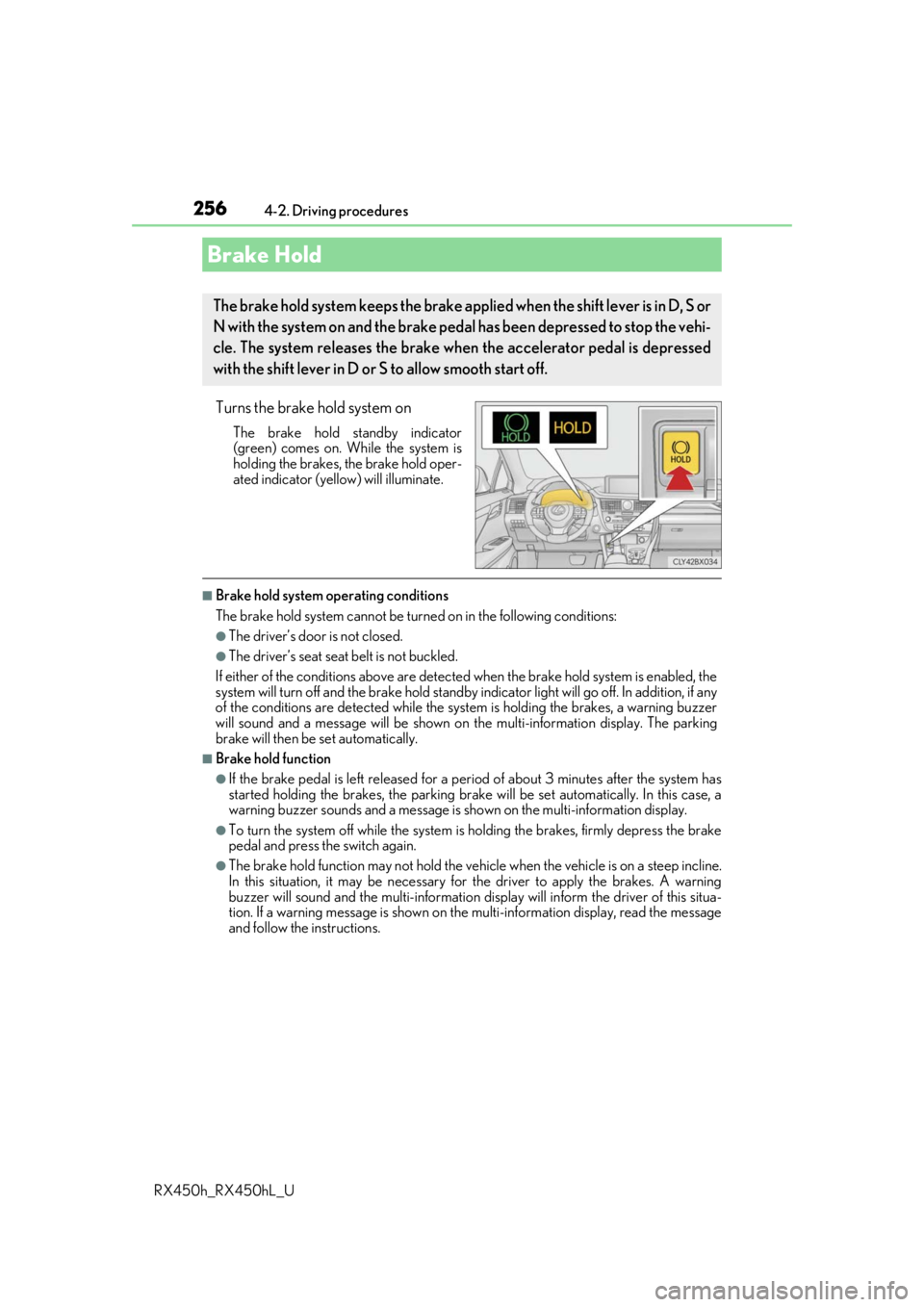
Turns the brake hold system on
The brake hold standby indicator
(green) comes on. Wh ile the system is
holding the brakes, the brake hold oper-
ated indicator (yellow) will illuminate.
■Brake hold system operating conditions
The brake hold system cannot be turn ed on in the following conditions:
●The driver’s door is not closed.
●The driver’s seat seat belt is not buckled.
If either of the conditions above are detected when the brake hold system is enabled, the
system will turn off and the brake hold standby in dicator light will go off. In addition, if any
of the conditions are detected while the sy stem is holding the brakes, a warning buzzer
will sound and a message will be shown on th e multi-information display. The parking
brake will then be set automatically.
■Brake hold function
●If the brake pedal is left released for a pe riod of about 3 minutes after the system has
started holding the brakes, the parking brake will be set automatically. In this case, a
warning buzzer sounds and a message is shown on the multi-information display.
●To turn the system off while the system is holding the brakes, firmly depress the brake
pedal and press the switch again.
●The brake hold function may not hold the vehicle when the vehicle is on a steep incline.
In this situation, it may be necessary for the driver to apply the brakes. A warning
buzzer will sound and the mult i-information display will inform the driver of this situa-
tion. If a warning message is shown on the multi-information display, read the message
and follow the instructions.
Brake Hold
The brake hold system keeps the brake appl ied when the shift lever is in D, S or
N with the system on and the brake peda l has been depressed to stop the vehi-
cle. The system releases the brake wh en the accelerator pedal is depressed
with the shift lever in D or S to allow smooth start off.
Page 257 of 792
2574-2. Driving procedures
4
Driving
RX450h_RX450hL_U
■When the parking brake is set automatically while the system is holding the brakes
Perform any of the following operat ions to release the parking brake.
●Depress the accelerator pedal. (The parking brake will not be released automatically if
the seat belt is not fastened.)
●Operate the parking brake switch with the brake pedal depressed.
Make sure that the parking brake indicator light goes off. ( P. 253)
■When an inspection at your Lexus dealer is necessary
When the brake hold standby indicator (green) does not illuminate even when the brake
hold switch is pressed with the brake hold system operating conditions met, the system
may be malfunctioning. Ha ve the vehicle inspected at your Lexus dealer.
■If “Brake Hold Fault Depress Brake to Deacti vate Visit Your Dealer” is displayed on the
multi-information display
The system may be malfunctioning. Have the vehicle inspected by your Lexus dealer.
■Warning messages and buzzers
Warning messages and buzzers are used to indicate a system malfunction or to inform
the driver of the need for caution. If a warn ing message is shown on the multi-information
display, read the message and follow the instructions.
■If the brake hold operated indicator flashes
P. 660
WARNING
■When the vehicle is on a steep incline
When using the brake hold system on a steep incline exercise caution. The brake hold
function may not hold the vehicle in such a situation.
■When stopped on a slippery road
The system cannot stop the vehicle when the gripping ability of the tires has been
exceeded. Do not use the system when stopped on a slippery road.
NOTICE
■When parking the vehicle
The brake hold system is not designed for use when parking the vehicle for a long
period of time. Turning the power switch off while the system is holding the brakes may
release the brakes, which would cause the vehicle to move. When operating the power
switch, depress the brake pedal, shift the shift lever to P and set the parking brake.
Page 258 of 792
258
RX450h_RX450hL_U4-3. Operating the lights and wipers
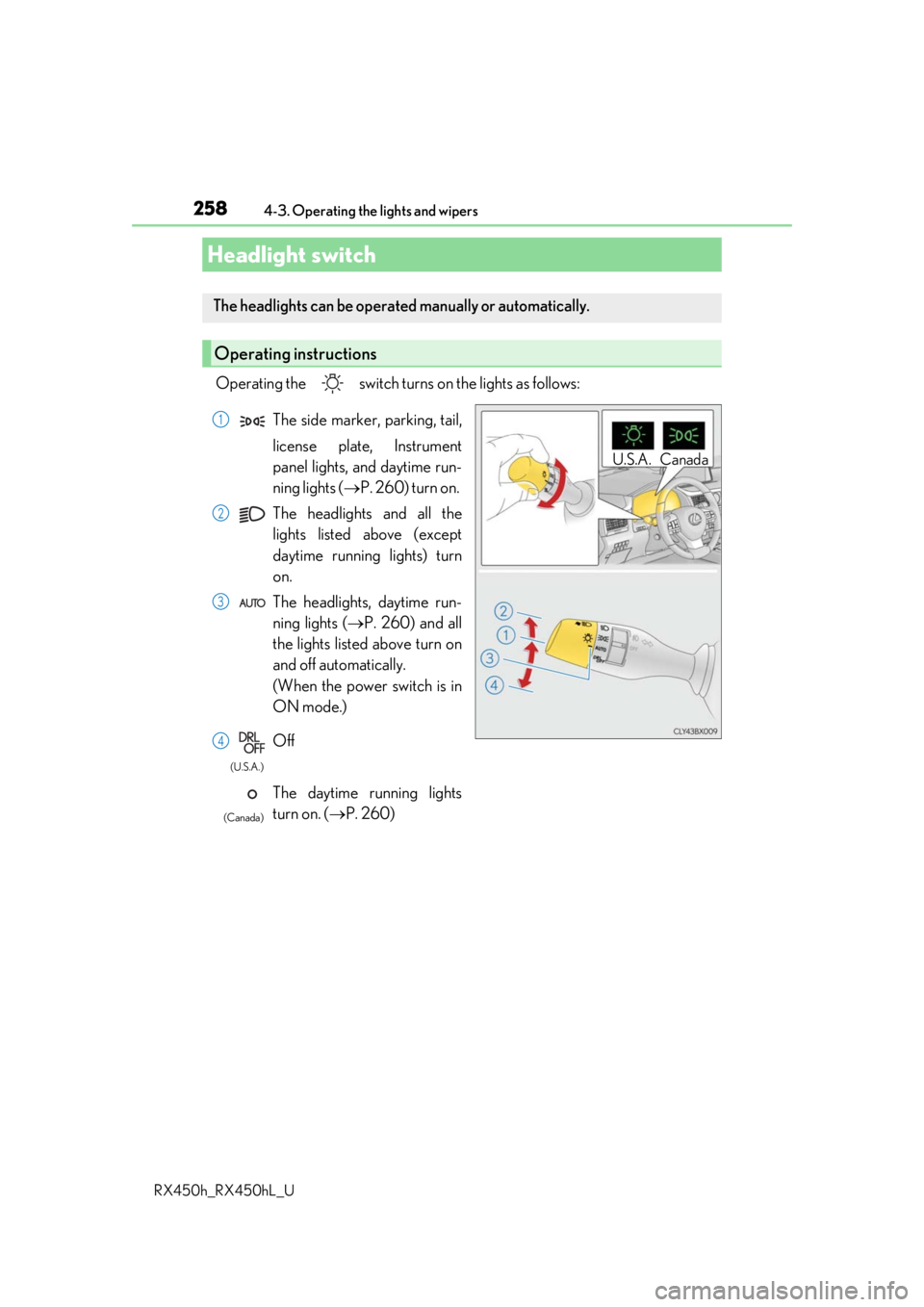
Operating the switch turn
s on the lights as follows:
Headlight switch
The headlights can be operated manually or automatically.
Operating instructions
U.S.A. Canada
The side marker, parking, tail,
license plate, Instrument
panel lights, and daytime run-
ning lights ( P. 260) turn on.
The headlights and all the
lights listed above (except
daytime running lights) turn
on.
The headlights, daytime run-
ning lights ( P. 260) and all
the lights listed above turn on
and off automatically.
(When the power switch is in
ON mode.)
Off
The daytime running lights
turn on. ( P. 260)1
2
3
4
(U.S.A.)
(Canada)
Page 259 of 792
2594-3. Operating the lights and wipers
4
Driving
RX450h_RX450hL_U
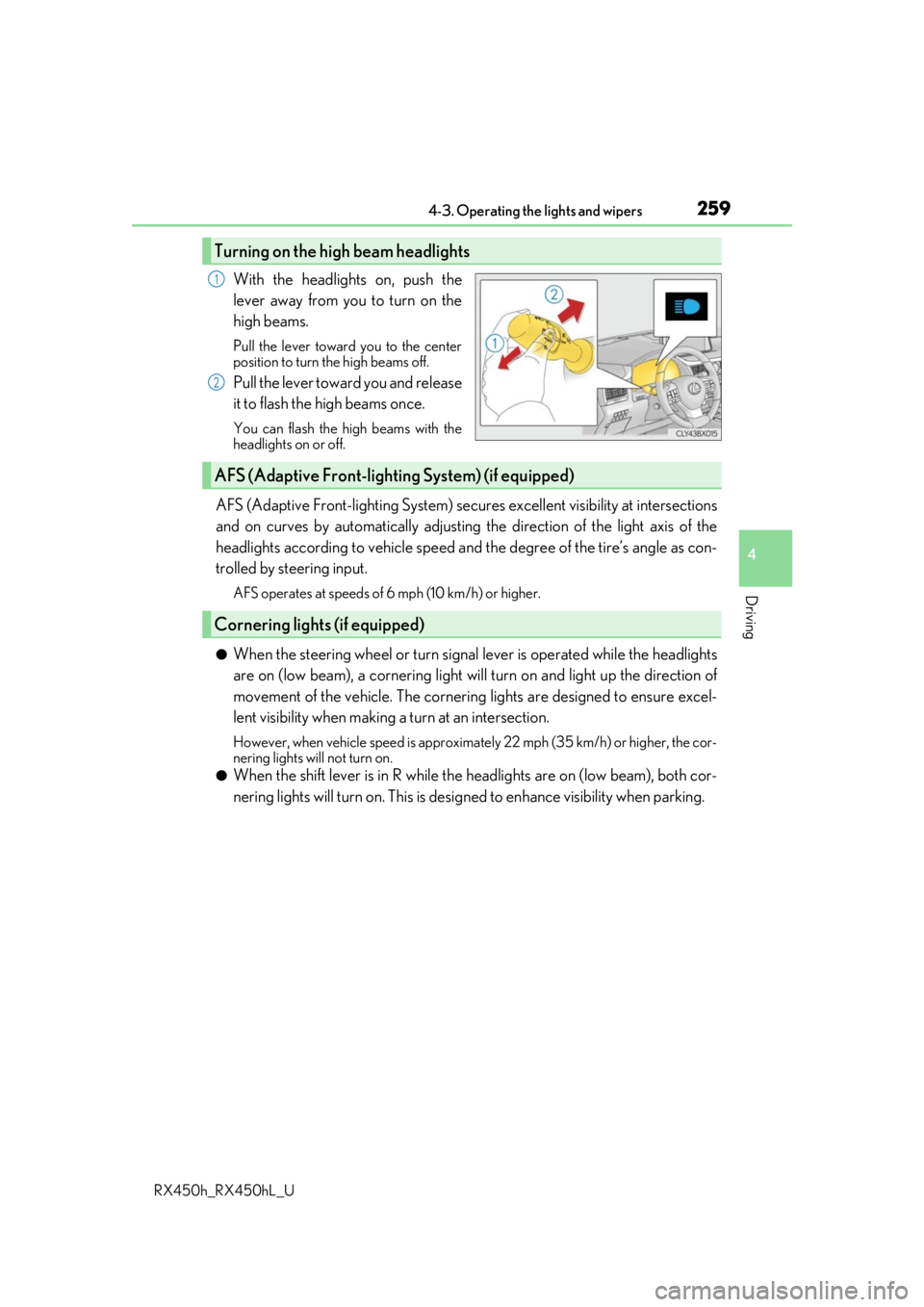
With the headlights on, push the
lever away from you to turn on the
high beams.
Pull the lever toward you to the center
position to turn the high beams off.
Pull the lever toward you and release
it to flash the high beams once.
You can flash the high beams with the
headlights on or off.
AFS (Adaptive Front-lighting System) secures excellent visibility at intersections
and on curves by automatically adjusting the direction of the light axis of the
headlights according to vehicle speed and the degree of the tire’s angle as con-
trolled by steering input.
AFS operates at speeds of 6 mph (10 km/h) or higher.
●When the steering wheel or turn signal lever is operated while the headlights
are on (low beam), a cornering light w ill turn on and light up the direction of
movement of the vehicle. The cornerin g lights are designed to ensure excel-
lent visibility when making a turn at an intersection.
However, when vehicle speed is approximately 22 mph (35 km/h) or higher, the cor-
nering lights will not turn on.
●When the shift lever is in R while the headlights are on (low beam), both cor-
nering lights will turn on. This is desi gned to enhance visibility when parking.
Turning on the high beam headlights
1
2
AFS (Adaptive Front-lighting System) (if equipped)
Cornering lights (if equipped)
Page 260 of 792

2604-3. Operating the lights and wipers
RX450h_RX450hL_U
■Daytime running light system
●The daytime running lights illuminate using th e same lights as the parking lights and illu-
minate brighter than the parking lights.
●To make your vehicle more visible to other drivers during daytime driving, the daytime
running lights turn on automatically when a ll of the following conditions are met. (The
daytime running lights are not designed for use at night.)
• The hybrid system is started
• The parking brake is released
• The headlight switch is in the (Canada only), or
* position
*: When the surroundings are bright
The daytime running lights remain on after they illuminate, even if the parking brake is set
again.
●For the U.S.A.: Daytime running lights can be turned off by operating the switch.
●Compared to turning on the headlights, the daytime running light system offers greater
durability and consumes less electricity, so it can help improve fuel economy.
■Cornering lights (if equipped)
When the cornering lights are on for more than 30 minutes, they will turn off automati-
cally.
■Headlight control sensor
■Automatic light off system
●When the headlights come on: The headlights and tail lights turn off 30 seconds after a
door is opened and closed if the power switch is turned to ACCESSORY mode or
turned off. (The lights turn off immediately if on the key is pre ssed after all the doors
are locked.)
●When only the tail lights come on: The tail lights turn off automatically if the power
switch is turned to ACCESSORY mode or tu rned off and the driver’s door is opened.
To turn the lights on again, turn the power switch to ON mode, or turn the light switch off
once and then back to or .
■Automatic headlight leve ling system (if equipped)
The level of the headlights is automatically adjusted accordi ng to the number of passen-
gers and the loading condition of the vehicle to ensure that the headlights do not inter-
fere with other road users.
■Light reminder buzzer
A buzzer sounds when the power switch is turned off or turned to ACCESSORY mode
and the driver’s door is opened while the lights are turned on. The sensor may not function properly if an
object is placed on the sensor, or anything that
blocks the sensor is affixed to the windshield.
Doing so interferes with the sensor detecting
the level of ambient light and may cause the
automatic headlight system to malfunction.