turn LEXUS RX450H 2019 Owners Manual
[x] Cancel search | Manufacturer: LEXUS, Model Year: 2019, Model line: RX450H, Model: LEXUS RX450H 2019Pages: 792, PDF Size: 13.48 MB
Page 481 of 792
4815-11. Bluetooth®
5
Lexus Display Audio system
RX450h_RX450hL_U
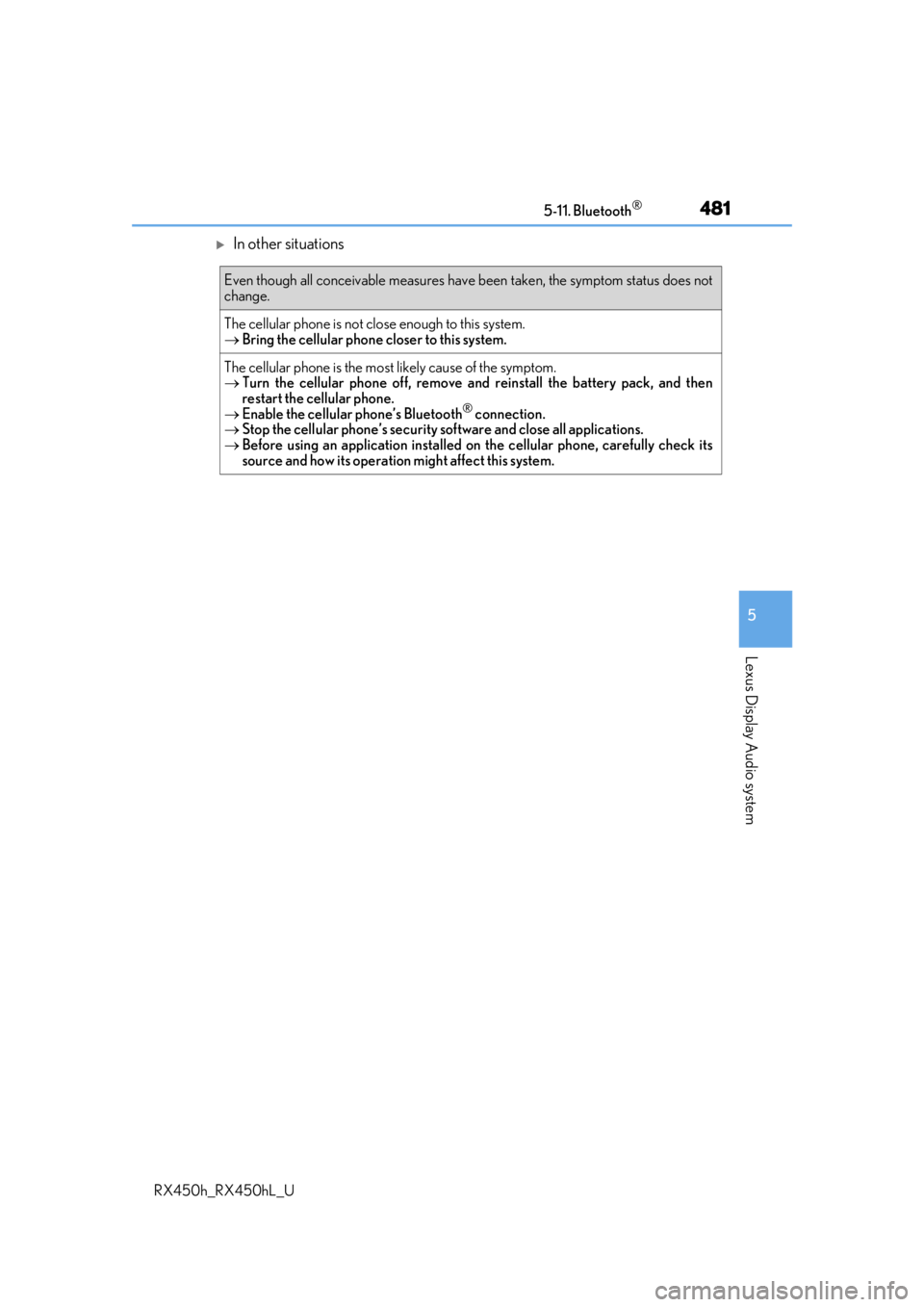
In other situations
Even though all conceivable measures have been taken, the symptom status does not
change.
The cellular phone is not close enough to this system.
Bring the cellular phone closer to this system.
The cellular phone is the most likely cause of the symptom.
Turn the cellular phone off, remove and reinstall the battery pack, and then
restart the cellular phone.
Enable the cellular phone’s Bluetooth
® connection.
Stop the cellular phone’s security software and close all applications.
Before using an application installed on the cellular phone, carefully check its
source and how its operation might affect this system.
Page 482 of 792
4825-11. Bluetooth®
RX450h_RX450hL_U
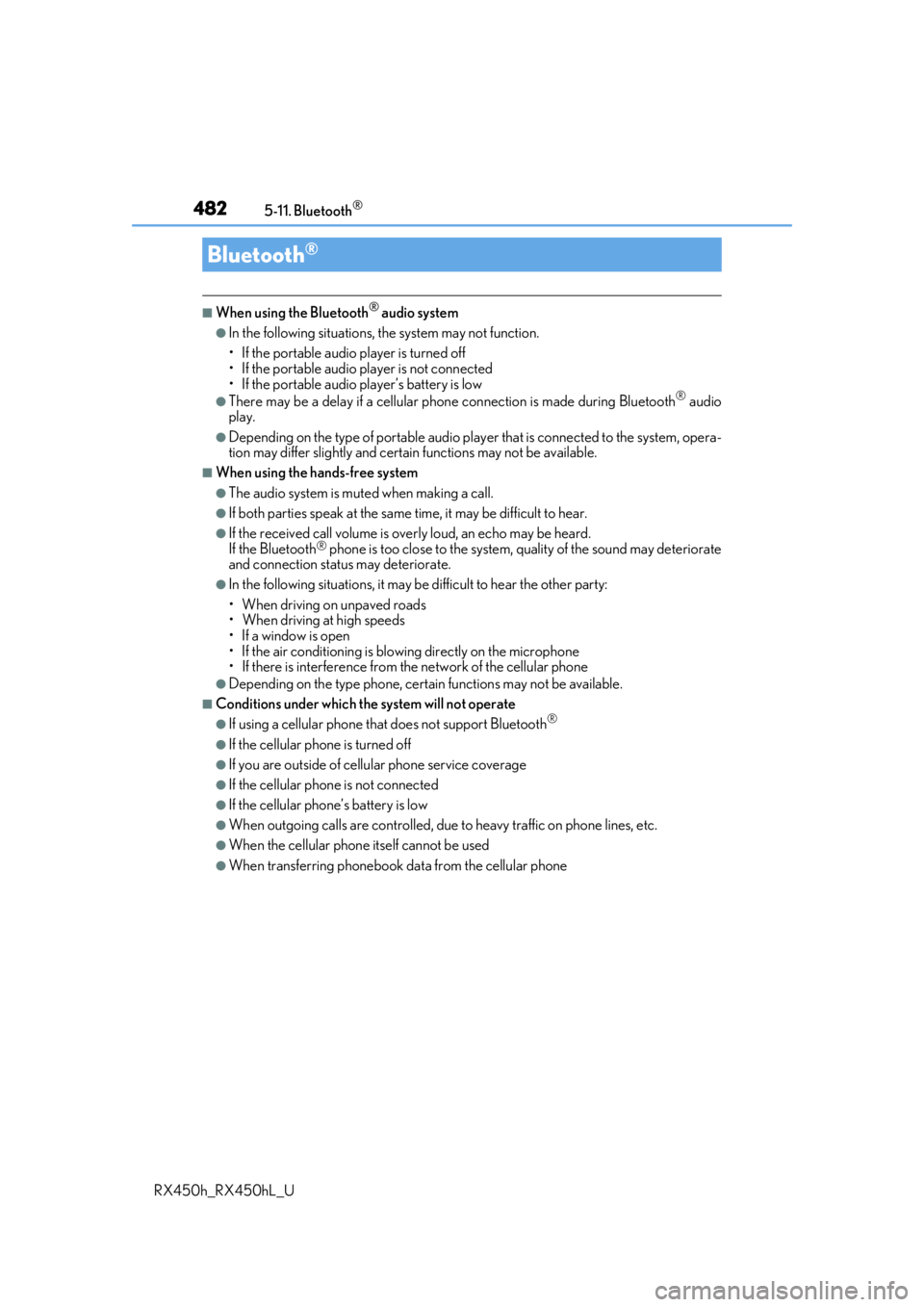
■When using the Bluetooth® audio system
●In the following situations, the system may not function.
• If the portable audio player is turned off
• If the portable audio player is not connected
• If the portable audio player’s battery is low
●There may be a delay if a cellular phone connection is made during Bluetooth® audio
play.
●Depending on the type of portable audio play er that is connected to the system, opera-
tion may differ slight ly and certain functions may not be available.
■When using the hands-free system
●The audio system is mu ted when making a call.
●If both parties speak at the same time, it may be difficult to hear.
●If the received call volume is over ly loud, an echo may be heard.
If the Bluetooth® phone is too close to the system, quality of the sound may deteriorate
and connection status may deteriorate.
●In the following situations, it may be difficult to hear the other party:
• When driving on unpaved roads
• When driving at high speeds
• If a window is open
• If the air conditioning is blow ing directly on the microphone
• If there is interference from the network of the cellular phone
●Depending on the type phone, certain functions may not be available.
■Conditions under which the system will not operate
●If using a cellular phone that does not support Bluetooth®
●If the cellular phone is turned off
●If you are outside of cellular phone service coverage
●If the cellular phone is not connected
●If the cellular phone’s battery is low
●When outgoing calls are controlled, due to heavy traffic on phone lines, etc.
●When the cellular phone itself cannot be used
●When transferring phonebook da ta from the cellular phone
Bluetooth®
Page 494 of 792
4945-12. Other function
RX450h_RX450hL_U
■Microphone
P. 462
■When using the microphone
●It is unnecessary to speak directly into the microphone when giving a command.
●Wait for the confirmation beep before speaking a command.
●Voice commands may not be recognized if:
• Spoken too quickly.
• Spoken at a low or high volume.
• The roof or windows are open.
• Passengers are talking while voice commands are spoken.
• The air conditioning speed is set high.
• The air conditioning vents are turned towards the microphone.
●In the following conditions, the system ma y not recognize the command properly and
using voice commands may not be possible:
• The command is incorrect or unclear. No te that certain words, accents or speech
patterns may be difficult for the system to recognize.
• There is excessive background noise, such as wind noise.
■When searching for a track
●A USB memory or iPod must be connected to enable track searching and playback.
( P. 409)
●When a USB memory or iPod is connected, recognition data is created so tracks can
be searched using voice commands.
●Recognition data is updated un der the following conditions:
• When the USB memory or iPod data has changed.
• When the voice recognition language is changed. ( P. 413)
●While the recognition data is being created or being updated, a track search cannot be
performed using a voice command.
■The Gracenote® media database
Page 496 of 792
4965-12. Other function
RX450h_RX450hL_U
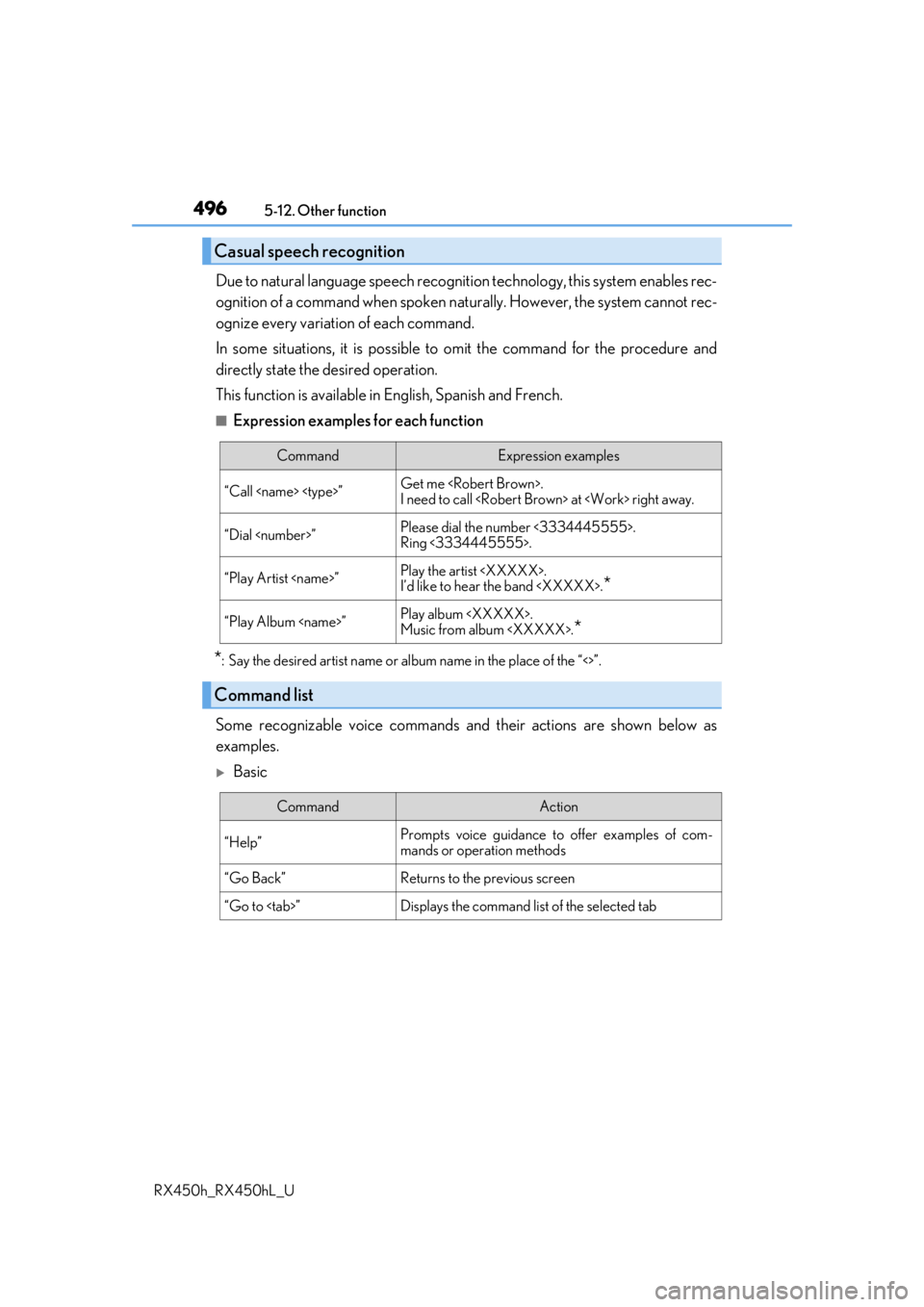
Due to natural language speech recognit ion technology, this system enables rec-
ognition of a command when spoken na turally. However, the system cannot rec-
ognize every variation of each command.
In some situations, it is possible to omit the command for the procedure and
directly state the desired operation.
This function is available in English, Spanish and French.
■Expression examples for each function
*: Say the desired artist name or al bum name in the place of the “<>”.
Some recognizable voice commands an d their actions are shown below as
examples.
Basic
Casual speech recognition
CommandExpression examples
“Call
I need to call
“Dial
Ring <3334445555>.
“Play Artist
I’d like to hear the band
“Play Album
Music from album
*
Command list
CommandAction
“Help”Prompts voice guidance to offer examples of com-
mands or operation methods
“Go Back”Returns to the previous screen
“Go to
Page 498 of 792
4985-12. Other function
RX450h_RX450hL_U
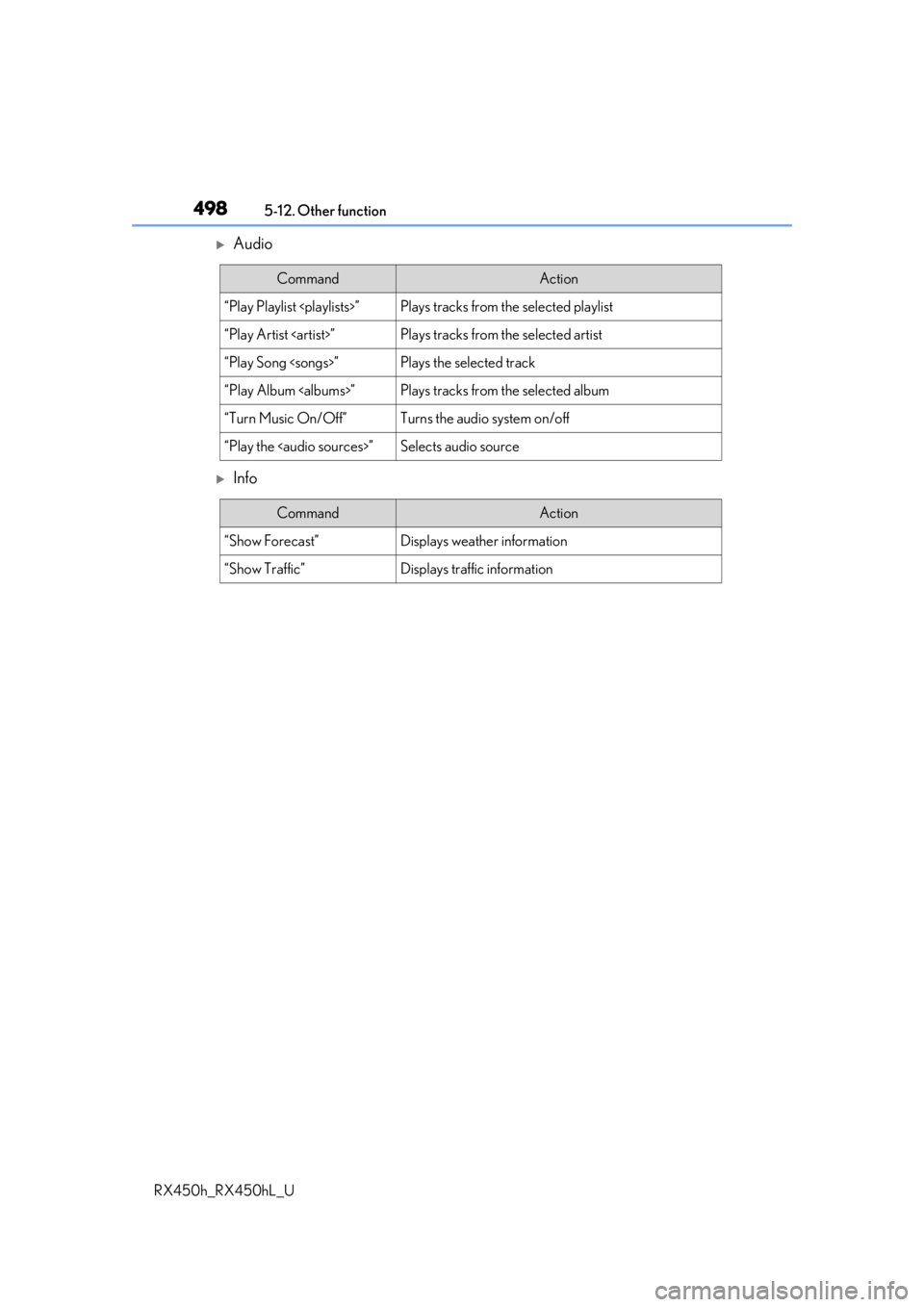
Audio
Info
CommandAction
“Play Playlist
“Play Artist
“Play Song
“Play Album
“Turn Music On/Off”Turns the audio system on/off
“Play the
Page 503 of 792
5036-1. Basic operation of the Remote Touch screen
6
Interior features
RX450h_RX450hL_U
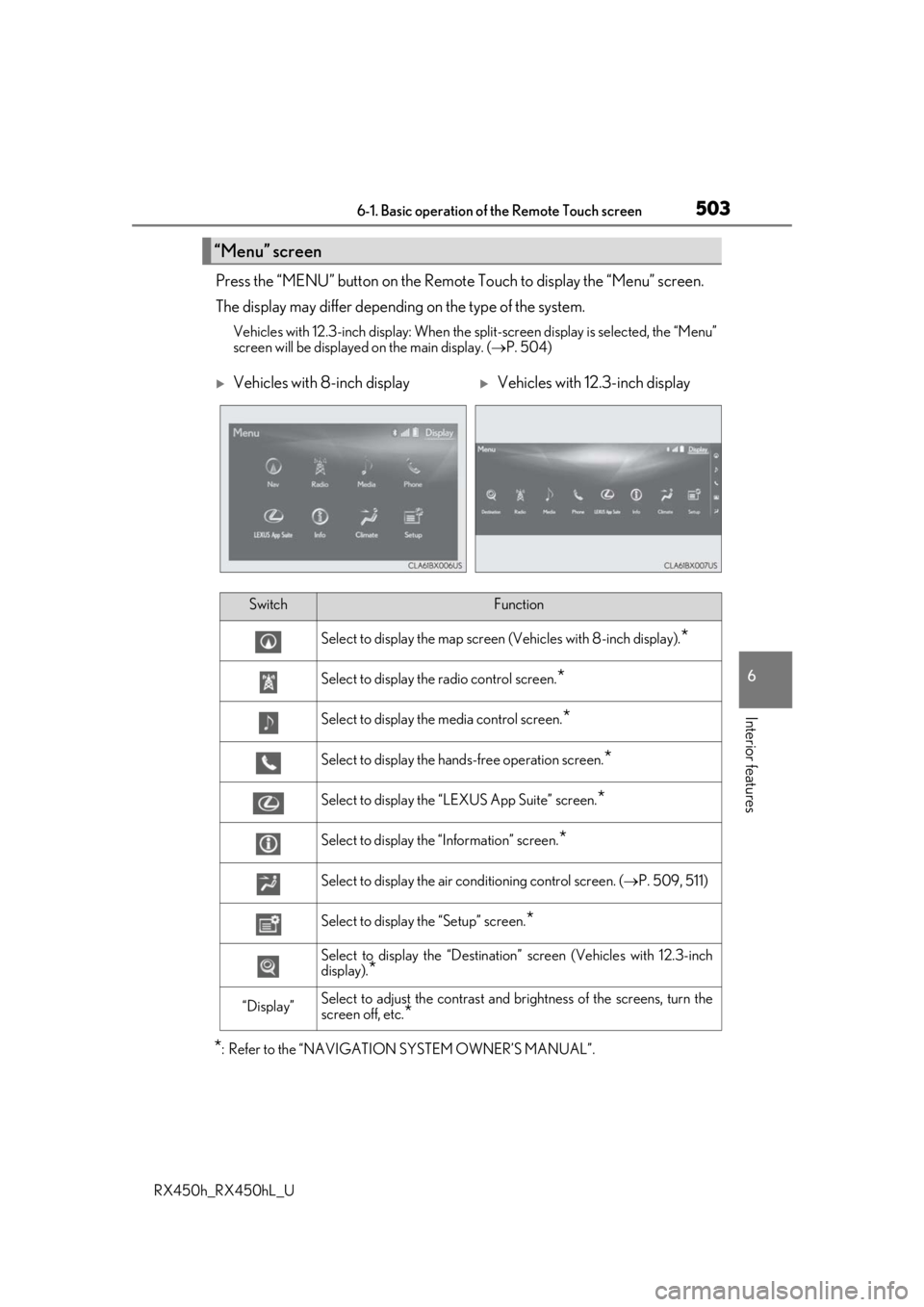
Press the “MENU” button on the Remote Touch to display the “Menu” screen.
The display may differ depending on the type of the system.
Vehicles with 12.3-inch display: When the split-screen display is selected, the “Menu”
screen will be displayed on the main display. ( P. 504)
*: Refer to the “NAVIGATION SYSTEM OWNER’S MANUAL”.
“Menu” screen
Vehicles with 8-inch displayVehicles with 12.3-inch display
SwitchFunction
Select to display the map screen (Vehicles with 8- inch display).*
Select to display the radio control screen.*
Select to display the media control screen.*
Select to display the hands-free operation screen.*
Select to display the “LEXUS App Suite” screen.*
Select to display the “Information” screen.*
Select to display the air conditioning control screen. ( P. 509, 511)
Select to display the “Setup” screen.*
Select to display the “Destination ” screen (Vehicles with 12.3-inch
display).
*
“Display”Select to adjust the contrast and brightness of the screens, turn the
screen off, etc.
*
Page 508 of 792
5086-2. Using the air conditioning system and defogger
RX450h_RX450hL_U
■Adjusting the temperature setting
Press to increase the temperature and to decrease the tem-
perature.
■Adjusting the fan speed setting
Press to increase the fan speed and to decrease the fan speed.
Press the “OFF” button to turn the fan off.
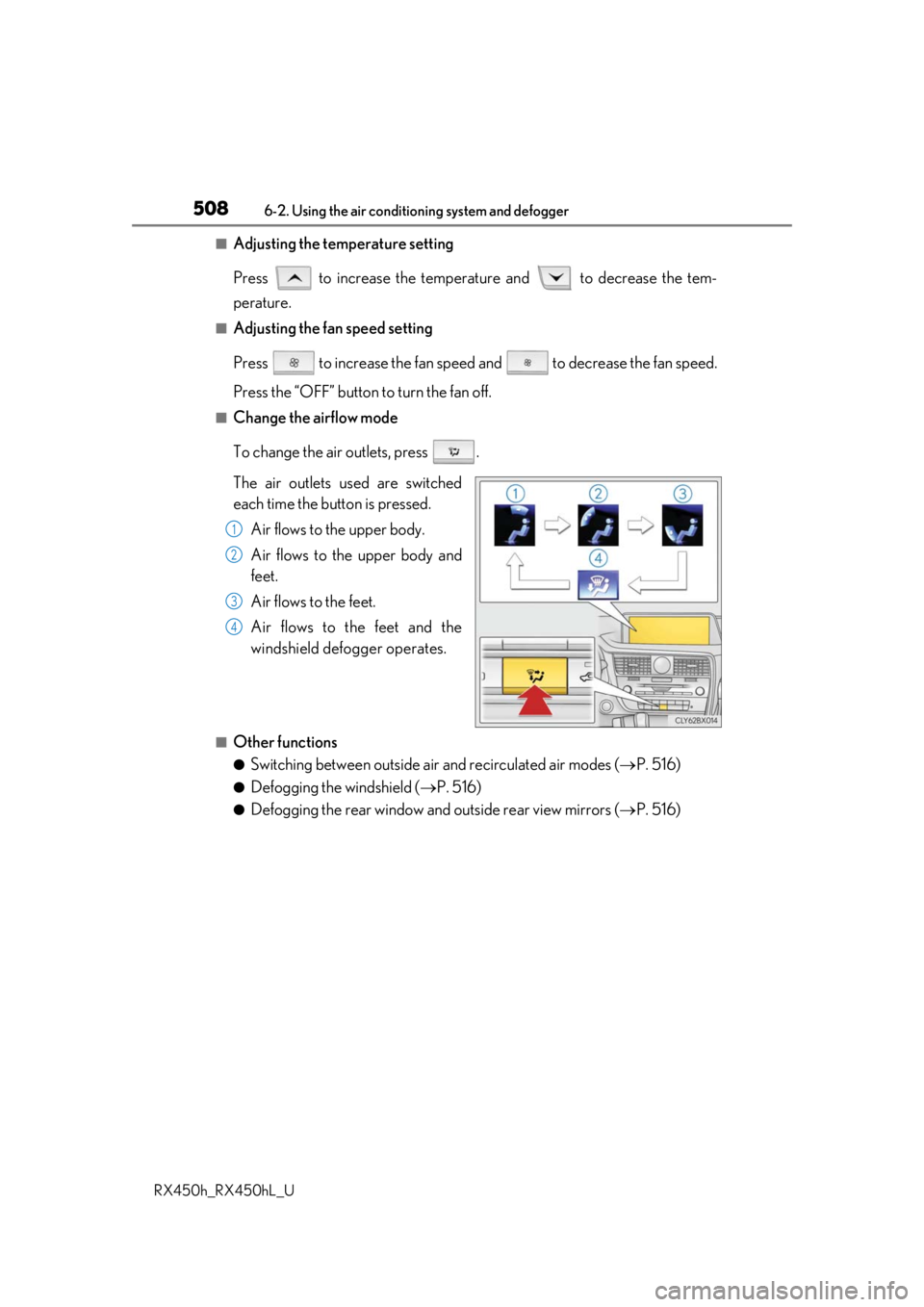
■Change the airflow mode
To change the air outlets, press .
The air outlets used are switched
each time the button is pressed. Air flows to the upper body.
Air flows to the upper body and
feet.
Air flows to the feet.
Air flows to the feet and the
windshield defogger operates.
■Other functions
●Switching between outside air and recirculated air modes ( P. 516)
●Defogging the windshield ( P. 516)
●Defogging the rear window and outside rear view mirrors ( P. 516)
1
2
3
4
Page 509 of 792
5096-2. Using the air conditioning system and defogger
RX450h_RX450hL_U
6
Interior features
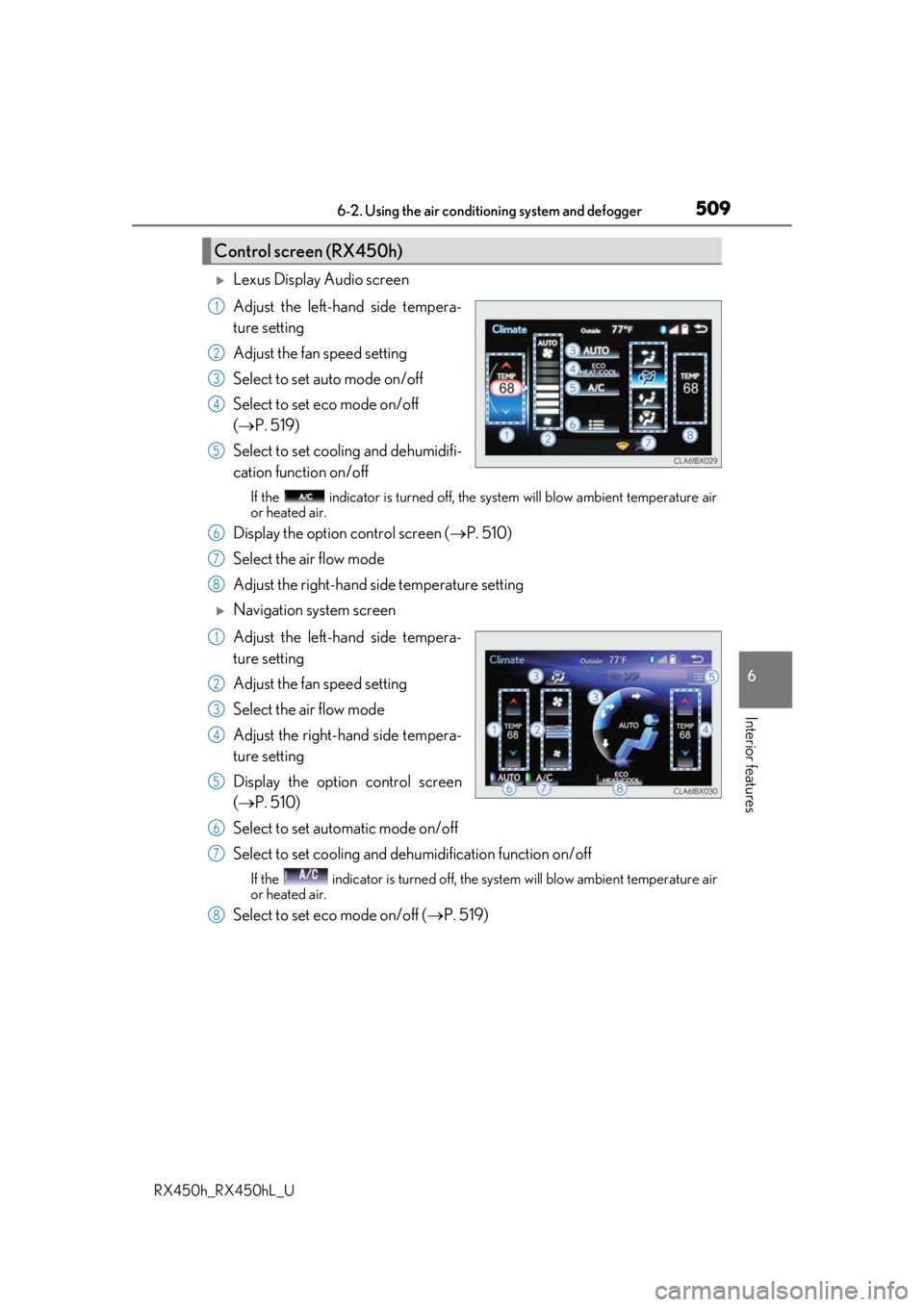
Lexus Display Audio screen
Adjust the left-hand side tempera-
ture setting
Adjust the fan speed setting
Select to set auto mode on/off
Select to set eco mode on/off
( P. 519)
Select to set cooling and dehumidifi-
cation function on/off
If the indicator is turned off, the system will blow ambient temperature air
or heated air.
Display the option control screen ( P. 510)
Select the air flow mode
Adjust the right-hand side temperature setting
Navigation system screen
Adjust the left-hand side tempera-
ture setting
Adjust the fan speed setting
Select the air flow mode
Adjust the right-hand side tempera-
ture setting
Display the option control screen
( P. 510)
Select to set automatic mode on/off
Select to set cooling and dehumidification function on/off
If the indicator is turned off, the system will blow ambient temperature air
or heated air.
Select to set eco mode on/off ( P. 519)
Control screen (RX450h)
1
2
3
4
5
6
7
8
1
2
3
4
5
6
7
8
Page 510 of 792
5106-2. Using the air conditioning system and defogger
RX450h_RX450hL_U
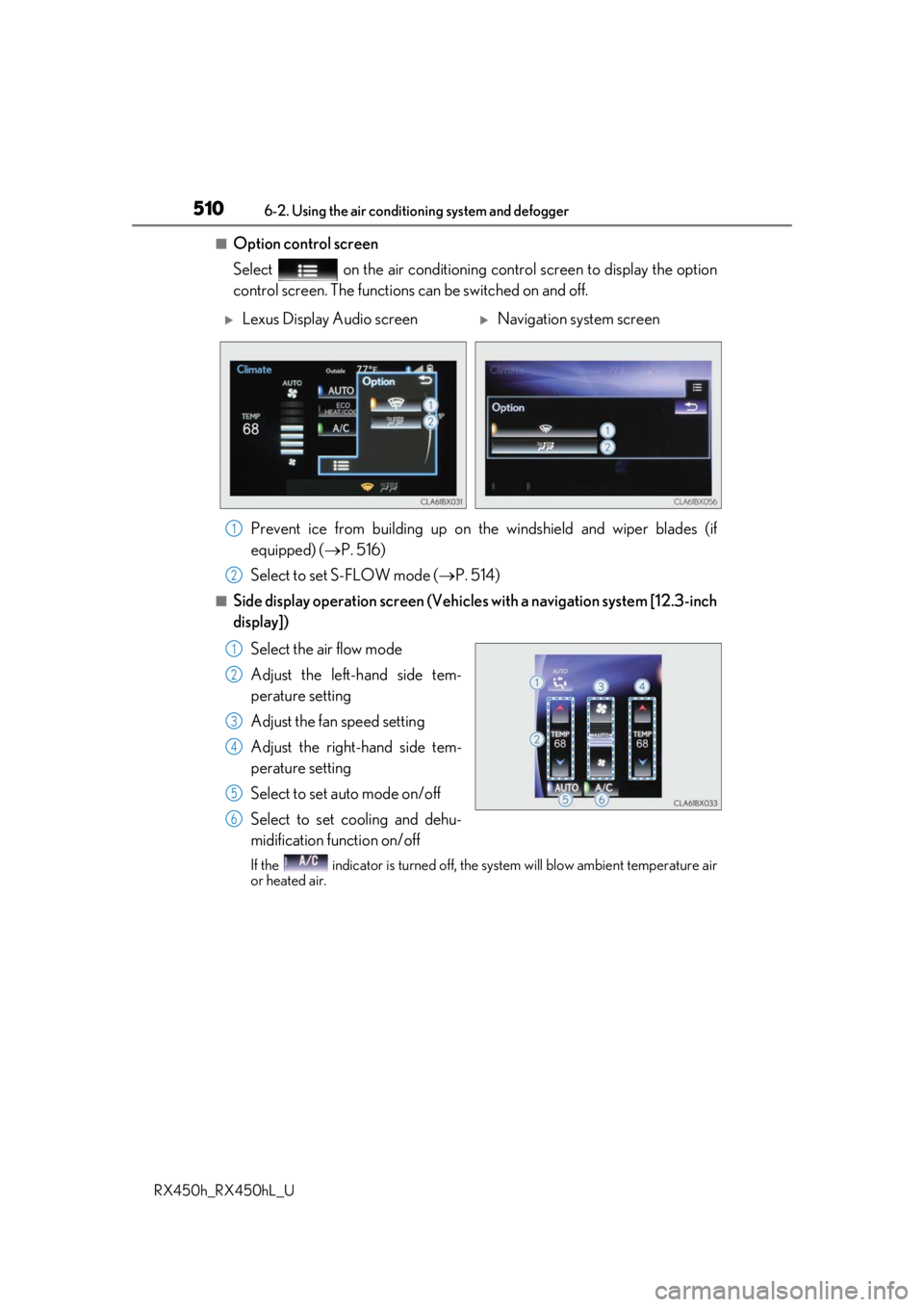
■Option control screen
Select on the air conditioning control screen to display the option
control screen. The functions can be switched on and off.
Prevent ice from building up on the windshield and wiper blades (if
equipped) ( P. 516)
Select to set S-FLOW mode ( P. 514)
■Side display operation screen (Vehicle s with a navigation system [12.3-inch
display])
Select the air flow mode
Adjust the left-hand side tem-
perature setting
Adjust the fan speed setting
Adjust the right-hand side tem-
perature setting
Select to set auto mode on/off
Select to set cooling and dehu-
midification function on/off
If the indicator is turned off, the system will blow ambient temperature air
or heated air.
Lexus Display Audio screenNavigation system screen
1
2
1
2
3
4
5
6
Page 511 of 792
5116-2. Using the air conditioning system and defogger
RX450h_RX450hL_U
6
Interior features
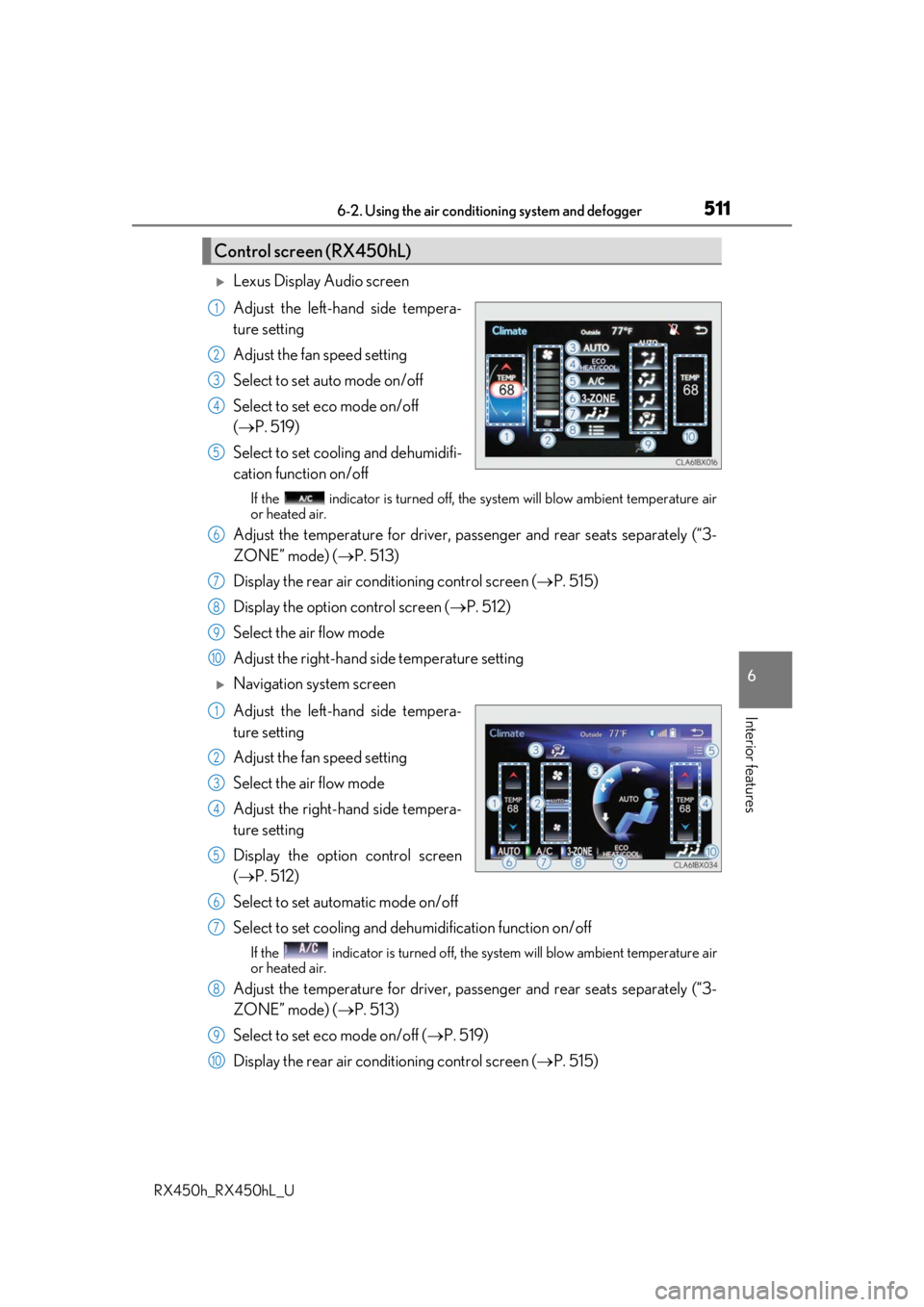
Lexus Display Audio screen
Adjust the left-hand side tempera-
ture setting
Adjust the fan speed setting
Select to set auto mode on/off
Select to set eco mode on/off
( P. 519)
Select to set cooling and dehumidifi-
cation function on/off
If the indicator is turned off, the system will blow ambient temperature air
or heated air.
Adjust the temperature for driver, passe nger and rear seats separately (“3-
ZONE” mode) ( P. 513)
Display the rear air condit ioning control screen (P. 515)
Display the option control screen ( P. 512)
Select the air flow mode
Adjust the right-hand side temperature setting
Navigation system screen
Adjust the left-hand side tempera-
ture setting
Adjust the fan speed setting
Select the air flow mode
Adjust the right-hand side tempera-
ture setting
Display the option control screen
( P. 512)
Select to set automatic mode on/off
Select to set cooling and dehumidification function on/off
If the indicator is turned off, the system will blow ambient temperature air
or heated air.
Adjust the temperature for driver, passe nger and rear seats separately (“3-
ZONE” mode) ( P. 513)
Select to set eco mode on/off ( P. 519)
Display the rear air condit ioning control screen (P. 515)
Control screen (RX450hL)
1
2
3
4
5
6
7
8
9
10
1
2
3
4
5
6
7
8
9
10