turn LEXUS RX450H 2019 Owners Manual
[x] Cancel search | Manufacturer: LEXUS, Model Year: 2019, Model line: RX450H, Model: LEXUS RX450H 2019Pages: 792, PDF Size: 13.48 MB
Page 545 of 792
5456-4. Using the storage features
6
Interior features
RX450h_RX450hL_U
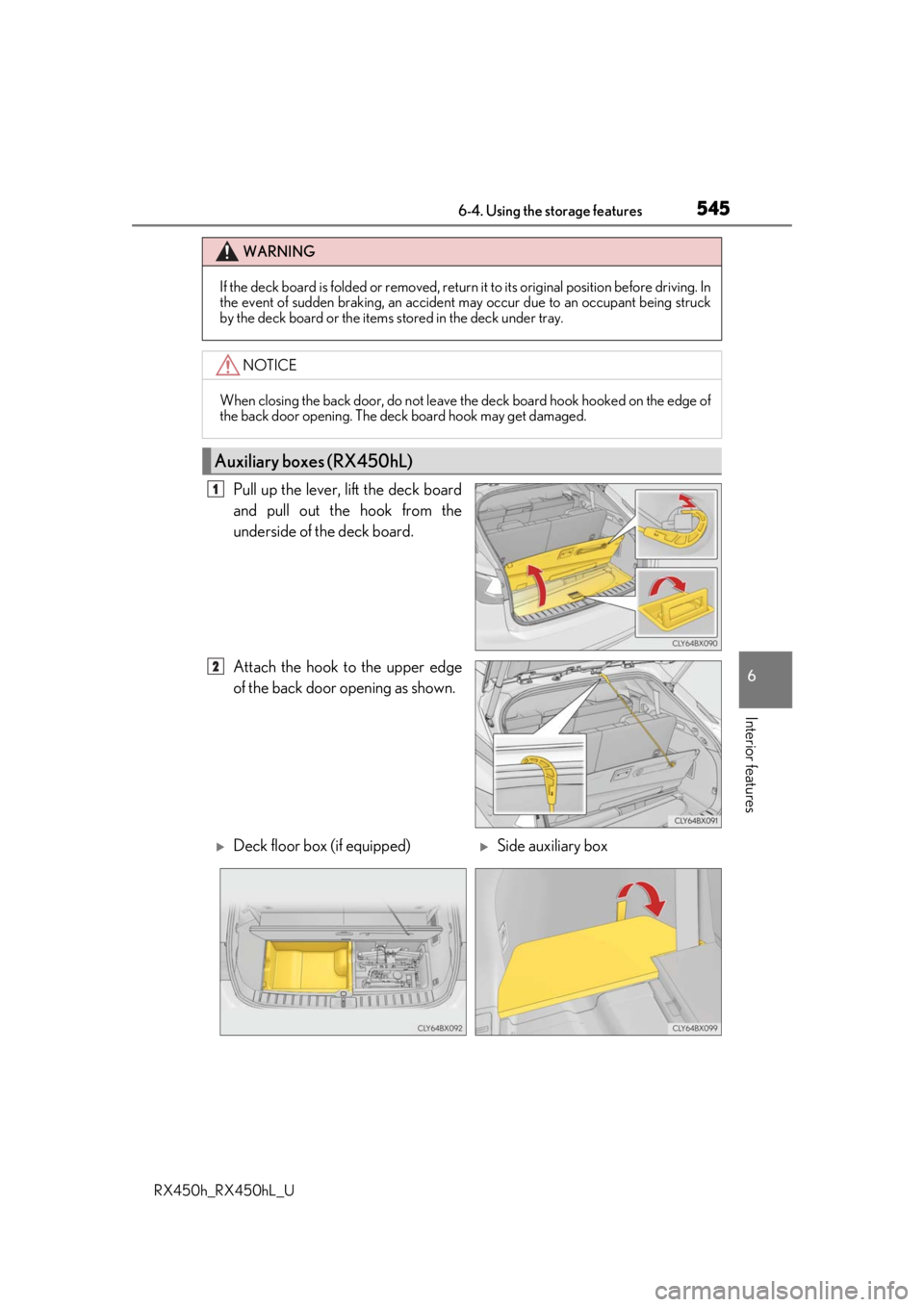
Pull up the lever, lift the deck board
and pull out the hook from the
underside of the deck board.
Attach the hook to the upper edge
of the back door opening as shown.
WARNING
If the deck board is folded or removed, return it to its original position before driving. In
the event of sudden braking, an accident may occur due to an occupant being struck
by the deck board or the items stored in the deck under tray.
NOTICE
When closing the back door, do not leave th e deck board hook hooked on the edge of
the back door opening. The deck board hook may get damaged.
Auxiliary boxes (RX450hL)
1
2
Deck floor box (if equipped)Side auxiliary box
Page 546 of 792
5466-4. Using the storage features
RX450h_RX450hL_U
WARNING
●If the deck board is folded or removed, return it to its original position before driving.
In the event of sudden braking, an accident may occur due to an occupant being
struck by the deck board or the items stored in the deck under tray.
NOTICE
When closing the back door, do not leave th e deck board hook hooked on the edge of
the back door opening. The deck board hook may get damaged.
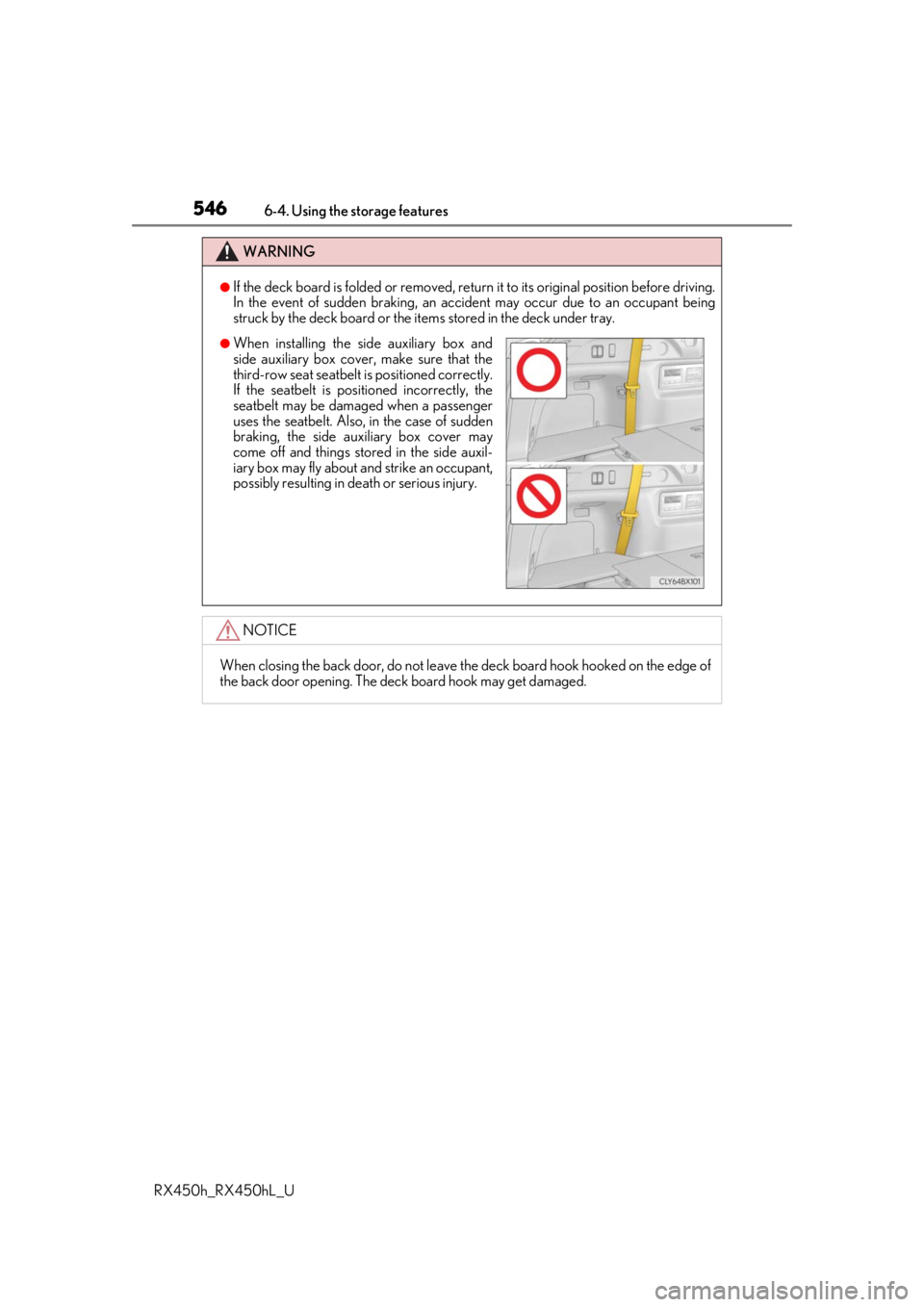
●When installing the side auxiliary box and
side auxiliary box cover, make sure that the
third-row seat seatbelt is positioned correctly.
If the seatbelt is posi tioned incorrectly, the
seatbelt may be damaged when a passenger
uses the seatbelt. Also, in the case of sudden
braking, the side auxiliary box cover may
come off and things stor ed in the side auxil-
iary box may fly about and strike an occupant,
possibly resulting in death or serious injury.
Page 547 of 792
547
RX450h_RX450hL_U
6
Interior features
6-5. Using the other interior features
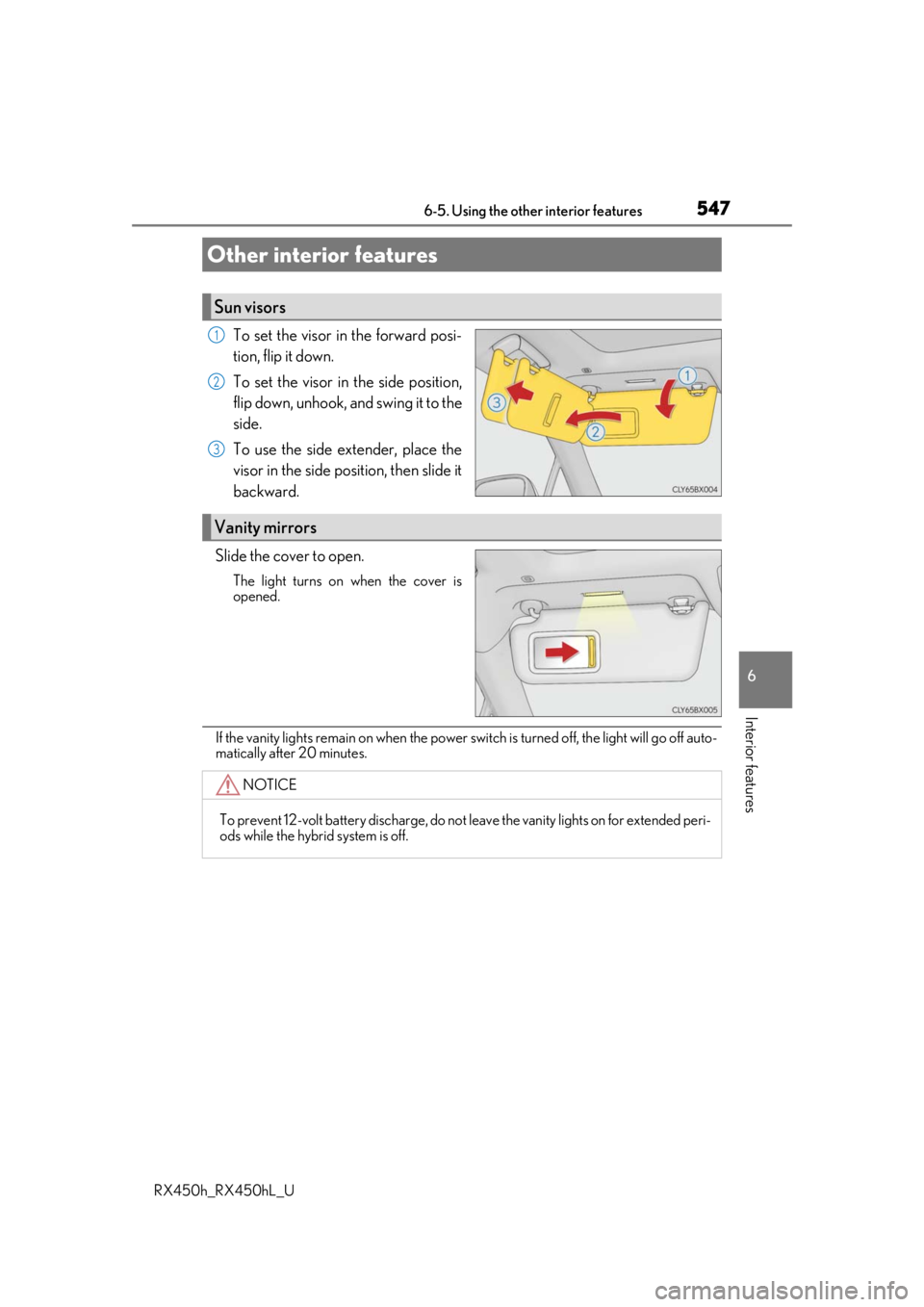
To set the visor in the forward posi-
tion, flip it down.
To set the visor in the side position,
flip down, unhook, and swing it to the
side.
To use the side extender, place the
visor in the side position, then slide it
backward.
Slide the cover to open.
The light turns on when the cover is
opened.
If the vanity lights remain on when the power sw itch is turned off, the light will go off auto-
matically after 20 minutes.
Other interior features
Sun visors
1
2
3
Vanity mirrors
NOTICE
To prevent 12-volt battery discharge, do not leave the vanity lights on for extended peri-
ods while the hybrid system is off.
Page 549 of 792
5496-5. Using the other interior features
6
Interior features
RX450h_RX450hL_U
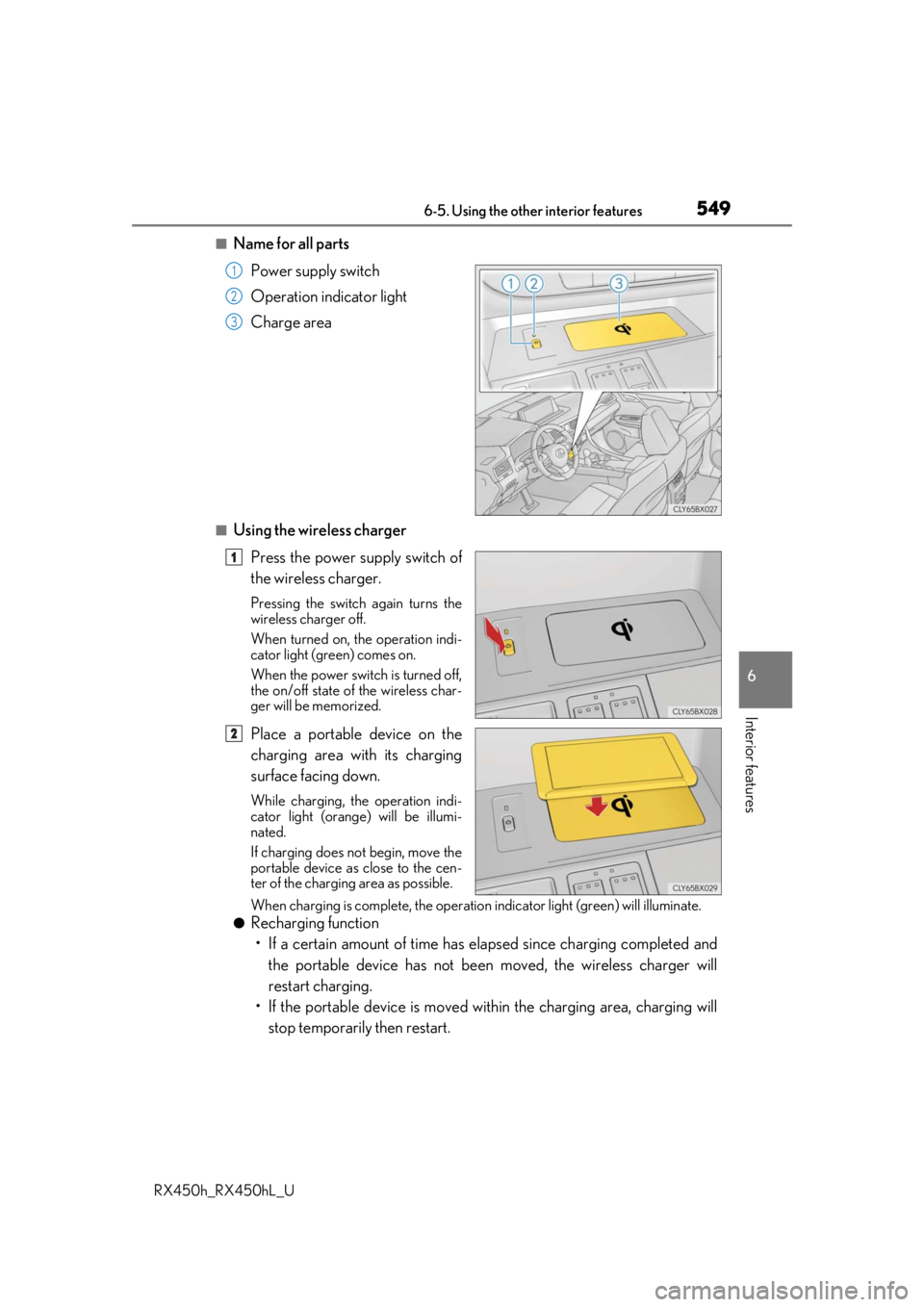
■Name for all partsPower supply switch
Operation indicator light
Charge area
■Using the wireless chargerPress the power supply switch of
the wireless charger.
Pressing the switch again turns the
wireless charger off.
When turned on, the operation indi-
cator light (green) comes on.
When the power switch is turned off,
the on/off state of the wireless char-
ger will be memorized.
Place a portable device on the
charging area with its charging
surface facing down.
While charging, the operation indi-
cator light (orange) will be illumi-
nated.
If charging does not begin, move the
portable device as close to the cen-
ter of the charging area as possible.
When charging is complete, the operatio n indicator light (green) will illuminate.
●Recharging function
• If a certain amount of time has elapsed since charging completed and the portable device has not been moved, the wireless charger will
restart charging.
• If the portable device is moved with in the charging area, charging will
stop temporarily then restart.
1
2
3
1
2
Page 551 of 792
5516-5. Using the other interior features
6
Interior features
RX450h_RX450hL_U
■If a cover or accessory is attached to the portable device
Do not charge a portable device if a cover or accessory which is not Qi compatible is
attached. Depending on the type of cover an d/or accessory attached, it may not be pos-
sible to charge the portable device. If the po rtable device is placed on the charging area
and does not charge, remove the cover and/or accessories.
■If interference is heard in AM radio broadcasts while charging
Turn off the wireless charger and check if the noise is reduced. If noise is reduced, press
and hold the power supply switch of the wireless charger for 2 seconds. The frequency of
the wireless charger is changed and noise may be reduced. When the frequency is
changed, the operation indicator lig ht will blink (orange) 2 times.
■Charging precautions
●If the electronic key cannot be detected in the cabin, charging cannot be performed.
When a door is opened and closed, ch arging may be temporarily suspended.
●While charging, the wireless charger and the po rtable device will become warm. This is
not a malfunction.
If a portable device become s warm while charging and ch arging stops due to the pro-
tection function of the portable device, wait until the portable device cools down and
charge it again.
■Sound generated during operation
When the power supply switch is turned on or while a portable device is being identified,
operation sounds may be heard. This is not a malfunction.
■Cleaning the wireless charger
P. 585
■Certification for the wireless charger
Page 557 of 792
5576-5. Using the other interior features
6
Interior features
RX450h_RX450hL_U
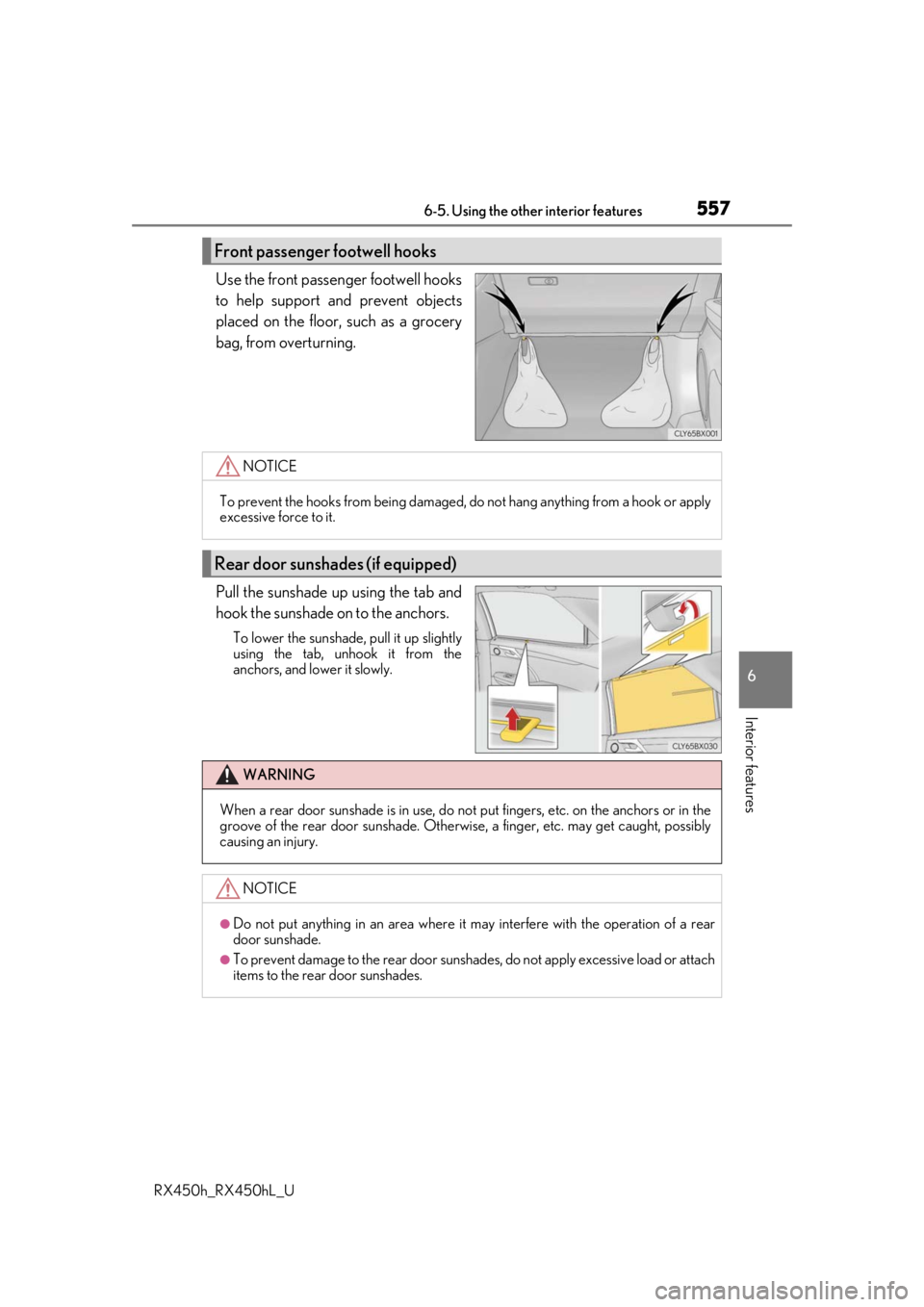
Use the front passenger footwell hooks
to help support and prevent objects
placed on the floor, such as a grocery
bag, from overturning.
Pull the sunshade up using the tab and
hook the sunshade on to the anchors.
To lower the sunshade, pull it up slightly
using the tab, unhook it from the
anchors, and lower it slowly.
Front passenger footwell hooks
NOTICE
To prevent the hooks from being damaged, do not hang anything from a hook or apply
excessive force to it.
Rear door sunshades (if equipped)
WARNING
When a rear door sunshade is in use, do not put fingers, etc. on the anchors or in the
groove of the rear door sunshade. Otherwise, a finger, etc. may get caught, possibly
causing an injury.
NOTICE
●Do not put anything in an area where it may interfere with the operation of a rear
door sunshade.
●To prevent damage to the rear door sunshades, do not apply excessive load or attach
items to the rear door sunshades.
Page 563 of 792
5636-5. Using the other interior features
6
Interior features
RX450h_RX450hL_U
■Enabling 2-way communication with a garage door (only available for com-
patible devices)
When enabled, 2-way communication allows you to check the status of the
opening and closing of a garage door through indicators in your vehicle.
2-way communication is only available if the garage door opener motor used
is a compatible device. (To check devi ce compatibility, refer to www.Home-
Link.com.)
Within 5 seconds after programming the garage door opener has been
completed, if the garage door op ener motor is trained to HomeLink
®,
both garage door operation indicator s will flash rapidly (green) and the
light on the garage door opener moto r will blink twice, indicating that 2-
way communication is enabled.
If the indicators do not flash, perform and within the first 10 presses of
the HomeLink
® button after programming has been completed.
Press a programmed HomeLink
® button to operate a garage door.
Within 1 minute of pressing the HomeLink
® button, after the garage door
operation has stopped, press the “Learn” or “Smart” button on the garage
door opener motor. Within 5 seconds of the establishment of 2-way com-
munication with the garage door opener, both garage door operation indi-
cators in the vehicle will flash rapidly (green) and the light on the garage
door opener motor will blink twice, indicating that 2-way communication is
enabled.
■Reprogramming a single HomeLink® button
When the following procedure is performed, buttons which already have
devices registered to them can be overwritten: With one hand, press and hold the desired HomeLink
® button.
When the HomeLink
® indicator starts flashing (orange), continue to hold
the HomeLink® button and perform “Programming HomeLink®” (it
takes 20 seconds for the HomeLink® indicator to start flashing).
Press the appropriate HomeLink
® button. The HomeLink® indicator light
should turn on.
Operating HomeLink®
1
23
2
3
1
2
1
Page 567 of 792
5676-5. Using the other interior features
6
Interior features
RX450h_RX450hL_U
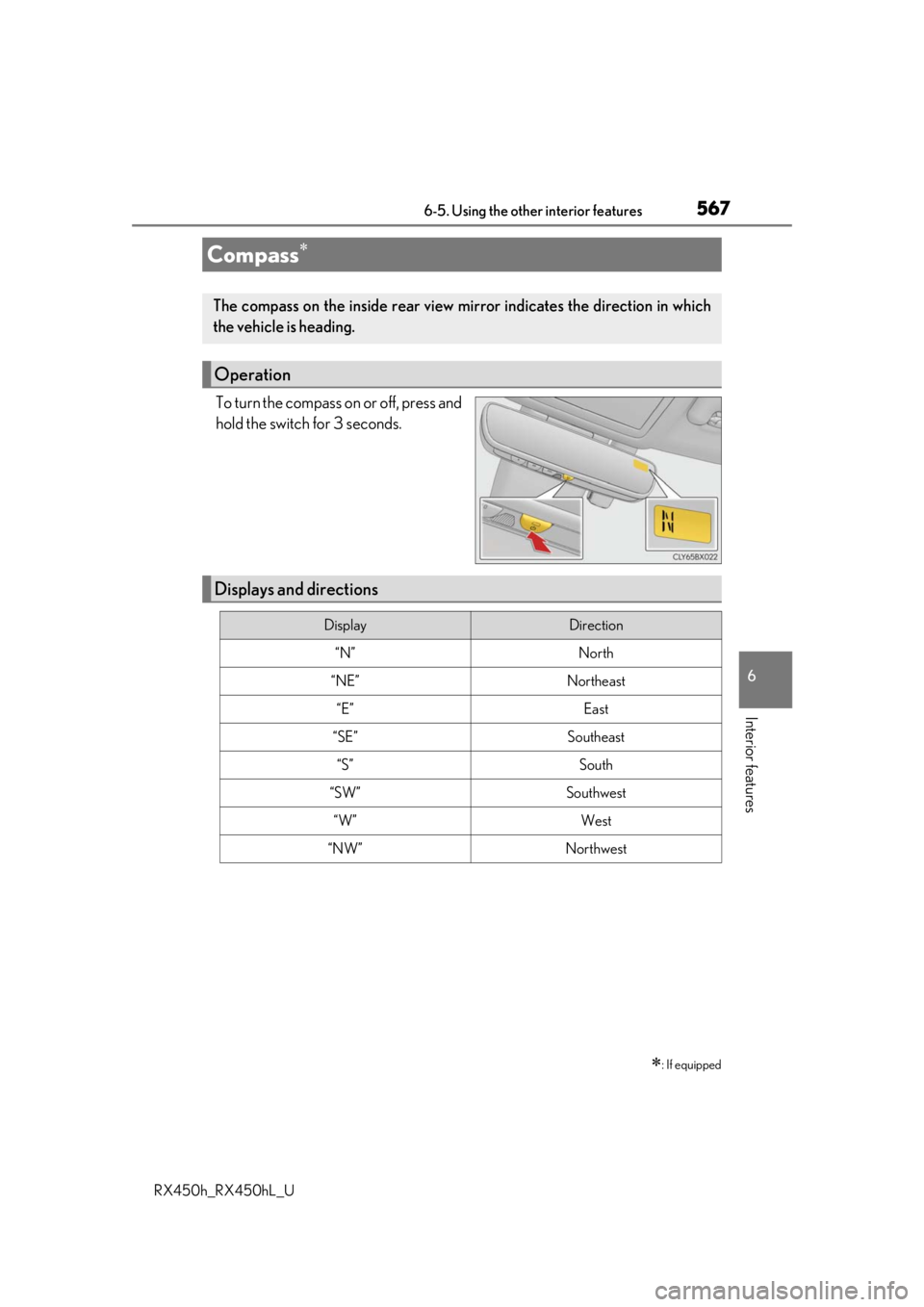
To turn the compass on or off, press and
hold the switch for 3 seconds.
Compass
: If equipped
The compass on the inside rear view mirror indicates the direction in which
the vehicle is heading.
Operation
Displays and directions
DisplayDirection
“N”North
“NE”Northeast
“E”East
“SE”Southeast
“S”South
“SW”Southwest
“W”West
“NW”Northwest
Page 569 of 792
5696-5. Using the other interior features
6
Interior features
RX450h_RX450hL_U
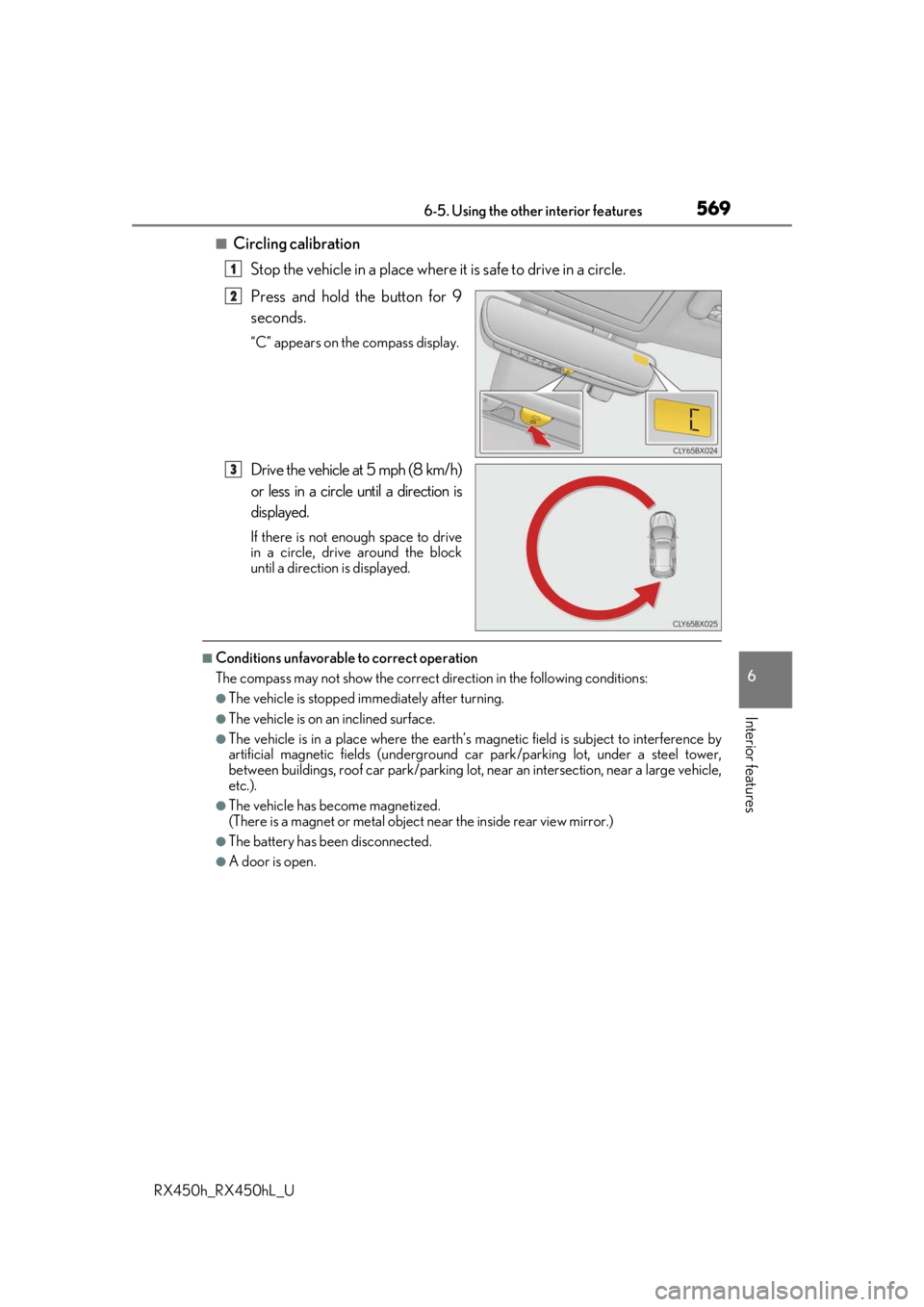
■Circling calibrationStop the vehicle in a place where it is safe to drive in a circle.
Press and hold the button for 9
seconds.
“C” appears on the compass display.
Drive the vehicle at 5 mph (8 km/h)
or less in a circle until a direction is
displayed.
If there is not enough space to drive
in a circle, drive around the block
until a direction is displayed.
■Conditions unfavorable to correct operation
The compass may not show the correct di rection in the following conditions:
●The vehicle is stopped immediately after turning.
●The vehicle is on an inclined surface.
●The vehicle is in a place where the earth’s magnetic field is subject to interference by
artificial magnetic fields (underground car park/parking lot, under a steel tower,
between buildings, roof car park/parking lot, near an intersection, near a large vehicle,
etc.).
●The vehicle has become magnetized.
(There is a magnet or metal object near the inside rear view mirror.)
●The battery has been disconnected.
●A door is open.
1
2
3
Page 573 of 792
5736-5. Using the other interior features
6
Interior features
RX450h_RX450hL_U
■Safety Connect Services Information
●Phone calls using the vehicles Bluetooth® technology will not be possible during Safety
Connect.
●Safety Connect is available be ginning Fall 2009 on select Lexus models (in the contig-
uous United States only). Contact with th e Safety Connect response center is depen-
dent upon the telematics device being in operative condition, cellular connection
availability, and GPS sa tellite signal reception, which can limit the ability to reach the
response center or receive emergency se rvice support. Enrollment and Telematics
Subscription Service Agreement required. A variety of subscription terms is available;
charges vary by subscription term selected and location.
●Automatic Collision Notification, Emergenc y Assistance and Stolen Vehicle Location
will function in the United States, includin g Hawaii and Alaska, Puerto Rico and in Can-
ada, and Enhanced Roadside Assistance will function in the United States, Puerto Rico
and in Canada.
●Automatic Collision Notification, Emergency Assistance, Stolen Vehicle Location and
Enhanced Roadside Assistance will not func tion in the United States Virgin Islands.
No Safety Connect services will function outs ide of the United States in countries other
than Canada.
For vehicles first sold in the USVI, no Safety Connect services will function in and out-
side the United States Virgin Islands.
●Safety Connect services are not subject to section 255 of the Telecommunications Act
and the device is not TTY compatible.
■Languages
The Safety Connect response ce nter will offer support in multiple languages. The Safety
Connect system will offer voice prompts in English, Spanish and French. Please indicate
your language of ch oice when enrolling.
■When contacting the response center
You may be unable to contact the resp onse center if the network is busy.
When the power switch is turned to ON mode, the red indicator light comes on
for 2 seconds then turns off. Afterward, the green indicator light comes on, indi-
cating that the service is active.
The following indicator light patterns indicate specific system usage conditions:
●Green indicator light on = Active service
●Green indicator light flashing = Safety Connect call in process
●Red indicator light (except at vehicle start-up) = System malfunction (contact
your Lexus dealer)
●No indicator light (off) = Safety Connect service not active
Safety Connect LED light Indicators