fold LEXUS RX450H 2019 User Guide
[x] Cancel search | Manufacturer: LEXUS, Model Year: 2019, Model line: RX450H, Model: LEXUS RX450H 2019Pages: 792, PDF Size: 13.48 MB
Page 179 of 792
1793-3. Adjusting the seats
3
Operation of each component
RX450h_RX450hL_U
WARNING
■When a rear seatback is folded
Observe the following precautions.
Failure to do so may result in death or serious injury.
●Do not fold down the rear seatbacks while driving.
●Stop the vehicle on level grou nd, apply the parking brake and shift the shift lever to P.
●Do not allow anyone to sit on a folded rear seatback or in th e luggage compartment
while driving.
●Do not allow children to enter the luggage compartment.
■When operating the rear seatback
Observe the following precautions.
Failure to do so may result in death or serious injury.
●Make sure that passengers are clear of the rear seatback before operating it.
●To prevent hands and other body parts from being caught, keep them away from the
gaps in the seats and the moving parts of the seats when operating a rear seatback.
●Power seat: Do not let children operate th e rear seatback. Other passengers may get
caught in the seat.
●Power seat: Make sure that a ll passengers are clear of a seat before folding it. Do not
let passengers sit in the seat while it is being folded.
■Seat adjustment
●Second-row seats: To reduce the risk of sliding under the lap belt during a collision,
do not recline the seat more than necessary.
If the seat is reclined excessively, the la p belt may slide past the hips and apply
restraint forces directly to the abdomen, or your neck may contact the shoulder belt,
increasing the risk of de ath or serious injury in the event of an accident.
●Adjustments should not be made while dr iving as the seat may unexpectedly move
and cause the driver to lose control of the vehicle.
■After adjusting the rear seats
Observe the following precautions.
Failure to do so may result in death or serious injury.
●Manual seats: Make sure that the rear se atback is securely locked in position by
lightly pushing it back and forth.
●Check that the seat belts are not twisted or caught between or behind in the rear
seatback.
Page 180 of 792
1803-3. Adjusting the seats
RX450h_RX450hL_U
WARNING
■Jam protection function (power seats)
Observe the following precautions.
Failure to do so may result in death or serious injury.
●Never use any part of your body to intentionally activate the jam protection function.
●The jam protection function may not operate if something is caught just before the
fully folded position. Be careful so th at fingers, etc. do not get caught.
●The jam protection function may not operat e depending on the shape or position of
the obstruction. Be careful so that fingers, etc. do not get caught.
■Precautions for third-row seat (RX450hL)
When operating a third-row seat, make sure to press and hold the switch until the third-
row seat seatback is complete ly folded/upright. Do not use a third-row seat in a posi-
tion other than the completely upright position, as doing so may lead to death or seri-
ous injury in an accident. (If the switch is released while the seatback is still moving, a
buzzer will sound continuously until the seatback is completely folded/upright.)
NOTICE
■Before folding a rear seat seatback
●Second-row seats: Make sure to stow the center seat seat belt buckle and armrest
before folding the second-row seat seatbacks. ( P. 558)
●Third-row seats: Make sure th at the third-row seats and trays are free of obstructions
before folding the seatbacks. Otherwise the seat or tray may be damaged.
■When moving the second-row seat for third-row seat access (RX450hL)
Do not slide the second-row se at forward if an electronic device is connected to the
power outlet on the rear console. Otherwise, the second-row seat may contact the
electronic device, possibly resu lting in damage to the device.
■Before returning the third-row seat seatbacks to the upright position (RX450hL)
If the luggage cover is installed in the luggage compartmen t, make sure to remove it
before returning the third-row seat seatbacks. ( P. 541) Otherwise, the luggage
cover may be damaged.
Page 193 of 792
1933-4. Adjusting the steering wheel and mirrors
3
Operation of each component
RX450h_RX450hL_U
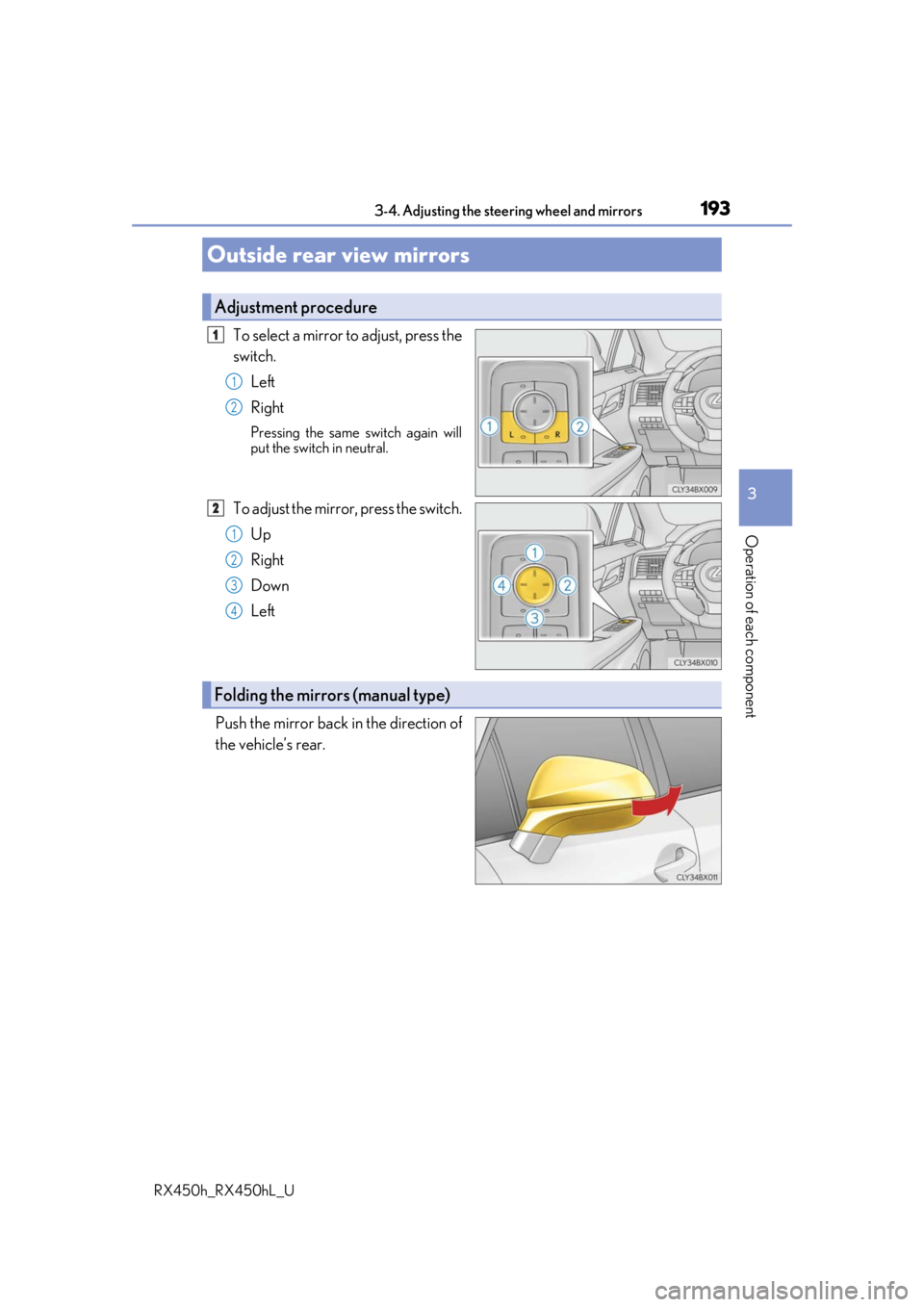
To select a mirror to adjust, press the
switch.Left
Right
Pressing the same switch again will
put the switch in neutral.
To adjust the mirror, press the switch.Up
Right
Down
Left
Push the mirror back in the direction of
the vehicle’s rear.
Outside rear view mirrors
Adjustment procedure
1
1
2
2
1
2
3
4
Folding the mirrors (manual type)
Page 194 of 792
1943-4. Adjusting the steering wheel and mirrors
RX450h_RX450hL_U
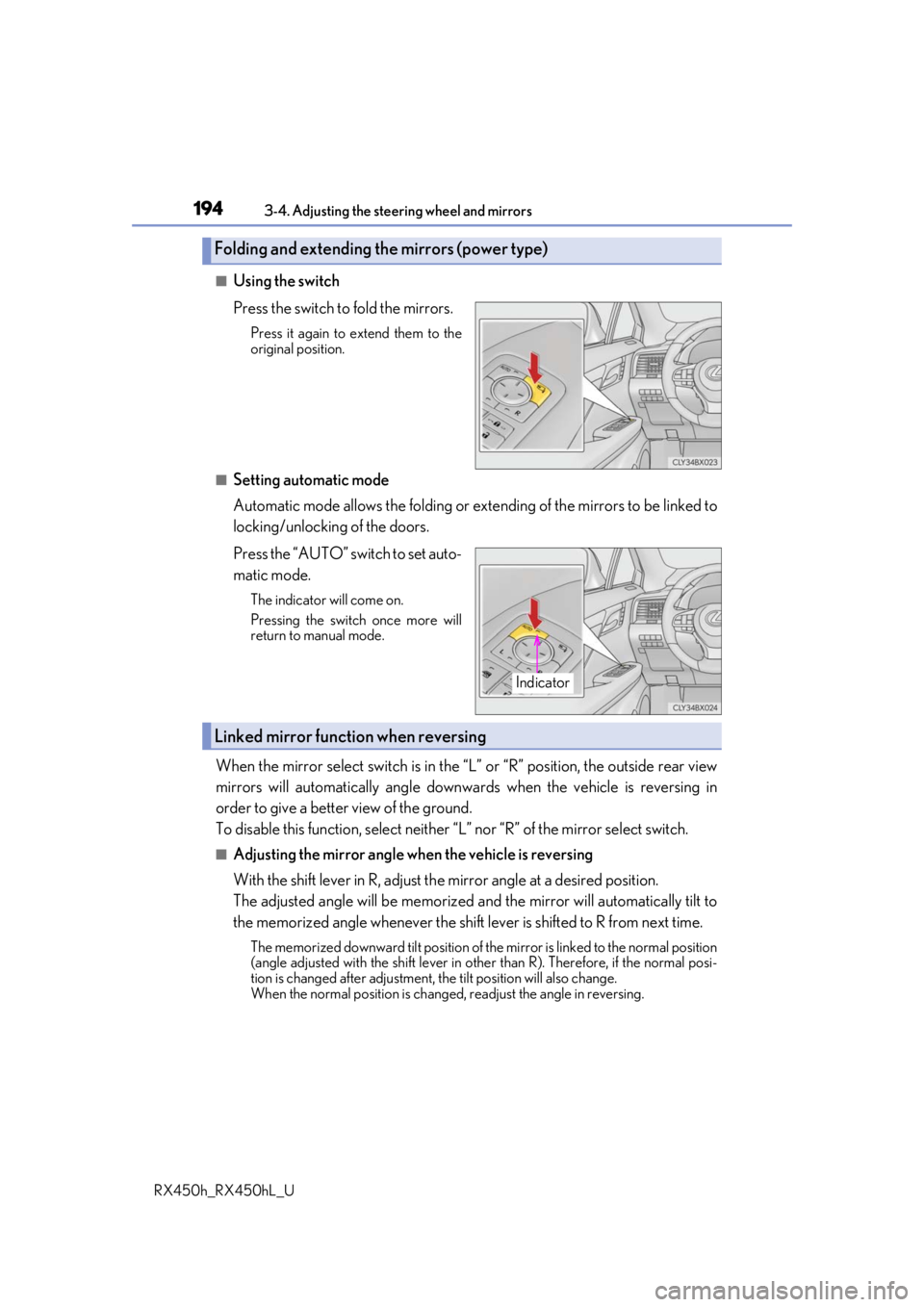
■Using the switch
Press the switch to fold the mirrors.
Press it again to extend them to the
original position.
■Setting automatic mode
Automatic mode allows the folding or ex tending of the mirrors to be linked to
locking/unlocking of the doors.
Press the “AUTO” switch to set auto-
matic mode.
The indicator will come on.
Pressing the switch once more will
return to manual mode.
When the mirror select switch is in the “L” or “R” position, the outside rear view
mirrors will automatically angle downwa rds when the vehicle is reversing in
order to give a better view of the ground.
To disable this function, select neither “L” nor “R” of the mirror select switch.
■Adjusting the mirror angle when the vehicle is reversing
With the shift lever in R, adjust the mirror angle at a desired position.
The adjusted angle will be memorized and the mirror will automatically tilt to
the memorized angle whenever the shift lever is shifted to R from next t\
ime.
The memorized downward tilt position of th e mirror is linked to the normal position
(angle adjusted with the shif t lever in other than R). Ther efore, if the normal posi-
tion is changed after adjustment, the tilt position will also change.
When the normal position is chang ed, readjust the angle in reversing.
Folding and extending the mirrors (power type)
Indicator
Linked mirror function when reversing
Page 195 of 792
1953-4. Adjusting the steering wheel and mirrors
3
Operation of each component
RX450h_RX450hL_U
■Mirror angle can be adjusted when
The power switch is in ACCESSORY or ON mode.
■When disconnecting and reconnecting 12-volt battery terminals (power type)
The automatic folding/extending mirror function will return to off as default. To turn the
function on, press the switch again to select on.
■When the mirrors are fogged up
The outside rear view mirrors can be cleare d using the mirror defoggers. Turn on the
rear window defogger to turn on the outside rear view mirror defoggers. ( P. 516)
■Automatic adjustment of the mirror angle (if equipped)
A desired mirror face angle can be entered to memory and recalled automatically by the
driving position memory. ( P. 181)
■Auto anti-glare function (if equipped)
When the anti-glare inside re ar view mirror is set to automatic mode, the outside rear
view mirrors will activate in conjunction with the anti-glare inside rear view mirror to
reduce reflected light. ( P. 191)
■Using automatic mode in cold weather (if equipped)
When automatic mode is used in cold weather, the door mirror could freeze up and
automatic stowing and return may not be possible. In this case, remove any ice and snow
from the door mirror, then either operate th e mirror using manual mode or move the mir-
ror by hand.
■Customization
Some functions can be customized. ( P. 736)
WARNING
■Important points while driving
Observe the following precautions while driving.
Failing to do so may result in loss of control of the vehicle and cause an accident, result-
ing in death or serious injury.
●Do not adjust the mirrors while driving.
●Do not drive with the mirrors folded.
●Both the driver and passenger side mirrors must be extended and properly adjusted
before driving.
■When a mirror is moving
To avoid personal injury and mirror malfunctio n, be careful not to get your hand caught
by the moving mirror.
■When the mirror defoggers are operating
Do not touch the rear view mirror surfaces, as they can become very hot and burn you.
Page 222 of 792
2224-1. Before driving
RX450h_RX450hL_U
WARNING
■Storage precautions
Observe the following precautions.
Failure to do so may prevent the pedals from being depressed properly, may block the
driver’s vision, or may result in items hittin g the driver or passengers, possibly causing
an accident.
●Stow cargo and luggage in the luggage compartment whenever possible.
●Do not stack cargo and luggage in the luggage compartment higher than the seat-
backs.
●When you fold down the rear seats, long items should not be placed directly behind
the front seats.
●Never allow anyone to ride in the luggage compartment. It is not designed for pas-
sengers. They should ride in their seats with their seat belts properly fastened.
●Do not place cargo or luggage in or on the following locations.
• At the feet of the driver
• On the front passenger or re ar seats (when stacking items)
•On the luggage cover
• On the instrument panel
•On the dashboard
●Secure all items in the occupant compartment.
■Capacity and distribution
●Do not exceed the maximum axle weight rating or the total vehicle weight rating.
●Even if the total load of occupant’s weight and the cargo load is less than the total load
capacity, do not apply the load unevenly. Improper loading may cause deterioration
of steering or braking control whic h may cause death or serious injury.
■Roof luggage carrier precautions
Observe the following precautions:
●Place the cargo so that its weight is distributed evenly between the front and rear
axles.
●If loading long or wide cargo, never exceed the vehicle overall length or width.
( P. 710)
●Before driving, make sure the cargo is secu rely fastened on the roof luggage carrier.
●Loading cargo on the roof luggage carrier will make the center of gravity of the vehi-
cle higher. Avoid high speeds, sudden star ts, sharp turns, sudden braking or abrupt
maneuvers, otherwise it may re sult in loss of control or vehicle rollover due to failure
to operate this vehicle correctly and result in death or serious injury.
●If driving for a long distance, on rough road s, or at high speeds, stop the vehicle now
and then during the trip to make sure the cargo remains in its place.
●Do not exceed 165 lb. (75 kg) cargo weight on the roof luggage carrier.
NOTICE
■When loading cargo (vehicles with a moon roof or panoramic moon roof)
Be careful not to scratch the surface of the moon roof or panoramic moon roof.
Page 414 of 792
4145-2. Setup
RX450h_RX450hL_U
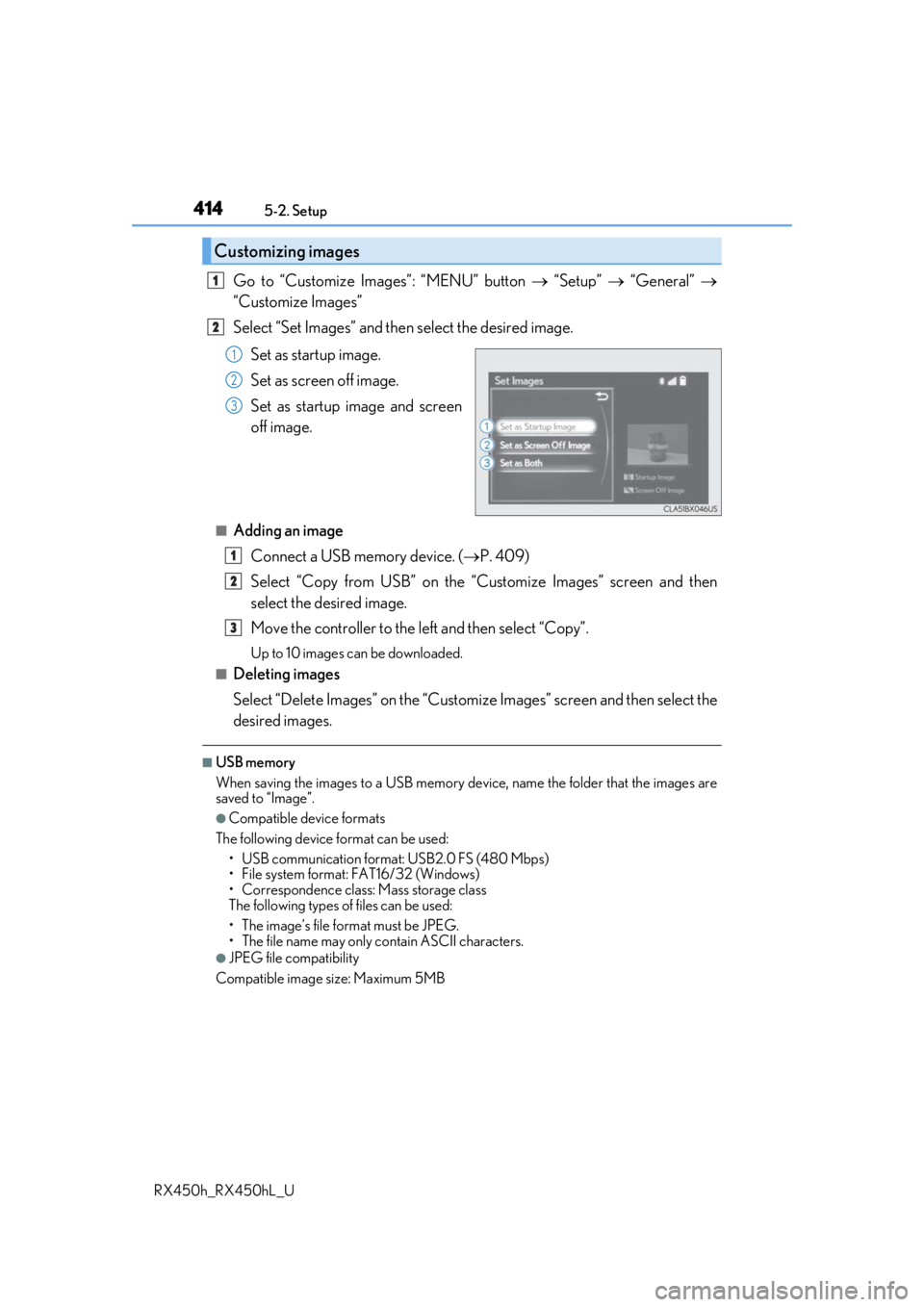
Go to “Customize Images”: “MENU” button “Setup” “General”
“Customize Images”
Select “Set Images” and then select the desired image.
Set as startup image.
Set as screen off image.
Set as startup image and screen
off image.
■Adding an imageConnect a USB memory device. ( P. 409)
Select “Copy from USB” on the “Customize Images” screen and then
select the desired image.
Move the controller to the left and then select “Copy”.
Up to 10 images can be downloaded.
■Deleting images
Select “Delete Images” on the “Customize Images” screen and then select the
desired images.
■USB memory
When saving the images to a USB memory de vice, name the folder that the images are
saved to “Image”.
●Compatible device formats
The following device format can be used: • USB communication format: USB2.0 FS (480 Mbps)
• File system format: FAT16/32 (Windows)
• Correspondence class: Mass storage class
The following types of files can be used:
• The image’s file fo rmat must be JPEG.
• The file name may only contain ASCII characters.
●JPEG file compatibility
Compatible image size: Maximum 5MB
Customizing images
1
2
1
2
3
1
2
3
Page 424 of 792
4245-3. Using the audio system
RX450h_RX450hL_U
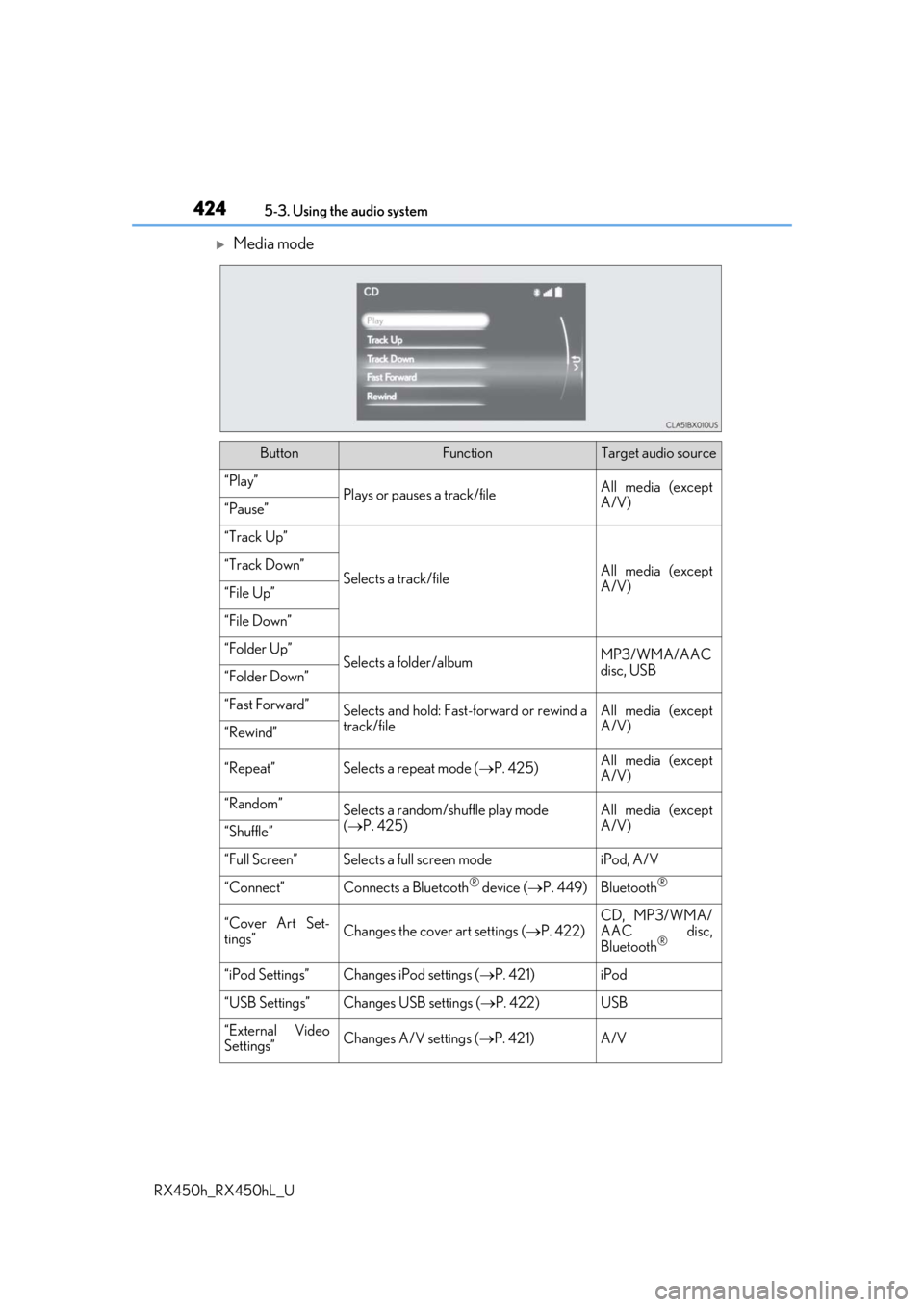
Media mode
ButtonFunctionTarget audio source
“Play”Plays or pauses a track/fileAll media (except
A/V)
“Pause”
“Track Up”
Selects a track/fileAll media (except
A/V)“Track Down”
“File Up”
“File Down”
“Folder Up”Selects a folder/albumMP3/WMA/AAC
disc, USB
“Folder Down”
“Fast Forward”Selects and hold: Fast-f orward or rewind a
track/fileAll media (except
A/V)
“Rewind”
“Repeat”Selects a repeat mode ( P. 425)All media (except
A/V)
“Random”Selects a random/shuffle play mode
( P. 425)All media (except
A/V)
“Shuffle”
“Full Screen”Selects a full screen modeiPod, A/V
“Connect”Connects a Bluetooth® device ( P. 449)Bluetooth®
“Cover Art Set-
tings”Changes the cover art settings ( P. 422)
CD, MP3/WMA/
AAC disc,
Bluetooth
®
“iPod Settings”Changes iPod settings ( P. 421)iPod
“USB Settings”Changes USB settings ( P. 422)USB
“External Video
Settings”Changes A/V settings (P. 421)A/V
Page 425 of 792
4255-3. Using the audio system
5
Lexus Display Audio system
RX450h_RX450hL_U
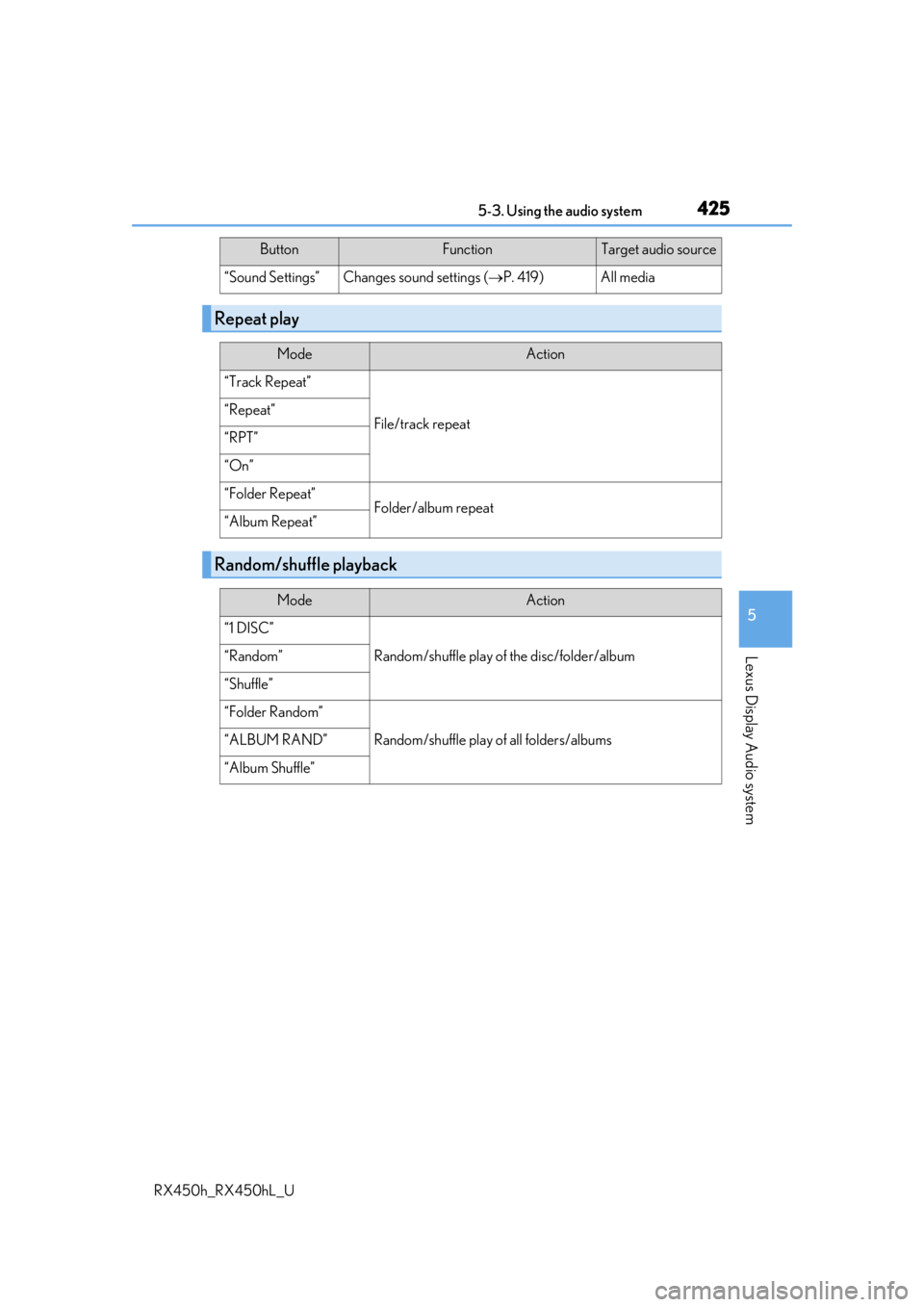
“Sound Settings”Changes sound settings (P. 419)All media
Repeat play
ModeAction
“Track Repeat”
File/track repeat“Repeat”
“RPT”
“On”
“Folder Repeat”Folder/album repeat“Album Repeat”
Random/shuffle playback
ModeAction
“1 DISC”
Random/shuffle play of the disc/folder/album“Random”
“Shuffle”
“Folder Random”
Random/shuffle play of all folders/albums“ALBUM RAND”
“Album Shuffle”
ButtonFunctionTarget audio source
Page 433 of 792
433
5
Lexus Display Audio system
RX450h_RX450hL_U5-5. Playing an audio CD and MP3/WMA/AAC discs
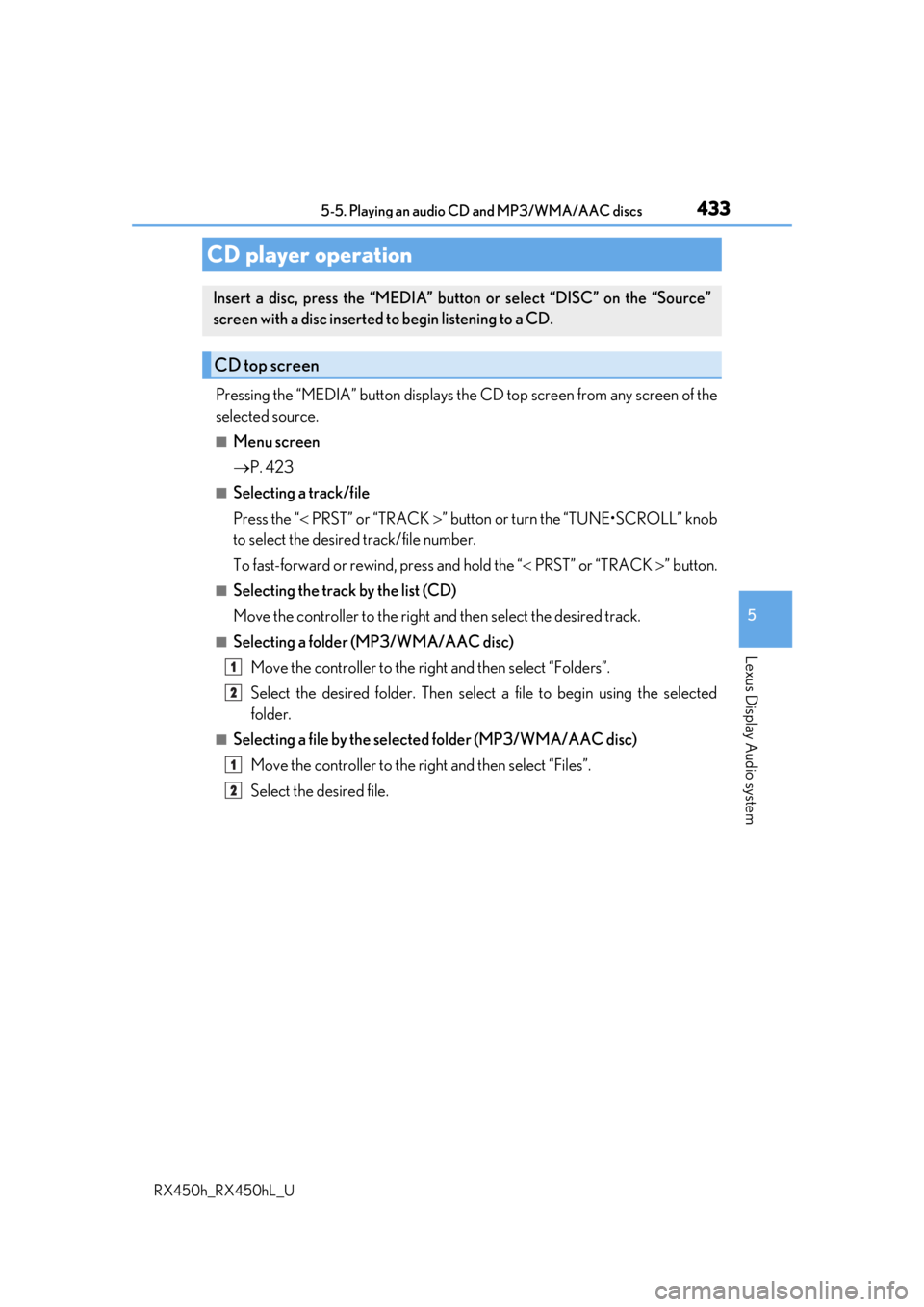
Pressing the “MEDIA” button displays the
CD top screen from any screen of the
selected source.
■Menu screen
P. 423
■Selecting a track/file
Press the “ PRST” or “TRACK ” button or turn the “TUNE•SCROLL” knob
to select the desired track/file number.
To fast-forward or rewind, press and hold the “ PRST” or “TRACK ” button.
■Selecting the track by the list (CD)
Move the controller to the right an d then select the desired track.
■Selecting a folder (MP3/WMA/AAC disc)
Move the controller to the ri ght and then select “Folders”.
Select the desired folder. Then select a file to begin using the selected
folder.
■Selecting a file by the selected folder (MP3/WMA/AAC disc)
Move the controller to the right and then select “Files”.
Select the desired file.
CD player operation
Insert a disc, press the “MEDIA” butto n or select “DISC” on the “Source”
screen with a disc inserted to begin listening to a CD.
CD top screen
1
2
1
2