phone LEXUS RX450H 2019 Workshop Manual
[x] Cancel search | Manufacturer: LEXUS, Model Year: 2019, Model line: RX450H, Model: LEXUS RX450H 2019Pages: 792, PDF Size: 13.48 MB
Page 548 of 792
5486-5. Using the other interior features
RX450h_RX450hL_U
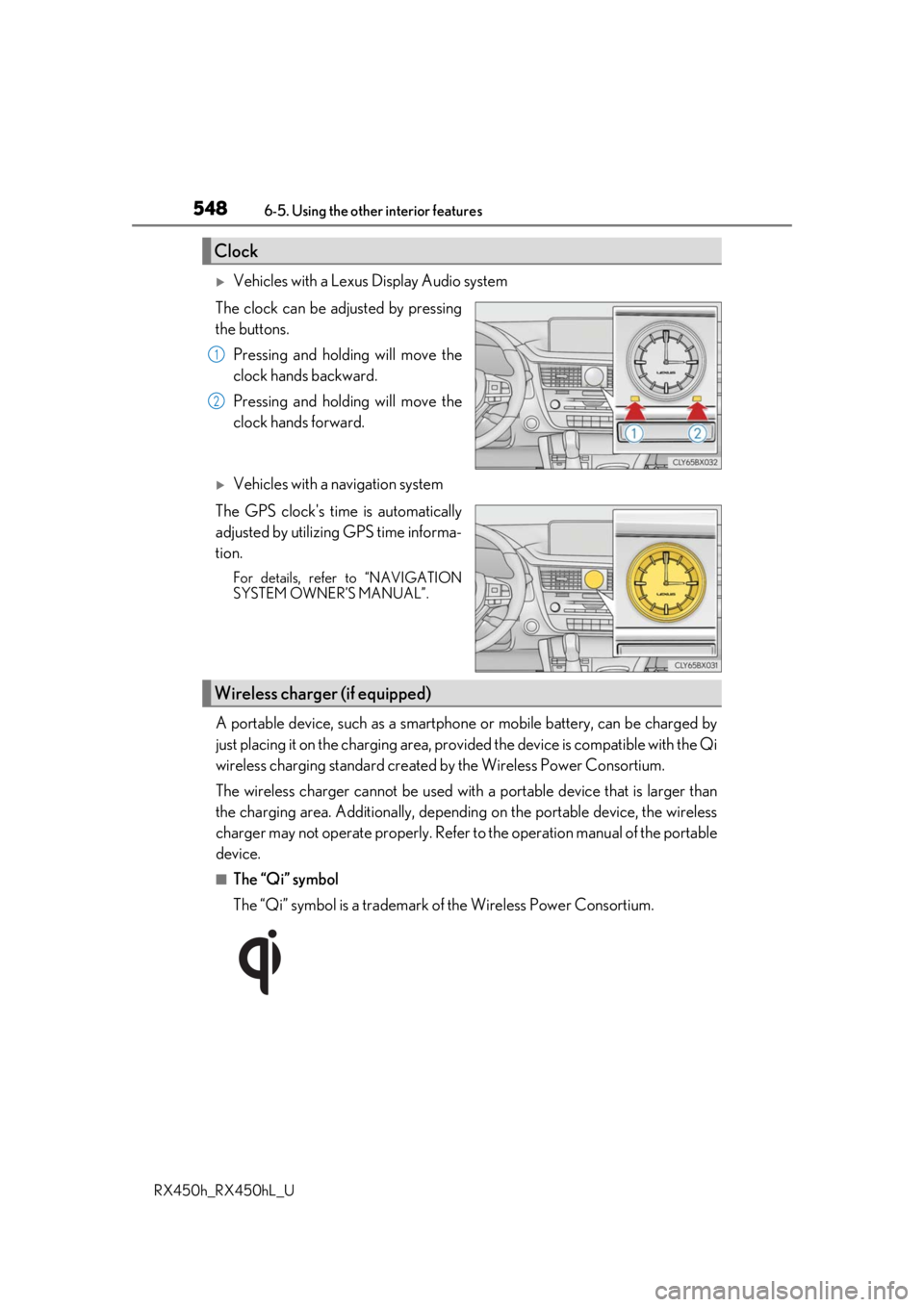
Vehicles with a Lexus Display Audio system
The clock can be adjusted by pressing
the buttons. Pressing and holding will move the
clock hands backward.
Pressing and holding will move the
clock hands forward.
Vehicles with a navigation system
The GPS clock's time is automatically
adjusted by utilizing GPS time informa-
tion.
For details, refer to “NAVIGATION
SYSTEM OWNER’S MANUAL”.
A portable device, such as a smartphone or mobile battery, can be charged by
just placing it on the charging area, prov ided the device is compatible with the Qi
wireless charging standard created by the Wireless Power Consortium.
The wireless charger cannot be used with a portable device that is larger than
the charging area. Additionally, dependin g on the portable device, the wireless
charger may not operate properly. Refer to the operation manual of the portable
device.
■The “Qi” symbol
The “Qi” symbol is a trademark of the Wireless Power Consortium.
Clock
1
2
Wireless charger (if equipped)
Page 550 of 792

5506-5. Using the other interior features
RX450h_RX450hL_U
■Operation indicator light status
*: Depending on the portable device, the oper ation indicator light may stay illuminated
(orange) after charging has completed.
●If the operation indicator light blinks
If an error is detected, the operation in dicator light will blink (orange). Take the
appropriate measures according to the table below.
■The wireless charger can be operated when
The power switch is in ACCESSORY or ON mode.
■Portable devices t hat can be charged
●Portable devices compatible with the Qi wireless charging standard can be charged by
the wireless charger. However, compatibility with all devices which meet the Qi wire-
less charging standard is not guaranteed.
●The wireless charger is designed to supply low power electricity (5 W or less) to a cel-
lular phone, smartphone, or other portable device.
Operation indicator lightState
OffThe Wireless charger is off
Green (illuminated)Standby (charging is possible)
Charging is complete*
Orange (illuminated)
A portable device has been placed on the charging
area (identifying the portable device)
Charging in progress
Operation indicator lightSuspected causesMeasure
Blinks (orange) at a one
second interval continu-
ously Vehicle to charger com-
munication failure.
Contact your Lexus dealer.
Blinks (orange) 3 times
repeatedly A foreign object exists
between the portable
device and charging area.
Remove the foreign object.
Portable device is not posi-
tioned properly on the
charging area. Move the portable device
toward the center of the
charging area.
Blinks (orange) 4 times
repeatedly The temperature of the
wireless charger is exces-
sively high.Stop charging immediately
and continue charging
after a while.
Page 571 of 792
5716-5. Using the other interior features
6
Interior features
RX450h_RX450hL_U
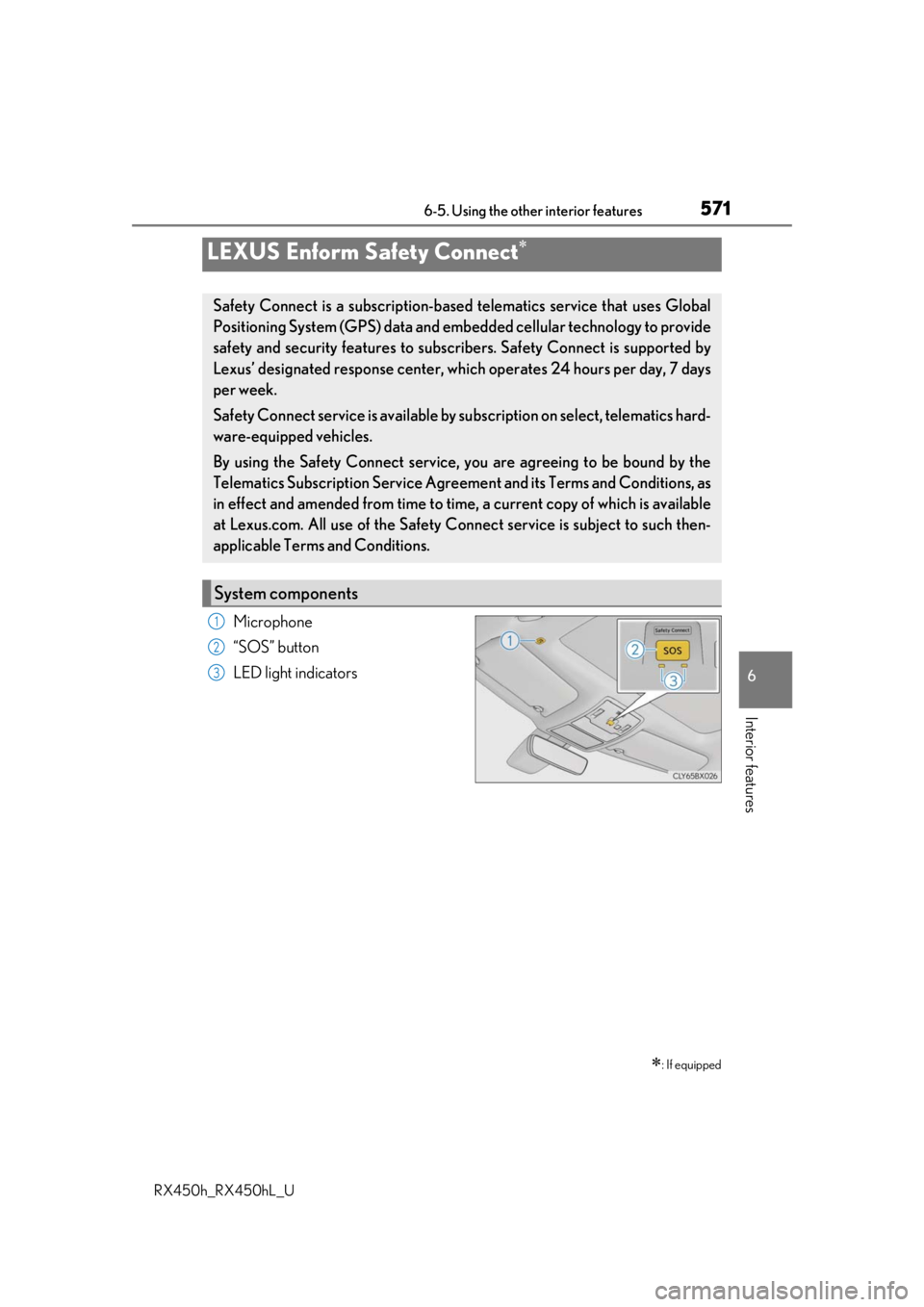
Microphone
“SOS” button
LED light indicators
LEXUS Enform Safety Connect
: If equipped
Safety Connect is a subscription-based telematics service that uses Global
Positioning System (GPS) data and embedded cellular technology to provide
safety and security features to subscribers. Safety Connect is supported by
Lexus’ designated response center, wh ich operates 24 hours per day, 7 days
per week.
Safety Connect service is available by su bscription on select, telematics hard-
ware-equipped vehicles.
By using the Safety Connect service, you are agreeing to be bound by the
Telematics Subscription Service Agre ement and its Terms and Conditions, as
in effect and amended from time to time, a current copy of which is available
at Lexus.com. All use of the Safety Co nnect service is subject to such then-
applicable Terms and Conditions.
System components
1
2
3
Page 573 of 792
5736-5. Using the other interior features
6
Interior features
RX450h_RX450hL_U
■Safety Connect Services Information
●Phone calls using the vehicles Bluetooth® technology will not be possible during Safety
Connect.
●Safety Connect is available be ginning Fall 2009 on select Lexus models (in the contig-
uous United States only). Contact with th e Safety Connect response center is depen-
dent upon the telematics device being in operative condition, cellular connection
availability, and GPS sa tellite signal reception, which can limit the ability to reach the
response center or receive emergency se rvice support. Enrollment and Telematics
Subscription Service Agreement required. A variety of subscription terms is available;
charges vary by subscription term selected and location.
●Automatic Collision Notification, Emergenc y Assistance and Stolen Vehicle Location
will function in the United States, includin g Hawaii and Alaska, Puerto Rico and in Can-
ada, and Enhanced Roadside Assistance will function in the United States, Puerto Rico
and in Canada.
●Automatic Collision Notification, Emergency Assistance, Stolen Vehicle Location and
Enhanced Roadside Assistance will not func tion in the United States Virgin Islands.
No Safety Connect services will function outs ide of the United States in countries other
than Canada.
For vehicles first sold in the USVI, no Safety Connect services will function in and out-
side the United States Virgin Islands.
●Safety Connect services are not subject to section 255 of the Telecommunications Act
and the device is not TTY compatible.
■Languages
The Safety Connect response ce nter will offer support in multiple languages. The Safety
Connect system will offer voice prompts in English, Spanish and French. Please indicate
your language of ch oice when enrolling.
■When contacting the response center
You may be unable to contact the resp onse center if the network is busy.
When the power switch is turned to ON mode, the red indicator light comes on
for 2 seconds then turns off. Afterward, the green indicator light comes on, indi-
cating that the service is active.
The following indicator light patterns indicate specific system usage conditions:
●Green indicator light on = Active service
●Green indicator light flashing = Safety Connect call in process
●Red indicator light (except at vehicle start-up) = System malfunction (contact
your Lexus dealer)
●No indicator light (off) = Safety Connect service not active
Safety Connect LED light Indicators
Page 575 of 792

5756-5. Using the other interior features
6
Interior features
RX450h_RX450hL_U
Important! Read this information about exposure to radio frequency signals
before using Safety Connect;
The Safety Connect system installed in your vehicle is a low-power radio trans-
mitter and receiver. It receives and also sends out radio frequency (RF) signals.
In August 1996, the Federal Communications Commission (FCC) adopted RF
exposure guidelines with safety levels for mobile wireless phones. Those guide-
lines are consistent with the safety standards previously set by the following U.S.
and international standards bodies.
●ANSI (American National Stan dards Institute) C95.1 [1992]
●NCRP (National Council on Radiation Protection and Measurement) Report
86 [1986]
●ICNIRP (International Commission on Non-Ionizing Radiation Protection)
[1996]
Those standards were based on comprehensive and periodic evaluations of the
relevant scientific literatur e. Over 120 scientists, engineers, and physicians from
universities, and government health agen cies and industries reviewed the avail-
able body of research to deve lop the ANSI Standard (C95.1).
The design of Safety Connect complies wi th the FCC guidelines in addition to
those standards.
■Certification for Lexus Enform
FCC ID: O6Y-CDMRF101
FCC ID: XOECDMRF101B
FCC ID: N7NGTM2
FCC WARNING:
This equipment complies with FCC radiation ex posure limits set forth for an uncontrolled
environment and meets the FCC radio frequenc y (RF) Exposure Guidelines in Supple-
ment C to OET65. This equipment should be installed and operated keeping the radia-
tor at least 20 cm or more away from person’s body (excluding extremities: hands, wrists,
feet and ankles).
Safety information for Safety Connect
Page 576 of 792
5766-5. Using the other interior features
RX450h_RX450hL_U
After you sign the Telematics Subscrip tion Service Agreement, download the
Lexus Enform Remote app from your cellular phone’s app store, and register
within the app (or enroll and complete registration at the dealer), you can begin
using these services. ( P. 571)
A variety of subscription terms are availa ble. Contact your Lexus dealer, or call 1-
800-25-LEXUS (1-800-255-3987) fo r further subscription details.
■Availability of service
●Lexus Enform Remote is available in the contiguous United States, Washington D.C.
and Alaska.
●Lexus Enform Remote is not available in Pu erto Rico, Canada, and in the United States
Virgin Islands.
■Lexus Enform Remo te Information
●Lexus Enform Remote should only be used by authorized users.
●Laws in some communities may require that th e vehicle be within view of the user when
operating Lexus Enform Remote.
In some states, use of Lexus Enform Remo te may violate state or local laws. Before
using Lexus Enform Remote, chec k your state and local laws.
●Any malfunction of the Lexus should be repaired by your Lexus dealer.
●Lexus Enform Remote is designed to work at temperatures above -22 F (-30 C). This
specification is related to the Lexus Enform Remote operation, but is dependent on the
vehicle’s operating temperature range which may be different.
●Content is subject to change without notice.
●Some features of the Lexus Enform Remote may not be available on some models.
●Additional information can be found at www.lexus.com/enform/.
●Availability of functions of the Lexus Enform service is dependent on network reception
level.
■Safety information for Lexus Enform Remote
Refer to the safety information for Safety Connect: P. 575
LEXUS Enform Remote
: If equipped
Lexus Enform Remote is a cellular phone application that lets you view and
remotely control certain aspects of your vehicle.
For details about the functions and serv ices of this application, refer to
http://www.lexus.com/enform/
.
Function of the Lexus Enform Remote is achieved by using an embedded cel-
lular device in the vehicle (DCM: Data Communication Module).
Subscription
Page 616 of 792

6167-3. Do-it-yourself maintenance
RX450h_RX450hL_U
■Situations in which the tire pressure warning system may not operate properly
●In the following cases, the tire pressure warning system may not operate properly.
• If non-genuine Lexus wheels are used.
• A tire has been replaced with a tire that is not an OE (Original Equipment) tire.
• A tire has been replaced with a tire that is not of the specified size.
• Tire chains, etc. are equipped.
• If a window tint that affects th e radio wave signals is installed.
• If there is a lot of snow or ice on the vehi cle, particularly around the wheels or wheel
housings.
• If the tire inflation pressure is extr emely higher than the specified level.
• If wheel without the tire pressure warning valve and transmitter is used.
• If the ID code on the tire pressure warning valves and transmitters is not registered in the tire pressure warning computer.
●Performance may be affected in the following situations.
• Near a TV tower, electric power plant, gas station, radio station, large display, air-
port or other facility that generates st rong radio waves or electrical noise.
• When carrying a portable radio, cellular phone, cordless phone or other wireless
communication device.
If tire position information is not correctl y displayed due to the radio wave conditions,
the display may be corrected by driving and changing the radio wave conditions.
●When the vehicle is parked, the time taken for the warning to start or go off could be
extended.
●When tire inflation pressure declines rapidly for example when a tire has burst, the
warning may not function.
■The initialization operation
●Make sure to carry out initialization afte r adjusting the tire inflation pressure.
Also, make sure the tires are cold before carryi ng out initialization or tire inflation pres-
sure adjustment.
●If you have accidentally turned the power switch off during initialization, it is not neces-
sary to press the reset switch again as initialization will restart automatically when the
power switch has been turned to ON mode for the next time.
●If you accidentally press the re set switch when initialization is not necessary, adjust the
tire inflation pressure to the specified leve l when the tires are cold, and conduct initial-
ization again.
●While the position of each tire is being de termined and the inflation pressures are not
being displayed on the multi-info rmation display, if the inflation pressure of a tire drops,
the tire pressure warning light will come on.
Page 772 of 792

772Alphabetical index
RX450h_RX450hL_U
Back doorPower back door .................................142
Touchless power back door ......... 144
Wireless remote control ..................142
Back-up lights Replacing light bulbs ........................637
Wattage ....................................................719
Battery (12-volt battery) Battery checking ............................... 605
If the 12-volt battery is discharged ........................................ 695
Preparing and checking before winter ................................................... 390
Replacing .............................................. 698
Warning light ...................................... 660
Battery (traction battery) ..................... 78
Blind Spot Monitor (BSM)..................319 Blind Spot Monitor function ............................................ 323
Rear Cross Traffic Alert function ............................................ 327 Bluetooth
®............................................. 482
Audio system ....................................... 459
Hands-free system (for cellular phone) .........................461
Bottle holders .........................................537
Brake Brake Hold ........................................... 256
Fluid ............................................................ 716
Parking brake ...................................... 253
Regenerative braking ..........................76
Warning light ...................................... 660
Brake assist ............................................. 382
Brake Hold.............................................. 256 Warning light .........................................661
Break-in tips ............................................. 214
Brightness control Instrument panel light control ........ 98
BSM (Blind Spot Monitor) ................. 319 Blind Spot Monitor function......... 323
Rear Cross Traffic Alert function.................................................327B
Page 778 of 792

778Alphabetical index
RX450h_RX450hL_U
Hands-free system (for cellular phone) .............................461
Head restraints ....................................... 186
Head-up display....................................... 118
Headlight cleaner................................. 267
Headlights ............................................... 258 Automatic headlight leveling ...... 260
Automatic High Beam .................... 262
Light switch .......................................... 258
Replacing light bulbs ........................637
Wattage ....................................................719
Windshield wiper linked headlight illumination..................... 261
Heated steering wheel ....................... 526
Heaters Automatic air conditioning system ..................................... 507, 522
Heated steering wheel ....................526
Outside rear view mirrors .............. 516
Seat heaters ..............................526, 527
High mounted stoplight Replacing ...............................................637
Hill-start assist control ........................ 382
Hood .......................................................... 595 Open ....................................................... 595
Hooks Cargo hooks ....................................... 540
Cargo net hooks ............................... 540
Front passenger footwell hooks ....................................................557
Grocery bag hooks........................... 541
Retaining hooks (floor mat) ............. 28 Horn.............................................................189
HUD (Head-up display)....................... 118
Humidity sensor...................................... 521
Hybrid battery air vent ........................... 79
Hybrid battery (traction battery)
Location .................................................... 78
Specification ........................................... 713
Hybrid system............................................ 74 Emergency shut off system ..............79
Energy monitor/consumption screen....................... 124
EV drive mode ................................... 244
High voltage components ............... 78
Hybrid System Indicator ................... 99
Hybrid system precautions ............. 78
Hybrid vehicle driving tips ........... 388
If the hybrid system will not start....................................................... 690
Overheating......................................... 702
Power (ignition) switch................... 239
Regenerative braking ..........................76
Starting the hybrid system............. 239
Vehicle proximity notification system ..................................................... 75
Hybrid System Indicator .......................99
Hybrid transmission .............................246 If the shift lever cannot be shifted from P ...................................250
Paddle shift switches............ 247, 248
S mode.................................................... 248
H
Page 786 of 792

786Alphabetical index
RX450h_RX450hL_U
SensorAutomatic headlight system ........ 260
Camera sensor .................................... 281
Humidity sensor .................................. 521
Inside rear view mirror ..................... 192
Intuitive parking assist ...................... 332
Radar sensor ......................................... 281
Rain-sensing windshield wipers .................................................. 268
Touchless sensor ................................ 144
Service reminder indicators ............... 90
Shift lever Hybrid transmission ....................... 246
If the shift lever cannot be shifted from P ................................ 250
Shift lock system .............................. 250
Side airbags ............................................... 37
Side doors..................................................136
Side marker lights Light switch .......................................... 258
Replacing light bulbs ........................637
Side mirrors ..............................................193 Adjusting and folding........................ 193
Blind Spot Monitor (BSM)............. 319
Heaters..................................................... 516
Side turn signal lights Replacing light bulbs ........................637
Turn signal lever ................................. 252 Smart access system
with push-button start .......................158 Antenna location................................. 158
Entry functions ............................136, 142
Starting the hybrid system............. 239
Snow tires ................................................ 392
Spare tire Inflation pressure.................................. 717
Storage location ................................. 674
Spark plug ................................................. 715
Specifications........................................... 710
Speedometer .............................................96
Sport mode ..............................................379
Steering wheel ........................................189 Adjustment............................................. 189
Audio switches ...................................406
Heated steering wheel ................... 526
Power easy access system .............. 181
Telephone switches............................ 471
Stop lights Replacing light bulbs ....................... 637
Storage feature ..................................... 532
Storage precautions ........................... 532
Stuck If the vehicle becomes stuck........ 706
Sun visors..................................................547
Sunshade Panoramic moon roof..................... 204
Rear door .............................................. 557
Roof ............................................................201