check LEXUS RX450H 2019 Repair Manual
[x] Cancel search | Manufacturer: LEXUS, Model Year: 2019, Model line: RX450H, Model: LEXUS RX450H 2019Pages: 792, PDF Size: 13.48 MB
Page 375 of 792
3754-5. Using the driving support systems
4
Driving
RX450h_RX450hL_U
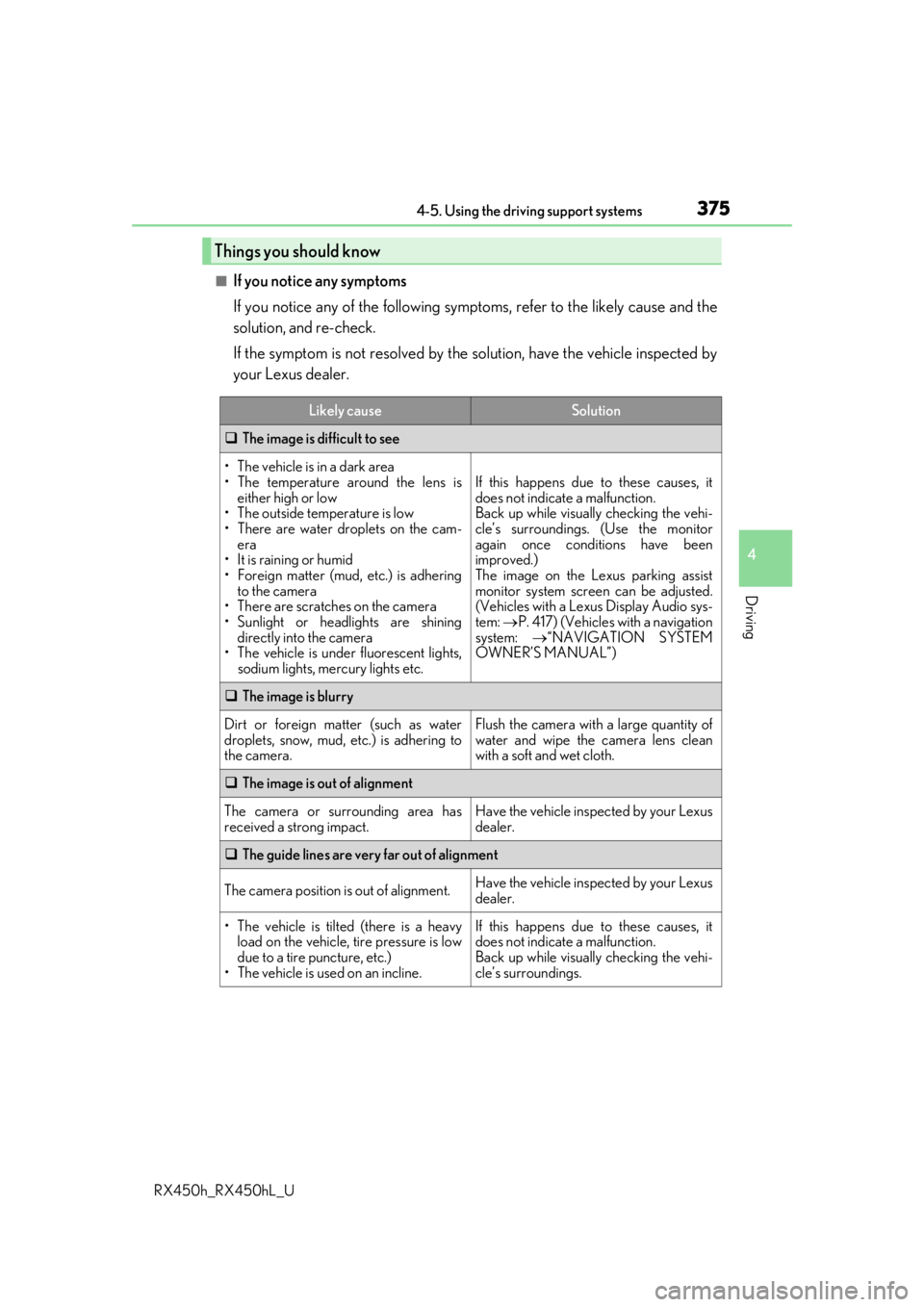
■If you notice any symptoms
If you notice any of the following symptoms, refer to the likely cause and the
solution, and re-check.
If the symptom is not resolved by the solution, have the vehicle inspected by
your Lexus dealer.
Things you should know
Likely causeSolution
The image is difficult to see
• The vehicle is in a dark area
• The temperature around the lens is
either high or low
• The outside temperature is low
• There are water droplets on the cam- era
• It is raining or humid
• Foreign matter (mud, etc.) is adhering to the camera
• There are scratches on the camera
• Sunlight or headlights are shining directly into the camera
•The vehicle is unde r fluorescent lights,
sodium lights, mercury lights etc.
If this happens due to these causes, it
does not indicate a malfunction.
Back up while visually checking the vehi-
cle’s surroundings. (Use the monitor
again once conditions have been
improved.)
The image on the Lexus parking assist
monitor system screen can be adjusted.
(Vehicles with a Lexus Display Audio sys-
tem: P. 417) (Vehicles with a navigation
system: “NAVIGATION SYSTEM
OWNER’S MANUAL”)
The image is blurry
Dirt or foreign matter (such as water
droplets, snow, mud, etc.) is adhering to
the camera.Flush the camera with a large quantity of
water and wipe the camera lens clean
with a soft and wet cloth.
The image is out of alignment
The camera or surrounding area has
received a strong impact.Have the vehicle inspected by your Lexus
dealer.
The guide lines are very far out of alignment
The camera position is out of alignment.Have the vehicle inspected by your Lexus
dealer.
• The vehicle is tilted (there is a heavy
load on the vehicle, tire pressure is low
due to a tire puncture, etc.)
• The vehicle is used on an incline.If this happens due to these causes, it
does not indicate a malfunction.
Back up while visually checking the vehi-
cle’s surroundings.
Page 377 of 792

3774-5. Using the driving support systems
4
Driving
RX450h_RX450hL_U
WARNING
■When using the Lexus parking assist monitor system
The parking assist monitor is a supplemental device intended to assist the driver when
backing up. When backing up, be sure to check visually behind and all around the vehi-
cle before proceeding.
Observe the following precautions to avoid an accident that could result in death or
serious injuries.
●Never depend on the parking assist monitor entirely when backing up. The image
and the position of the guide lines displaye d on the screen may differ from the actual
state.
Use caution, just as you woul d when backing up any vehicle.
●Be sure to back up slowly, depressing the brake pedal to control vehicle speed.
●If you seem likely to hit nearby vehicles, obstacles, people or mount the shoulder,
depress the brake pedal to stop the vehicle.
●The instructions given are only guidelines.
When and how much to turn the steering wheel will vary according to traffic condi-
tions, road surface conditions, vehicle condit ion, etc. when parking. It is necessary to
be fully aware of this before using the parking assist system.
●When parking, be sure to check that the parking space will accommodate your vehi-
cle before maneuvering into it.
●Do not use the parking assist monitor in the following cases:
• On icy or slick road surfaces, or in snow
• When using tire chains or emergency tires
• When the back door is not closed completely
• On roads that are not flat or stra ight, such as curves or slopes.
●In low temperatures, the screen may darken or the image may become faint. The
image could distort when the vehicle is movi ng, or you may become unable to see the
image on the screen. Be sure to check dire ct visually and with the mirrors all around
the vehicle before proceeding.
●If the tire sizes are changed, the position of the guide lines displayed on the screen
may change.
●The camera uses a special lens. The distances between objects and pedestrians that
appear in the image displayed on the screen will differ from the actual distances.
( P. 371)
●Estimated course line display mode: If the st eering wheel is straight and the vehicle
width guide lines and the estimated course lines are not in alignment, have the vehicle
inspected by your Lexus dealer.
Page 389 of 792

3894-6. Driving tips
4
Driving
RX450h_RX450hL_U
◆Delays
Repeated acceleration and deceleration, as well as long waits at traffic lights,
will lead to bad fuel economy. Check traffic reports before leaving and avoid
delays as much as possible. When drivin g in a traffic jam, gently release the
brake pedal to allow the vehicle to move forward slightly while avoiding over-
use of the accelerator pedal. Doing so can help control excessive gasoline
consumption.
◆Highway driving
Control and maintain the vehicle at a co nstant speed. Before stopping at a toll
booth or similar, allow plenty of ti me to release the accelerator and gently
apply the brakes. A greater amount of electrical energy can be regenerated
when slowing down.
◆Air conditioning
Use the air conditioning only when necessary. Doing so can help reduce
excessive gasoline consumption.
In summer: When the ambient temperature is high, use the recirculated air
mode. Doing so will help to reduce the burden on the air conditioning system
and reduce fuel consumption as well.
In winter: Because the gasoline engine will not automatically cut out until it
and the interior of the vehicle are warm , it will consume fuel. Also, fuel con-
sumption can be improved by av oiding overuse of the heater.
◆Checking tire inflation pressure
Make sure to check the tire inflation pr essure frequently. Improper tire infla-
tion pressure can cause poor fuel economy.
Also, as snow tires can cause large amou nts of friction, their use on dry roads
can lead to poor fuel economy. Use tires that are appropriate for the season.
◆Luggage
Carrying heavy luggage will lead to poor fuel economy. Avoid carrying
unnecessary luggage. Installing a large roof rack will also cause poor fuel
economy.
◆Warming up before driving
Since the gasoline engine starts up an d cuts out automatically when cold,
warming up the engine is unnecessary. Moreover, frequently driving short dis-
tances will cause the engine to repeated ly warm up, which can lead to excess
fuel consumption.
Page 390 of 792
3904-6. Driving tips
RX450h_RX450hL_U
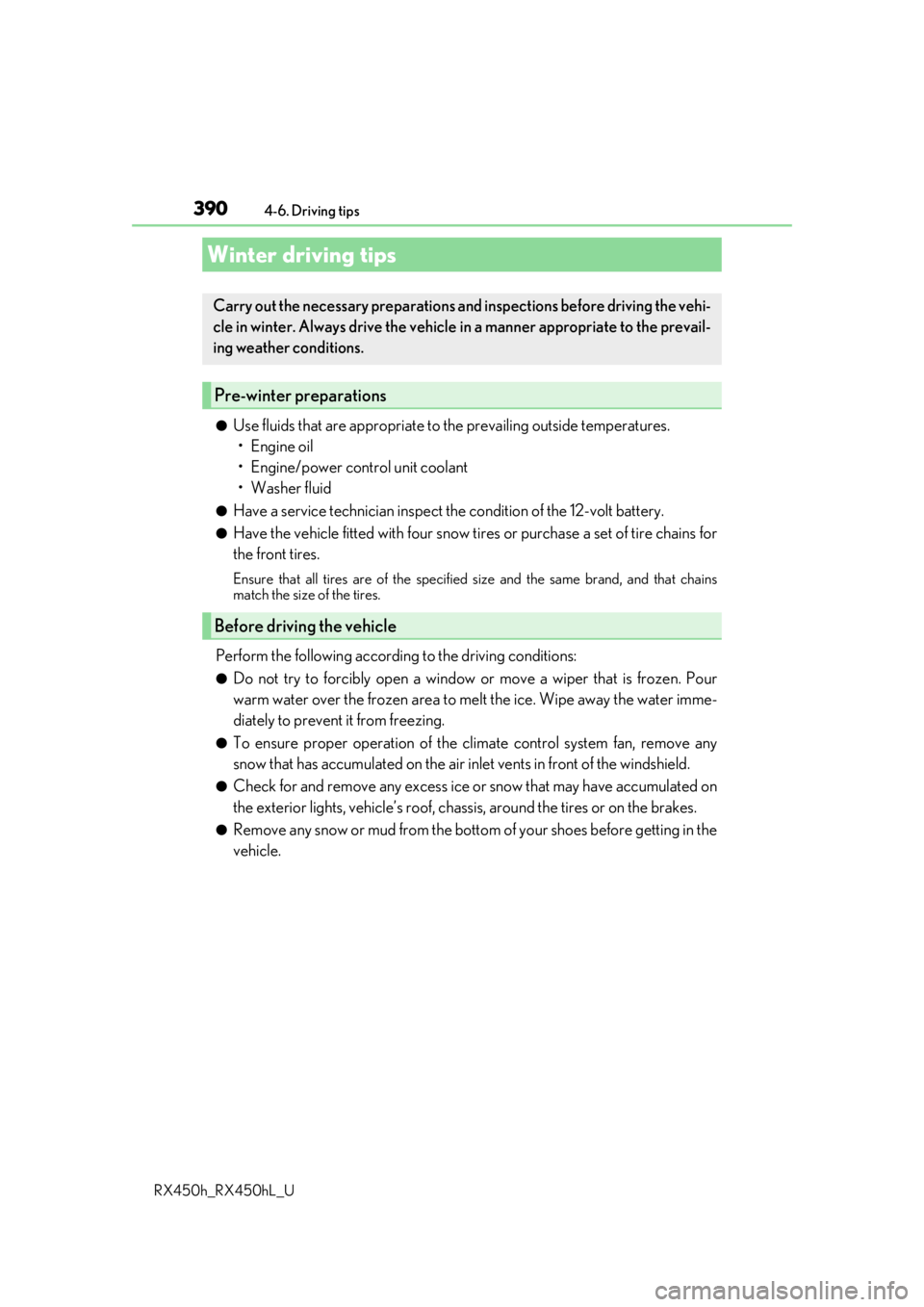
●Use fluids that are appropriate to the prevailing outside temperatures.
•Engine oil
• Engine/power cont rol unit coolant
• Washer fluid
●Have a service technician inspect the condition of the 12-volt battery.
●Have the vehicle fitted with four snow tires or purchase a set of tire chains for
the front tires.
Ensure that all tires are of the specified size and the same brand, and that chains
match the size of the tires.
Perform the following according to the driving conditions:
●Do not try to forcibly open a window or move a wiper that is frozen. Pour
warm water over the frozen area to me lt the ice. Wipe away the water imme-
diately to prevent it from freezing.
●To ensure proper operation of the c limate control system fan, remove any
snow that has accumulated on the air inlet vents in front of the windshield.
●Check for and remove any excess ice or snow that may have accumulated on
the exterior lights, vehicle’s roof, chassi s, around the tires or on the brakes.
●Remove any snow or mud from the bottom of your shoes before getting in the
vehicle.
Winter driving tips
Carry out the necessary preparations an d inspections before driving the vehi-
cle in winter. Always drive the vehicle in a manner appropriate to the prevail-
ing weather conditions.
Pre-winter preparations
Before driving the vehicle
Page 391 of 792
3914-6. Driving tips
4
Driving
RX450h_RX450hL_U
Accelerate the vehicle slowly, keep a safe distance between you and the vehicle
ahead, and drive at a reduced spee d suitable to road conditions.
●Park the vehicle and move the shift lever to P without setting the parking
brake. The parking brake may freeze up, preventing it from being released. If
the vehicle is parked without setting the parking brake, make sure to block the
wheels.
Failure to do so may be dangerous because it may cause the vehicle to move
unexpectedly, possibly leading to an accident.
When the parking brake is in automatic mo de, release the parking brake after shifting
the shift lever to P. ( P. 253)
●If the vehicle is parked without setting the parking brake, confirm that the shift
lever cannot be moved out of P
*.
*: The shift lever will be locked if it is atte mpted to be shifted from P to any other posi-
tion without depressing the brake pedal. If the shift lever can be shifted from P, there
may be a problem with the shift lock sy stem. Have the vehicle inspected by your
Lexus dealer immediately.
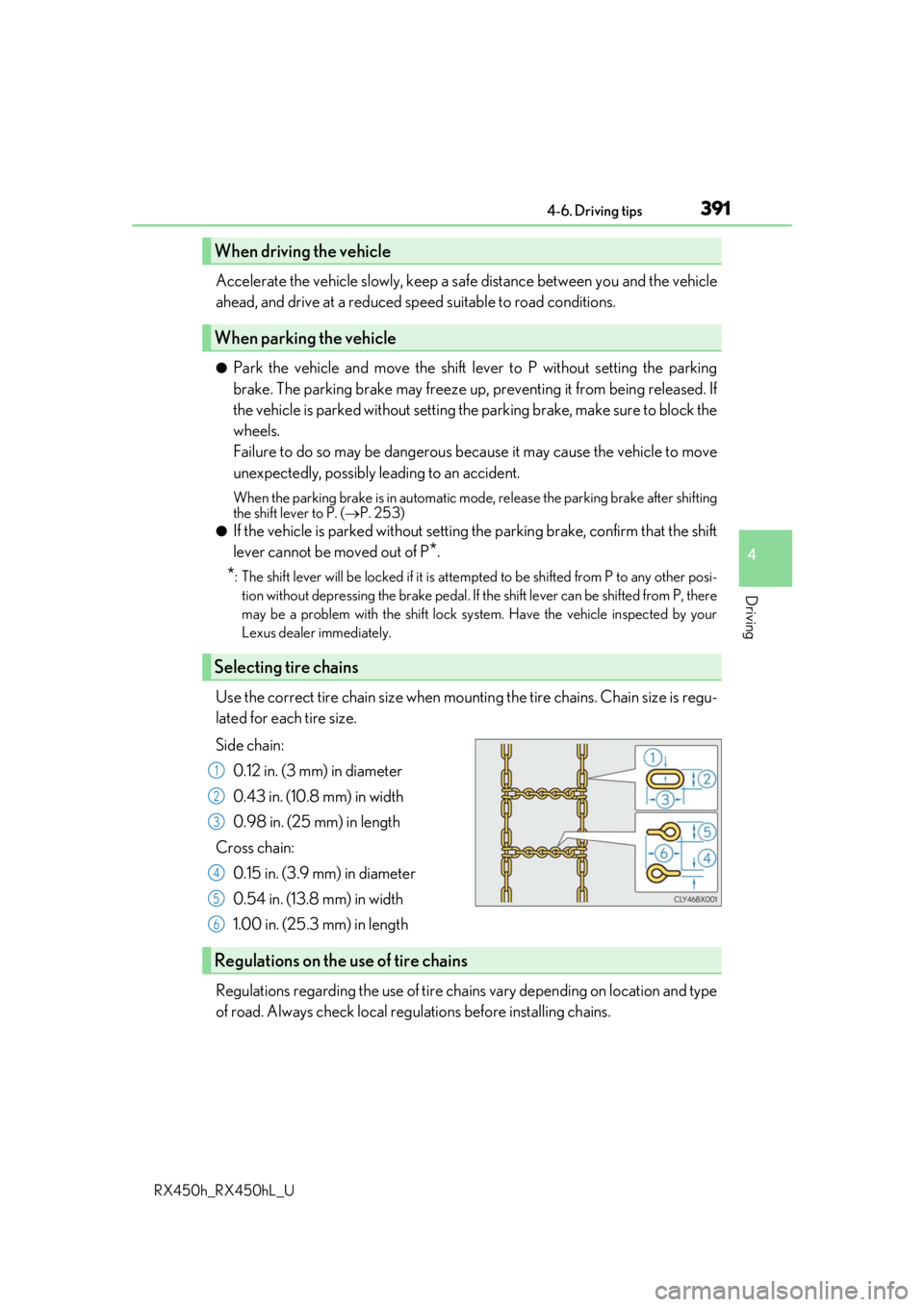
Use the correct tire chain size when mounti ng the tire chains. Chain size is regu-
lated for each tire size.
Side chain:
0.12 in. (3 mm) in diameter
0.43 in. (10.8 mm) in width
0.98 in. (25 mm) in length
Cross chain: 0.15 in. (3.9 mm) in diameter
0.54 in. (13.8 mm) in width
1.00 in. (25.3 mm) in length
Regulations regarding the use of tire chains vary depending on location and type
of road. Always check local regu lations before installing chains.
When driving the vehicle
When parking the vehicle
Selecting tire chains
1
2
3
4
5
6
Regulations on the use of tire chains
Page 396 of 792
3964-6. Driving tips
RX450h_RX450hL_U
[
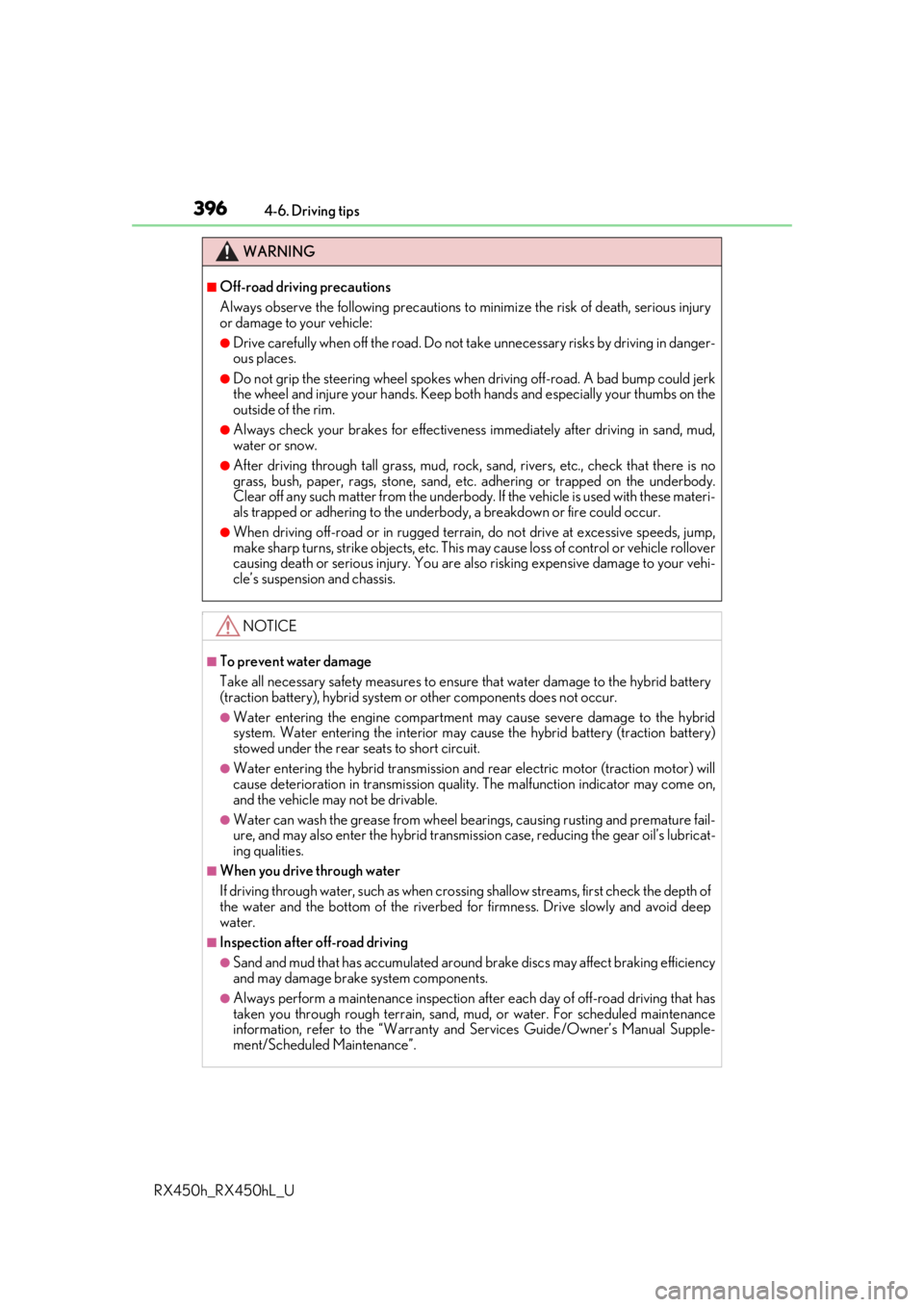
WARNING
■Off-road driving precautions
Always observe the following precautions to minimize the risk of death, serious injury
or damage to your vehicle:
●Drive carefully when off the road. Do not ta ke unnecessary risks by driving in danger-
ous places.
●Do not grip the steering wheel spokes when driving off-road. A bad bump could jerk
the wheel and injure your hands. Keep both hands and especially your thumbs on the
outside of the rim.
●Always check your brakes for effectiveness immediately after driving in sand, mud,
water or snow.
●After driving through tall grass, mud, rock , sand, rivers, etc., check that there is no
grass, bush, paper, rags, stone, sand, etc. adhering or trapped on the underbody.
Clear off any such matter from the underbody. If the vehicle is used with these materi-
als trapped or adhering to the underbody, a breakdown or fire could occur.
●When driving off-road or in rugged terrain , do not drive at excessive speeds, jump,
make sharp turns, strike obje cts, etc. This may cause loss of control or vehicle rollover
causing death or serious injury. You are also risking expensive damage to your vehi-
cle’s suspension and chassis.
NOTICE
■To prevent water damage
Take all necessary safety measures to ensure that water damage to the hybrid battery
(traction battery), hybrid system or other components does not occur.
●Water entering the engine compartment may cause severe damage to the hybrid
system. Water entering the interior may cause the hybrid battery (traction battery)
stowed under the rear seats to short circuit.
●Water entering the hybrid transmission and rear electric motor (traction motor) will
cause deterioration in transmission qualit y. The malfunction indicator may come on,
and the vehicle may not be drivable.
●Water can wash the grease from wheel be arings, causing rusting and premature fail-
ure, and may also enter the hybrid transmissi on case, reducing the gear oil’s lubricat-
ing qualities.
■When you drive through water
If driving through water, such as when cro ssing shallow streams, first check the depth of
the water and the bottom of the riverbed for firmness. Drive slowly and avoid deep
water.
■Inspection after off-road driving
●Sand and mud that has accumulated around brake discs may affect braking efficiency
and may damage brake system components.
●Always perform a maintenance inspection afte r each day of off-road driving that has
taken you through rough terrain, sand, mud, or water. For scheduled maintenance
information, refer to the “Warranty and Services Guide/Owner’s Manual Supple-
ment/Scheduled Maintenance”.
Page 415 of 792
4155-2. Setup
5
Lexus Display Audio system
RX450h_RX450hL_U
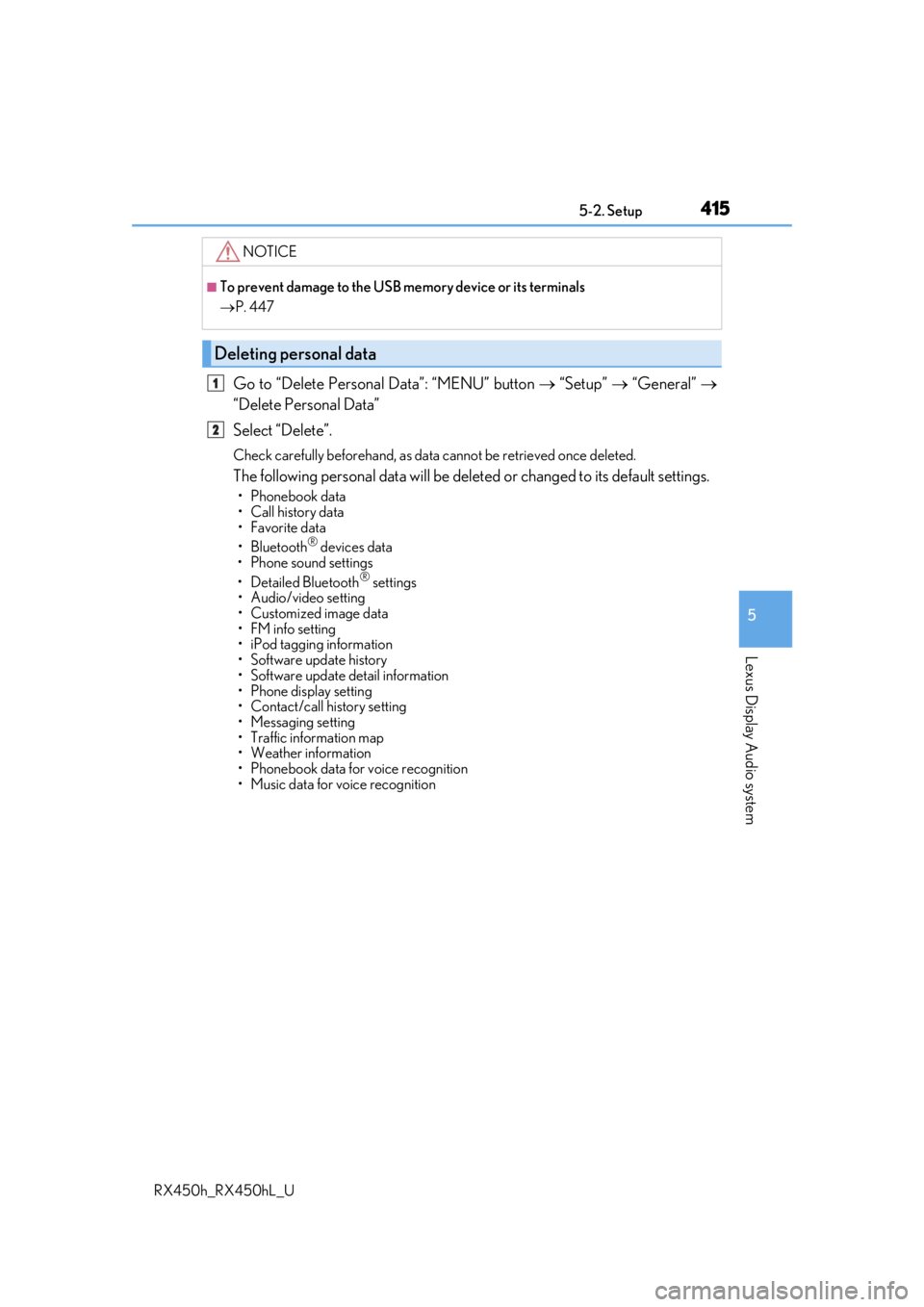
Go to “Delete Personal Data”: “MENU” button “Setup” “General”
“Delete Personal Data”
Select “Delete”.
Check carefully beforeha nd, as data cannot be retrieved once deleted.
The following personal data will be dele ted or changed to its default settings.
• Phonebook data
• Call history data
•Favorite data
•Bluetooth
® devices data
• Phone sound settings
• Detailed Bluetooth
® settings
• Audio/video setting
• Customized image data
•FM info setting
• iPod tagging information
• Software update history
• Software update detail information
• Phone display setting
• Contact/call history setting
• Messaging setting
• Traffic information map
• Weather information
• Phonebook data for voice recognition
• Music data for voice recognition
NOTICE
■To prevent damage to the USB me mory device or its terminals
P. 447
Deleting personal data
1
2
Page 432 of 792
4325-4. Using the radio
RX450h_RX450hL_U
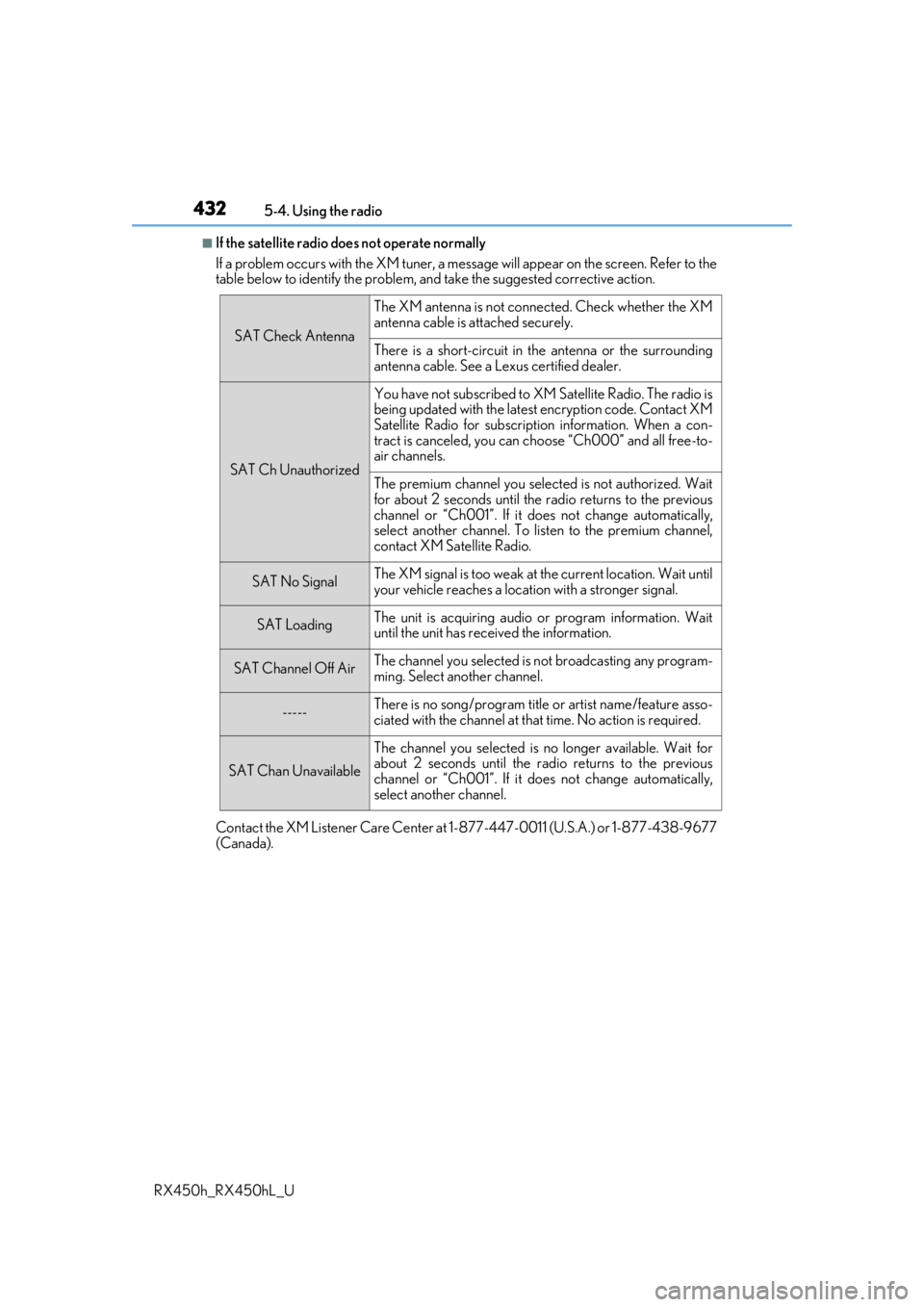
■If the satellite radio does not operate normally
If a problem occurs with the XM tuner, a message will appear on the screen. Refer to the
table below to identify the problem, an d take the suggested corrective action.
Contact the XM Listener Care Center at 1-877-447-0011 (U.S.A.) or 1-877-438-9677
(Canada).
SAT Check Antenna
The XM antenna is not connected. Check whether the XM
antenna cable is attached securely.
There is a short-circuit in the antenna or the surrounding
antenna cable. See a Lexus certified dealer.
SAT Ch Unauthorized
You have not subscribed to XM Satellite Radio. The radio is
being updated with the latest encryption code. Contact XM
Satellite Radio for subscripti on information. When a con-
tract is canceled, you can choose “Ch000” and all free-to-
air channels.
The premium channel you selected is not authorized. Wait
for about 2 seconds until the radio returns to the previous
channel or “Ch001”. If it does not change automatically,
select another channel. To listen to the premium channel,
contact XM Satellite Radio.
SAT No SignalThe XM signal is too weak at the current location. Wait until
your vehicle reaches a location with a stronger signal.
SAT LoadingThe unit is acquiring audio or program information. Wait
until the unit has rece ived the information.
SAT Channel Off AirThe channel you selected is not broadcasting any program-
ming. Select another channel.
-----There is no song/program title or artist name/feature asso-
ciated with the channel at that time. No action is required.
SAT Chan Unavailable
The channel you selected is no longer available. Wait for
about 2 seconds until the radio returns to the previous
channel or “Ch001”. If it does not change automatically,
select another channel.
Page 434 of 792

4345-5. Playing an audio CD and MP3/WMA/AAC discs
RX450h_RX450hL_U
■Error messages
If the following error messages appear on th e screen, refer to the table and take the
appropriate measures. If the pr oblem is not rectified, take the vehicle to your Lexus
dealer.
■Discs that can be used
Discs with the marks sh own below can be used.
Playback may not be possible depending on recording format or disc features, or due to
scratches, dirt or deterioration.
CDs with copy-protection feat ures may not play correctly.
■CD player protection feature
To protect the internal components, playback is automatically stopped when a problem is
detected.
■If a disc is left inside the CD player or in the ejected position for extended periods
Disc may be damaged and may not play properly.
■Lens cleaners
Do not use lens cleaners. Doing so may damage the CD player.
■MP3, WMA and AAC files
MP3 (MPEG Audio LAYER3) is a standard audio compression format.
Files can be compressed to approximately 1/10 of their original size by using MP3 com-
pression.
WMA (Windows Media Audio) is a Microsoft audio compression format.
This format compresses audio data to a si ze smaller than that of the MP3 format.
AAC is short for Advanced Audio Coding and refers to an audi o compression technol-
ogy standard used with MPEG2 and MPEG4.
MP3, WMA and AAC file and media/formats compatibility are limited.
MessageCauseCorrection procedures
“Check disc”
• The disc is dirty or dam- aged.
• The disc is inserted upside down.
•The disc is not playable with the player.
•Clean the disc.
• Insert the disc correctly.
•Confirm the disc is play-able with the player.
“DISC Error”There is a malfunction
within the system.Eject the disc.
“No music files found.”No playable data is
included on the disc.Eject the disc.
Page 436 of 792

4365-5. Playing an audio CD and MP3/WMA/AAC discs
RX450h_RX450hL_U
●File names
The only files that can be recognized as MP3/WMA/AAC and played are those with
the extension .mp3, .wma or .m4a.
●Discs containing mult i-session recordings
As the audio system is compatible with multi session discs, it is possible to play discs
that contain MP3, WMA and AAC files. Howeve r, only the first session can be played.
●ID3, WMA and AAC tags
ID3 tags can be added to MP3 files, making it possible to record the track title, artist
name, etc.
The system is compatible with ID3 Ver. 1.0, 1.1, and Ver. 2.2, 2.3 ID3 tags. (The number
of characters is based on ID3 Ver. 1.0 and 1.1.)
WMA tags can be added to WMA files, making it possible to record the track title and
artist name in the same way as with ID3 tags.
AAC tags can be added to AAC files, making it possible to record the track title and
artist name in the same way as with ID3 tags.
●MP3, WMA and AAC playback
When a disc containing MP3, WMA or AAC fi les is inserted, all files on the disc are
first checked. Once the file check is fi nished, the first MP3, WMA or AAC file is
played. To make the file check finish more quickly, we recommend you do not write any
files to the disc other than MP3, WMA or AAC files or create any unnecessary fold-
ers.
Discs that contain a mixture of music data and MP3, WMA or AAC format data can-
not be played.
●Extensions
If the file extensions .mp3, .wma and .m4a are used for files other than MP3, WMA
and AAC files, they may be mistakenly recognized and played as MP3, WMA and
AAC files. This may result in large amount s of interference and damage to the speak-
ers.
●Playback
• To play MP3 files with steady sound quality, we recommend a fixed bit rate of at least 128 kbps and a sampling frequency of 44.1 kHz.
• CD-R or CD-RW playback may not be poss ible in some instances, depending on
the characteristics of the disc.
• There is a wide variety of freeware an d other encoding software for MP3, WMA
and AAC files on the market, and depending on the status of the encoding and the
file format, poor sound quality or noise at the start of playback may result. In some
cases, playback may not be possible at all.
• When files other than MP3, WMA or AAC files are recorded on a disc, it may take more time to recognize the disc and in some cases, playback may not be possible at
all.
• Microsoft, Windows, and Windows Media ar e the registered trademarks of Micro-
soft Corporation in the U.S.A. and other countries.