ECO LEXUS RX450h 2022 Owner's Guide
[x] Cancel search | Manufacturer: LEXUS, Model Year: 2022, Model line: RX450h, Model: LEXUS RX450h 2022Pages: 532, PDF Size: 27.62 MB
Page 84 of 532
822-1. Instrument cluster
play.
If the system is fu nctioning correctly,
the BSM outside rear view mirror indi-
cators will turn off after a few seconds.
If the BSM outside rear view mirror
indicators do not illuminate or do not
turn off, there may be a malfunction in
the system. If this occurs, have the vehi-
cle inspected by your Lexus dealer.
*4: This light illuminates on the outside rear view mirrors.
*5: This light illuminates on the multi-infor-mation display.
*6: When the outside temperature is approximately 37°F (3°C) or lower, this
indicator will flash for approximately 10
seconds, then stay on.
*7: This light illuminates on the center panel.
Page 87 of 532

852-1. Instrument cluster
2
Vehicle status information and indicators
■Rev indicator (F SPORT models)
When the engine speed reaches a set
speed, a ring-shaped indicator will be
displayed on the tachometer.
The desired engine speed at which the Rev
indicator will begin to be displayed can be
set on of the multi-information display.
( P.88)
■Rev peak (F SPORT models)
The engine speed reaches or exceeds
4000 rpm, an afterimage of the
tachometer will be displayed at the
highest engine speed for approxi-
mately 1 second.
■The meters and display illuminate when
The power switch is in ON mode.
■Hybrid System Indicator
Except F SPORT models
Charge area
Shows regenerative charging.
Hybrid Eco area
Shows that gasoline en gine power is not
being used very often.
The gasoline engine will automatically stop
and restart under various conditions.
Eco area
Shows that the vehicle is being driven in an
Eco-friendly manner.
Power area
Shows that an Eco-friendly driving range is
being exceeded (during full power driving
etc.)
F SPORT models
Charge area
Shows regenerative charging.
Hybrid Eco area
Shows that gasoline en gine power is not
A
B
C
D
A
B
Page 88 of 532

862-1. Instrument cluster
being used very often.
The gasoline engine will automatically stop
and restart under various conditions.Eco area
Shows that the vehicle is being driven in an
Eco-friendly manner.
Power area
Shows that an Eco-friendly driving range is
being exceeded (durin g full power driving
etc.)
●Depending on the selected driving mode,
the Hybrid System Indicator or tachome-
ter will be displayed. The Hybrid System
Indicator or tachometer can be set to
always be displa yed on of the
multi-information display. ( P.92)
●The Hybrid System Indicator is displayed
in the following situations:
• When the tachometer setting is set to
change according to the driving mode
and a driving mode other than sport
mode is selected
• When the tachometer setting is set to always display the Hybrid System Indica-
tor
●By keeping the indicat or needle (except
F SPORT models) or bar display (F
SPORT models) within the Eco area,
more Eco-friendly driving can be
achieved.
●Charge area indicates regeneration* sta-
tus. Regenerated energy will be used to
charge the hybrid battery (traction bat-
tery).
*: When used in this manual, regeneration
refers to the conversion of energy cre-
ated by the movement of the vehicle into
electrical energy.
■Tachometer
Hybrid System Indicator switches to the
tachometer when driving mode is in sport
mode.
The settings of the ta chometer display can
be changed on the multi-information dis-
play.
■Engine speed
On hybrid vehicles, engine speed is pre-
cisely controlled in order to help improve
fuel efficiency and reduce exhaust emis-
sions etc.
There are times when the engine speed that
is displayed may differ even when vehicle
operation and driving conditions are the
same.
■Outside temperature display
●In the following situations, the correct
outside temperature may not be dis-
played, or the display may take longer
than normal to change:
• When stopped, or driving at low speeds (less than 12 mph [20 km/h])
• When the outside temperature has
changed suddenly (at the entrance/exit of
a garage, tunnel, etc.)
●When “--” or “E” is displayed, the system
may be malfunctioning . Take your vehicle
to your Lexus dealer.
■Liquid crystal display
Small spots or light sp ots may appear on the
display. This phenomenon is characteristic
of liquid crystal disp lays, and there is no
problem continuing to use the display.
■Customization
The gauges and meters can be customized
on of the multi-in formation display.
( P.92)
C
D
WARNING
■The information display at low tem-
peratures
Allow the interior of the vehicle to warm
up before using the liquid crystal infor-
mation display. At extremely low tem-
peratures, the information display
monitor may respond slowly, and display
changes may be delayed.
Page 89 of 532
872-1. Instrument cluster
2
Vehicle status information and indicators
■Display items
Odometer
Displays the total distance the vehicle has
been driven.
Trip meter A/trip meter B
Displays the distance the vehicle has been
driven since the meter was last reset. Trip
meters A and B can be used to record and
display different distances independently.
Distance until next engine oil
change
Displays the distance the vehicle can be
driven until an oil change is necessary.
■Changing the display
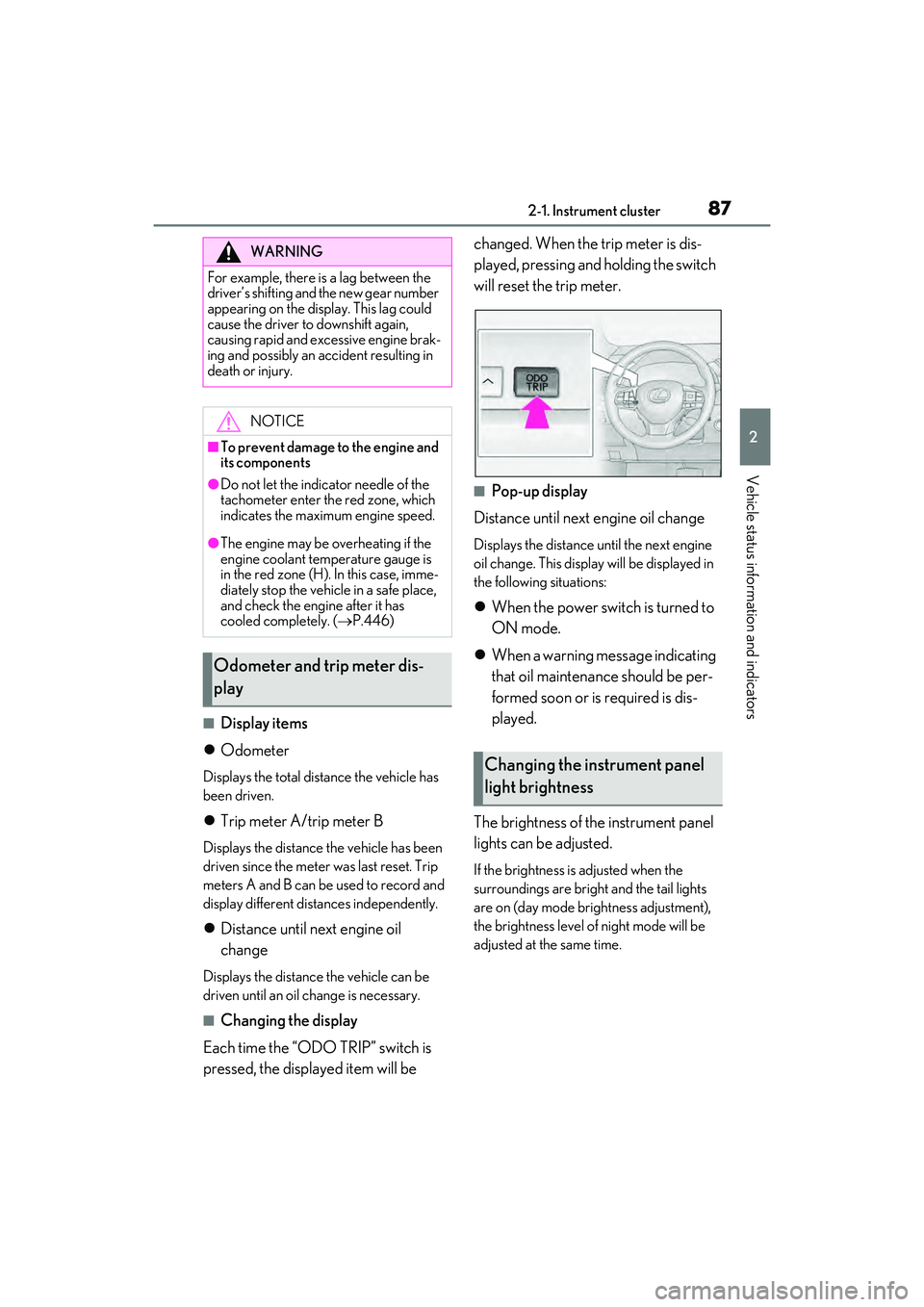
Each time the “ODO TRIP” switch is
pressed, the displayed item will be changed. When the trip meter is dis-
played, pressing and holding the switch
will reset the trip meter.
■Pop-up display
Distance until next engine oil change
Displays the distance until the next engine
oil change. This display will be displayed in
the following situations:
When the power switch is turned to
ON mode.
When a warning message indicating
that oil maintenance should be per-
formed soon or is required is dis-
played.
The brightness of the instrument panel
lights can be adjusted.
If the brightness is adjusted when the
surroundings are bright and the tail lights
are on (day mode brightness adjustment),
the brightness level of night mode will be
adjusted at the same time.
WARNING
For example, there is a lag between the
driver’s shifting and the new gear number
appearing on the display. This lag could
cause the driver to downshift again,
causing rapid and excessive engine brak-
ing and possibly an accident resulting in
death or injury.
NOTICE
■To prevent damage to the engine and
its components
●Do not let the indicator needle of the
tachometer enter the red zone, which
indicates the maxi mum engine speed.
●The engine may be overheating if the
engine coolant temperature gauge is
in the red zone (H). In this case, imme-
diately stop the vehicle in a safe place,
and check the engine after it has
cooled completely. ( P.446)
Odometer and trip meter dis-
play
Changing the instrument panel
light brightness
Page 92 of 532
902-1. Instrument cluster
changed to a registered screen of your
choice. To register a screen as the top
screen, display the desired screen and
press and hold .
A message asking to confirm if reg-
istration is desired will be displayed.
If the selected screen cannot be
registered, a registration failure
message will be displayed.
When no screen has been regis-
tered, the drive information screen
will be displayed.
■Content displayed as drive infor-
mation
Displays drive information such as the
following:
Drive information 1
• Current fuel consumption
• Average fuel economy (after reset)
Drive information 2
• Distance (driving range)
• Average vehicle speed (after reset)
Drive information 3
• Average fuel economy (after refuel)
• Elapsed time (after start)
Displayed items (listed below) can be
changed on . ( P.92)
Current fuel consumption
Displays instantaneous current fuel con-
sumption
Average fuel economy
After reset: Displays average fuel con- sumption since the display was reset
*1, 2
After start: Displays average fuel con-
sumption since hybrid system start
*2
After refuel: Displays average fuel con-
sumption since refuel
*2, 3
Average vehicle speed
After reset: Displays average vehicle
speed since the display was reset
*1
After start: Displays average vehicle speed
since hybrid system start
Elapsed time
After reset: Displays elapsed time since the
display was reset
*1
After start: Displays elapsed time since
hybrid system start
Distance
Driving range: Displays driving range with
remaining fuel
*3, 4
After start: Displays drive distance since
vehicle start
Other
Blank: No item
*1: To reset, display the desired item and
press and hold of the meter con-
trol switch.
If both of the displayed items are reset-
table, a message will be displayed ask-
ing which item(s) to reset.
*2: Use the displayed fuel consumption as a reference.
*3: When only a small amount of fuel is added to the tank, the display may not
be updated.
When refueling, turn the power switch
off. If the vehicle is refueled without
turning the power switch off, the display
may not be updated.
Drive information
Page 93 of 532
912-1. Instrument cluster
2
Vehicle status information and indicators
*4: This distance is computed based on your average fuel consumption. As a
result, the actual distance that can be
driven may differ from that displayed.
■Energy monitor
P.99
■AWD Control
Displays the driving force applied to
each wheel using segments.
The greater the number of segments
displayed, the greater the driving force
applied.
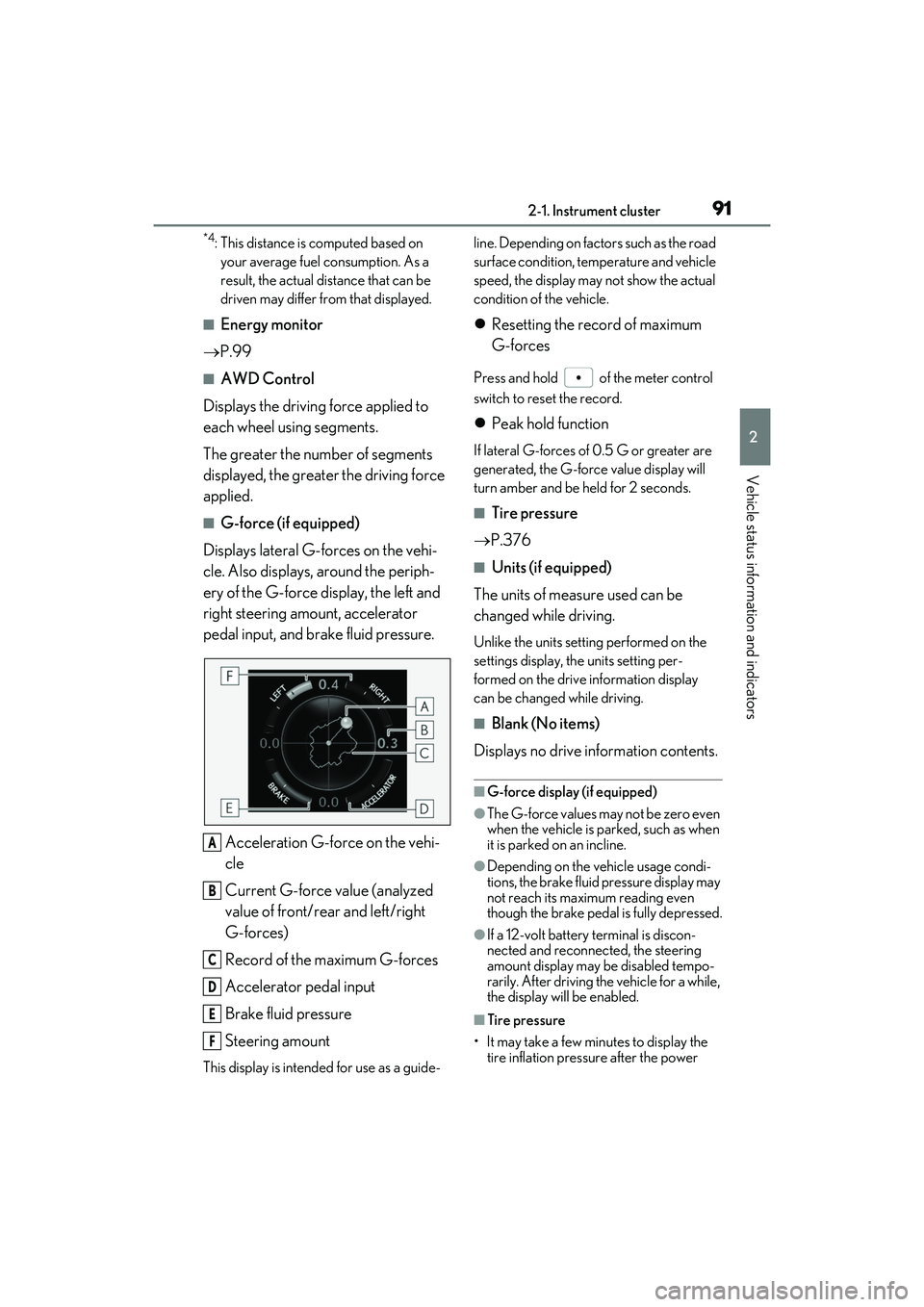
■G-force (if equipped)
Displays lateral G-forces on the vehi-
cle. Also displays, around the periph-
ery of the G-force display, the left and
right steering amount, accelerator
pedal input, and brake fluid pressure.
Acceleration G-force on the vehi-
cle
Current G-force value (analyzed
value of front/rear and left/right
G-forces)
Record of the maximum G-forces
Accelerator pedal input
Brake fluid pressure
Steering amount
This display is intended for use as a guide- line. Depending on fact
ors such as the road
surface condition, temperature and vehicle
speed, the display may not show the actual
condition of the vehicle.
Resetting the record of maximum
G-forces
Press and hold of the meter control
switch to reset the record.
Peak hold function
If lateral G-forces of 0.5 G or greater are
generated, the G-forc e value display will
turn amber and be held for 2 seconds.
■Tire pressure
P.376
■Units (if equipped)
The units of measure used can be
changed while driving.
Unlike the units setting performed on the
settings display, th e units setting per-
formed on the drive information display
can be changed while driving.
■Blank (No items)
Displays no drive information contents.
■G-force display (if equipped)
●The G-force values may not be zero even
when the vehicle is parked, such as when
it is parked on an incline.
●Depending on the vehicle usage condi-
tions, the brake fluid pressure display may
not reach its maximum reading even
though the brake pedal is fully depressed.
●If a 12-volt battery terminal is discon-
nected and reconnect ed, the steering
amount display may be disabled tempo-
rarily. After driving th e vehicle for a while,
the display will be enabled.
■Tire pressure
• It may take a few minutes to display the tire inflation pressu re after the power
A
B
C
D
E
F
Page 95 of 532
932-1. Instrument cluster
2
Vehicle status information and indicators
be changed to automatically according to
the driving mode.
Needle (F SPORT models)
Select to set the tachometer needle color.
Rev indicator (F SPORT models)
( P.85)
• Select to enable/disable the Rev indica-
tor.
• Select to set the desired engine speed at which the Rev indicator will begin to be
displayed.
Selectable engine speed range:
2000 rpm to 6000 rpm
Rev peak (F SPORT models)
( P.85)
Select to enable/disable the Rev peak.
Default setting
Select to reset the meter display settings to
the default setting.
■Vehicle functions and settings that
can be changed
P.472
■Background color of the indicator/shift
position display area (except F SPORT
models)
The background color of the indicator/shift
position display area is changed according
to the driving mode as follows ( P.276):
●Eco drive mode: Blue
●Sport mode: Red
■Suspension of the settings display
●Some settings cannot be changed while
driving. When changing settings, park
the vehicle in a safe place.
●If a warning message is displayed, opera-
tion of the settings display will be sus-
pended.
Displays suggestions to the driver in
the following situations. To select a
response to a displayed suggestion,
use the meter control switches.
■Suggestion to enable the power
back door
If the power back door system is dis-
abled (setting on set to off) and the
power back door switch on the instru-
ment panel is operated, a suggestion
message will be displayed asking if you
wish to enable the power back door
system.
To enable the power back door system,
select “Yes”.
After enabling the power back door sys-
tem, press the power back door switch
again to open or close the power back
door.
WARNING
■Cautions during setting up the dis-
play
As the hybrid system needs to be operat-
ing during setting up the display, ensure
that the vehicle is parked in a place with
adequate ventilation. In a closed area
such as a garage, ex haust gases includ-
ing harmful carbon monoxide (CO) may
collect and enter the vehicle. This may
lead to death or a serious health hazard.
NOTICE
■While setting up the display
To prevent 12-volt battery discharge,
ensure that the hybrid system is operat-
ing while setting up the display features.
Suggestion function
Page 98 of 532
962-1. Instrument cluster
Displayed content is the same as that displayed on the multi-information display. For details,
refer to the explanations of each system.
Vehicle speed display area
Displays the following items:
• Vehicle speed
• Speed limit (vehicles with a na vigation system) (U.S.A. only)
• Road sign icons recognized by the RSA ( P.234)
Hybrid System Indicator/Tachometer ( P.99)
Shift position display ( P.189)
HUD (Head-up display) switch ( P.96)
■Head-up display
The head-up disp lay may seem dark or hard
to see when viewed through sunglasses,
especially polarized su nglasses. Adjust the
brightness of the he ad-up display or
remove your sunglasses.
■Enabling/Disabling the head-up
display
Press the HUD (Head-up display)
switch.
E
F
G
H
WARNING
■Before using the head-up display
●Check that the position and brightness
of the head-up display image does not
interfere with safe driving. Incorrect
adjustment of the image’s position or
brightness may obstru ct the driver’s
view and lead to an accident, resulting
in death or serious injury.
●Do not continuously look at the
head-up display while driving as you
may fail to see pedestrians, objects on
the road, etc. ahead of the vehicle.
NOTICE
■To prevent damage to components
●Do not place any drinks near the
head-up display projector. If the pro-
jector gets wet, electrical malfunctions
may result.
●Do not place anything on or put stick-
ers onto the head-up display projector.
Doing so could interrupt head-up dis-
play indications.
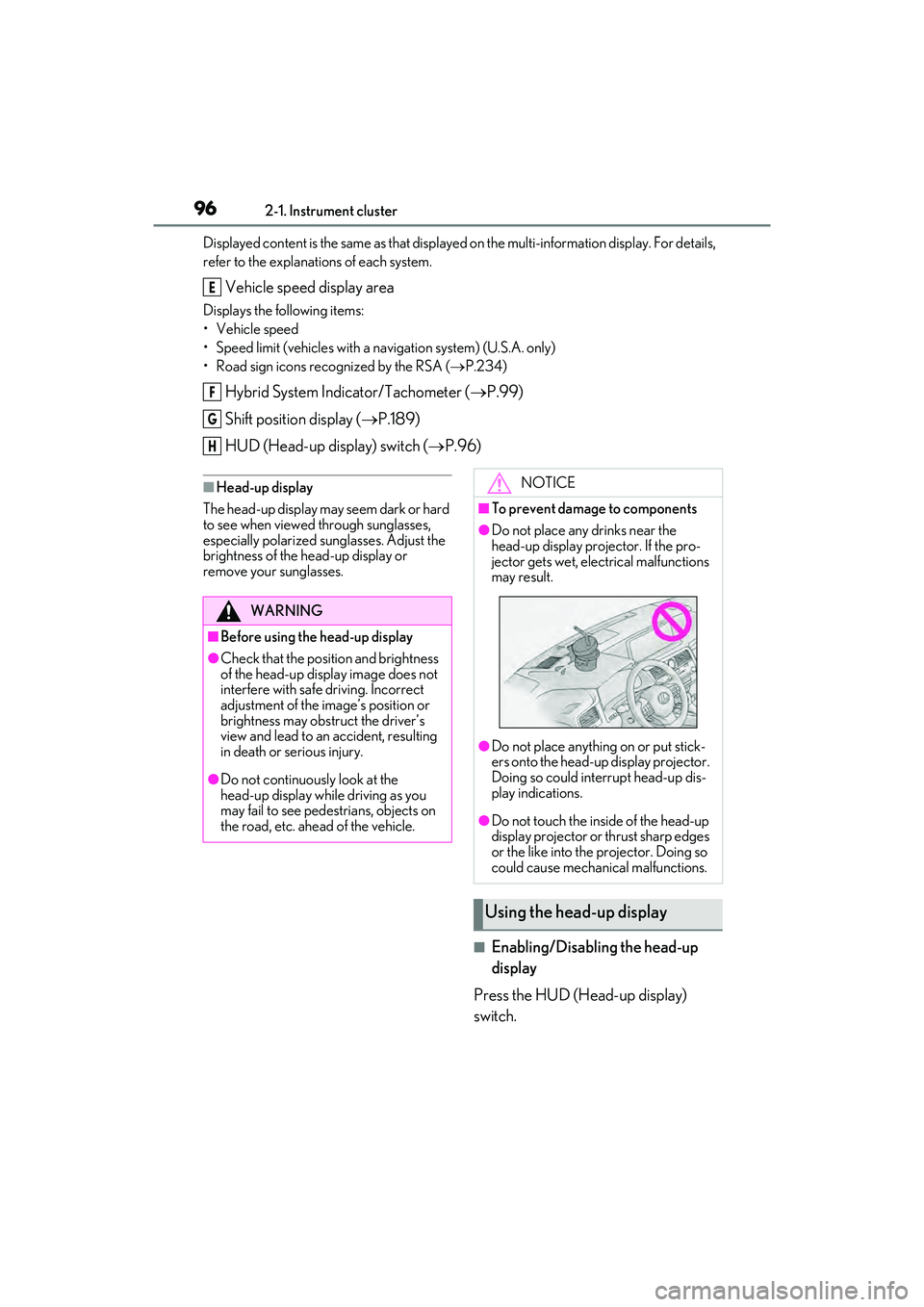
●Do not touch the inside of the head-up
display projector or thrust sharp edges
or the like into the projector. Doing so
could cause mechanical malfunctions.
Using the head-up display
Page 101 of 532
992-1. Instrument cluster
2
Vehicle status information and indicators
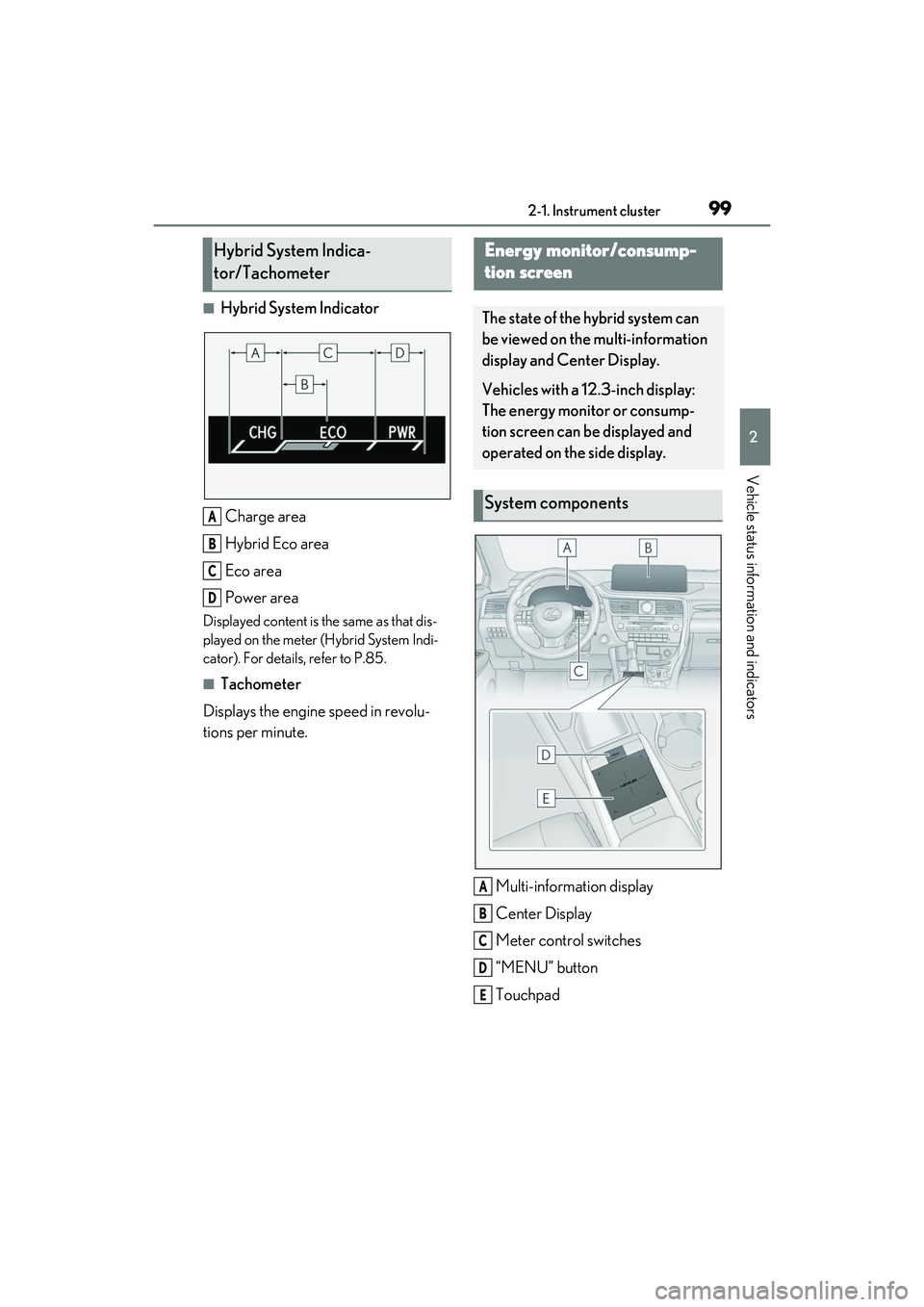
■Hybrid System IndicatorCharge area
Hybrid Eco area
Eco area
Power area
Displayed content is th e same as that dis-
played on the meter (Hybrid System Indi-
cator). For details, refer to P.85.
■Tachometer
Displays the engine speed in revolu-
tions per minute.
Multi-information display
Center Display
Meter control switches
“MENU” button
Touchpad
Hybrid System Indica-
tor/Tachometer
A
B
C
D
Energy monitor/consump-
tion screen
The state of the hybrid system can
be viewed on the multi-information
display and Center Display.
Vehicles with a 12.3-inch display:
The energy monitor or consump-
tion screen can be displayed and
operated on the side display.
System components
A
B
C
D
E
Page 104 of 532

1022-1. Instrument cluster
■Trip information
Press the “MENU” button on the
Remote Touch, then select on the
menu screen.
If a screen other than “Trip Information”
is displayed, select “Trip Information”.
This system can also be operated by
the touch screen.
Resetting the consumption data
Fuel consumption in the past 15
minutes
Current fuel consumption
Regenerated energy in the past 15
minutes
One symbol indicates 50 Wh. Up to 5
symbols are shown.
Average vehicle speed since the
hybrid system was started.
Elapsed time since the hybrid sys-
tem was started.
Cruising range
Average fuel consumption for the past
15 minutes is divided by color into past
averages and averages attained since
the power switch was last turned to
ON mode. Use the displayed average fuel consumption as a reference.
The image is an example only, and may
vary slightly from actual conditions.
■History
Press the “MENU” button on the
Remote Touch, then select on the
menu screen.
If a screen other than “History” is dis-
played, select “History”.
This system can also be operated by
the touch screen.
Best recorded fuel consumption
Latest fuel consumption
Previous fuel consumption record
Resetting the history data
Updating the latest fuel consump-
tion data
The average fuel consumption history
is divided by color into past averages
and the average fuel consumption
since the last updated. Use the dis-
played average fuel consumption as a
reference.
The image is an example only, and may
vary slightly from actual conditions.
■Updating the history data
Update the latest fuel consumption by
Consumption
A
B
C
D
E
F
G
A
B
C
D
E