ECO LEXUS RX450h 2022 Service Manual
[x] Cancel search | Manufacturer: LEXUS, Model Year: 2022, Model line: RX450h, Model: LEXUS RX450h 2022Pages: 532, PDF Size: 27.62 MB
Page 105 of 532
1032-1. Instrument cluster
2
Vehicle status information and indicators
selecting “Update” to measure the current
fuel consumption again.
■Resetting the data
The fuel consumption data can be deleted
by selecting “Clear”.
■Cruising range
Displays the estimated maximum distance
that can be driven with the quantity of fuel
remaining.
This distance is comp uted based on your
average fuel consumption.
As a result, the actual distance that can be
driven may differ from that displayed.
Display the vehicle information on the
side display ( P.295), and then select
or to display the desired
screen.
The image is an example only, and may
vary slightly from actual conditions.
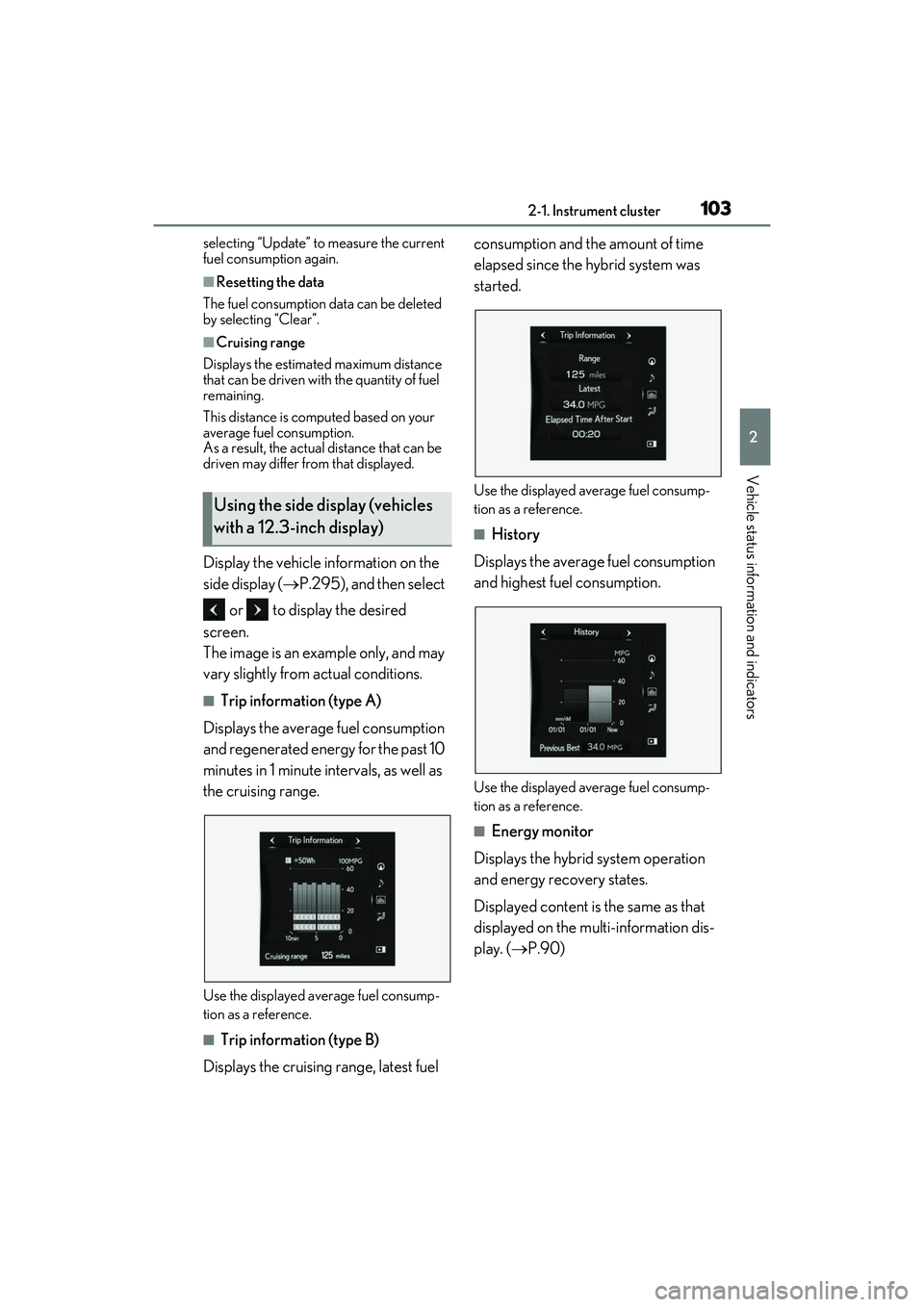
■Trip information (type A)
Displays the average fuel consumption
and regenerated energy for the past 10
minutes in 1 minute intervals, as well as
the cruising range.
Use the displayed average fuel consump-
tion as a reference.
■Trip information (type B)
Displays the cruising range, latest fuel consumption and the amount of time
elapsed since the hybrid system was
started.
Use the displayed average fuel consump-
tion as a reference.
■History
Displays the average fuel consumption
and highest fuel consumption.
Use the displayed average fuel consump-
tion as a reference.
■Energy monitor
Displays the hybrid system operation
and energy recovery states.
Displayed content is the same as that
displayed on the multi-information dis-
play. ( P.90)
Using the side display (vehicles
with a 12.3-inch display)
Page 108 of 532

1063-1. Key information
3-1.Key information
The following keys are provided with
the vehicle.Electronic keys
• Operating the smart access system with push-button start ( P.125)
• Operating the wireless remote control function ( P.107)
Mechanical keys
Key number plate
■When riding in an aircraft
When bringing an elec tronic key onto an
aircraft, make sure you do not press any
buttons on the electronic key while inside
the aircraft cabin. If you are carrying an
electronic key in your bag, etc., ensure that
the buttons are not likely to be pressed acci-
dentally. Pressing a button may cause the
electronic key to em it radio waves that
could interfere with the operation of the air-
craft.
■Electronic key battery depletion
●The standard battery life is 1 to 2 years.
●If the battery becomes low, an alarm will
sound in the cabin when the hybrid sys-
tem is stopped.
●To reduce key battery depletion when the
electronic key is to not be used for long
periods of time, set the electronic key to
the battery-saving mode. ( P.126)
●As the electronic key always receives
radio waves, the battery will become
depleted even if the electronic key is not
used. The following symptoms indicate
that the electronic key battery may be
depleted. Replace the battery when nec-
essary.
• The smart access system with push-but- ton start or the wireless remote control
does not operate.
• The detection area becomes smaller.
•The LED indicator on the key surface
does not turn on.
●To avoid serious dete rioration, do not
leave the electronic key within 3 ft. (1 m)
of the following electrical appliances that
produce a magnetic field:
•TVs
• Personal computers
• Cellular phones, cordless phones and battery chargers
• Recharging cellular phones or cordless
phones
•Table lamps
• Induction cookers
■Replacing the battery
P.386
■Confirmation of the registered key
number
The number of keys already registered to
the vehicle can be confirmed. Ask your
Lexus dealer for details.
■If “A New Key has been Registered
Contact Your Dealer for Details” is
shown on the multi-information display
This message will be displayed each time
the driver’s door is opened when the doors
are unlocked from the outside for approxi-
mately one week after a new electronic key
has been registered.
If this message is disp layed but you have not
had a new electronic key registered, ask
your Lexus dealer to check if an unknown
electronic key (other than those in your
possession) has be en registered.
Keys
The keys
A
B
C
Page 109 of 532

1073-1. Key information
3
Before driving
The electronic keys are equipped with
the following wireless remote control:Locks all the doors (
P.109)
Unlocks all the doors ( P.109)
Opens the windows
*2 and the
moon roof
*1, 2 or panoramic moon
roof
*1, 2 ( P.109)
Opens and closes the power back
door ( P.114)
Sounds the alarm
*1: If equipped
*2: These settings must be customized at
your Lexus dealer.
■Theft deterrent panic mode
When is pressed for longer than
about one second, an alarm will sound
intermittently and the vehicle lights will flash
to deter any person from trying to break
into or damage your vehicle.
To stop the alarm, pr ess any button on the
electronic key.
To take out the mechanical key, push
NOTICE
■To prevent key damage
●Do not drop the keys, subject them to
strong shocks or bend them.
●Do not expose the keys to high tem-
peratures for long periods of time.
●Do not get the keys wet or wash them
in an ultrasonic washer, etc.
●Do not attach meta llic or magnetic
materials to the keys or place the keys
close to such materials.
●Do not disassemb le the keys.
●Do not attach a sticker or anything else
to the surface of the electronic key.
●Do not place the keys near objects that
produce magnetic fields, such as TVs,
audio systems and induction cookers,
or medical electrical equipment, such
as low-frequency therapy equipment.
■Carrying the electronic key on your
person
Carry the electronic key 3.9 in. (10 cm)
or more away from electric appliances
that are turned on. Radio waves emitted
from electric applianc es within 3.9 in. (10
cm) of the electronic key may interfere
with the key, causing the key to not func-
tion properly.
■In case of a smart access system with
push-button start malfunction or
other key-related problems
P.439
■When an electronic key is lost
P.438
Wireless remote control
Using the mechanical key
A
B
C
D
E
Page 111 of 532

1093-2. Opening, closing and locking the doors
3
Before driving
3-2.Opening, closing and locking the doors
■Smart access system with
push-button start
Carry the electronic key to enable this
function.
1 Grip the driver’s door handle to
unlock the door. Grip any passen-
ger door handle to unlock all the
doors.
*
Make sure to touch the sensor on the back
of the handle.
The doors cannot be unlocked for 3 sec-
onds after the doors are locked.
*: The door unlock settings can be
changed.
2 Touch the lock sensor (indentation
on the surface of the door handle)
to lock all the doors.
Check that the door is securely locked.
■Wireless remote control
1 Locks all the doors
Check that the door is securely locked.
2Unlocks all the doors
Pressing the button unlocks the driver’s
door. Pressing the button again within 3
seconds unlocks the other doors.
Press and hold to open the windows
*2 and
the moon roof
*1, 2 or panoramic moon
roof
*1, 2
*1
: If equipped
*2: This setting must be customized at your
Lexus dealer.
■Switching the door unlock function
It is possible to set which doors the entry
function unlocks using the wireless remote
control.
1 Turn the power switch off.
2 When the indicator light on the key sur-
face is not on, press and hold ,
or for approxi-
mately 5 seconds while pressing and
holding .
The setting changes each time an operation
is performed, as shown below. (When
changing the setting continuously, release
the buttons, wait for at least 5 seconds, and
repeat step 2 .)
Side doors
The vehicle can be locked and
unlocked using the entry function,
wireless remote control or door
lock switches.
Unlocking and locking the doors
from the outside
Page 112 of 532

1103-2. Opening, closing and locking the doors
To prevent unintended triggering of the
alarm, unlock the doors using the wireless
remote control and open and close a door
once after the settings have been changed.
(If a door is not opened within 60 seconds
after is pressed, the doors will be
locked again and the alarm will automati-
cally be set.)
In a case that the alarm is triggered, imme-
diately stop the alarm. (P.74)
■Impact detection door lock release sys-
tem
In the event that the vehicle is subject to a
strong impact, all the doors are unlocked.
Depending on the force of the impact or the
type of accident, however, the system may
not operate.
■Operation signals
Doors:
A buzzer sounds and the emergency flash-
ers flash to indicate that the doors have
been locked/unlocke d. (Locked: Once;
Unlocked: Twice)
Windows and moon roof or panoramic
moon roof:
A buzzer sounds.
■Security feature
If a door is not opened within approximately
60 seconds after the vehicle is unlocked,
the security feature automatically locks the
vehicle again.
■When the door cannot be locked by the
lock sensor on the surface of the door
handle
When the door cannot be locked even if the
lock sensor on the surface of the door han-
dle is touched by a finger, touch the lock
sensor with the palm.
When gloves are being worn, remove the
gloves.
■Door lock buzzer
If an attempt to lock the doors using the
smart key system is made when a door is
not fully closed, a buzzer will sound continu-
ously for 5 seconds. Fully close the door to
stop the buzzer, and lock the doors again.
■Setting the alarm
Locking the doors will set the alarm system.
( P.74)
■Conditions affecting the operation of
the smart access system with push-but-
ton start or wireless remote control
P.126
■If the smart access system with
push-button start or the wireless remote
control does not operate properly
Use the mechanical key to lock and unlock
the doors. (P.439)
Replace the key battery with a new one if it
is depleted. ( P.386)
■If the 12-volt batte ry is discharged
The doors cannot be locked and unlocked
using the smart access system with
push-button start or wireless remote con-
trol. Lock or unlock the doors using the
Multi-information display/BeepUnlocking function
Exterior: Beeps 3 times
Interior: Pings once
Holding the driver’s
door handle unlocks
only the driver’s
door.
Holding any of the
passenger door
handles unlocks all
the doors.
Exterior: Beeps twice
Interior: Pings once
Holding a door han-
dle unlocks all the
doors.
Page 113 of 532
1113-2. Opening, closing and locking the doors
3
Before driving
mechanical key. (P.439)
■Customization
Some functions can be customized.
( P.472)
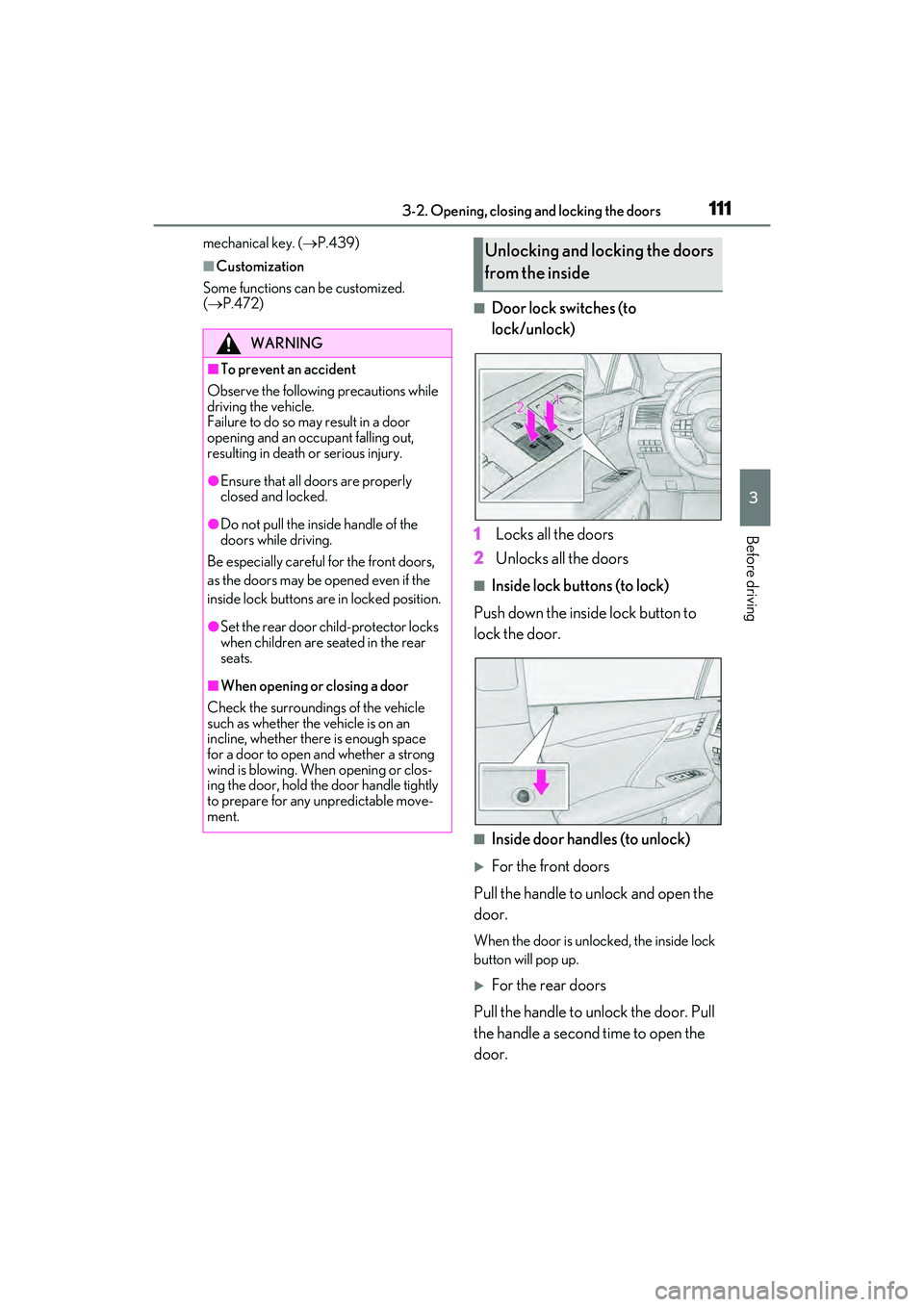
■Door lock switches (to
lock/unlock)
1 Locks all the doors
2 Unlocks all the doors
■Inside lock buttons (to lock)
Push down the inside lock button to
lock the door.
■Inside door handles (to unlock)
For the front doors
Pull the handle to unlock and open the
door.
When the door is unlocked, the inside lock
button will pop up.
For the rear doors
Pull the handle to unlock the door. Pull
the handle a second time to open the
door.
WARNING
■To prevent an accident
Observe the following precautions while
driving the vehicle.
Failure to do so may result in a door
opening and an occupant falling out,
resulting in death or serious injury.
●Ensure that all doors are properly
closed and locked.
●Do not pull the inside handle of the
doors while driving.
Be especially careful for the front doors,
as the doors may be opened even if the
inside lock buttons are in locked position.
●Set the rear door ch ild-protector locks
when children are seated in the rear
seats.
■When opening or closing a door
Check the surroundings of the vehicle
such as whether the vehicle is on an
incline, whether there is enough space
for a door to open and whether a strong
wind is blowing. When opening or clos-
ing the door, hold the door handle tightly
to prepare for any unpredictable move-
ment.
Unlocking and locking the doors
from the inside
Page 116 of 532

1143-2. Opening, closing and locking the doors
■Smart access system with
push-button start
Carry the electronic key to enable this
function. 1
Locks all the doors
Check that the door is securely locked.
2Unlocks all the doors
The doors cannot be unlocked for 3 sec-
onds after the d oors are locked.
■Wireless remote control
P.107
■Door lock switch
P.111
■Opening/closing the power back
door using the wireless remote
control
Press and hold the switch for approxi-
mately 1 second.
The power back door can be operated
whether it is locked
* or unlocked.
Pressing the switch while the power back
door is opening/closing will stop the oper-
ation.
Pressing and holding the switch again for
approximately 1 second will operate the
power back door in the opposite direction.
WARNING
●When closing the power back door,
take extra care to prevent your fingers,
etc., from being caught.
●When closing the power back door,
make sure to press it lightly on its outer
surface. If the back d oor handle is used
to fully close the power back door, it
may result in hands or arms being
caught.
●Do not pull on the back door spindle
(P.122) to close the power back
door, and do not hang on the back
door spindle.
Doing so may cause hands to be caught
or the back door spindle to break, caus-
ing an accident.
●If a bicycle carrier or similar heavy
object is attached to the power back
door, it may suddenly shut again after
being opened, causing someone’s
hands, arms, head or neck to be
caught and injured. When installing an
accessory part to the power back
door, using a genuine Lexus part is
recommended.
Unlocking and locking the
power back door from the out-
side
Unlocking and locking the
power back door from the inside
Opening/closing the power back
door
Page 117 of 532
1153-2. Opening, closing and locking the doors
3
Before driving
*: Opening of the power back door when it
is locked can be disabled by a custom-
ized setting.
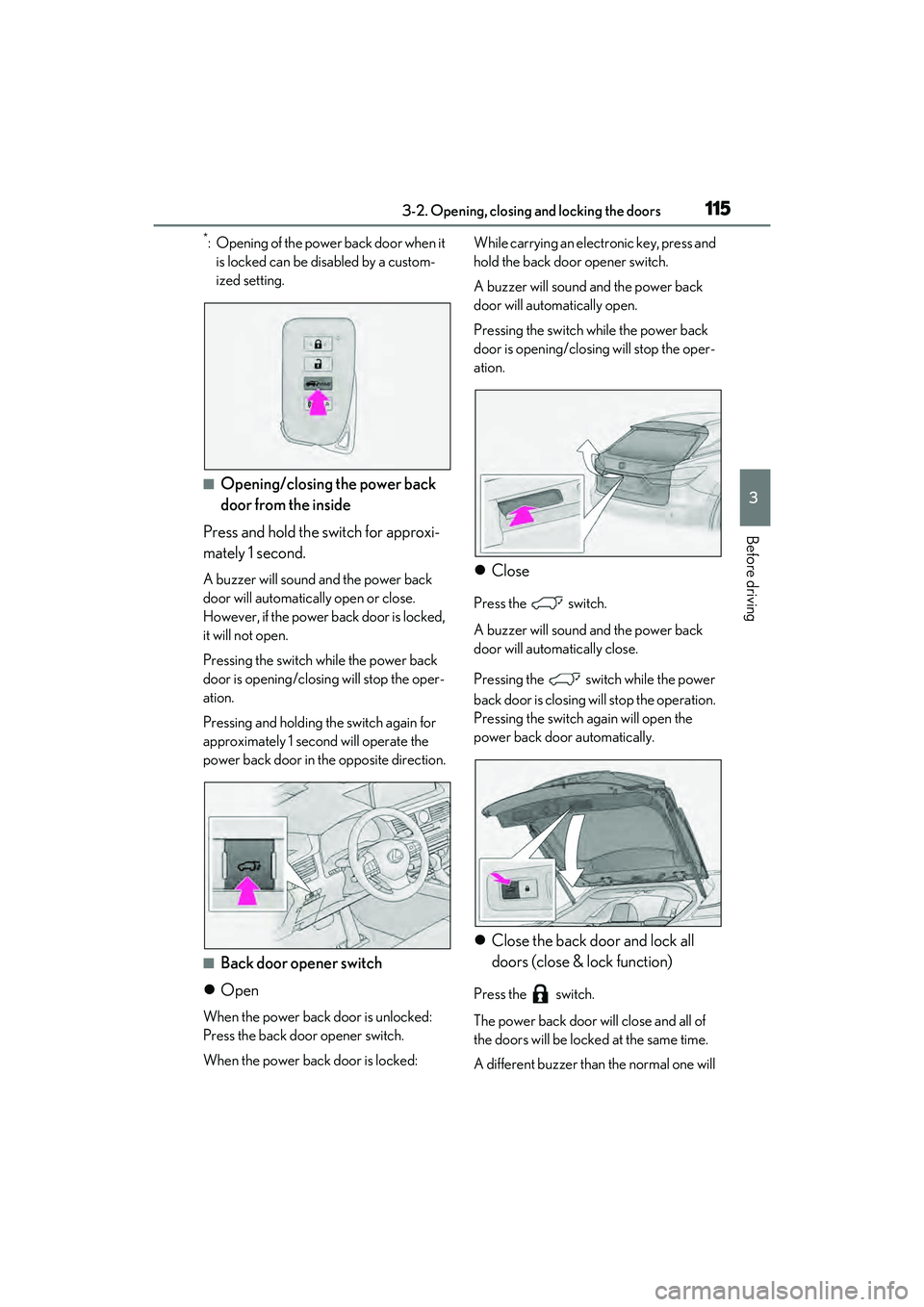
■Opening/closing the power back
door from the inside
Press and hold the switch for approxi-
mately 1 second.
A buzzer will sound and the power back
door will automatically open or close.
However, if the power back door is locked,
it will not open.
Pressing the switch while the power back
door is opening/closing will stop the oper-
ation.
Pressing and holding the switch again for
approximately 1 second will operate the
power back door in the opposite direction.
■Back door opener switch
Open
When the power back door is unlocked:
Press the back door opener switch.
When the power back door is locked: While carrying an electronic key, press and
hold the back door opener switch.
A buzzer will sound and the power back
door will automatically open.
Pressing the switch while the power back
door is opening/closing will stop the oper-
ation.
Close
Press the switch.
A buzzer will sound and the power back
door will automatically close.
Pressing the switch while the power
back door is closing will stop the operation.
Pressing the switch again will open the
power back door automatically.
Close the back door and lock all
doors (close & lock function)
Press the switch.
The power back door will close and all of
the doors will be locked at the same time.
A different buzzer than the normal one will
Page 118 of 532

1163-2. Opening, closing and locking the doors
sound and the power back door will begin
closing automatically. When the power
back door is closed, all of the doors will
lock simultaneously and operation signals
will indicate that all of the doors have been
locked.
If the switch is pr essed while the power
back door is closin g, the operation will
stop.
Pressing the switch again will open the
power back door automatically.
■Closing the power back door using
the back door handle
Lower the power back door using the
back door handle, then a buzzer will
sound and the power back door will
automatically close.
■Hands Free Power Back Door (if
equipped)
1 While carrying an electronic key,
stand within the smart access sys-
tem with push-button start opera- tion range, approximately 19.7 to
23.6 in. (50 to 60 cm) from the
rear bumper.
Kick sensor
Hands Free Power Back Door
operation detection area
Smart access system with
push-button start operation detec-
tion area (
P.125)
2 Perform a kick operation by mov-
ing your foot to within approxi-
mately 3.9 in. (10 cm) of the rear
bumper and then pulling it back.
Perform the entire kick operation
within 1 second.
The Hands Free Power Back Door
will not start operating while a foot is
detected under the rear bumper.
Operate the Hands Free Power
Back Door without contacting the
rear bumper with your foot.
If another electronic key is in the
cabin or luggage compartment, it
may take slightly longer than normal
A
B
C
Page 121 of 532

1193-2. Opening, closing and locking the doors
3
Before driving
If the rear bumper has been touched for a
while, wait for a short time before
attempting to operate the Hands Free
Power Back Door again.
●When standing excessively close to the
rear bumper
●When an external radio wave source
interferes with the communication
between the electronic key and the vehi-
cle (P.126)
●When the vehicle is parked near metal, or
an external radio wave or electrical noise
source which affects the sensitivity of the
Hands Free Power Back Door, such as a
pay parking spot, gas station, electrically
heated road, fluorescent light, or metal
plate
●When the vehicle is near a TV tower,
electric power plant, radio station, large
display, airport or ot her facility that gen-
erates strong radio waves or electrical
noise
●When a large amount of water is applied
to the rear bumper, such as when the
vehicle is being washed or in heavy rain
●When mud, snow, ice, etc. is attached to
the rear bumper
●When the vehicle has been parked for a
while near objects that may move and
contact the rear bumper, such as plants
●When an accessory is installed to the rear
bumper
If an accessory has been installed, turn the
Hands Free Power Back Door (kick sen-
sor) operation setting off.
●RX450hL: When a ti re other than the
spare tire is stored in the spare tire stor-
age area
■Preventing unintentional operation of
the Hands Free Power Back Door (if
equipped)
When an electronic key is in the operation
detection area, the Ha nds Free Power Back
Door may operate unintentionally, so be
careful in the following situations:
●When a large amount of water is applied
to the rear bumper, such as when the
vehicle is being washed or in heavy rain
●When dirt is wiped off the rear bumper
●When a small animal or small object, such
as a ball, moves under the rear bumper
●When an object is moved from under the
rear bumper
●If someone is swinging their legs while sit-
ting on the rear bumper
●If the legs or another part of someone’s
body contacts the rear bumper while
passing by the vehicle
●When the vehicle is parked near an elec-
trical noise source which affects the sen-
sitivity of the Hands Free Power Back
Door, such as a pay parking spot, gas sta-
tion, electrically heated road, or fluores-
cent light
●When the vehicle is near a TV tower,
electric power plant, radio station, large
display, airport or ot her facility that gen-
erates strong radio waves or electrical
noise
●When the vehicle is parked in a place
where objects such as plants are near the
rear bumper
●If luggage, etc. is set near the rear
bumper
●If accessories or a vehicle cover is
installed/removed ne ar the rear bumper
●When the vehicle is being towed
To prevent unintentiona l operation, turn the
Hands Free Power Back Door (kick sensor)
operation setting off.
■When reconnecting the 12-volt battery
To enable the power back door to operate
properly, close the power back door manu-
ally.
■Jam protection function
Sensors are installed in the right and left
sides of the power back door. When the
door is automatically closing and the sen-
sors are pushed due to an object being
caught, etc., the jam protection function will
operate.
From that position the door will automati-
cally move a little in the opposite direction
and then the function will stop.