open LEXUS UX200 2019 Service Manual
[x] Cancel search | Manufacturer: LEXUS, Model Year: 2019, Model line: UX200, Model: LEXUS UX200 2019Pages: 452, PDF Size: 10.06 MB
Page 119 of 452
1193-2. Opening, closing and locking the doors
3
Before driving
For vehicles sold in Canada
Page 120 of 452
1203-2. Opening, closing and locking the doors
WARNING
■Caution regarding interference with
electronic devices
●People with implantable cardiac pace-
makers, cardiac resynchronization
therapy-pacemakers or implantable
cardioverter defibrillators should keep
away from the smart access system
with push-button start antennas.
( P.114)
The radio waves may affect the opera-
tion of such devices. If necessary, the
entry function can be disabled. Ask
your Lexus dealer for details, such as
the frequency of radio waves and tim-
ing of the emitted radio waves. Then,
consult your doctor to see if you
should disable the entry function.
●Users of any electrical medical device
other than implantable cardiac pace-
makers, cardiac resynchronization
therapy-pacemakers or implantable
cardioverter defibrillators should con-
sult the manufacturer of the device for
information about its operation under
the influence of radio waves.
Radio waves could have unexpected
effects on the operation of such medi-
cal devices.
Ask your Lexus dealer for details on dis-
abling the entry function.
Page 125 of 452
1253-3. Adjusting the seats
3
Before driving
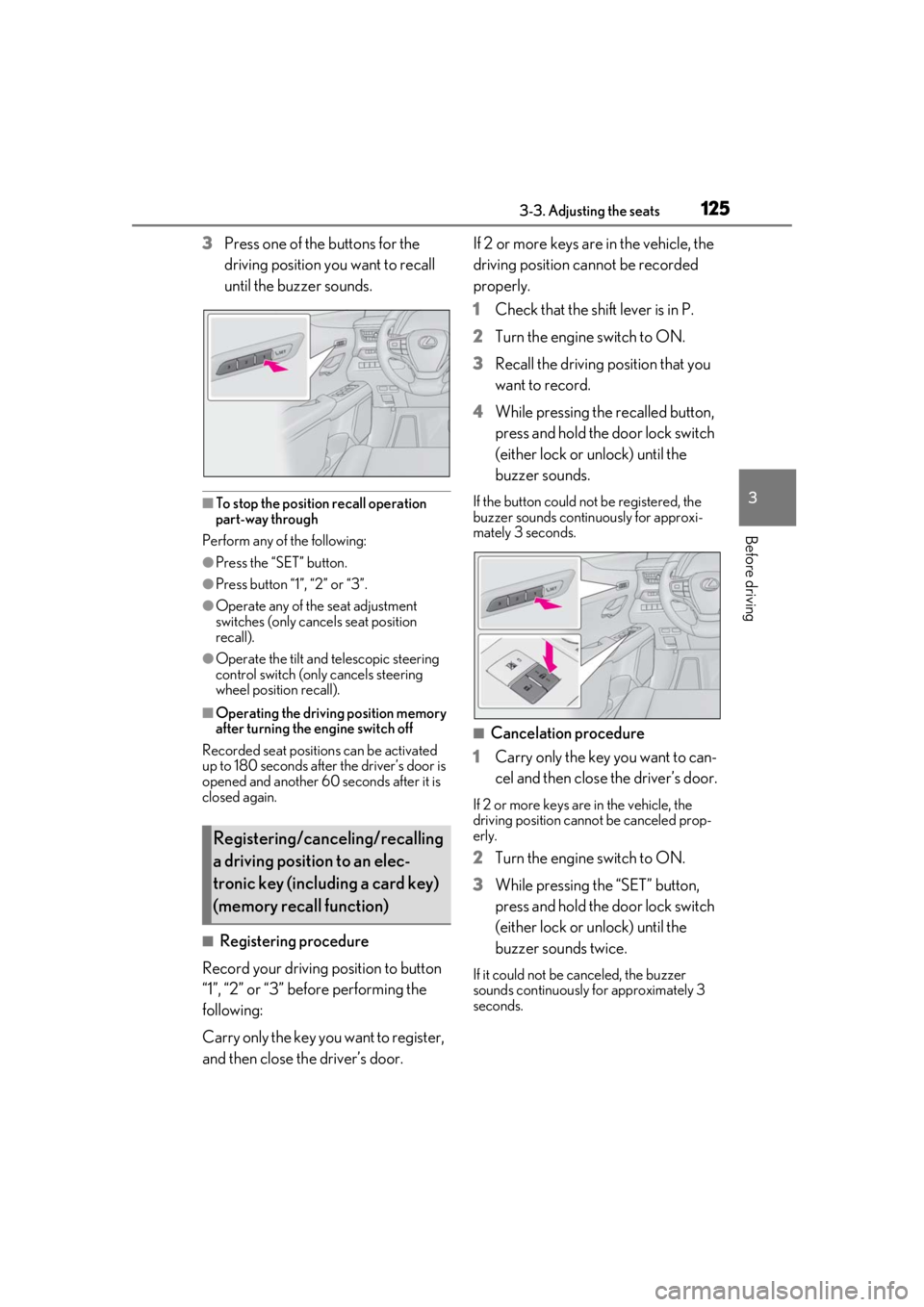
3Press one of the buttons for the
driving position you want to recall
until the buzzer sounds.
■To stop the position recall operation
part-way through
Perform any of the following:
●Press the “SET” button.
●Press button “1”, “2” or “3”.
●Operate any of the seat adjustment
switches (only cancels seat position
recall).
●Operate the tilt and telescopic steering
control switch (only cancels steering
wheel position recall).
■Operating the driving position memory
after turning the engine switch off
Recorded seat positions can be activated
up to 180 seconds after the driver’s door is
opened and another 60 seconds after it is
closed again.
■Registering procedure
Record your driving position to button
“1”, “2” or “3” before performing the
following:
Carry only the key you want to register,
and then close the driver’s door. If 2 or more keys are in the vehicle, the
driving position cannot be recorded
properly.
1
Check that the shift lever is in P.
2 Turn the engine switch to ON.
3 Recall the driving position that you
want to record.
4 While pressing the recalled button,
press and hold the door lock switch
(either lock or unlock) until the
buzzer sounds.
If the button could not be registered, the
buzzer sounds continuously for approxi-
mately 3 seconds.
■Cancelation procedure
1 Carry only the key you want to can-
cel and then close the driver’s door.
If 2 or more keys are in the vehicle, the
driving position cannot be canceled prop-
erly.
2Turn the engine switch to ON.
3 While pressing the “SET” button,
press and hold the door lock switch
(either lock or unlock) until the
buzzer sounds twice.
If it could not be canceled, the buzzer
sounds continuously for approximately 3
seconds.
Registering/canceling/recalling
a driving position to an elec-
tronic key (including a card key)
(memory recall function)
Page 126 of 452
1263-3. Adjusting the seats
■Recall procedure
1
Make sure that the doors are
locked before recalling the driving
position.Carry the electronic key
that has been registered to the driv-
ing position, and then unlock and
open the driver’s door using the
smart access system with push-but-
ton start or wireless remote control.
The driving position will move to the
recorded position (not including the steer-
ing wheel and head-up display [if
equipped]). However, the seat will move to
a position slightly behind the recorded
position in order to make entering the vehi-
cle easier.
If the driving position is in a position that
has already been recorded, the seat and
outside rear view mirrors will not move.
2Turn the engine switch to ACC or
ON, or fasten a seat belt.
The seat, steering wheel and head-up dis-
play (if equipped) will move to the
recorded position.
■Recalling the driving position using the
memory recall function
●Different driving positions can be regis-
tered for each electronic key. Therefore,
the driving position that is recalled may
be different depending on the key being
carried.
●If a door other than the driver’s door is
unlocked with the smart access system
with push-button start, the driving posi-
tion cannot be recalled. In this case, press
the driving position button which has
been set.
■Customization
The unlock door settings of the memory
recall function can be customized. (Cus-
tomizable features: P.413)
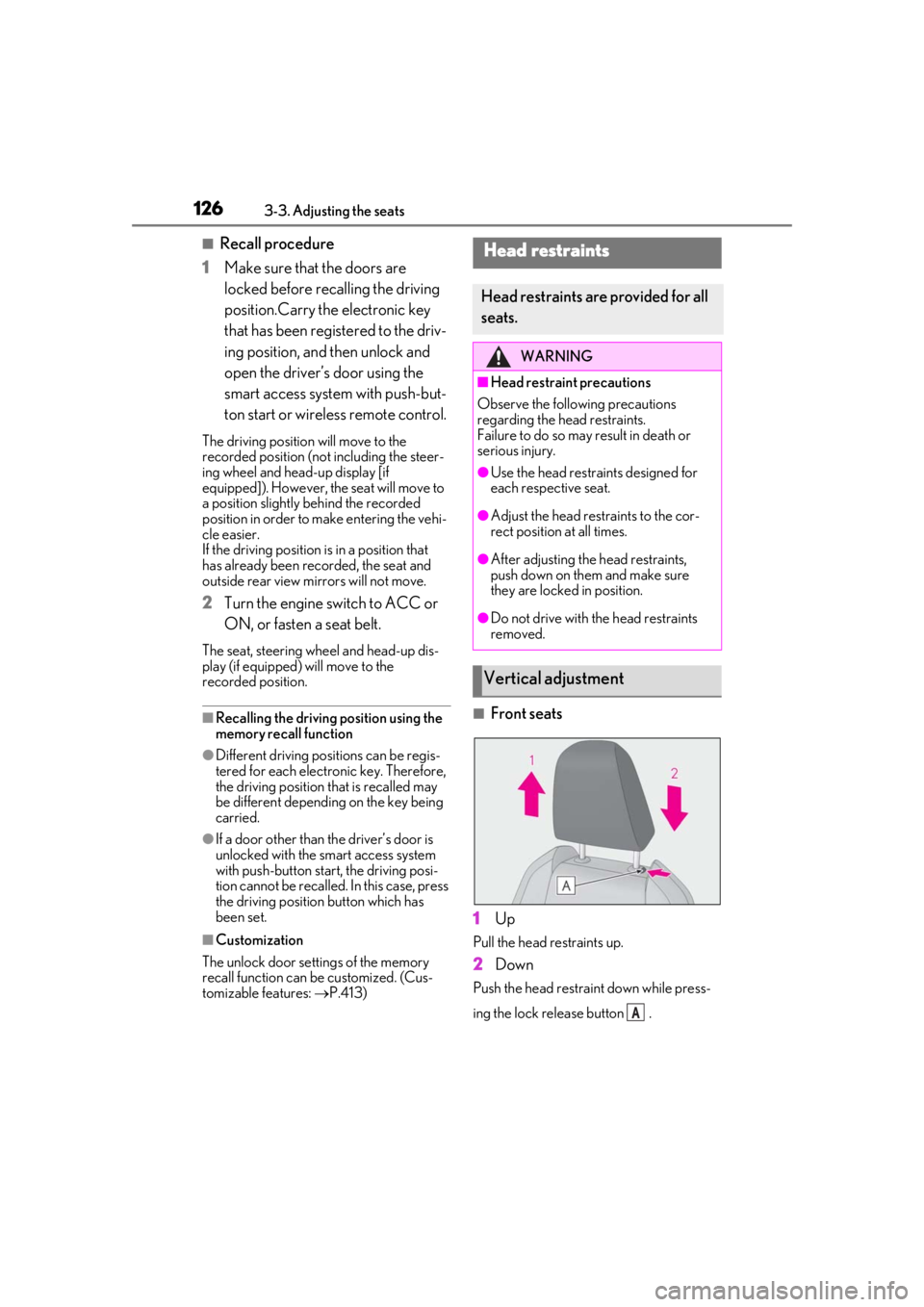
■Front seats
1
Up
Pull the head restraints up.
2Down
Push the head restraint down while press-
ing the lock release button .
Head restraints
Head restraints are provided for all
seats.
WARNING
■Head restraint precautions
Observe the following precautions
regarding the he ad restraints.
Failure to do so may result in death or
serious injury.
●Use the head restraints designed for
each respective seat.
●Adjust the head restraints to the cor-
rect position at all times.
●After adjusting the head restraints,
push down on them and make sure
they are locked in position.
●Do not drive with the head restraints
removed.
Vertical adjustment
A
Page 135 of 452
1353-5. Opening, closing the windows and moon roof
3
Before driving
3-5.Opening, closing the windows and moon roof
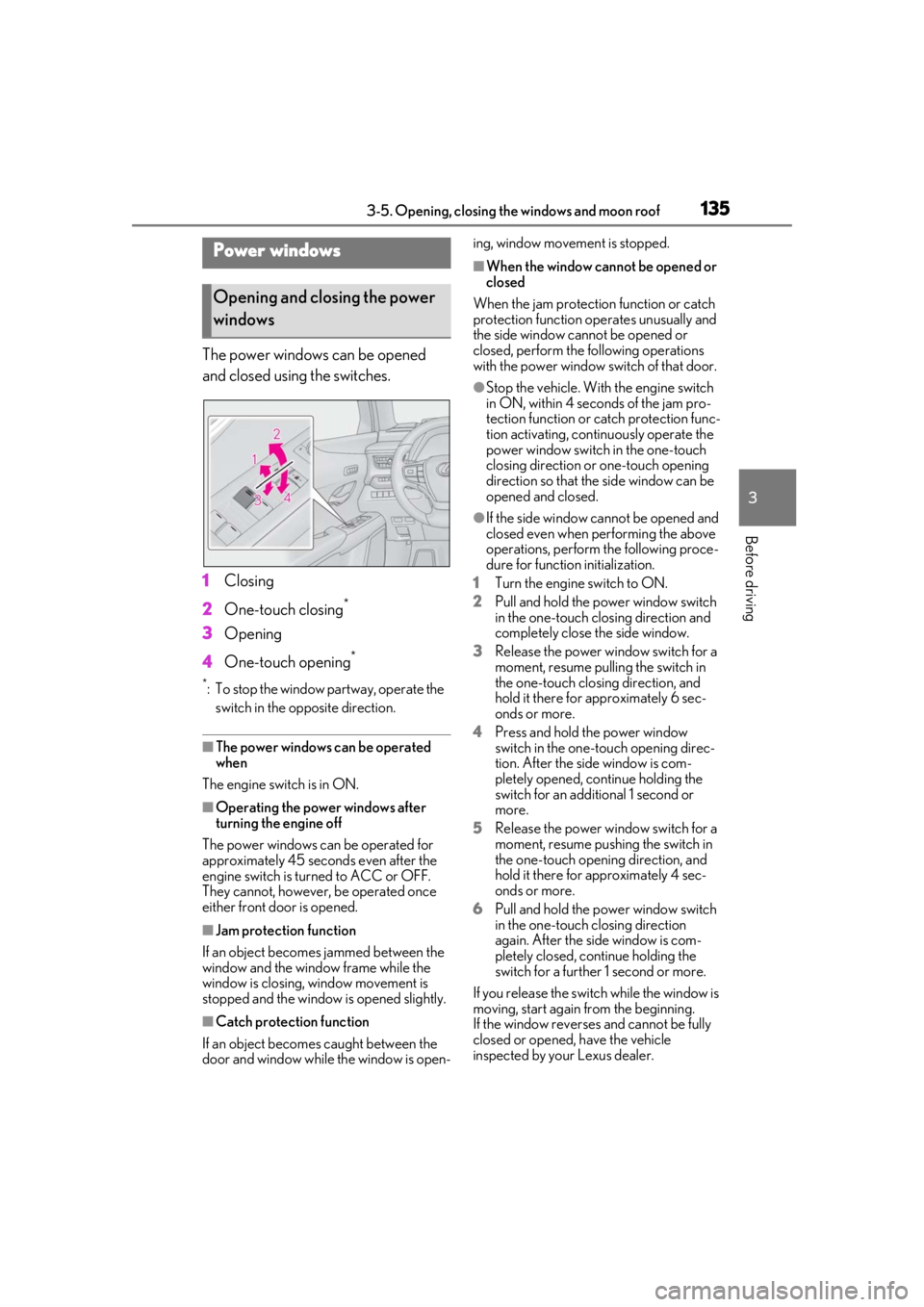
The power windows can be opened
and closed using the switches.
1Closing
2 One-touch closing
*
3Opening
4 One-touch opening
*
*: To stop the window partway, operate the
switch in the op posite direction.
■The power windows can be operated
when
The engine switch is in ON.
■Operating the power windows after
turning the engine off
The power windows can be operated for
approximately 45 seconds even after the
engine switch is turned to ACC or OFF.
They cannot, however, be operated once
either front door is opened.
■Jam protection function
If an object becomes jammed between the
window and the window frame while the
window is closing, window movement is
stopped and the window is opened slightly.
■Catch protection function
If an object becomes caught between the
door and window while the window is open- ing, window movement is stopped.
■When the window cannot be opened or
closed
When the jam protection function or catch
protection function operates unusually and
the side window cannot be opened or
closed, perform the following operations
with the power window switch of that door.
●Stop the vehicle. With the engine switch
in ON, within 4 seconds of the jam pro-
tection function or catch protection func-
tion activating, continuously operate the
power window switch in the one-touch
closing direction or one-touch opening
direction so that the side window can be
opened and closed.
●If the side window cannot be opened and
closed even when performing the above
operations, perform the following proce-
dure for function initialization.
1 Turn the engine switch to ON.
2 Pull and hold the power window switch
in the one-touch closing direction and
completely close the side window.
3 Release the power window switch for a
moment, resume pulling the switch in
the one-touch closing direction, and
hold it there for approximately 6 sec-
onds or more.
4 Press and hold the power window
switch in the one-touch opening direc-
tion. After the side window is com-
pletely opened, continue holding the
switch for an additional 1 second or
more.
5 Release the power window switch for a
moment, resume pushing the switch in
the one-touch opening direction, and
hold it there for approximately 4 sec-
onds or more.
6 Pull and hold the power window switch
in the one-touch closing direction
again. After the side window is com-
pletely closed, continue holding the
switch for a further 1 second or more.
If you release the switch while the window is
moving, start again from the beginning.
If the window reverses and cannot be fully
closed or opened, have the vehicle
inspected by your Lexus dealer.
Power windows
Opening and closing the power
windows
Page 136 of 452
1363-5. Opening, closing the windows and moon roof
■Door lock linked window operation
●The power windows can be opened and
closed using the mechanical key.*
( P.381)
●The power windows can be opened using
the wireless remote control.* ( P.98)
*: These settings must be customized at
your Lexus dealer.
■Power windows open warning buzzer
The buzzer sounds and “Window Open” is
shown on the multi-information display in
the instrument cluster when the engine
switch is turned off and the driver’s door is
opened with the power windows open.
■Customization
Setting (e.g. linked door lock operation) can
be changed.
(Customizable features: P.413)
This function is designed to prevent
children from accidentally opening or
closing a passenger window.
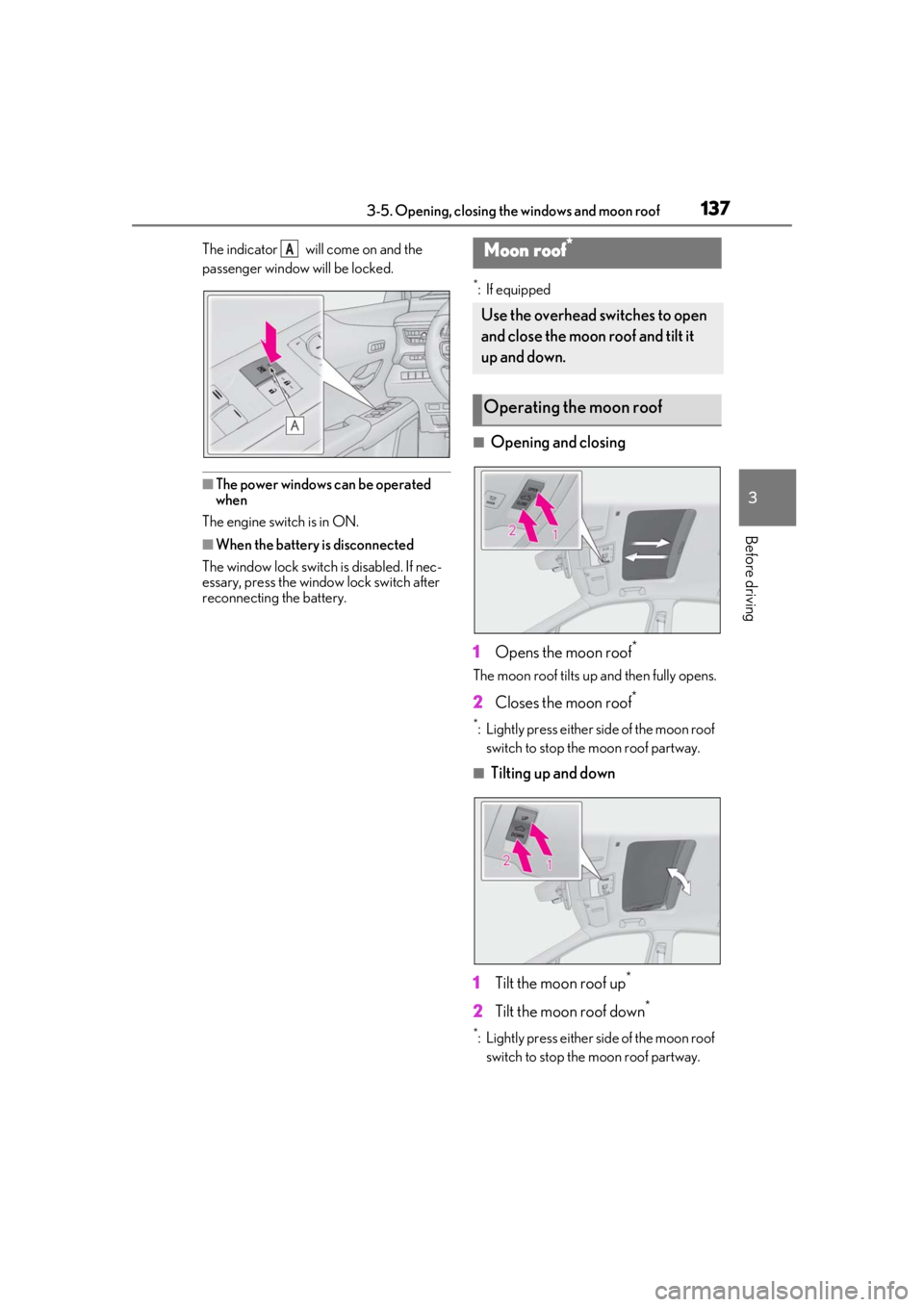
Press the switch.
WARNING
Observe the following precautions.
Failing to do so may result in death or
serious injury.
■Closing the windows
●The driver is responsible for all the
power window operations, including
the operation for the passengers. In
order to prevent accidental operation,
especially by a child, do not let a child
operate the power windows. It is possi-
ble for children and other passengers
to have body parts caught in the power
window. Also, when riding with a child,
it is recommended to use the window
lock switch. ( P.136)
●Check to make sure that all passen-
gers do not have any part of their body
in a position where it could be caught
when a window is being operated.
●When using the wireless remote con-
trol or mechanical key and operating
the power windows, operate the
power window after checking to make
sure that there is no possibility of any
passenger having any of their body
parts caught in the window. Also do
not let a child operate window by the
wireless remote control or mechanical
key. It is possible for children and other
passengers to get caught in the power
window.
●When exiting the vehicle, turn the
engine switch off, carry the key and
exit the vehicle along with the child.
There may be accidental operation,
due to mischief, etc., that may possibly
lead to an accident.
■Jam protection function
●Never use any part of your body to
intentionally activa te the jam protec-
tion function.
●The jam protection function may not
work if something gets jammed just
before the window is fully closed. Be
careful not to get any part of your body
jammed in the window.
■Catch protection function
●Never use any part of your body or
clothing to intentionally activate the
catch protection function.
●The catch protection function may not
work if something gets caught just
before the window is fully opened. Be
careful not to get any part of your body
or clothing caught in the window.
Preventing accidental operation
(window lock switch)
Page 137 of 452
1373-5. Opening, closing the windows and moon roof
3
Before driving
The indicator will come on and the
passenger window will be locked.
■The power windows can be operated
when
The engine switch is in ON.
■When the battery is disconnected
The window lock switch is disabled. If nec-
essary, press the window lock switch after
reconnecting the battery.
*: If equipped
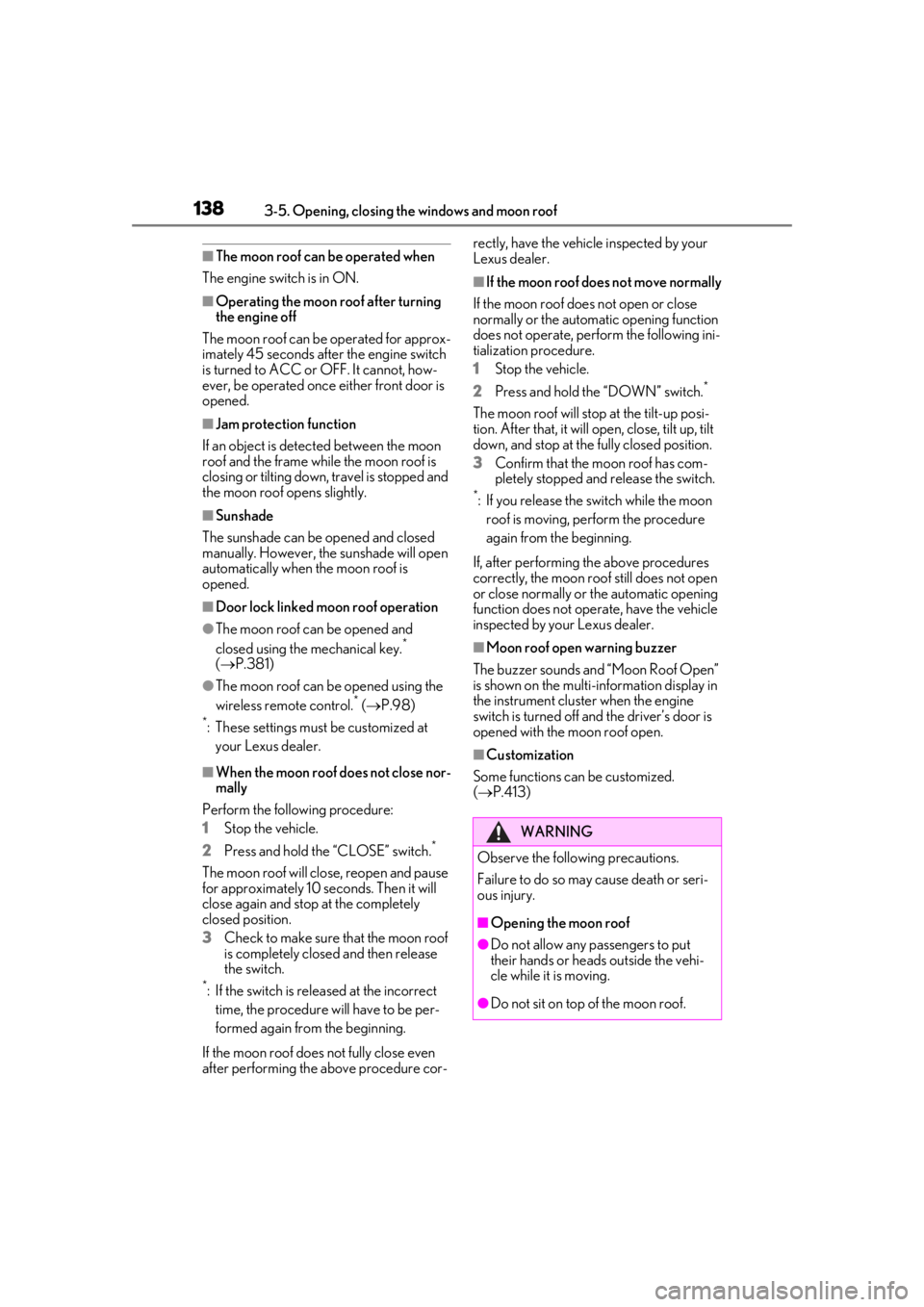
■Opening and closing
1 Opens the moon roof
*
The moon roof tilts up and then fully opens.
2Closes the moon roof*
*: Lightly press either side of the moon roof
switch to stop the moon roof partway.
■Tilting up and down
1 Tilt the moon roof up
*
2Tilt the moon roof down*
*: Lightly press either side of the moon roof
switch to stop the moon roof partway.
AMoon roof*
Use the overhead switches to open
and close the moon roof and tilt it
up and down.
Operating the moon roof
Page 138 of 452
1383-5. Opening, closing the windows and moon roof
■The moon roof can be operated when
The engine switch is in ON.
■Operating the moon roof after turning
the engine off
The moon roof can be operated for approx-
imately 45 seconds after the engine switch
is turned to ACC or OFF. It cannot, how-
ever, be operated once either front door is
opened.
■Jam protection function
If an object is detected between the moon
roof and the frame while the moon roof is
closing or tilting down, travel is stopped and
the moon roof opens slightly.
■Sunshade
The sunshade can be opened and closed
manually. However, the sunshade will open
automatically when the moon roof is
opened.
■Door lock linked moon roof operation
●The moon roof can be opened and
closed using the mechanical key.*
( P.381)
●The moon roof can be opened using the
wireless remote control.* ( P.98)
*: These settings must be customized at
your Lexus dealer.
■When the moon roof does not close nor-
mally
Perform the following procedure:
1
Stop the vehicle.
2
Press and hold the “CLOSE” switch.*
The moon roof will close, reopen and pause
for approximately 10 seconds. Then it will
close again and stop at the completely
closed position.
3
Check to make sure that the moon roof
is completely closed and then release
the switch.
*: If the switch is released at the incorrect time, the procedure will have to be per-
formed again from the beginning.
If the moon roof does not fully close even
after performing the above procedure cor- rectly, have the vehicle inspected by your
Lexus dealer.
■If the moon roof does not move normally
If the moon roof does not open or close
normally or the automatic opening function
does not operate, perform the following ini-
tialization procedure.
1
Stop the vehicle.
2
Press and hold the “DOWN” switch.*
The moon roof will stop at the tilt-up posi-
tion. After that, it will open, close, tilt up, tilt
down, and stop at the fully closed position.
3
Confirm that the moon roof has com-
pletely stopped and release the switch.
*: If you release the sw itch while the moon
roof is moving, perform the procedure
again from the beginning.
If, after performing the above procedures
correctly, the moon roof still does not open
or close normally or the automatic opening
function does not operate, have the vehicle
inspected by your Lexus dealer.
■Moon roof open warning buzzer
The buzzer sounds and “Moon Roof Open”
is shown on the multi-information display in
the instrument cluster when the engine
switch is turned off and the driver’s door is
opened with the moon roof open.
■Customization
Some functions can be customized.
( P.413)
WARNING
Observe the following precautions.
Failure to do so may cause death or seri-
ous injury.
■Opening the moon roof
●Do not allow any passengers to put
their hands or heads outside the vehi-
cle while it is moving.
●Do not sit on top of the moon roof.
Page 139 of 452
1393-5. Opening, closing the windows and moon roof
3
Before driving
WARNING
■Opening and closing the moon roof
●The driver is responsible for moon roof
opening and closing operations.
In order to prevent accidental opera-
tion, especially by a child, do not let a
child operate the moon roof. It is possi-
ble for children and other passengers
to have body parts caught in the moon
roof.
●Check to make sure that all passen-
gers do not have any part of their body
in a position where it could be caught
when the moon roof is being operated.
●When using the wireless remote con-
trol or mechanical key and operating
the moon roof, operate the moon roof
after checking to make sure that there
is no possibility of any passenger hav-
ing any of their body parts caught in
the moon roof. Also, do not let a child
operate moon roof by the wireless
remote control or mechanical key. It is
possible for children and other passen-
gers to get caught in the moon roof.
●When exiting the vehicle, turn the
engine switch off, carry the key and
exit the vehicle along with the child.
There may be accid ental operation,
due to mischief, etc., that may possibly
lead to an accident.
■Jam protection function
●Never use any part of your body to
intentionally activate the jam protec-
tion function.
●The jam protection function may not
work if something gets caught just
before the moon roof is fully closed.
Also, the jam protection function is not
designed to operate while the moon
roof switch is being pressed. Take care
so that your fingers, etc. do not get
caught.
Page 140 of 452

1403-5. Opening, closing the windows and moon roof