open LEXUS UX200 2019 Repair Manual
[x] Cancel search | Manufacturer: LEXUS, Model Year: 2019, Model line: UX200, Model: LEXUS UX200 2019Pages: 452, PDF Size: 10.06 MB
Page 212 of 452
![LEXUS UX200 2019 Repair Manual 2124-5. Using the driving support systems
below approximately 20 mph [30 km/h],
the set speed will be set to approximately
20 mph [30 km/h].)
■Accelerating after setting the vehicle
speed
The veh](/img/36/58038/w960_58038-211.png "LEXUS UX200 2019 Repair Manual 2124-5. Using the driving support systems
below approximately 20 mph [30 km/h],
the set speed will be set to approximately
20 mph [30 km/h].)
■Accelerating after setting the vehicle
speed
The veh")
2124-5. Using the driving support systems
below approximately 20 mph [30 km/h],
the set speed will be set to approximately
20 mph [30 km/h].)
■Accelerating after setting the vehicle
speed
The vehicle can accelerate by operating the
accelerator pedal. After accelerating, the
set speed resumes. However, during vehi-
cle-to-vehicle distance control mode, the
vehicle speed may decrease below the set
speed in order to maintain the distance to
the preceding vehicle.
■When the vehicle stops while follow-up
cruising
●Pressing the “+RES” switch while the
vehicle ahead stops w ill resume follow-up
cruising if the vehicle ahead starts off
within approximately 3 seconds after the
switch is pressed.
●If the vehicle ahead starts off within 3 sec-
onds after your vehicle stops, follow-up
cruising will be resumed.
■Automatic cancelation of vehicle-to-
vehicle distance control mode
Vehicle-to-vehicle dist ance control mode is
automatically canceled in the following situ-
ations.
●VSC is activated.
●TRAC is activated for a period of time.
●When the VSC or TRAC system is
turned off.
●The sensor cannot detect correctly
because it is covered in some way.
●Pre-collision braking is activated.
●The parking brake is operated.
●The vehicle is stopped by system control
on a steep incline.
●The following are detected when the
vehicle has been stopped by system con-
trol:
• The driver is not wearing a seat belt.
• The driver’s door is opened.
• The vehicle has been stopped for about 3 minutes
If vehicle-to-vehicle distance control mode
is automatically canceled for any reasons
other than the above, there may be a mal- function in the system. Contact your Lexus
dealer.
■Automatic cancelation of constant
speed control mode
Constant speed control mode is automati-
cally canceled in the following situations:
●Actual vehicle speed is more than
approximately 10 mph (16 km/h) below
the set vehicle speed.
●Actual vehicle speed falls below approxi-
mately 20 mph (30 km/h).
●VSC is activated.
●TRAC is activated for a period of time.
●When the VSC or TRAC system is
turned off.
●Pre-collision braking is activated.
If constant speed control mode is automati-
cally canceled for any reasons other than
the above, there may be a malfunction in the
system. Contact your Lexus dealer.
■Brake operation
A brake operation sound may be heard and
the brake pedal response may change, but
these are not malfunctions.
■Warning messages and buzzers for
dynamic radar cruise control with full-
speed range
Warning messages and buzzers are used to
indicate a system malfunction or to inform
the driver of the need for caution while driv-
ing. If a warning messa ge is shown on the
multi-information displa y, read the message
and follow the instructions. ( P.184, 367)
■When the sensor may not be correctly
detecting the vehicle ahead
In the case of the fo llowing and depending
on the conditions, operate the brake pedal
when deceleration of the system is insuffi-
cient or operate the accelerator pedal
when acceleration is required.
As the sensor may not be able to correctly
detect these types of vehicles, the approach
warning ( P.210) may not be activated.
●Vehicles that cut in suddenly
●Vehicles traveling at low speeds
●Vehicles that are not moving in the same
Page 250 of 452
2504-6. Driving tips
Perform the following according to the
driving conditions:
Do not try to forcib ly open a window
or move a wiper that is frozen. Pour
warm water over the frozen area to
melt the ice. Wipe away the water
immediately to prevent it from
freezing.
To ensure proper operation of the
climate control system fan, remove
any snow that has accumulated on
the air inlet vents in front of the
windshield.
Check for and remove any excess
ice or snow that may have accumu-
lated on the exterior lights, vehicle’s
roof, chassis, around the tires or on
the brakes.
Remove any snow or mud from the
bottom of your shoes before getting
in the vehicle.
Accelerate the vehicle slowly, keep a
safe distance between you and the
vehicle ahead, and drive at a reduced
speed suitable to road conditions.
Park the vehicle and move the shift
lever to P without setting the park-
ing brake. The parking brake may
freeze up, preventing it from being
released. If the vehicle is parked
without setting the parking brake,
make sure to block the wheels.
Failure to do so may be dangerous
because it may cause the vehicle to
move unexpectedly, possibly lead-
ing to an accident.
When the parking brake is in automatic
mode, release the parking brake after shift-
ing the shift lever to P. ( P.160)
If the vehicle is left parked with the
brakes damp in cold temperatures,
there is a possibility of the brakes
freezing.
If the vehicle is parked without set-
ting the parking brake, confirm that
the shift lever cannot be moved out
of P
*.
*: The shift lever will be locked if it is
attempted to be shifted from P to any
other position with out depressing the
brake pedal. If the shift lever can be
shifted from P, there may be a problem
with the shift lock system. Have the vehi-
cle inspected by your Lexus dealer
immediately.
NOTICE
■Repairing or replacing snow tires
Request repairs or replacement of snow
tires from Lexus dealers or legitimate tire
retailers.
This is because the removal and attach-
ment of snow tires affects the operation
of the tire pressure warning valves and
transmitters.
Before driving the vehicle
When driving the vehicle
When parking the vehicle
WARNING
■When parking the vehicle
When parking the vehicle without apply-
ing the parking brake, make sure to
chock the wheels. If you do not chock the
wheels, the vehicle may move unexpect-
edly, possibly result ing in an accident.
Page 255 of 452

255
5
5
Interior features
Interior features
5-1. Remote TouchRemote Touch ............................ 256
5-2. Lexus Climate Concierge Lexus Climate Concierge ..... 260
5-3. Using the air conditioning system and defogger
Automatic air conditioning system ........................................................ 262
Heated steering wheel/seat heat- ers/seat ventilators ................. 271
5-4. Using the interior lights Interior lights list......................... 274
5-5. Using the storage features List of storage features............ 277
Luggage compartment features ........................................................ 280
5-6. Using the other interior features Other interior features ........... 285
Garage door opener............... 295
Compass........................................ 301
Page 268 of 452
2685-3. Using the air conditioning system and defogger
To turn on the “DUAL” mode, perform
any of the following procedures:
Select “DUAL” on the sub function
menu. ( P.265)
Select “DUAL” on the option con-
trol screen.
Adjust the front passenger’s side
temperature setting.
The indicator comes on when the “DUAL”
mode is on.
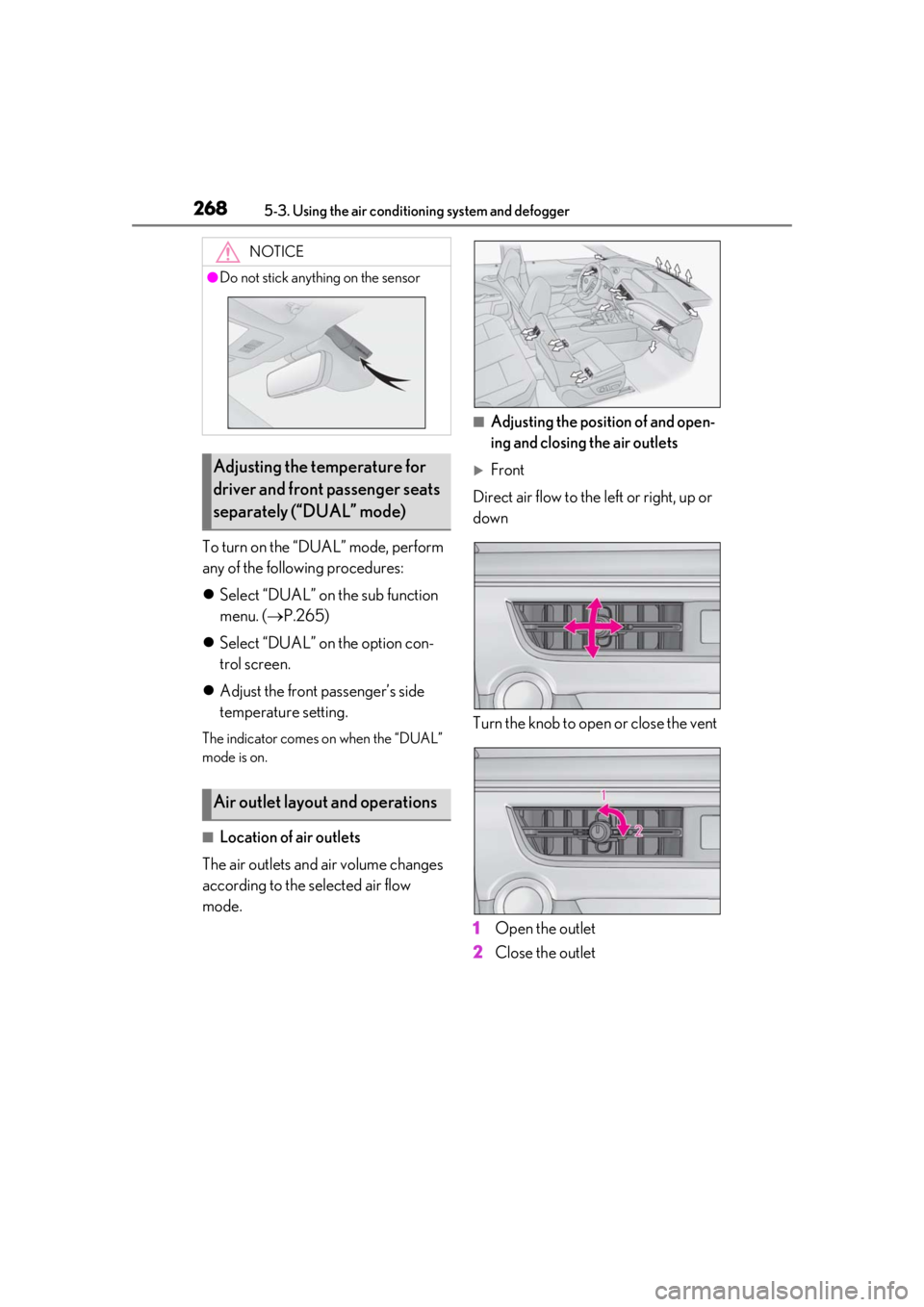
■Location of air outlets
The air outlets and air volume changes
according to the selected air flow
mode.
■Adjusting the position of and open-
ing and closing the air outlets
Front
Direct air flow to the left or right, up or
down
Turn the knob to open or close the vent
1
Open the outlet
2
Close the outlet
NOTICE
●Do not stick anything on the sensor
Adjusting the temperature for
driver and front passenger seats
separately (“DUAL” mode)
Air outlet layout and operations
Page 269 of 452
2695-3. Using the air conditioning system and defogger
5
Interior features
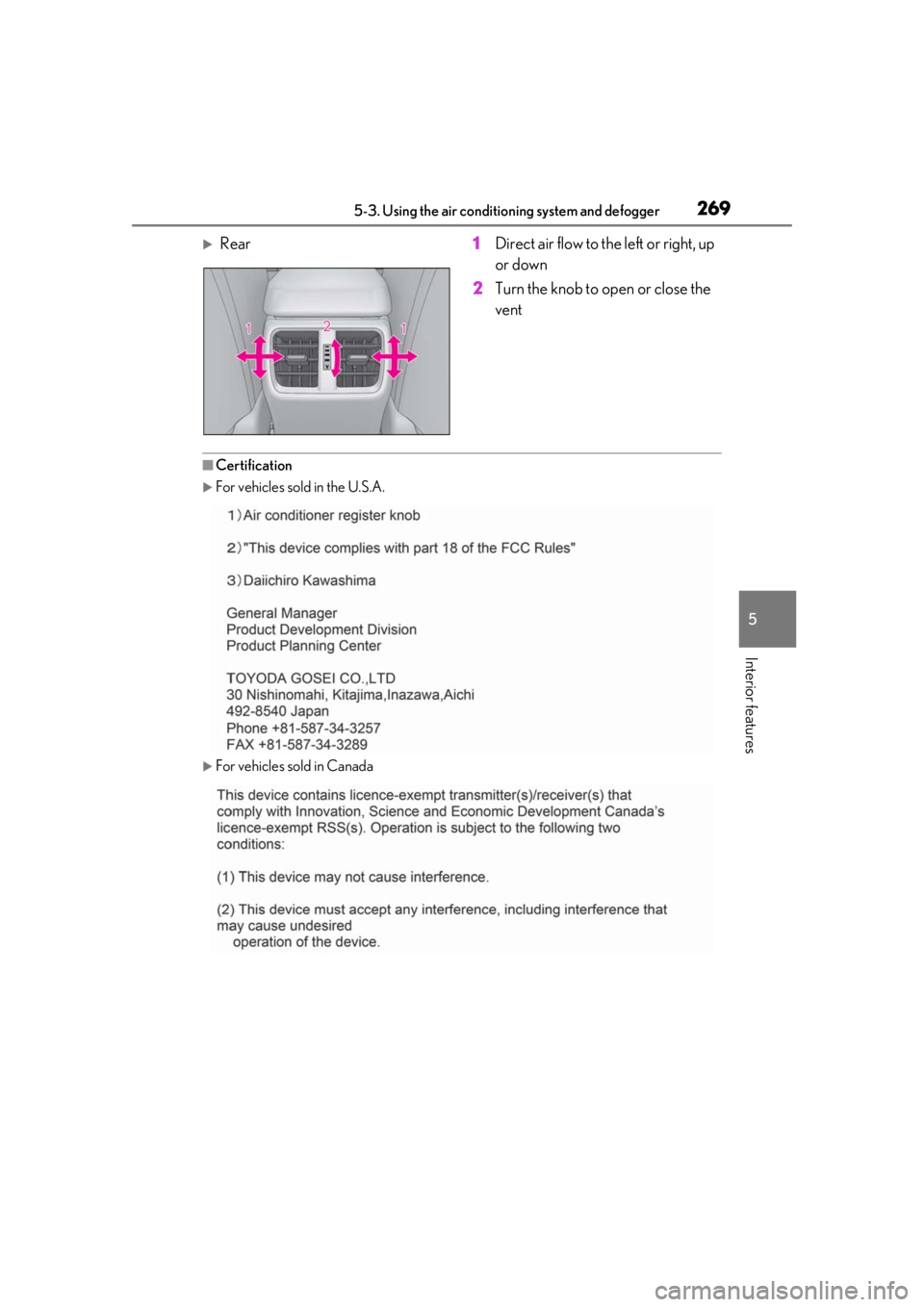
Rear 1Direct air flow to the left or right, up
or down
2 Turn the knob to open or close the
vent
■Certification
For vehicles sold in the U.S.A.
For vehicles sold in Canada
Page 274 of 452
2745-4. Using the interior lights
5-4.Using the interior lights
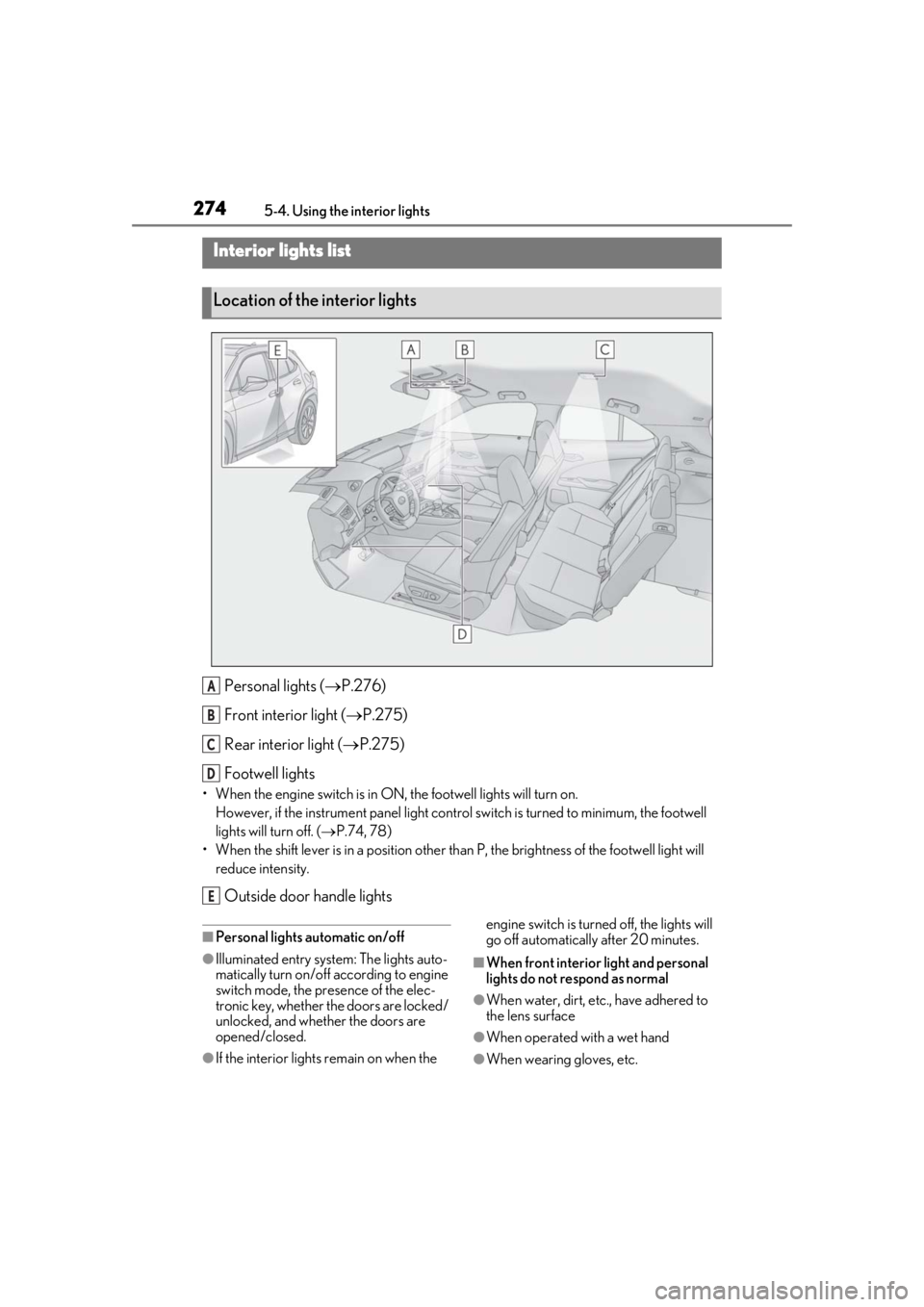
Personal lights ( P.276)
Front interi or light (P.275)
Rear interior light ( P.275)
Footwell lights
• When the engine switch is in ON, the footwell lights will turn on. However, if the instrume nt panel light control switch is turned to minimum, the footwell
lights will turn off. ( P.74, 78)
• When the shift lever is in a position other th an P, the brightness of the footwell light will
reduce intensity.
Outside door handle lights
■Personal lights automatic on/off
●Illuminated entry system: The lights auto-
matically turn on/off according to engine
switch mode, the presence of the elec-
tronic key, whether the doors are locked/
unlocked, and whether the doors are
opened/closed.
●If the interior lights remain on when the engine switch is turned
off, the lights will
go off automatically after 20 minutes.
■When front interior light and personal
lights do not respond as normal
●When water, dirt, etc., have adhered to
the lens surface
●When operated with a wet hand
●When wearing gloves, etc.
Interior lights list
Location of the interior lights
A
B
C
D
E
Page 275 of 452
2755-4. Using the interior lights
5
Interior features
■Automatic turning on of the interior
lights
If any of the SRS airbags deploy (inflate) or
in the event of a strong rear impact, the inte-
rior lights will turn on automatically. The
interior lights will turn off automatically after
approximately 20 minutes. The interior
lights can be turned off manually. However,
in order to help prevent further collisions, it
is recommended that th ey be left on until
safety can be ensured. (The interior lights
may not turn on automatically depending
on the force of the impact and conditions of
the collision.)
■Customization
Setting (e.g. the time elapsed before lights
turn off) can be changed. (Customizable
features: P.412)
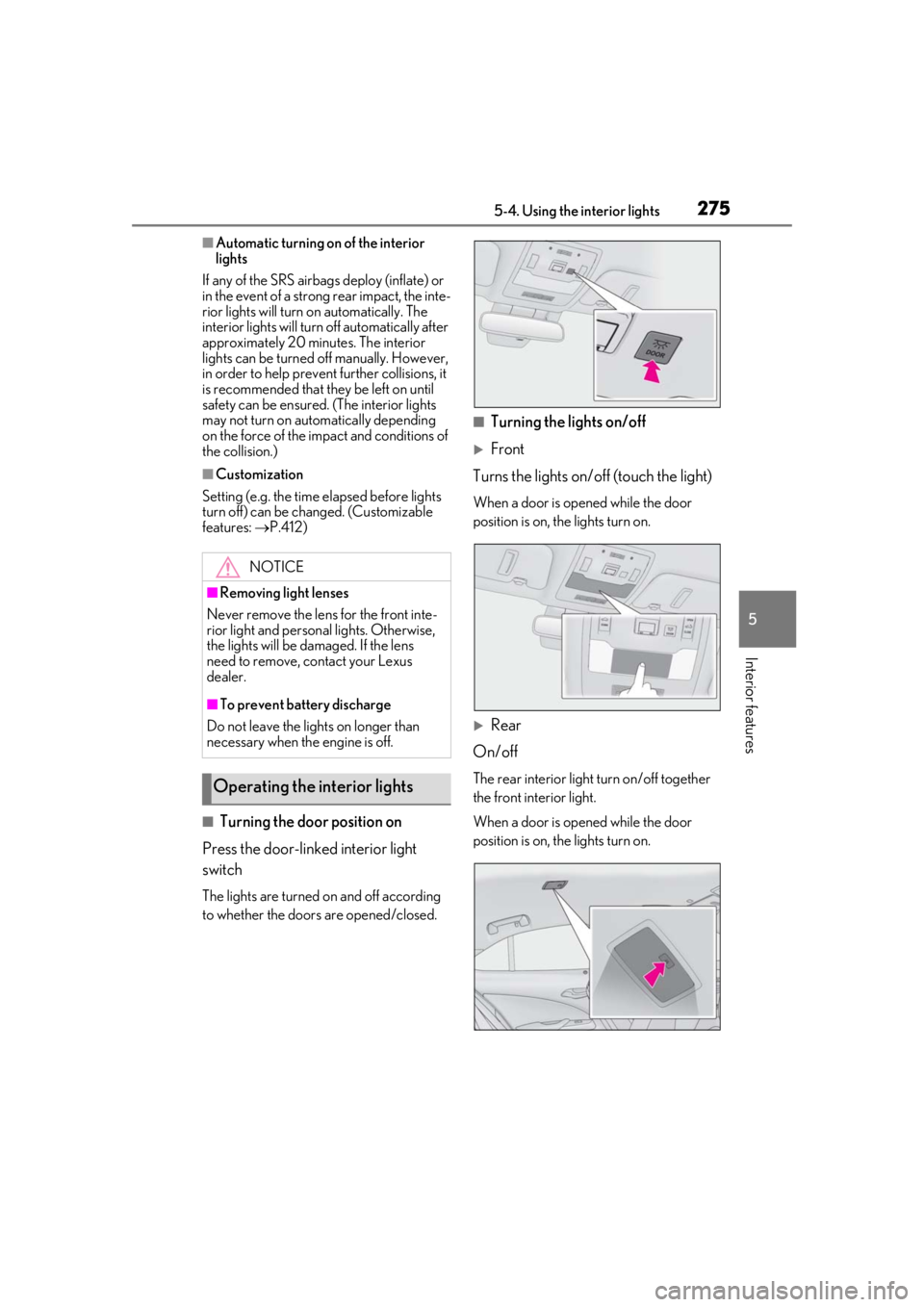
■Turning the door position on
Press the door-linked interior light
switch
The lights are turned on and off according
to whether the doors are opened/closed.
■Turning the lights on/off
Front
Turns the lights on/off (touch the light)
When a door is opened while the door
position is on, the lights turn on.
Rear
On/off
The rear interior light turn on/off together
the front interior light.
When a door is opened while the door
position is on, the lights turn on.
NOTICE
■Removing light lenses
Never remove the lens for the front inte-
rior light and personal lights. Otherwise,
the lights will be damaged. If the lens
need to remove, contact your Lexus
dealer.
■To prevent battery discharge
Do not leave the lights on longer than
necessary when the engine is off.
Operating the interior lights
Page 276 of 452
2765-4. Using the interior lights
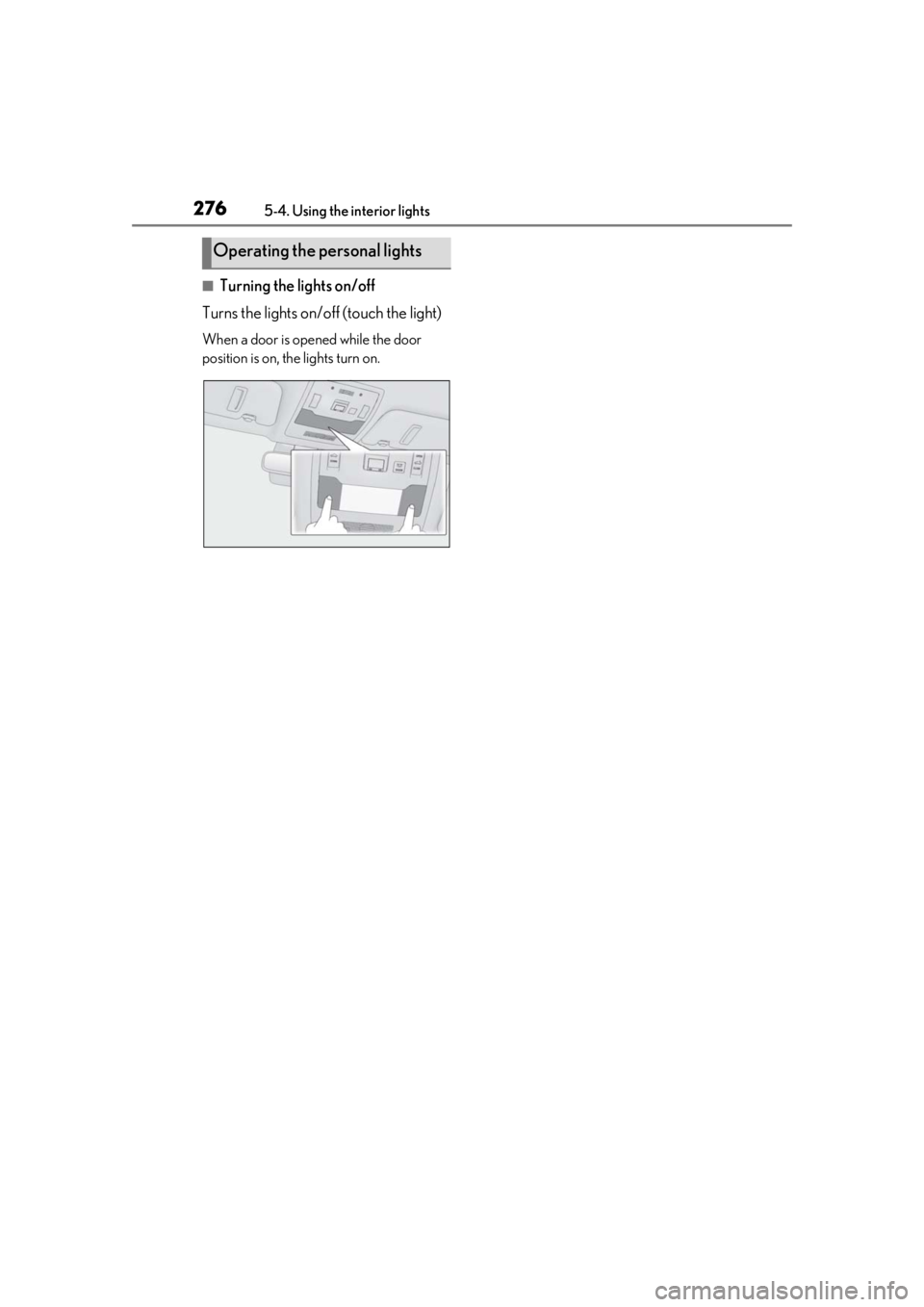
■Turning the lights on/off
Turns the lights on/off (touch the light)
When a door is opened while the door
position is on, the lights turn on.
Operating the personal lights
Page 278 of 452
2785-5. Using the storage features
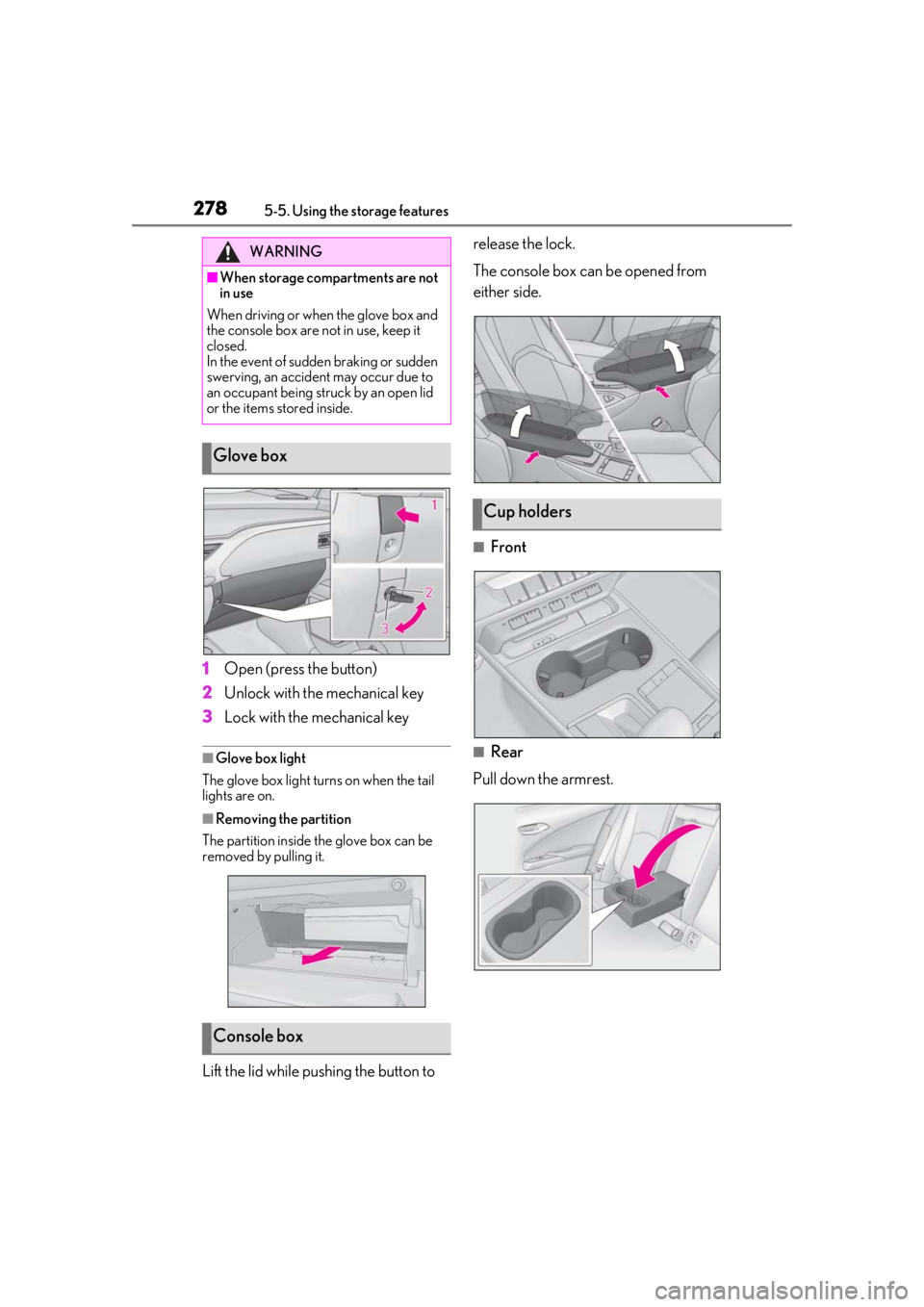
1Open (press the button)
2
Unlock with the mechanical key
3
Lock with the mechanical key
■Glove box light
The glove box light turns on when the tail
lights are on.
■Removing the partition
The partition inside the glove box can be
removed by pulling it.
Lift the lid while pushing the button to release the lock.
The console box can be opened from
either side.
■Front
■Rear
Pull down the armrest.
WARNING
■When storage compartments are not
in use
When driving or when the glove box and
the console box are not in use, keep it
closed.
In the event of sudden braking or sudden
swerving, an accident may occur due to
an occupant being struck by an open lid
or the items stored inside.
Glove box
Console box
Cup holders
Page 279 of 452
2795-5. Using the storage features
5
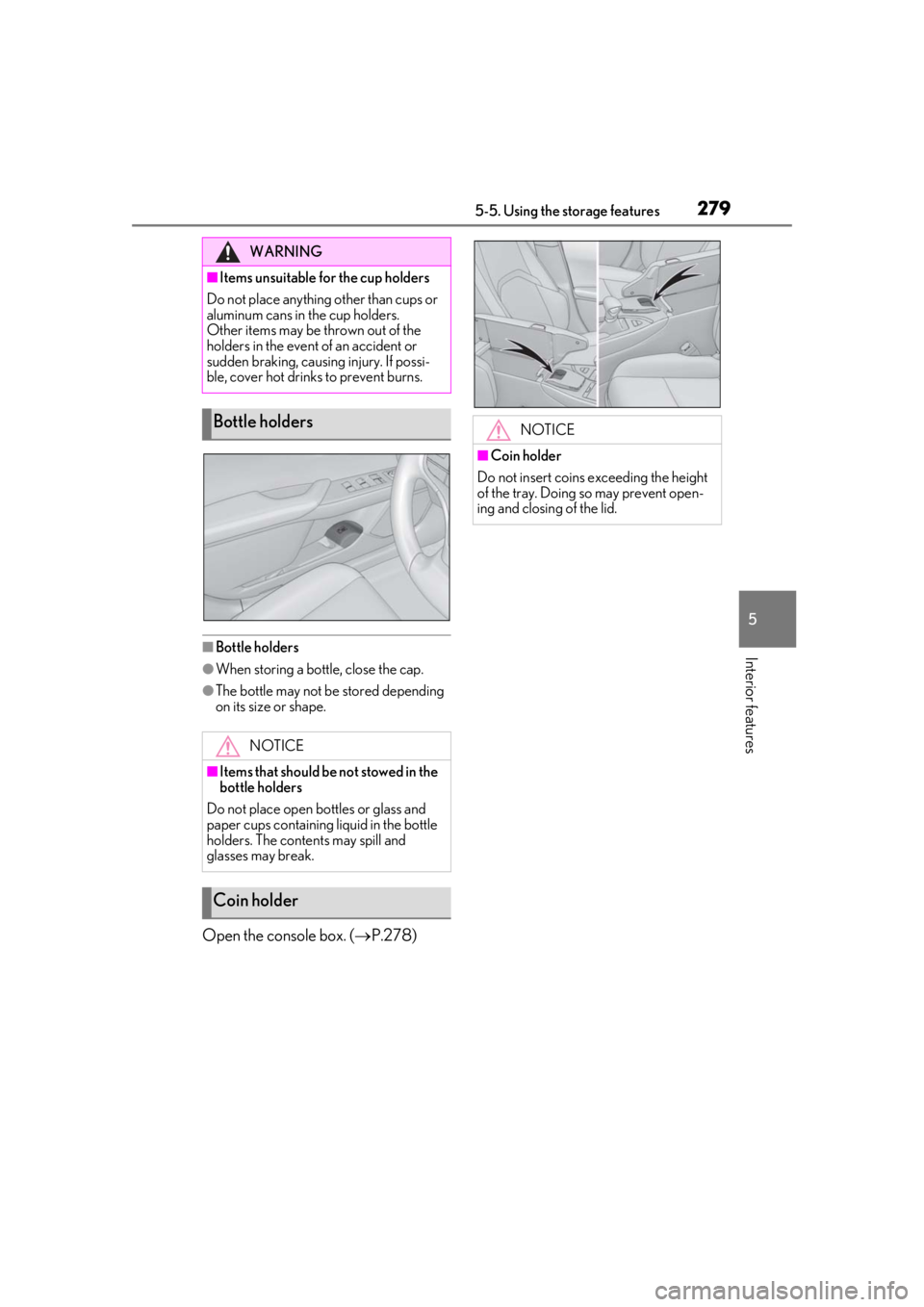
Interior features■Bottle holders
●When storing a bottle, close the cap.
●The bottle may not be stored depending
on its size or shape.
Open the console box. (P.278)
WARNING
■Items unsuitable for the cup holders
Do not place anything other than cups or
aluminum cans in the cup holders.
Other items may be thrown out of the
holders in the event of an accident or
sudden braking, causing injury. If possi-
ble, cover hot drinks to prevent burns.
Bottle holders
NOTICE
■Items that should be not stowed in the
bottle holders
Do not place open bottles or glass and
paper cups containing liquid in the bottle
holders. The contents may spill and
glasses may break.
Coin holder
NOTICE
■Coin holder
Do not insert coins exceeding the height
of the tray. Doing so may prevent open-
ing and closing of the lid.