center LEXUS UX250H 2019 Owner's Manual
[x] Cancel search | Manufacturer: LEXUS, Model Year: 2019, Model line: UX250H, Model: LEXUS UX250H 2019Pages: 476, PDF Size: 10.51 MB
Page 132 of 476
1323-3. Adjusting the seats
■Before folding down the rear seat-
backs
1
Park the vehicle in a safe place.
Apply the parking brake firmly and shift the
shift lever to P. ( P.172)
2Adjust the position of the front seat
and the angle of the seatback.
( P.131)
Depending on the position of the front seat,
if the seatback is fo lded backward, it may
interfere with the operation of the rear
seat.
3Lift up and push down the head
restraints of the rear outboard
seats, and lower the head restraint
of the rear center seat. ( P.136)
4
Stow the armrest of the rear seat if
it is pulled out. ( P.310)
This step is not necessary when operating
the left side seat only.
■Folding down rear seatbacks
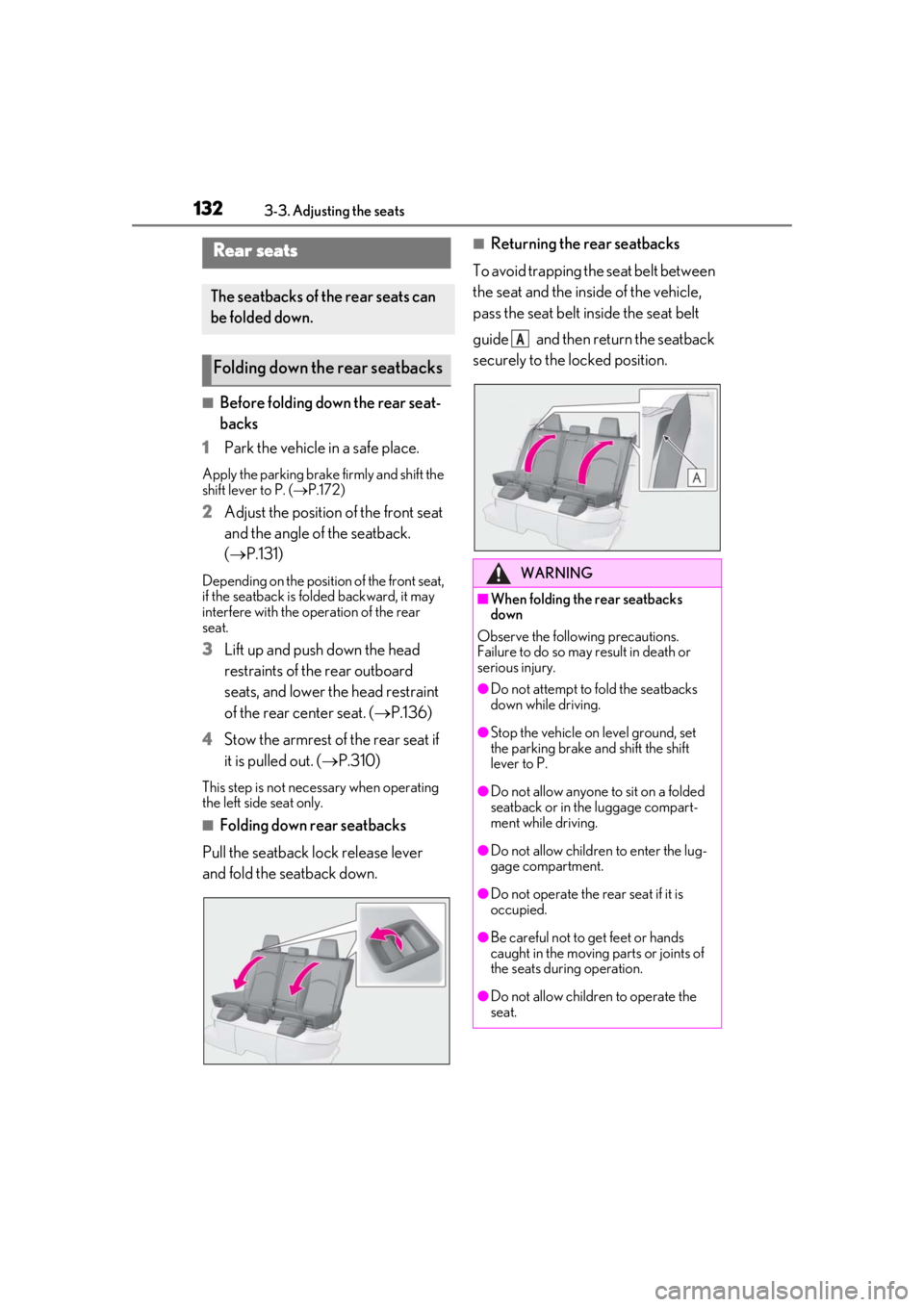
Pull the seatback lock release lever
and fold the seatback down.
■Returning the rear seatbacks
To avoid trapping the seat belt between
the seat and the inside of the vehicle,
pass the seat belt inside the seat belt
guide and then return the seatback
securely to the locked position.Rear seats
The seatbacks of the rear seats can
be folded down.
Folding down the rear seatbacks
WARNING
■When folding the rear seatbacks
down
Observe the following precautions.
Failure to do so may result in death or
serious injury.
●Do not attempt to fold the seatbacks
down while driving.
●Stop the vehicle on level ground, set
the parking brake and shift the shift
lever to P.
●Do not allow anyone to sit on a folded
seatback or in the luggage compart-
ment while driving.
●Do not allow childre n to enter the lug-
gage compartment.
●Do not operate the rear seat if it is
occupied.
●Be careful not to get feet or hands
caught in the moving parts or joints of
the seats during operation.
●Do not allow children to operate the
seat.
A
Page 137 of 476
1373-3. Adjusting the seats
3
Before driving
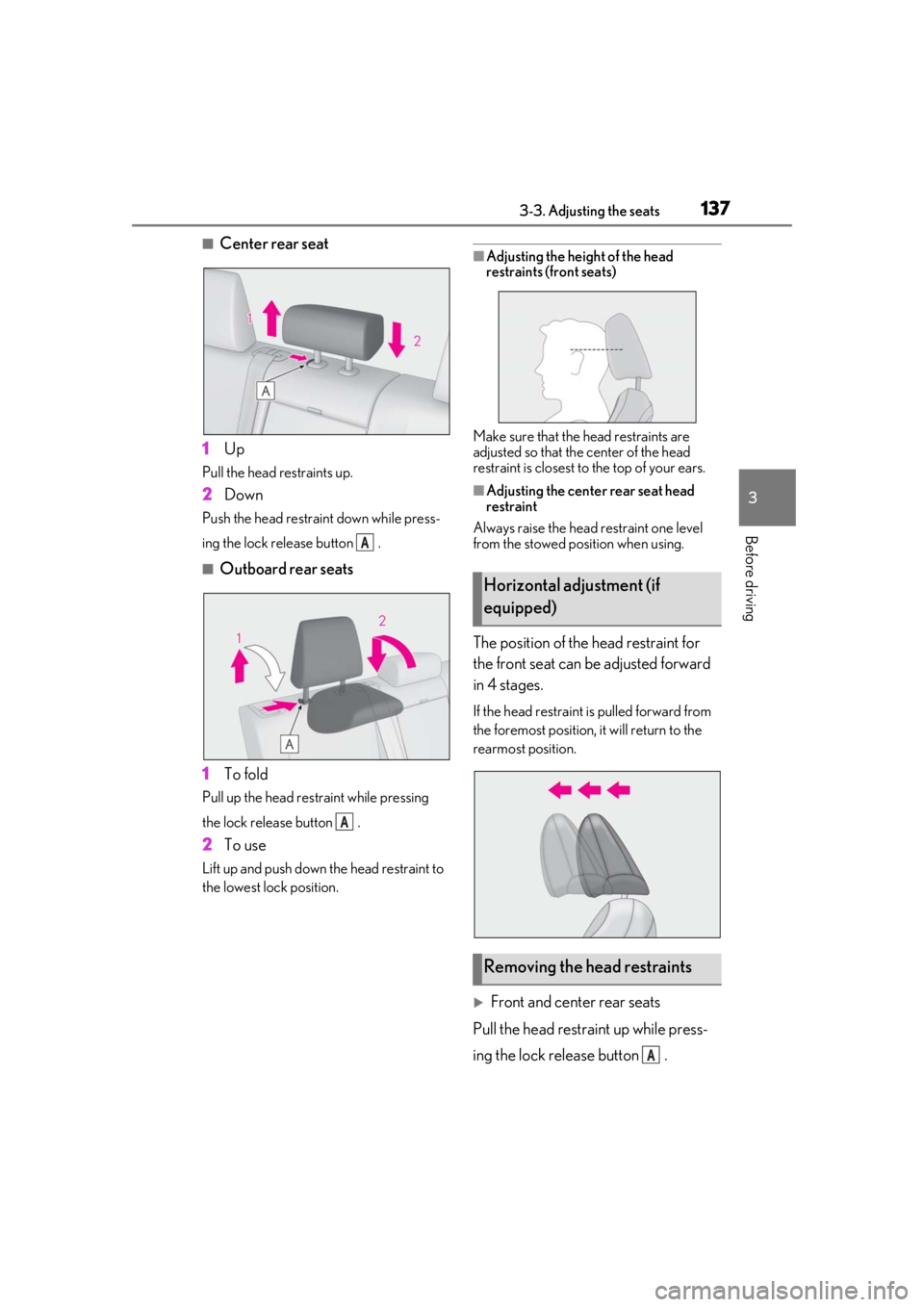
■Center rear seat
1 Up
Pull the head restraints up.
2Down
Push the head restraint down while press-
ing the lock release button .
■Outboard rear seats
1 To fold
Pull up the head restraint while pressing
the lock release button .
2To use
Lift up and push down the head restraint to
the lowest lock position.
■Adjusting the heig ht of the head
restraints (front seats)
Make sure that the head restraints are
adjusted so that the center of the head
restraint is closest to the top of your ears.
■Adjusting the center rear seat head
restraint
Always raise the head restraint one level
from the stowed position when using.
The position of the head restraint for
the front seat can be adjusted forward
in 4 stages.
If the head restraint is pulled forward from
the foremost position, it will return to the
rearmost position.
Front and center rear seats
Pull the head restraint up while press-
ing the lock release button .
A
A
Horizontal adjustment (if
equipped)
Removing the head restraints
A
Page 138 of 476
1383-3. Adjusting the seats
If the head restraint touches the ceiling,
making the removal difficult, change
the seat height or angle. ( P.131)
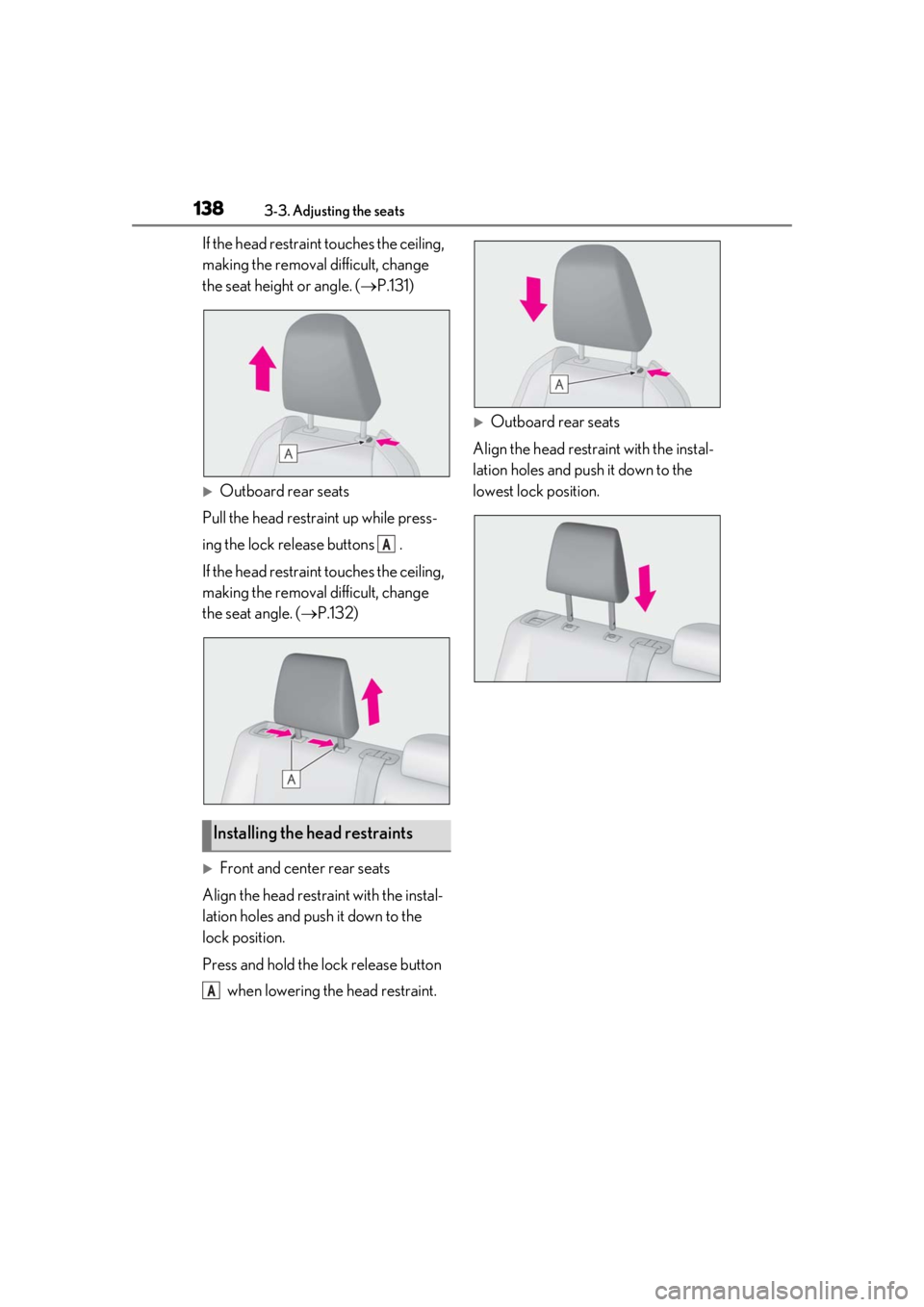
Outboard rear seats
Pull the head restraint up while press-
ing the lock release buttons .
If the head restrain t touches the ceiling,
making the removal difficult, change
the seat angle. ( P.132)
Front and center rear seats
Align the head restraint with the instal-
lation holes and push it down to the
lock position.
Press and hold the lock release button when lowering the head restraint.
Outboard rear seats
Align the head restraint with the instal-
lation holes and push it down to the
lowest lock position.
Installing the head restraints
A
A
Page 158 of 476
1584-1. Before driving
Cargo capacity depends on the total
weight of the occupants.
(Cargo capacity) = (Total load capac-
ity) (Total weight of occupants)
Steps for Determining Correct Load
Limit
(1) Locate the statement “The com-
bined weight of occupants and cargo
should never exceed XXX kg or XXX
lbs.” on your vehicle’s placard.
(2) Determine the combined weight of
the driver and passengers that will be
riding in your vehicle.
(3) Subtract the combined weight of
the driver and passengers from XXX
kg or XXX lbs.
(4) The resulting figure equals the
available amount of cargo and luggage
load capacity.
For example, if the “XXX” amount
equals 1400 lbs. and there will be five
150 lb passengers in your vehicle, the
amount of available cargo and luggage
load capacity is 650 lbs. (1400 − 750
(5 150) = 650 lbs.)
(5) Determine the combined weight of
luggage and cargo being loaded on
the vehicle. That weight may not safely
exceed the available cargo and lug-
gage load capacity calculated in Step
WARNING
●Do not place cargo or luggage in or on
the following locations.
• At the feet of the driver
• On the front passenger or rear seats (when stacking items)
• On the luggage cover
• On the instrument panel
• On the dashboard
• In front of the Center Display
●Secure all items in the occupant com-
partment.
■When using a roof luggage carrier
Observe the following precautions:
●Place the cargo so that its weight is dis-
tributed evenly between the front and
rear axles.
●If loading long or wide cargo, never
exceed the vehicle overall length or
width. ( P.416)
●Before driving, make sure the cargo is
securely fastened on the roof luggage
carrier.
●Loading cargo on the roof luggage
carrier will make the center of gravity
of the vehicle higher. Avoid high
speeds, sudden starts, sharp turns,
sudden braking or abrupt maneuvers,
otherwise it may result in loss of con-
trol or vehicle rollover due to failure to
operate this vehicle correctly and
result in death or serious injury.
●If driving for a long distance, on rough
roads, or at high speeds, stop the vehi-
cle now and then during the trip to
make sure the cargo remains in its
place.
●Do not exceed 176.3 lb. (80 kg) cargo
weight on the roof luggage carrier.
NOTICE
■When loading cargo (vehicles with
moon roof)
Be careful not to scratch the surface of
the moon roof.
Capacity and distribution
Page 179 of 476
1794-3. Operating the lights and wipers
4
Driving
Pull the lever toward you to the center
position to turn the high beams off.
2Pull the lever toward you and
release it to flash the high beams
once.
You can flash the high beams with the
headlights on or off.
AFS (Adaptive Front-lighting System)
secures excellent visibility at intersec-
tions and on curves by automatically
adjusting the direction of the light axis
of the headlights according to vehicle
speed and the degree of the tire’s angle
as controlled by steering input.
AFS operates at speed s of approximately
6 mph (10 km/h) or higher.
■Customization
Some functions can be customized.
( P.440)
When any of the following conditions is
met, while the headlights (low beam)
are on, the cornering lights will addi-
tionally turn on and light up the direc-
tion of movement for the vehicle. This is
to ensure excellent visibility when
either driving at intersections or park-
ing at night.
The steering wheel is operated
The turn signal lever is operated
The shift lever is in R (both left and
right side cornering lights)
■Cornering light control
●The lights illuminate when the vehicle
speed is approximately 19 mph (30
km/h) or less. However, the lights turn off
when the vehicle speed increases to
approximately 22 mph (35 km/h) or
more.
●After the lights remain illuminated for 30
minutes, they automatically turn off.
AFS (Adaptive Front-lighting
System) (if equipped)
Cornering lights (if equipped)
Page 193 of 476
1934-5. Using the driving support systems
4
Driving
WARNING
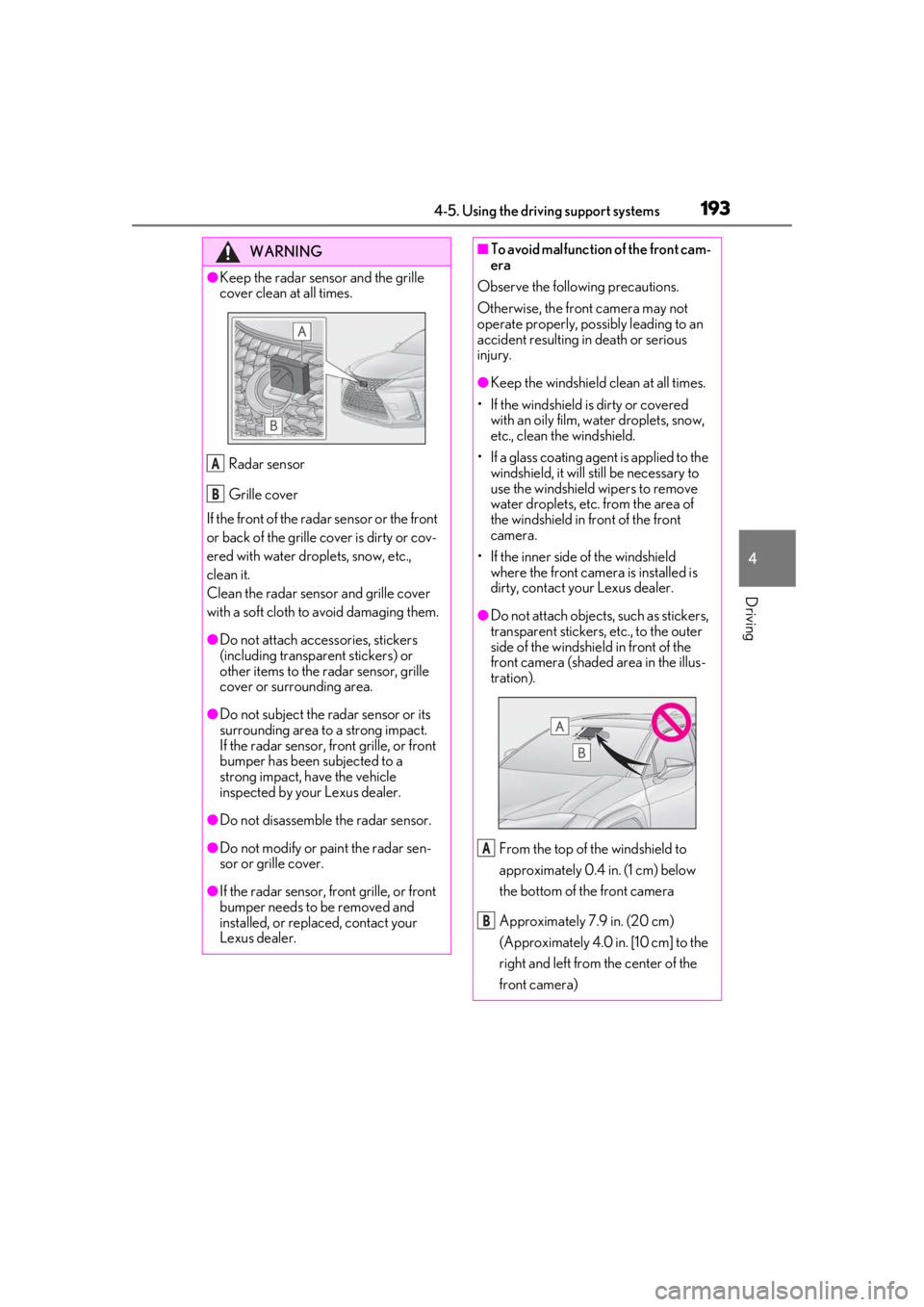
●Keep the radar sensor and the grille
cover clean at all times.Radar sensor
Grille cover
If the front of the rada r sensor or the front
or back of the grille cover is dirty or cov-
ered with water droplets, snow, etc.,
clean it.
Clean the radar sensor and grille cover
with a soft cloth to avoid damaging them.
●Do not attach accessories, stickers
(including transparent stickers) or
other items to the radar sensor, grille
cover or surrounding area.
●Do not subject the radar sensor or its
surrounding area to a strong impact.
If the radar sensor, front grille, or front
bumper has been subjected to a
strong impact, have the vehicle
inspected by your Lexus dealer.
●Do not disassemble the radar sensor.
●Do not modify or paint the radar sen-
sor or grille cover.
●If the radar sensor, front grille, or front
bumper needs to be removed and
installed, or replaced, contact your
Lexus dealer.
A
B
■To avoid malfunction of the front cam-
era
Observe the following precautions.
Otherwise, the front camera may not
operate properly, possibly leading to an
accident resulting in death or serious
injury.
●Keep the windshield clean at all times.
• If the windshield is dirty or covered with an oily film, water droplets, snow,
etc., clean the windshield.
• If a glass coating agent is applied to the windshield, it will still be necessary to
use the windshield wipers to remove
water droplets, etc. from the area of
the windshield in front of the front
camera.
• If the inner side of the windshield where the front camera is installed is
dirty, contact your Lexus dealer.
●Do not attach objects, such as stickers,
transparent stickers, etc., to the outer
side of the windshield in front of the
front camera (shaded area in the illus-
tration).
From the top of the windshield to
approximately 0.4 in. (1 cm) below
the bottom of the front camera
Approximately 7.9 in. (20 cm)
(Approximately 4.0 in. [10 cm] to the
right and left from the center of the
front camera)
A
B
Page 208 of 476
2084-5. Using the driving support systems
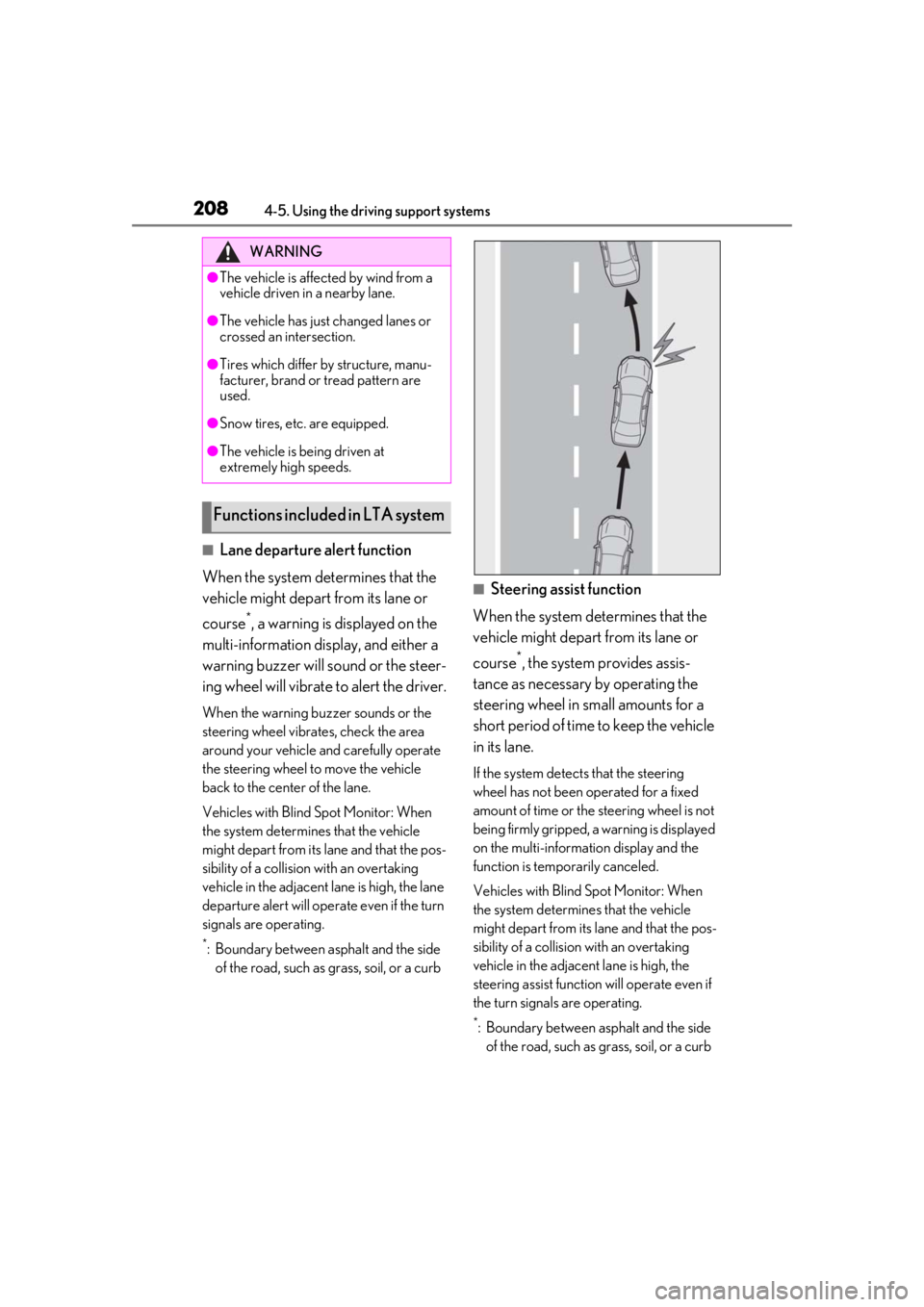
■Lane departure alert function
When the system determines that the
vehicle might depart from its lane or
course
*, a warning is displayed on the
multi-information display, and either a
warning buzzer will sound or the steer-
ing wheel will vibrate to alert the driver.
When the warning buzzer sounds or the
steering wheel vibrates, check the area
around your vehicle and carefully operate
the steering wheel to move the vehicle
back to the center of the lane.
Vehicles with Blind Spot Monitor: When
the system determines that the vehicle
might depart from its lane and that the pos-
sibility of a collision with an overtaking
vehicle in the adjacent lane is high, the lane
departure alert will operate even if the turn
signals are operating.
*: Boundary between asphalt and the side of the road, such as grass, soil, or a curb
■Steering assist function
When the system determines that the
vehicle might depart from its lane or
course
*, the system provides assis-
tance as necessary by operating the
steering wheel in small amounts for a
short period of time to keep the vehicle
in its lane.
If the system detects that the steering
wheel has not been operated for a fixed
amount of time or the steering wheel is not
being firmly gripped, a warning is displayed
on the multi-informat ion display and the
function is temporarily canceled.
Vehicles with Blind Spot Monitor: When
the system determines that the vehicle
might depart from its lane and that the pos-
sibility of a collision with an overtaking
vehicle in the adjacent lane is high, the
steering assist function will operate even if
the turn signals are operating.
*: Boundary between asphalt and the side of the road, such as grass, soil, or a curb
WARNING
●The vehicle is affected by wind from a
vehicle driven in a nearby lane.
●The vehicle has just changed lanes or
crossed an intersection.
●Tires which differ by structure, manu-
facturer, brand or tread pattern are
used.
●Snow tires, etc. are equipped.
●The vehicle is being driven at
extremely high speeds.
Functions included in LTA system
Page 209 of 476
2094-5. Using the driving support systems
4
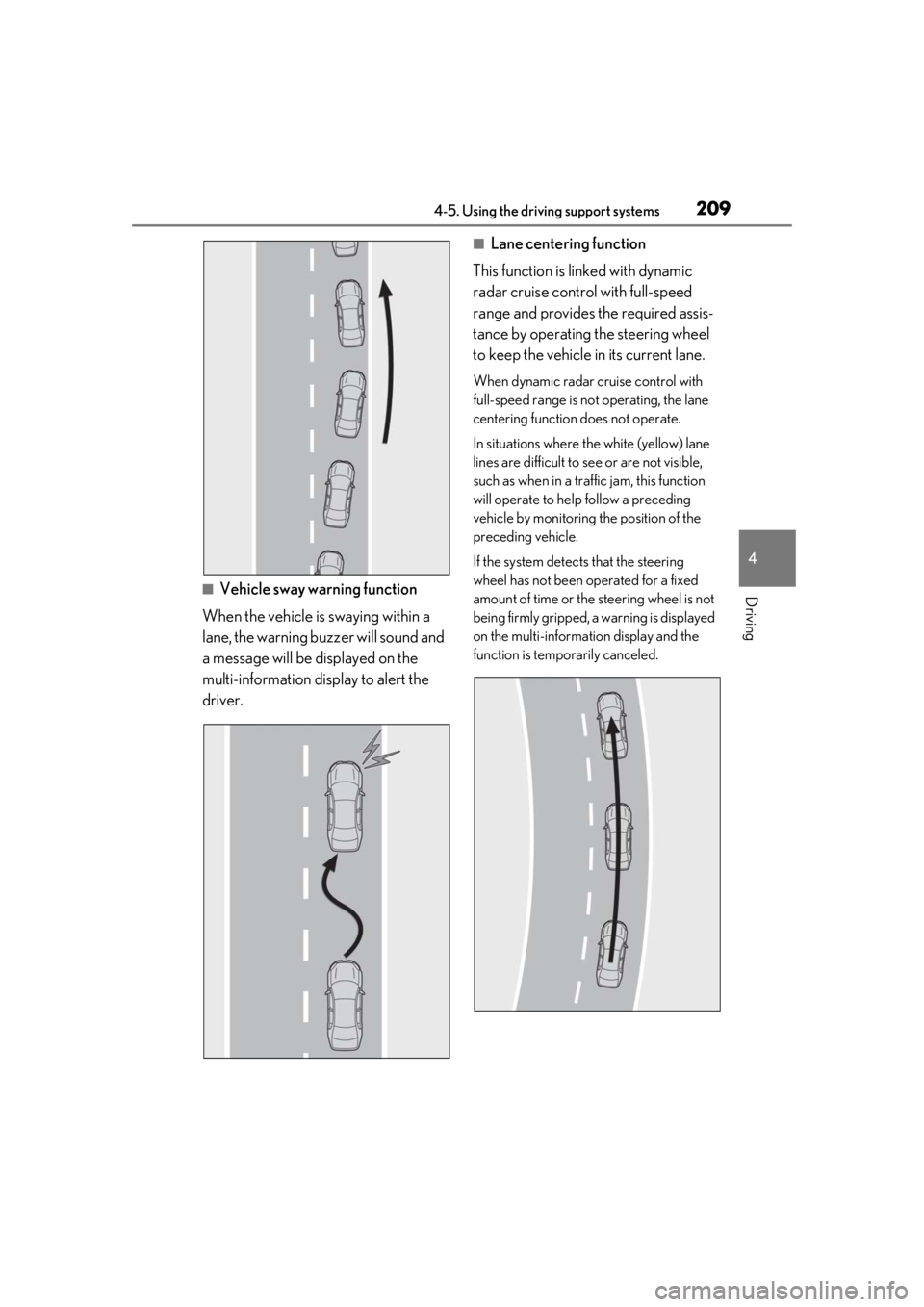
Driving■Vehicle sway warning function
When the vehicle is swaying within a
lane, the warning buzzer will sound and
a message will be displayed on the
multi-information display to alert the
driver.
■Lane centering function
This function is linked with dynamic
radar cruise control with full-speed
range and provides the required assis-
tance by operating the steering wheel
to keep the vehicle in its current lane.
When dynamic radar cruise control with
full-speed range is not operating, the lane
centering function does not operate.
In situations where the white (yellow) lane
lines are difficult to see or are not visible,
such as when in a traffic jam, this function
will operate to help follow a preceding
vehicle by monitoring the position of the
preceding vehicle.
If the system detects that the steering
wheel has not been operated for a fixed
amount of time or the steering wheel is not
being firmly gripped, a warning is displayed
on the multi-informat ion display and the
function is temporarily canceled.
Page 210 of 476
2104-5. Using the driving support systems
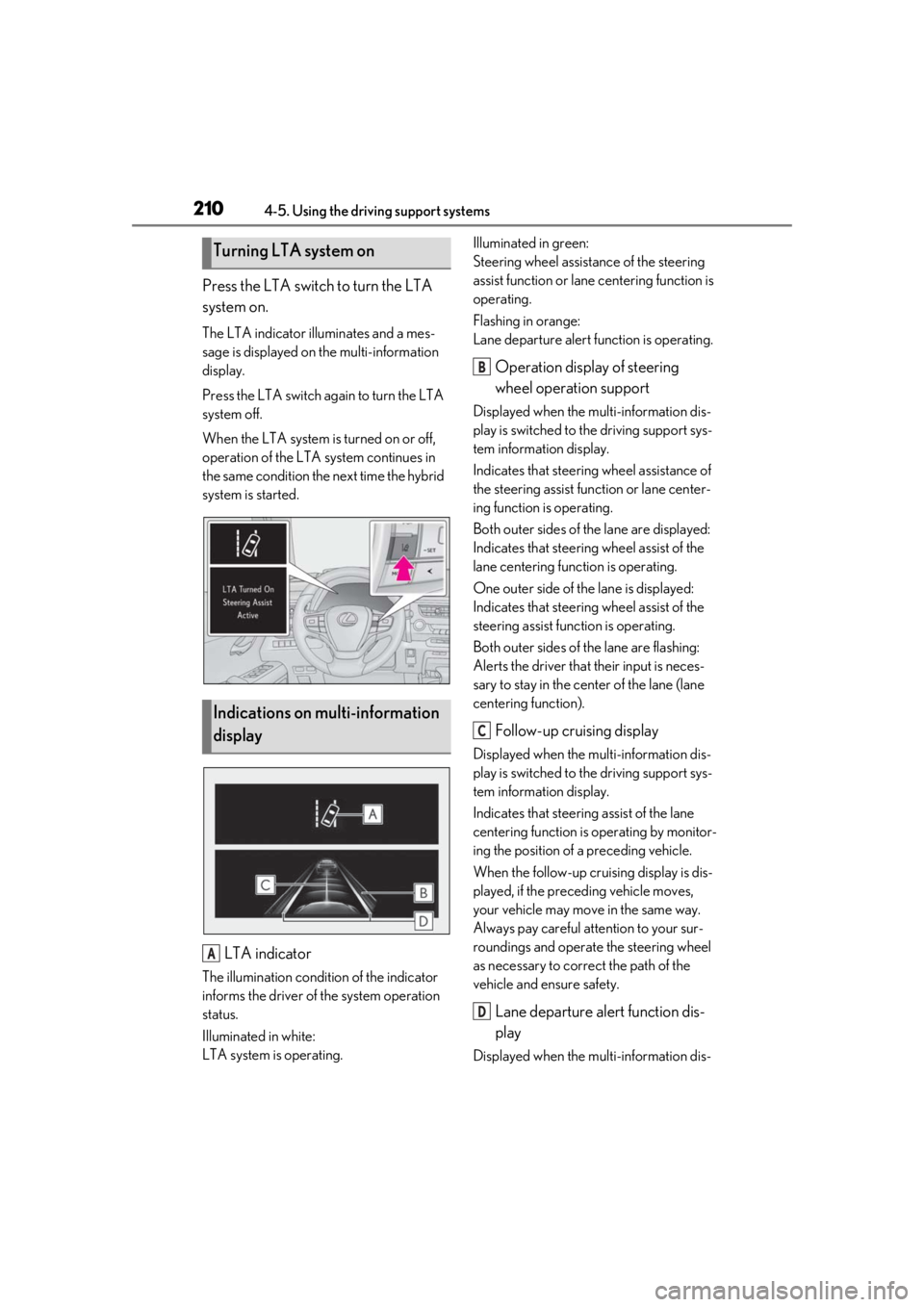
Press the LTA switch to turn the LTA
system on.
The LTA indicator illuminates and a mes-
sage is displayed on the multi-information
display.
Press the LTA switch again to turn the LTA
system off.
When the LTA system is turned on or off,
operation of the LTA system continues in
the same condition the next time the hybrid
system is started.
LTA indicator
The illumination condition of the indicator
informs the driver of the system operation
status.
Illuminated in white:
LTA system is operating.Illuminated in green:
Steering wheel assistance of the steering
assist function or lane centering function is
operating.
Flashing in orange:
Lane departure alert function is operating.
Operation display of steering
wheel operation support
Displayed when the multi-information dis-
play is switched to the driving support sys-
tem information display.
Indicates that steering
wheel assistance of
the steering assist function or lane center-
ing function is operating.
Both outer sides of the lane are displayed:
Indicates that steering wheel assist of the
lane centering function is operating.
One outer side of the lane is displayed:
Indicates that steering wheel assist of the
steering assist func tion is operating.
Both outer sides of the lane are flashing:
Alerts the driver that their input is neces-
sary to stay in the center of the lane (lane
centering function).
Follow-up cruising display
Displayed when the multi-information dis-
play is switched to the driving support sys-
tem information display.
Indicates that steering assist of the lane
centering function is operating by monitor-
ing the position of a preceding vehicle.
When the follow-up cruising display is dis-
played, if the preceding vehicle moves,
your vehicle may move in the same way.
Always pay careful attention to your sur-
roundings and operate the steering wheel
as necessary to correct the path of the
vehicle and ensure safety.
Lane departure alert function dis-
play
Displayed when the multi-information dis-
Turning LTA system on
Indications on multi-information
display
A
B
C
D
Page 211 of 476
2114-5. Using the driving support systems
4
Driving
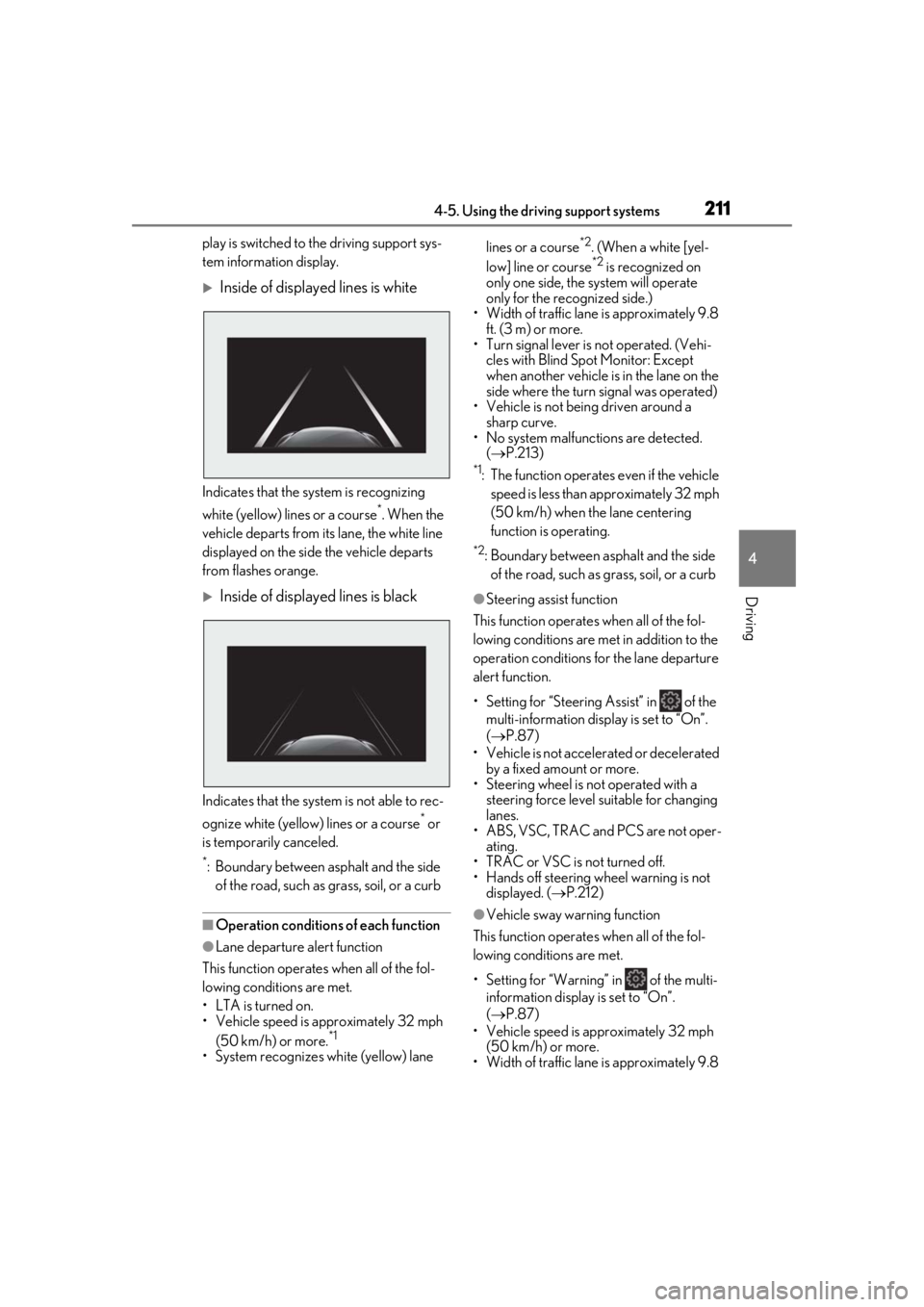
play is switched to the driving support sys-
tem information display.
Inside of displayed lines is white
Indicates that the system is recognizing
white (yellow) lines or a course
*. When the
vehicle departs from it s lane, the white line
displayed on the side the vehicle departs
from flashes orange.
Inside of displayed lines is black
Indicates that the system is not able to rec-
ognize white (yellow) lines or a course
* or
is temporarily canceled.
*: Boundary between asphalt and the side of the road, such as grass, soil, or a curb
■Operation conditions of each function
●Lane departure alert function
This function operates when all of the fol-
lowing conditions are met.
• LTA is turned on.
• Vehicle speed is approximately 32 mph (50 km/h) or more.
*1
•System recognizes wh ite (yellow) lane lines or a course
*2. (When a white [yel-
low] line or course*2 is recognized on
only one side, the system will operate
only for the recognized side.)
• Width of traffic lane is approximately 9.8
ft. (3 m) or more.
• Turn signal lever is not operated. (Vehi- cles with Blind Spot Monitor: Except
when another vehicle is in the lane on the
side where the turn signal was operated)
• Vehicle is not being driven around a
sharp curve.
• No system malfunctions are detected. ( P.213)
*1: The function operates even if the vehicle
speed is less than ap proximately 32 mph
(50 km/h) when the lane centering
function is operating.
*2: Boundary between asphalt and the side of the road, such as grass, soil, or a curb
●Steering assist function
This function operates when all of the fol-
lowing conditions are met in addition to the
operation conditions for the lane departure
alert function.
• Setting for “Steering Assist” in of the multi-information display is set to “On”.
( P.87)
• Vehicle is not acceler ated or decelerated
by a fixed amount or more.
• Steering wheel is not operated with a steering force level su itable for changing
lanes.
• ABS, VSC, TRAC and PCS are not oper- ating.
• TRAC or VSC is not turned off.
• Hands off steering wheel warning is not displayed. ( P.212)
●Vehicle sway warning function
This function operates when all of the fol-
lowing conditions are met.
• Setting for “Warning” in of the multi- information display is set to “On”.
( P.87)
• Vehicle speed is ap proximately 32 mph
(50 km/h) or more.
• Width of traffic lane is approximately 9.8