center LEXUS UX250H 2019 User Guide
[x] Cancel search | Manufacturer: LEXUS, Model Year: 2019, Model line: UX250H, Model: LEXUS UX250H 2019Pages: 476, PDF Size: 10.51 MB
Page 74 of 476
742-1. Instrument cluster
2-1.Instrument cluster
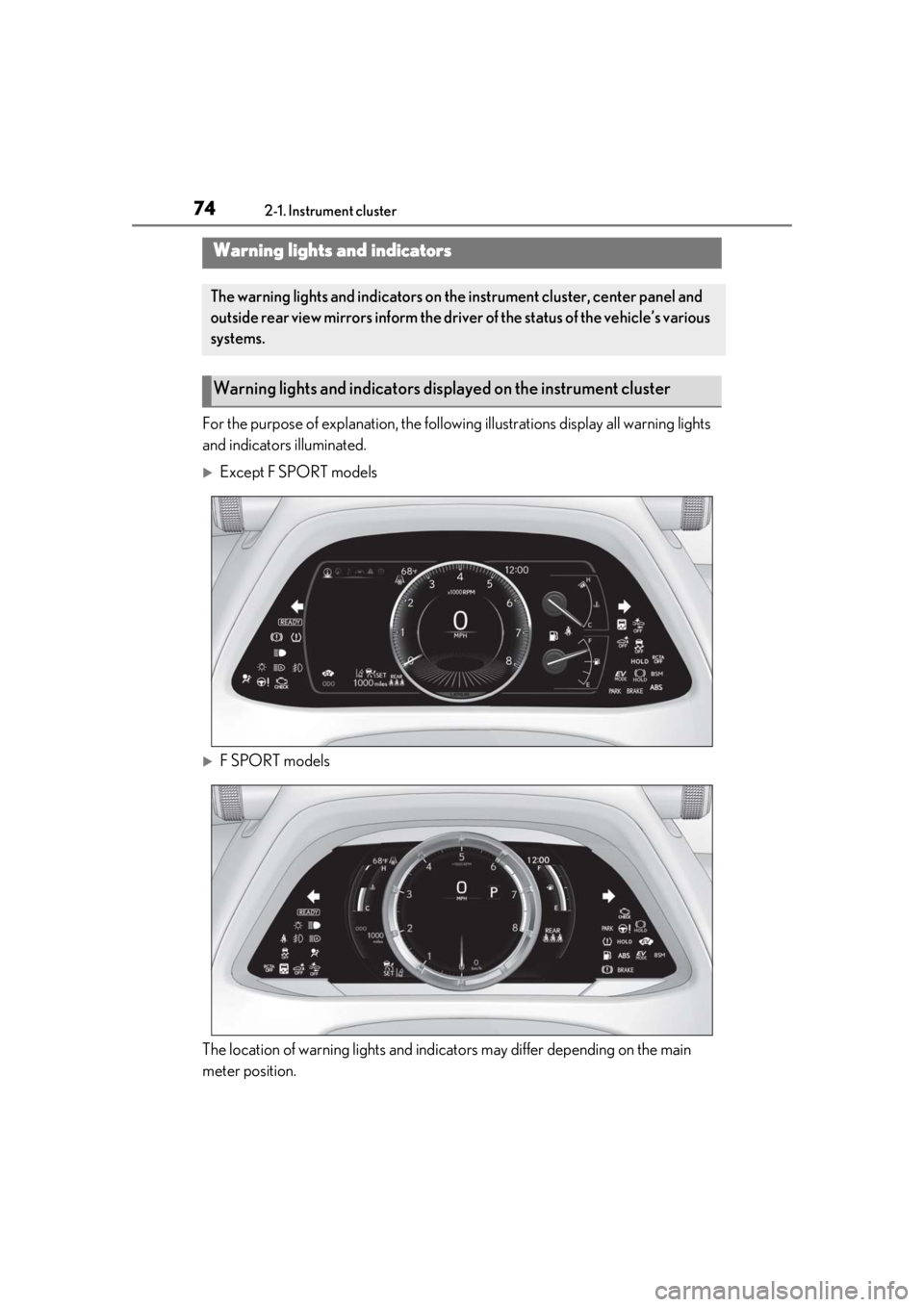
For the purpose of explanation, the following illustrations display all warning lights
and indicators illuminated.
Except F SPORT models
F SPORT models
The location of warning lights and indicat ors may differ depending on the main
meter position.
Warning lights and indicators
The warning lights and indicators on th e instrument cluster, center panel and
outside rear view mirrors inform the driver of the status of the vehicle’s various
systems.
Warning lights and indicators displayed on the instrument cluster
Page 77 of 476
772-1. Instrument cluster
2
Vehicle status information and indicators
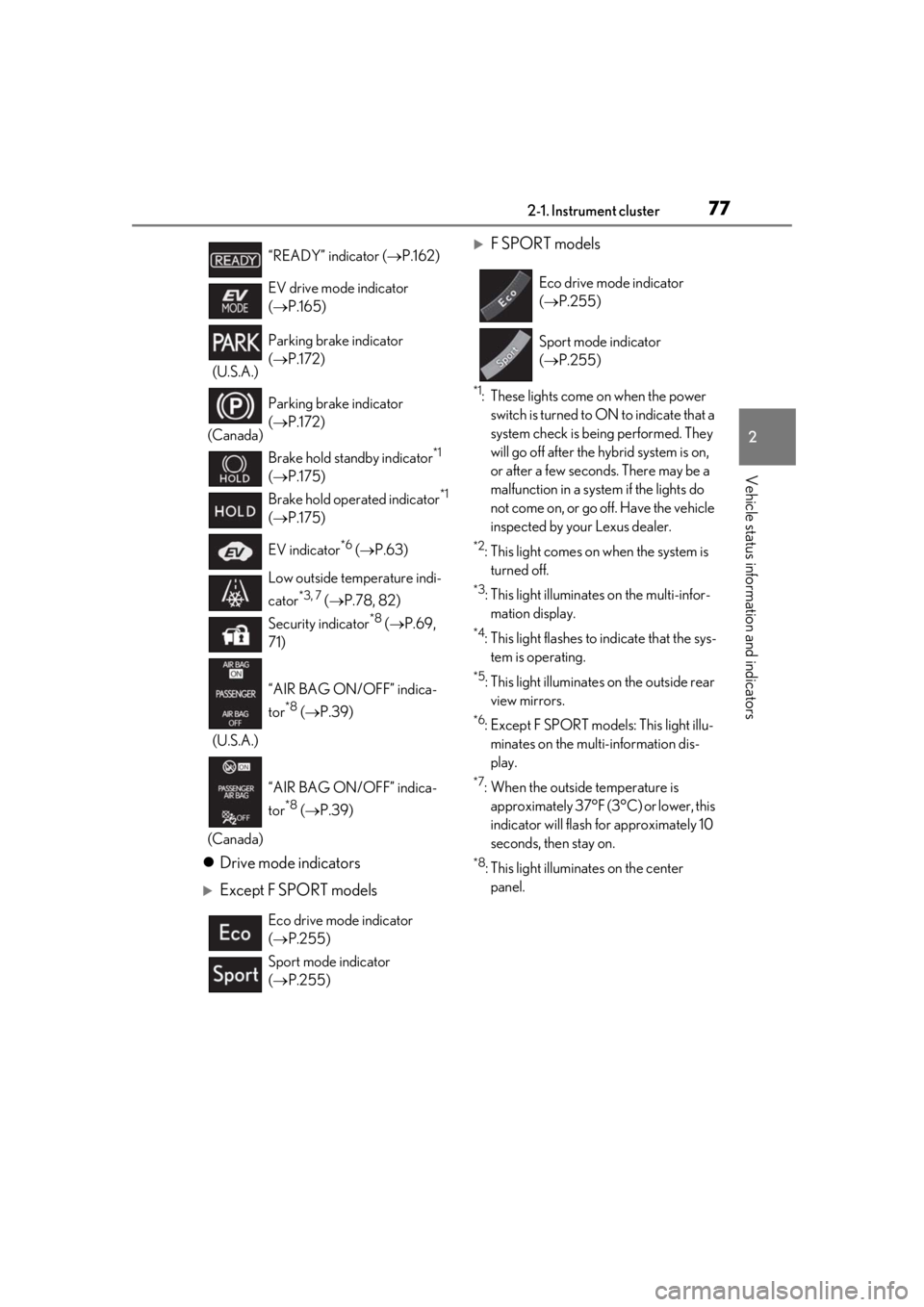
Drive mode indicators
Except F SPORT models
F SPORT models
*1: These lights come on when the power
switch is turned to ON to indicate that a
system check is being performed. They
will go off after the hybrid system is on,
or after a few second s. There may be a
malfunction in a system if the lights do
not come on, or go off. Have the vehicle
inspected by your Lexus dealer.
*2: This light comes on when the system is turned off.
*3: This light illuminates on the multi-infor-mation display.
*4: This light flashes to indicate that the sys- tem is operating.
*5: This light illuminates on the outside rear view mirrors.
*6: Except F SPORT models: This light illu- minates on the multi-information dis-
play.
*7: When the outside temperature is approximately 37°F (3°C) or lower, this
indicator will flash for approximately 10
seconds, then stay on.
*8: This light illuminates on the center panel.
“READY” indicator (
P.162)
EV drive mode indicator
( P.165)
(U.S.A.) Parking brake indicator
(
P.172)
(Canada) Parking brake indicator
(
P.172)
Brake hold standby indicator
*1
( P.175)
Brake hold operated indicator
*1
( P.175)
EV indicator
*6 ( P.63)
Low outside temperature indi-
cator
*3, 7 ( P.78, 82)
Security indicator
*8 ( P.69,
71)
(U.S.A.) “AIR BAG ON/OFF” indica-
tor
*8 (
P.39)
(Canada) “AIR BAG ON/OFF” indica-
tor
*8 (
P.39)
Eco drive mode indicator
( P.255)
Sport mode indicator
( P.255)
Eco drive mode indicator
( P.255)
Sport mode indicator
( P.255)
Page 78 of 476
782-1. Instrument cluster
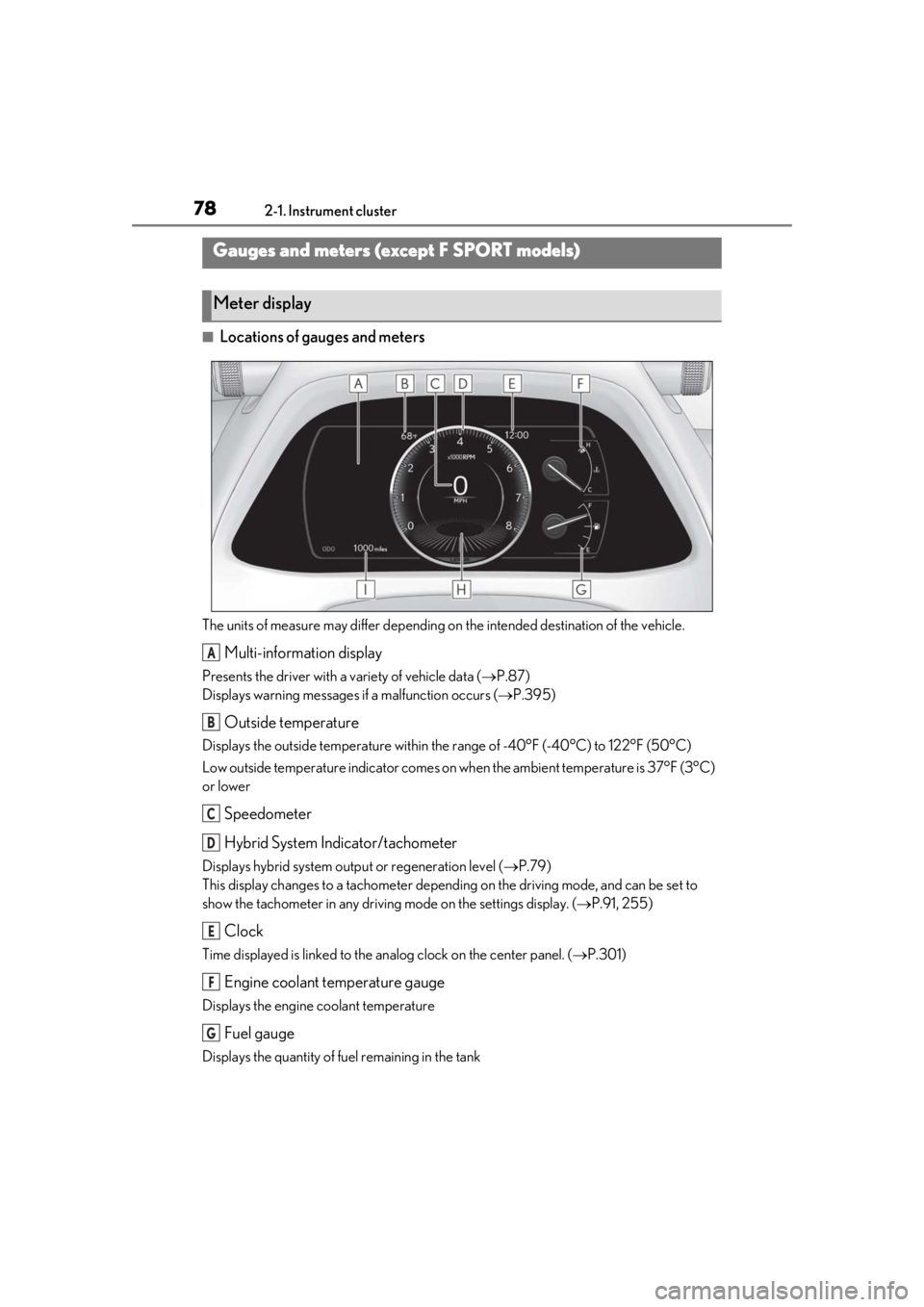
■Locations of gauges and meters
The units of measure may differ depending on the intended destination of the vehicle.
Multi-information display
Presents the driver with a variety of vehicle data ( P.87)
Displays warning messages if a malfunction occurs (P.395)
Outside temperature
Displays the outside temperature within the range of -40°F (-40°C) to 122°F (50°C)
Low outside temperature indicator comes on wh en the ambient temperature is 37°F (3°C)
or lower
Speedometer
Hybrid System Indicator/tachometer
Displays hybrid system outp ut or regeneration level (P.79)
This display changes to a tachometer depending on the driving mode, and can be set to
show the tachometer in any driving mode on the settings display. (P.91, 255)
Clock
Time displayed is linked to the analog clock on the center panel. (P.301)
Engine coolant temperature gauge
Displays the engine coolant temperature
Fuel gauge
Displays the quantity of fuel remaining in the tank
Gauges and meters (except F SPORT models)
Meter display
A
B
C
D
E
F
G
Page 82 of 476
822-1. Instrument cluster
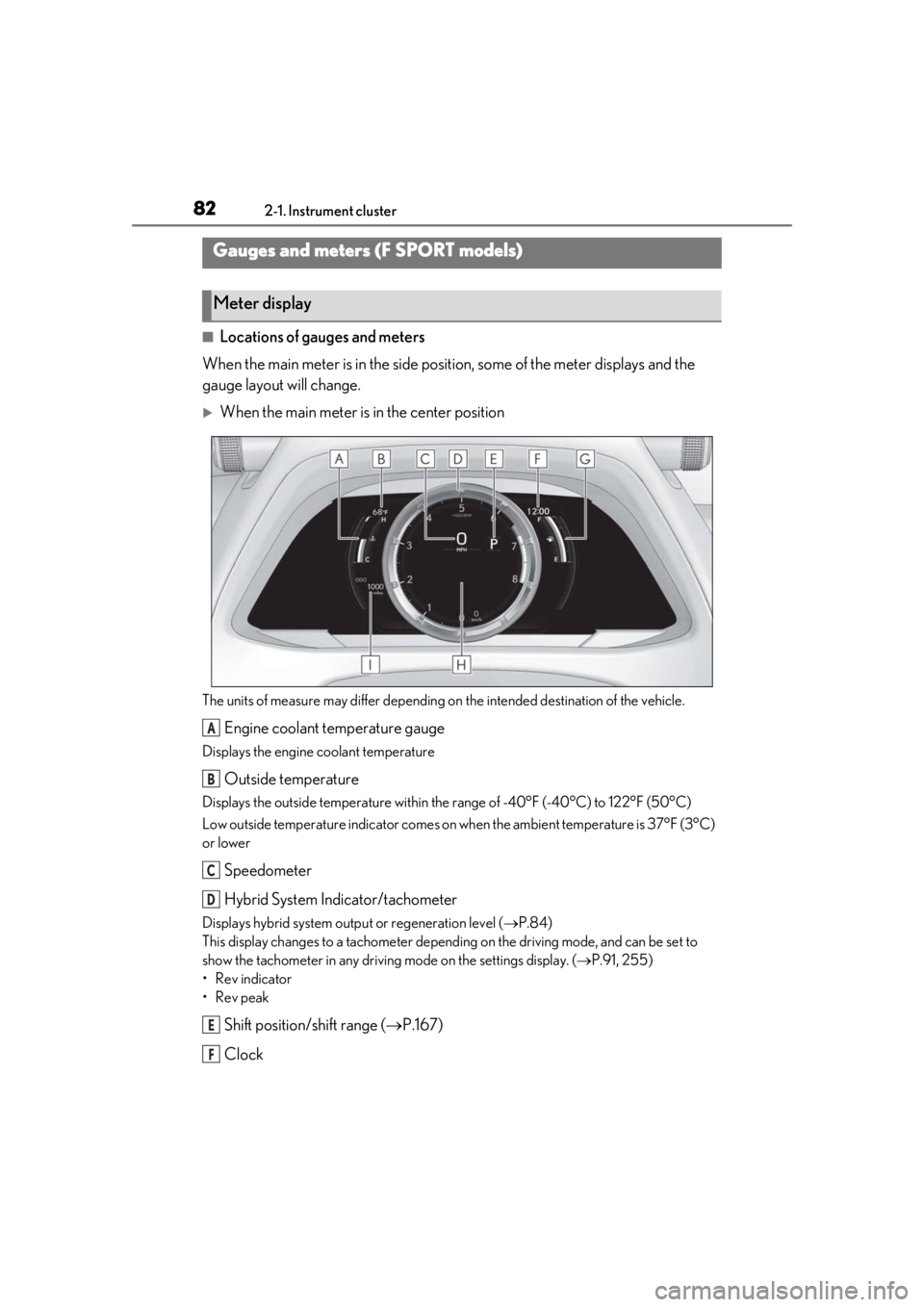
■Locations of gauges and meters
When the main meter is in the side posi tion, some of the meter displays and the
gauge layout will change.
When the main meter is in the center position
The units of measure may differ depending on the intended destination of the vehicle.
Engine coolant temperature gauge
Displays the engine coolant temperature
Outside temperature
Displays the outside temperature within the range of -40°F (-40°C) to 122°F (50°C)
Low outside temperature indicator comes on wh en the ambient temperature is 37°F (3°C)
or lower
Speedometer
Hybrid System Indicator/tachometer
Displays hybrid system outp ut or regeneration level (P.84)
This display changes to a tachometer depending on the driving mode, and can be set to
show the tachometer in any driving mode on the settings display. (P.91, 255)
• Rev indicator
•Rev peak
Shift position/shift range ( P.167)
Clock
Gauges and meters (F SPORT models)
Meter display
A
B
C
D
E
F
Page 83 of 476
832-1. Instrument cluster
2
Vehicle status information and indicators
Time displayed is linked to the analog clock on the center panel. (P.301)
Fuel gauge
Displays the quantity of fuel remaining in the tank
Multi-information display
Presents the driver with a variety of vehicle data ( P.87)
Displays warning messages if a malfunction occurs (P.395)
Odometer and trip meter display ( P.86)
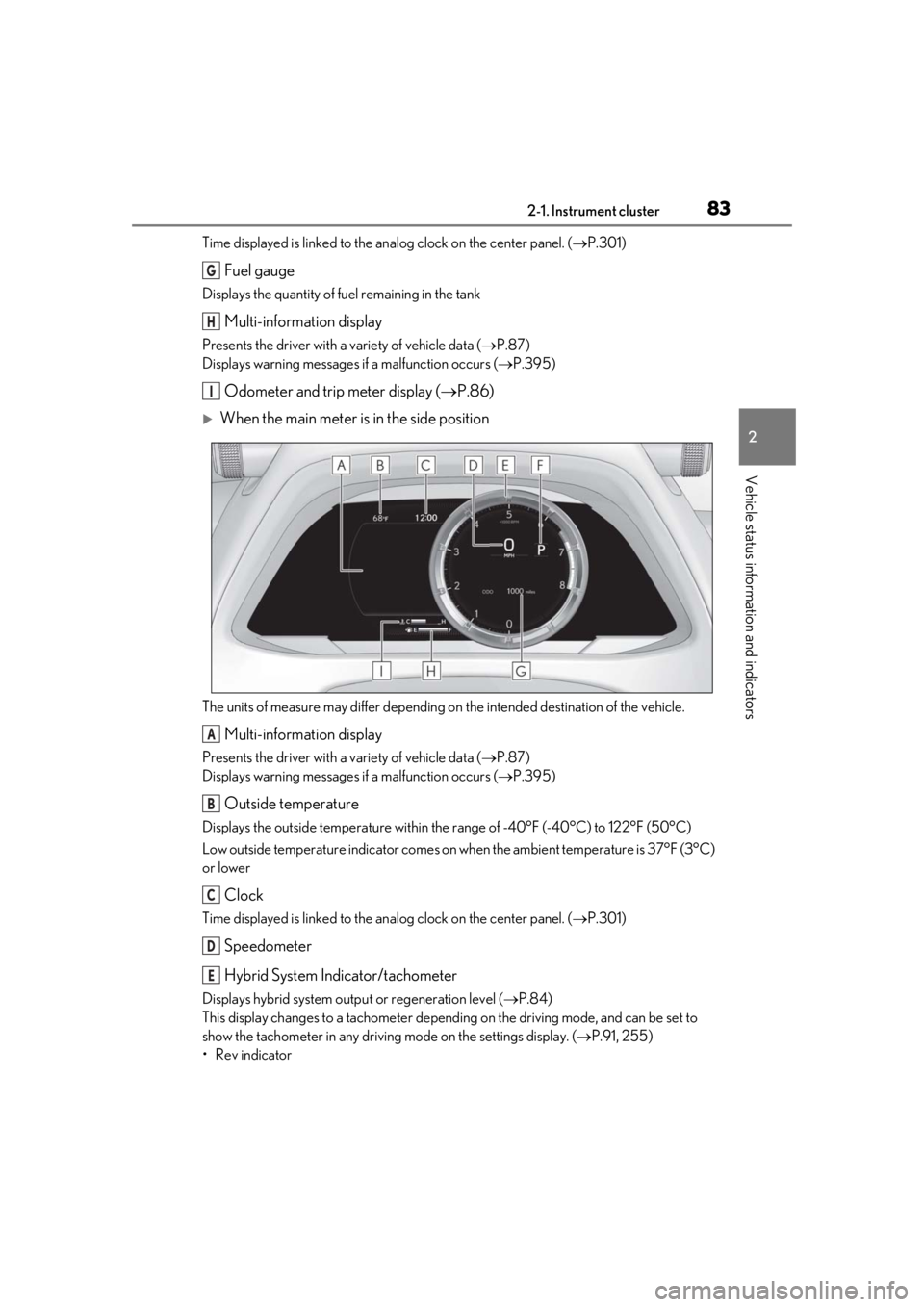
When the main meter is in the side position
The units of measure may differ depending on the intended destination of the vehicle.
Multi-information display
Presents the driver with a variety of vehicle data ( P.87)
Displays warning messages if a malfunction occurs (P.395)
Outside temperature
Displays the outside temperature within the range of -40°F (-40°C) to 122°F (50°C)
Low outside temperature indicator comes on wh en the ambient temperature is 37°F (3°C)
or lower
Clock
Time displayed is linked to the analog clock on the center panel. (P.301)
Speedometer
Hybrid System Indicator/tachometer
Displays hybrid system outp ut or regeneration level (P.84)
This display changes to a tachometer depending on the driving mode, and can be set to
show the tachometer in any driving mode on the settings display. (P.91, 255)
• Rev indicator
G
H
I
A
B
C
D
E
Page 86 of 476
862-1. Instrument cluster
■Display items
Odometer
Displays the total distance the vehicle has
been driven.
Trip meter A/trip meter B
Displays the distance the vehicle has been
driven since the meter was last reset. Trip
meters A and B can be used to record and
display different distances independently.
Distance until next engine oil
change
Displays the distance the vehicle can be
driven until an oil change is necessary.
■Changing the display
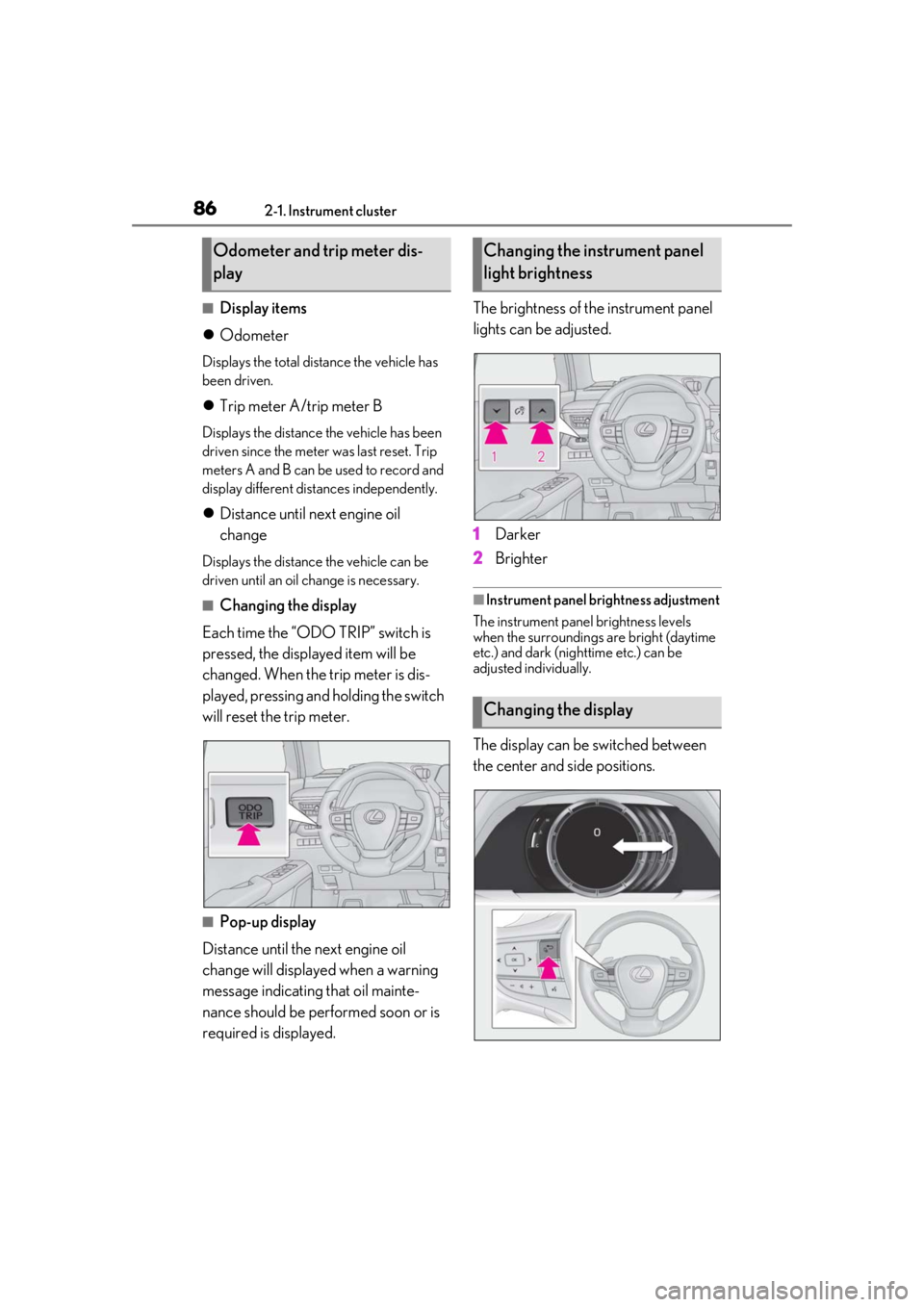
Each time the “ODO TRIP” switch is
pressed, the displayed item will be
changed. When the trip meter is dis-
played, pressing and holding the switch
will reset the trip meter.
■Pop-up display
Distance until the next engine oil
change will displayed when a warning
message indicating that oil mainte-
nance should be performed soon or is
required is displayed. The brightness of the instrument panel
lights can be adjusted.
1
Darker
2 Brighter
■Instrument panel brightness adjustment
The instrument panel brightness levels
when the surroundings are bright (daytime
etc.) and dark (nighttime etc.) can be
adjusted individually.
The display can be switched between
the center and side positions.
Odometer and trip meter dis-
playChanging the instrument panel
light brightness
Changing the display
Page 97 of 476
972-1. Instrument cluster
2
Vehicle status information and indicators
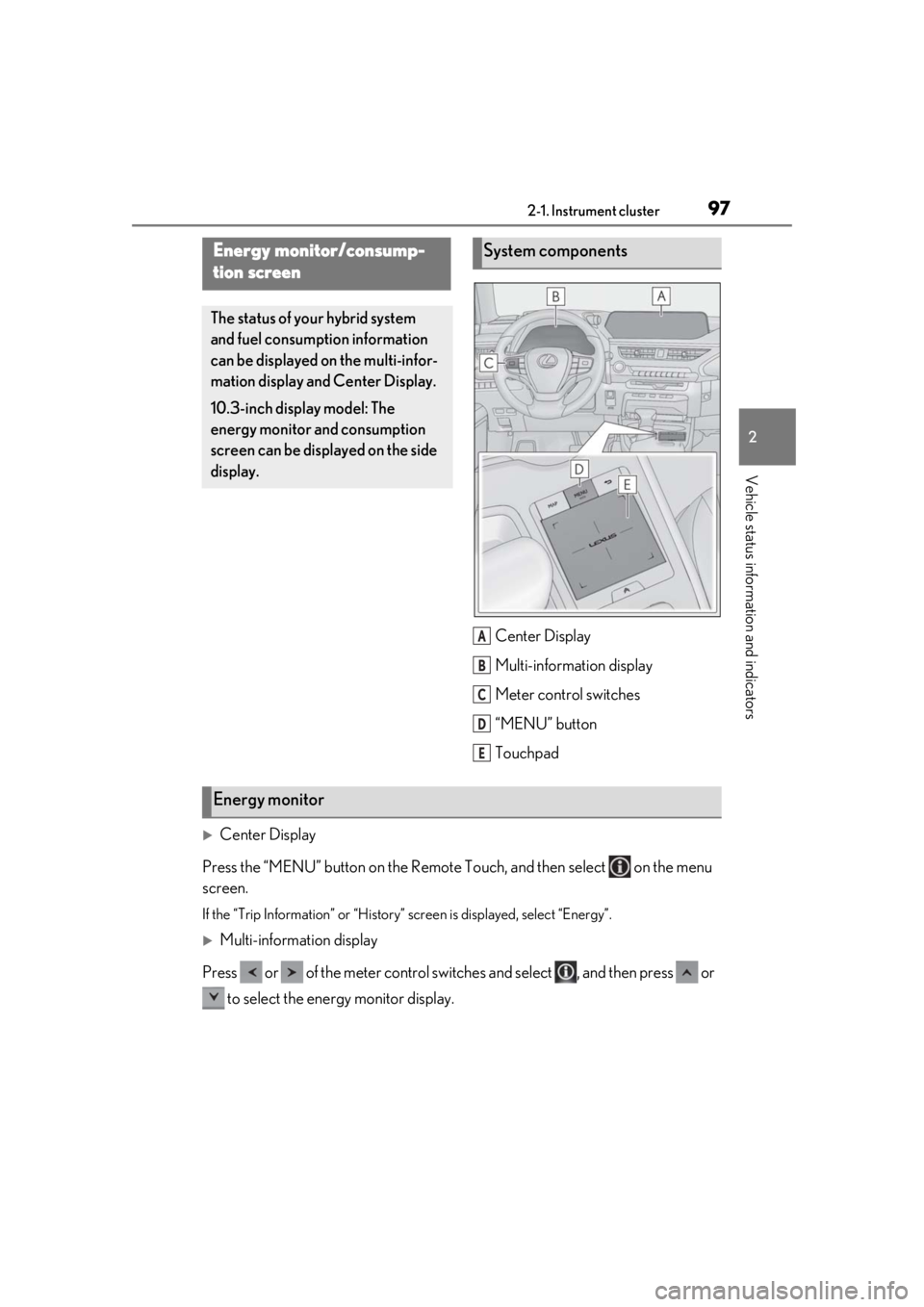
Center Display
Multi-information display
Meter control switches
“MENU” button
Touchpad
Center Display
Press the “MENU” button on the Remote Touch, and then select on the menu
screen.
If the “Trip Information” or “History” screen is displayed, select “Energy”.
Multi-information display
Press or of the meter control switch es and select , and then press or
to select the energy monitor display.
Energy monitor/consump-
tion screen
The status of your hybrid system
and fuel consumption information
can be displayed on the multi-infor-
mation display and Center Display.
10.3-inch display model: The
energy monitor and consumption
screen can be displayed on the side
display.
System components
A
B
C
D
E
Energy monitor
Page 98 of 476
982-1. Instrument cluster
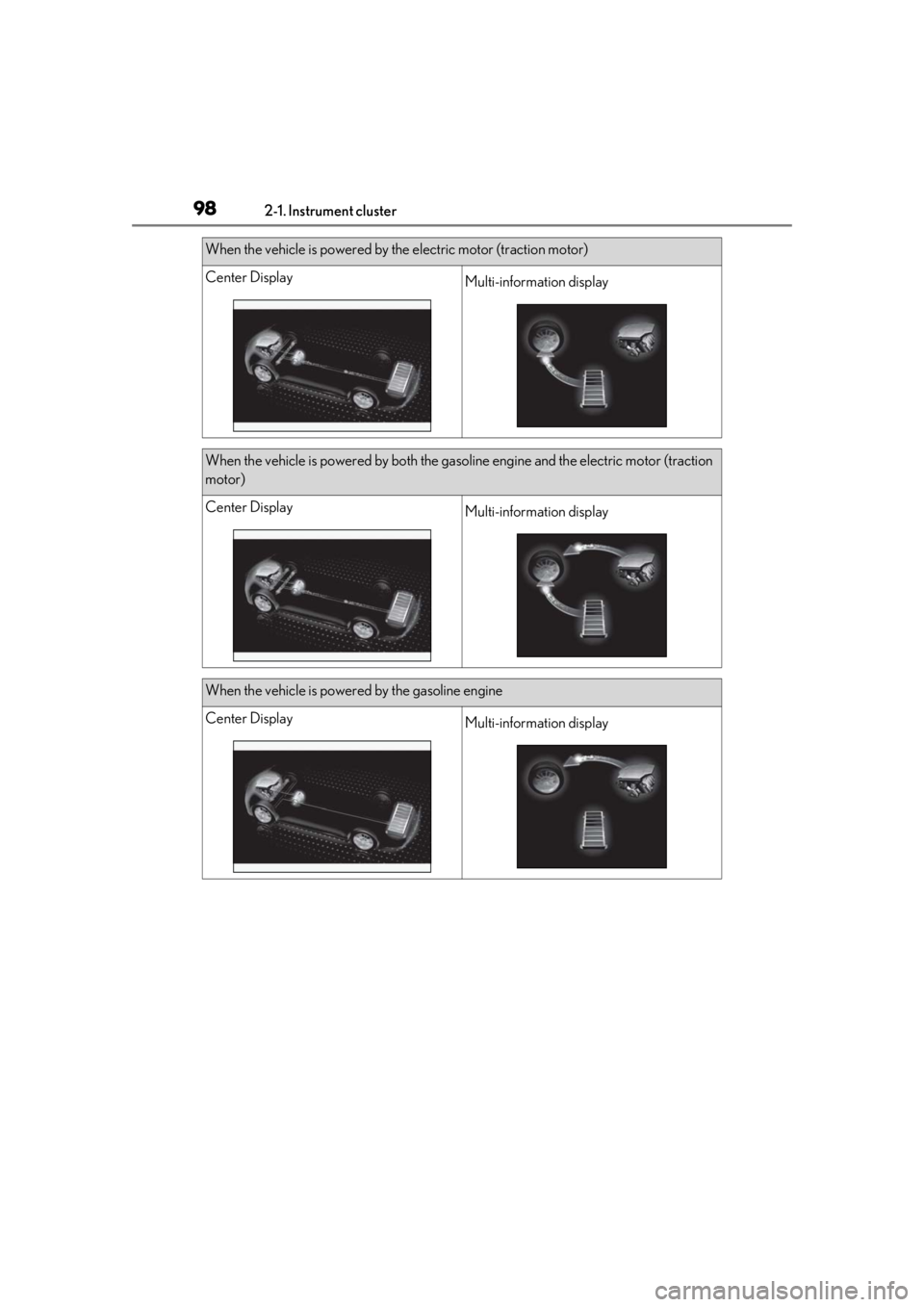
When the vehicle is powered by the electric motor (traction motor)
Center DisplayMulti-information display
When the vehicle is powered by both the gasoline engine and the electric motor (traction
motor)
Center DisplayMulti-information display
When the vehicle is powered by the gasoline engine
Center DisplayMulti-information display
Page 99 of 476
992-1. Instrument cluster
2
Vehicle status information and indicators
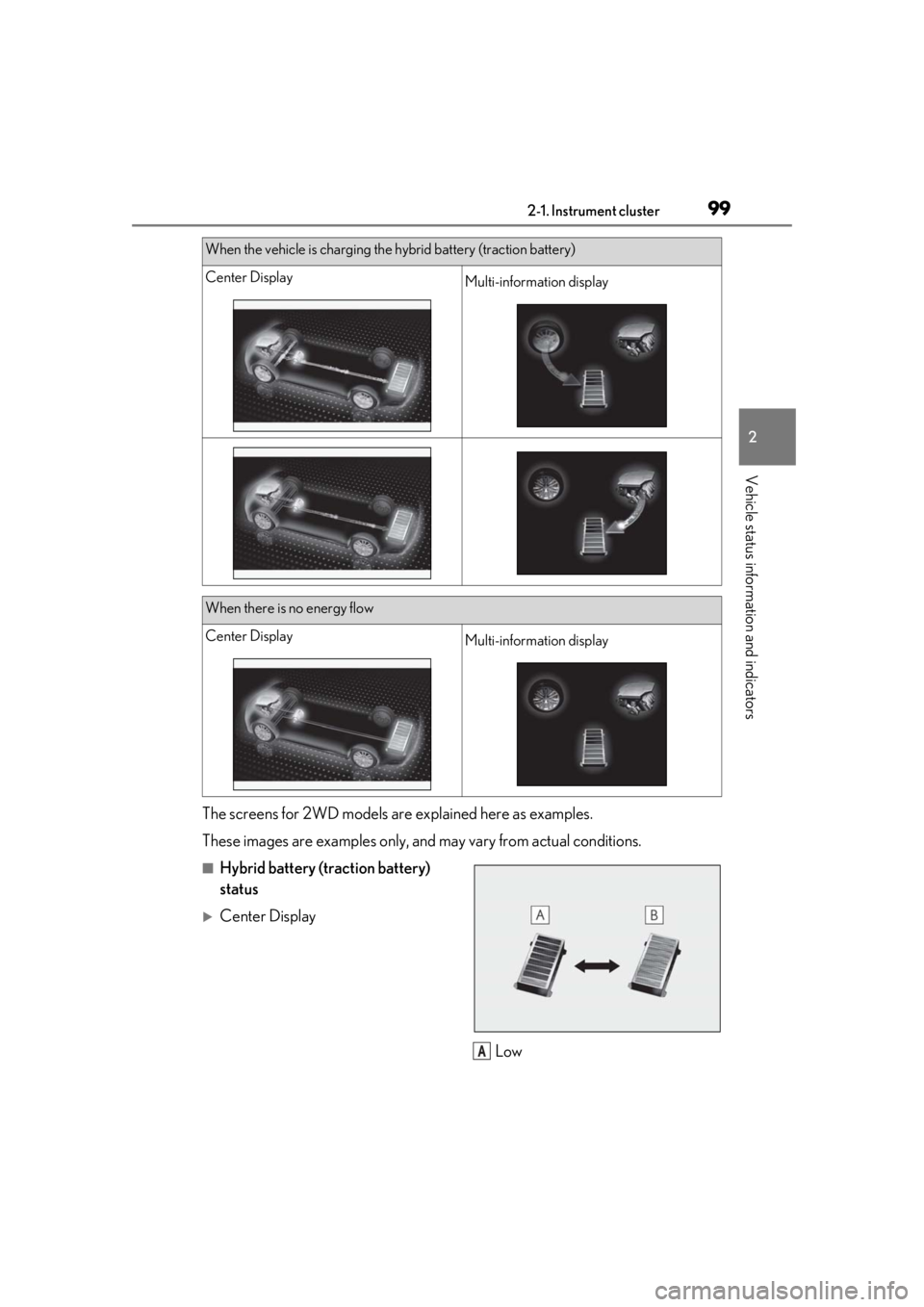
The screens for 2WD models are explained here as examples.
These images are examples only, an d may vary from actual conditions.
■Hybrid battery (traction battery)
status
Center Display
Low
When the vehicle is charging the hybrid battery (traction battery)
Center DisplayMulti-information display
When there is no energy flow
Center DisplayMulti-information display
A
Page 122 of 476
1223-2. Opening, closing and locking the doors
The power back door system can be
enabled/disabled on the multi-informa-
tion display.(P.87)
1
Press or of the meter con-
trol switches and select .
2
Press or of the meter con-
trol switches, select the “Vehicle
Settings” and then press “OK”. 3
Press or of the meter con-
trol switches, select and
then press “OK”.
4
Press or of the meter con-
trol switches, and then select “Sys-
tem Settings”.
5
ON and OFF will be switched over
with presses of “OK” on the meter
control switches.
If the power back door is disabled, it will
remain disabled unless it is enabled on the
multi-information display. (It will not be
enabled even when the power switch is
turned off and then back to ON.)
The Hands Free Power Back Door
(kick sensor) can be enabled/disabled
on the multi-information dis-
play.( P.87)
1
Press or of the meter con-
trol switches and select .
2
Press or of the meter con-
trol switches, select the “Vehicle
Settings” and then press “OK”.
3
Press or of the meter con-
trol switches, select , and
then press “OK”.
4
Press or of the meter con-
trol switches, and then select
“KICK SENSOR”.
NOTICE
■Hands Free Power Back Door pre-
cautions
Observe the following to ensure that the
power back door function operates
properly:
●Do not apply coatings that have a rain
clearing (hydrophilic) effect, or other
coatings, to the lower center part of
the rear bumper.
●Do not subject the rear bumper to a
strong impact.
If the rear bumper has been subjected
to a strong impact, the Hands Free
Power Back Door may not operate
properly. If the Hands Free Power
Back Door does not operate in the fol-
lowing situations, have the vehicle
inspected by your Lexus dealer.
• The Hands Free Power Back Door sensor or its surrounding area has
been subjected to a strong impact.
• The lower center part of the rear bumper is scratched or damaged.
●Do not disassemble the rear bumper.
●Do not attach stickers to the rear
bumper.
●Do not paint the rear bumper.
Canceling the power back door
system (vehicles with power
back door)
Canceling the Hands Free
Power Back Door (vehicles with
power back door)